![How to make Instagram Reels in 2026 [AI Edition]](https://blogs-cdn.imagine.art/How_to_make_Instagram_reels_with_AI_featured_image_f351d7f612.png)

Saba Sohail
June 18, 2025 • Updated June 29, 2026
7 mins Read
In this blog, I’ll tell you how to make Instagram reels using AI Instagram reels maker ImagineArt.
Instagram Reels continue to be one of the most powerful formats for creators, brands, and businesses alike. With Meta pushing Reels across Explore and Feed, short-form video remains a high-visibility medium on the platform.
- Over 2.35 billion users engage with Reels each month
- Reels generate 67% more engagement than regular videos
- Instagram paid up to $1,200 per Reel via its Bonus Program
- Reels are the fastest-growing content type on Instagram
- Reels are now integrated with Facebook for dual-platform monetization
- With shopping integration, Instagram reels are highly profitable for businesses.
Whether you're building a faceless channel, launching a product, or riding a trend, Reels help you do it faster and with more impact.
✨ Pro tip: Pair your Reels with automated content creation using ImagineArt to speed up your workflow and stay consistent.
How to Make Instagram Reels with ImagineArt (Step-by-Step)
ImagineArt gives you a full suite of tools for creating Instagram Reels — from first concept to final export. Choose the workflow that matches your content type, or combine tools for more control at each stage.
Step 1: Choose Your Reel Type and the Right Tool
The starting point is deciding what the Reel needs to do. Different goals need different tools. Picking the right tool before you start saves time and produces better output because each tool is optimized for a specific content format.
Step 2: Write or Generate Your Script
Every strong Reel starts with a clear script. You can write your own or use ImagineArt's AI to generate one.
When generating a script, define:
- Topic or idea — the core subject of the Reel
- Length — 30 seconds, 60 seconds, or up to 90 seconds
- Style — explainer, POV, listicle, cinematic, tutorial, product reveal, behind-the-scenes
- Tone — educational, funny, dramatic, motivational, conversational, urgent
- Language — ImagineArt supports 30+ languages for multilingual content
Keep scripts front-loaded. The hook — the line or visual that makes someone stop scrolling — should land in the first two seconds. Everything else supports it.
Step 3: Generate the Video
Once the script and format are set, generate the video using your chosen tool:
-
ImagineArt AI Video Generator: Creates vertical video from a text prompt. Specify the scene, subject, mood, camera movement, and style. Always mention "vertical 9:16 Instagram Reel" in the prompt to ensure correct framing from the first frame.
-
ImagineArt AI UGC Creator: Builds avatar-led, creator-style vertical videos with product placement and natural short-form pacing. Best for brand deals, affiliate content, and sponsored Reels that need to look authentic, not produced.
-
ImagineArt AI Product Video Generator: Creates product-first vertical Reels from a product image or URL. Keeps the product centered, visible early, and paired with a clear CTA — built for ecommerce and product tag monetization.
-
ImagineArt AI Ad Studio: Formats Reels with hook structure, safe zone-aware caption placement, and CTA positioning built for paid and organic reach. Use for brand partnership deliverables and performance campaigns.
-
ImagineArt AI Film Studio: For cinematic or narrative Reels. Build shot-by-shot sequences with scene descriptions, lighting direction, and camera movement. Best for story-driven content, short films, and premium brand content.
-
ImagineArt AI Anime Video Generator: Generates anime-style vertical videos for entertainment, storytelling, and stylized brand content. Strong choice for creators in gaming, pop culture, and animation niches.
-
ImagineArt AI Avatars: Creates a persistent digital avatar for faceless content. Use the same avatar across multiple Reels to build a consistent creator identity without appearing on camera.
Step 4: Add Voiceover and Audio
Audio is one of the most skipped steps in AI Reel production and one of the most important for retention.
ImagineArt Audio Studio handles:
- AI Voiceover — 30+ voice options across gender, accent, and delivery style. Match the narration tone to the Reel's mood: calm and informative for educational content, high-energy for offers and reveals, conversational for UGC-style Reels
- Background music — dramatic, upbeat, chill, or neutral. Music should support the pacing, not compete with the voiceover
- Sound effects — add ambient sound or action cues to make scenes feel grounded
- For avatar-led or character-based Reels, ImagineArt Lipsync Studio syncs the avatar's mouth movements to the voiceover track — making the content feel natural and direct-to-camera rather than dubbed.
Sound-off rule: 85% of Instagram Reels are watched without sound. Even with a strong voiceover, always add burned-in captions for sound-off viewers.
Step 5: Customize Visuals and Style
Once the base video is generated, refine the visual layer:
- Visual style — choose from realistic, cinematic, anime, claymation, stylized 3D, or illustrated depending on your niche and brand
- Captions — select font, size, placement, and color. Keep captions centered and away from the bottom UI area Transitions — match cut pace to the audio rhythm
- Color grade — warm tones for lifestyle content, cool and clean for product and tech, high contrast for ads
ImagineArt AI Image Generator can produce still frames, cover images, or background visuals to incorporate into the Reel when a specific scene needs a custom image rather than generated video.
Step 6: Edit and Refine
Before exporting, use ImagineArt AI Video Editor to tighten the Reel:
- Scene cleanup — remove unwanted elements or replace backgrounds
- Object removal — clean up distracting details in any frame
- Pacing — adjust clip timing so the hook lands before the two-second mark and the CTA appears before the final frame
- Caption timing — sync caption appearance with the voiceover
- Background removal — isolate subjects for clean product or creator shots using the Background Remover
Watch the full clip at full playback before exporting. Thumbnail approval misses pacing problems, audio sync issues, and late CTAs.
Step 7: Export in the Right Format
Export every Reel in the correct Instagram format before uploading:
- Aspect ratio: 9:16
- Resolution: 1080 x 1920 px
- File format: MP4 (H.264)
- Frame rate: 30 fps
- Max file size: 4 GB
- Max length: 90 seconds
For the full breakdown of safe zones, cover crop, and export settings, see the Instagram Reels aspect ratio guide.
Step 8: Scale with ImagineArt Workflows
One Reel is not a strategy. ImagineArt Workflows connects video generation, editing, audio, format output, and variation production into a repeatable process — so you can produce multiple Reels per week without rebuilding from scratch each time.
Use Workflows when:
- You post more than three Reels per week
- You need multiple format or language variations from the same concept
- You manage Reels across more than one account or brand
- You want to automate the production steps that repeat every time
Can You Monetize AI-Generated Instagram Reels?
Yes — but there are a few things to keep in mind.
Instagram offers monetization through bonuses, branded content, and affiliate features. While AI-generated content is allowed, it must still follow Instagram’s community guidelines and originality standards. That means:
- No copyrighted media (e.g., brand logos, audio, celebrity likenesses).
- No misleading or fake content (deepfakes must be clearly labeled).
- Reels should offer value: entertainment, education, or emotion.
With ImagineArt, you’re safe.
The platform generates everything — script, narration, visuals, and background music — from scratch.
So even if you’re not filming, you’re still creating unique, original Reels that meet monetization policies.
Ready to make REAL money with Instagram reels with AI?
How Much Does It Cost to Make Instagram Reels with AI?
Instagram Reels follow the same affordable structure on ImagineArt. You just select the video duration — the rest is bundled in!
Exact Credit Cost:
- 1 credit = 30s Reel
- 2 credits = 1-minute Reel
- 3 credits = 2-minute Reel
And that includes:
- Video (you write a prompt and AI generates)
- Voiceover (you pick tone, accent, energy)
- Visual style (from anime to hyper-real)
- Music, pacing, captions — all set for Reels
Output is always 9:16 portrait format, optimized for Instagram.
Compared to traditional video teams charging $100–300 for a single Reel, ImagineArt brings it down to under $2/video.
Trendiest Instagram Reels Ideas (You Can Make with AI)
Need reel ideas that are fully doable with AI? These six high-performing niches are perfect for AI-generated scripts, voices, and visuals using tools like ImagineArt.
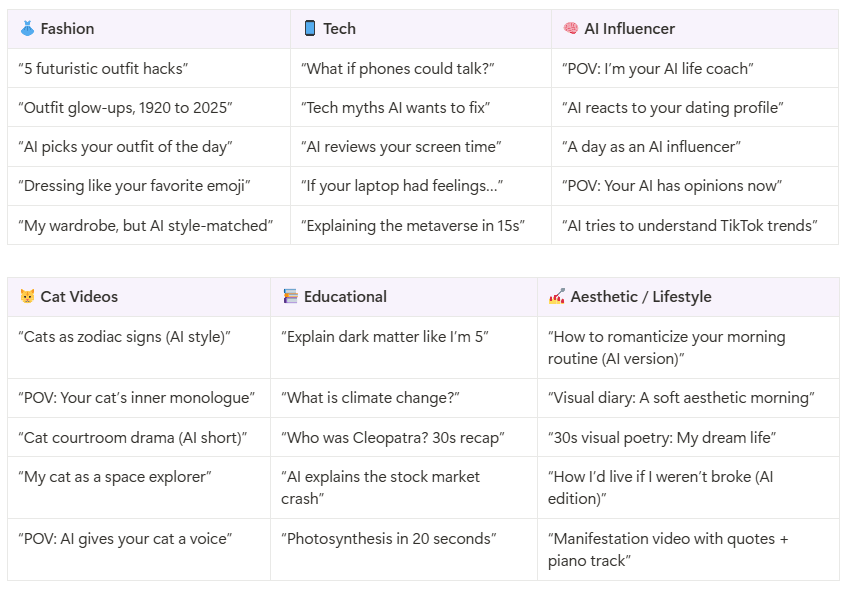 Instagram Reels Ideas
Already picked an epic idea?
Tips to Optimize Your Instagram Reels for Virality
Want your Reel to land on Explore or trend in Reels tabs? These AI + strategy-backed tips can boost your chances:
-
Hook viewers in the first 2 seconds
Start with action, bold text, or a punchy line—AI can help script these hooks.
-
Add captions and on-screen text
85% of users watch without sound. Adding captions in ImagineArt makes this easy.
-
Keep Reels between 15–30 seconds
Short, snappy Reels get better retention and completion rates.
-
Use niche-relevant hashtags
Go beyond #reels and #viral—add 2–3 niche tags (e.g., #techshorts, #fashioninspo).
-
Post consistently
Instagram favors active creators—use AI to batch-produce and schedule Reels weekly.
Related readings:
50 Instsgram Reels Ideas to Try n 2025
Best Time to Post Reels on Instagram
Saba Sohail
Saba Sohail is a Generative Engine Optimization and SaaS marketing specialist working in automation, product research and user acquisition. She strongly focuses on AI-powered speed, scale and structure for B2C and B2B teams. At ImagineArt, she develops use cases of AI Creative Suite for creative agencies and product marketing teams.