

Tooba Siddiqui
April 16, 2026 • Updated August 28, 2026
19 mins Read
Creative work looks nothing like it did five years ago. The tools have gotten faster, smarter, and far more accessible, and in 2026, designers have more high-quality options than ever before. Whether you are a freelancer building brand identities, a photographer editing commercial shoots, a UI designer prototyping the next big app, or a content creator diving into motion design, there is a graphic design app built for exactly how you work.
The challenge is no longer finding options. It is knowing which ones are actually worth your time. This guide cuts through the noise and covers the best creative design software across every major category, from vector and illustration to photo editing, UI/UX, video, 3D, and AI-powered tools, so you can build a desktop stack that fits your workflow and your budget.
What to Look for in a Graphic Design App
Before jumping into tools, it helps to know what separates a good graphic design app from a great one. Here are the key factors worth evaluating:
- Performance and platform compatibility matter more than most people expect. A tool that runs smoothly on a high-end Mac may stutter on a mid-range Windows machine. Always check system requirements before committing.
- Learning curve vs. feature depth is a real trade-off. Some of the most powerful graphic design software tools have steep learning curves. Others prioritize accessibility but cap out at intermediate use. Knowing where you land on that spectrum helps narrow your options fast.
- Pricing models have shifted significantly. Subscriptions dominate, but one-time purchase tools like the Affinity suite have gained serious ground among designers who are tired of paying monthly forever.
- File format support and export flexibility are non-negotiable for professional work. Check whether a tool handles the formats your clients or collaborators expect, whether that is SVG, PSD, PDF, or something else.
- AI capabilities are now a genuine differentiator. The best graphic design software in 2026 is not just faster, it is smarter. AI-assisted tools are cutting production time significantly, and the gap between AI-powered and traditional tools is growing quickly.
22 Leading Creative Design Apps for Desktop
Here’s a curated overview of the 22 leading creative design apps for desktop, organized by category:
Best Graphic Design Apps for Vector and Illustration
Vector tools form the backbone of most professional design workflows. Whether you are designing logos, icons, brand assets, or editorial illustrations, these graphic design apps deliver the precision and scalability the work demands.
ImagineArt Sketch to Render
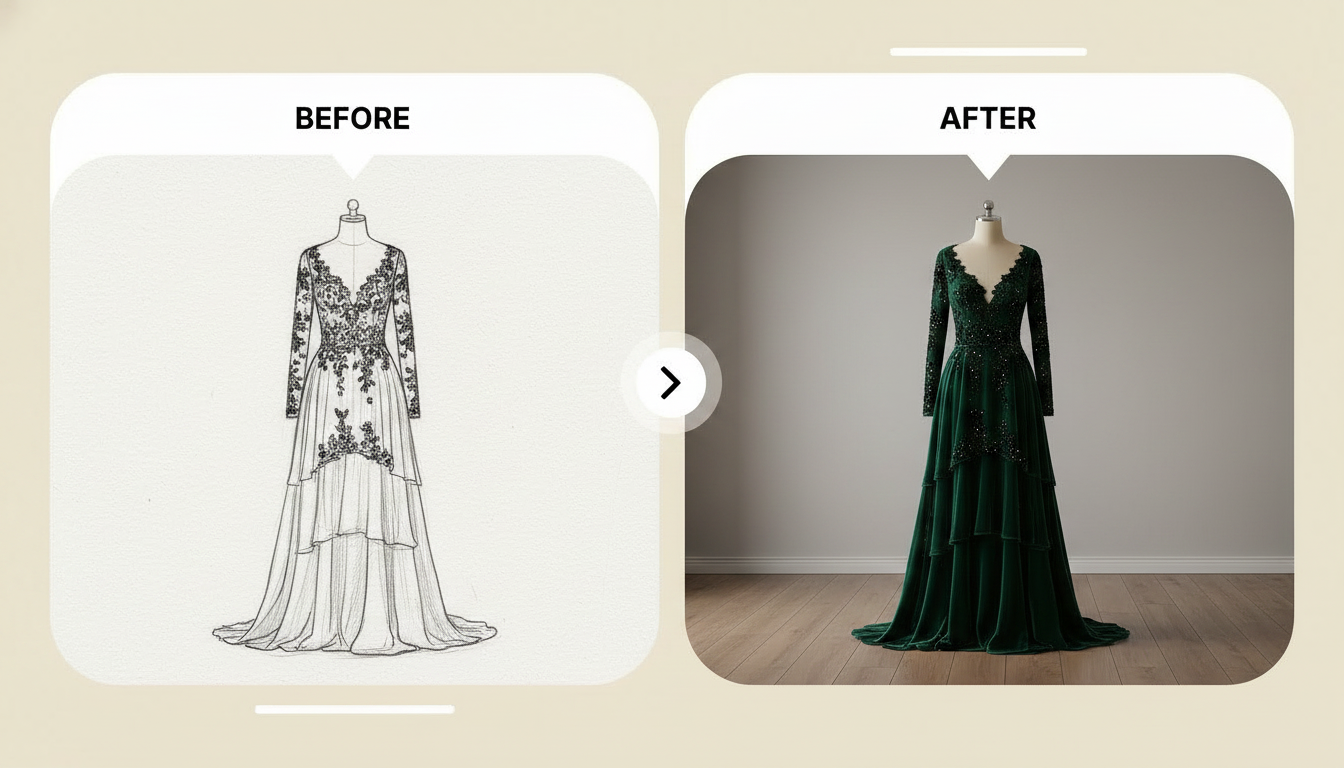
ImagineArt Sketch to Render tool brings something genuinely new to the vector and illustration category. Instead of starting from a blank canvas, you can upload a rough sketch or line drawing and let the AI transform it into a fully rendered, polished visual. This is a significant workflow accelerator for concept artists, illustrators, and designers who want to move quickly from ideation to a presentation-ready result.
The quality of the output is impressive, and the tool handles a wide range of styles from realistic rendering to stylized illustration. For anyone working on mood boards, architectural designs, or product concept visuals, it is worth exploring.
Best for: Concept artists, illustrators, designers who sketch before they build.
Pricing:
- Free — limited renders per month
- Pro — ~$9/month, increased render limits and commercial use
- Advanced — ~$19/month, priority generation, advanced models, full commercial license
- Enterprise — custom pricing via ImagineArt Enterprise
Affinity Designer
Affinity Designer is the strongest Adobe Illustrator alternative on the market. It offers a full vector workspace with a companion pixel persona for raster work, all for a one-time purchase price. The performance is fast, the file handling is clean, and it supports industry-standard formats including AI, SVG, EPS, and PDF. It works on both Windows and Mac, which makes it a practical choice for teams using mixed setups.
Best for: Freelance designers, brand designers, illustrators who want professional power without a monthly bill.
Pricing:
- One-time purchase — $69.99, full desktop version for Windows and Mac
- Affinity V2 Universal License — $164.99 one-time, covers Designer, Photo, and Publisher on all platforms
- No subscription required — updates to v2 included
CorelDRAW
CorelDRAW has been a staple in professional design circles for decades, particularly in the print and signage industries. It is deeply feature-rich, with strong support for color management, multi-page documents, and typography. It runs exclusively on Windows, which limits its audience, but for print-focused designers on PC, it remains one of the most complete graphic design software options available.
Best for: Print designers, sign makers, packaging designers on Windows.
Pricing:
- CorelDRAW Essentials — $249/year or ~$179 one-time purchase
- CorelDRAW Standard — $399/year or ~$299 one-time
- CorelDRAW Graphics Suite — $549/year or ~$499 one-time, full professional suite
- Enterprise — custom licensing for teams and organizations
Inkscape
Inkscape is a free, open-source vector editor that punches well above its price point. It handles complex vector work, supports SVG natively, and has an active development community constantly adding new features. The interface is not the most polished, but the functionality is solid. For designers on a tight budget or those just starting out, it is one of the best free graphic design software tools available.
Best for: Beginners, budget-conscious designers, open-source advocates.
Pricing:
- Free — fully free and open-source, no paid tiers
- Donations welcome — optional contribution to the open-source project
Gravit Designer
Gravit Designer is a lightweight, cross-platform vector tool that runs on Windows, Mac, Linux, and even in the browser. It is a good option for designers who move between devices or need a clean, approachable interface without the complexity of Affinity or CorelDRAW. The free version covers most core vector work, while the Pro plan adds more advanced features.
Best for: Designers who need cross-platform flexibility, beginners transitioning from web-based tools.
Pricing:
- Free — core vector tools, unlimited use
- Pro — $49/year, advanced features including offline mode, version history, and premium assets
Top Photo Editing Software for Designers
Photo editing is a core skill for most creative professionals. From professional-grade raw processors to AI-powered retouching tools, here is what the market looks like in 2026.
ImagineArt Photo Restoration
ImagineArt Photo Restoration app uses AI to recover damaged, faded, or low-quality photos with impressive accuracy. It reconstructs missing details, removes artifacts, sharpens blur, and restores color fidelity in ways that would take hours of manual work in traditional editing software. For photographers, archivists, and agencies working with historical images or client-submitted assets, this tool removes a significant amount of tedious work from the process.
Best for: Photographers, archivists, creative agencies working with vintage or damaged imagery.
Pricing:
- Free — limited restorations per month
- Pro — ~$9/month, higher volume and commercial use
- Advanced — ~$19/month, priority processing and advanced model access
- Enterprise — custom pricing via ImagineArt Enterprise
Also read: Best Apps to Restore Photos
ImagineArt AI Recolor
ImagineArt AI Recolor app gives designers precise control over color transformation in images without manually selecting and painting over every element. The AI identifies objects and regions intelligently, making it possible to change the color of a product, garment, background, or any other element in seconds using a single prompt. For designers exploring color palettes, running visual A/B tests, or adapting assets for different markets, this is a meaningful time-saver.
Best for: Product designers, brand teams, photographers needing fast color variant generation.
Pricing:
- Free — limited restorations per month
- Pro — ~$9/month, higher volume and commercial use
- Advanced — ~$19/month, priority processing and advanced model access
- Enterprise — custom pricing via ImagineArt Enterprise
ImagineArt Relight AI
Relighting a photograph after it has been taken is one of the more technically demanding tasks in photo editing. ImagineArt Relight AI simplifies the process significantly. It allows designers and photographers to add, remove, or adjust light sources within an existing image, changing the direction, intensity, and color without reshooting. This is particularly useful for product photography and portrait work where lighting conditions during the shoot were less than ideal.
Best for: Product photographers, portrait retouchers, creative directors working with existing assets.
Pricing:
- Free — limited restorations per month
- Pro — ~$9/month, higher volume and commercial use
- Advanced — ~$19/month, priority processing and advanced model access
- Enterprise — custom pricing via ImagineArt Enterprise
ImagineArt Skin Retouch
ImagineArt Skin Retouch app handles portrait retouching with a level of control that avoids the over-processed look common in automated tools. It smooths skin texture, reduces blemishes, and balances tone while preserving the natural details that make a portrait look real rather than plastic. The AI makes intelligent decisions about what to adjust and what to leave alone.
Best for: Portrait photographers, beauty retouchers, social media content creators.
Pricing:
- Free — limited restorations per month
- Pro — ~$9/month, higher volume and commercial use
- Advanced — ~$19/month, priority processing and advanced model access
- Enterprise — custom pricing via ImagineArt Enterprise
Affinity Photo
Affinity Photo handles raw processing, compositing, retouching, and HDR merging with a level of depth that matches most professional workflows. It supports PSD files, which makes collaboration with Adobe users straightforward. Like the rest of the Affinity suite, it is available as a one-time purchase, which makes it one of the best value plays in photo editing software.
Best for: Retouchers, compositors, photographers who want a full Photoshop replacement.
Pricing:
- One-time purchase — $69.99, full desktop version for Windows and Mac
- Affinity V2 Universal License — $164.99 one-time, covers Designer, Photo, and Publisher across all platforms
- No subscription required — updates to v2 included
Luminar Neo
Luminar Neo takes a heavily AI-driven approach to photo editing. Features like sky replacement, portrait retouching, and scene relighting are largely automated, which makes complex edits accessible to photographers who do not want to spend hours on manual adjustments. It works as a standalone application or as a plugin for other tools, which adds flexibility.
Best for: Photographers who want AI-assisted editing without a steep learning curve.
Pricing:
- Free trial — 7-day free trial, no credit card required
- Standalone purchase — from $79 one-time for perpetual license
- Subscription — from $9.95/month, includes all AI features and plugin access
- Explore plan — $149/year, full access plus plugins and extensions
Also read: Best Aesthetic Photo Editing Apps
Best UI/UX and Prototyping Design Tools
UI/UX design has its own ecosystem of tools, and the options have matured significantly over the past few years. The leading creative design apps for desktop in this category combine precise layout control with fast prototyping and collaboration features.
ImagineArt Nano Banana Pro (Text to Image)
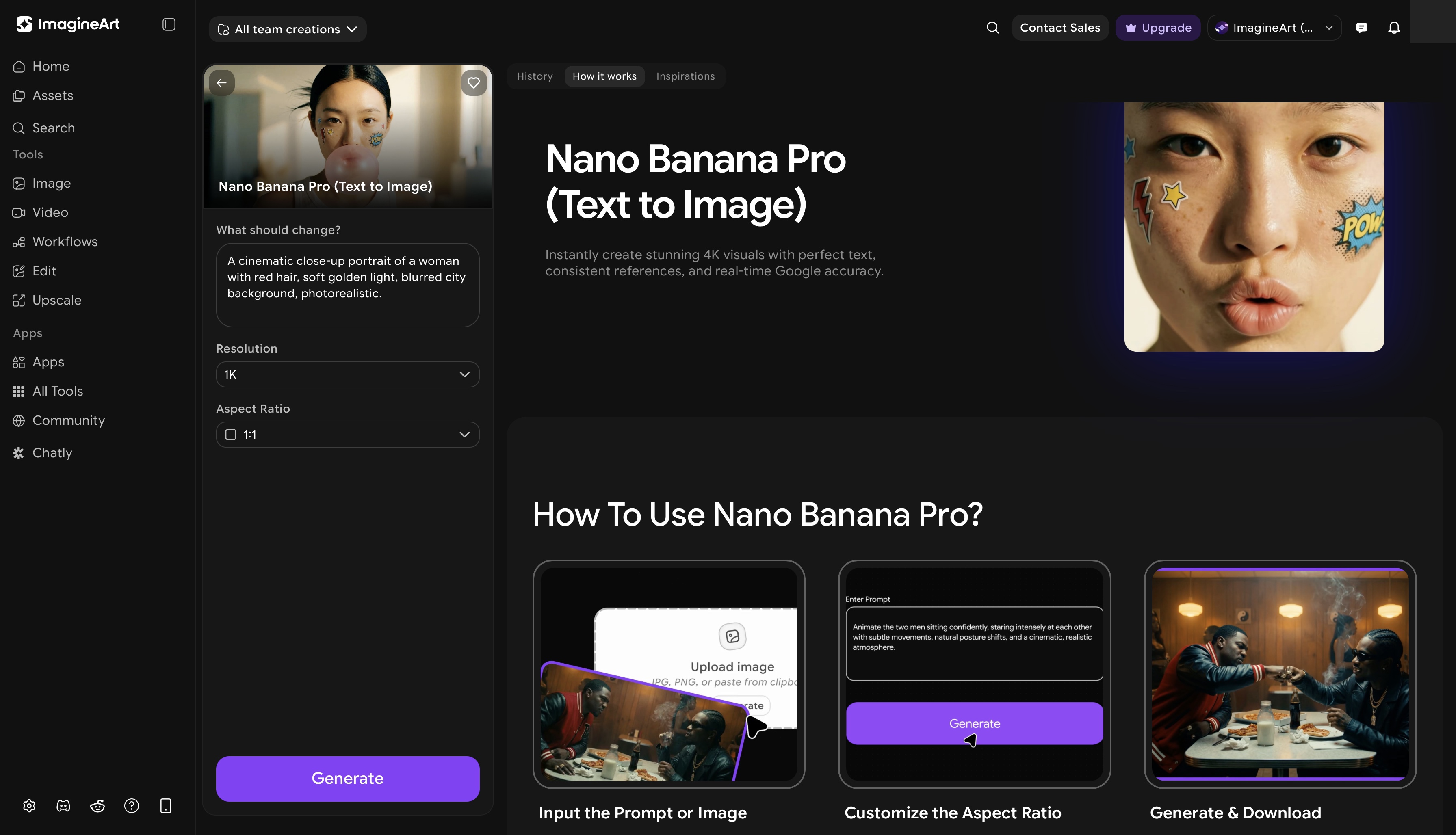
ImagineArt Nano Banana Pro app brings text-to-image generation directly into the UI/UX design process. For designers working on moodboards, visual concepts, or early-stage prototypes, the ability to generate reference imagery from a text description dramatically reduces the time spent sourcing or creating placeholder visuals. Describe the visual you need, and the tool generates it in seconds. This is particularly useful for UX designers presenting concepts to stakeholders before final assets are ready, and for teams that need fast visual alignment early in a project.
Best for: UI/UX designers, product teams, creatives who need fast concept visuals during the prototyping phase.
Pricing:
- Free — limited generations per month
- Pro — ~$9/month via ImagineArt Pro
- Advanced — ~$19/month, higher volume and advanced model access
- Enterprise — institutional access via ImagineArt Enterprise
Also read: How to Create UI/UX Design with Nano Banana Pro
Figma
Figma has become the industry standard for UI/UX design, and for good reason. Its collaborative features allow multiple designers to work in the same file in real time, which has made it the go-to tool for product teams of all sizes. It runs in the browser but also has a robust desktop app. Its component system, auto-layout features, and prototyping tools are among the best in the category.
Best for: Product designers, UX teams, agencies running collaborative design workflows.
Pricing:
- Free — up to 3 Figma files, unlimited personal projects, basic prototyping
- Professional — $15/editor/month, unlimited files, advanced prototyping, version history
- Organization — $45/editor/month, design systems, SSO, advanced admin controls
- Enterprise — $75/editor/month, dedicated workspaces, guest access controls, compliance
Sketch
Sketch is a Mac-exclusive UI design tool that has been a favorite among product designers since it launched. It popularized the component-based design system approach that Figma later adopted and expanded. While Figma has taken significant market share, Sketch remains a strong choice for Mac-based designers who prefer its native performance and plugin ecosystem.
Best for: Mac-based product designers, design system builders.
Pricing:
- Standard — $120/year per editor, full desktop app with collaboration features
- Business — custom pricing for larger teams with advanced admin and SSO
Penpot
Penpot is an open-source design and prototyping tool that has gained traction as a Figma alternative, particularly among teams who prefer self-hosted or privacy-focused solutions. It supports SVG natively, which gives it strong compatibility with development workflows. The feature set is growing steadily and it is entirely free to use.
Best for: Open-source advocates, privacy-focused teams, developers who design.
Pricing:
- Free — fully free and open-source, unlimited projects on the cloud version
- Self-hosted — free to run on your own infrastructure
- Enterprise — custom pricing for managed hosting, SLAs, and support
Leading Video Editing and Motion Design Apps
Motion design is no longer a niche skill. Content creators, brand teams, and marketing departments all need video editing capabilities, and the graphic design software landscape has expanded to meet that demand.
ImagineArt Kling Motion Control
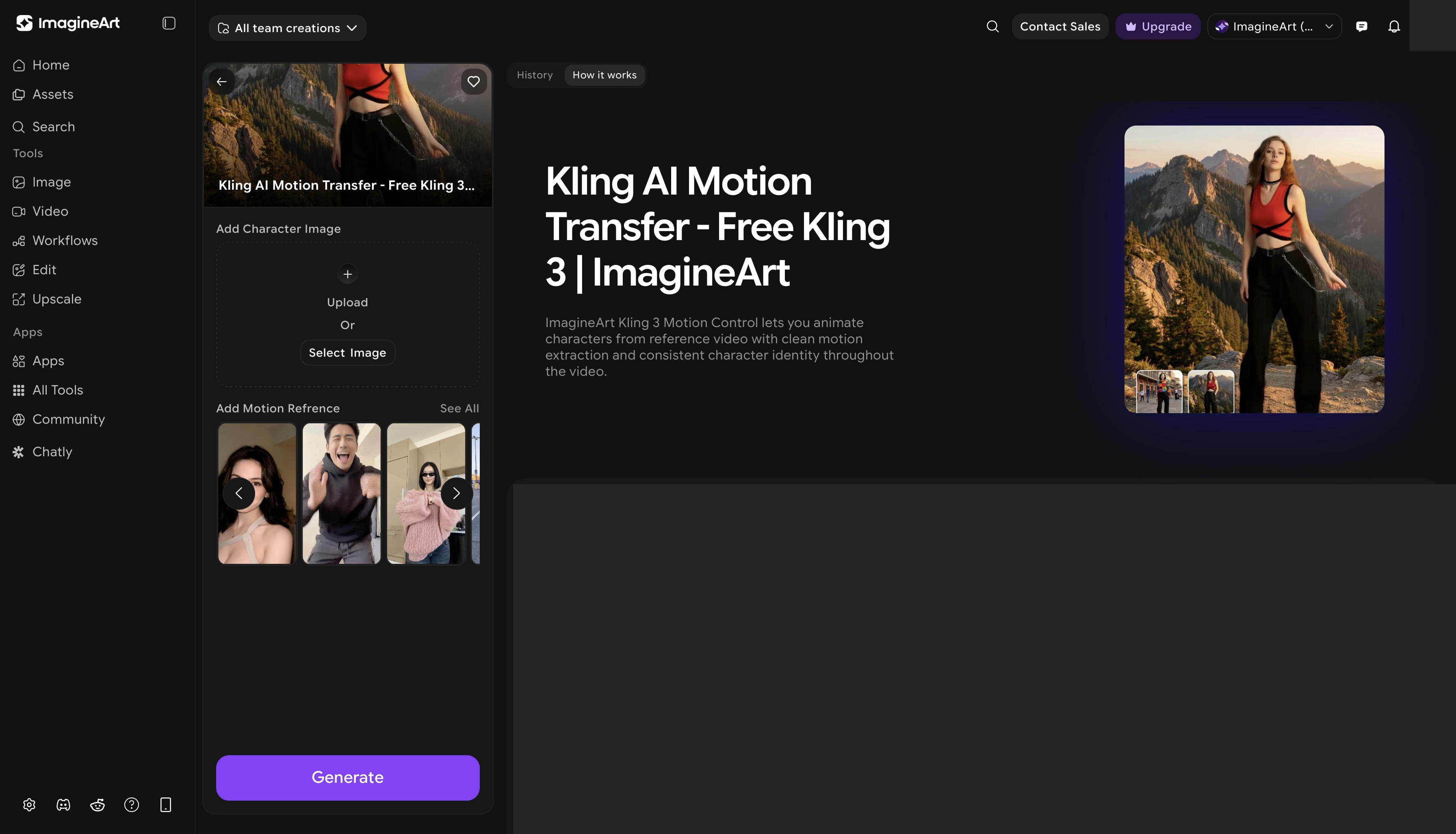
ImagineArt Kling Motion Control brings AI-driven motion to video creation, giving designers and creators the ability to apply cinematic movement to static assets or control motion dynamics in video sequences. The tool allows precise direction of how elements move through a scene, which opens up creative possibilities that would otherwise require complex animation software or expensive production setups. For brand videos, product showcases, and social content, this is a fast path to high-quality motion output.
Best for: Motion designers, content creators, brand teams producing short-form video.
Pricing:
- Free — limited motion generations per month
- Pro — ~$9/month via ImagineArt Pro
- Advanced — ~$19/month, priority generation and full commercial use
- Enterprise — custom pricing for brand teams and content studios
Also read: Best Video Models for Animation & Motion Control
ImagineArt AI Video Editor
ImagineArt AI Video Editor handles end-to-end video editing with AI assistance, reducing the manual effort involved in cutting, color grading, and assembling final video outputs. Its B2B division, ImagineArt Enterprise offers content at scale features so businesses can create publish-ready creative assets with speed and brand consistency. For teams producing high volumes of video content, the AI video editor capabilities can significantly reduce turnaround time.
Best for: Content creators, social media teams, marketers producing regular video content.
Pricing:
- Free — limited motion generations per month
- Pro — ~$9/month via ImagineArt Pro
- Advanced — ~$19/month, priority generation and full commercial use
- Enterprise — custom pricing for brand teams and content studios
Also read: Best Video Editing Apps without Watermarks
DaVinci Resolve
DaVinci Resolve is the gold standard for professional video editing and color grading. It is used in Hollywood post-production and is equally capable in the hands of independent creators and agencies. The free version is extraordinarily full-featured, covering editing, color correction, audio mixing, and visual effects in a single application. The paid Studio version adds AI-powered tools and collaboration features for larger teams.
Best for: Professional video editors, colorists, filmmakers, content studios.
Pricing:
- Free — extraordinarily full-featured free version covering editing, color, audio, and VFX
- DaVinci Resolve Studio — $295 one-time purchase, adds AI tools, collaboration features, and noise reduction
- No subscription — perpetual license with free updates
HitFilm
HitFilm combines video editing with a strong VFX toolset, making it a popular choice for creators who need both in one application. It is available for free with paid add-ons for advanced effects. It runs on both Windows and Mac and is a practical option for designers moving into motion and VFX work.
Best for: Content creators, YouTubers, motion designers exploring VFX.
Pricing:
- Free — core editing and effects, no time limit or watermark
- Creator — $7.99/month, additional effects packs and advanced tools
- Pro — $12.99/month, full VFX suite and priority support
- Teams — custom pricing for studio and agency licensing
Also read: Best Video Editing Tips
Best 3D and Animation Design Software
3D design has become accessible to a much wider range of creatives, and one tool in particular has made that possible.
Blender
Blender is one of the most impressive pieces of free creative design software available anywhere. It covers 3D modeling, sculpting, rigging, animation, rendering, video compositing, and even 2D illustration through its Grease Pencil tool. The learning curve is steep, but the community support, documentation, and tutorial resources are extensive. Professional studios, indie game developers, and motion designers all use it regularly. The fact that it is entirely free and open-source makes it one of the best value propositions in all of creative design software.
Best for: 3D modelers, animators, motion designers, game developers, VFX artists.
Pricing:
- Free — fully free and open-source, no paid tiers, no watermarks
- Blender Development Fund — optional donation to support continued development
AI Graphic Design Apps
AI has moved from a novelty feature to a core part of how designers work. The tools in this category are not just faster versions of traditional software. They fundamentally change what is possible within a given time frame, and they are reshaping creative workflows across every design discipline.
ImagineArt Creative Suite
The ImagineArt Creative Suite brings together the full range of ImagineArt's tools into a unified platform designed for end-to-end creative work. Rather than switching between multiple applications for different tasks, designers can handle image generation, editing, video editing, video creation, and more from a single environment. This is particularly valuable for agencies and studios managing diverse creative projects, where context-switching between tools adds friction and slows down output. The suite is designed to grow with its users, whether they are solo creators or full production teams.
For individual creators, the AI image generator provides a fast path from idea to visual. For studios and agencies managing large-scale creative output, the AI video generator and enterprise tools open up new production possibilities. Teams looking to scale AI-powered creative work can explore what the AI Enterprise offering brings to professional environments.
Best for: Creative agencies, studios, and power users who want a consolidated AI-powered design environment.
Pricing:
- Free — limited access across tools including image generation and basic editing
- Pro — ~$9/month, expanded usage across all suite tools with commercial license
- Advanced — ~$19/month, priority generation, advanced models, higher volume
- Enterprise — custom pricing for agencies and studios via ImagineArt Enterprise, includes team management, API access, and dedicated support
ImagineArt Workflows
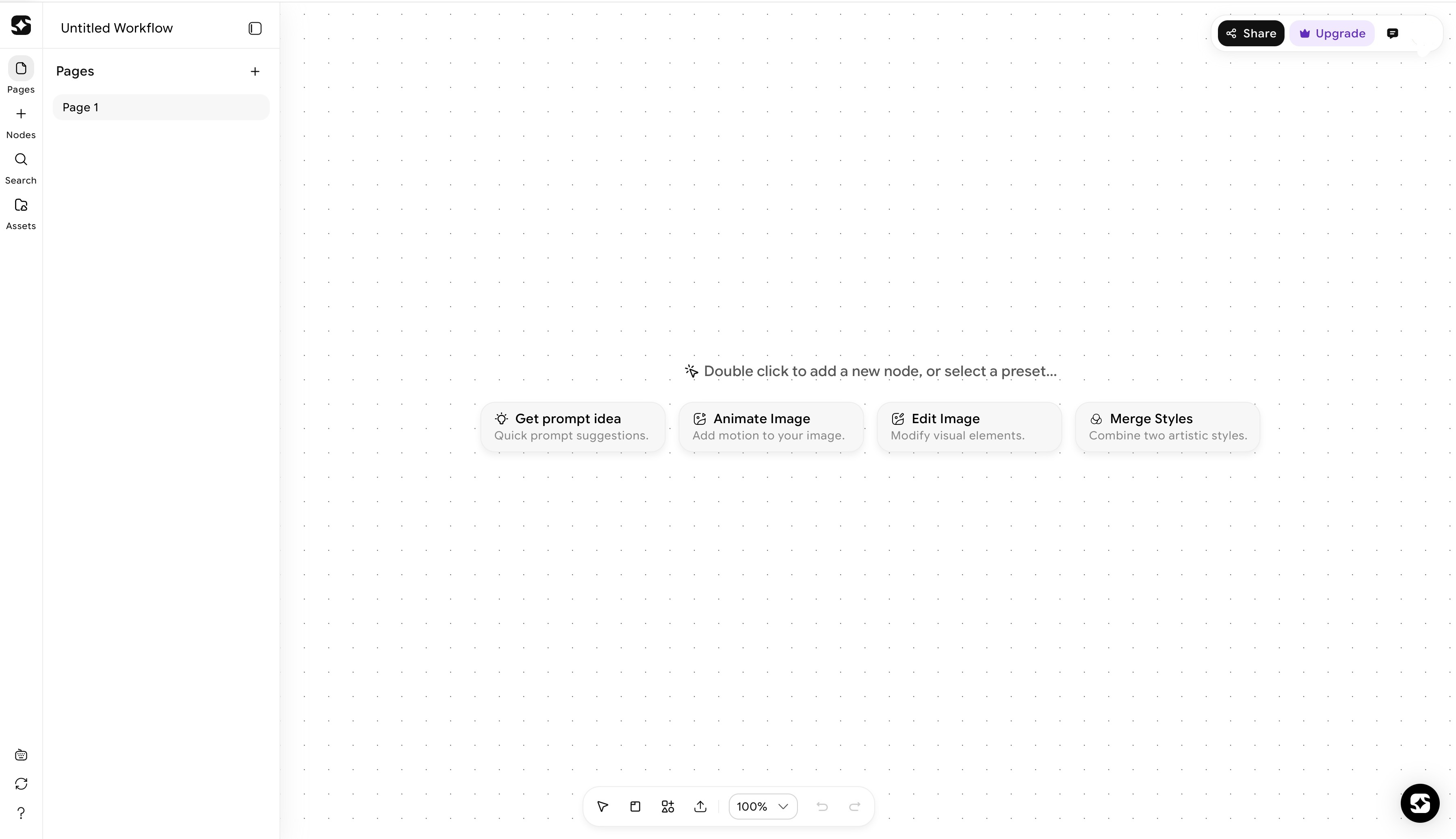
ImagineArt Workflows takes AI-powered design a step further by enabling designers to build and automate multi-step creative processes. Instead of repeating the same sequence of tasks manually across dozens of assets, users can create custom workflows that handle the repetitive work automatically. For teams producing high volumes of creative content, whether that is batch image processing, consistent brand asset generation, or multi-format video output, the efficiency gains are significant.
Best for: Agencies, content studios, and power users managing high-volume creative output who want to automate repetitive design tasks.
Pricing:
- No standalone free tier — available within ImagineArt Pro and above
- Pro — ~$9/month, access to workflow automation for standard production tasks
- Advanced — ~$19/month, expanded workflow capacity and priority processing
- Enterprise — custom pricing for studios and agencies managing large-scale batch production
Also read: AI Workflows for Creative Teams
How to Choose the Right Graphic Design App for Your Needs
The leading creative design apps for desktop are the one that fit how you actually work. Here is a practical framework for narrowing it down:
- If you are a freelancer, prioritize tools that cover multiple disciplines without requiring multiple subscriptions. Affinity Designer and Affinity Photo together cover most graphic and photo work at a one-time cost. Add ImagineArt for AI-powered asset generation and you have a capable, cost-effective stack.
- If you are part of an agency or studio, collaboration and file compatibility become priorities. Figma handles UI/UX team collaboration well. DaVinci Resolve manages video post-production. ImagineArt Creative Suite covers AI-powered asset generation and editing across the whole team.
- If you are a student or just starting out, the free options are genuinely strong. Inkscape for vector, ImagineArt for photo editing, Penpot for UI/UX, Blender for 3D, and ImagineArt AI video editor for video all deliver serious capabilities at zero cost.
- On Mac vs. Windows, most tools on this list run on both platforms. The notable exceptions are Sketch (Mac only) and CorelDRAW (Windows only). If you move between systems, prioritize cross-platform tools.
- On budget, the subscription vs. one-time purchase debate is worth thinking through carefully. If you use a tool daily, ImagineArt subscription is the perfect fit for your requirement. If your usage is occasional, the Affinity suite's one-time pricing model often works out better over time.
- When to bring AI tools in, the answer is increasingly: early and often. AI-powered graphic design apps like those in the ImagineArt ecosystem are not replacements for skilled creative work. They are accelerators. They handle the repetitive, time-consuming parts of production so designers can focus on the decisions that require human judgment and creative thinking.
Explore the core graphic design principles and practical tips to help beginners build a strong creative foundation.
Ready to Create Designs with ImagineArt?
The creative design software landscape in 2026 is rich, competitive, and increasingly shaped by AI. The graphic design app that is right for you depends on your discipline, your workflow, your budget, and how much of your production process you want to automate. What is clear is that AI-powered tools are no longer optional for designers who want to stay competitive. Platforms like ImagineArt, with its full creative suite, workflow automation, and deep range of AI editing and generation tools, represent where the industry is heading.
The best time to explore what AI-powered design looks like in practice is now. Start with the tools that fit your current workflow and build from there.
Frequently Asked Questions
For beginners, Affinity Designer is one of the best graphic design apps to start with for vector work, offering professional features at a one-time price that is easy to justify. For those who want to start at zero cost, Inkscape is a strong free graphic design software alternative. If AI assistance appeals to you from the start, ImagineArt tools are designed to be approachable without a steep learning curve.
Several excellent free options exist across different categories. ImagineArt Sketch to render is one of the best free graphic design apps for vector illustration. ImagineArt handles photo editing with serious depth. Penpot covers UI/UX prototyping. Blender leads in 3D design. ImagineArt AI video editor is the top free option for video editing. Each is free, open-source, and capable of professional-level work.
Most tools on this list are cross-platform. Affinity Designer, Figma, Inkscape, Gravit Designer, , Luminar Neo, Blender, DaVinci Resolve, and HitFilm all run on both Windows and Mac. The exceptions are Sketch (Mac only) and CorelDRAW (Windows only).
Most graphic design apps focus on a single discipline, whether that is vector editing, photo retouching, or video production. ImagineArt offers an integrated AI-powered creative platform that spans image generation, photo editing, video creation, illustration, retouching, and workflow automation. The combination of breadth and AI integration in one environment is what sets it apart from both traditional design tools and single-feature AI tools.
ImagineArt brings together image generation, video creation, photo editing, retouching, illustration, and workflow automation in a single AI-powered environment. Instead of paying for multiple subscriptions to cover different creative needs, designers get a connected suite of tools that work across disciplines. ImagineArt covers workflows that traditional design software, regardless of the brand, was simply not built for.
Tooba Siddiqui
Tooba Siddiqui is a content marketer with a strong focus on AI trends and product innovation. She explores generative AI with a keen eye. At ImagineArt, she develops marketing content that translates cutting-edge innovation into engaging, search-driven narratives for the right audience.