![15 Aesthetic Photo Editing Apps for Insta-Worthy Pictures [2026 Guide] | ImagineArt](https://blogs-cdn.imagine.art/Whisk_9f9bfc7ce66575a935b483157057ffb5dr_f1c059fc68.png)

Tooba Siddiqui
February 20, 2026 • Updated July 15, 2026
12 mins Read
Except for a few lucky ones who wake up Insta-ready and can capture golden-hour masterpieces randomly, most of us struggle to get even a single aesthetic shot after taking dozens. Somewhere between clicking the photo and previewing it later, the aesthetics fade away; hmm I hear you, sis!
The truth is, aesthetic photos are not random or accidental; they are refined. Behind every effortlessly curated Instagram aesthetic is a thoughtful editing process.
- the balanced tones
- intentional color palettes
- the glow that just hits right
- corrected lighting
- unnoticeable fixes
There’s a workflow where aesthetic photo editing apps do the heavy lifting for the results.
15 Aesthetic Photo Editing Apps - A Quick Rundown
- ImagineArt 2.0 Edit
- AI Recolor
- AI Image Colorizer
- Relight AI
- Change Lighting on Photos
- Background Changer
- Blur Background
- AI Object Remover
- AI Image Replace
- Change Camera Angle
- Image Upscaler
- HDR
- AI Image Editor
- VSCO
- Snapseed
What Does “Aesthetic Photo Editing” Actually Mean?
Let’s be honest, most aesthetic photo editing apps offer a bunch of dreamy presets, vintage vibes, aesthetic filters, or brightness correction tools. While an aesthetic photo edit is about trying different presets or filters, it’s more about perfecting the mood of the photo using:
- Soft or dramatic lighting
- Curated color palettes
- Clean, minimal backgrounds
- Balanced contrast
- Subtle blur and depth
- High clarity without harshness
The right aesthetic photo editor will produce images that make the viewer feel something — calm, nostalgic, cozy, or even leave them awestruck.
Many people confuse aesthetic photo editing with applying a handful of heavy filters. While in actuality, it enhances the natural elements of the photo instead of masking them.
That’s why using a proper AI image editor matters more than simply downloading another preset pack.
How to Click Aesthetic Pictures
Scrolling through Instagram or Pinterest feels like browsing an art gallery. The feeds are soft and pastel-colored, every shot is toned and moody, and the selfies are minimal. Editing can make a huge difference, but it can’t fix everything. If you want to do the same for your Instagram feed or Pinterest boards, you need to start with better shots.
Here’s how to click aesthetic pictures:
1. Use Natural Light
Shoot near windows or during golden hour. Avoid harsh overhead lighting or strong camera flash.
2. Keep Backgrounds Minimal
Background clutter ruins the aesthetic vibes. Clean walls, neutral spaces, or natural outdoor settings work best.
3. Choose a Color Theme
Think beige, white, brown, soft green, muted blue. Select cohesive color palettes that can elevate an aesthetic photo edit.
4. Slightly Underexpose
Slightly darker images are easier to adjust during aesthetic photo editing without blowing out highlights.
5. Focus on Composition
Use symmetry, leading lines, or negative space to make your photo feel intentional.
If you master how to create aesthetic pictures at the shooting stage, editing becomes powerful rather than corrective.
15 Best Aesthetic Photo Editing Apps by ImagineArt
While a basic aesthetic filter might slightly improve the photo quality, it won’t give your photos the refined touch or a polished look. That’s where aesthetic photo editing apps can make all the difference.
These are not just aesthetic filter apps. ImagineArt image editing apps give you complete control over color, composition, light, and depth.
1. ImagineArt 2.0 Edit — Best AI Aesthetic Editor in 2026
ImagineArt 2.0 Edit lets you describe a visual aesthetic in plain language and applies it as a coherent photo edit. Type "film grain, faded greens, golden-hour warmth, soft contrast, 35mm feel" and 2.0 Edit translates that brief into a real edit across the whole image. No filter presets to cycle through, no manual colour grading to adjust by eye.
The strength for aesthetic editing is consistency. Apply the same prompt to a set of photos and the outputs hold together visually — they feel like they came from a single editing session. For creators building a grid aesthetic or brands managing visual identity across content, that repeatability is harder to find at this price point than it sounds.
What makes ImagineArt 2.0 Edit work for aesthetic editing:
- Text-prompt colour grading and mood transformation
- Film, cinematic, and vintage aesthetic support
- Style reference: upload a reference photo and describe what to borrow from it
- Regional inpainting — apply a grain or grade to the background only, keep the subject clean
- Photorealistic finish — edits enhance without over-processing
Free plan at imagine.art. No credit card required.
2. AI Recolor
Color sets the right aesthetic for any photo. Be it soft beige tones, cinematic blues, earthy browns, or muted pastels, ImagineArt AI Recolor lets you redefine the photo aesthetics. Instead of experimenting with filters and presets, this aesthetic photo editing app lets you adjust the hues while maintaining the natural textures and skin tones.
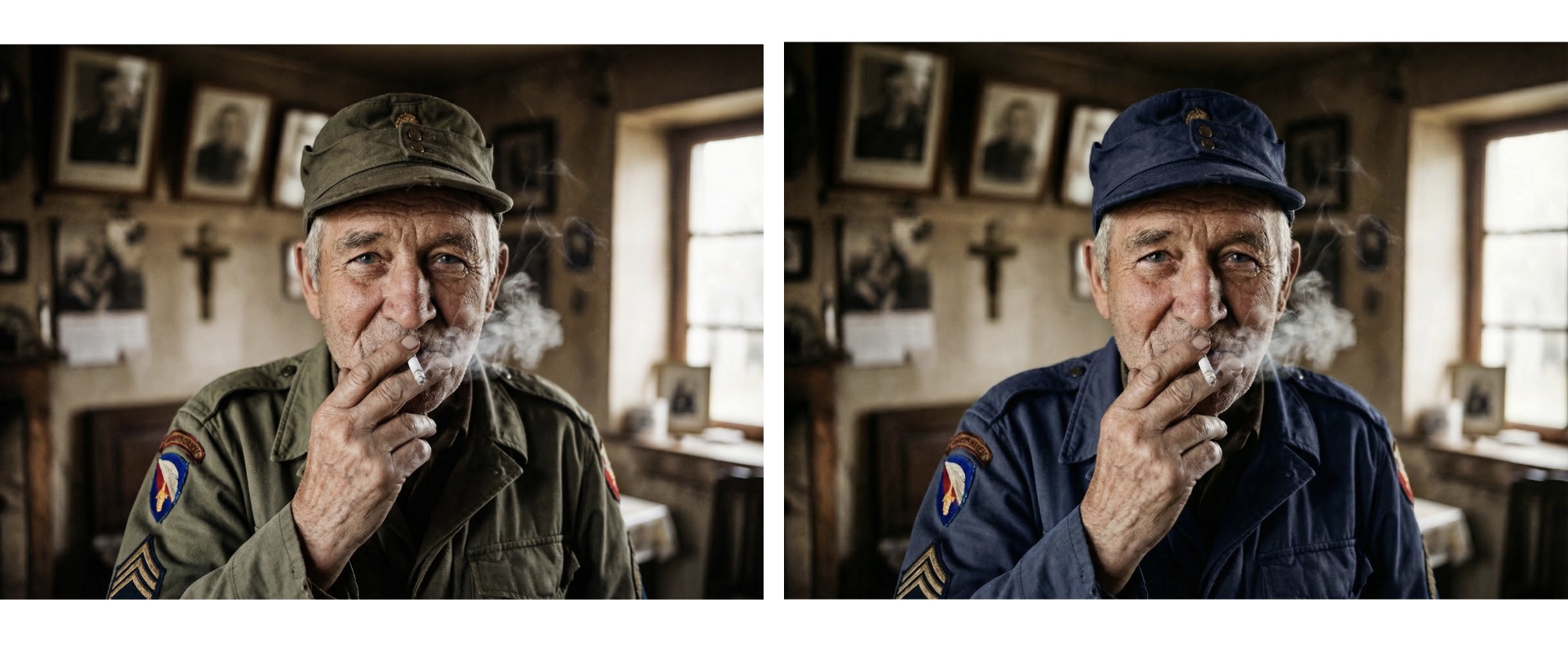 Generated by ImagineArt AI Recolor
Key Features
- Adjust dominant color tones instantly.
- Preserve natural lighting and subtle shadows.
- Generate eye-capturing Instagram feed palettes.
- Experiment with warm, vibrant, vintage, or moody aesthetics
Use Cases
- Curating a cohesive and consistent Pinterest or Instagram feed
- Transforming the images with moody edits
- Producing influencer-inspired soft and neutral-toned social media images
3. AI Image Colorizer
It’s 2026, and you don’t need expensive and highly complicated color-grading and aesthetic photo editing apps to add colors to your black-and-white photos. With ImagineArt AI Image Colorizer, you can restore color to your old, faded, or even slightly damaged photos. The app ensures thorough preservation of original details and subtleties. If your aesthetic leans toward classic, cinematic, or retro edits, this tool transforms ordinary photos into timeless pieces.
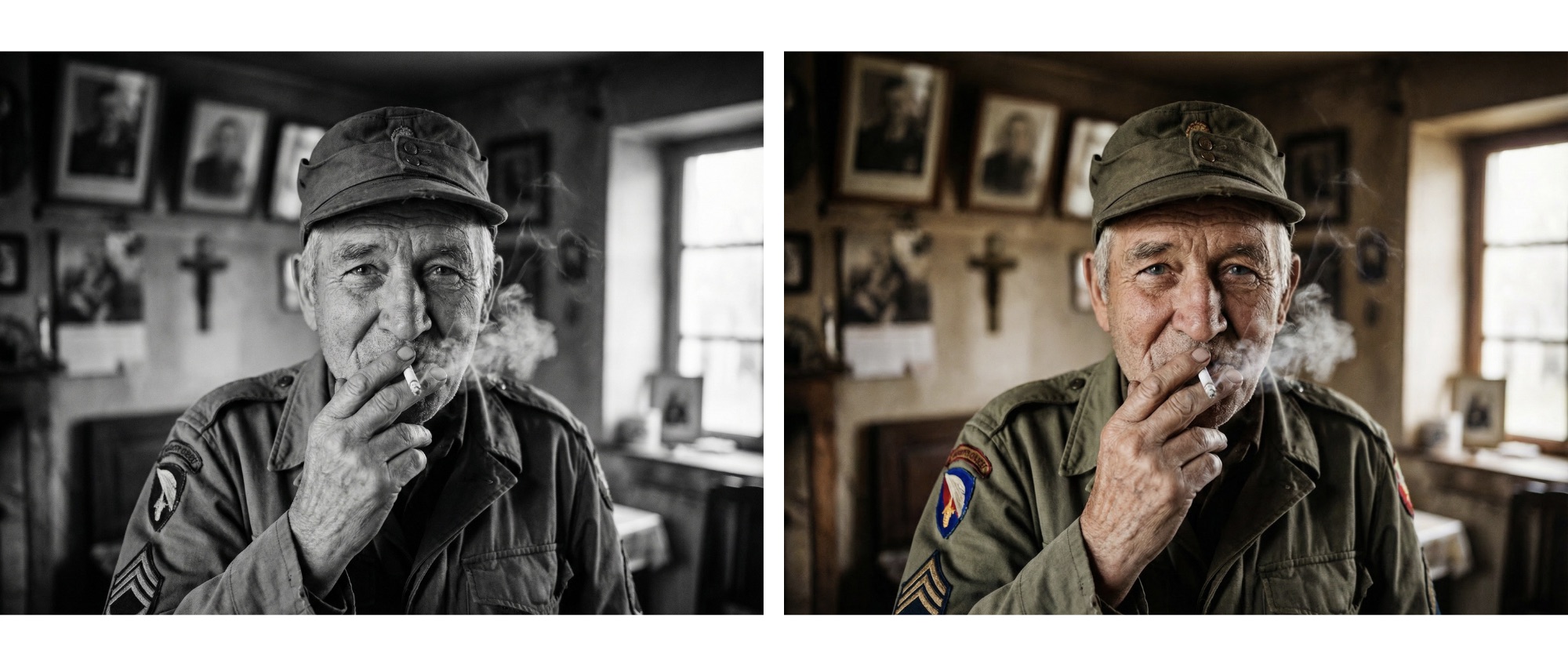 Generated by ImagineArt AI Image Colorizer
Key Features
- Instant black-and-white color restoration
- Realistic tone preservation
- Well-balanced object coloring
- Subtle vintage-style color enhancement
Use Cases
- Restoring old family photos
- Creating retro Instagram aesthetics
- Adding vibrancy to monotone portraits
4. Relight AI
Lighting is one of the most crucial aspects in photography and is the secret behind most aesthetic photo edits. With ImagineArt Relight AI, you can adjust light direction, intensity, color, and softness to give your photos a dreamy, dramatic, or cinematic aesthetic without complex aesthetic photo editing apps or expensive studio lighting.
Key Features
- Add soft glow to portraits.
- Enhance shadows for depth.
- Adjust light direction naturally.
Use Cases
- Influencer-style portraits
- Cozy indoor aesthetic shots
- Moody café photography
- Dramatic editorial-style edits
5. Blur Background
Why would you blur your photo background? Because it brings all the focus to what’s important, fading the rest into a soft DSLR-style bokeh effect. With ImagineArt Blur Background, you add a soft, dreamy aesthetic to your photos while maintaining the professional touch. Such aesthetic photo editing apps add blur effects and subtle polish without over-editing.
Key Features
- Adjustable background blur
- Natural depth simulation
- Maintain subject sharpness
- Soft focus control
Use Cases
- Portrait photography
- Lifestyle influencer photos
- Product photography
6. AI Image Replace
At times, a photo is missing a tiny detail that can make it extraordinary. With ImagineArt AI Image Replace, you can remove any object from your photo and replace it with an element that fits with the overall aesthetic. Such aesthetic photo editing apps make sure to keep the perspective, texture, and lighting consistent.
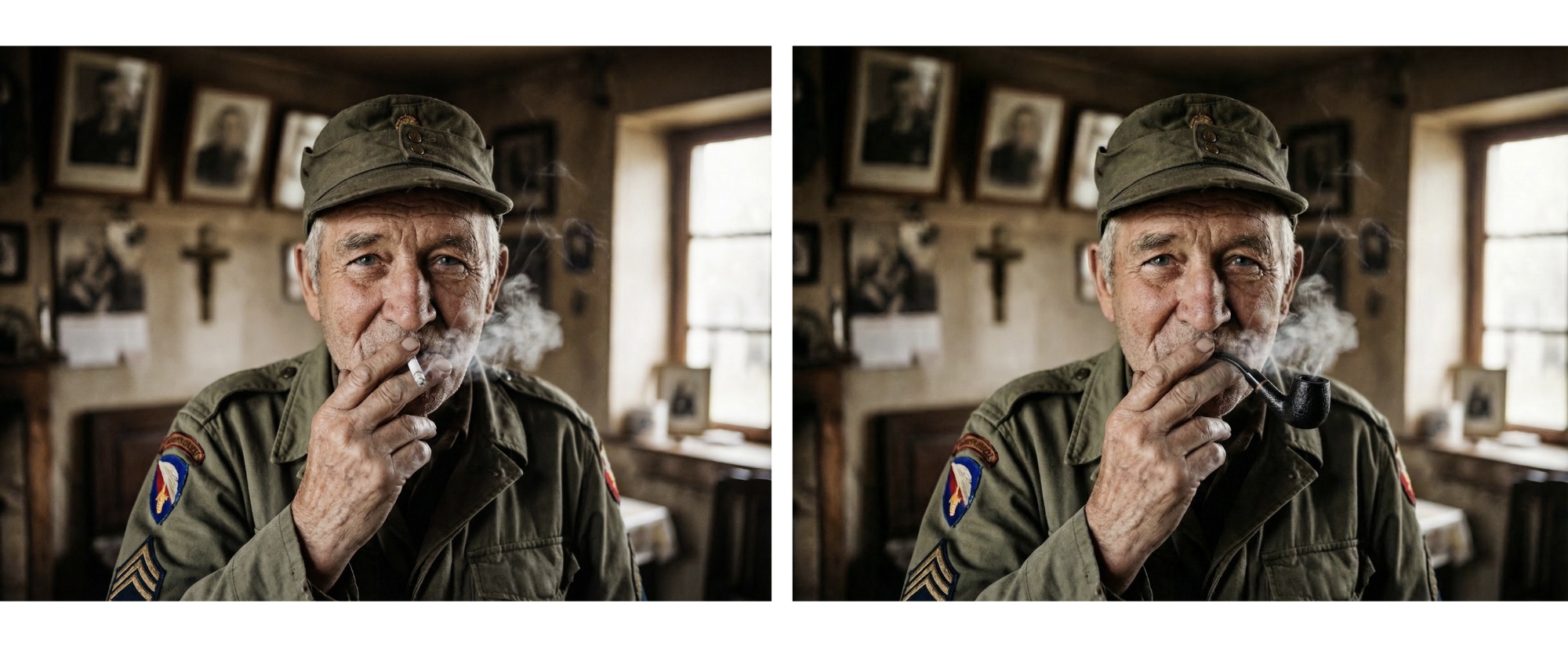 Generated by ImagineArt AI Image Replace
Key Features
- Replace objects seamlessly
- Leverages AI generative fill
- Match lighting and shadow
- Maintains composition
Use Cases
- Product shots
- Artistic concept edits
- Trend-based Instagram visuals
7. Change Lighting on Photos
Sometimes, the photo composition looks perfect, but bad lighting can ruin the mood, flatten the details, and make a stunning shot look dull. With ImagineArt Change Lighting on Photos, you can adjust the brightness, contrast, and intensity to fix your poorly-lit photos while maintaining the natural textures. This app is the perfect amalgamation of aesthetic filter apps and professional photo editing software.
Key Features
- Improve brightness
- Correct harsh shadows
- Enhance natural lighting
- Enhance natural skin tones.
Use Cases
- Fixing underexposed selfies
- Improving indoor restaurant shots
- Enhancing lifestyle photography
- Making everyday pictures look professional.
8. Background Changer
Your photo background sets the tone for your photo and impacts the mood, focus, and overall aesthetic. You don’t really think that influencers just happen to walk past empty, clutter-free, and aesthetic locations, do you? With ImagineArt Background Changer, you can even do the same by fixing your background and removing the distractions for clean backdrops. If you are searching for the best photo editing app for Instagram, ImagineArt Background Changer is one of them.
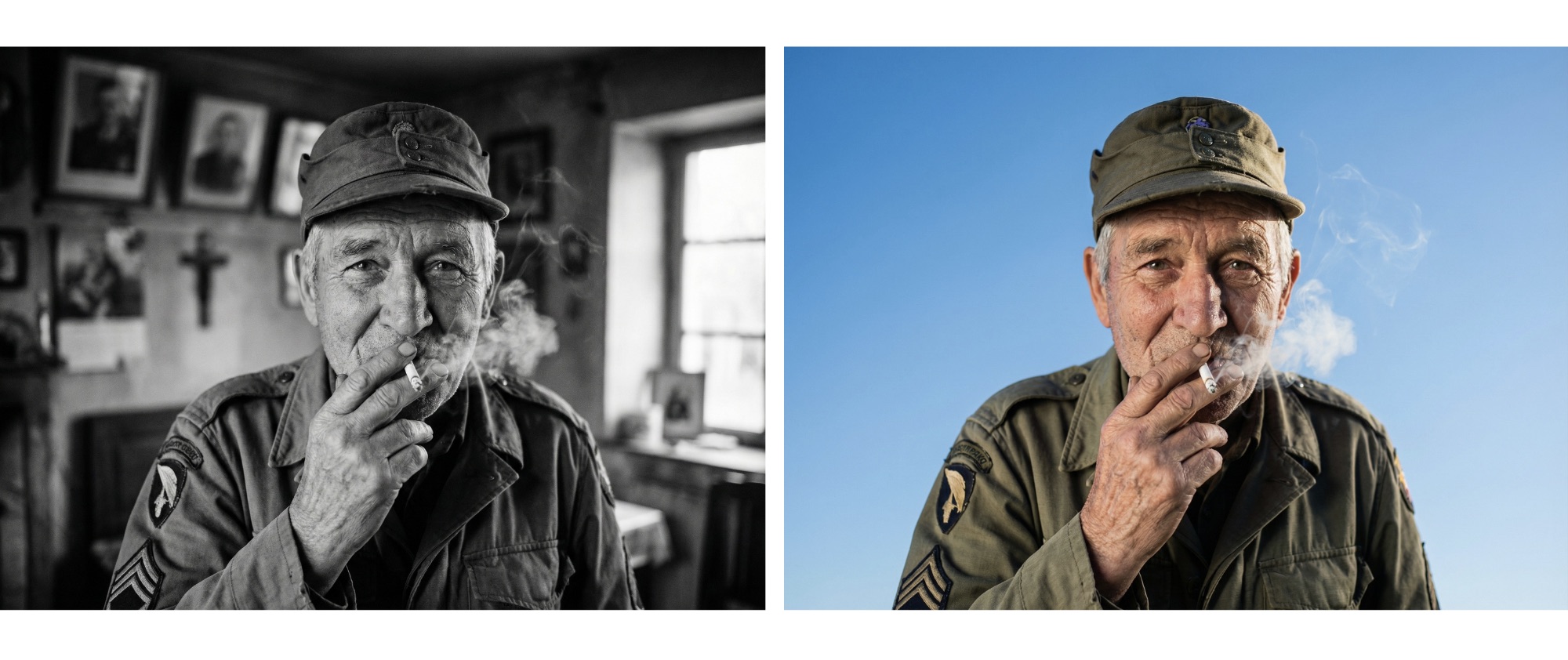 Generated by ImagineArt Background Changer
Key Features
- Precise subject isolation
- Remove background clutter and distractions.
- Replace backdrops and add new backgrounds.
- Maintain realistic shadows and depth.
Use Cases
- Creating clean Instagram layouts
- Studio-style edits from home
- Travel photos with enhanced skies.
- Lifestyle portraits with minimal distraction
Recommended read: How to Change Backgroud of a Photo
9. AI Object Remover
Distractions break the aesthetic flow. One misplaced object can pull all the focus away from the main subject. With ImagineArt AI Object Remover, you can remove unwanted elements from photos without ruining the natural look of the photo, adding any visual artefacts. Sometimes, aesthetic photo editing means removing certain elements more than adding.
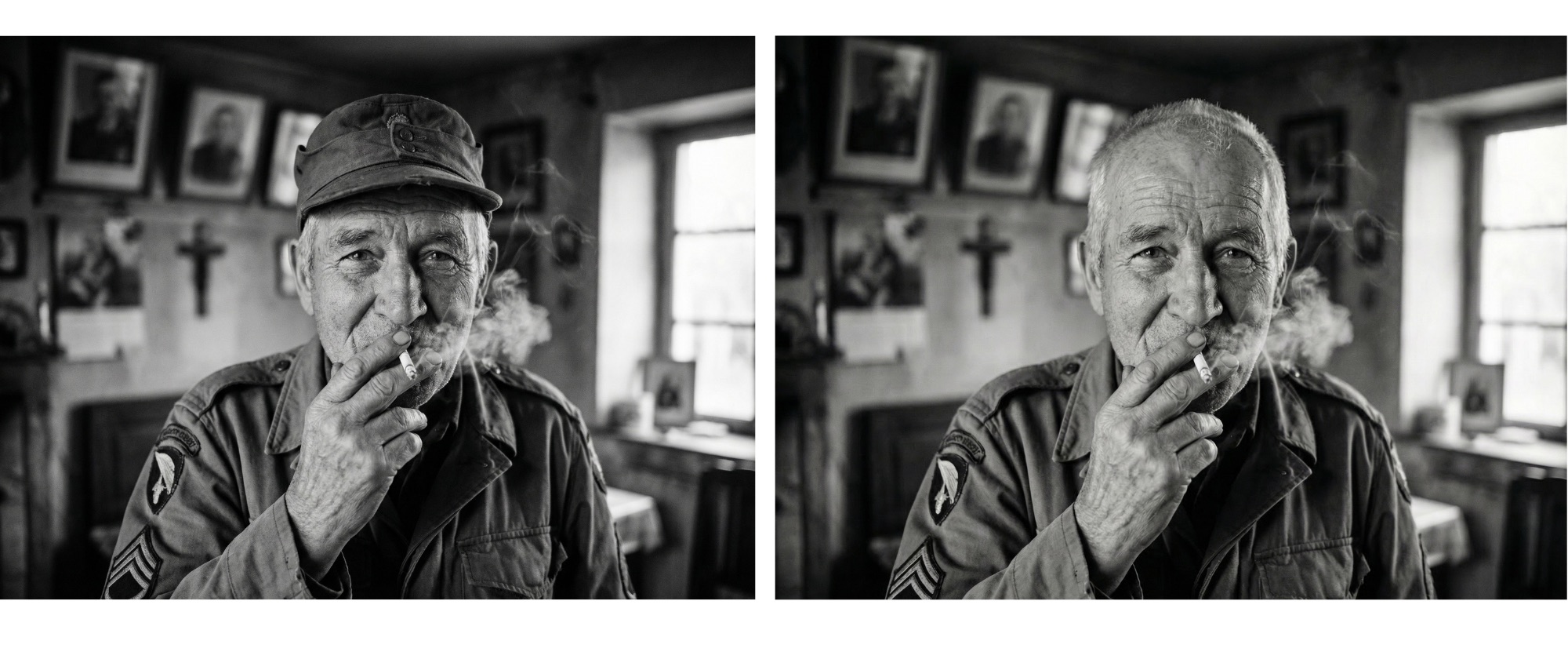 Generated by ImagineArt AI Object Remover
Key Features
- Remove photobombers
- Erase wires or distractions.
- Preserve texture and lighting.
- Seamless background reconstruction
Use Cases
- Travel photography cleanup
- Street photography refinement
- Minimal aesthetic feeds
- Professional product shots
Recomended read: How to Remove Objects from Images
10. Change Camera Angle
Composition is pivotal when it comes to creating an aesthetic photo. With ImagineArt Camera Angle Changer, you can adjust the camera movements, rotations, angles, and zoom settings to fix the perspective and make your photo look more intentional.
Key Features
- Adjust camera logic
- Improve photo symmetry
- Fix distorted angles
- Balance image composition
Use Cases
- Casual selfies refinement
- Architecture photography
- Lifestyle shots
- Instagram grid optimization
11. Image Upscaler
Only a blurred background looks aesthetically pleasing, not a blurry photo. With ImagineArt Image Upscaler, you can enhance the photo resolution and highlight the details without worrying about pixelation or image distortion.
Key Features
- Improve sharpness
- Increase resolution up to 1080p
- Preserve finer details
- Reduce noise
Use Cases
- Instagram uploads
- Pinterest-quality images
- Fine-tuning the details of old scans and photos
12. HDR
With ImagineArt HDR app, you can enhance highlights and shadows for a dynamic visual impact. This aesthetic photo editing app makes sure to preserve the natural textures and color tones. It works well for cinematic travel aesthetics.
Key Features
- Balanced light correction
- Enhance shadow details
- Improve landscape depth
- Preserves original composition
Use Cases
- Travel photography
- Outdoor landscapes
- Street photography
- Dramatic aesthetic edits
13. AI Image Editor
ImagineArt AI Image Editor gives you full control to polish your images, making subtle changes or dramatic enhancements. This app makes sure your aesthetic photo editing looks natural, not over-processed.
Key Features
- Add effects and visual styles.
- Adjust brightness and contrast.
- Detail and color enhancements
Use Cases
- Final Instagram-ready touches
- Fine color corrections
- Subtle mood balancing
New Entry #2:
14. VSCO
Platforms: iOS, Android | Price: Free (limited); Plus $29.99/year
VSCO built its reputation on film-accurate presets — the A, C, F, and G series replicate specific film stocks rather than generic "vintage" filters. The practical advantage for aesthetic editing is feed cohesion: apply the same preset across all photos before uploading and your Instagram grid reads as intentional rather than inconsistent.
The free tier includes basic editing tools and a small subset of presets. The Plus plan ($29.99/year) unlocks 200+ presets, video editing, and the Montage feature for layered compositions. Reddit consistently flags frustration over features moving behind the paywall in recent updates — worth knowing if you've used older free VSCO.
Best for: Creators who want a consistent filter identity across their feed, travel photography, and film-inspired portrait aesthetics. Best for film presets and feed cohesion
15. Snapseed
Platforms: iOS, Android | Price: Free — no ads, no subscription, no paywall
Snapseed is the only fully professional mobile photo editor from a major company (Google) that has never charged for access. Its 29 tools include Curves, Selective (adjust specific color ranges), Healing, and a Looks feature that lets you stack multiple edits into a saveable preset — the closest free equivalent to VSCO's filter packs.
For aesthetic editing specifically: the Vintage, Grainy Film, and Retrolux filters are customizable rather than fixed. You can tune the style, grain, and light leak intensity rather than applying a preset as-is.
Best for: Anyone who wants precise aesthetic control for free. Also the best recommendation for beginners who want to learn editing fundamentals before committing to a paid app.
Step-by-Step: How to Create Aesthetic Pictures Using ImagineArt Apps
With ImagineArt AI image editing apps, you can try this practical workflow to create aesthetic pictures:
Step 1: Removing Distractions
Unwanted elements and objects are a visual roadblock and reduce the visual appeal of any good shot. Use AI Object Remover for clean edits and minimal vibes.
Step 2: Fixing Background
Your background should complement the main subject, harmonizing the overall aesthetics. Use AI Background Changer or Blur Background to make sure your background sets the right mood.
Step 3: Adjusting Lighting
This is the make-or-break aspect of aesthetic photo editing. Get it wrong, and you will end up in an endless cycle of edits. Nail it, and you will have an aesthetic photo that commands attention. Use Relight AI or Change Lighting to achieve that professionalism in your photos.
Step 4: Mood Setting with Colors
Add colors that match your aesthetic mood to give a cohesive look to your Instagram feed or Pinterest boards. Use AI Recolor for a consistent palette.
Step 5: Improve Quality
Even a professionally-shot photo can lose its visual appeal if it's blurry or dull. Improve image quality with AI Image Upscaler and apply HDR to bring out the subtle details.
Step 6: Final Edit
The final touches separate an aesthetic masterpiece from a good photo. Use AI Image Editor for adjustments and small tweaks.
Recommended read: Photo Editing Basics
Aesthetic Photo Editing Apps for iPhone vs Android
Most aesthetic editing apps are available on both platforms, but a few are iOS-exclusive or have meaningful feature differences:
- iOS-only apps in this list: Afterlight, RNI Films, Photomator, Darkroom
- Android parity apps: VSCO, Snapseed, Lightroom, Picsart, Facetune, Prequel, Tezza, Canva
Best aesthetic photo editing stack for iPhone:
- Primary editor: VSCO for preset consistency
- Free editing: Snapseed for precision adjustments
- Film effects: VSCO for texture and grain
- AI editing: ImagineArt for prompt-based color grading and mood transformation
Best aesthetic photo editing stack for Android:
- Primary editor: ImagineArt AI image editor
- Film presets: VSCO
- Free editing: Snapseed and ImagineArt
- AI editing: ImagineArt (web or Android app)
- Retro effects: Prequel
Ready to create aesthetic photos?
If you want quick edits, aesthetic filters can do the trick. But if you want complete control over color, lighting, composition, and depth, choose ImagineArt AI image editing apps so your photos can stop looking edited and start looking curated.
Recommended read: Best Photo Editing Apps | Best AI Tools for Image Editing
Tooba Siddiqui
Tooba Siddiqui is a content marketer with a strong focus on AI trends and product innovation. She explores generative AI with a keen eye. At ImagineArt, she develops marketing content that translates cutting-edge innovation into engaging, search-driven narratives for the right audience.