
Tooba Siddiqui
March 27, 2026 • Updated March 27, 2026
13 mins Read
AI animation has a new problem: too many good options. Two years ago the question was whether AI could animate anything convincingly. That debate is over. In 2026, the question every creator, marketer, and filmmaker is actually asking is more interesting — and more practical: which model should I use for this specific task?
Motion control, character animation, and cinematic physics simulation have all reached production-ready quality. But they've reached it in different models, built on different architectures, optimized for different outcomes. The landscape has matured into a set of specialized tools, and the creators producing the best AI animation content in 2026 are the ones who understand what each tool does — not just what it can do in a demo.
What Is AI Motion Control — and Why Does It Matter?
Traditional character animation relied on one of two approaches. Keyframing — where animators manually set a character's pose at specific frames and let the software interpolate the movement in between — was precise but extraordinarily time-consuming. Motion capture — where a performer wore tracking sensors and their movement data was recorded and applied to a 3D character — was faster but required expensive hardware, controlled studio environments, and significant post-processing.
AI motion control replaces both approaches with a fundamentally different input: a reference video. You upload a short clip of a person performing a movement — a dance, a walk, a gesture, a speech — and the AI extracts the motion from reference video and transfers it onto your character image or 3D model. The character moves the way the person in the reference video moved, with their timing, their weight shifts, their micro-expressions — all applied automatically without manual keyframing or physical sensors.
Best AI Video Models for Motion Control and Animation
Motion Control Specialists
These are the four models that define the state of the art in AI motion control — each with a distinct approach, a distinct strength, and a distinct audience.
Kling 3.0
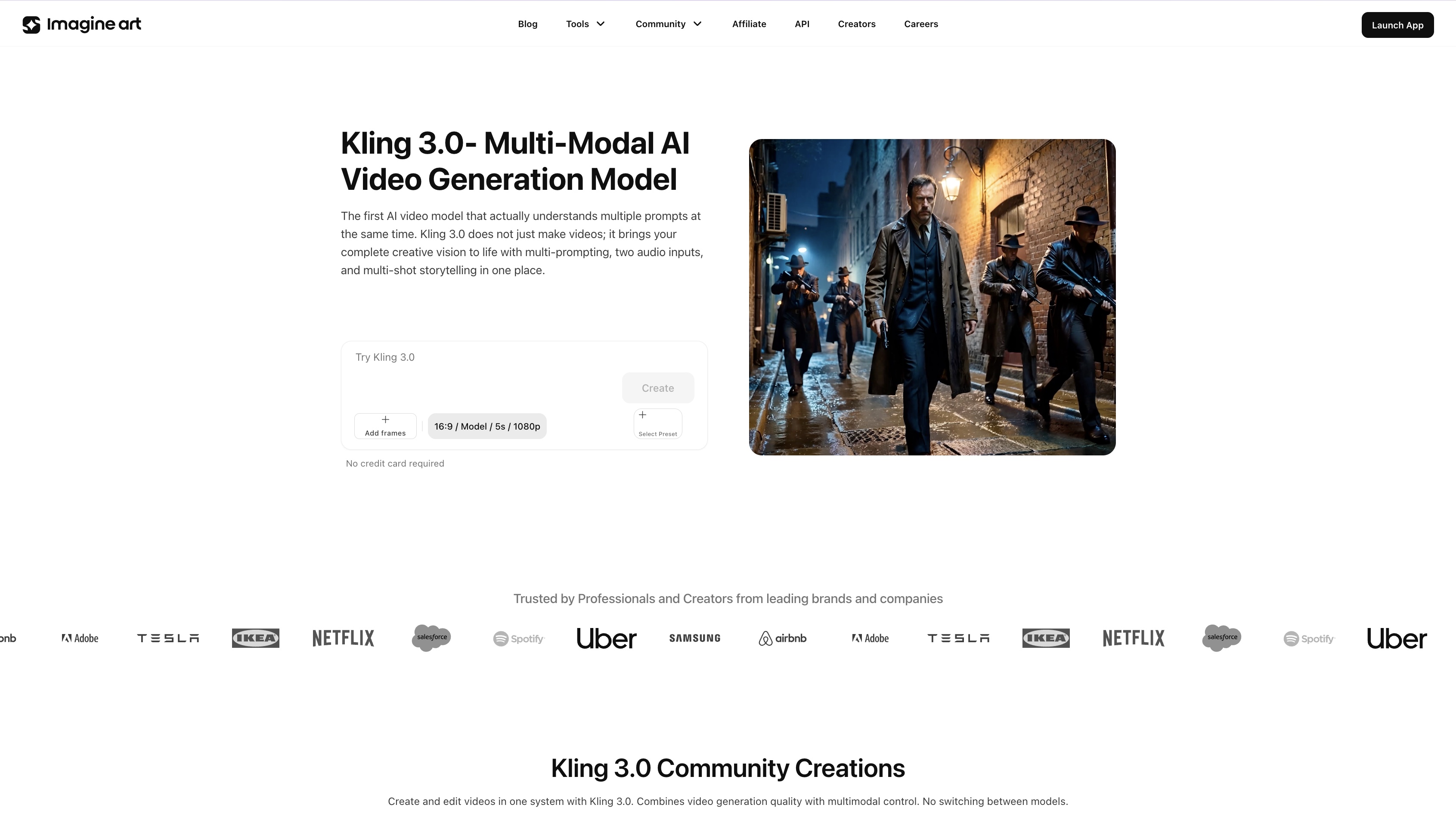 Kling 3.0 on ImagineArt
Kling 3.0 is the current benchmark for AI motion control quality. Released in March 2026 as part of Kuaishou's unified Video 3.0 and 3.0 Omni architectures, it represents the most significant capability leap in the Kling family since the model's initial release. The headline improvements are technical but their impact is immediately visible in output quality.
Element binding — Kling 3.0's most important new capability — maintains facial and character consistency across multi-shot sequences by allowing creators to upload multiple close-up images and short reference videos to build a robust character reference point. Where earlier motion control models struggled to keep a character looking like themselves across camera cuts, Kling 3.0 locks in visual identity and carries it through every frame of a generation. Full-body movement stability, hand gesture accuracy, and camera synchronization have all been meaningfully improved — the motion is smoother, the physics more believable, and the camera behavior more cinematic.
Kling 3.0 also interprets cinematic camera language with significantly greater accuracy than its predecessors. Specify a dolly zoom, a Hitchcock-style focal length change, or a slow aerial pull-back, and Kling 3.0 executes it correctly — not approximately. For filmmakers, agencies, and brand teams producing multi-shot narrative content, this is the model that finally makes AI motion control feel like a real production tool rather than a clip generator.
Kling 2.6
Kling 2.6 arrived in December 2025 and immediately established itself as the standard for single-subject motion transfer — particularly for social media content. In head-to-head benchmarking against the best AI video generator for animation and AI animation tools, Kling 2.6 achieved win rates that weren't close. For the specific task of taking a still image and making it perform a dance, gesture, or physical action from a reference video, Kling 2.6 remains the most reliable tool available at its price point.
Where Kling 3.0 excels at complex, multi-shot, character-consistent narrative production, Kling 2.6 is optimized for speed, volume, and the kind of single-subject motion transfer that drives viral social content. It ships with a dedicated dance movement reference library — templates including Chanel, Dance Baby, Shake It To Max, Jennie, and Milkshake — each capturing nuanced choreography that translates cleanly to any uploaded character image. Upload a character, select a template, and generate a finished dance animation in minutes.
For creators managing a high-volume content calendar across TikTok, Reels, and YouTube Shorts — where speed and consistency matter more than cinematic complexity — Kling 2.6 is the production workhorse that Kling 3.0 is not trying to be. Both models have a role in a serious content workflow. The question is what you're making, not which is better.
ImagineArt Kling Motion Control
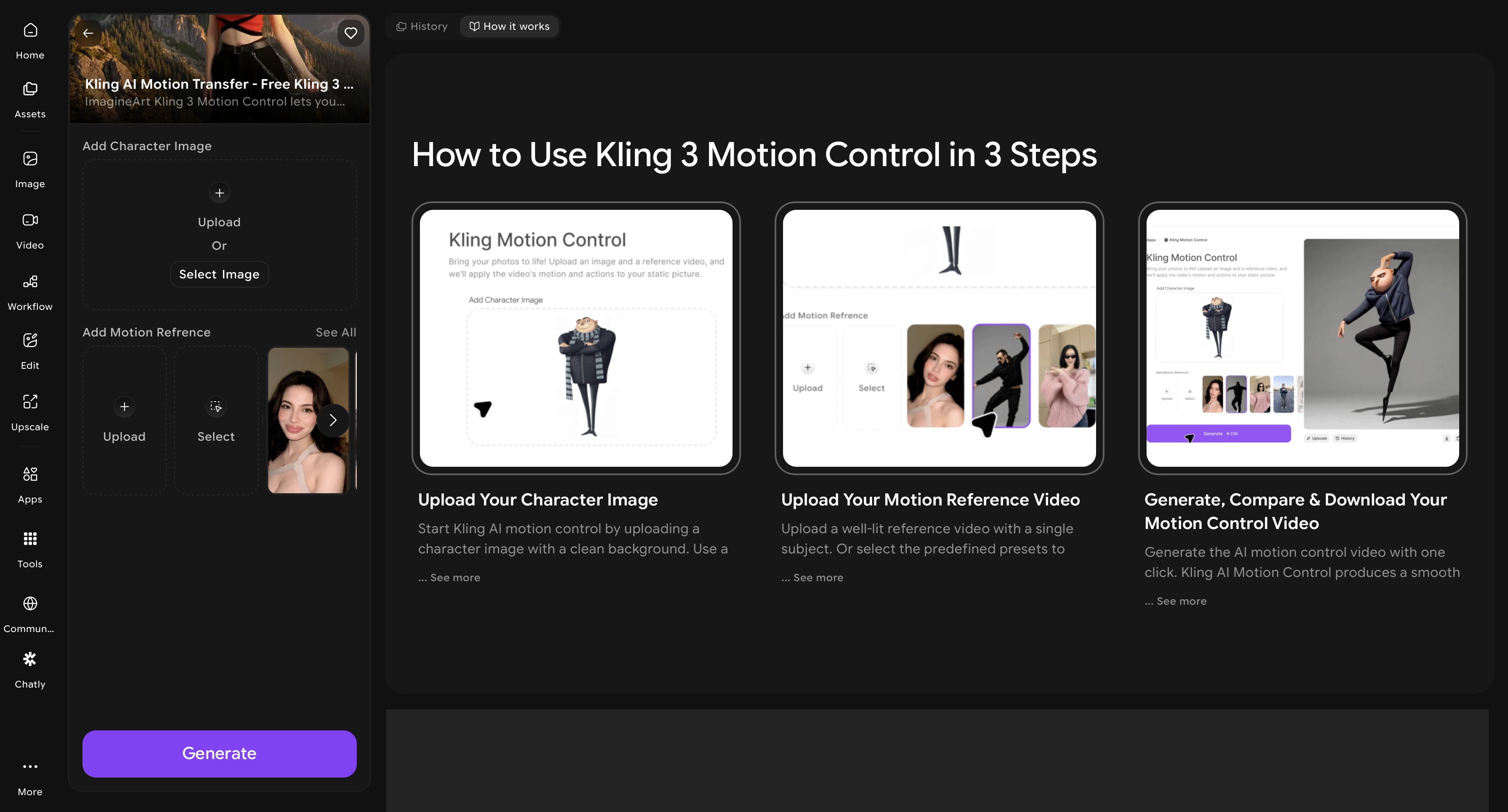 ImagineArt Kling AI Motion Control app dahsboard
ImagineArt AI motion control app is the most practical starting point on this list. It gives creators who want the full motion control pipeline without the complexity of managing multiple tool subscriptions. The AI video animation tool lets you catpure and transfer motion from reference video or the selected preset to the character image.
The practical advantage of using ImagineArt Kling AI motion control app is workflow flexibility. You can produce character images and reference videos within the same platform. It also offers well-Integrated AI video editing apps for color correction, video object removal, and background removal. This helps the content creators to generate high-volume social content where speed and cost efficiency matter
The platform offers 100 free daily credits that are refilled every 24 hours, making it the most accessible entry point into Kling's motion control ecosystem for creators who want to test, iterate, and produce without committing to a subscription upfront.
Runway Gen-4.5 with Act-Two
Runway Gen-4.5 currently holds the top position on the Artificial Analysis Text-to-Video leaderboard — and it earned that position through a combination of motion quality, creative control, and output flexibility that no other commercial model currently matches. The architecture supports controllable camera paths, multi-motion brushes for directing independent movement on different parts of an image, native lip sync, and Act-Two performance capture — a feature that deserves specific attention.
Act-Two brings professional motion capture to any creator with a smartphone. Upload a driving performance video — a facial expression, a body performance, a speech delivery filmed on any camera — and provide a character reference image. Act-Two transfers the movement from the performance video to the character with impressive fidelity, capturing not just gross body movement but the subtler elements of human performance: the slight lean forward during emphasis, the eye movement between points, the micro-expressions that separate a believable character from an obviously generated one.
Gen-4.5 also leads on realistic object motion — weight, inertia, fluid dynamics, cloth simulation, and physically plausible collisions between objects. Sequences where elements interact with each other or with their environment look grounded rather than floaty, which is one of the persistent failure modes of earlier video generation models. For production agencies, VFX teams, and brand creators who need precise directorial control and the highest-quality output available commercially, Runway Gen-4.5 is the professional-tier choice.
Cinematic & Physics-Based Generation
These two models aren't motion control tools in the reference-transfer sense — they're physics simulators and cinematic generators. They excel at making AI-generated scenes look like they were filmed, not rendered. The distinction matters for creators who need maximum visual realism over maximum motion directability.
OpenAI Sora 2 Pro
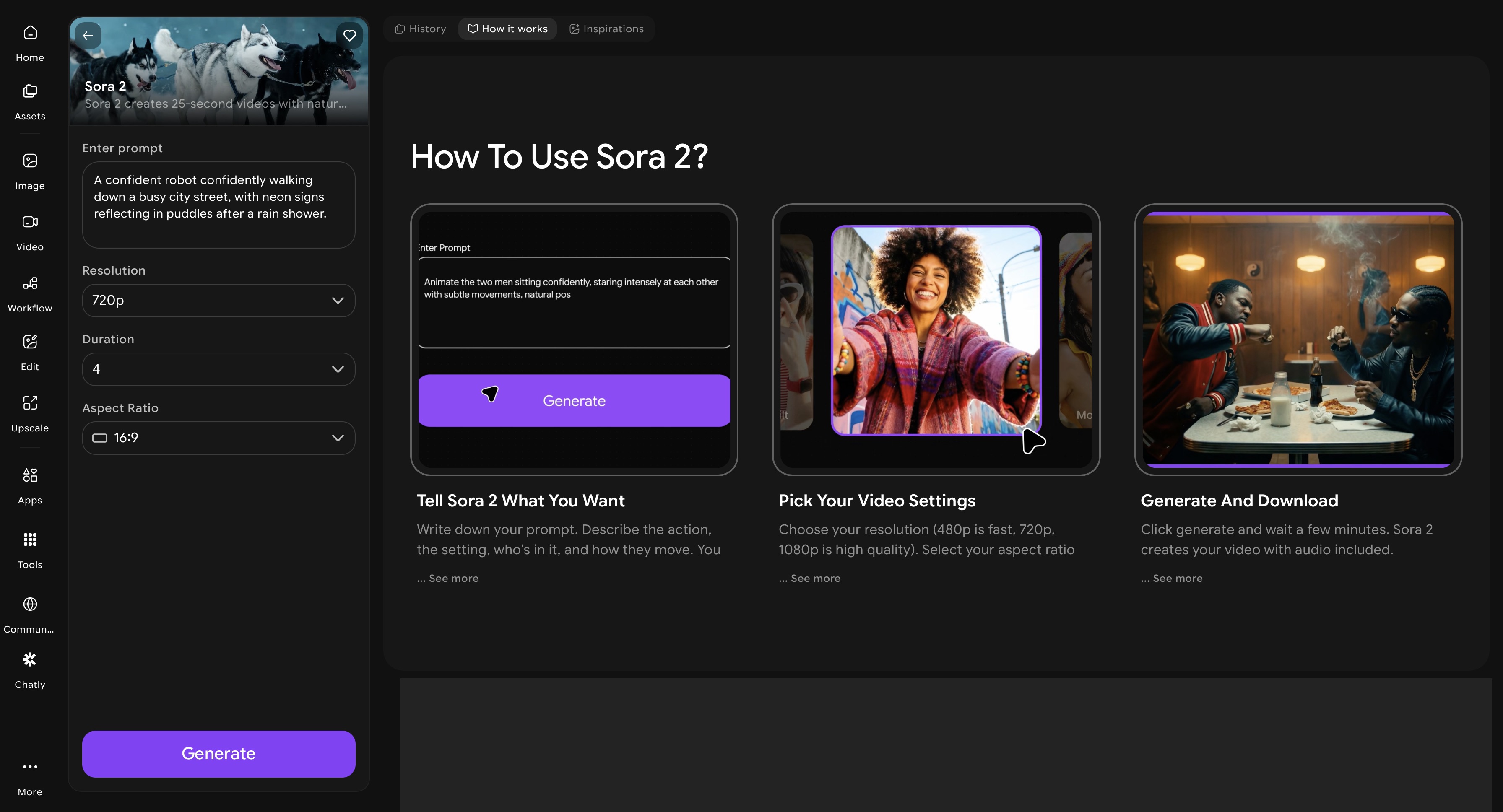 ImagineArt Sora 2 app dashboard
Sora 2 Pro is the most physically accurate video generation model currently available to the public. Where most video AI still struggles with the implicit rules that govern how objects behave — what happens when a glass falls, how water moves around an obstacle, what a crowd looks like from above — Sora 2 demonstrates a genuine understanding of cause-and-effect relationships. The AI video model is trained on physical dynamics at a scale no other AI video generator has matched.
Sora 2 also leads the field on native synchronized audio — generating dialogue, ambient sound, footsteps, and environmental audio within the video itself, not as a separate post-production layer. Combined with its ability to maintain character consistency across multiple camera cuts within a single generation and produce clips up to twenty seconds long, Sora 2 Pro is the strongest available tool for cinematic storytelling that requires maximum realism and integrated sound.
The access model is the primary limiting factor: Sora 2 Pro requires a premium subscription, making it this an entry point on this list. For creators whose output quality justifies that investment, it delivers. For creators focused on social content volume and speed, they can access Sora 2 Pro on ImagineArt AI video generator at a much lower cost.
Google Veo 3.1
Google Veo 3.1 occupies a different position from Sora 2 — it's the strongest model for stylized cinematic output, native audio generation, and vertical video production. Where Sora 2 prioritizes physical accuracy and temporal coherence, Veo 3.1 excels at mood, aesthetic, and the kind of beautifully art-directed visual output that defines high-production-value brand content.
Veo 3.1's native 4K output and vertical video support make it uniquely suited for YouTube Shorts and Reels production at the highest resolution tier. Its Ingredients to Video feature — which allows up to four reference images per generation — provides precise control over subjects, styles, and compositional elements that other models can only approximate through text prompts alone. The result is a level of art-direction specificity that brand teams and creative agencies can actually use in client work.
Veo 3.1 also leads every model on this list for native audio generation — producing synchronized dialogue, sound effects, and ambient audio that matches the visual content with quality and timing accuracy that Sora 2 matches but no other model approaches. For audio-forward content formats — documentary-style videos, narrated explainers, brand films with dialogue — Veo 3.1 is the current best tool. Google Veo 3.1 is also available on ImagineArt and lets you edit and optimize AI animation video for any platform using the free, built-in AI video editor.
Character Animation
Character animation tools are built for speed, social media volume, and accessible creative production — where the goal is compelling character-driven content and performance-accurate motion transfer.
ImagineArt Workflow
ImagineArt Workflow is a multi-step automation pipeline built specifically for creators and teams who need to produce character animation content at volume — without rebuilding the same generation process from scratch for every piece of content. Rather than generating individual clips one at a time, ImagineArt Workflow lets you chain generation steps together: character image creation, style refinement, motion control application, background replacement, and video editing all connected in a single automated sequence that runs end-to-end without manual handoffs between tools.
The practical value for character animation workflows is significant. A marketing team producing weekly animated content for TikTok, Reels, and YouTube Shorts — each needing a different aspect ratio, different background, and platform-specific formatting — can define the workflow once and run it across every piece of content in the calendar. Character consistency, motion style, and visual identity are locked in at the workflow level rather than recreated manually each time. You can even reefine your chracter images using ImagineArt AI image editor to adjust colors, clean backgrounds, and lock in the visual style that every downstream generation step will inherit.
ImagineArt Workflow also removes the most time-consuming parts of multi-platform animation production: resizing outputs for different aspect ratios, generating background variants for different campaigns, and producing language or copy variations of the same animated piece. These are defined once in the workflow and executed automatically across every output. For agencies and in-house content teams producing animation at scale, this is the shift from per-project production to systematic content manufacturing — with a proportional reduction in per-unit cost.
Pika 2.2
Pika 2.2 is where the Pika model family found its social media footing. The introduction of Pikaframes — a keyframe transition system that enables smoother, more visually coherent movement between different character states — addressed the clip-to-clip inconsistency that limited earlier Pika outputs. The result is character animation that reads as intentional rather than random, which is the minimum bar for social content that needs to perform algorithmically. Start with a high-quality character image or create one using an AI image generator to get the cleanest possible input before animating.
Pikaffects is Pika 2.2's most distinctive feature: a set of physics-driven transformation effects applied to characters and objects — explosions, melting, deflation, squishing, and material transformations — that produce the kind of visually surprising content that stops a scroll. These aren't filters applied over existing video; they're physics simulations that change how the character or object behaves within the scene. For viral content, meme-able animations, and creative visual storytelling on TikTok and Reels, Pikaffects gives Pika 2.2 a creative lane that no other model on this list occupies.
Pika 2.5
Pika 2.5 represents the point at which Pika stopped being a clip generator and became a production environment. The Pika 2.5 Studio introduces a timeline and layer-based editing interface — not just a single-clip generation panel — which means creators can now build multi-shot character sequences within the platform rather than generating clips individually and assembling them in a separate editor. This is a meaningful workflow improvement for creators who've been using Pika for its generation quality but losing time in the assembly process.
The character animation quality in 2.5 also improves on 2.2 in facial performance — Pikaswaps enable subject replacement within existing video, and the expanded Pikaffects library gives more transformation options across longer clip durations. At $8 per month for 700 credits, Pika 2.5 is the most affordable entry point into a timeline-based AI character animation workflow on this list — making it the practical choice for social media creators who need volume, speed, and quality without a production budget.
Open Source Options
Open-source AI video models occupy a different part of the landscape from the commercial tools above — they're not trying to compete on interface polish or accessibility. They exist for developers, researchers, and creators who need full control over their pipeline, local deployment, and freedom from API costs and content restrictions.
Wan 2.2
Wan 2.2 is the most capable open-source video generation model available in 2026. Released by Alibaba's Wan-AI team under Apache 2.0 license — which permits free use, modification, and commercial distribution of generated content — it handles both text-to-video and image-to-video generation with motion coherence and temporal consistency that rivals mid-tier commercial models. The outputs are stable, the motion is physically plausible, and the model can be deployed locally on capable GPU hardware or accessed via Hugging Face without any subscription.
What Wan 2.2 provides that no commercial model can is complete control. No content moderation API, no rate limits, no per-generation cost at scale, no dependency on a third-party platform's uptime or pricing decisions. For developers building custom AI video pipelines, studios handling sensitive client content, and researchers who need to run experiments at volume, these properties are not minor conveniences — they're the reason the tool exists.
Which AI Motion Control or AI Animation Tool Should You Use?
The right model depends on three questions: What are you making? How fast do you need it? What level of technical setup are you willing to manage? Here is a direct decision guide based on those parameters. So, if you need:
- Best overall AI motion control: Use Kling 3.0 or ImagineArt Kling AI Motion Control app
- High-volume social media AI dance videos: Use Kling 2.6
- Accurate performance capture: Runway Gen-4.5 with Act Two
- Maximum cinematic realism: Sora 2 pro and Google Veo 3.1
- Fast social media character animation: Pika 2.2 or Pika 2.5
- High-volume multi-platform animation pipeline: ImagineArt Workflow
- Full local control with commercial license: Wan 2.2
The most important nuance in this decision: the serious creators producing the best AI animation content in 2026 are not choosing one model. They're running multi-model AI workflows — using Kling for motion transfer, Sora or Veo for cinematic scene generation, Pika for social character content, and open-source tools for prototyping and pipeline work. Understanding what each model does best is what makes that orchestration possible.
Ready to Create AI Animation Video?
The AI motion control and animation landscape in 2026 is defined by specialization. No single model wins every category, and no creator working seriously in AI video should expect one to. What the field has produced instead is something more useful: a set of best-in-class tools, each optimized for a specific dimension of the problem.
Recommended read: 2D Animation Cost | 3D Animation Cost | 10 Video Animation Apps for Visual Storytelling
Tooba Siddiqui
Tooba Siddiqui is a content marketer with a strong focus on AI trends and product innovation. She explores generative AI with a keen eye. At ImagineArt, she develops marketing content that translates cutting-edge innovation into engaging, search-driven narratives for the right audience.