
Faisal Saeed
April 10, 2026 • Updated May 6, 2026
11 mins Read
When you think of AI video generation models, you usually think of Veo, Seedance, Kling or Hailuo. But recently there has been a new model on the rise named HappyHorse 1.0.
On the Artificial Analysis Leaderboard, HappyHorse 1.0 leads models like Dreamina Seedance 2.0. But what is this model? Where did it come from, and what are the features that make it so special? This is the blog where we cover all of that.
What Is HappyHorse 1.0?
HappyHorse 1.0 is an AI video generation model by Alibaba that currently holds the #1 position on the Artificial Analysis Video Arena leaderboard.
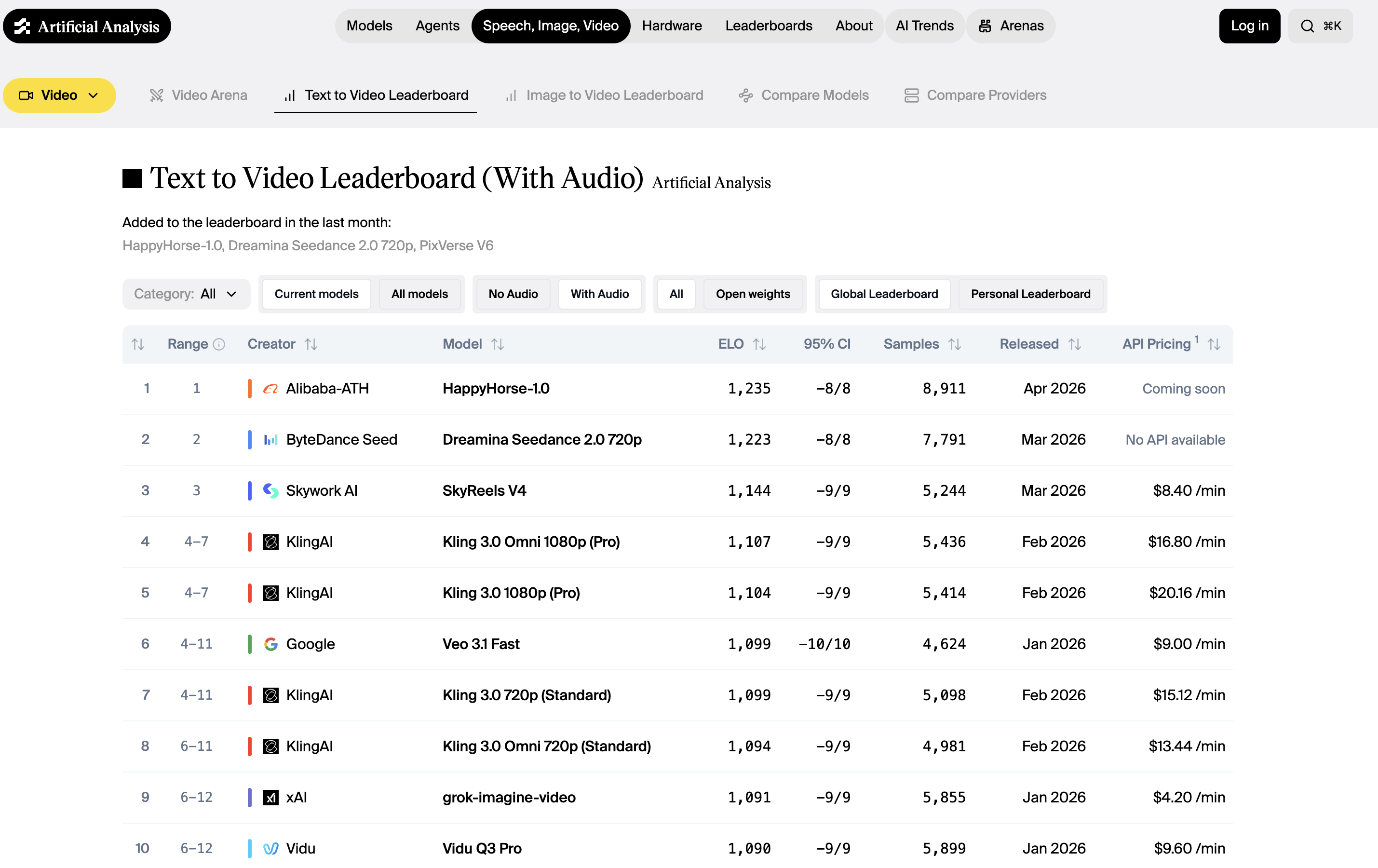 Artificial Analysis Video Generation Arena Leaderboard
What makes HappyHorse stand out from a technical standpoint is how it processes your input. Most AI video models use a diffusion-based architecture that treats video generation and audio separately. HappyHorse uses a unified single-stream transformer that processes text, image, video, and audio tokens together in one sequence.
Every part of the model sees every modality at once, which is why the outputs feel more coherent. The motion, sound, and visuals are planned together rather than layered on after the fact.
At a glance, the core specs:
- 15 billion parameters across a 40-layer unified transformer
- 1080p native output via latent-space super-resolution
- Joint audio-video generation — dialogue, ambient sound, and Foley in the same pass
- Multilingual lip sync across seven languages at the phoneme level
Key Features of HappyHorse 1.0
What pushed HappyHorse to the top of the Artificial Analysis leaderboard is a set of architectural decisions that most video models have not made yet.
The features below are the specific reasons it outperforms closed-source competitors in blind comparisons, and they are worth understanding if you want to know whether this lead is likely to hold.
Native Audio Generation
Most video models that support audio run a separate pipeline. They generate the video first, then layer sound on top using a different model.
HappyHorse generates dialogue, ambient sound, and Foley effects in the same forward pass as the video, because audio tokens sit in the same sequence as the visual tokens during generation.
The model plans both together, which is why the audio feels matched to what is happening on screen rather than approximately synced after the fact. Models like Seedance 2.0 and Veo 3 have strong audio capabilities too, but both route through separate generation stages to get there.
Accurate Lip-Sync
Lip synchronization in most models is handled by a post-processing module that maps audio to mouth shapes after the video is generated.
HappyHorse builds the relationship between speech and facial motion into the architecture itself, aligned at the phoneme level rather than the word or sentence level.
It supports:
- English
- Mandarin
- Cantonese
- Japanese
- Korean
- German
- French
All this with a reported Word Error Rate (measures lip-sync accuracy) of 14.60%, which is comparatively lower than other competing models. For creators producing multilingual content, that difference shows up visibly in how convincing the lip movement looks across languages.
Latent-Space Super-Resolution
The 1080p output is not produced by resizing a lower-resolution generation. HappyHorse runs a dedicated super-resolution module in latent space.
It includes 5 additional diffusion steps that reconstruct fine detail before the video is decoded into pixels. This preserves sharpness in textures, facial features, and edges that a standard upscale would smooth over. The distinction matters most in portrait content and close-up shots, which is also where the model scores highest in blind comparisons.
Fast Creative Iteration
Most AI video models require a long wait between each generation. Long enough that rapid back-and-forth refinement feels impractical. HappyHorse's distilled version cuts that generation time dramatically.
In practice, this changes how you work with the model. Instead of committing to a prompt, waiting, and living with whatever comes out, you can treat each generation as a quick draft. Adjust your prompt, regenerate, compare, and refine until the output actually matches what you had in mind.
It is the kind of speed that makes HappyHorse well suited for content creators who work iteratively. But while you wait, ImagineArt AI product video maker and AI animation generator cover multiple workflows that creative teams need to scale their products.
Enhanced Prompt Fidelity
Most AI video models quietly simplify what you ask for. Describe a scene with five specific elements and the output usually gets two or three of them right. The rest get smoothed out into something generic.
HappyHorse holds onto the specifics better than most. Describe something unusual or layered, and the output tends to reflect it. For creators who have learned to keep their prompts simple because complex ones never pay off, this model is worth testing with the detailed version first.
HappyHorse 1.0 vs. Competing Models
Here is how HappyHorse 1.0 compares to the top-ranked models it displaced on the Artificial Analysis leaderboard:
HappyHorse 1.0 vs. Seedance 2.0
Seedance 2.0 is purpose-built for multimodal reference control. You can feed it up to 9 images, 3 video clips, and 3 audio files in a single generation, tagging each one in your prompt to control exactly how it appears in the output.
Where Seedance 2.0 wins:
- Multi-asset productions with multiple characters, scenes, and reference files
- Shot-to-shot character consistency across complex sequences
- Motion cloning from reference video clips
Where HappyHorse wins:
- Single-character portrait quality and facial performance
- More architecturally coherent audio. Everything lives in one sequence rather than two parallel branches
- Stronger results from a text prompt alone, without needing to supply reference assets
The Seedance 2.0 guide covers its multi-asset workflow in detail if that production style fits your needs.
HappyHorse 1.0 vs. Kling 3.0
Kling 3.0 is the strongest multi-character model in this group. It supports multi-prompt generation, different instructions for different parts of the same clip, and produces native 4K output with dual audio inputs for layering dialogue and ambient sound independently.
Where Kling 3.0 wins:
- Multi-character scenes and longer structured sequences
- Native 4K resolution
- Multi-prompt storytelling with reliable character consistency across shots
Where HappyHorse wins:
- Phoneme-level lip sync across seven languages
- More natural facial performance in single-character content
- Architecturally integrated audio rather than layered pipelines
For a deeper look at what Kling 3.0 prioritises in its design, the Kling 3.0 vs. Kling 2.6 comparison is worth reading.
HappyHorse 1.0 vs. Veo 3.1
Veo 3.1 is Google's most capable video model to date. Its "ingredients to video" feature combines up to three reference images into a single cohesive output, scene extension runs up to 30 seconds, and its physics simulation leads the field.
Where Veo 3.1 wins:
- Physically complex scenes with fluid dynamics, fire, crowd movement
- Scene extension up to 30 seconds with visual consistency
- "Ingredients to video" multi-reference composition
Where HappyHorse wins:
- Portrait realism and dialogue-driven content
- Audio generated as part of the same token sequence as video, producing more natural dialogue and lip movement
- Single-character prompt adherence
The Veo 3.1 alternatives breakdown gives further context on where Veo 3.1 sits in the wider field.
HappyHorse 1.0 vs. Sora 2 Pro
Sora 2 Pro produces visually impressive footage with strong character consistency and a public API. Its clearest strength is cinematic environmental realism which includes large-scale scenes, complex lighting, physics-accurate motion across an entire frame.
Where Sora 2 Pro wins:
- Large-scale cinematic environments and scenes
- Complex lighting and physics across the full frame
- Public API with reliable access
Where HappyHorse wins:
- Architecturally integrated audio vs. Sora's separately generated audio layer
- Latent-space super-resolution to 1080p vs. Sora's 1080p cap with no upscaling path
- No high cost barrier for portrait and voice-driven content
If you are still working out which model fits your workflow, the best AI video generators of 2026 covers the full field with that question in mind.
Use Cases of HappyHorse 1.0
HappyHorse's combination of portrait realism and multilingual audio makes it particularly well suited for:
- Content creation: generating short-form clips for social media, YouTube, or branded campaigns where portrait quality and audio sync matter
- Marketing: producing product videos, spokesperson content, and campaign visuals with multilingual audio for different markets
- E-commerce: creating product visualization videos with consistent visual identity across scenes
- Education: generating explanatory content with spoken audio aligned to on-screen visuals
- Entertainment: prototyping character animation, short films, and cinematic sequences before committing to full production
If output realism is your primary benchmark across any model, the best realistic AI video generators guide and the how to make realistic AI videos walkthrough are both useful contexts for understanding where HappyHorse sits in that wider picture.
How to Access HappyHorse 1.0
HappyHorse 1.0 is officially accessible through happyhorse.app, the model's own platform. A public API is confirmed as coming soon, and the team has indicated that model weights will be released openly.
In the meantime, if you want to start working with the best AI video models available right now, ImagineArt gives you access to Seedance 2.0, Kling 3.0, Veo 3.1, and more. All under one subscription, with no API setup required. Once HappyHorse 1.0 launches its API, it will be available on ImagineArt alongside them.
Also read: How to Use HappyHorse 1.0?
HappyHorse 1.0 Prompt Examples
HappyHorse responds well to prompts that are specific about the subject, the action, the visual tone, and the audio. The ten examples below are built around HappyHorse's core strengths.
- A Korean woman in her early 30s sits at a wooden café table by a rain-streaked window, speaking directly to camera in Korean with a warm, unhurried tone. Soft ambient café noise in the background. Shallow depth of field, warm tungsten lighting, close-up framing.
- A male product presenter in a clean white studio holds up a slim black smartwatch, turning it slowly to show the side profile. He speaks in clear English, explaining the display features. Bright, even key lighting, minimal background, 16:9 wide shot.
- A French fashion model walks a sunlit cobblestone street in Paris, wearing a structured camel coat. Slow tracking shot from behind, transitioning to a frontal medium shot as she turns. The sound of heels on stone and distant city ambiance. Golden hour lighting.
- A young male teacher stands at a whiteboard, drawing a simple diagram of the solar system with a marker. He explains each planet in Japanese, gesturing toward the drawing. Bright classroom lighting, medium wide shot, natural audio.
- A close-up of a woman's hands preparing matcha in a traditional ceramic bowl, whisking the powder into a smooth green paste. No dialogue — only the soft sound of the whisk and ambient silence. Natural daylight from a side window, extremely shallow depth of field.
- A male spokesperson in his 40s sits in a modern office, speaking confidently to camera in Mandarin about a new product launch. Sharp corporate lighting, shallow background blur, tight mid-shot framing. Professional, authoritative tone.
- A woman in athletic wear runs through a misty early morning park, her breath visible in the cold air. The camera tracks alongside her at eye level. No dialogue — only footsteps, breath, and distant birdsong. Desaturated cool tones, cinematic wide aspect ratio.
- A barista in a specialty coffee shop pulls an espresso shot, the crema swirling in slow motion as it fills a small glass. Ambient café sounds, low warm lighting, extreme close-up transitioning to a medium shot of the barista looking up with a slight smile.
- A German voiceover artist records in a professional studio booth, speaking calmly into a large condenser microphone. Tight mid-shot through the glass partition, studio monitor glow in the background, the sound of her voice clean and present in the mix.
- A couple walks along a windswept coastal cliff at dusk, speaking quietly to each other in Cantonese. Wide establishing shot pulling into a medium two-shot. The sound of wind and breaking waves below. Fading golden light, long shadows.
Also read: HappyHorse 1.0 Prompt Guide
Start Creating with HappyHorse 1.0 Today
HappyHorse 1.0 is one of the best video generation models based on the Artificial Analysis Video Arena, a 116-point lead over the previous #1 model in text-to-video, and a genuinely novel architecture that generates video and audio together in a single forward pass. Those are real results based on hundreds of thousands of real human preference votes.
What it does not have yet is a public API, confirmed model weights under the HappyHorse name, or a clear identity behind the release. It is the most impressive AI video model on the leaderboard and one of the least accessible in practice. That gap will close but for production work happening today, the models available on ImagineArt deliver state-of-the-art results without the wait.
Frequently Asked Questions
The model is widely attributed to a team at Alibaba's Taotian Group, led by Zhang Di — the former Vice President of Kuaishou who previously headed development of Kling AI. No official confirmation has been published, though both The Information and Bloomberg reported the Alibaba connection on April 10, 2026.
The base model generates clips up to 5 seconds, with the distilled version producing that length in roughly 38 seconds. Longer generation lengths have not been officially confirmed, though the underlying architecture supports up to approximately 10–15 seconds per clip.
Yes. HappyHorse supports both text-to-video and image-to-video generation. You can provide a reference image and the model will animate it while preserving the visual identity of the subject across the clip.
HappyHorse supports phoneme-level lip synchronization in seven languages: English, Mandarin, Cantonese, Japanese, Korean, German, and French. The synchronization is built into the architecture rather than applied as a post-processing step, which is why it performs more convincingly across all seven than most models do even in their primary language.
Faisal Saeed
Faisal Saeed specializes in content writing and marketing for SaaS and GenAI businesses, driving conversion through comprehensive content that people love to engage with.