
Saba Sohail
December 16, 2025 • Updated December 16, 2025
9 mins Read
When viewers say an AI video “looks real,” they’re usually reacting to a combination of small details working together rather than one text prompt. Yes, generating a hyper-realistic video requires more than a prompt: you need to choose the right AI video generator, use proper reference images and customize according to your desired creative output. So, in this blog, I am breaking the steps, right practices, prompt examples and a list of best realistic AI video generators so you can create and use the playbook right away!
Step-by-step Process to Make Realistic AI Videos
Here is a quick step-wise breakdown for generating realistic videos with AI using ImagineArt. Simply open https://www.imagine.art/video and start!
 ImagineArt AI Video Generator
Step 1: Prompts
Type a text prompt or upload an image. Some video generators in ImagineArt will give you additional prompt options like start and end frames.
For best realistic AI videos, I would recommend going for an image to video workflow. This way, you already have a preview/start frame. Use realistic AI image generators like Imagen 4 and ImagineArt 1.5 for creating cinematic and photorealistic scenes.
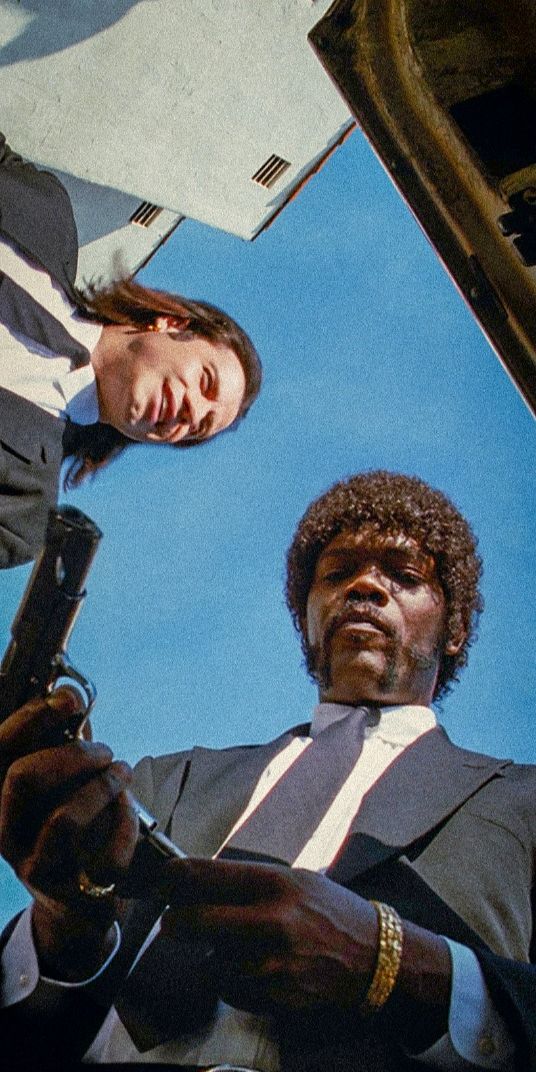
 Created with ImagineArt 1.5
Step 2: AI Video Model
Pick a video generation model for realistic results. I have shared a list of best realistic AI video generators in the next section.
Step 3: Video Settings
Select your aspect ratio, video duration, and resolution. Video length and better resolution consume credits.
Step 4: Presets
Choose presets for your video to create desired video output like camera movement, UGC style, filters, and effects.
Step 5: Download
Download your realistic AI video in MP4 format.
Quick tip: if you are creating a specific effect, like product reveal, behind the scenes etc., check ImagineApps. These apps create videos faster!
Top 6 Realistic AI Video Generators
Here are top 6 AI video generation tools for realistic videos. All of these video models are available on ImagineArt.
1. Sora 2 Pro
Sora 2 Pro branches out from OpenAI’s family and delivers highest cinematic quality in videos. AI videos in Sora 2 Pro have strong character consistency, as well as built-in dialogue which makes it one of the most realistic AI video generators available. While being the most realistic, Sora 2 Pro is also super expensive when compared to other AI video generators. Sora 2 Pro works well for documentaries, social media content, film scenes, and Hollywood-style video advertisements.
2. Google Veo 3.1
Veo 3.1 from Google DeepMind offers highly fluid motion, real-life interactions, natural textures and detail in realistic videos. It is one of the most realistic AI video generators which gives high fidelity video output with built-in sound effects and natural dialogue. Again, Veo 3.1 is also super expensive like Sora 2 Pro but the price does justify the cinema-grade videos it creates. You should use Google Veo 3.1 for short AI films and customer onboarding videos.
3. WAN 2.6
WAN 2.6 from Alibaba offers a superb mix of video realism and generation speed. It produces high-quality videos without demanding heavy resources or credits. Wan 2.6 is efficient for everyday content creation: it keeps visuals believable, renders characters and motion without jitters and is super affordable. If you are a social media content creator, online course seller or trainer, try Wan 2.6 to keep your creative output and budgets under control.
4. Kling 2.6 with Native Audio
Kling 2.6competes the video realism of Veo 3.1 and Sora 2 but is cheaper than western AI video generators. It gives users strong prompt control with start and end frames, camera movements, built-in dialogue and speech with sound effects. It’s a godsend for marketing teams and content creators that want an AI realistic video generator that balances quality and price.
5. Runway Aleph
Runway Aleph stands out for prompt diversity. It offers advanced use cases of realistic AI videos like motion transfer, training videos and video-to-video transformation. It follows text, image and reference prompts really well and preserves the originality of inputs against creative outputs. Runway offers a decent price so it’s good for mid-tier production projects and marketing videos.
6. PixVerse v5.5
PixVerse v5.5 is best for multi-shot videos, social media content and video advertisements. It renders realistic AI videos fast and follows simple to detailed prompts. It’s a great AI video generator for beginners.
Recommended Read: Top Realistic AI Video Generators
What makes an AI video realistic?
I would say that realism, as much as it’s an understanding and depiction of real world, is cumulative. If even one element feels off, the illusion breaks. So, here are 4 practical elements of realistic videos:
Visual realism
This is the first implicit ingredient of any realistic video: how light behaves in a scene.
In real footage, light has direction, falloff, and interaction with surfaces. It wraps around faces, creates soft or hard shadows, and changes subtly as the camera moves.
A realistic AI video generator understands this relationship and generates the same in a video. That’s why, when you create videos with Google Veo 3.1, or Sora 2 Pro:
- the textures don’t look painted on
- skin has variation
- fabric creases naturally
- metal reflects rather than shines uniformly
Motion Physics
In realistic AI videos, objects accelerate and slow down the way they would in the real world, people shift their weight naturally, and nothing appears to “float” or snap between positions.
When lighting, textures, and motion obey real-world logic, the video immediately feels grounded.
Temporal realism
Temporal realism is about what happens over time, not in a single frame.
Many AI videos look impressive at first glance but fall apart when you watch them for more than a few seconds. However, Sora 2 Pro or Seedance’s videos maintain consistency from frame to frame. Faces don’t subtly change shape, clothing stays the same, and backgrounds don’t morph unexpectedly.
Camera Movements
Camera movement also matters here: pans, tilts, and dolly shots should feel continuous, not jittery or reinterpreted every second. When characters remain stable and the camera behaves predictably, your brain stops looking for errors and starts accepting the scene as real.
Built-in Audio
Audio realism is often underestimated, but Kling 2.6 Native Audio actually set benchmarks in realistic audio generation. You’ll know already that natural dialogue has rhythm which comes with pauses, emphasis, breath, and slight imperfections.
When speech feels too clean or robotic, the video instantly feels artificial. That’s why, ambient sound is just as important.
For rendering sound effects, you know that real environments are never silent; there’s always room tone, distant noise, or subtle echoes that match the space.
Then if your videos have lip-sync, it all looks stitched together. Even small mismatches between mouth movement and speech can make a video feel fake, no matter how good the visuals are. When voice, environment, and facial movement align, the scene feels alive rather than generated.
Prompt Adherence
Following text and image prompts and other customization instructions is just as important in generating a realistic video as everything else. A model can have incredible visual quality, but if it doesn’t follow instructions reliably, your video output will break.
- Poor prompt adherence leads to inconsistent characters, ignored camera directions, or scenes that drift away from the original intent.
- Strong adherence means the model understands not just what you want to see, but how those elements should relate to each other across the entire clip.
This is why advanced models feel more “cinematic”: they don’t just render pretty frames, they execute a coherent vision.
Prompt Examples for Realistic AI Videos
1. Cinematic Movie Scene for Urban Drama
A handheld cinematic shot of a rain-soaked city street at night, neon lights reflecting on wet asphalt. A man in his early 30s walks slowly through the crowd, adjusting his coat as cars pass by, headlights flaring naturally into the lens. The camera follows from behind, shallow depth of field, realistic motion blur, ambient city sounds, moody lighting, film-like color grading.
2. Cinematic Movie Scene for Emotional Close-Up
A slow, intimate close-up of a woman sitting by a window during golden hour, soft sunlight illuminating her face. She exhales gently, eyes shifting as if processing heavy emotions, subtle facial movements and natural blinking. The camera holds steady with slight breathing motion, cinematic lighting, realistic skin texture, shallow depth of field, quiet room tone.
3. Product Video (Image-to-Video) for Luxury Perfume Ad
Using the uploaded perfume bottle image as the reference, create a cinematic product video. The bottle rests on a marble surface as soft studio lighting moves across the glass, highlighting reflections and engraved details. Slow camera push-in, shallow depth of field, subtle floating dust particles, premium luxury aesthetic, realistic shadows, high-end commercial style.
4. Training Video Prompt for Instructional Dialogue Scene
A realistic kitchen setting with a chef standing behind a counter, natural indoor lighting. The chef looks into the camera and speaks calmly: “First, wash the vegetables thoroughly under cold water.” Cut to a closer shot as the chef continues, “Next, chop them evenly to ensure they cook at the same pace.” Final shot shows the chef smiling slightly, saying, “Now you’re ready to start cooking.” Clear lip-sync, natural dialogue pacing, instructional tone.
5. Drone Video of a Scenic Landscape
A smooth cinematic drone shot flying over rolling green hills at sunrise, low altitude at first before gradually ascending. Morning mist moves naturally across the landscape, sunlight casting long shadows over the terrain. The drone motion is steady and realistic, with gentle turns, natural wind movement in trees, ultra-realistic lighting and atmospheric depth.
Mistakes to avoid when creating realistic AI videos
After exploring the major elements of realistic videos, here are 6 mistakes you should avoid when generating realistic videos with AI video generators.
1. Prompt Guides for Models
Every AI video generation model has a dedicated prompt guide. Kling follows simple prompts while Veo 3.1 works with complex JSON prompts as well. So, use specific prompt guides for the respective models. Find prompting guides [here].
2. Overloaded Prompts
Too many instructions in a single prompt confuse the AI and lead to inconsistent results. Keep prompts clear and focused and give the model one main idea at a time.
3. Ignoring Lighting Logic
Light behaves predictably in the real world, and ignoring it makes scenes feel fake. Consider direction, shadows, and intensity to keep visuals grounded.
4. Mixing Incompatible Styles
Combining clashing aesthetics, like hyper-realistic characters in cartoon environments looks unnatural. Keep style consistent throughout the scene for believable output.
5. Relying on One-Shot Generations
Expecting perfection in a single render rarely works. Iterating, refining prompts, and adjusting settings ensures higher realism and fewer visual errors.
6. Unrealistic Camera Movements
Jittery pans, impossible angles, or sudden zooms instantly break video realism. Stick to smooth, natural camera motions that mimic real-world filming.
How to use Google Veo 3 to make realistic videos?
As I mentioned earlier, Google Veo 3.1 makes hyperrealistic videos. To use this model, open https://www.imagine.art/video and choose Google Veo 3.1 as the model. It consumes around 700 credits for a 10 second video with built-in audio like speech and sound effects.
Ready to create realistic AI videos?
Creating realistic AI videos that actually look real isn’t magic: it’s about choosing the right tools, writing smart prompts, and knowing the tricks video pros use. With the right AI video generator like ImagineArt, you can make cinematic clips, social media content, and product videos that feel alive.
Saba Sohail
Saba Sohail is a Generative Engine Optimization and SaaS marketing specialist working in automation, product research and user acquisition. She strongly focuses on AI-powered speed, scale and structure for B2C and B2B teams. At ImagineArt, she develops use cases of AI Creative Suite for creative agencies and product marketing teams.