Zahida Misher
November 25, 2026 • Updated November 25, 2026
13 mins Read
HeyGen's free plan gives you three videos a month, each capped at one minute. D-ID's free option is a 14-day trial. The Captions free plan comes with no AI credits at all. Free plans are where the gap between AI avatar tools shows up first, and the price and language gaps come right after.
So which is the best AI avatar generator for your job? We put 11 tools side by side on the six things that decide it: how you make the avatar, how many languages it speaks, what the free plan really includes, what the cheapest paid plan costs, what vendors say they ask for before cloning a face, and how users rate it on G2. ImagineArt AI Avatar Studio comes first, and the reasons are below. Every tool after it wins somewhere.
What is the best AI avatar generator in 2027?
ImagineArt AI Avatar Studio is the best AI avatar generator for most people right now. It gives you four ways to make an avatar (library, one photo, a written description or a 30-second recording), speaks 50+ languages with lip sync re-timed per language, and exports four aspect ratios from one take, all on one saved avatar.
That mix matters because most teams need one face doing many jobs: an ad this week, a lesson next week, a Spanish cut after that. Avatar Studio keeps the avatar, voice and set in one place so the face stays the same across all of them.
Pick something else when one job dominates. Training teams that need course packages lean toward Colossyan. Ad teams that churn variants lean toward Creatify. If you need the biggest language list, HeyGen leads it. The table below shows the trade-offs at a glance.
How we compared the 11 tools
We judged every tool on the same six points, using each vendor's own pages plus its G2 listing.
- Ways to make an avatar. Stock library, photo, text prompt, recorded twin. More routes means fewer dead ends.
- Languages. The number the vendor states for voice and lip sync.
- Free plan. What you get before paying: minutes, watermark, resolution.
- Cheapest paid plan. Monthly price and billing period, from the vendor's pricing page.
- Consent controls. What the tool asks for before it builds a likeness of a real person, where the vendor says (most of the 11 don't).
- User rating. The G2 score and review count, where G2 lists the product.
If the terms are new to you, start with what an AI avatar is and how the voice, face and lip sync fit together. One honest limit: we didn't render the same script in all 11 tools, so this list ranks features, prices and policies, not output quality. G2 scores are user opinions, collected over years, so treat them as a tiebreaker.
AI avatar generators compared: the table
All prices are the lowest paid tier as of November 2026, from each vendor's pricing page.
| # | Tool | Best for | Ways to make an avatar | Languages | Free plan | Cheapest paid plan |
|---|---|---|---|---|---|---|
| 1 | ImagineArt Avatar Studio | One avatar across ads, courses and translations | Library, photo, description, 30-second recording | 50+ | Free to start, no credit card | See ImagineArt's pricing page |
| 2 | HeyGen | Widest language reach | Library, photo, recorded twin | 175+ (paid) | 3 videos a month, up to 1 min each, watermark | $29/mo monthly, $24/mo annual |
| 3 | Synthesia | Corporate video at scale | Library, photo, prompt, recorded twin | 140+ | 10 min a month, watermark | $19/mo monthly, $14/mo annual |
| 4 | Colossyan | Training and L&D | Library, photo, prompt, 20-second instant avatar | 120+ | 20 min a month (older NEO model), watermark | $59/mo, billed annually |
| 5 | Creatify | Ad and UGC variants | Library, photo, prompt, recorded twin | 75+ | 10 credits a month, watermark | $15/mo monthly, $10/mo annual |
| 6 | D-ID | Conversational agents | Library, photo, recorded twin | 120+ | 14-day trial, 3 min | $5.90/mo monthly (personal use) |
| 7 | Captions | Phone-first creators | Library, AI twin | Not stated | No AI credits | $24.99/mo (iOS price) |
| 8 | AI Studios | Dubbing plus live avatars | Library, photo, recorded twin | 70+ (paid) | 3 videos a month, 720p, watermark | $29/mo monthly, $24/mo annual |
| 9 | Hedra | Animating one image | Photo or still frame | Not stated | None | $20/mo monthly |
| 10 | Elai.io | Simple text-to-video | Library, selfie avatar (add-on) | 75+ | 1 minute of video | $29/mo monthly, $23/mo annual |
| 11 | Vidnoz | Free daily credits | Library, photo, avatar lite | 140+ (translator) | Daily credits, 720p, 3 min max, watermark | No readable price on its page |
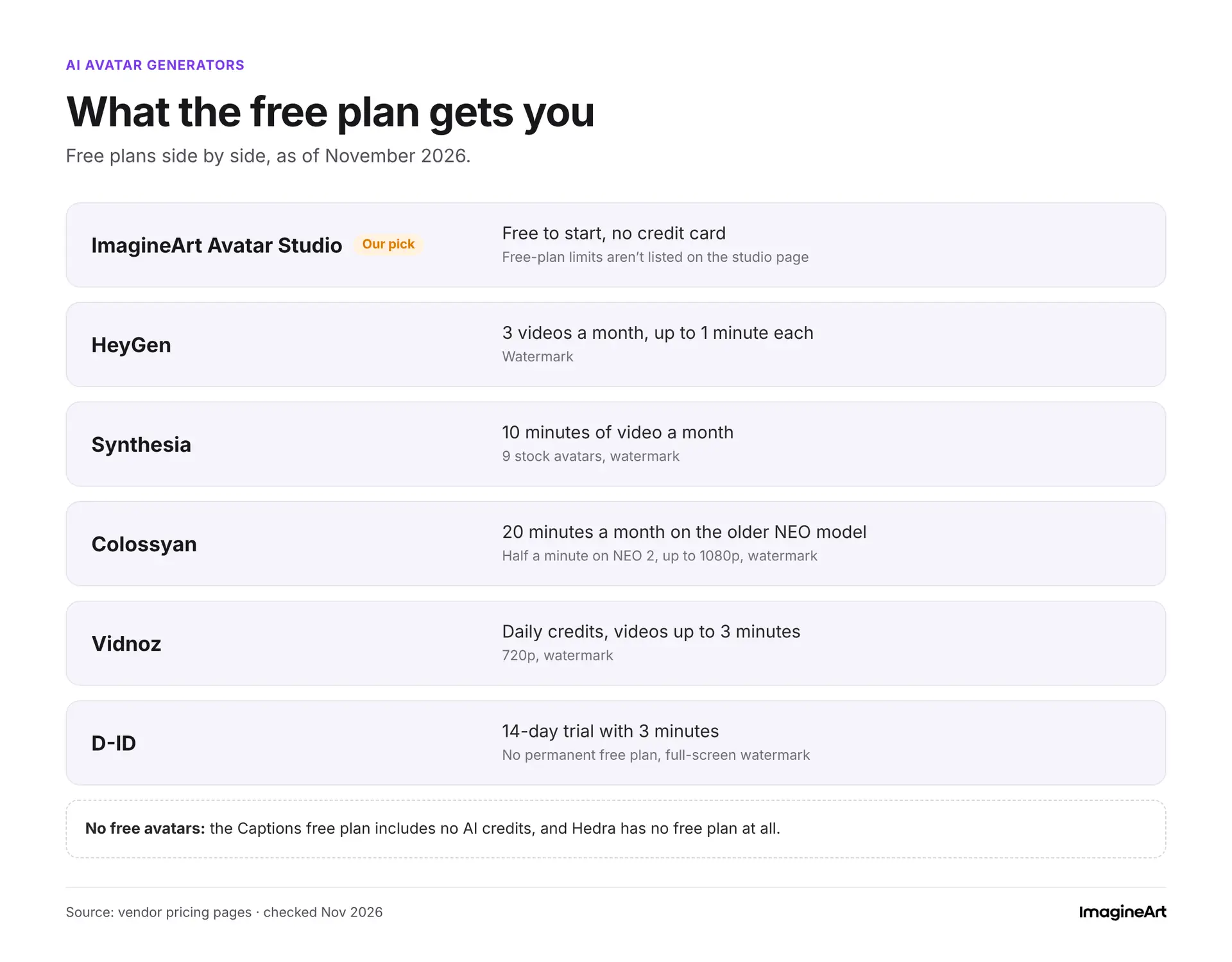 What the free plan gets you in ImagineArt, HeyGen, Synthesia, Colossyan, Vidnoz and D-ID, as of November 2026
The 11 best AI avatar generators, ranked
1. ImagineArt AI Avatar Studio
Best for: one presenter you reuse across ads, courses, team updates and other languages.
ImagineArt Avatar Studio is the best AI avatar creator here because the four routes to a face, 50+ languages with re-timed lip sync and four aspect ratios all sit in one studio, on the same saved avatar. Pick a library avatar, upload one portrait for an instant avatar (ready in under a minute, per its page), describe a person and choose from four options, or record about 30 seconds of yourself for a studio avatar. The voice can come from the library, a clone of your own or a voiceover you upload, and the avatar follows its accent and pitch.
Two details matter for teams. The studio avatar is bound to your consent recording, so ImagineArt says no other account can use that likeness. And one takes exports in 9:16, 4:5, 1:1 and 16:9, so the Reels cut and the YouTube cut match. When a price changes, you edit that line and regenerate rather than reshoot. If your face is the brand, the AI digital twin route is the one to start with.
Watch out: an instant avatar from a photo is a looser likeness than a recorded one (ImagineArt says so itself). Free-plan limits aren't listed on the studio page, so check current plan limits before you plan a big batch.
2. HeyGen
Best for: reaching the most languages with one avatar.
HeyGen introduced Avatar 6 this month, November 2026. Its Avatar 6 model page says every frame renders in 2K and that gestures follow the script's meaning, so the avatar points or counts when the words do. HeyGen says Avatar 6 scored 84.4% "indistinguishable" from real footage in its own side-by-side test, a vendor figure rather than an independent one. Paid plans list 175+ languages and dialects, the biggest number in this list.
The free plan gives 3 watermarked videos a month, each up to 1 minute. Creator costs $29 a month billed monthly or $24 billed annually, as of November 2026, on HeyGen's pricing page, with 1080p and 600 credits. 4K needs Pro at $49 a month. A personal avatar takes a short recording plus a consent check. G2: 4.8 from 1,978 reviews.
Watch out: HeyGen's own pages disagree on how much footage a personal avatar needs (15 or 30 seconds), and 4K starts at Pro, one tier above Creator.
3. Synthesia
Best for: companies producing a lot of internal and customer video.
Synthesia's current model, Express-3, is live on every plan, including the free one, and adds an Avatar Builder that makes an avatar from a text prompt. The library holds 240+ stock avatars, you can make one from a single photo, and a personal avatar from video needs 1 to 5 minutes of footage plus a live consent recording with a passcode. It lists 140+ languages and voices.
Basic is free: 10 minutes of video a month, 9 stock avatars and a watermark. Starter is $19 a month billed monthly or $14 billed annually, as of November 2026, for about 12 minutes a month at 1080p. G2: 4.6 from 2,863 reviews, the most of any tool here.
Watch out: the top Studio avatar is a $1,000-a-year add-on on annual plans only, and Synthesia's pricing lists no 4K export.
4. Colossyan
Best for: training teams that publish courses to an LMS.
Colossyan is built for learning and development. Its Professional plan includes SCORM exports and interactive video, so a lesson drops into a course platform without a separate tool. The NEO 2 engine drives the newer avatars, there are 300+ stock presenters, and an instant avatar needs 20 seconds of footage. You can also describe a presenter and pick from four. It lists 120+ languages, with 3 cloned voices even on the free plan.
The free Starter plan gives 20 minutes a month on the older NEO model and half a minute on NEO 2, at up to 1080p with a watermark. Professional costs $59 a month billed annually, as of November 2026; Colossyan's pricing page publishes no monthly price. G2: 4.6 from 502 reviews.
Watch out: NEO 2 minutes are rationed (10 a month on Professional), and 4K is Enterprise only.
5. Creatify
Best for: performance marketers testing many ad variants.
Creatify is an ad tool first. It offers 1,500+ AI presenters on higher plans, makes a spokesperson from a written description, turns a photo into a talking clip with its Aurora model, and builds a custom avatar from a 2 to 5 minute video. Every avatar lip-syncs in 75+ languages, per Creatify's avatar page.
Free gets 10 credits a month and a watermark. Standard is $15 a month billed monthly or $10 billed annually, as of November 2026, with 55 credits and exports up to 2 minutes. If ad variants are your job, compare it with ImagineArt's AI UGC ad generator route, which runs on the same avatar you use everywhere else. G2: 4.8 from 1,831 reviews.
Watch out: Aurora renders 720p clips of 15 seconds, so it suits short ads more than long explainers.
6. D-ID
Best for: real-time conversational avatars on a website.
D-ID pairs a video studio with Visual AI Agents, avatars that hold a live conversation. Its V4 Expressive avatars power both. There are 100+ stock avatars, photo avatars on every plan, and personal avatars from 1 to 5 minutes of video depending on tier. D-ID's homepage says 120+ languages; its personal-avatar page says over 100.
There's no permanent free plan: the trial runs 14 days with 3 minutes and a full-screen watermark. On D-ID's pricing page, Lite costs $5.90 a month billed monthly or $4.70 billed annually, as of November 2026, the lowest sticker price here, but it keeps the watermark and covers personal use only. Commercial use starts at Pro, $29 a month billed monthly. G2: 4.6 from 139 reviews.
Watch out: minutes don't roll over, and D-ID rounds each video up to the nearest 15 seconds.
7. Captions
Best for: creators who edit on their phone.
Captions, from Mirage, released its Mirage Avatar X model in July 2026. It generates expression, voice and motion together and powers its AI avatars and AI twins, in vertical or horizontal frames. Captions sells it alongside a full phone editor and auto captions in 100+ languages. Unused credits roll over, up to three times the monthly allowance.
The free plan includes no AI credits, so you can't make an avatar without paying. Max costs $24.99 a month, as of November 2026, and Captions notes that its published prices are iOS plans. G2: 4.3 from 58 reviews.
Watch out: Captions doesn't state a language count for voice and lip sync, and avatar features need a paid plan.
8. AI Studios by DeepBrain AI
Best for: dubbing plus live, interactive avatars.
AI Studios combines a video avatar studio, a dubbing tool and a separate line of real-time interactive avatars. A custom avatar needs at least 10 seconds of upload, with 15 to 60 seconds recommended. Paid plans add 70+ text-to-speech languages and voice cloning.
Free gives 3 videos a month, each up to 1 minute, at 720p with a watermark. Personal is $29 a month billed monthly or $24 billed annually per its pricing FAQ, as of November 2026, with 1080p and videos up to 30 minutes. G2: 4.3 from 1,061 reviews.
Watch out: 4K needs the Team plan, which sells per seat with a two-seat minimum.
9. Hedra
Best for: making one still image talk, including stylised characters.
Hedra's Character-3 model takes a start frame and an audio track and returns a talking video at up to 1080p and up to 10 minutes long. Hedra says it animates any still: a person, an illustrated character or a stylised face. Hedra itself has moved toward AI infrastructure, and its consumer app is now a canvas for many third-party models.
There's no free plan. Basic costs $20 a month, billed monthly, as of November 2026. G2: 4.6 from 2,194 reviews, though G2's listing now describes Hedra as an infrastructure company.
Watch out: Hedra's own page warns of overly dramatic hand gestures and says lip sync depends heavily on audio quality. No stock library, no voice cloning listed.
10. Elai.io
Best for: straightforward text-to-video with a presenter.
Elai, now part of Panopto, turns a script or document into a presenter video with 80+ stock avatars and 75+ languages. A selfie avatar and a studio avatar are both available, as paid add-ons on the entry plan. Its Team plan exports in 4K.
The free plan covers 1 minute of video. Creator costs $29 a month billed monthly or $23 billed annually, as of November 2026, for 15 minutes a month in Full HD. We found no Elai listing on G2.
Watch out: 80+ stock avatars is one of the smaller libraries here, and voice cloning on Creator is a $200-a-year add-on.
11. Vidnoz
Best for: trying avatars free, every day.
Vidnoz is the free-first pick. Its free plan refreshes credits daily and opens a library of 1,800+ avatars, the largest free stock library in this list, with 890 voices. Videos run up to 3 minutes at 720p with a Vidnoz watermark. Its translator lists 140+ languages, and paid plans step up to 1080p and 60-minute videos.
Watch out: Vidnoz's pricing page showed no readable paid price when we checked in November 2026, and its credit figures conflict between the plan card and the comparison table. Read the page carefully before you pay. G2: 4.9 from 16 reviews, too few to lean on.
Which AI avatar generator should you pick?
Pick by the job, not the leaderboard. The best AI avatar video generator for a training team is wrong for a TikTok shop, and the reverse is just as true.
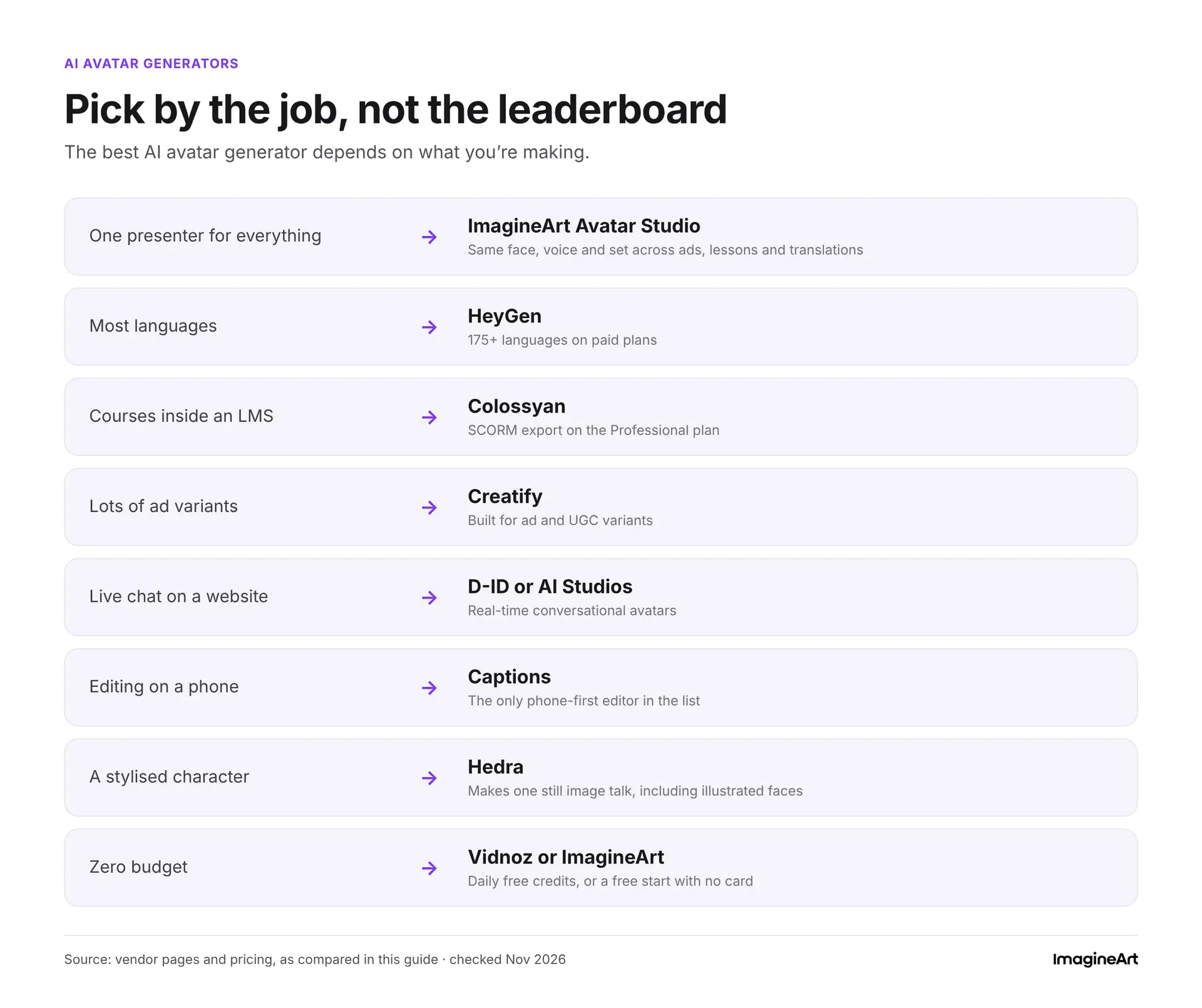 Which AI avatar generator fits each job, from one presenter for everything to zero budget
- One presenter for everything: ImagineArt Avatar Studio. Same face, voice and set across ads, lessons and translated videos.
- Most languages: HeyGen, with 175+ on paid plans.
- Courses inside an LMS: Colossyan, for SCORM export. ImagineArt's AI training video generator covers the lesson itself.
- Lots of ad variants: Creatify, or ImagineArt's UGC ad route.
- Live chat on a website: D-ID's agents or AI Studios' interactive avatars.
- Editing on a phone: Captions. If you want the best AI avatar app for editing on iOS, it's the only phone-first editor here.
- A stylised character: Hedra.
- Zero budget: Vidnoz's daily credits, or ImagineArt's free start.
Looking for the best AI avatar for a profile picture instead of a video? That's a different tool. Canva and Adobe Firefly make still avatar images; everything in this list makes the face talk.
Do AI avatar generators need consent to clone a face?
Yes. The tools here that publish a policy, including Synthesia, HeyGen and ImagineArt, ask for proof that the person agreed before they build a likeness from video. Synthesia asks for a live consent recording with a passcode, HeyGen runs a consent check, and ImagineArt binds a studio avatar to the consent recording that made it.
Photo avatars are the weak spot. With a single photo, the tool can't see who's uploading it, so the rule falls on you: only use faces of people who agreed. ImagineArt's page says exactly that for instant avatars.
Labelling rules apply after you publish. The EU AI Act's Article 50 requires businesses and creators who publish a deepfake, meaning a realistic AI video of a real-seeming person, to disclose it (purely personal use is exempt); the article applies from August 2, 2026. YouTube's disclosure rules ask creators to label realistic AI content that makes a real person appear to say something they didn't. An avatar of yourself reading your own script is the easy case. A colleague's face needs a yes in writing.
The short version
Every tool here can put words in a face's mouth. They split on what happens after the first video: whether you can reuse the face, translate it, and prove the person agreed. HeyGen leads on languages, Synthesia on scale, Colossyan on training and Creatify on ad variants. D-ID and AI Studios handle live chat, and Vidnoz is the zero-budget way in.
If you want one presenter that works across all of those jobs, start with ImagineArt. Record 30 seconds or upload one photo, write a paragraph, and see your first video in the AI Avatar Studio.
Frequently asked questions
Is there a free AI avatar generator?
Yes, several. HeyGen gives 3 watermarked videos a month, Synthesia gives 10 minutes a month, Colossyan gives 20 minutes on its older model and Vidnoz refreshes credits daily, as of November 2026. ImagineArt Avatar Studio is free to start with no credit card. Expect watermarks and lower resolution on most free plans.
How do you create a realistic AI avatar?
Record yourself rather than using a single photo. A short, well-lit clip gives the model your real movement and speech, which a photo can't. In our Avatar video generator that's about 30 seconds of video. Then clone your own voice so the face and the sound match.
Can I use AI avatar videos commercially?
Usually only on paid plans. D-ID's cheapest plan is personal use only, and ImagineArt includes commercial use on all plans. Check each tool's licence, and only use faces and voices you have the rights to.
Zahida Misher
Exploring how AI transforms marketing, I help businesses unlock growth and future-proof their presence.
View all articlesRecent posts

50 Types of Art Styles: Definitions, Examples and AI Prompts
How to Edit Images With Ideogram 4.6: 38 Edits, Prompts and Results

Best time to post on Instagram and Reels: 4 studies compared