
Zahida Misher
November 25, 2026 • Updated November 25, 2026
12 mins Read
Later's data says 5 a.m. Sprout Social's says weekday afternoons. The head of Instagram says there's no universal best time at all. All three are telling the truth about something different.
Here's the short version of the best time to post on Instagram: start midweek, between late morning and early evening, where three of the four big studies overlap. Then check when your own followers are online and test from there. This guide puts Sprout, Buffer, Hootsuite and Later in one table, splits out Reels, and shows how to use Trial Reels to test a slot without testing your followers' patience.
What is the best time to post on Instagram?
Midweek, from late morning to early evening, is the safest place to start. Sprout Social's 2026 data (published March 31, 2026, from nearly 2 billion engagements) favours Tuesday from 1 to 7 p.m. Buffer's 9.6 million-post study, September 2026, ranks Thursday at 9 a.m. and Wednesday at noon highest.
Each study counts something slightly different, so here's what sits behind the numbers.
- Sprout Social (March 2026): nearly 2 billion engagements across roughly 307,000 profiles from November 27, 2025 to February 27, 2026, in local time.
- Buffer (September 2026): 9.6 million Instagram posts from January 2024 to December 2025, part of a 52 million-post study across ten platforms. It ranks by median engagement rate: likes, comments, shares and saves divided by followers, times 100. Times are normalized to local time.
- Hootsuite (July 2026): Hootsuite's 2026 numbers come from over 1 million posts analyzed with Critical Truth, localized across 118 countries. No date range is given.
- Later (April 2026): more than 6 million feed posts from January to October 2024, by engagement rate in local time, plus a separate analysis of 975,000 Reels that doesn't say when they were posted.
Instagram itself won't pick a winner. On a reel posted June 16, 2026, Adam Mosseri, the head of Instagram, put it plainly: "There's no universal best time to post." The studies are the best starting point you have. Your own audience is the finish line.
Best time to post on Instagram today
Find your best time to post on Instagram today in the table below: pick the slot that two or more studies share. Then open your follower activity chart, covered further down, and nudge the time toward your own audience's peak.
Best time to post on Instagram by day: 4 studies side by side
Each cell below comes from the study's own page, read on November 10, 2026. Sprout gives windows, Buffer gives its top hour per day, Hootsuite gives one or two windows, and Later's finding is the same early-morning band for every day.
| Day | Sprout Social (2026) | Buffer (2026) | Hootsuite (2026) | Later (2024 feed data) |
|---|---|---|---|---|
| Monday | 2 to 4 p.m. | 7 p.m. | 3 to 9 p.m. | 3 to 6 a.m. |
| Tuesday | 1 to 7 p.m. | 7 p.m. | 5 to 8 a.m. and 3 to 7 p.m. | 3 to 6 a.m. |
| Wednesday | 12 to 9 p.m. (plus an 11 p.m. spike) | 12 p.m. | 5 p.m. | 3 to 6 a.m. |
| Thursday | 12 to 2 p.m. | 9 a.m. | 4 to 5 p.m. | 3 to 6 a.m.* |
| Friday | No significant peaks | 10 p.m. | 4 p.m. | 3 to 6 a.m. |
| Saturday | Lowest engagement of the week | 9 p.m. | 11 a.m. and 5 p.m. | 3 to 6 a.m. |
| Sunday | Among the worst days | 9 p.m. | 12 to 3 p.m. | 3 to 6 a.m. |
| Sample | ~2 billion engagements, 307,000 profiles, Nov 2025 to Feb 2026 | 9.6 million posts, Jan 2024 to Dec 2025 | 1 million+ posts, 118 countries, dates not given | 6 million+ feed posts, Jan to Oct 2024 |
| Metric | Not stated | Median engagement rate | Not stated | Engagement rate |
*Later's own page also lists Thursday at 3 a.m. among its worst times, so its band is a weekly pattern, not a promise for every hour.
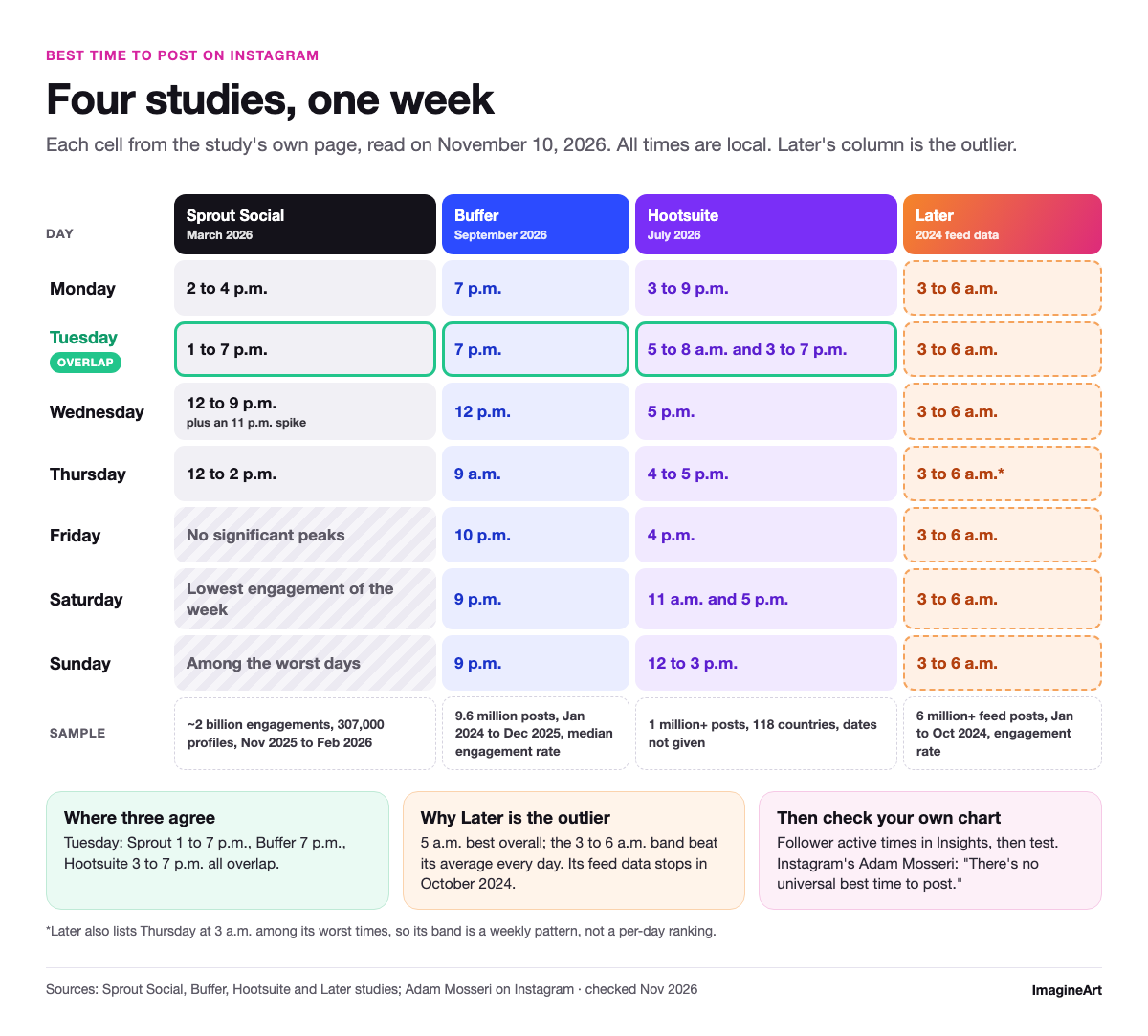 Four studies, one week. Later's early-morning column is the outlier.
Three columns roughly agree that weekday afternoons and evenings do well. Tuesday is the clearest example: Sprout's 1 to 7 p.m., Buffer's 7 p.m. and Hootsuite's 3 to 7 p.m. all overlap.
Why Later is the outlier
Later is the odd one out. Later's study found 5 a.m. was the best time overall, and the 3 to 6 a.m. band beat the average on every day of the week.
Two things set it apart. Its feed data stops in October 2024. Sprout's and Buffer's run into late 2025 or 2026. And an early post sits in the feed as people wake up, which may give it a head start before the midday rush. That last point is our reading, not Later's finding.
Still, don't throw Later's result away. If your audience is early risers, or spread across time zones, a pre-dawn post is a slot worth testing.
What is the best day to post on Instagram?
The best day to post on Instagram is Wednesday, according to Buffer, followed by Thursday and Tuesday. Sprout's data leans early-to-mid week, with its strongest windows from Monday to Thursday. Later picks Monday as the best day for feed posts. Hootsuite gives windows for every day but doesn't rank the days. Both Buffer and Sprout rate the end of the week poorly: Buffer puts Friday and Saturday at the bottom, and Sprout says Saturday has the lowest engagement of the week.
So if you only post twice a week, Wednesday and Thursday are the safest bets on the data. Weekends are where the studies disagree most, so test before you commit.
What is the best time to post Reels on Instagram?
The studies split again on Reels. Sprout says the best time to post Reels on Instagram mirrors its overall weekday windows. Buffer suggests evenings from 6 to 11 p.m. on Wednesday and Thursday, though not from Reels-only data. Later's separate Reels analysis found midnight was the best time and Monday the best day.
Sprout gives no separate Reels clock, so its Monday to Thursday windows are your Reels windows too.
Buffer's evening slot is a sensible guess built on its wider data rather than a measured peak.
Later is the only one of the four that publishes a separate Reels dataset, with 975,000 Reels, though it doesn't say when they were posted. Its midnight finding is the furthest from everyone else's. It's also the only number here that was measured on Reels alone.
Our take: if Reels are your main format, test a midweek evening slot against a late-night slot and let the numbers settle it. Trial Reels, covered below, make that test cheap.
How to find your followers' most active times in Instagram Insights
Your Insights screen shows when your own followers are online, and that's more useful than any study. You'll need a Creator or Business account for these charts. Labels vary by app version, so if a menu name below doesn't match, look for the follower or audience section.
In the app (path as described by Buffer):
- Go to your profile.
- Open your Professional dashboard.
- Tap New followers.
- Scroll to Follower active times and switch between hours and days.
On the web (path as described by Buffer):
- Log in at instagram.com.
- Open Dashboard, then Insights.
- Choose Account, then Followers.
Sprout describes the app route a little differently: Insights sits below your bio, then New Followers, then a Most Active Times chart by hours and days. Same data, different signposts.
One warning from Buffer is worth keeping in mind. Follower activity times are not the same as engagement times. A chart that says your followers are online at 8 p.m. tells you when they're around, not when they're in the mood to comment. That's why the next step is a test, not a guess. It's also why Mosseri's no-universal-time line holds up: your chart is yours alone.
Test your slot with Trial Reels
Trial Reels let you test a time slot without showing the experiment to your followers. According to TechCrunch's report on Trial Reels from December 10, 2024, a trial Reel goes to non-followers first and stays off your profile grid and Reels tab.
Per that report, here's how the feature worked at launch. You turn on a Trial toggle before sharing. After 24 hours, Instagram shows the Reel's views, likes, comments and shares. Then you choose whether to share it to your profile or leave it archived. Instagram began rolling it out globally to professional accounts on December 10, 2024, so check the sharing options in your own app, since they may have changed.
Here's the test we'd run with it. This is a method, not a result.
- Pick two slots. One from your Follower active times chart, one from the table above. A midweek noon against a midweek evening is a good first pair.
- Make two cuts of the same idea. Same topic and length, a different opening shot, so you're not posting a duplicate.
- Post one trial in each slot in the same week.
- Read both at 24 hours. Compare views first, then shares and comments.
- Share the winner to your followers and log both results.
Run the same pair for weeks 1 and 2, swapping which cut goes in which slot in week 2 so the opening shot isn't what wins. In weeks 3 and 4, test a new pair the same way.
| Week | Slot A (day / time) | Slot B (day / time) | Cut in A | A views at 24 h | B views at 24 h | Winner shared? |
|---|---|---|---|---|---|---|
| 1 | ||||||
| 2 | ||||||
| 3 | ||||||
| 4 |
One caveat. Trial Reels go to non-followers, so the result tells you when new viewers respond, not when your existing followers do. For a growing account that's often the number you want anyway.
Make one clip work as a Reel and a feed post
The test needs two 9:16 cuts of one idea every week. Generate both from one prompt with a different opening shot, then reframe the winner to a square for the feed.
ImagineArt's AI video generator turns a text prompt, an image or an existing clip into video with sound, and its page lists 40+ models. It formats short videos for Instagram Reels, TikTok, YouTube Shorts and LinkedIn, with 9:16 output for vertical feeds.
The Reel prompt recipe
Try this prompt in ImagineArt's AI video generator with Seedance 2.5, set to 9:16 and 10 seconds:
Vertical 9:16 video. A barista slides a flat white across a marble counter toward the camera, latte art of a leaf, slow push-in, warm morning window light, steam rising, calm cozy mood, no text, no logos.
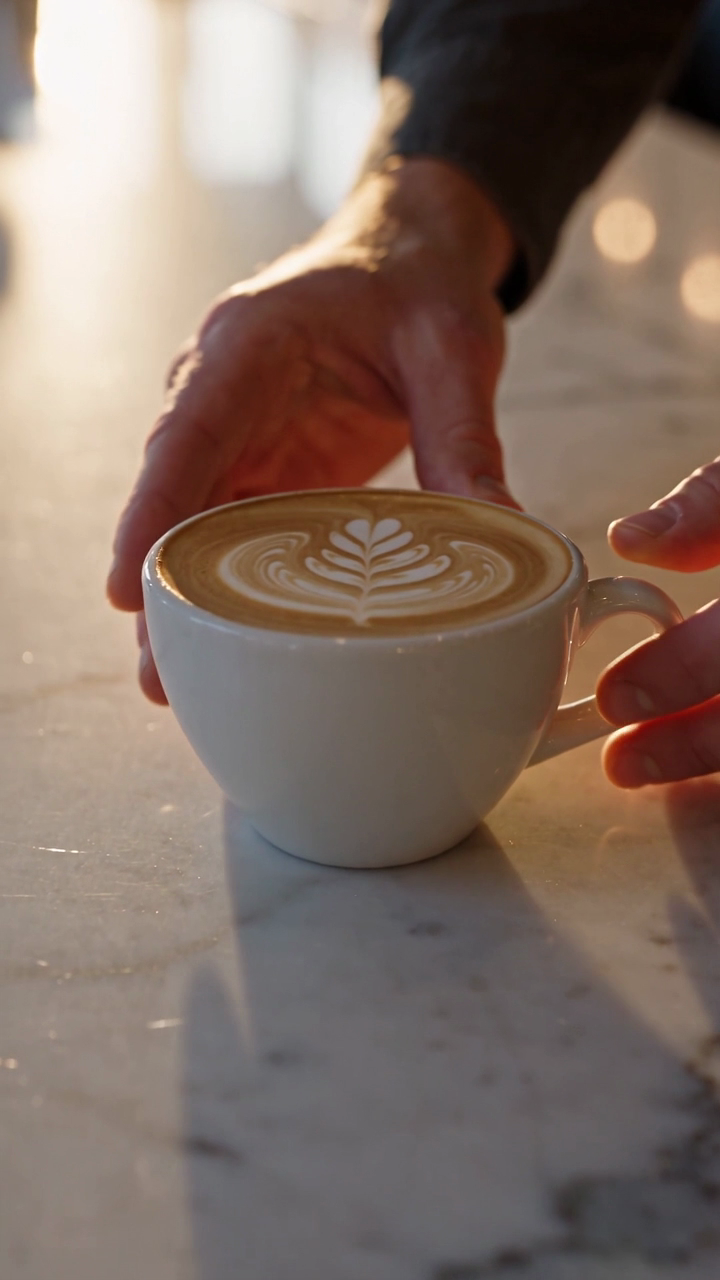 Seedance 2.5 kept the leaf intact through the push-in.
 The last stretch of our 10-second test Reel.
What to look for: the cup should stay centred as it moves toward the lens, and the latte art should keep its leaf shape for the whole push-in. Keep the subject in the middle third of the frame. You'll thank yourself at the reframe step. If you want more starting points, borrow a structure from our AI video prompts list.
Reframe it for the feed
ImagineArt's video reframe app, which its page titles Video Angle Changer, changes a clip's size, framing and orientation, including 1:1, 16:9 and 9:16. Its page lists MP4, MOV and AVI uploads up to 30MB. The app has an upload box, a prompt field and an aspect ratio setting. Upload the Reel, choose 1:1 to reframe the clip to a square, and add a prompt like: "Keep the cup and the latte art centred."
What to look for: anything that got cut off at the top or bottom, and anything at the edges that wasn't in the original. A reframe that adds a stranger to your café is a reframe to redo.
Caption the Reel
The test Reel has no speech, so skip subtitles and add one on-screen text overlay: "Wednesday 12 p.m. or Thursday 9 a.m.? We're testing both." It's a hook and a log entry in one. For footage with speech, ImagineArt's AI Caption Generator syncs subtitles to it and has caption styles for Reels, TikTok and Shorts. Here's how to caption your Reels step by step.
ImagineArt has a free plan, so before a batch it's worth taking a minute to check current plan limits. Posting for a business? Paid plans include commercial use rights, per the AI video generator page's FAQ on November 10, 2026.
What is the most active time on Instagram?
The most active time for your account is the peak in your Follower active times chart, and nothing else beats it. Across the studies, midweek from late morning to early evening shows up most often, from Sprout's Monday to Thursday windows to Buffer's Wednesday noon and Wednesday 6 p.m.
Later is the exception. Its 2024 data found the 3 to 6 a.m. band above average every day. If your chart shows an early-morning bump, test it.
Best times on other platforms
TikTok's studies clash even harder than Instagram's, most of all on Sundays. Our guide to the best time to post on TikTok compares them and adds a 4-week test.
Frequently asked questions
Use today's row in the four-study table above, then nudge it toward the peak in your Follower active times chart.
For your account, it's the highest bar in your Follower active times chart; the most-active section above covers what the studies say.
Sprout says no: Reels follow the same windows as its overall data. Later's separate Reels study found a midnight peak, five hours away from its 5 a.m. feed result, though both point to Monday as the best day. If Reels are a big part of your mix, test them on their own schedule.
It matters less than the post itself. Adam Mosseri, the head of Instagram, says there's no universal best time to post, and Buffer notes that follower activity isn't the same as engagement. Your 24-hour Trial Reel numbers will tell you whether the slot or the post is doing the work.
Yes, for the three that say so. Sprout reports local time, Buffer normalizes times to local time, and Later uses local time too. Hootsuite says it localized its data across 118 countries.
Start with the overlap, then let a trial decide
The four big studies agree on less than you'd hope, but three of them overlap in one place: midweek, late morning to early evening. That's your first slot. Later's pre-dawn finding and the Reels split are reasons to test, not reasons to panic.
Your Follower active times chart narrows it down, and Trial Reels let you try two slots a week without your followers seeing the experiments. Keep the test fed by making one clip do double duty as a Reel and a square post. Generate your first test Reel in ImagineArt's AI video generator, reframe it for the feed, and let four weeks of numbers pick your time.
Zahida Misher
Exploring how AI transforms marketing, I help businesses unlock growth and future-proof their presence.
View all articlesRecent posts

The Best AI Avatar Generators In 2027: 11 Tools Compared And Ranked

50 Types of Art Styles: Definitions, Examples and AI Prompts
How to Edit Images With Ideogram 4.6: 38 Edits, Prompts and Results