Zahida Misher
November 20, 2026 • Updated November 23, 2026
19 mins Read
Our GTA VI-inspired short film runs 66 seconds. Getting there took 24 steps, roughly 45 planned clips, one custom font and a 32-millisecond echo nobody could explain.
This is the whole pipeline, with nothing held back. Most AI filmmaking guides stop at "pick a tool, write a prompt". This one hands you the verbatim look prompt, the character sheet specs, the Blender previz briefs, a real Seedance 2.5 prompt, the edit built on a 129 bpm song, the colour grade, the subtitle spec and the export settings.
The stack was three tools. Claude Code directed and edited. ImagineArt MCP gave it Nano Banana Pro for stills and Seedance 2.5 for video. Blender 5 handled previz.
We wrote every step into a 24-step blueprint built to be handed to an AI. Hand this pipeline (this post, or the 24-step blueprint if you have it) to Claude with one line: "Follow this pipeline to make my film."
By Misher · Updated November 20, 2026 · How we made this: written from ImagineArt's own production files for the film (the 24-step pipeline document, prompts, edit boards and render reports). Tool facts come from each tool's own page.
 Cover of our 24-step blueprint.
What is AI filmmaking, really?
AI filmmaking is making a film where AI models generate the pictures and sound you'd normally shoot, while a person still directs the story, the references, the takes and the cut. In our pipeline, AI made every shot, but a human approved every scene list, ran every generation and signed off every render.
That split matters more than any model name. The models are fast and literal. They copy a previz camera almost frame for frame, paint shoes under faces if you feed them the wrong sheet, and flag a clip if a character laughs.
Our film borrows the neon, sun-blasted GTA art style of Vice City: canals, speedboats, a rooftop at blue hour, a neon gas station. It's fan-made and GTA VI-inspired. It isn't affiliated with or endorsed by Rockstar Games or Take-Two, and every GTA name and trademark belongs to Rockstar.
So here's the honest definition. AI filmmaking is directing a crew that copies a grey mannequin's camera move frame for frame and flags a clip if anyone laughs.
The AI filmmaking stack and four standing rules
Three tools did the work, and each had one job.
| Tool | Job in the film | Settings we used |
|---|---|---|
| Claude Code | Director and editor: files, Python, ffmpeg, transcription, beat tracking | Ends every video task at folders, prompts and an HTML copy page |
| ImagineArt MCP: Nano Banana Pro | Character sheets and empty location plates | 4K, 16:9 |
| ImagineArt MCP: Seedance 2.5 | Every video clip, reference-to-video | 10 s, 16:9, scene sound, no music |
| Blender 5 | Previz: grey mannequins, camera paths, timing | 1920x1080, Workbench grey |
The brief asked for a 60-second game-trailer-style film at 16:9 and 24 fps, built from about 45 clips of 10 seconds. The cut landed at 66 seconds, because the song decided where it ended.
Before any work started, we set four standing rules for Claude:
- The human runs the generations. Claude stops at upload folders, prompts and a copy page. It never auto-generates video.
- Never crop or resize a reference. Sheets and plates go in exactly as made.
- Reprint the full prompt on every change. No "same as before, but".
- Ask before rendering. Edit decisions are questions with a recommended answer.
Rule one sounds slow. It's the opposite: you spend credits only on takes you've read, and the agent never burns a batch on a typo. New to the connector? Our guide to generate AI videos in Claude covers the setup.
Pre-production: the trailers, the scenes and the locked look
Most AI films look random because they start generating on day one. We didn't make a single frame until the scenes, the look and the cast were signed off.
Study the references, then put them away
GTA VI launched on November 19, 2026, on PlayStation 5 and Xbox Series X|S, per Rockstar's GTA VI page. Its trailers set the rhythm we wanted, so we took them apart frame by frame (ffmpeg tiles one frame per second into a contact sheet) and measured them.
| Trailer | Length | Shots | Median shot | Mean shot | Frame |
|---|---|---|---|---|---|
| Trailer 1 | 90 s | 42 | 1.6 s | 2.2 s | 16:9 |
| Trailer 2 | 167 s | 46 | 2.2 s | 3.6 s | letterboxed to about 2.2:1 |
| Launch trailer | 90 s | 32 | 1.9 s | 2.8 s | letterboxed to 2:1 |
Montage sections cut every 1.5 to 2 seconds, and almost nothing in a montage runs past 3 seconds. Dialogue slows to 3 to 6 second shots with a near-still camera. The longest shots, 6 to 19 seconds, are title cards, establishing shots and dialogue. Never action.
That gave us a structure: open cold on dialogue, reveal the city with a drone flight, then accelerate, and keep one sincere Jason and Lucia moment near the end. Just as important, reference stills never went into a generation. Every clip was built only from our own plates and character sheets.
Design the scenes before the shots
Each scene got one row: an ID, the cast (two speaking at most), a location plate, one action, two short lines or none, a camera idea, 10 seconds, 16:9. We mixed dialogue two-shots, silent emote shots and loose gameplay-camera fillers. Every scene got an outfit or accessory change, and neighbouring scenes never reused the same pair.
Nothing moved until the table was signed off. A film storyboard does the same job on paper. Keep stable IDs like N01, V11 and B5, because folders, prompts and edit decisions all key off them.
Lock the look with one verbatim prompt
Every image and every video started with the same paragraph, word for word:
A cinematic scene captured on ARRI ALEXA 35, renowned for its rich colour science, soft highlight roll-off, and deep dynamic range. Soft highlights bloom gently without clipping, shadows retain texture and depth. Film-like latitude with realistic exposure falloff, smooth tonal transitions, and refined colour fidelity. Shot with a cinematic lighting setup emphasising natural light behaviour, controlled highlights, and realistic shadow gradation. Atmospheric depth with gentle haze, volumetric light rays, and cinematic mood. Raw indie aesthetic. Heavy organic film grain. Unpolished realism.
Then add one shot-specific line that ties the grade to the plate: "Keep the hard afternoon sun and turquoise water of @Image1." Paraphrase the look prompt once and the grain shifts, the highlights clip, and your film starts looking like three films.
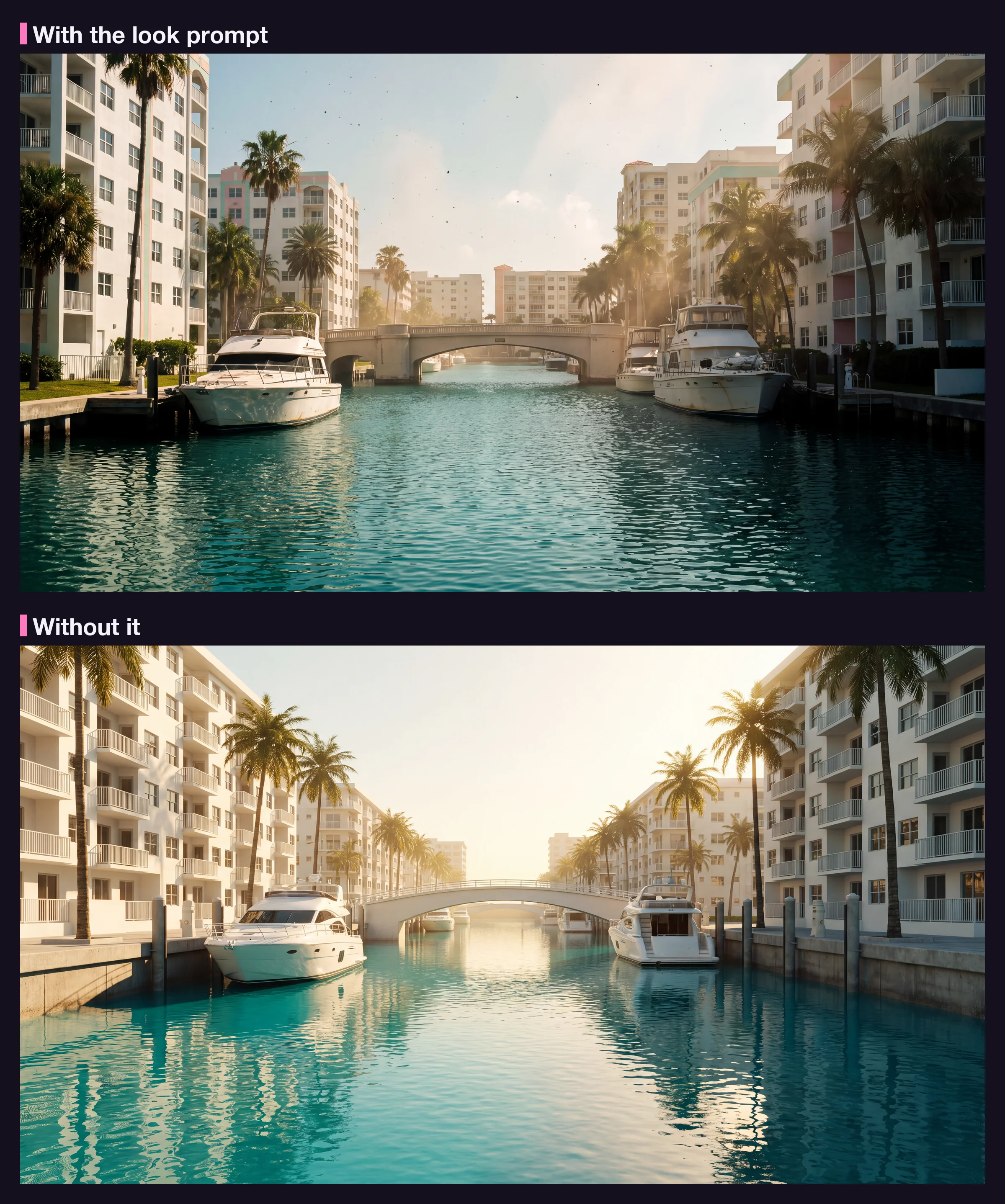 The same canal prompt with the look paragraph and without it. Made on ImagineArt with Nano Banana Pro at 4K.
Character sheets: two per person, per outfit
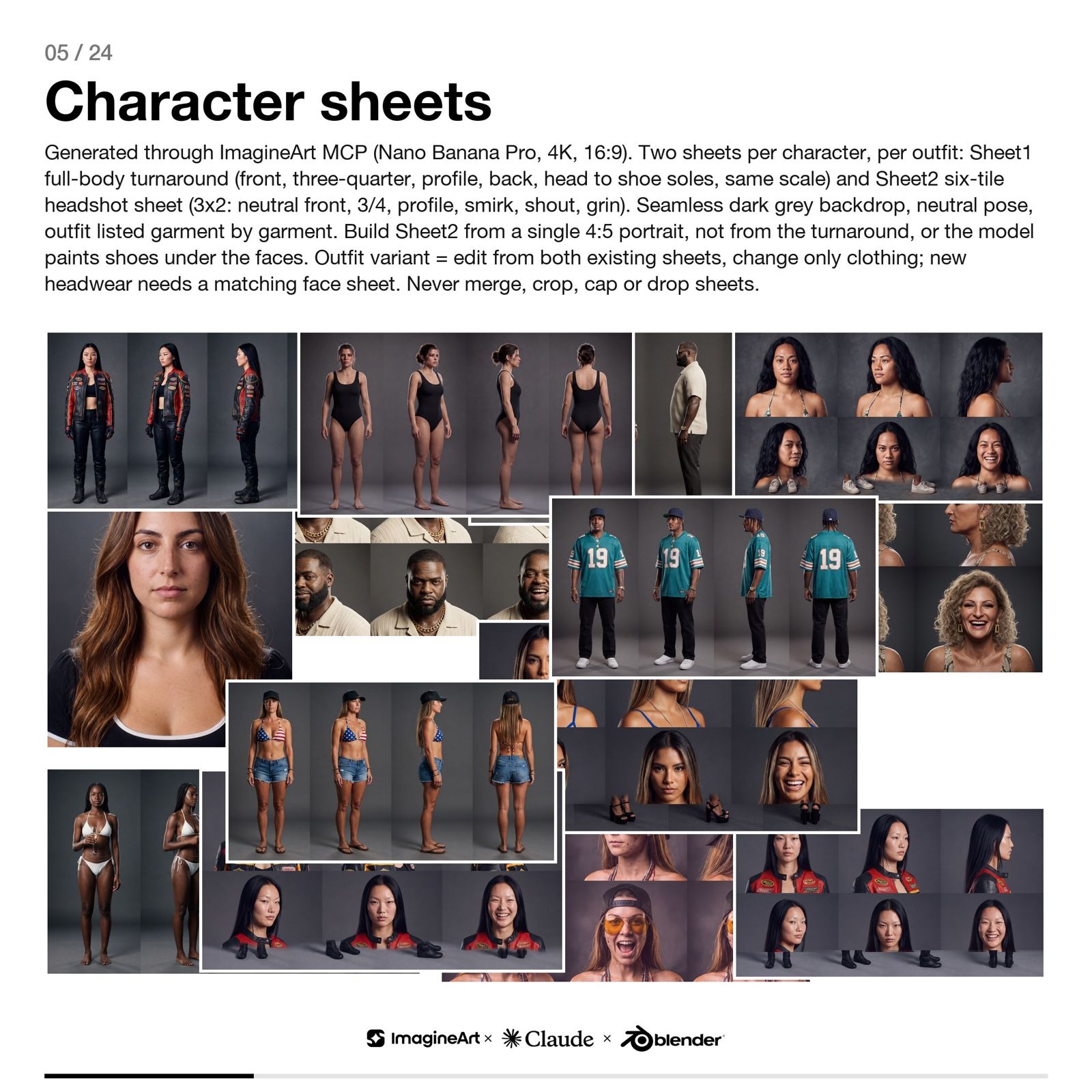
Our leads were fan versions of Jason and Lucia, built from our own character sheets generated through ImagineArt MCP with Nano Banana Pro at 4K and 16:9, with supporting characters named after the announced cast. Each character got two sheets per outfit:
- Sheet 1, the turnaround: front, three-quarter, profile and back, head to shoe soles, same scale.
- Sheet 2, the headshots: a 3x2 grid of neutral front, three-quarter, profile, smirk, shout and grin.
Both sit on a plain dark grey backdrop, in a neutral pose, with the outfit listed garment by garment. Build Sheet 2 from a single 4:5 portrait, not from the turnaround, or the model paints little shoes under the faces. For who's who in the game itself, see our guide to GTA 6 characters.
An outfit change is an edit of both existing sheets that changes only the clothing. New headwear needs a matching face sheet. Never merge, crop, cap or drop a sheet.
 Page 6 of our 24-step blueprint.
Location plates: the plate sets the light
One empty plate per location and per time of day: 4K, 16:9, a stated camera height, no people, no readable text, no logos. We made them with Nano Banana Pro, which ImagineArt runs at up to 4K.
Plates set each clip's brightness and palette, so a night scene needs a night plate. If a clip comes back too dark, regenerate the plate. Don't colour-boost it.
The sneakiest rule is about framing. If a plate matches the shot's framing, Seedance treats it as a destination and cuts to it mid-shot. Frame plates from a different angle, or leave that plate out. Vehicles get a four-view sheet.
Previz in Blender: grey mannequins beat clever wording
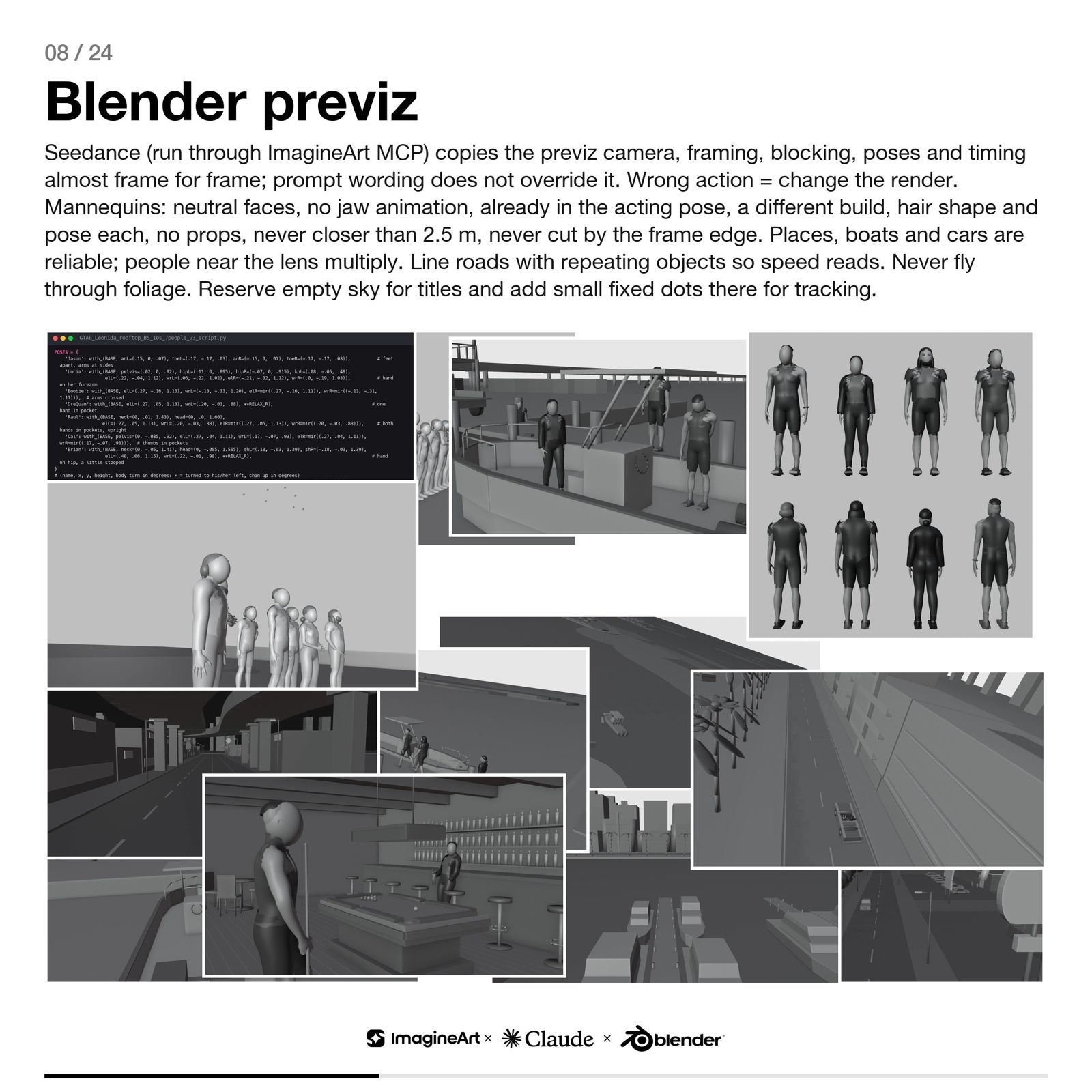
Here's the finding that changed the whole film. Seedance 2.5 copies a previz render's camera, framing, blocking, poses and timing almost frame for frame, and prompt wording doesn't override it. If the action is wrong, change the render, not the words.
So every previz clip got a markdown brief, written for an agent to run in Blender:
- What this is for and what we learned from the last render.
- Files with absolute paths, and what to render: frames, fps, 1920x1080, one mp4.
- Look: plain grey Workbench, distinct greys for sky, water, road and people.
- The set in metres, with XYZ for every object, and characters with height, build, hair shape and pose.
- Camera as a timed flight path: 24 to 35 mm, max bank 25 degrees, 5 m clearance.
- Timeline by the second, then final checks.
Add "no mood board, render straight away", and keep one continuous camera. Never a cut. Our breakdown of types of camera shots helps you name the move before you fly it.
The mannequins have rules too. Neutral faces, no jaw animation, already in the acting pose, a different build, hair shape and pose each, no props. Keep them at least 2.5 m from the lens and never cut by the frame edge, because people near the lens multiply.
Line roads with repeating objects so speed reads. Reserve empty sky for titles, with small fixed dots up there for tracking. Our closing shot, B5, has nine people on a rooftop at blue hour, and the last 3.5 seconds are sky only, waiting for the title.
 Page 9 of our 24-step blueprint.
An illustration of the previz-to-final relationship: a grey clay pass wiping into a finished Seedance 2.5 on ImagineArt shot. Not a frame from our film.
How do you prompt Seedance 2.5 for an AI short film?
You prompt Seedance 2.5 in a fixed section order, bind every reference image to a role by number, and describe one continuous shot that ends on a stated last frame. Without a previz, the text carries camera, placement and action. With one, the render carries those and the text fills the gaps.
Building an AI short film clip by clip? Here's the long version.
Without a previz: 15 sections, always in this order
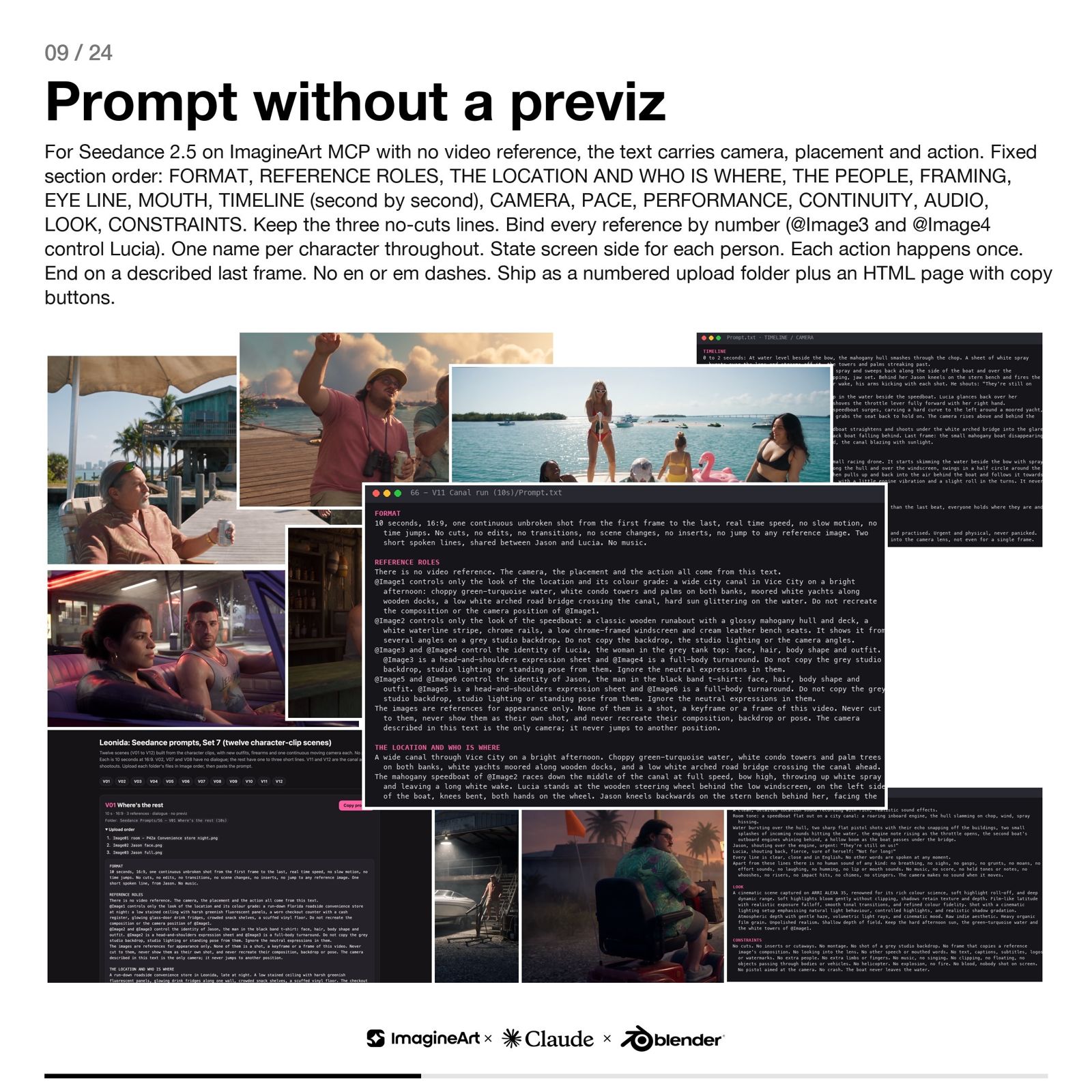
FORMAT, REFERENCE ROLES, THE LOCATION AND WHO IS WHERE, THE PEOPLE, FRAMING, EYE LINE, MOUTH, TIMELINE (second by second), CAMERA, PACE, PERFORMANCE, CONTINUITY, AUDIO, LOOK, CONSTRAINTS.
Keep the three no-cuts lines. Bind every reference by number, and use one name per character all the way through. State which side of the screen each person is on.
Each action happens once. End on a described last frame. And no en or em dashes anywhere in the prompt.
Here's how scene V11, the canal run, opened (character names swapped for Lead A and Lead B here):
10 seconds, 16:9, one continuous unbroken shot from the first frame to the last, real time speed, no slow motion, no time jumps. No cuts, no edits, no transitions, no scene changes, no inserts, no jump to any reference image. Two short spoken lines, shared between Lead A and Lead B. No music.
The reference roles did the heavy lifting. @Image1 controlled only the look of the location and its grade: a wide canal on a bright afternoon. @Image2 was the speedboat, a wooden runabout with a glossy mahogany hull. @Image3 and @Image4 were Lead B's sheets, and @Image5 and @Image6 were Lead A's. One more line saves a lot of takes: "The images are references for appearance only. None of them is a shot, a keyframe or a frame of this video."
 Page 10 of our 24-step blueprint.
With a previz: describe what the render shows
Watch the render first, as a frame grid at 0.5-second steps, and write what it shows. @Video1 owns the camera path, framing, positions, poses and timing. Sheets own identity, plates own light, and the prompt covers only what none of them show.
Say the grey figures are layout only and every person is fully dressed. Map each mannequin to a named person in screen order and state that each appears exactly once. Never fix a pose, a head count or a prop with wording.
A copy-paste prompt skeleton
Here's a prompt to try, built from our section order. Fill the brackets with your own scene.
FORMAT
10 seconds, 16:9, one continuous unbroken shot, real time speed. No cuts, no edits, no transitions, no inserts, no jump to any reference image. [Number] short spoken lines. No music.

REFERENCE ROLES
@Image1 controls only the look of the location and its colour grade: [plate]. Do not recreate its composition.
@Image2 and @Image3 control the identity of [Lead A], [outfit]. Do not copy the grey backdrop or pose.
The images are references for appearance only. None of them is a shot, a keyframe or a frame of this video.

THE LOCATION AND WHO IS WHERE / THE PEOPLE / FRAMING / EYE LINE / MOUTH
[Place, time, who stands screen left or right, who looks where, who speaks.]

TIMELINE
0 to 3 seconds: [action]. 3 to 10 seconds: [action]. Last frame: [exact final image].

CAMERA / PACE / PERFORMANCE / CONTINUITY
[One continuous move. Energy. Outfit and prop continuity.]

AUDIO
Rich scene sound. [Lines in quotes.] No music, risers, whooshes, hits, breaths, gasps or laughs.

LOOK
[The verbatim look prompt.] [One line tying the grade to @Image1.]

CONSTRAINTS
No cuts. No text, captions or logos. No extra people.
Generate, then fix the cause
Generation is the easy part. Upload in prompt order: the previz video first (if any), then plates, then a face sheet and a full sheet per person. Ask for 10 seconds at 16:9 with rich scene sound and no music.
The audio rules are stricter than you'd guess. Ban risers, whooshes and hits, plus every human non-speech sound: breaths, gasps, laughs. Leave them in and the audio filter flags the clip.
Read the error closely. "Output video has sensitive content" means the picture, and "output audio" means the sound, so fix only that side. Run 2 to 4 takes per scene, and mark a reject with an x in its filename so every later script skips it.
When something breaks, don't reroll and hope. Fix the cause.
| What went wrong | The cause | The fix |
|---|---|---|
| Shoes painted under the headshots | Sheet 2 built from the turnaround | Rebuild it from a 4:5 portrait |
| Clip cuts away mid-shot | A plate matches the shot's framing | Remove or reframe that plate |
| Clip too dark | The plate is too dark | Generate a new plate; don't colour-boost |
| Wrong person driving | Sheet order | Put that character's sheets first and say who holds the wheel |
| Same person painted twice | Identical mannequins in the previz | Distinct builds and poses, cast cut to seven, people listed in front-view order |
| A line stops mid-word | The take ends too early | Extend the take; never trim a word |
| Morphing hands or bodies | Physics slip in one take | Drop only the obvious morphs |
The last row is a warning about yourself. You'll start rejecting usable takes for glitches nobody sees at 24 fps. Drop the obvious morphing and keep the rest.
How do you edit an AI trailer to music?
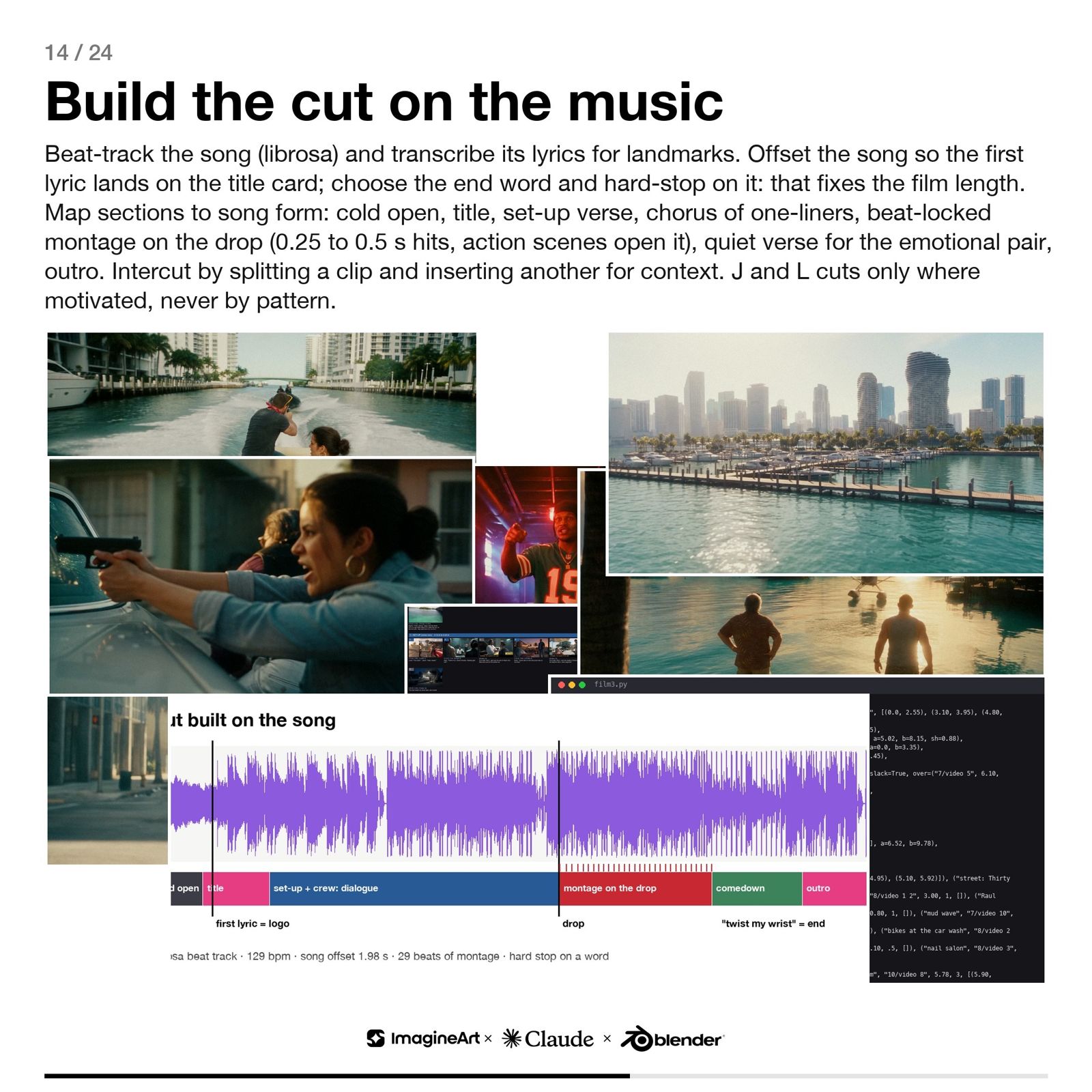
You edit an AI trailer to music by beat-tracking the song first and letting it set the structure: the first lyric lands on the title, the drop opens a montage of 0.25 to 0.5 second hits, and the film hard-stops on a chosen word. The song fixes the length. You fill it.
That's why our AI trailer runs 66 seconds instead of 60. We picked the end word, and the cut followed.
Pick the takes with transcripts
Claude transcribed every clip with word timestamps using faster-whisper, into one table: clip ID, line, speakers, usable in and out points, silent action ranges. Older folders were weighted 15 to 25 percent lower than the newest.
One banger line per clip beats a full exchange. A clip can be used twice, from different parts, and every dialogue edit snaps to the nearest silence. Dropped lines can live on as picture-only cutaways.
Cut on the beat
We beat-tracked the song with librosa: 129 bpm, a song offset of 1.98 seconds so the first lyric hits the title, 29 beats of montage, and a hard stop on a word.
The sections follow song form: cold open, title, a set-up verse with the crew's dialogue, a beat-locked montage on the drop, a quiet comedown for the emotional pair, then the outro. Use J and L cuts only where they're motivated, never as a pattern.
 Page 15 of our 24-step blueprint.
Ask before rendering
Claude didn't guess edit decisions. It showed a numbered order board (thumbnail, timecode, clip, line) and asked multiple-choice questions, each with one recommended option, about the L-cut point, the dialogue load and how deep the music dips.
One real question: while someone speaks, what does the clip sound do? We chose "stay low", so it continues 12 dB down. After each render, Claude transcribed the mix against the planned lines, sampled a frame sheet and measured loudness and true peak, then said plainly what it hadn't heard or watched.
Build your own editor (yes, really)
This is where Claude Code video editing gets interesting. We had Claude write a local web page as the project's fine-tuning tool: 640x360 proxies, clip bins with hover scrub, two monitors, and a free-position timeline where nothing ripples. Picture and sound trim independently for L and J cuts, with waveforms, colour tags and 20-step undo.
Save writes JSON, and "Send to Claude" writes a request file. It's a communicator, not a full editing suite: the human moves things, and Claude reads exactly what changed.
On "sent", Claude diffed the board against the last cut and filled gaps of three frames or fewer. One render report read: 49 picture cuts, 0 gaps, 47 sounds, a 1-frame gap filled at 18.58 seconds, 20 items retimed.
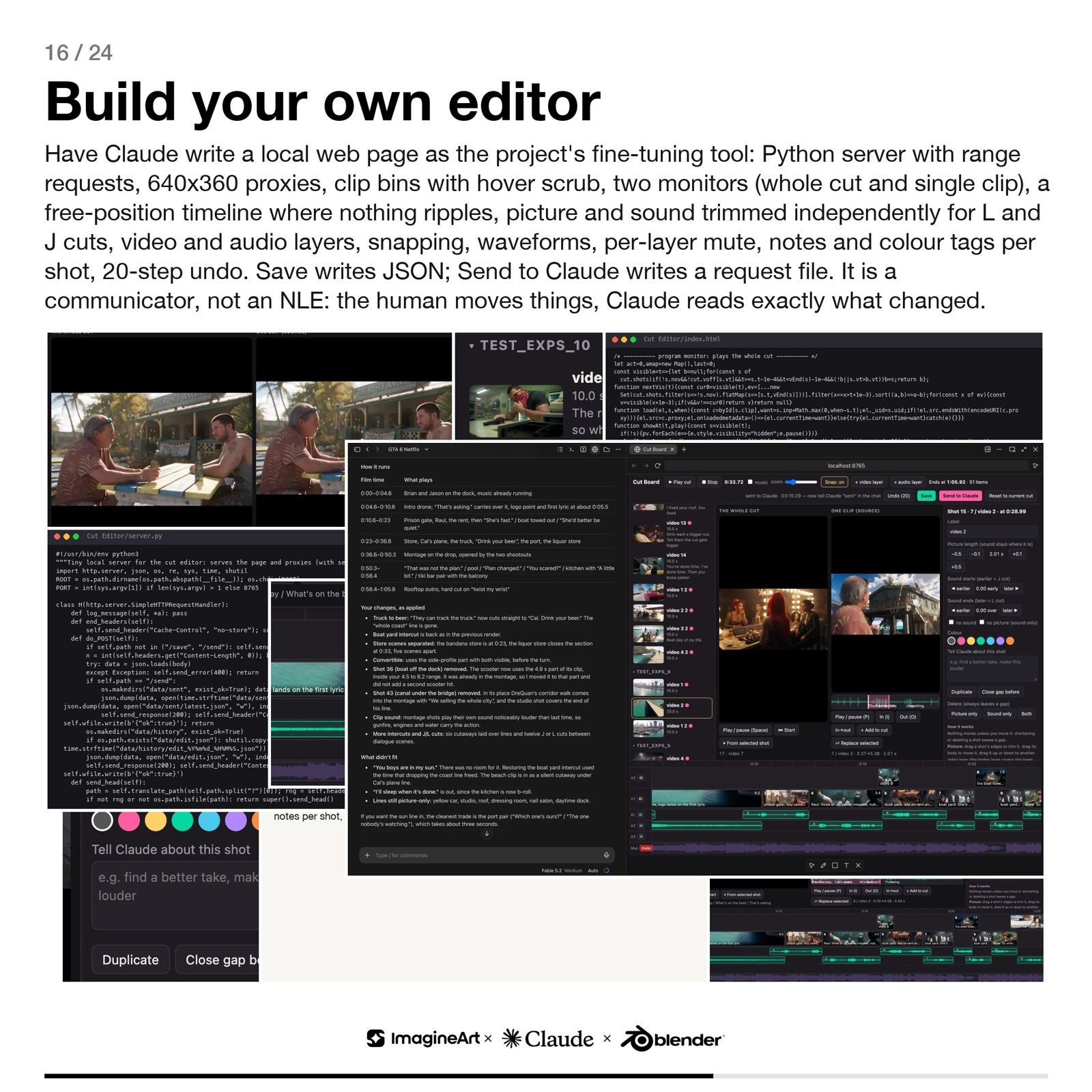 Page 17 of our 24-step blueprint.
Finishing an AI filmmaking project: grade, titles, sound, upload
Finishing is where a pile of AI clips starts to look like one film. Every setting below shipped.
Colour grade in one filter chain
The grade is one ffmpeg filter chain in 16-bit RGB (gbrp16le):
- A 3D LUT (tetrahedral) blended at 57.7 percent.
- Halation: curves knee 0.72, blur sigma 29, warm channel mix, screened at 35 percent.
- Contrast 0.98, saturation 1.07, then bloom: a sigma-14 blur screened at 17 percent on body shots.
- Titles composited, then grain last: 1440x810 noise upscaled, luma 13.8.
To match someone else's look, align their frames with yours, fit a blur-and-screen model numerically, then scale it by eye. Export: x264 slow, CRF 14, capped at 50 Mbps.
A title font made in code
No stock font. XM Throwie was generated in Python: each capital drawn as a centre-line stroke, turned into a signed-distance field (radius 98), traced, fitted with Beziers and written as an .otf. That's 90 glyphs with a -40 sidebearing, so letters overlap like a graffiti throw-up.
Blender 5.3 then rendered each word as one poured chrome mesh: pink #ff78c0, metallic 1.0, roughness 0.03, an 85 mm lens, Cycles at 2400x1200 and 160 samples. Render one word at a time. Parallel Blender runs fail silently, which is the most polite way software has ever wasted an evening.
A "TAKE 24" title sting: a GPT Image 2.6 still animated with Seedance 2.5 on ImagineArt.
Tracked titles and subtitles
Titles are separate ProRes 4444 overlays with alpha, tracked to one source clip, so overlay frame 0 equals clip frame 0. Trim N frames from the clip's head and you trim the overlay by the same N. Composite after the grade and before the grain, and never retime that clip afterwards.
Subtitles: Helvetica Neue Medium, 49 px at 1080p, sentence case, plain white, no shadow, line centre at 88 percent height, one line, 42 characters max. Time them from the voice on the dialogue stem, not from model word stamps.
Come on one frame early and hold 0.25 seconds, never into the next line. Claude flagged six lines on bright backgrounds, and we left them as is. On a simpler project, adding subtitles to a video with AI captions is faster.
Three-layer sound and the 32 ms echo
The mix has three stems: clean dialogue, AI-clip scene sound and music.
- Clip sound: 4-frame constant-power crossfades, full level in the montage, about 12 dB under speech elsewhere.
- Music: dip only the 350 to 4,500 Hz band by about 4.6 dB across whole dialogue segments, never per line.
- Dialogue: level only, plus 2 dB inside the montage.
- Master: -14 LUFS, true peak at or under -1 dBTP.
Then the echo. Dialogue sounded slightly doubled, and nobody could say why. Claude cross-correlated the dialogue stem against the clip audio line by line and found a constant 32 ms lag from an editing-app export: two copies of every voice. Shift, align, blend, done.
The upload spec
Master in one pass from the cut intermediate, so nothing gets compressed twice.
| Setting | Value |
|---|---|
| Codec | H.264 High, faststart, bt709 tags |
| Resolution and frame rate | 1920x1080, 24 fps |
| Quality | CRF 14, capped at 50 Mbps |
| Audio | AAC 320 kbps, -14 LUFS |
Verify the file itself: frame count, loudness, true peak and the transcript against the cut. Keep the stems, SRT, board JSON and build scripts beside it. Then post.
How to make an AI movie with this pipeline
The fastest answer to how to make an AI movie is to hand this post to Claude with one line: "Follow this pipeline to make my film." The model picks up the steps, tools and settings. You direct, approve and run the generations.
Building it yourself means running the same order: rules, references, scenes, look, sheets and plates, previz, prompts, fixes, then a cut on the music.
There are two ways to run AI filmmaking on ImagineArt. The agent route is ImagineArt MCP: add the connector in Claude Code, sign in with your imagine.art account, and the agent calls Nano Banana Pro and Seedance 2.5 on the same credits as the platform. The studio route is AI Film Studio, which plans a film scene by scene and shot by shot, with camera and lens controls and characters pinned from reference images.
Pick the agent for files, scripts and a custom edit. Pick the studio when you want the planning on one screen.
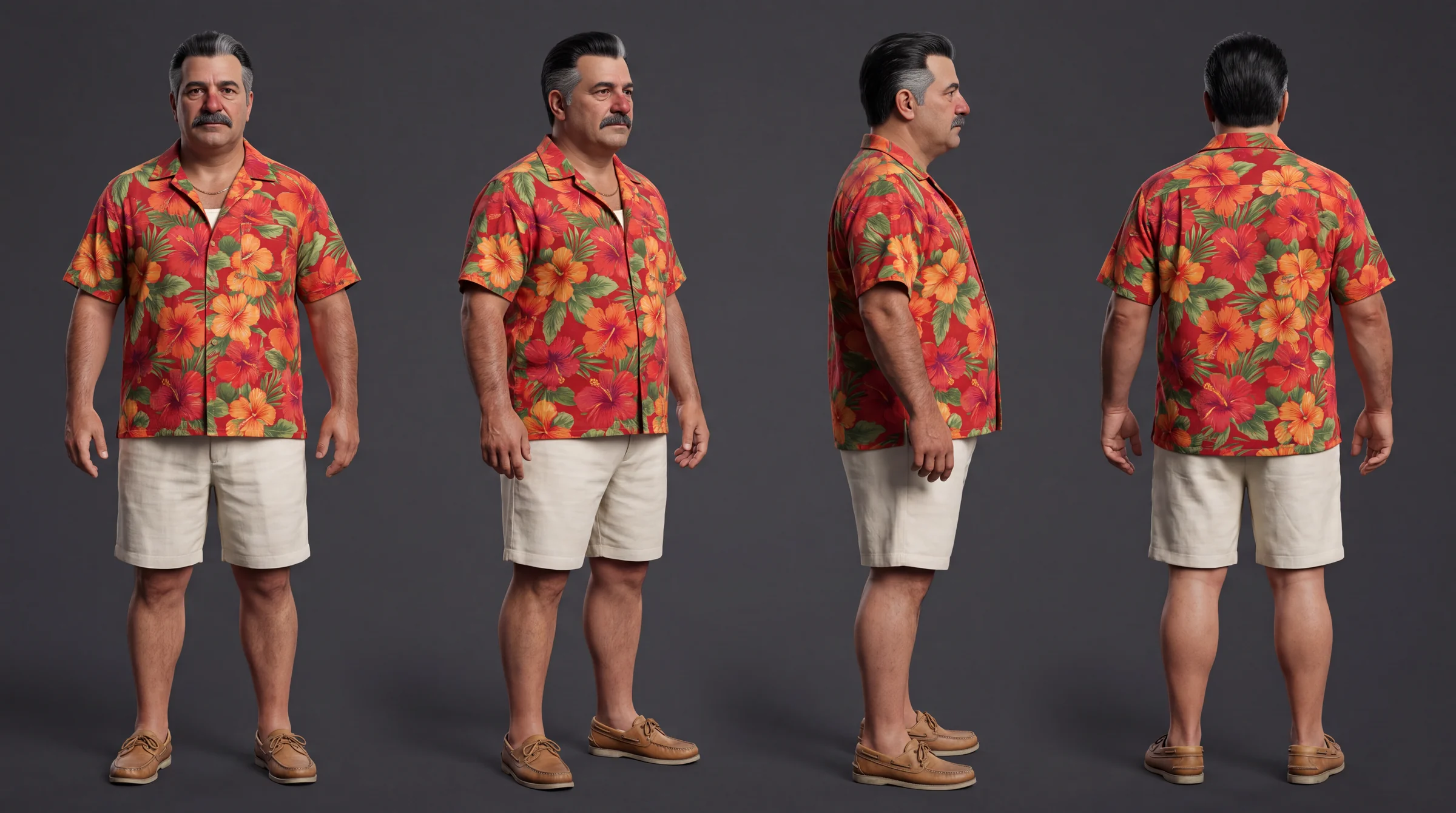 Crew member one: turnaround sheet.
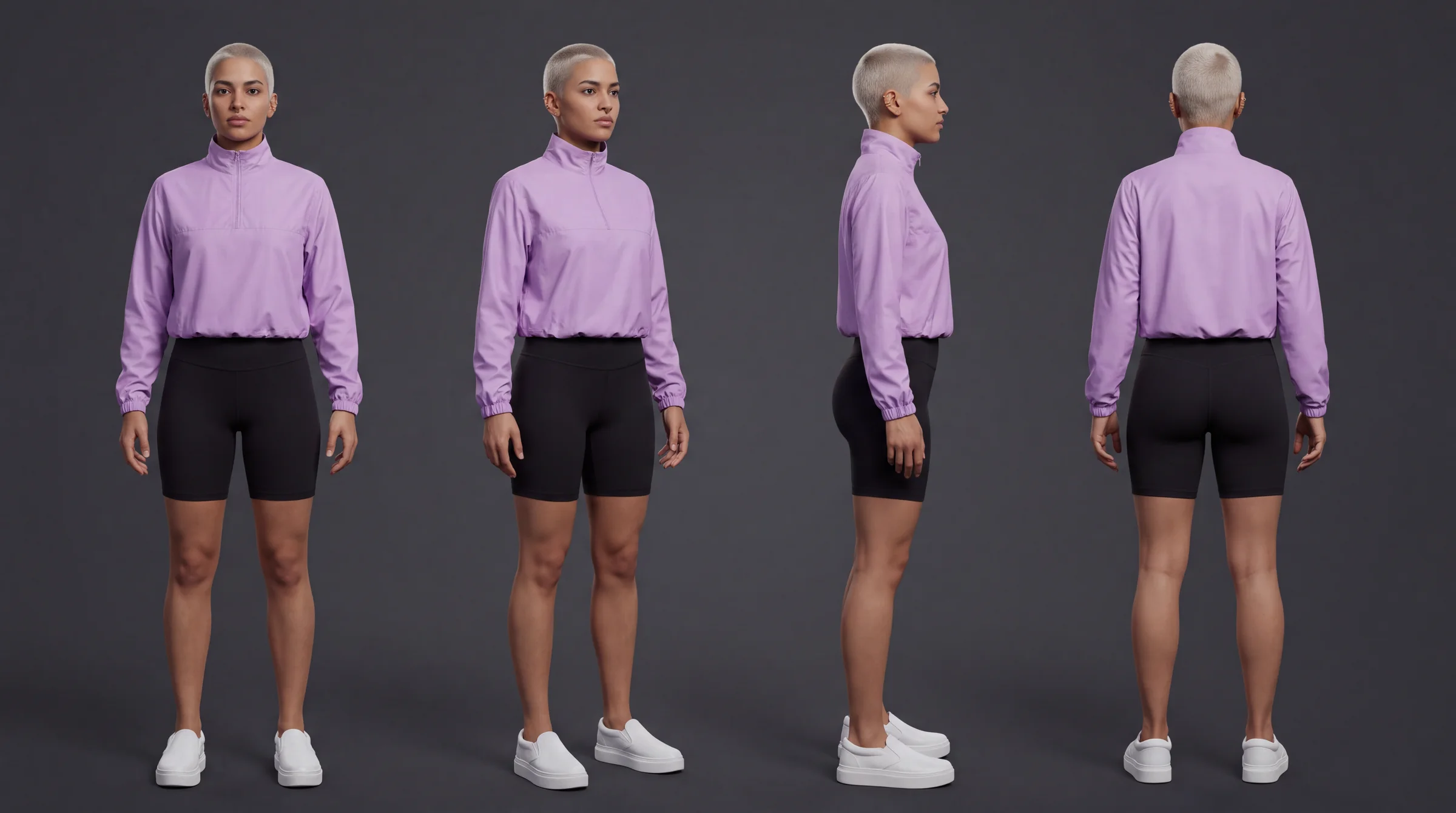 Crew member two: turnaround sheet.
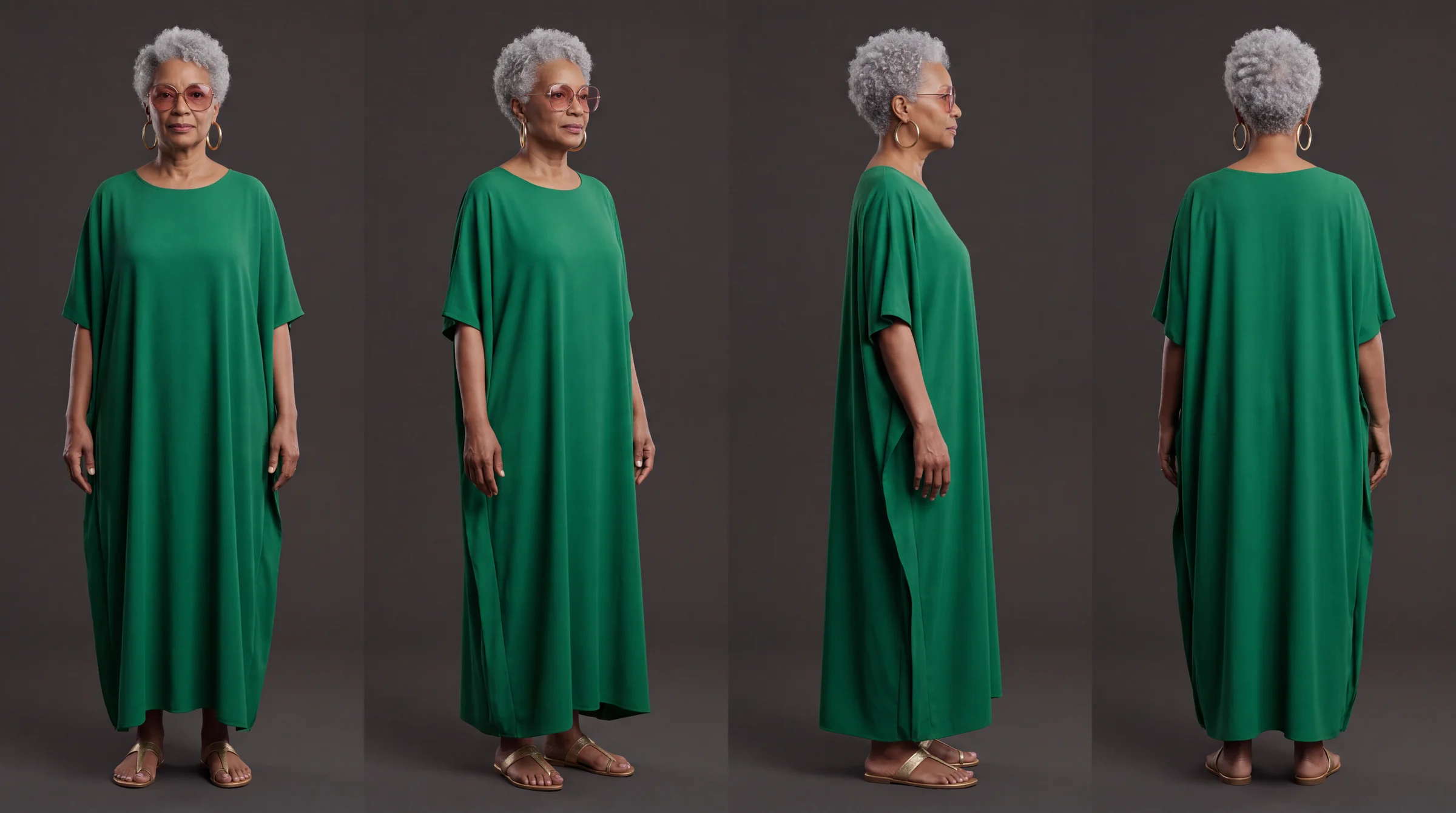 Crew member three: turnaround sheet. Made on ImagineArt with Nano Banana Pro at 4K.
Frequently asked questions
Yes. In our 66-second GTA VI-inspired film, every shot was AI-generated, with Claude Code directing and editing, ImagineArt MCP generating stills and clips, and Blender handling previz. What you still need is direction: a scene list, references, a locked look, and the patience to fix causes instead of rerolling.
In our production, AI generated character sheets and plates, turned previz renders into finished shots, transcribed every take, beat-tracked the song, ran the grade and sound checks, and built a custom edit board. A human made every creative call. That's AI filmmaking right now: fast hands, human taste.
Using AI tools to make a film is legal, but two rights questions follow you. The US Copyright Office's 2025 report says purely AI-generated material isn't copyrightable and prompts alone don't give enough control, while human selection, arrangement and creative edits can be protected. Borrowed characters and trademarks still belong to their owner. That's why our film is labelled fan-made and not affiliated with Rockstar, and every plate and prompt bans logos. Rockstar keeps its official GTA VI artwork on its own site.
Steal the pipeline, then make it yours
AI filmmaking is 24 small decisions made in the right order, from the brief to the upload.
Three things carry most of the weight. Lock the look before you generate anything, with one verbatim prompt and your own sheets and plates. Let a grey previz drive the camera, because Seedance 2.5 follows the render, not your adjectives. And cut on the music, so the song sets the length.
GTA VI only launched this week, per launch-week reviews, and Vice City is already the internet's favourite film set. Hand this post to Claude, connect ImagineArt, and start with one 10-second shot.
Zahida Misher
Exploring how AI transforms marketing, I help businesses unlock growth and future-proof their presence.
View all articlesRecent posts
The Best AI Avatar Generators In 2027: 11 Tools Compared And Ranked
50 Types of Art Styles: Definitions, Examples and AI Prompts
How to Edit Images With Ideogram 4.6: 38 Edits, Prompts and Results