
Arooj Ishtiaq
March 27, 2026 • Updated July 17, 2026
10 mins Read
If you’ve been seeing people mention what is GPT Image 1.5 and wondering whether it’s actually worth paying attention to, you’re in the right place. It’s OpenAI’s newer image generation model, and it’s designed to make creating images feel more like describing what you want than learning a bunch of complicated steps.
Since this guide was published, OpenAI has released GPT Image 2 — the successor to GPT Image 1.5 with notable improvements in realism, instruction following, and style consistency.
In this article, we’ll clarify what GPT Image 1.5 is, and help you decide if it fits what you’re trying to make.
What Is GPT Image 1.5?
OpenAI GPT Image 1.5 model is a next-generation visual synthesis model, building directly on the GPT Image 1 and GPT Image 1 mini releases. Unlike traditional diffusion-based models that focus on matching pixels to text descriptions, GPT Image 1.5 uses a multimodal reasoning engine to understand the logic and context behind a prompt, delivering significantly higher fidelity and prompt adherence as a result.
The model supports both text-to-image generation and image-to-image editing, making it applicable across a wide range of creative and commercial workflows. It is accessible through ImagineArt alongside every other leading image and video generation model, all within a single subscription.
Creators who want to explore GPT Image 1.5 for product photography, brand design, or social media content can start immediately through the AI image generator on ImagineArt, which provides a dedicated workspace for image generation and editing across all available models.
How GPT Image 1.5 Differs From DALL-E 3?
The most significant difference between GPT Image 1.5 and DALL-E 3 is in how each model processes a prompt. DALL-E 3 focuses on matching pixels to a text description. GPT Image 1.5 understands the logic of the world, including the physics, causality, cultural context, and spatial relationships behind what you are describing, and generates an image that reflects that understanding.
In practical terms, this produces the following differences:
- Complex prompts describing relationships between objects are handled more accurately
- Text rendered within images is legible and correctly spelled rather than approximated
- Iterative editing preserves the original image's composition, lighting, and fine detail rather than regenerating the whole scene
- Diagrams, flowcharts, and structured visual content are produced with logical accuracy
Recommended read: How To Use GPT Image 1.5?
GPT Image 1.5 Benchmark Results
The following results come from Microsoft's internal benchmark dataset, measuring GPT Image 1.5 against GPT Image 1, Qwen Image, and Nano Banana Pro across text-to-image and image editing tasks.
| Model | Prompt Alignment | Diagram / Flowchart Accuracy |
|---|---|---|
| GPT Image 1.5 | 91.2% | 96.9% |
| GPT Image 1 | 87.3% | 90.0% |
| Qwen Image | 83.9% | 33.9% |
| Nano Banana Pro | 87.9% | 95.3% |
For image editing specifically, GPT Image 1.5 achieves 100 % modification accuracy in single-turn editing and an 89.96 % visual quality score, both of which are the highest results in the benchmark set. These results confirm that GPT Image 1.5 not only generates more accurately from text but also edits existing images with greater precision and visual consistency than its predecessors.
Key Capabilities of GPT Image 1.5
GPT Image 1.5 introduces a range of capabilities that improve how images are generated and controlled. Here’s a quick look at what it offers.
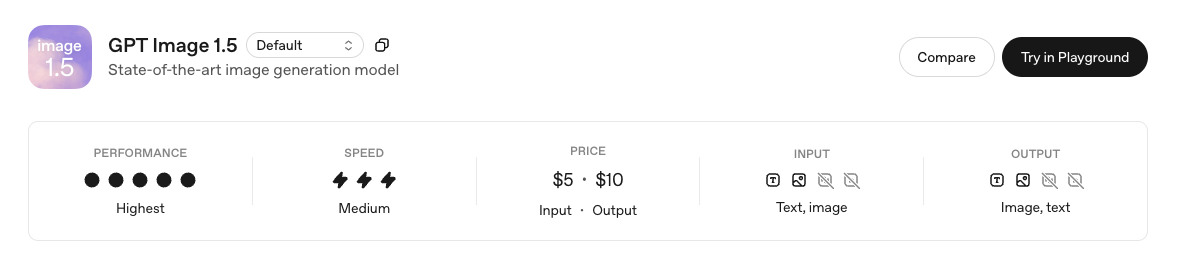 Key Capabilities of GPT Image 1.5
Text-to-Image Generation
GPT Image 1.5 generates images from text prompts with stronger instruction following and higher visual fidelity than its predecessors. The model's deep world knowledge reduces hallucinations and generic results, meaning prompts describing specific cultural contexts, historical settings, or domain-specific scenarios produce more accurate and detailed outputs.
For creators producing social media content, product visuals, or marketing graphics, ImagineArt's AI image generator gives immediate access to GPT Image 1.5 alongside other top models, including Nano Banana Pro, Seedream 5, Flux 2, and Ideogram 3, all within the same dashboard.
Image-to-Image Editing
Using natural language instructions, users can change a shirt colour, move an object, or expand a background without regenerating the entire scene. The model maintains the original composition, lighting, style, and fine-grained detail across edits. This makes it particularly well-suited for workflows built around iterative asset refinement rather than full regeneration.
Creators working with existing assets can extend GPT Image 1.5 editing outputs through ImagineArt's AI image editor image edit suite, which includes object removal, relighting, background replacement, clothing changes, and camera angle adjustment within the same platform. For quality refinement after editing, the image upscaler provides additional output resolution and detail enhancement without leaving the platform.
Native Text Rendering
GPT Image 1.5 resolves the gibberish text problem that is common across older AI image generation models. The model generates accurately spelled headlines, code snippets, data labels on charts, logo typography, and legible multi-line text across a range of font sizes and structured layouts. This makes it directly applicable to professional design and marketing workflows where text is a structural design element rather than an optional detail.
Designers producing branded materials such as posters, product labels, or social media graphics can explore ImagineArt's AI poster maker and social media post generator as starting points for integrating GPT Image 1.5's text rendering accuracy into regular content production.
Improved Visual Fidelity and Brand Preservation
GPT Image 1.5 delivers stronger image preservation across iterative edits, maintaining critical details including facial likeness, lighting, composition, and colour tone across successive changes. This is particularly relevant for commercial workflows where branded visual elements such as logos, colour palettes, and product aesthetics must survive across multiple rounds of editing without degradation.
For e-commerce teams producing product imagery at scale, ImagineArt AI product photo generator and AI product background changer are directly relevant tools to use alongside GPT Image 1.5 for a complete product photography workflow.
Recommended read: GPT 1.5 Prompt Guide
Up to 4x Faster Generation Speed
GPT Image 1.5 generates images up to 4x faster than GPT Image 1. For content teams generating at volume — producing multiple variants per campaign, running model comparisons, or iterating rapidly on a single concept — the speed difference reduces the time cost of each iteration cycle meaningfully, and when combined with higher first-pass accuracy, fewer total generations are typically needed to reach a usable output.
Inpainting
GPT Image 1.5 supports inpainting, which is the ability to add, remove, or modify specific objects or regions within an existing image while preserving everything outside the targeted area. This is executed through natural language instructions rather than manual masking, making targeted edits accessible without design software skills.
For teams working with the inpaint tool as part of a broader editing workflow, ImagineArt's AI object remover, AI replace, and AI object replacer tools complement GPT Image 1.5 outputs with additional precision editing capabilities.
Recommended read: Inpainting Image with AI - The Complete Step-by-Step Guide (2026)
What GPT Image 1.5 Is Used For?
GPT Image 1.5's combination of reasoning depth, editing precision, and text rendering accuracy makes it applicable across several distinct production contexts:
- Retail and ecommerce: generating product imagery for catalogues, listings, and personalized shopping experiences where visual accuracy and brand consistency are production requirements
- Marketing and advertising: creating campaign visuals, social media graphics, and branded creative assets where in-image text accuracy affects commercial viability
- Education: developing diagrams, illustrated explanations, and learning materials where logical accuracy in structured visual content is essential
- Entertainment and media: editing storyboards, character designs, and scene illustrations for films and games
- UI and UX design: accelerating interface mockups, prototype visuals, and design system assets where text precision and compositional accuracy are required
For teams building structured creative pipelines around GPT Image 1.5, ImagineArt's AI Workflow system allows you to connect image generation, editing, and output steps into a repeatable, node-based production process where GPT Image 1.5 sits alongside other models as part of a defined pipeline.
GPT Image 1.5 Across Industries
The model's capabilities translate across several commercial verticals in specific ways worth understanding before deciding whether it fits your production context:
- Fashion and retail: generating product imagery, catalogue visuals, and lookbook content where material texture accuracy and brand colour fidelity matter
- Real estate: producing interior visualizations, exterior renderings, and listing imagery where architectural detail and lighting accuracy are production requirements
- Food and beverage: creating food photography, packaging visuals, and menu imagery where colour accuracy and material realism drive commercial appeal
- Technology and SaaS: producing UI screenshots, product mockups, and interface illustrations where text accuracy and compositional precision are non-negotiable
For industry-specific workflows, ImagineArt's dedicated solution pages, including ecommerce, marketing teams, fashion, and real estate, provide applied guidance on building AI image generation into sector-specific production workflows.
How to Access GPT Image 1.5 on ImagineArt?
The most accessible way to use GPT Image 1.5 is through ImagineArt, where the model is available at 35 credits per generation with no API configuration required. ImagineArt's free plan provides 100 credits on signup, refreshed every 24 hours, giving you immediate access to try the model before committing to a paid subscription.
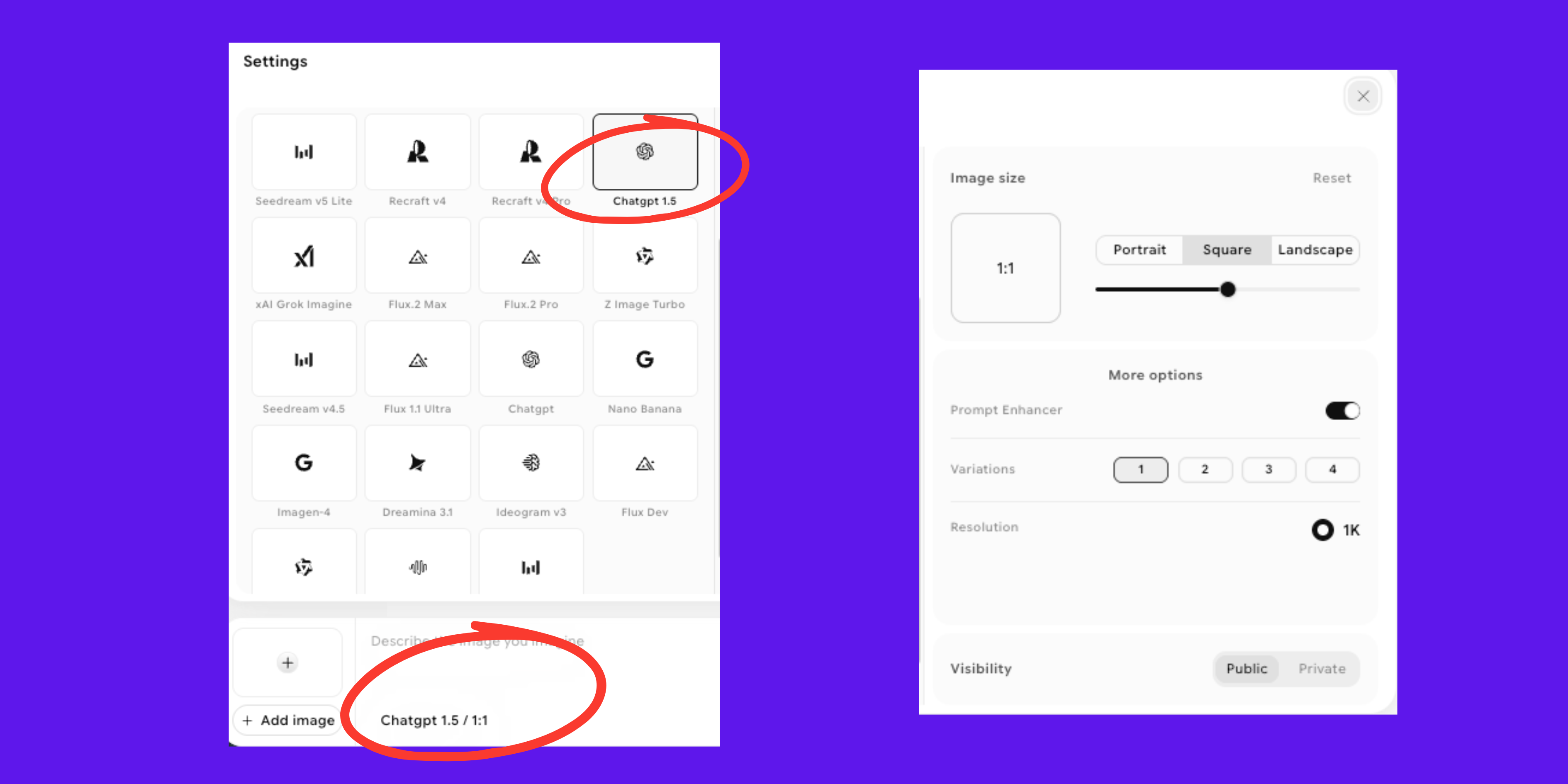 How to Access GPT Image 1.5 on ImagineArt?
Enterprise teams can also explore ImagineArt's team plan for smaller collaborative groups, and for organizations needing a tailored setup, the enterprise contact page allows direct discussion of custom credit allocations, SSO, and SLA requirements.
Transform Your Ideas into Real Visuals
GPT Image 1.5 makes bringing creative concepts to life faster and more intuitive than ever. Whether you’re designing, prototyping, or producing content at scale, it gives you the confidence to focus on your vision. Start exploring today and see your ideas take shape.
Frequently Asked Questions
What is GPT Image 1.5?
GPT Image 1.5 is OpenAI's AI image generation model released December 16, 2025. It uses a multimodal reasoning engine — meaning it understands context and intent, not just keywords — to generate images from text prompts and edit existing images with precise instruction-following. Its three headline improvements over previous OpenAI models are: edit consistency (changes only what you ask for), significantly improved text rendering inside images, and approximately 4× faster generation speed.
Is GPT Image 1.5 the same as DALL-E 3?
No. GPT Image 1.5 is a separate, more advanced model. DALL-E 3 would often re-render entire images when asked for small edits and produced frequent spelling errors in image text. GPT Image 1.5 uses a reasoning engine that understands edit intent — preserving unchanged elements and rendering text accurately in headlines, labels, and brand names. It also runs approximately 4× faster and is 20% cheaper at the API level than its predecessor GPT Image 1.
What is the difference between GPT Image 1.5 and GPT Image 2?
GPT Image 2 is OpenAI's current flagship and offers higher output quality for complex compositions and detailed final-quality outputs. GPT Image 1.5 is approximately 2× cheaper at medium API quality and is better suited for high-volume production workflows where speed and cost per image matter more than the quality ceiling.
Can GPT Image 1.5 put readable text inside images?
Yes — text rendering is one of GPT Image 1.5's signature improvements. It handles headlines, button copy, brand names, and denser text (subheads, labels, short paragraphs) accurately. The benchmark score is 91.2% prompt alignment for text-heavy prompts. For typography-first use cases (logos, poster design, infographics), Ideogram v4 scores higher at 97% OCR accuracy, but GPT Image 1.5 is the strongest option among the major multi-use image models.
Is GPT Image 1.5 free?
GPT Image 1.5 is available free through ChatGPT's free tier (limited generations) and on ImagineArt's free plan (100 credits refreshed daily; 35 credits per generation). Paid access through ImagineArt starts at $9/month. API access through OpenAI is billed per image — $0.01 (low), $0.04 (medium), or $0.17 (high) per image.
What is GPT Image 1.5 best used for?
GPT Image 1.5 is strongest for content requiring reliable text rendering inside the image (social graphics, posters, branded visuals), e-commerce product photo variation workflows, and any use case requiring precise single-element editing without full re-renders. It is not the top choice for artistic, highly stylized output (Midjourney) or vector/SVG generation (Recraft V4).
How does GPT Image 1.5 compare to Nano Banana Pro?
Both are strong, instruction-following image models with good text rendering. GPT Image 1.5 leads on single-turn edit consistency and has broader industry familiarity through OpenAI's ecosystem. Nano Banana Pro leads on UI/UX mockups, structured layout accuracy, and product photography with precise attribute fidelity. Both are available on ImagineArt from $9/month, so you can test both on the same prompt without a separate subscription.
Arooj Ishtiaq
Arooj is a SaaS content writer specializing in AI models and applied technology. At ImagineArt, she creates sharp, product-focused content that helps creators and businesses understand, adopt, and get real value from AI tools.