
Umaima Shah
June 12, 2026 • Updated June 16, 2026
15 mins Read
Your product page already does the hard work: it convinces buyers with clear benefits, social proof and strong visuals. A product URL to video ad lets you rearrange those elements into a 30‑second clip instead of starting from scratch. Most advertisers still write scripts, hire crews and coordinate shoots, so a single product video can cost five thousand dollars or more and drag on for months.
Yet everything you need sits in the URL, the headline holds the hook, the images show the demo and the reviews provide the proof.
Here’s how to extract those pieces and turn one product listing into more than fifty video variations.
What a Product URL to Video Ad Really Is
AI tools turn a product page into a video ad by reading your existing images, pricing, and copy.
Instead of shooting and scripting from scratch, you repurpose what your page already has.
- Image and headline: The hero image and title become the hook and demo.
- Bullets and reviews: Benefits and proof come straight from your bullet points and customer reviews.
- FAQ and price: Objections and pricing are pulled from the FAQ and product details.
This works because the creative elements are already present; you just need to assemble them into a clear format.
For more on why raw content needs a strong visual and copy structure, see ImagineArt’s What Is an Ad Creative?
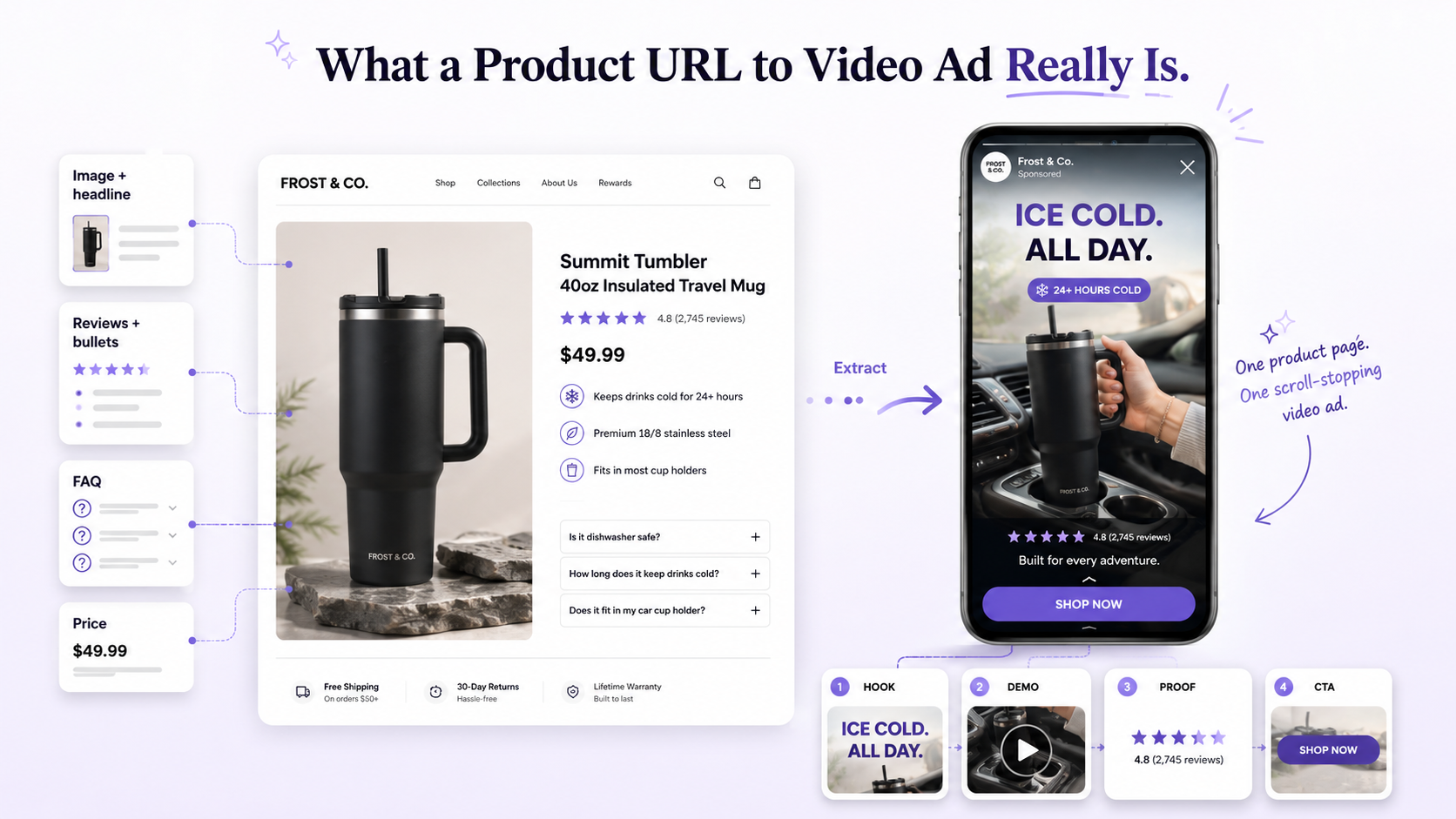 From product page to video ad
Why Product URL to Video Ads Solve Creative Bottlenecks
Traditional ad production slows campaigns. Teams brainstorm scripts, hire crews, and wait weeks for content. Video ads can cost thousands and still arrive too late to test.
- Expensive shoots: product commercials can cost $5K+ per variation.
- Long timelines: planning, shooting, and editing stretch out for months.
- Creative fatigue: one or two ads aren’t enough; you need constant refreshes.
Your product page already has the raw ingredients. Your headline is the hook, your hero image shows the product working, your bullet points list benefits, and your reviews provide proof. Instead of reinventing the script, you extract those elements and structure them into a hook, demo, proof, and call‑to‑action.
- Headline = hook.
- Hero image = demo.
- Reviews & bullets = proof and benefits.
Creative bottlenecks aren’t about ideas; they’re about volume. Winning brands refresh their creative constantly. With a product URL-to-video ad workflow, you can produce multiple angles from the same page. Once the ads go live, use ImagineArt’s guide on How to Do Ad Creative Analysis in 2026 to compare hook rate, hold rate, CTR, CPA, and ROAS. The results show which versions you should improve, scale, or replace.
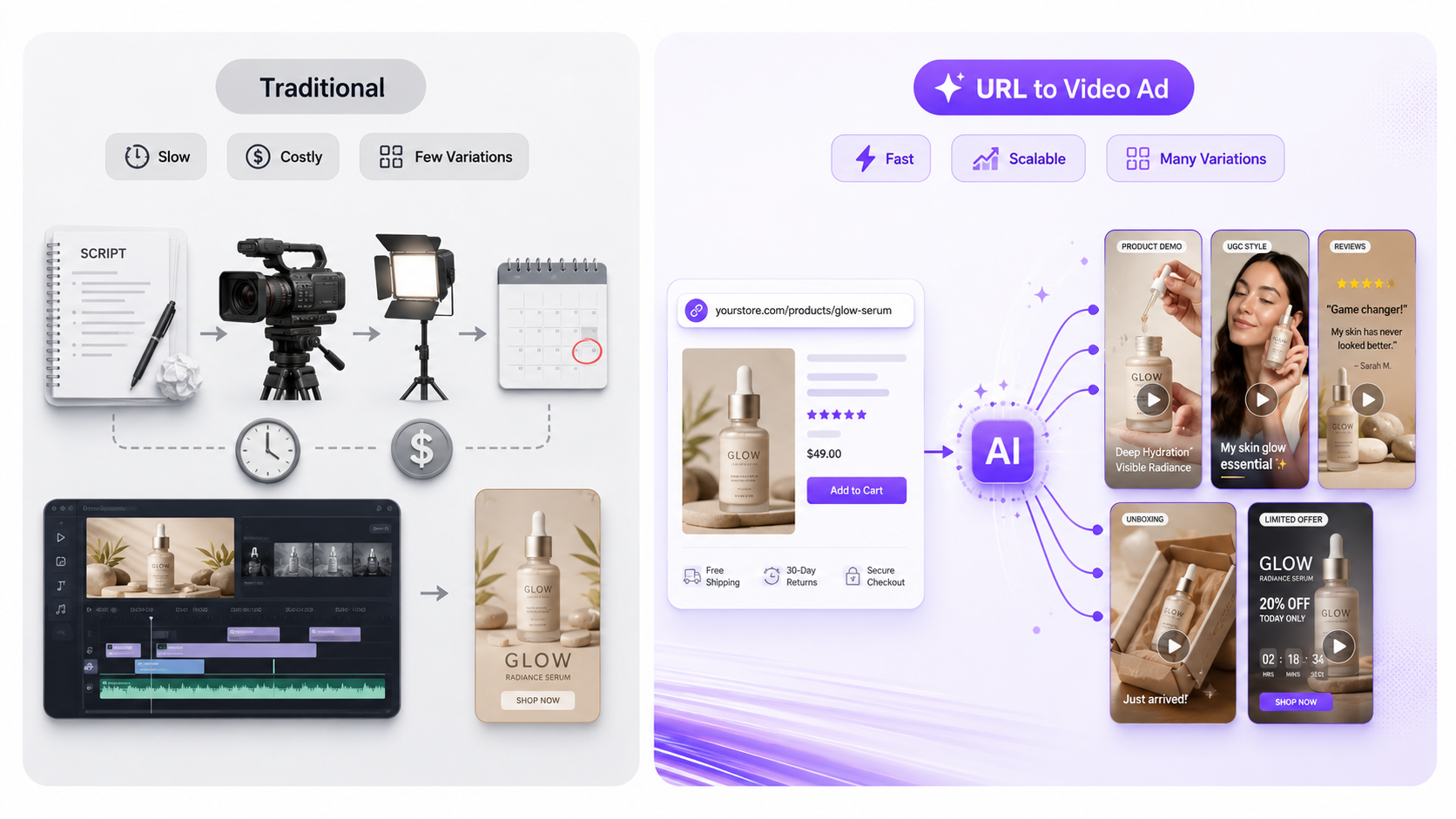 Traditional vs Automated AD Workflows
How to Extract Raw Material from Your Product Page Before Generating
Most advertisers ask "what should we say?" before they generate. That is the wrong starting point. Your customers already told you what to say in the reviews they left, the questions they asked, and the features they kept coming back to.
Before you paste the URL, spend five minutes pulling these four things from your product page.
Find the top three benefits customers actually mention
Open your reviews and look for the outcomes people describe, not the features listed in the bullet points. Customers do not say "aerospace-grade aluminum." They say "survived dropping it on concrete three times." That language is your hook. Pick the three benefits that come up most often and write them down before you generate anything.
Find your strongest proof element
Look for a review with a specific number, a before-and-after result, or a star rating with volume behind it. "12,000 five-star reviews" is proof. "Lost 8 pounds in the first two weeks" is proof. "Switched from X and never looked back" is proof. One strong proof element is enough to anchor the entire ad.
Check your headline and hero image
Your headline should state the problem you solve. Your hero image should show the product working, not just sitting. If either of these is weak, the AI will still generate a video but the story will feel thin. Fix the headline and swap the image before you paste the URL.
Structure what you found before you generate
Once you have the benefits, the proof, and the visuals, map them to the four-part ad structure:
- Hook (3 seconds): the problem or the strongest benefit from reviews
- Demo (15 seconds): two to three benefits shown visually with the product in action
- Proof (5 seconds): the review, stat, or rating that makes it credible
- CTA (3 seconds): one clear instruction telling the viewer what to do next
That is your raw material. When you paste the URL into ImagineArt Ad Studio, the AI uses this foundation to generate script variations that already have the right structure. The stronger your product page going in, the stronger your ad coming out
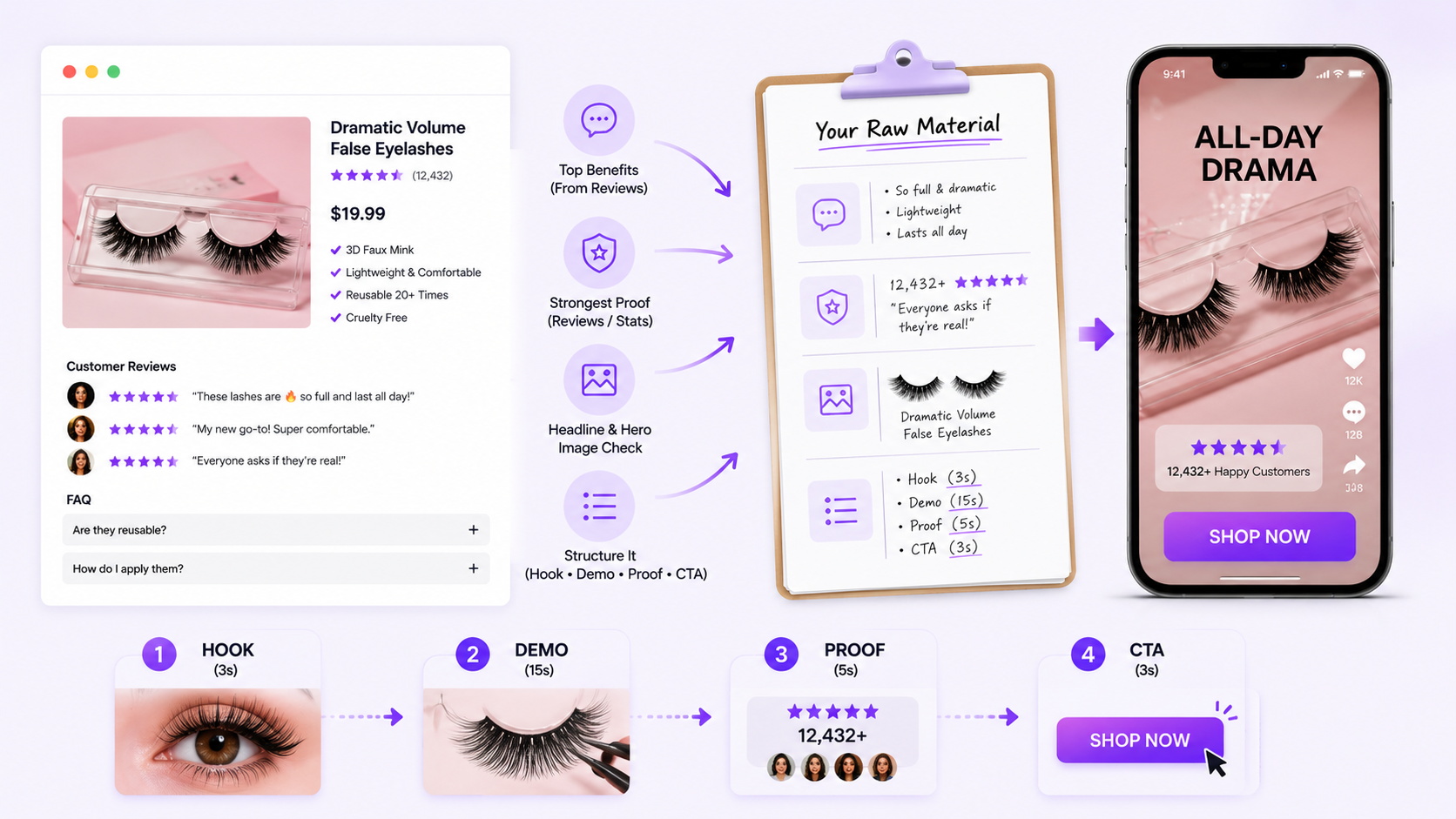 product marketing infographic
How to Turn a Product URL into Video Ads with ImagineArt AI Ad Studio
ImagineArt AI Ad Studio turns a public ecommerce product page into a complete video ad. It pulls the product images and copy, generates a script, and applies the settings you select.
Step 1: Paste your product URL
Add a link from Amazon, Shopify, your DTC store, or another public ecommerce product page. ImagineArt pulls the available product details and images from the page.
You can upload a product image manually when you do not have a product URL.
Step 2: Choose an ad format
Select one of nine formats based on the product and campaign goal:
- UGC video ad
- Unboxing reveal
- Creator UGC
- Virtual try-on
- Hyper Motion
- Product review
- Pro virtual try-on
- UGC testimonial
- ASMR
A product review works well when the page contains strong customer proof. Virtual try-on suits fashion and accessories, while Hyper Motion gives static product photos more movement.
Step 3: Choose your hook, avatar, and scene
Select a stunt hook for a bold opening or a subtle hook for a curiosity-led first scene. You can swap hooks and test several openings from the same product URL.
Choose an avatar from the built-in library or create a custom presenter. Then set the background, product action, aspect ratio, duration, and video quality.
Step 4: Generate and export
ImagineArt creates the video with your chosen script, product, avatar, and opening. The AI Ad Studio page states that the process can take under three minutes from brief to finished ad.
Export the result with the required specifications for Meta, TikTok, YouTube, or Google. Generate more versions by changing the hook, avatar, scene, or format while keeping the product consistent.
If the page lacks strong visuals, use ImagineArt AI Image Generator to create new product scenes. You can also refine existing photos with ImagineArt AI Image Editor before turning the URL into a video.
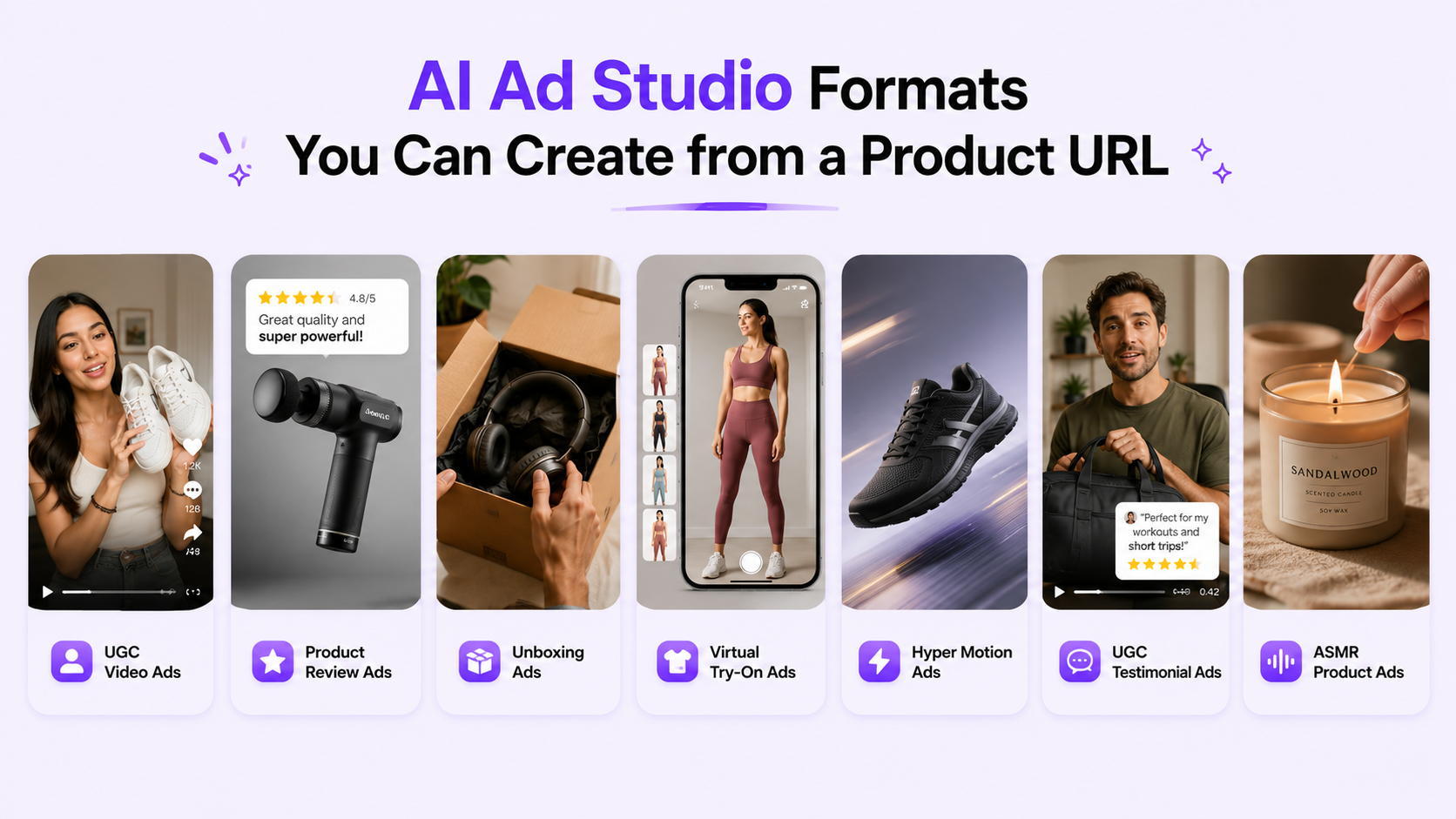
AI Ad Studio Formats You Can Create from a Product URL
UGC Video Ads
UGC video ads feel like a genuine customer sharing a product experience. They work well when you need trust and relatability on social feeds. For a deeper look at how to shape this format, read the ImagineArt guide on How to Create Realistic AI UGC Videos, which explains why AI UGC costs 80 %–90 % less than live‑action shoots.
Product Review Ads
Product review ads use your existing reviews to build a script. They open with a problem, show the product in action, flash a statistic or star rating, then finish with a call to action. This structure is great for high‑consideration products; if you’re running DTC campaigns, see ImagineArt’s blog on Which Is the Best AI Video Generator for DTC Product Ads? to understand how review‑based ads fit into a broader creative workflow.
Unboxing Ads
Unboxing ads capture the pleasure of opening a package. Use pans and zooms to highlight design details and materials. When you need to enhance or correct product photos before turning them into unboxing videos, try the ImagineArt AI Image Editor.
Virtual Try‑On Ads
Virtual try‑on ads let shoppers see apparel, footwear or accessories on a model without a physical fitting. They build confidence in style and sizing decisions. Start by generating clean product photos with the ImagineArt AI Image Generator, then animate them in Ad Studio to create a realistic try‑on.
Hyper Motion Ads
Hyper motion ads add cinematic movement to static products, zooming or panning across the item to guide the viewer’s eye. Use this format for tech gadgets, premium beauty products or fashion pieces. To explore other ways to animate product visuals, visit the ImagineArt AI Video Generator.
UGC Testimonial Ads
UGC testimonial ads turn real customer stories into short clips. Start with the top benefits customers mention in reviews, then structure them into a problem, experience and result. This format works well for retargeting and higher‑ticket offers; for inspiration on aspirational storytelling, see ImagineArt’s blog on Fashion Ads.
ASMR Product Ads
ASMR product ads play up texture, sound and sensory appeal. Use them for food, beverages, skincare, candles or any product where the feel matters. To see how AI tools transform e‑commerce content, read the ImagineArt blog on 10 Best AI Tools for E‑Commerce, which includes sensory‑driven advertising strategies.
 AI ad studio format showcase
Platform Differences for Product Video Ads
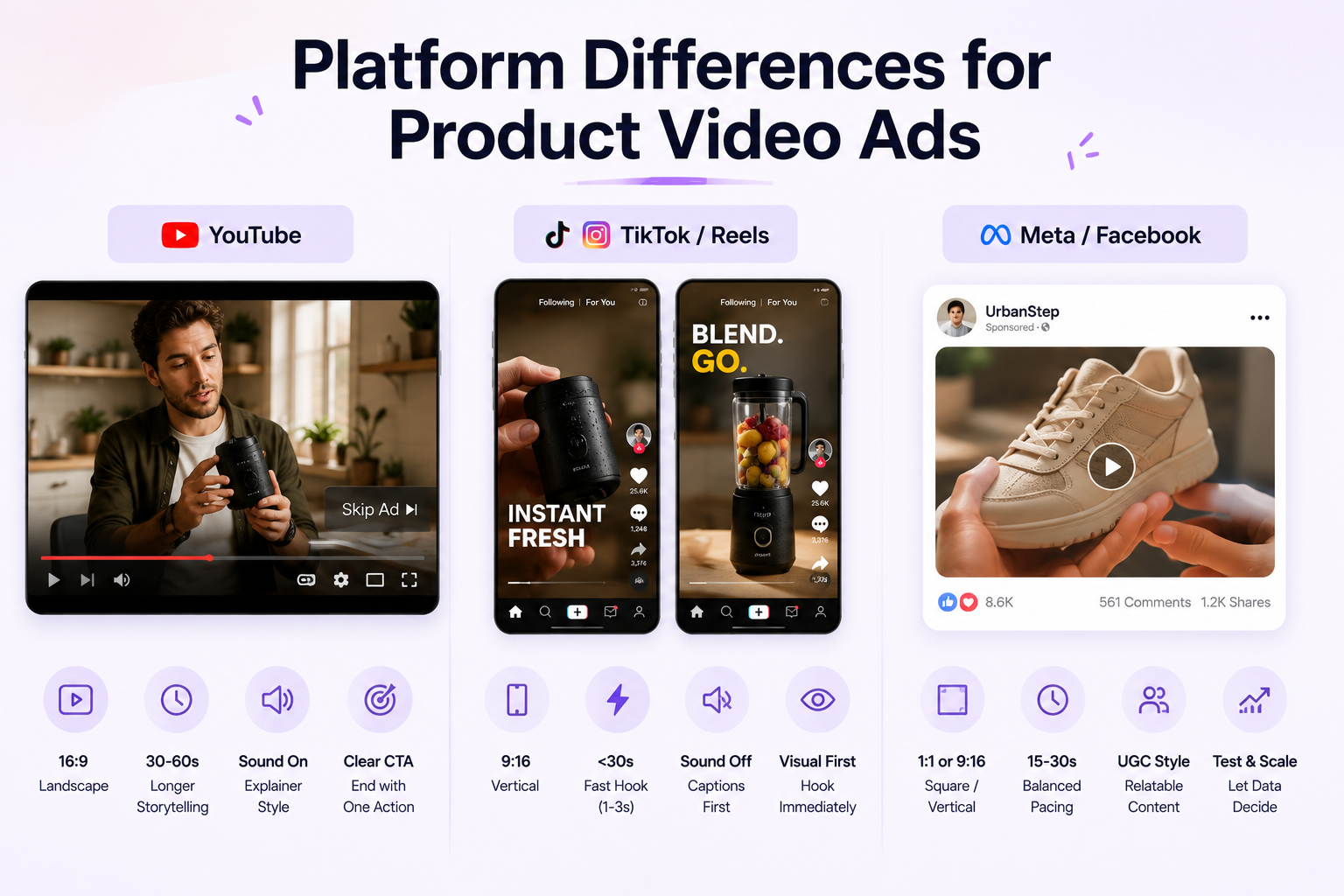
The format that works on YouTube will not work on TikTok. The pacing that converts on Meta will feel slow on Reels. Before you export, understand what each platform expects from a viewer and match your ad to that behavior.
YouTube
YouTube viewers came to watch. They have sound on, they are leaning back, and they will tolerate 30 to 60 seconds if the first five seconds earned their attention. This gives you room to tell a story.
Open with a customer scenario, someone dealing with the problem your product solves. Show them discovering the product, walk through two or three benefits, then close with proof and a CTA. YouTube product ads can carry more explanation because the viewer is already in a watching mindset.
Use horizontal 16:9 format. Keep captions on anyway. End with a clear single action.
TikTok and Instagram Reels
You have one to three seconds before the scroll. There is no warmup, no context-setting, and no patience for a slow intro.
Start with the product already working or showing a result. Hook first, explanation after. The viewer needs a reason to stop before they will listen to anything you say. For a deeper look at what works on each platform, see the ImagineArt guides on the best AI video generator for TikTok and the best AI video generator for Instagram Reels.
Use vertical 9:16 format. Keep it under 30 seconds. Assume sound-off for the first watch and use captions to carry the message.
Meta and Facebook Feed
Meta sits between YouTube and TikTok in terms of viewer patience. Feed scrollers move fast but are more open to slightly longer content than Reels if the first frame stops them.
UGC-style ads, product demos, testimonials, and retargeting angles all perform well here. The hook still needs to land in the first two to three seconds, but you have more room to build the proof and CTA than you do on TikTok.
Use 1:1 square format for feed placements and 9:16 for Stories and Reels placements. Run both and let performance data decide.
 Platform Differences for Video Ads
What Makes a Product URL Ready for Video Ad Generation?
A strong product page sets you up for better ads. AI can only work with what it finds, so make sure the key elements are there.
- Clear visuals: Multiple high‑resolution images showing different angles, textures and use cases.
- Benefit‑driven copy: A headline that states the problem you solve, bullet points that highlight features and outcomes, and a short description.
- Proof and offer: Reviews with customer language, a visible price or discount, and answers to common objections.
If any of these are missing, the AI will still generate a video, but the story may feel thin. Consider adding more images with the ImagineArt AI Image Generator or retouching existing ones with the AI Image Editor before you paste the URL. A public, accessible product page also matters, the AI cannot scrape gated pages. For more on refreshing creative when ads fatigue, see ImagineArt’s guide on How to Handle Ad Fatigue and Refresh Ad Creative in 2026.
Product URL to Video Ads for Different Brands
DTC Brands
Direct‑to‑consumer brands live or die on creative velocity. Each new product launch demands dozens of ad variations across TikTok, Reels, Shorts and Meta. A product URL to video ad workflow gives DTC marketers multiple angles from the same page, so they can keep testing without waiting on shoots. For deeper optimisation tips, read ImagineArt’s guide on AI Avatars vs Real UGC Creators to see how AI personas can boost performance.
Fashion & Beauty Brands
Fashion and beauty campaigns rely on visuals that show fit, feel and transformation. Use virtual try‑on ads for apparel, hyper motion ads for sleek product shots, unboxing ads for luxe packaging and ASMR or lifestyle ads for sensory impact. When your brand story depends on aesthetics, refer to ImagineArt’s Which AI Tool Is Best for UGC — Here's the Answer (2026) to choose the right model for creator‑style content.
Agencies & Teams
Agencies and in‑house creative teams juggle multiple clients and projects. A product URL to video ad process means you can turn 20 URLs into 100 ads using batch mode. Each URL produces several script angles and aspect ratios at once. For a deeper look at collaboration and workflow automation, see ImagineArt’s post on Structure, Speed and Scale with ImagineArt for Teams which explains how centralised templates and brand kits accelerate production.
E‑Commerce Stores
E‑commerce stores manage dozens or hundreds of SKUs. A single shoot rarely covers every product or variant. AI URL‑to‑video generation allows retailers to update ads as inventory changes and to personalise creatives at scale. For more ideas on building high‑ROAS ads, read the ImagineArt tutorial on How to Make Video Ads with AI for High ROAS, which walks through image generation, animation and editing for product clips.
Product URL to Video Ads vs Traditional Production
Traditional video ads require teams to brainstorm scripts, hire crews, shoot footage and edit from scratch. A single product commercial can cost thousands of dollars and still take weeks to produce. Even a basic advertisement often starts at $200–$1 200, while Hollywood‑style ads range from $1 750 to $6 000+.
- Big budgets: Cinematic or CGI ads cost $800–$2 000; high‑end ads can exceed $6 000.
- Slow timelines: Crews plan, film and edit across months.
- Few variations: Agencies deliver a handful of ads, which fatigue before testing is complete.
A product URL to video ad flips this. You paste your product page link, and AI scans the page, pulls out the images, copy and features and generates multiple script variations. The tool formats the output for TikTok, YouTube, Meta and Instagram, producing finished videos in under ten minutes. Batch mode can convert 20 product URLs into 100 ads simultaneously. AI ad production often costs $5–$120 per video and reduces total production time by up to 90 percent. For a deeper look at the full AI workflow and cost comparison, see ImagineArt’s guide on How to Make Video Ads with AI for High ROAS and the overview of Which AI Video Editor Is Best for Ads?
Common Mistakes When Generating Video Ads from a Product URL
AI can turn a product URL into a video ad quickly, but it still needs human review. Most mistakes happen when marketers treat the first output as final.
Avoid these common errors:
-
Using the wrong product URL: Always check that the URL opens the correct product page, not a category page, expired offer, out-of-stock listing, or old landing page.
-
Not reviewing what AI pulled from the page: AI may pick the wrong image, miss the main benefit, ignore a discount, or use weak product details if the page has unclear information.
-
Posting without human approval: Do not publish the first generated video without checking the hook, product claim, visuals, pacing, captions, and CTA.
-
Missing product accuracy issues: Check that the product color, size, packaging, label, and use case match the actual item. Small visual mistakes can make the ad look misleading.
-
Ignoring offer and landing page match: If the ad says 50% off, the product page should show the same offer. If the ad promises free shipping, the checkout experience should support it.
-
Leaving AI-written hooks unchecked: AI can create a clean hook, but your best hook usually comes from customer reviews, pain points, objections, or the strongest product benefit.
-
Generating only one version: One video rarely gives enough testing range. Create different hooks, openings, product angles, and CTAs before choosing what to run.
Before publishing, watch the full ad like a customer. Confirm that the product is correct, the offer is accurate, the visual flow makes sense, and the CTA sends people to the right page.
AI can speed up production, but human review keeps the ad trustworthy, accurate, and ready for real campaign use.
Ready to Turn Your Product URL into Video Ads with ImagineArt?
Stop brainstorming scripts and waiting for expensive shoots. Paste your product link and let AI assemble the hook, demo, proof, and call‑to‑action.
- Fast: ImagineArt scans your page, pulls out images, copy and features and formats finished ads in under ten minutes.
- Flexible: Choose UGC, demo, unboxing, try‑on, hyper motion, testimonial or ASMR templates, then customise the hook and avatar to match your brand.
- Scalable: Generate multiple script variations and aspect ratios from a single URL.
Start by picking one product page and see how many ad variations you can create. Then scale across your catalog.
Frequently Asked Questions
Yes, you can create a product URL to video ad from most public product pages. The page should include clear product images, a title, key benefits, pricing, and product details. If the page lacks strong content, improve the visuals or copy before generating the ad.
AI can pull the product name, images, description, features, benefits, pricing, and customer proof from the page. It can use the headline as a hook, the images as product demonstrations, and customer reviews as proof.
Yes, you should review or refine the hook yourself. AI can suggest an opening line, but your strongest hook will often come from a customer pain point, product result, or specific phrase found in customer reviews.
Choose a format that matches your campaign goal. Use UGC ads to build trust, product demos to explain the product, unboxing ads for first impressions, virtual try-on ads for fashion, hyper-motion ads for premium visuals, and testimonial ads for customer proof.
Yes, but you should adjust the pacing and aspect ratio for each platform. TikTok and Instagram Reels need a fast first frame. YouTube Shorts can include slightly more explanation, while Meta works well with UGC, product demos, testimonials, and retargeting ads.
Start with 10 to 15 video ad variations. Test different hooks, product benefits, CTAs, avatars, scenes, and formats. One product URL can support several creative angles without requiring you to rebuild the campaign from scratch.
Umaima Shah
Umaima Shah is a creative content strategist specializing in AI tools, image generation, and emerging technologies. She focuses on translating complex platforms into clear, practical insights for creators, designers, and product teams