
Arooj Ishtiaq
August 3, 2026 • Updated August 3, 2026
22 mins Read
Learning how to prompt Hailuo 3.0 well starts with seeing real prompts that produced real results, not an abstract list of tips. Hailuo 3.0, officially MiniMax H3, reads text, images, video, and audio together in one request, which is a fundamentally different design than the single-image, single-description input most video models expect. That difference is exactly why generic prompting advice written for older models tends to underperform here: the strongest prompts in this guide combine a reference asset with specific camera, timing, and sound direction rather than a text description alone.
For the underlying model specs behind Hailuo 3.0 and MiniMax H3 prompting, including the official input limits these prompts work within, see MiniMax H3 vs Hailuo 2.3. For prompting fundamentals across the whole Hailuo line, the general Hailuo AI prompt guide covers ground this piece doesn't repeat, and Hailuo AI vs other AI video generators is worth a look if you're still deciding whether Hailuo 3.0 is the right model for your project at all.
The Three Modes For Hailuo 3.0 Prompts
Before writing a single prompt, it helps to know which of Hailuo 3.0's three generation modes a given shot actually calls for, since the mode determines what you can hand the model and how the prompt itself should be structured.
- Text to Video — prompt only, no reference media. The model invents the subject, environment, and style entirely from your description.
- First & Last Frame — one image (an opening or closing frame) or two (both), with the model generating the motion in between. The composition is already decided; the prompt's job is to describe how it moves.
- Reference to Video — up to 9 images, 3 video clips, and 3 audio clips in one request. This is the mode for identity locking, motion transfer, style matching, voice cloning, and editing a clip you already have.
First & Last Frame mode and Reference to Video mode are mutually exclusive per request; you can't mix first_frame or last_frame inputs with reference-role inputs in one generation, so this is a real decision to make before you start writing rather than something you can hedge on. On Hailuo 3.0, these three modes sit behind Director Mode for camera control, Motion Brush for localized animation, and Music Prompts for audio direction.
For how these input limits compare to the prior model in the line, Hailuo 2.3 and the Hailuo 2.3 overview cover that baseline directly, and how to use Hailuo AI walks through the setup if any of this is new to you.
20 Image-Based MiniMax H3 Prompts
Every prompt in this section starts from one or more images and generates an entirely new shot; no existing footage is being edited here. These split into three practical categories: product and e-commerce work, locking a character's identity across a moving shot, and cinematic or title-sequence direction where mood matters more than a specific product.
Product and E-Commerce Prompts
Product work is usually the easiest place to start with Hailuo 3.0, since the goal is narrow: preserve the product exactly while directing everything around it. First & Last Frame mode works well here because the two endpoints (closed and open, before and after) are often already known.
1. Product-to-open reveal (First & Last Frame)
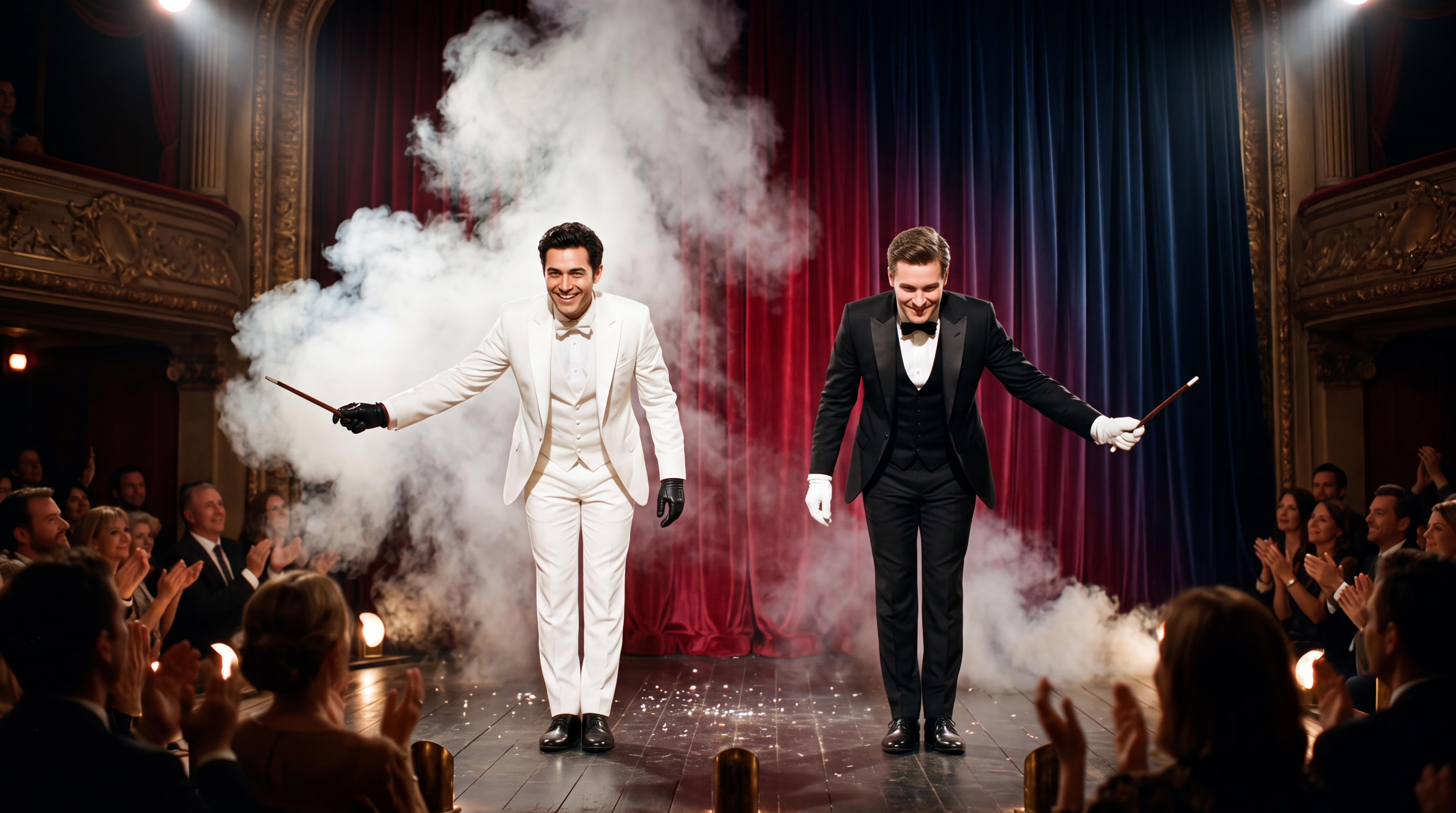
Two magicians stand onstage facing the audience and perform a "swap" illusion. They wave their wands simultaneously and smoke rises. When it clears, their suit colors have exchanged: the magician on the left now wears white, and the one on the right now wears black. Their glove colors do not change. They bow; the red curtain closes behind them and gradually shifts from deep red to dark blue.
This demonstrates locking a specific detail (the gloves) while everything else transforms, useful whenever one element of a product or scene needs to stay fixed through a visual change.
 Product-to-open reveal (First & Last Frame)
2. Rotating product page reveal (First & Last Frame)
Reveal the layout from top to bottom. Upper and center typography slides down; lower typography slides up. Once the central product appears, let it rotate subtly.
A minimal prompt like this works because the two frames already define the beginning and end state; the text only needs to describe the motion connecting them.
3. UI mockup animation (First & Last Frame)
Animate the website UI: the top headline slides down into place, the copy panel below slides up, and the car's lights shift from dark to red.
4. Product with talent hand-off (Reference to Video)
Create a 15-second cinematic fragrance commercial in a 16:9 aspect ratio using the uploaded perfume bottle images as the exact product reference. The bottle must remain perfectly identical throughout the video, preserving its shape, faceted glass design, pink liquid, cap, label typography, logo placement, proportions, and brand colors. Do not redesign, simplify, or modify the packaging in any way.
Scene 1 (0–7 seconds): Open with an elegant macro close-up of the perfume bottle standing on a glossy black reflective surface between two vertical neon light bars. Soft pink and purple lighting creates premium reflections across the faceted glass. The camera performs a slow, smooth 180-degree orbit around the bottle, highlighting its luxurious details and craftsmanship.
Scene 2 (7–15 seconds): As the camera completes its orbit, a stylish model wearing a fitted black leather jacket naturally enters the frame from the side. She gently picks up the perfume bottle and raises it toward the camera with a confident, elegant motion while maintaining the bottle's front label facing the viewer. End on a premium hero shot of the bottle held in the foreground with the model softly out of focus behind it. Cinematic luxury advertising, ultra-photorealistic, premium beauty campaign aesthetic, realistic glass reflections, shallow depth of field, soft volumetric lighting, smooth camera movement, luxury fragrance commercial quality.
The negative instruction at the end, "do not redesign the packaging," matters as much as the positive description. Product prompts that skip this step are more likely to drift on label detail once a person enters the frame.
5. Product feature visualization (Reference to Video)
Create a 20-second premium product commercial in a 16:9 aspect ratio using the uploaded reference images. Use Image 2 as the exact product reference for the office chair, preserving its design, proportions, color, mesh texture, armrests, base, wheels, and all physical details without any modifications. Use Image 1 only as a reference for highlighting product features and functionality.
Scene 1 (0–5s): Open in a modern executive office with floor-to-ceiling windows and soft natural daylight. The black ergonomic office chair is positioned on a premium wood floor. Perform a smooth, cinematic 360-degree orbit around the chair, showcasing its elegant silhouette, premium materials, and refined craftsmanship.
Scene 2 (5–9s): Transition into macro cinematic close-ups of the breathable mesh backrest. Show realistic airflow moving naturally through the mesh using subtle blue translucent airflow visualization, emphasizing ventilation without appearing overly technical or animated.
Scene 3 (9–13s): Reveal the lumbar support through a clean engineering-style cutaway animation. The outer chair briefly becomes semi-transparent to expose the internal lumbar mechanism, demonstrating how it flexes and adapts to the user's back. Keep the animation elegant, realistic, and premium.
Scene 4 (13–17s): Demonstrate the chair's ergonomic adjustability with smooth, realistic movements. Show the multidirectional armrests adjusting in height and angle, followed by the seat smoothly raising and lowering. Every adjustment should feel precise, premium, and mechanically accurate.
Scene 5 (17–20s): Transition to a subtle semi-transparent 3D skeletal visualization of a person sitting comfortably in the chair. Highlight the spine, neck, and lumbar alignment with elegant glowing support lines to communicate proper posture and all-day comfort. Gradually fade back to the fully rendered chair in the premium office setting.
Final Shot: End with a dramatic hero shot of the chair centered in the frame under premium lighting. Display the tagline in elegant, bold white typography:
"WHERE INSPIRATION MEETS COMFORT."
Premium commercial advertising, Apple-style product launch aesthetic, ultra-photorealistic, cinematic lighting, realistic materials, luxury furniture commercial quality, smooth camera motion, shallow depth of field, clean composition, no logos or branding other than the final tagline
6. Game equipment UI with timed beats (Reference to Video)
Use Image 1 for the character and Image 2 for the UI style. [0–2 seconds] High-angle overhead shot. The character sits on a vivid purple floor and looks up at camera. A game menu appears on the right. [2–4 seconds] Push in to her right arm. A panel slides in; her mechanical hand reconfigures with cyan LEDs flaring brighter. [10–15 seconds] As she stands, the full world loads around her: a dense cyberpunk slum with flickering neon and rain-wet streets. HUD elements fade in: minimap, health, ammo, then a mission marker.
This is the clearest example of timecoding in the whole set. Bracketed time ranges give the model distinct beats to hit across a full 15-second generation rather than one continuous, drifting description.
Character and Identity-Locking Hailuo 3.0 Prompts
The hardest thing to get right in any AI video generator is keeping a specific person or character recognizable across an entire moving shot, not just in a single frame. These prompts share one habit: they describe the identifying features explicitly rather than trusting the reference image to carry the whole job alone.
7. Locked identity, moving camera (Reference to Video)
Use the uploaded reference images as identity, hairstyle, and wardrobe references for the same woman in a belted camel-brown leather coat. She walks steadily toward the camera along an empty tree-lined boulevard, golden leaves scattered on the pavement behind her. Begin with a low front tracking shot as she approaches, then settle into a steady medium shot. Preserve her exact face, hair, coat design, belt, and body proportions throughout. Confident natural walking motion, soft warm daylight, shallow depth of field. Do not change the coat or add other people.
8. Multi-role fashion campaign (Reference to Video)
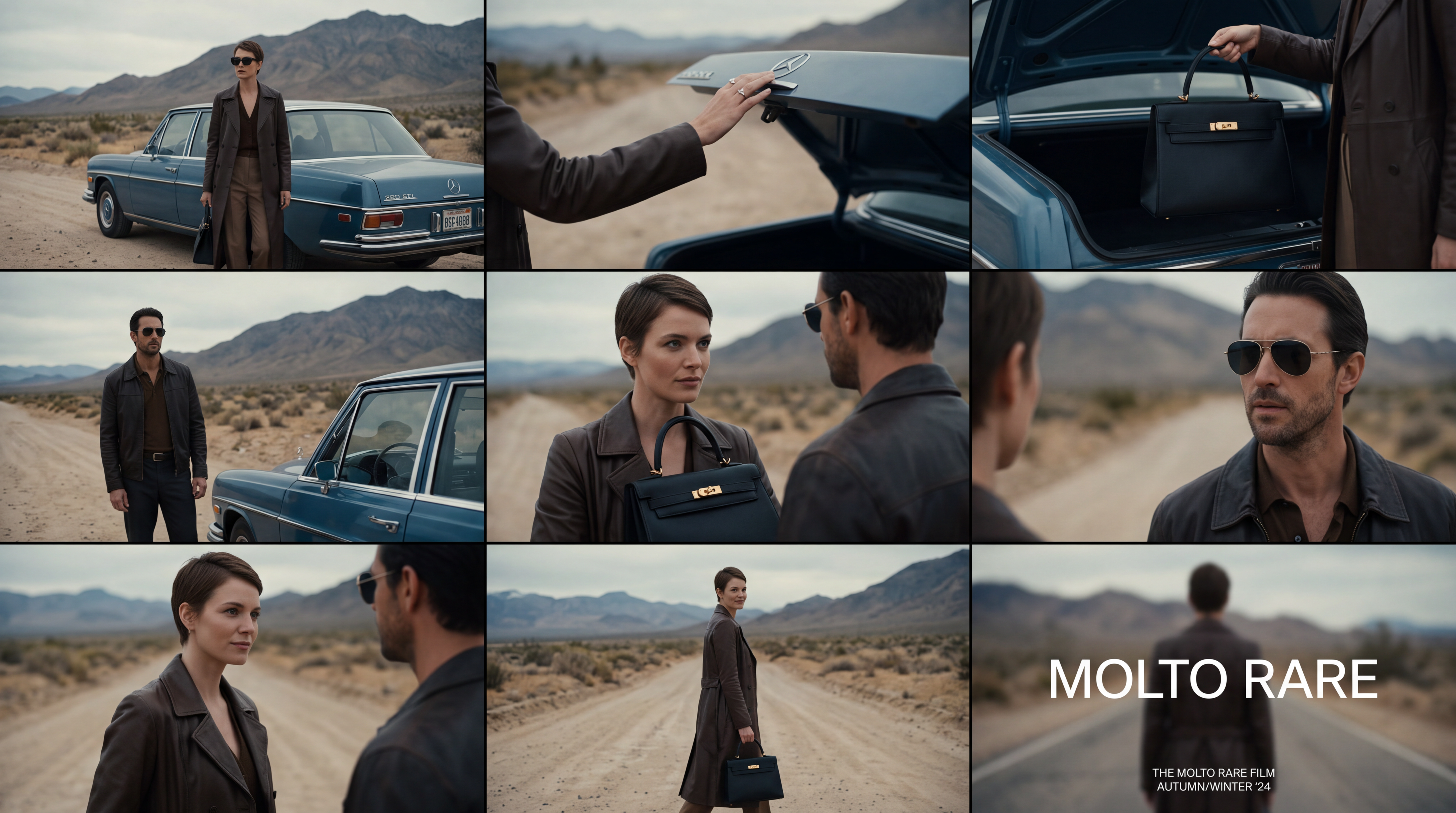
Create a premium 16:9 landscape fashion film. Use Image 1 for the overall mood, location, and film texture; Image 2 for the talent; Image 3 for the bag; and Image 4 for the closing brand mark. Keep the story simple: beside a vintage car on a desert highway, a woman walks to the rear of the car, opens the trunk, takes out a black bag, shares a quiet beat with the man standing nearby, then leaves carrying the bag. Integrate the clothing and bag naturally into the performance so they feel like part of the characters' identity.
Four images, four distinct jobs. This is the single most repeated habit across every strong multi-reference prompt in this guide: name what each asset is for rather than letting the model guess.
 Multi-role fashion campaign (Reference to Video)
9. Identity-locked stylized short (Reference to Video)
Use Image 1 as the reference for texture and mood, and Image 2 for the subject's appearance. Preserve the subject's identity: long platinum-blonde hair, narrow black vintage sunglasses, a glossy black patent-leather trench coat, a cool, self-assured expression, and orange firelight reflected across the coat. Style: fast-cut fashion film on analog stock, set against a nighttime blaze with black smoke and orange-red flames.
10. Character-locked wuxia sequence (Reference to Video)
Use Image 2 as the locked character reference. Preserve the half-up long black hair, openwork silver crown, indigo ribbon, layered pale hanfu, translucent blue outer robe, deep-blue sash, silver floral fastener, and long tassels. Use Image 1 for storyboard order and pacing. Follow the storyboard beat by beat, with natural camera movement and seamless transitions, never a slideshow.
This lists seven distinct identifying details in one sentence. That level of specificity is what actually holds a costume together across camera angle changes; a single word like "elaborate robes" doesn't give the model enough to anchor to.
11. Fashion transformation walk (First & Last Frame)
Use the first uploaded image as the exact opening composition and the second uploaded image as the exact final composition. A young woman in a denim jacket and ripped jeans walks down a grand marble staircase. As she descends, her casual outfit gradually transforms into a sleek illuminated futuristic gown with flowing light trails, while the staircase lighting shifts from daylight to cool neon. Keep her face, hair, and downward walking motion consistent throughout. One continuous forward-facing camera, physically ordered transition, no sudden cuts.
12. Character promo, strict reference (Reference to Video)
Create a character promo for a lead role. Use Image 2 as a strict identity reference. Preserve the same face, hairstyle, body proportions, costume design, material detail, and polished aesthetic throughout.
13. Romantic interior scene with sound design (Reference to Video)
Use Image 1 for the male lead. Photoreal, cinematic live action, framed in a frontal close shot. Set the scene in the intimate red-and-black interior from Image 2: dim, low-saturation, luxurious, softly defocused background. The man lounges on a red velvet sofa, leaning back with effortless composure. Beside him sits a cut-crystal tumbler holding amber whiskey with fine condensation on the glass. Sound design: ice lightly tapping crystal, a faint cigar burn, subtle room air, clothing movement, and controlled breathing.
Since Hailuo 3.0 generates audio in the same pass as the video, sound direction belongs in the prompt itself, not left to chance. This example treats it with the same specificity as the visual description.
Cinematic and Title Sequence MiniMax H3 Prompts
Mood and typography direction differ from product or character work in one key way: there's usually nothing physical to preserve, so these prompts lean harder on visual-style vocabulary and, in several cases, explicit rules about what must never appear.
14. Epic title sequence (First & Last Frame)
Epic theatrical space-opera teaser. Keep the pace fast and the scale enormous without letting the edit drag. Use sharp hard cuts, a shaking command deck, white-hot flashes, split-second black frames, and a violent jump-to-warp impact. Title cards should use wide-tracked cinematic typography, not pure white, with restrained material texture, subtle illumination, and a faint edge glow. Animate the titles by emerging from deep-space shadow, catching a sweep of starlight, opening their letter spacing, and flashing briefly against black.
15. Animated key art (First & Last Frame)
Animate the source artwork as a motion poster while preserving its white gallery border, inner frame, red/white/black palette, 3D collectible-figure look, and original layout. Add a light, playful type-on sound whenever text appears.
16. Claymation action leap (First & Last Frame)
Claymation. A fox sprints to the edge of a cliff and launches without hesitation, making a dramatic heroic leap in slow motion over an immense lava canyon. Midair, the camera races beneath the fox's belly in a bold dynamic move, revealing the terrifying depth of the chasm and the fully extended motion of its clay body.
17. FPS gameplay simulation (First & Last Frame)
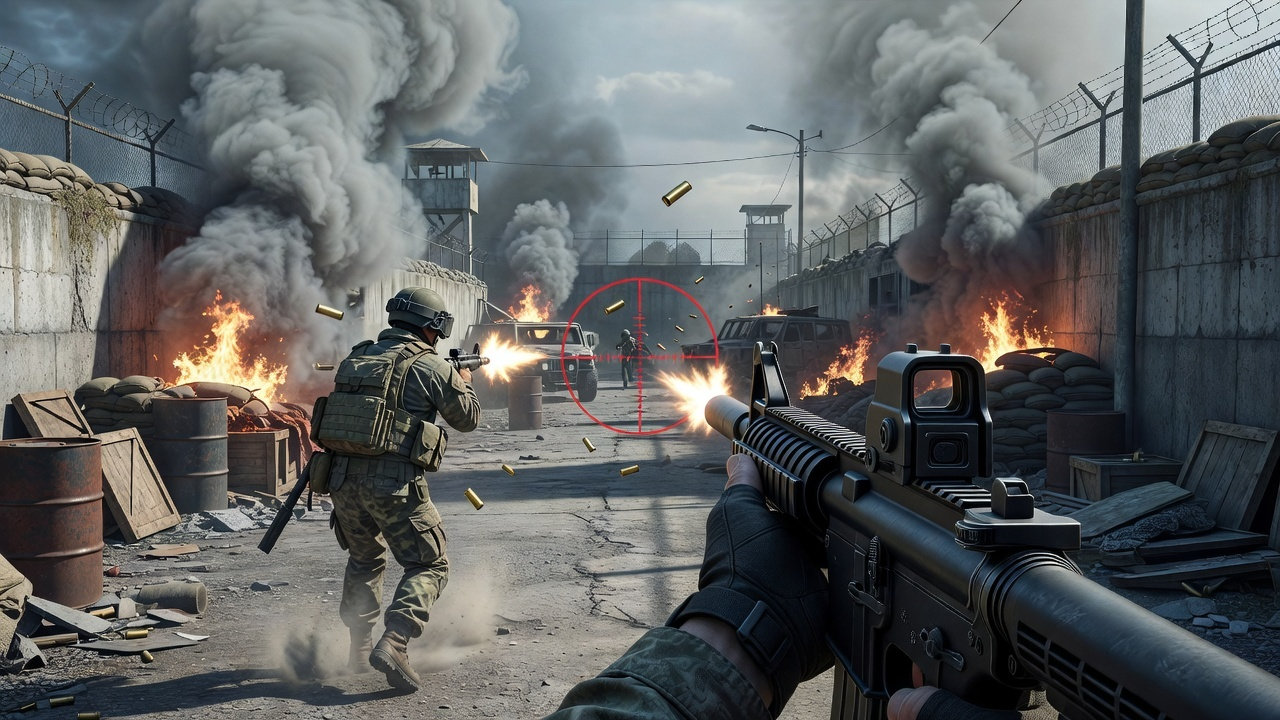
Camera: first-person, eye level, handheld gameplay. Simulate a player operating a modern-warfare FPS, holding an assault rifle and advancing slowly around the perimeter of a military base. Sweep the reticle across the passage ahead, pause to fire several rounds at a distant target, then continue pushing forward like authentic player-controlled footage. Lighting: cool natural light mixed with smoke and firelight.
 FPS gameplay simulation (First & Last Frame)
18. Otome-style interface transition (First & Last Frame)
Use the first image as the exact opening frame and the second as the exact ending frame. Create a transition within a premium visual-novel interface, capturing an intimate backstage moment before and after a performance. Reveal UI copy, choices, and dialogue boxes with refined game motion design. Keep transitions fluid and the romantic tension suggestive but restrained.
19. Title sequence with strict typography rules (Reference to Video)
Create a 15-second, 16:9 opening-title sequence for a stylish crime mystery. Draw from retro Japanese animation titles, hard-edged silhouettes, comic-book collage, asymmetric split screens, and English credit typography. Credits must be clean and legible. Do not introduce Chinese text, garbled characters, or misspellings. Each role and each name appears once only. Keep every transition crisp, rhythmic, and collage-driven. No soft dissolves or fluid morphs.
Five separate negative instructions in one prompt. Title and credit sequences are exactly where things most commonly go wrong (garbled text, duplicated names, an unwanted transition style), so this prompt spends more words ruling things out than describing what should happen.
20. Style-matched music video, image reference only (Reference to Video)
Style: dark-pop / cyber-grunge / rap music video with photoreal high-fashion polish and the texture of a scanned film magazine, high contrast without looking cheap. Reference late-1990s to early-2000s indie magazines, photocopies, film scans, and zine collage. Add coarse grain, subtle gate weave, halftone dots, and slight scan misregistration. Keep the edit fast and use hard cuts only, no fades or soft transitions.
20 Video, Audio, and Text-Only Hailuo H3 Prompts
Every prompt in this section either edits an existing clip, transfers motion or voice from video or audio, or generates purely from text with no reference media at all. These split into four categories: pure text-to-video, motion and performance transfer, voice cloning, and precise editing of footage you already have.
Pure Text-to-Video Prompts
When there's no reference media at all, the entire burden of description falls on the prompt. The four examples here show how much specificity that actually requires; none of them are short.
21. Speeder chase, single continuous shot (Text to Video)
Speeder chase across a cliff city, single continuous shot. From a monumental cliffside city carved into stone, the camera dives toward a tiny streak of light ripping along a narrow ledge-road. Lock-on: a speeder hugging the wall at insane speed. The camera slingshots ahead, whips back, then drops tight to the rear thrusters: heat haze, grit snapping off the ledge, warning lights flashing. A collapsing balcony rains debris; the rider snaps a last-inch swerve under a falling arch, then threads through hanging laundry lines in one fluid line. One final bend and sudden calm: the camera blasts outward into a reveal of the city opening onto a boundless waterfall-fed valley, mist turning into rainbow.
This is a full continuous camera choreography written as a sequence of physical events (dive, slingshot, whip, drop, swerve, thread, blast outward) rather than named camera moves. That distinction is worth noticing across every prompt in this guide: describing what the camera physically does produces a more specific result than labeling a technique.
22. Vertical social ad, no references (Text to Video)
Create a 9:16 short-form social advertisement for a ceremonial matcha drink. A young athlete in a bright blue sports outfit and cap moves through a sunlit outdoor skate bowl, mid-stride, holding a green matcha drink. Bold layered kinetic typography reading the product name sweeps across the frame as she moves. High-energy daylight, crisp shadows, punchy saturated color, fast but readable motion. Leave clean space at the top and bottom for captions added in post-production. End on a strong action pose with the product clearly visible.
23. Hand-drawn animation over live action (Text to Video)
15 seconds, 16:9 landscape. Blend live-action footage of a small kitchen at dusk with hand-drawn luminous animation. The last sunset light lingers at the window. Shoot as if someone is filming one-handed on a phone: subtle hand tremor, hesitant close-focus pulls, backlit exposure breathing, and slightly coarse noise in the shadows. Use only room tone, cloth friction, a soft mug clink, faucet drips, and gentle electronic tones from the drawn creatures.
24. Documentary-style hybrid animation (Text to Video)
15 seconds, 16:9 landscape. Combine a live-action late-night laundromat with hand-drawn luminous animation. Keep the space quiet and faintly nostalgic. Use a one-handed phone-camera feel with visible shake, exposure fluctuation under white fluorescent light, and delayed autofocus at close range. Avoid polished commercial composition; it should feel like an authentic late-night encounter.
Motion and Performance Transfer Hailuo 3.0 Prompts
This is where Reference to Video mode does something a single-image model genuinely can't: take the actual motion, pacing, or camera rhythm from a video clip and apply it to a different subject entirely.
25. Multi-asset moodboard remix (Reference to Video, images + video)
Use Images 1–6 as assets. Match Reference Video 1 closely for shot rhythm, transition language, and music.
Six images and one video, and the entire instruction is two sentences. When the reference assets already carry most of the creative direction, the prompt's job shrinks to assigning roles rather than describing content from scratch.
26. Live-action to stylized transformation (Reference to Video)
Preserve the buildings, pedestrians, and overall environment in Video 1 as photoreal live action. Transform only the trees and cars into 3D pixel-art or voxel-block objects, using Image 1 as the visual reference. Keep their motion physically correct, and preserve the real environment's shadows and transmitted light.
27. Performance transfer onto a new character (Reference to Video)
Match the character motion, expressions, and performance timing in Image 1 closely to Input Video 1. At the sink, the man hands a washed plate to the woman. He turns, then suddenly flicks dish-soap foam at her. Startled, she immediately retaliates. They laugh, dodge, and playfully throw foam back and forth.
28. Dance motion transfer (Reference to Video)
Use Video 1 as the motion reference for a street-dance performance. Use Images 1 and 2 as the character references.
29. Motion recreation with subject swap (Reference to Video)
Match the action in Video 1 from a locked-off wide camera. Replace the three suited men with three highly photoreal capybaras. Preserve the original movement path exactly: all three drop quickly to the floor, then rotate positions to form a pyramid. Keep the camera fixed and integrate fur, lighting, and shadows realistically.
30. Motion reference with separate identity (Reference to Video)
Create a 9:16 high-fashion editorial using the uploaded model images for identity and wardrobe. Use the reference video only for pose timing and camera rhythm. Two models stand against a clean white studio backdrop wearing wraparound sport sunglasses. They shift through a slow sequence of confident poses in sync. Preserve each model's face, skin tone, outfit construction, and sunglasses design. Match the reference clip's pacing without copying its background.
The phrase "without copying its background" is doing real work here. Motion references carry more than just motion; camera style, lighting, and setting can bleed through unless the prompt explicitly excludes them.
31. Macro-to-landscape morph (Reference to Video)
Push in rapidly toward the milk foam, cocoa particles, and dark liquid texture on the coffee until particles, bubbles, and ripples fill the frame. At the exact moment when the cocoa particles and coffee swirl closely resemble the dune ridges in Image 2, transition seamlessly into the desert landscape. No tearing, black frames, hard cuts, or compositing seams. One continuous shot with no visible edit.
Voice Cloning MiniMax H3 Prompts
Native audio generation means a reference audio clip can define a character's actual voice, not just background sound. Both examples here pair the audio reference with a video or image, since audio alone is never accepted as the sole input.
32. Voice cloning onto a character (Reference to Video)
The character says: "Follow the wind, live free. Leave worries behind, enjoy the moment." Match the voice in Audio 1.
33. Dialogue replacement with a new voice (Reference to Video)
In Video 1, replace the woman's line, "There's no way we can be together. It's not that I don't love you; we simply can't make it to the end.", with the line from Audio 1: "Please don't go. This time, let's not let each other go." Adjust the performance subtly to match the new dialogue.
Precise Video Editing Prompts for Hailuo 3.0
These prompts all edit footage that already exists rather than generating something new, and the pattern across every one of them is the same: name the exact change, and name what stays the same.
34. Simple object replacement edit (Reference to Video)
Replace the cat in the video with a dog.
35. Adding a synced character to existing footage (Reference to Video)
Add one person on the left side of frame wearing the same team uniform and moving in sync with the others.
36. Precise subject and wardrobe swap (Reference to Video)
Replace the child at the back of Video 1 with the golden retriever from Image 1. Replace the khaki jacket worn by the child on the far left with the denim jacket from Image 2.
37. Green-screen environment swap (Reference to Video)
Remove the green screen background of Video 1 and turn it into a fairy tale-like background similar to Video 2. The background elements need to completely match the actions of the characters in Video 1. Modify the lighting of the characters in Video 1 so that it completely matches the background.
38. Lighting-only edit (Reference to Video)
Change the lighting in the reference video from daytime to night.
39. Background replacement through a window (Reference to Video)
Replace the view outside the window in Video 1 with Image 1.
40. Multiple simultaneous edits in one pass (Reference to Video)
In the reference video: replace the newspaper with a green hardcover book; replace the chair with a red sofa; remove the subject's sunglasses and reveal a clear face; remove the burning-car effect and restore the vehicle to normal; replace the photograph taken from the coat with a small black notebook; and add a tree on the left side of frame.
This last prompt lists six distinct edits in a single request, and each one follows the same replace-X-with-Y structure. That consistency is what lets one editing pass handle several unrelated changes without the instructions becoming ambiguous about which change applies where.
The Pattern Across All 40 Hailuo 3.0 Prompt Examples
Stepping back from the individual examples, a few habits hold true across nearly every one of these Hailuo 3.0 prompt examples, and they're worth treating as a checklist for your own MiniMax H3 prompting rather than just something to notice in passing.
- Every reference gets an assigned job. "Image 1 for mood, Image 2 for the talent, Image 3 for the product" appears constantly, never just a stack of images with one shared description.
- Edits are written as substitutions, not vague instructions. "Replace X with Y" and "keep Z unchanged" produce a targeted change; "make this better" does not.
- Negative direction is doing real work. "No soft dissolves," "do not introduce Chinese text," "do not add other people" all show up because stating what shouldn't happen keeps the result from drifting into an adjacent look.
- Anything longer than one beat gets timecoded. Prompt 6 above is the clearest example: distinct bracketed time ranges rather than one continuous paragraph.
- Identity gets described, not just referenced. Naming the exact hair, garment, and accessory details (prompt 10) gives the model something concrete to hold onto across a full clip.
- Motion references need explicit boundaries. Prompt 30 shows why: a reference video carries more than motion alone, and the prompt has to say what shouldn't come along with it.
Once you have a clip you're happy with, an AI video editor handles trims and final polish before publishing. And if a specific brief consistently underperforms no matter how the prompt is restructured, it's worth testing the same shot on a hub covering multiple video models, comparing against Seedance 2.0, Kling 3.0, or Veo 3.1, since some briefs suit one model's strengths over another's regardless of how carefully the prompt is written.
Conclusion
The 40 prompts in this Hailuo 3.0 prompt guide cover nearly every practical use case MiniMax H3 supports: brand films, product reveals, UI animation, character consistency, motion transfer, voice cloning, and precise editing of footage you already have. The pattern underneath all of them is simple even when the prompts themselves get long: assign every reference a job, write out edits as explicit substitutions, and say plainly what shouldn't happen.
Hailuo 3.0 gives you all three modes from one workflow, and MiniMax H3 vs Hailuo 2.3 covers the underlying specs if you're deciding which Hailuo version fits your project. For pricing across the Hailuo line, see Hailuo AI pricing, and for the full setup walkthrough, how to use Hailuo AI covers getting started from scratch.
Frequently Asked Questions
What's the difference between the image-based and video-based prompts in this guide?
Image-based prompts (Part 1) generate an entirely new shot from image references, either as a First & Last Frame pair or as identity, style, and product references. Video-based prompts (Part 2) either transfer motion or voice from existing media, edit a clip you already have, or generate from text alone with no reference media at all.
Can I mix an image reference with a video reference in the same prompt?
Yes, in Reference to Video mode, images, video clips, and audio can all appear in the same request, up to 9 images, 3 video clips, and 3 audio clips, 12 files total. What you can't do is combine that reference mode with First & Last Frame mode in a single request.
Do I need to write prompts this long for good MiniMax H3 prompting results?
Not always. Simple edits (prompts 34, 38, and 39 above) are a single sentence. Length should match complexity: a one-object edit needs one instruction, a multi-shot brand film needs a full shot list.
What's the easiest type of Hailuo 3.0 prompt to start with?
A First & Last Frame prompt with one clear transition, like prompt 2 or 3 above. It's the smallest possible test of the model's motion generation before adding reference images, video, or audio into the mix.
Can Hailuo 3.0 clone a specific voice?
Yes, through Reference to Video, using an audio clip as a voice reference, shown in prompts 32 and 33 above. The audio reference must be submitted alongside at least one image or video reference.
Why do so many of these prompts include negative instructions?
Because stating what shouldn't happen is one of the more reliably effective techniques for this model. A stylized prompt without any negative direction is more likely to drift into an adjacent genre or reintroduce a detail you specifically wanted excluded, garbled text, an extra person, an unwanted transition style.
Arooj Ishtiaq
Arooj is a SaaS content writer specializing in AI models and applied technology. At ImagineArt, she creates sharp, product-focused content that helps creators and businesses understand, adopt, and get real value from AI tools.