
Tooba Siddiqui
June 29, 2026 • Updated June 29, 2026
15 mins Read
Your Reel can have the right idea and still look wrong after upload. The Instagram Reels aspect ratio decides whether your video fills the screen, keeps captions readable, avoids awkward crop, and leaves enough room for buttons, text, product names, and CTAs. The safest format is vertical 9:16, but the real work starts before export.
As of 2026, Instagram has not changed Reels dimensions — 9:16 at 1080×1920 remains the current standard, and this guide reflects current upload behavior.
According to Meta, Reels account for more than 50% of the time people spend on Instagram. A format mismatch — wrong aspect ratio, cropped subject, or covered CTA — affects every one of those views.
This guide explains the best Instagram Reels aspect ratio, size, resolution, safe zones, cover crop, and AI workflow so your Reels look clean where people actually watch them.
For Instagram Reels: vertical is not a preference. It is the format.
What Is the Best Instagram Reels Aspect Ratio?
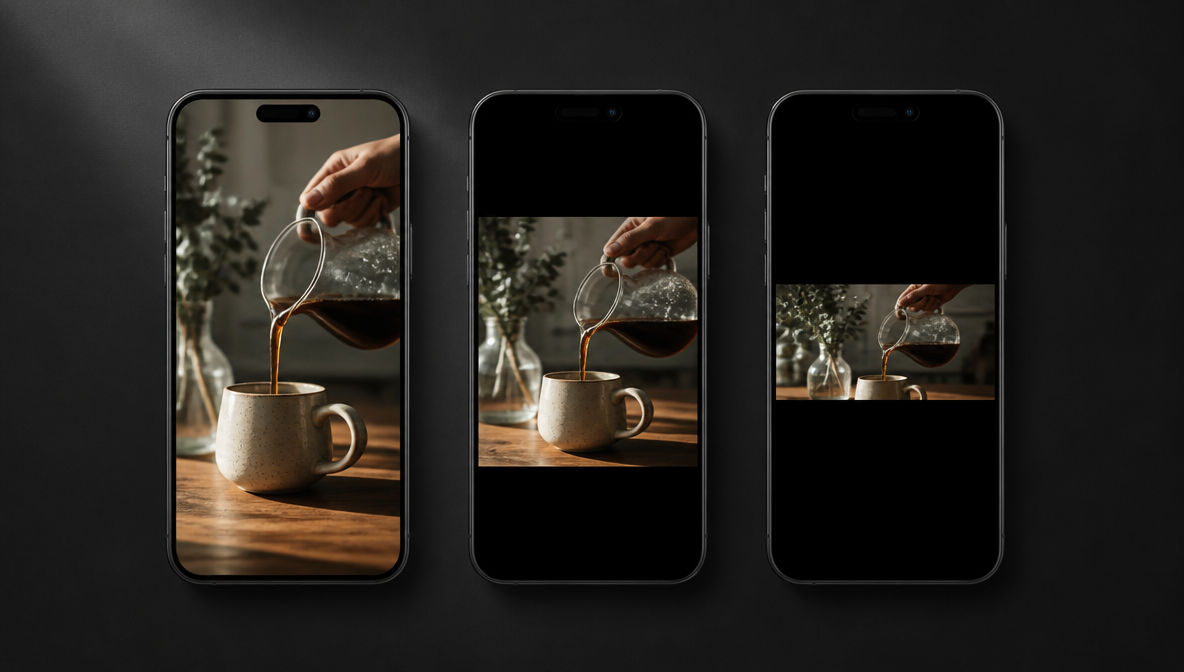 Instagram Reel aspect ratio preview generate by ImagineArt AI image generator
The best Instagram Reels aspect ratio is 9:16.
That means the video should be vertical, full-screen, and designed for mobile viewing. The most common export size for this format is 1080 x 1920 pixels.
Use this setup:
- Aspect ratio: 9:16
- Common export size: 1080 x 1920 pixels
- Orientation: Vertical
- Format: MP4 or MOV
- Frame rate: 30 fps or higher if your editor supports it cleanly
- Text placement: Away from the top and bottom UI areas
The Instagram Reels aspect ratio matters because Reels do not behave like square feed posts. People watch them full-screen, scroll fast, and expect the video to fit the phone screen without black bars or cropped subjects.
If you upload a square or wide video, Instagram may still accept it, but the final result can look weaker. You may get empty space, awkward crop, hidden captions, or a product that feels too small on mobile.
| Format | Aspect Ratio | Result on Upload |
|---|---|---|
| Vertical (recommended) | 9:16 | Full screen, no crop or black bars |
| Portrait | 4:5 | Slight crop top and bottom |
| Square | 1:1 | Black bars top and bottom |
| Landscape | 16:9 | Pillarboxed, subject appears small |
For most creators, brands, and marketers, 9:16 should be the default Instagram Reels aspect ratio from the start.
Instagram Reels Size, Dimensions, and Resolution
Instagram Reels size and Instagram Reels aspect ratio work together. The aspect ratio controls the shape of the video. The resolution controls how sharp the video looks inside that shape.
For most Reels, use:
- 1080 x 1920 pixels for standard vertical export
- 9:16 aspect ratio
- MP4 or MOV file format
- Clear audio if the Reel depends on sound
- Captions if the Reel needs to work without sound
You can export higher than 1080 x 1920 if your workflow supports it, but the final upload still needs to stay vertical. A higher-resolution 9:16 file can help with sharpness, but a poor edit, bad lighting, or low-quality source clip can still look soft after upload.
Do not create the video in a random canvas and resize it at the end. Build the Reel in the correct Instagram Reels aspect ratio before adding captions, products, faces, logos, stickers, and CTA text. That saves time because you do not need to move every text layer after export.
Why 9:16 Works Best for Instagram Reels
A 9:16 Instagram Reels aspect ratio fills the full mobile screen.
That gives your video more visual presence and removes the extra black space that appears when a wide or square video does not fit the viewing area. It also helps the subject feel larger, which matters for faces, products, text overlays, and UGC clips.
9:16 works especially well for:
- creator videos
- product demos
- UGC ads
- vertical video ads
- tutorials
- product reveals
- behind-the-scenes clips
- AI-generated videos
- short explainers
- offer videos
The Instagram Reels aspect ratio also affects pacing. In vertical video, viewers see less horizontal space, so the subject, product, and text need to stay clear and centered.
A wide composition may work on YouTube, but it often looks weak inside Reels. The product may appear too far away, the face may sit too low, or the text may compete with Instagram buttons.
Design for 9:16 first. Then adjust the subject, text, and CTA for how people actually watch Reels.
The same 9:16 format applies to TikTok and YouTube Shorts. If you publish across platforms, the TikTok aspect ratio guide and YouTube Shorts aspect ratio guide cover where safe zones and upload specs differ between platforms.
Instagram Reels Safe Zone: Where to Place Text, Captions, and CTAs
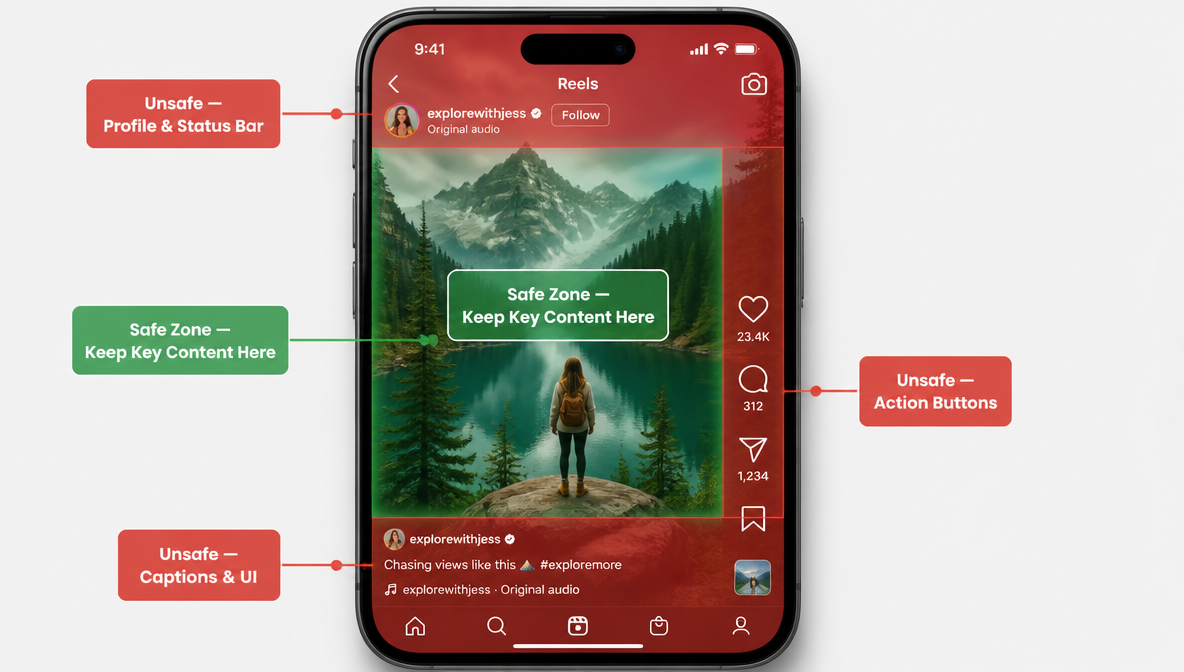 Instagram Reels safe zone instructions, generated by ImagineArt AI image generator
The Instagram Reels aspect ratio gives you a full vertical frame, but not every part of that frame is safe for text.
Instagram adds interface elements over the video. Profile name, caption text, like button, comment button, share button, audio label, and other UI elements can cover important details.
Keep key content away from:
- the very top of the frame
- the bottom caption area
- the right-side action buttons
- the lower center where captions or CTA text may sit
- the edges where feed previews can crop
For a 1080×1920 export, keep key content within these boundaries: at least 270px clear at the top (14% of frame height), 385px clear at the bottom (20% of frame height), and 85px clear on the right side (8% of frame width). Everything important should sit in the center 66% of the frame.
Place important text in the center area, slightly above the lower caption zone.
For product videos, keep the product near the center. For UGC videos, keep the face and hands inside the safe area. For Reels ads, keep the CTA visible but not too close to the bottom.
A good Instagram Reels safe zone protects:
- product names
- discounts
- CTA text
- subtitles
- logo
- face
- product label
- demo steps
- before-and-after labels
Do not place your most important message at the bottom of the video. That is where Instagram UI usually creates the most problems.
If you are creating Reels-style ads, ImagineArt AI Ad Studio helps you plan vertical ad formats from the start instead of forcing a horizontal concept into a Reel later.
Instagram Reels Cover Size and Feed Preview Crop
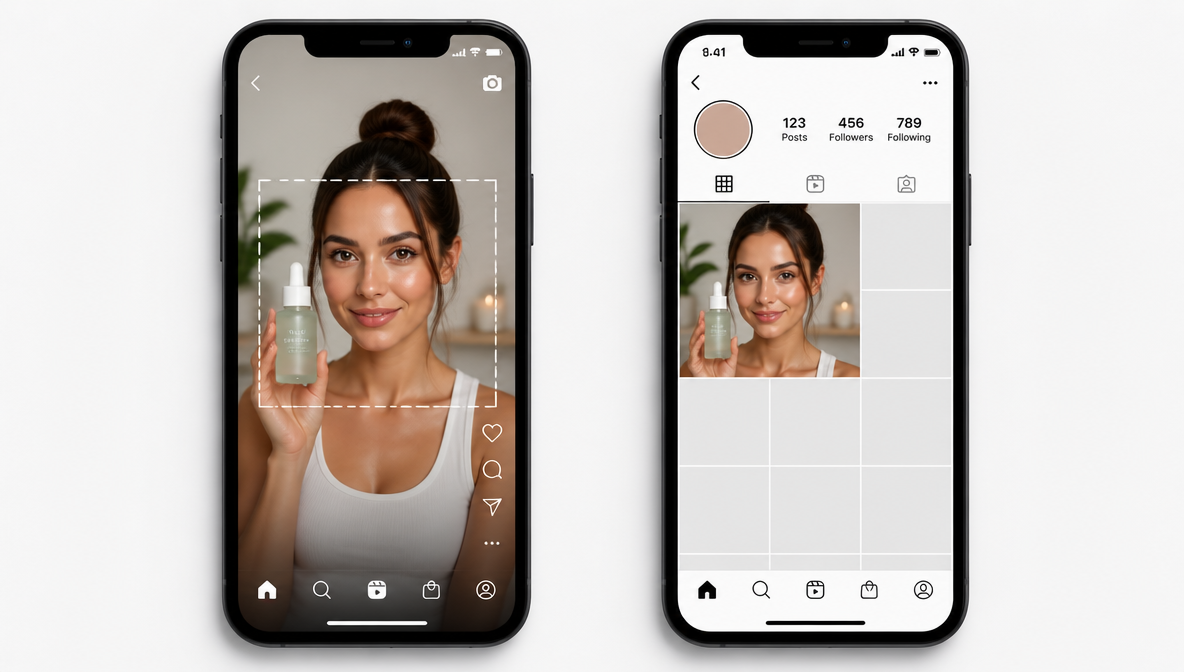 Instagram Reel cover size preview generated by ImagineArt AI image generator
The Instagram Reels aspect ratio for the full video should stay 9:16, but the cover and feed preview need extra planning.
Your Reel may appear in multiple places:
- full-screen Reels tab
- profile grid
- main feed
- Explore
- shared previews
- ad placements
The full Reel uses vertical viewing, but the preview can crop differently depending on where it appears.
The profile grid crops your cover to a 1:1 square from the center of the 9:16 frame. On a 1080×1920 video, the grid shows a 1080×1080 square taken from the vertical center of the frame. Any subject or text sitting above or below that center square will be cut off in the grid view — even if it looks correct in full-screen Reels view.
That is why the cover frame needs a centered subject and readable text. If your title sits near the top or bottom, the profile grid or feed crop may cut it off.
Use a cover design with:
- centered face or product
- short title
- readable text
- no tiny captions
- no important text near the edges
- strong first frame
- clean visual contrast
The Instagram Reels cover size is usually designed as a vertical 9:16 image or frame, but the profile grid preview automatically crops them tighter to a 3:4 rectangular thumbnail. Keep the main subject and title inside the center area so the cover still works after cropping.
Do not treat the cover as an afterthought. A weak cover can lower clicks even when the actual Reel is strong.
Best Instagram Reels Aspect Ratio by Use Case
The best Instagram Reels aspect ratio stays 9:16 across most use cases, but the way you design inside the frame changes.
A creator talking to camera, a product demo, a UGC ad, and an AI-generated video should not use the same layout.
| Content Type | Aspect Ratio | Why It Works | When to Use | Cross-Platform |
|---|---|---|---|---|
| Creator / talking head | 9:16 | Face fills full screen, natural eye contact | Tips, reviews, tutorials, stories | Reels, TikTok, YouTube Shorts |
| Product demos | 9:16 | Product stays large and centered on mobile | Unboxing, reveals, before/after | Reels, TikTok ads, Stories |
| UGC ads | 9:16 | Looks native, avoids ad-like framing | DTC campaigns, social proof | Reels, TikTok, paid social |
| Tutorials with screen content | 16:9 | Horizontal space for steps and detail | Software walkthroughs, explainers | YouTube main feed; crop carefully for Reels |
| Brand announcements | 1:1 | Versatile across feeds and Stories | Launches, campaign reveals | Instagram feed, Facebook, LinkedIn |
| AI-generated Reels | 9:16 | Native format prevents post-gen crop | Automated content, product ads | Reels, TikTok, paid social |
For Creator Reels
For creator Reels, use 9:16 and keep the face in the upper-middle area.
The eyes should not sit too close to the top edge. Leave enough room for captions, gestures, and product placement if the creator holds something.
This works well for:
- tips
- reviews
- tutorials
- personal stories
- creator-led product mentions
- mini explainers
If you are creating creator-style marketing content, ImagineArt AI UGC Creator can help build vertical UGC videos with product details, avatar-style presentation, and short-form structure.
For a deeper UGC workflow, use the ImagineArt guide on How to Create Realistic AI UGC Videos before building creator-style Reels.
For Product Reels
For product Reels, the Instagram Reels aspect ratio should keep the product large enough to see clearly.
Do not place the product too low. The bottom UI can cover the label, offer, or CTA. Keep the product centered, and keep the most important selling point slightly above the lower third.
Product Reels work well for:
- product demos
- unboxing clips
- product reveals
- before-and-after visuals
- offer videos
- ecommerce ads
- product page videos
ImagineArt AI Product Video Generator works well when you need a product-first vertical video for Instagram Reels, product pages, or paid social campaigns.
If your product page already has the needed details, ImagineArt URL to Video Ad Maker can turn a product URL into a vertical video ad workflow.
For product-led ad strategy, the ImagineArt blog on How to Turn a Product URL into a Video Ad with AI gives useful context before you create Reels from product pages.
For Instagram Reels Ads
For Reels ads, use the same 9:16 Instagram Reels aspect ratio, but design with stronger safe zones.
Ads need to communicate faster because the viewer did not ask to see them. The hook, product, offer, and CTA should appear early and stay readable.
A strong Reels ad layout includes:
- bold hook near the center
- product visible in the first few seconds
- clear benefit text
- captions for sound-off viewing
- CTA before the final frame
- logo or product name placed safely
- no key text under the UI buttons
For paid social, the ImagineArt guide on How to Make Video Ads with AI for High ROAS can help you connect the right format with stronger campaign performance.
If you are unsure which ad format to use, the ImagineArt blog on AI Ad Formats: UGC, Product Demos, Unboxing & More gives useful examples for Reels-style campaigns.
For AI-Generated Reels
For AI-generated Reels, choose the Instagram Reels aspect ratio before generation.
Do not generate a wide cinematic shot and crop it later unless you have to. The subject may move out of frame, captions may lose space, and the product may become too small.
With ImagineArt AI Video Generator, create vertical video ideas for Reels from the beginning. This helps the AI frame the subject, product, motion, and scene around the mobile screen.
A good prompt should mention:
- vertical 9:16 video
- Instagram Reel format
- centered subject
- safe space for captions
- product placement
- CTA space
- video mood
- platform use
Prompt example:
“Create a vertical 9:16 Instagram Reel for a skincare product. Keep the product centered, leave space for captions in the middle, show a clean bathroom counter, soft morning light, and a final frame with room for a Shop Now CTA.”
That gives the AI the right layout before it creates the video.
How ImagineArt Creates Instagram Reels in the Right Format
The easiest way to avoid Instagram Reels aspect ratio problems is to create the video in the correct format from the start. ImagineArt AI Video Generator handles the formatting requirements automatically so you focus on the content, not the specs.
Vertical-First, Always
Most AI video generators for Instagram Reels like ImagineArt create all vertical content natively in 9:16 format. No rotation, no resizing after the fact — the correct aspect ratio is set before generation begins. The subject, product, and scene are framed for mobile from the first frame.
Safe Zone-Aware Layout
ImagineArt AI Ad Studio places captions, product names, and CTAs within the Instagram safe zone automatically. Key content stays away from Instagram's UI buttons, profile name area, and bottom caption zone — without manual repositioning between drafts.
Export-Ready for Instagram
Final exports output in full 1080×1920 MP4 using H.264 — Instagram's preferred format — without requiring format conversion or re-renders before upload. Audio outputs at AAC 192 kbps or higher for clean sound-on and sound-off performance.
Flexible Workflow
Start with a goal — educate, sell, introduce, explain, entertain, or retarget — then choose the format:
- UGC Reel
- product demo
- product reveal
- short explainer
- offer video
- tutorial
- ad creative
- behind-the-scenes clip
Use ImagineArt AI Video Editor when your Reel needs cleanup, editing, scene changes, object changes, or stronger pacing before export. Generate two or three versions, review the first frame and cover frame, then export for Instagram.
Common Mistakes with Instagram Reels Aspect Ratio
- The first mistake while making an Instagram Reel is choosing the landscape format.
A 16:9 video can look polished on desktop, but it usually feels small inside Instagram Reels. Cropping it later can cut faces, hands, captions, or products.
- The second mistake is placing text too low.
Instagram UI can cover bottom text, captions, product names, discount codes, or CTAs. Keep text away from the bottom and right-side button area.
- The third mistake is ignoring the cover crop.
Your Reel may look fine in full-screen view but awkward in the grid or feed preview. The grid crops to a 1:1 square from the center of the frame. Keep the cover subject and title inside that center area.
- The fourth mistake is using tiny captions.
A caption that looks readable in your editor may feel too small on a phone. Use fewer words and larger text.
- The fifth mistake is designing only for the video, not the viewer.
Reels get watched quickly. Put the hook, product, or key message early. Do not make people wait for the point.
- The sixth mistake is fixing the Instagram Reels aspect ratio after editing.
By that point, every layer needs adjustment. Start in 9:16 and keep the layout vertical from the first frame
Instagram Reels Export Checklist
Before uploading, check your Reel like a viewer, not like an editor.
| Setting | Recommended Value | Notes |
|---|---|---|
| Aspect ratio | 9:16 | Required for full-screen Reels; other ratios get black bars or crop |
| Resolution | 1080 x 1920 px | Minimum for sharp upload; higher resolutions accepted but compressed on delivery |
| Frame rate | 30 fps | 60 fps supported; avoid variable frame rate — causes playback issues after upload |
| File format | MP4 | Most reliable across all editors and upload workflows |
| Video codec | H.264 | H.265 may cause upload errors on some devices; stick with H.264 |
| Audio codec | AAC | MP3 not recommended; AAC gives cleaner compression at lower file size |
| Audio bitrate | 192 kbps or higher | Lower bitrates sound compressed, especially on louder audio or music |
| Video bitrate | 3,500–5,000 kbps | Below 3,500 kbps produces visible compression artifacts after Instagram re-encodes |
| Max file size | 4 GB | Files above this limit will fail to upload |
| Max video length | 90 seconds | Clips longer than 90 seconds will be rejected at upload |
| Color space | sRGB | Rec. 709 also accepted; avoid wide-gamut profiles — colors shift after upload |
| Captions | Burned-in or SRT file | 85% of Reels are watched without sound; captions are not optional for reach |
The Instagram Reels aspect ratio is only one part of the final result. A strong Reel also needs a clear hook, clean pacing, good framing, readable text, and a final action.
For Reels ads, the ImagineArt guide on Hook Rate vs Hold Rate can help you review whether viewers stay after the first few seconds.
Once your Reel is export-ready, the next step is getting the timing right. The ImagineArt guide on best time to post Reels on Instagram covers when to publish for maximum reach.
Ready to Create Instagram Reels with ImagineArt?
The best Instagram Reels aspect ratio is 9:16, but the best results come from planning the full frame.
Think about the subject, captions, product, UI space, cover crop, and CTA before you generate or export.
ImagineArt is one of the best tools to create vertical Reels from prompts, product images, product URLs, UGC formats, and campaign ideas. You can create the Reel, edit the video, refine the format, and prepare different versions for organic posts or ads.
Use ImagineArt Workflow when you want to connect video creation, editing, ad formats, and campaign variations inside one repeatable process.
FAQs About Instagram Reels Aspect Ratio
The best Instagram Reels aspect ratio is 9:16. This vertical format fills the mobile screen and works best for full-screen Reels viewing.
Yes, but square videos usually do not fill the full Reels screen. A 9:16 Instagram Reels aspect ratio gives a stronger full-screen result.
Use at least 1080 x 1920 pixels for clean vertical export. If your editor supports higher resolution, keep the file at 9:16 and check the final upload quality.
Place important text near the center of the frame. Avoid the very top, bottom caption area, right-side buttons, and edges where preview crops may cut the design.
The Instagram Reels safe zone is the part of the video where important text, products, faces, and CTAs stay visible without getting covered by Instagram UI. Keep key content centered and away from the bottom and right side..
Use a vertical 9:16 cover frame, commonly 1080 x 1920 pixels. Keep the subject and title centered because the grid or feed preview can crop the cover.
Instagram Reels ads should use 9:16. Keep the product, hook, CTA, and captions inside the safe area so the ad does not get covered by app buttons.
Create the video in vertical 9:16 from the start. Mention “vertical 9:16 Instagram Reel” in your prompt, keep the subject centered, and leave space for captions and CTA text.
Tooba Siddiqui
Tooba Siddiqui is a content marketer with a strong focus on AI trends and product innovation. She explores generative AI with a keen eye. At ImagineArt, she develops marketing content that translates cutting-edge innovation into engaging, search-driven narratives for the right audience.