
Zahida Misher
November 19, 2026 • Updated November 19, 2026
8 mins Read
A medium shot frames a person from about the waist up, which is exactly enough to catch a face and what the hands are doing at the same time. Pull back and the expression shrinks; push in and the gesture falls out of frame. It's the size most dialogue scenes are built on, and Wikipedia calls it the most common shot in movies.
It sits in the middle of the size range in our guide to types of camera shots, and it looks easy, but where you cut matters more than it looks. Here's how it differs from its close neighbours, six films that use it well, where to cut the frame on a phone or camera, and three ways to word an AI prompt so you can check which one holds the frame at the waist.
What is a medium shot?
A medium shot (also called a mid shot or waist shot) cuts a person off at roughly the waist, keeping facial expression, body language and some surroundings in view. That makes it the go-to size for dialogue, small groups, interviews and news presenters.
That's the medium shot definition most guides agree on, but the edges are soft. Wikipedia's medium shot entry notes the line between long, medium and close-up isn't definite, and some texts even call a full-length view a medium shot. ACMI's shot types guide says waist up "doesn't have to be exact".
In practice, the waist is the target, not a law.
Medium shot vs medium close-up, medium long and cowboy shots
Four sizes crowd around the waist, and StudioBinder separates them by where the bottom of the frame lands.
| Shot | Where the frame cuts | What it's for |
|---|---|---|
| Medium close-up (MCU) | Roughly chest up | More face, a little context |
| Medium (MS) | Roughly waist up | Face and gesture together; a buffer before the close-up |
| Cowboy shot | Roughly mid-thigh up | Named for Westerns that kept the holster in frame |
| Medium long (MLS), also medium wide or three-quarters | Just above or below the knees | More setting while staying close |
Cut at mid-thigh with no holster in sight and you've still made a cowboy shot. The Westerns just gave it the name.
Try this prompt in ImagineArt's AI video generator with Kling 4.0 at 16:9, four times, swapping only the framing phrase ("Medium close-up, chest up", "Medium shot, waist up", "Medium long shot, knees up", "Cowboy shot, mid-thigh up"): "[framing phrase]. A cook in her forties in a white jacket stands alone at a steel prep counter in a small, busy restaurant kitchen, hanging pans behind her. Eye-level camera, static, warm tungsten light and steam. No text, no watermark."
What to look for: where each frame actually cuts, and whether it creeps tighter or looser during the clip.
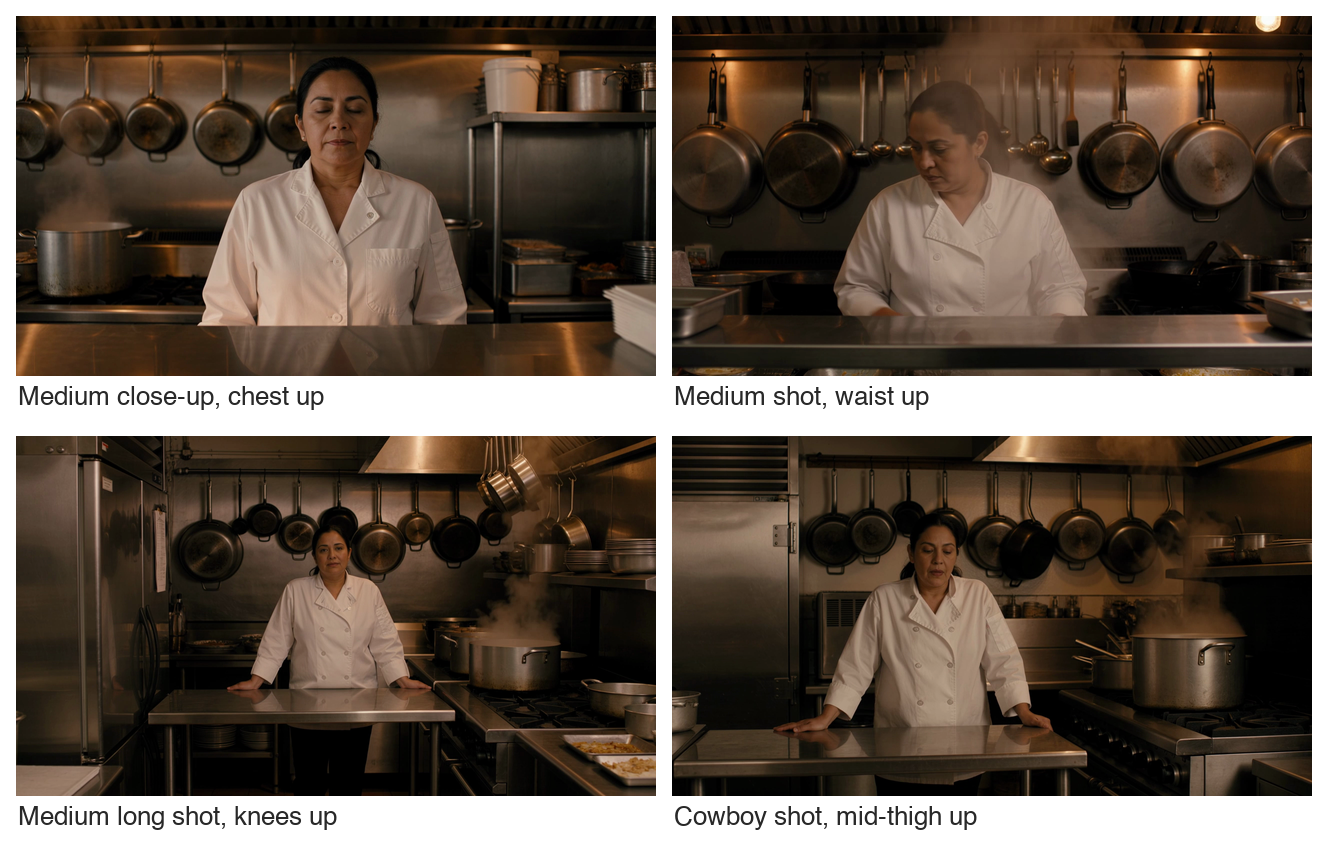 The four framing phrases side by side: chest up, waist up, knees up and mid-thigh up
 Medium close-up, chest up
 Medium shot, waist up
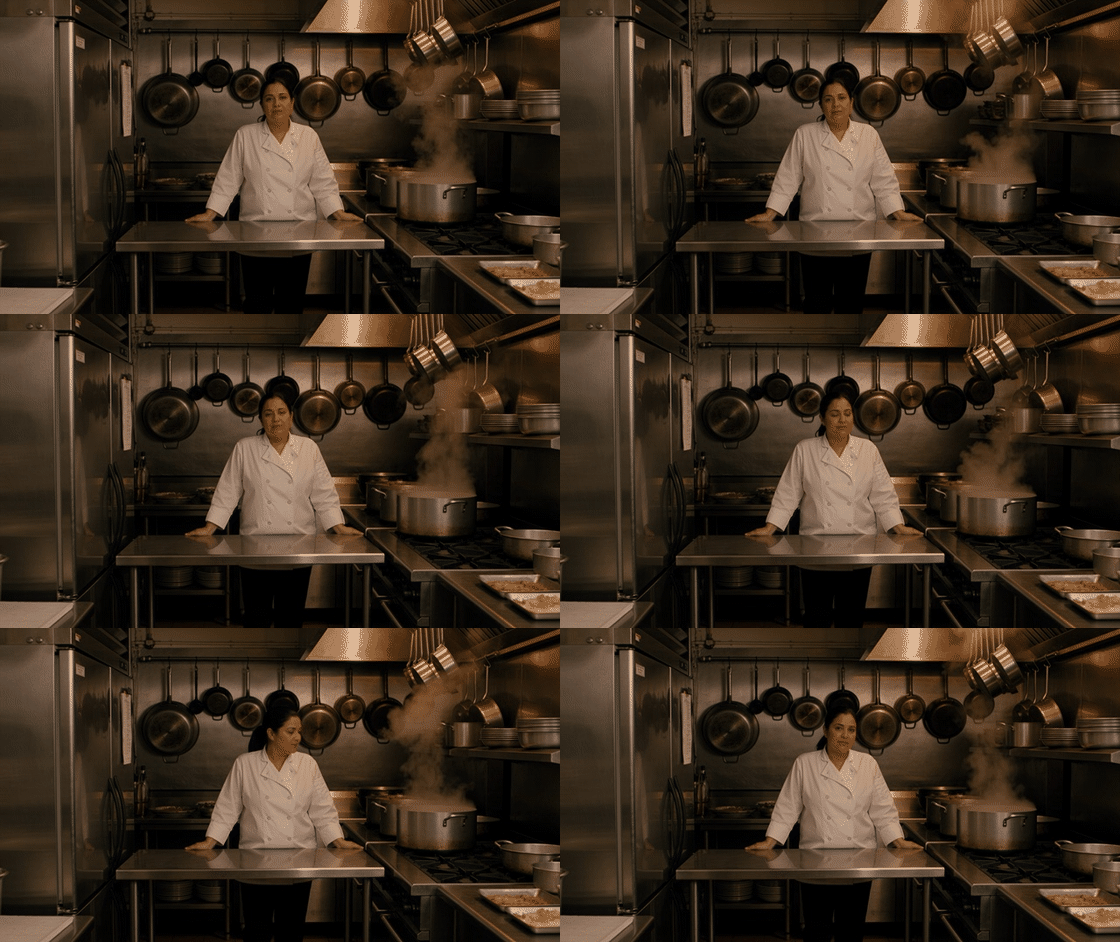 Medium long shot, knees up
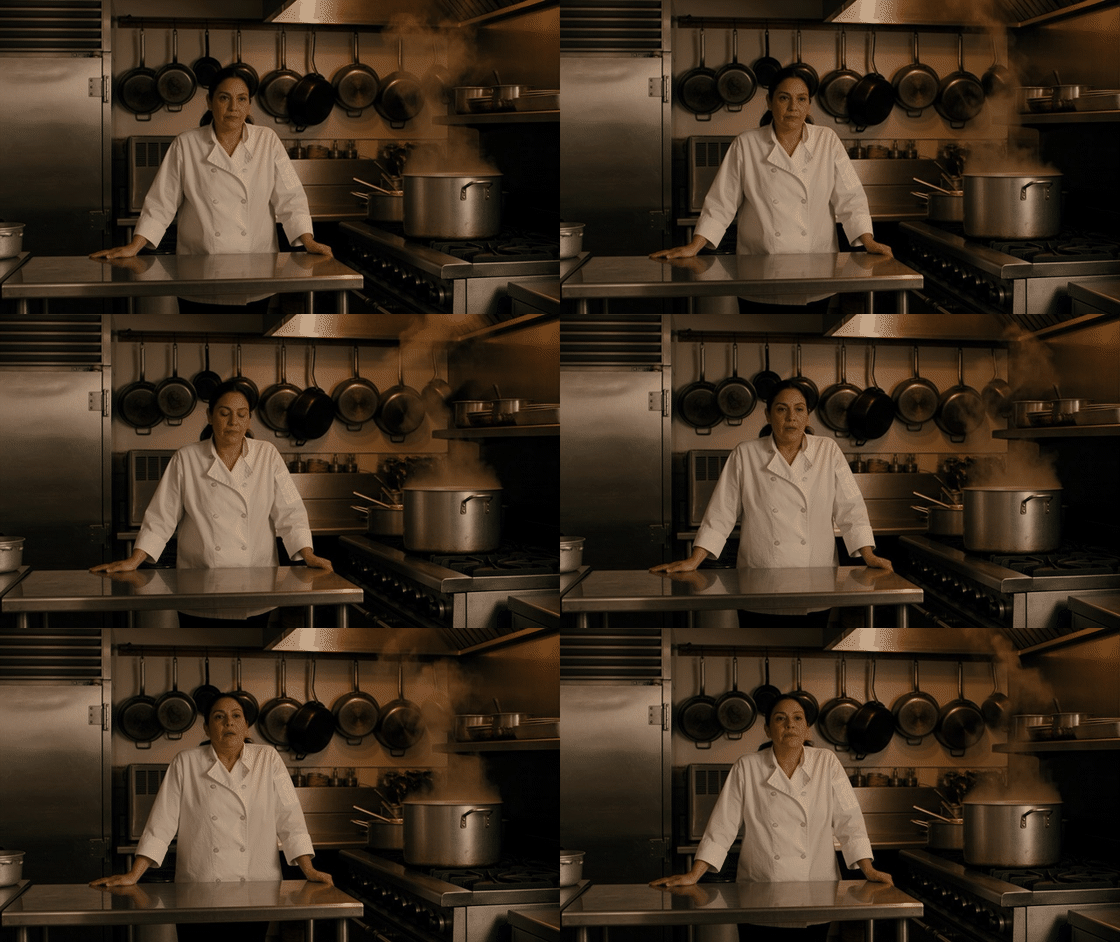 Cowboy shot, mid-thigh up
Why do filmmakers use medium shots?
Filmmakers reach for it because it shows a performance and its setting at once. You read the face, you see the hands, and you still know where everyone is standing. StudioBinder describes it as a buffer in dialogue scenes before a close-up lands the key moment.
It's also comedy's home turf: StudioBinder says the best comedies live in medium shots and medium close-ups, because the performance carries the scene.
Plan which size each line gets before you shoot: storyboard your coverage.
Medium shot examples from 6 films
StudioBinder's medium shot breakdowns supply the first four; Adobe's examples cover The Gold Rush, and ACMI adds Titanic.
The Hunger Games
In The Hunger Games, as the Capitol tries to turn Katniss and Peeta against each other, a waist-up frame keeps both in view and their bond intact. When the film finally cuts to a close-up, it lands harder because of the restraint.
Jurassic Park
The lost characters are framed waist up in the jungle, so one shot tells you where they are and how bad it's going: wounds, torn clothes and all.
Creed
Ryan Coogler and DP Rachel Morrison hold Adonis in a medium shot in the ring: not too close, so we can see him in action, and StudioBinder notes the framing resembles a sports broadcast. It's a good reminder that a medium shot in film can carry action, not just talk.
The Princess Diaries
Mia, tied to her chair to fix her posture, is surrounded by silverware choices at a fine-dining lesson. StudioBinder says the scene is shot medium so we take in every joke: too far and you miss the details, too close and you miss the jokes.
The Gold Rush
For the "potato dance" in Chaplin's 1925 silent film, Adobe says he needed a shot "wide enough to show the dancing potato feet while still close enough to capture his inimitable facial expressions."
Titanic
ACMI uses a Titanic frame as its mid shot example and points out that it also reads as a two-shot, because two characters interact in it. One size can do two jobs.
Framing it on a phone or camera
- Pick a lens. Wikipedia says a normal lens, close to what the eye sees, is usual. Sirui's lens and distance table puts the common range at 35 to 50 mm on full frame, with 85 mm for tighter, portrait-style framing and more background blur.
- Set the distance. Sirui's approximate figures for a waist-up frame on full frame: about 1.3 m at 35 mm, 1.9 m at 50 mm and 3.2 m at 85 mm.
- On a phone, choose 2x. Apple's iPhone 17 camera specs list the 2x Telephoto option at 52 mm, just past the top of that range, so you can frame waist up from a conversational distance. The 26 mm 1x lens needs you to step much closer.
- Cut above the waist, not on it. Many cinematographers frame around the navel so the edge doesn't land on the belt line, and PremiumBeat (via Sirui) advises against cutting at the waist, elbows or knees.
- Keep the camera near eye level for a conversational feel.
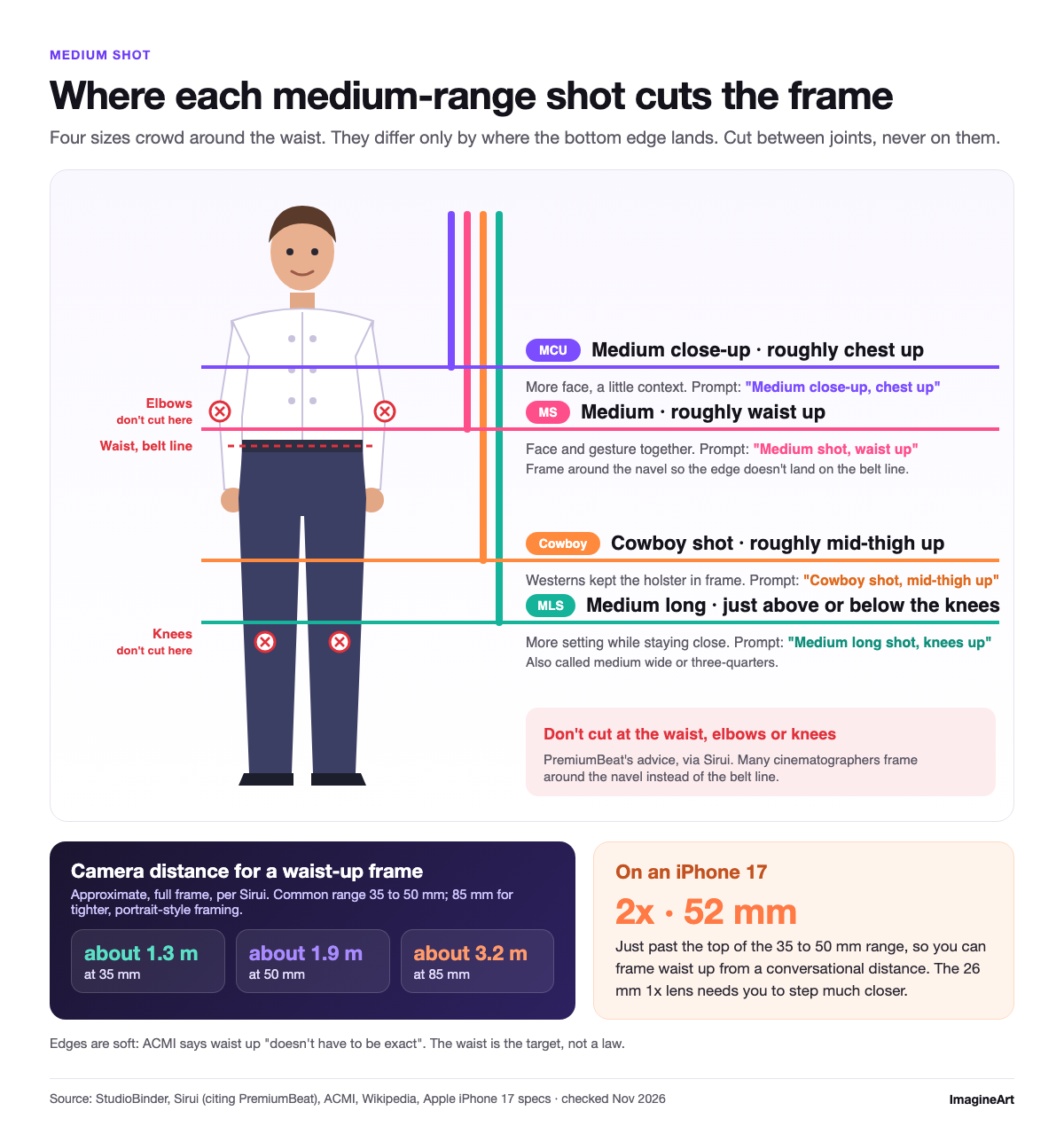 Where each medium-range shot cuts the frame, with camera distances and the iPhone 17 2x lens
Getting waist-up framing from an AI video generator
Name the size, say where the frame cuts, then give a camera distance and a lens. Field size comes from two things, how far the camera is and the focal length, so a prompt with both gives the model two more framing cues than the size name alone. The test below checks whether that helps.
Google's own Veo prompting guide defines a medium shot as roughly waist up, balancing detail with some context, and suggests it for dialogue. It also warns that some advanced camera terms aren't officially supported, so check where each take actually cuts.
In AI Film Studio, write the brief like a director, set the virtual camera to around 50 mm, keep it static and animate the shot in Create Video. For the reverse angle, Cross-scene consistency keeps the same face and costume from shot to shot.
Try this prompt in AI Film Studio at about 50 mm: "Medium shot, framed from just above the waist up. Two cooks in their forties in white jackets argue across a steel prep counter in a small, busy restaurant kitchen; one jabs a spoon toward a pan, the other folds her arms. Both stay in frame, the kitchen and hanging pans visible behind them. Eye-level camera, static, warm tungsten light and steam. No text, no watermark."
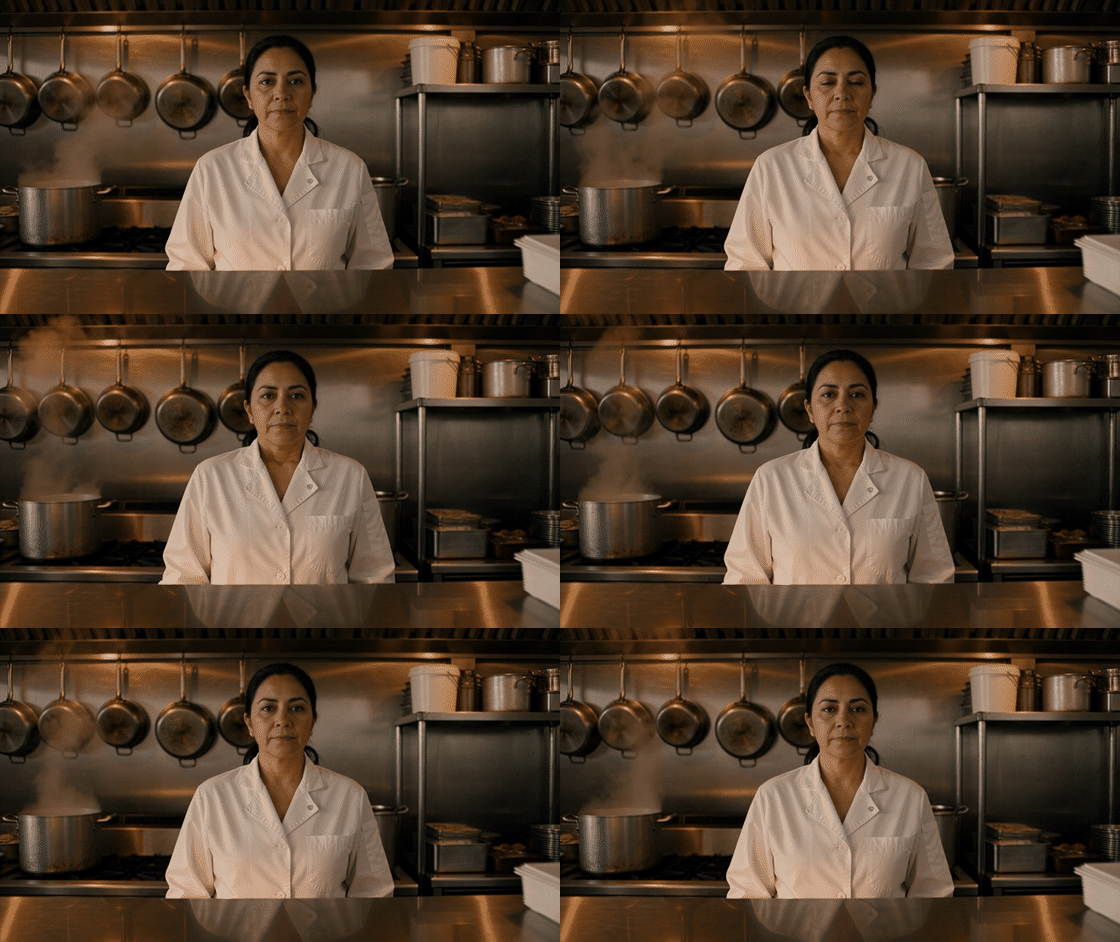
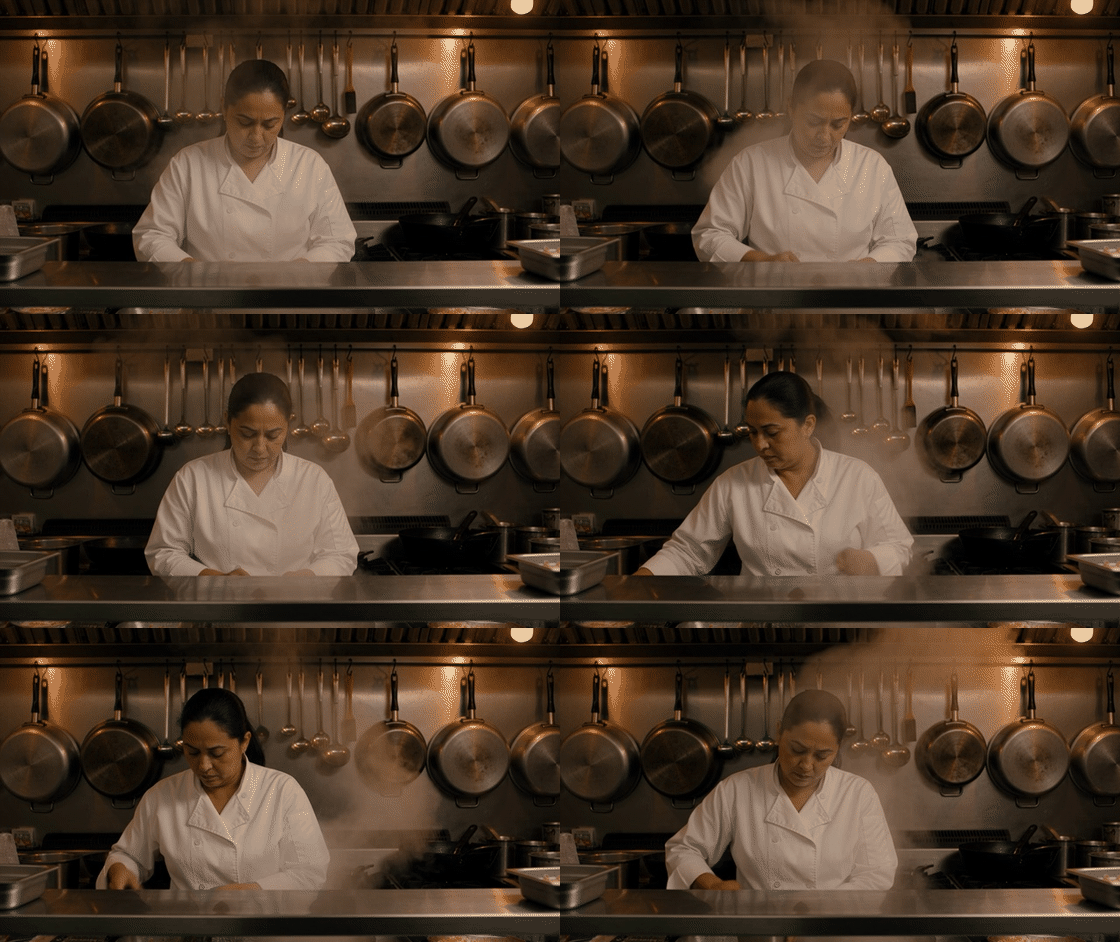
Then find out which wording holds. Back in the AI video generator with Kling 4.0 and the single-cook scene from the ladder above, run three versions:
| Run | Framing words | What to look for |
|---|---|---|
| A | "medium shot" | Does it stay waist up, or drift? |
| B | "waist-up framing" | Same check, plain description |
| C | "waist-up framing, camera about 2 metres away, 50mm lens" | Whether distance and lens hold the frame for the whole clip |
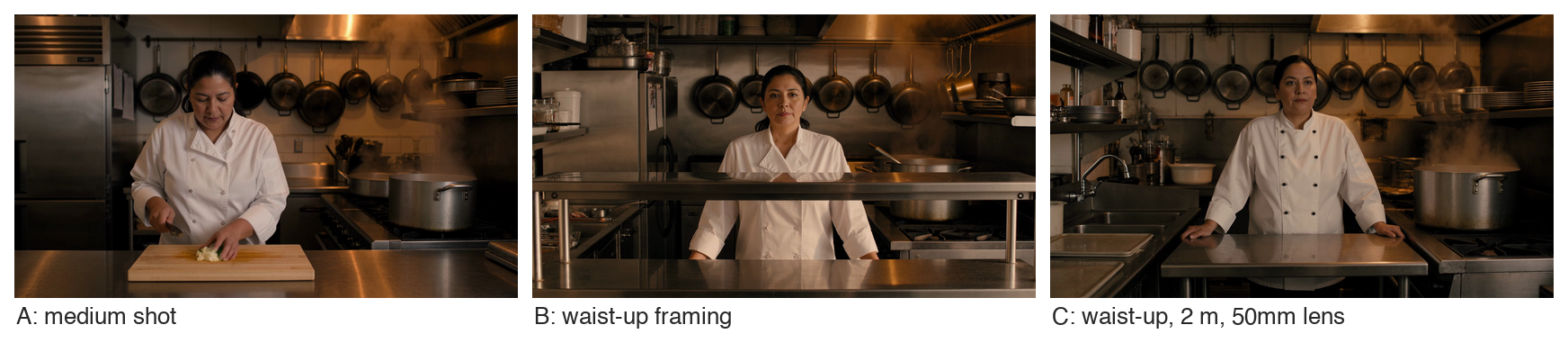 The three runs side by side: A, B and C
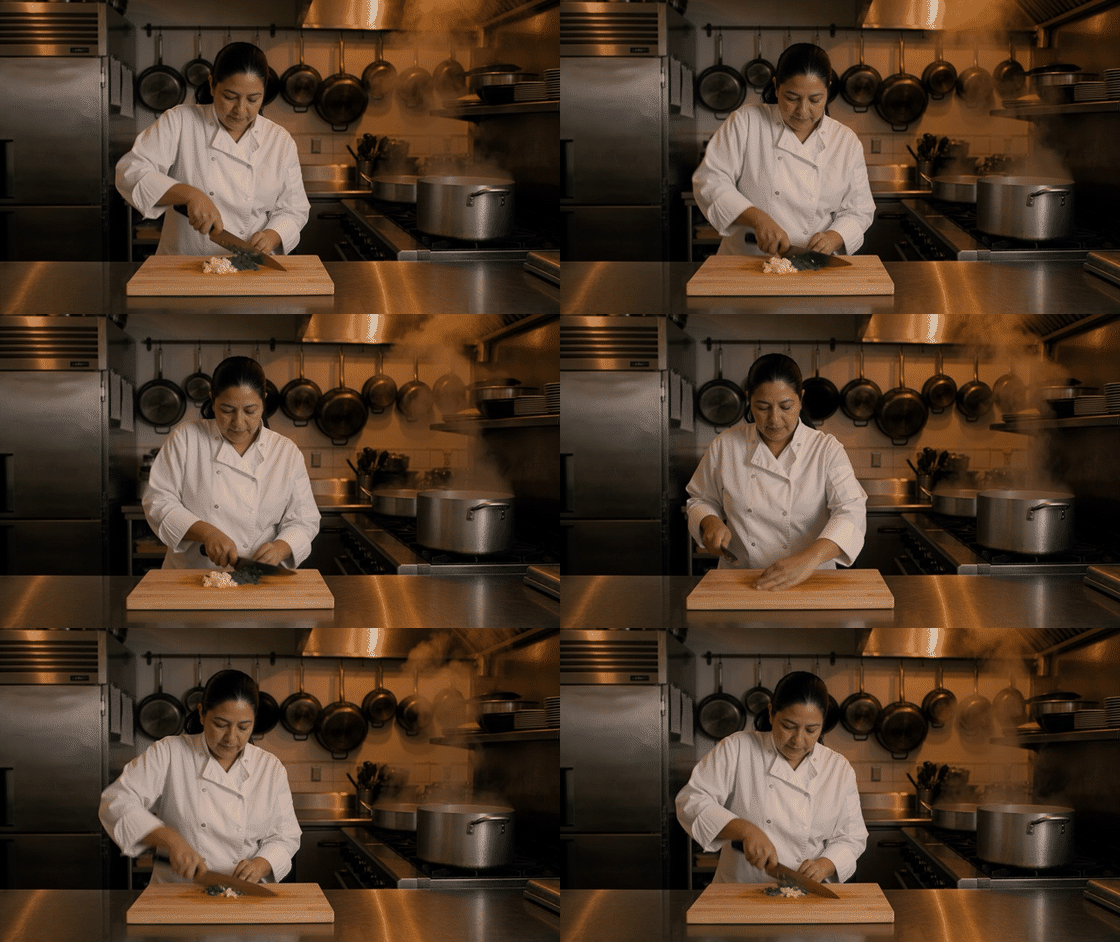 Run A: "medium shot"
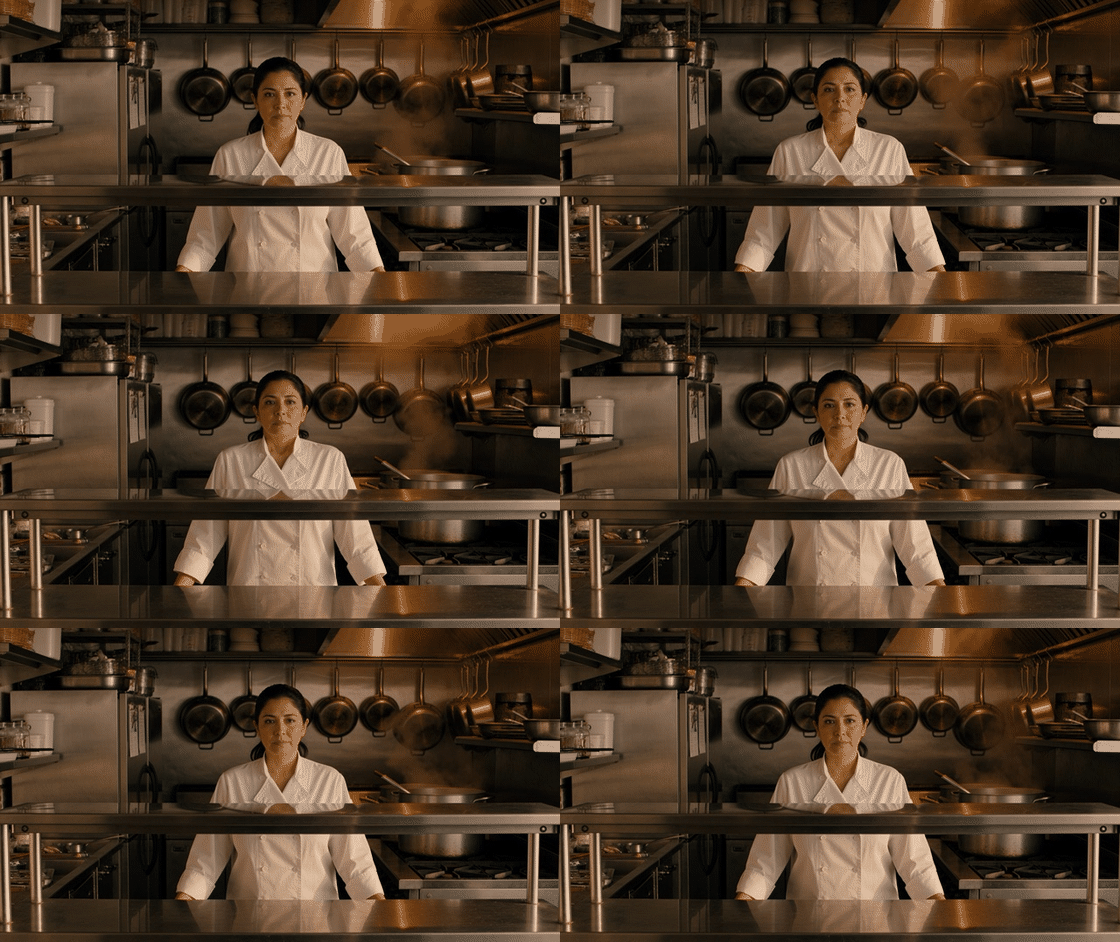 Run B: "waist-up framing"
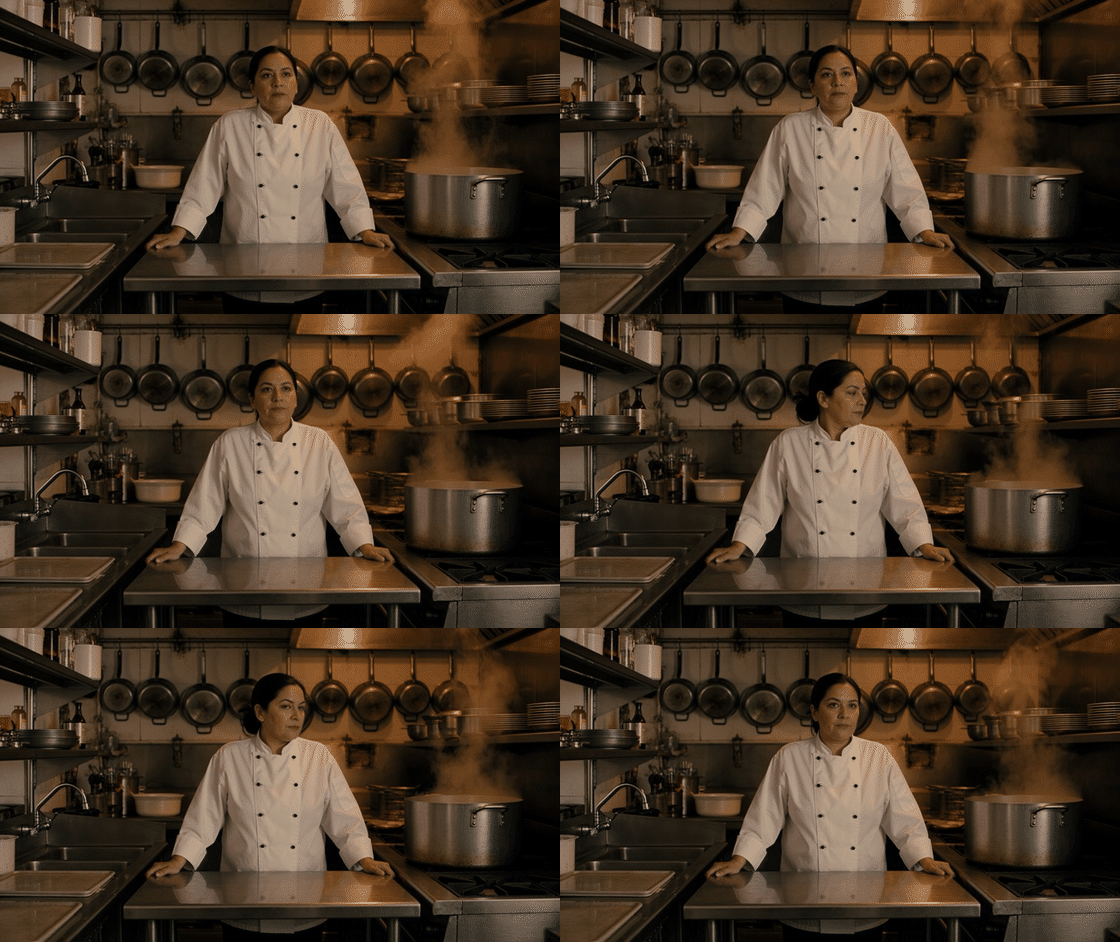 Run C: "waist-up framing, camera about 2 metres away, 50mm lens"
Our AI video prompts guide collects more camera wording to run through the same check.
Frequently asked questions
Yes, roughly. The waist is the usual reference, but ACMI says it doesn't have to be exact.
Waist up on a person. Its neighbours are the medium close-up (chest up) and the medium long shot (around the knees), with the cowboy shot (mid-thigh up) in between.
It frames someone around the knees (just above or below them, not on them), so you keep their body language and gain more of the setting without going fully wide.
No. Lists vary by source. The four sizes in the table above sit between the wide shot and the close-up, and the hub guide covers the full range.
Sirui suggests 35 to 50 mm on full frame, or 85 mm for a tighter, portrait-style frame with more background blur. On an iPhone 17, the 52 mm 2x option is the closest match.
Keep it at the waist
This size earns its place by holding a face and a gesture in one frame. Its neighbours differ only by where the bottom edge lands: chest, waist, mid-thigh or knee. Be precise about where you cut, and never cut on a joint.
On a phone, 2x at conversational distance does most of the work. With an AI model, describe the cut, try adding distance and lens, and check the whole clip, not just the first frame. Open AI Film Studio, put two people across a counter and see whether your wording keeps them both waist up.
Zahida Misher
Exploring how AI transforms marketing, I help businesses unlock growth and future-proof their presence.
View all articlesRecent posts
The Best AI Avatar Generators In 2027: 11 Tools Compared And Ranked
50 Types of Art Styles: Definitions, Examples and AI Prompts
How to Edit Images With Ideogram 4.6: 38 Edits, Prompts and Results