
Zahida Misher
November 18, 2026 • Updated November 18, 2026
13 mins Read
Sprout Social says Sunday is the worst day to post on TikTok. Buffer says Sunday at 9 a.m. is the single best slot of the week. Both are big studies, both were published in 2026, and they can't both be right for you.
What's the best time to post on TikTok, then? Start with a study slot, then move to your own followers' active hours as soon as your analytics show them. This guide lays three big 2025 to 2026 studies (Sprout Social, Buffer and Hootsuite) side by side by day, explains why they clash, shows where TikTok hides your audience data and gives you a 4-week test to settle it on your own account.
The test needs a steady flow of videos, so the last part covers batching a week of clips in one sitting.
What is the best time to post on TikTok?
There isn't one answer. Sprout Social's 2026 study (published March 31, 2026) points to Tuesday to Thursday, 2 to 6 p.m. local time. Buffer's 2026 study names Sunday at 9 a.m. Hootsuite's November 2025 data names Thursday, 6 to 9 a.m.
Here's how each one got there.
- Sprout Social (March 2026): about 2 billion engagements across roughly 307,000 social profiles belonging to 30,000 Sprout customers, collected from November 27, 2025 to February 27, 2026. All times are in the audience's local time.
- Buffer (September 2026): Buffer's analysis of 7.1 million posts, covering videos, carousels, photos and text posts, ranked by median engagement rate. Buffer doesn't publish the date range. It says its times are universal, so you don't convert them.
- Hootsuite (November 2025): Hootsuite's November 2025 data draws on more than 1 million social posts plus its own experiments, localized across 118 countries. No date range is given either.
Buffer's runner-up slots are Monday at 1 p.m. and Sunday at 1 p.m. Hootsuite's other top window is Saturday, 10 a.m. to 6 p.m.
Notice the three studies pick three different best slots. Two of them don't even agree on whether Sunday is worth getting out of bed for.
Best time to post on TikTok today
For the best time to post on TikTok today, find today's weekday in the table below and read across. If two of the three studies land near the same hour, that's your first pick. If they scatter, choose the slot that falls a little before your followers' busiest hour, which the analytics section shows you how to find.
Best time to post on TikTok by day: three studies side by side
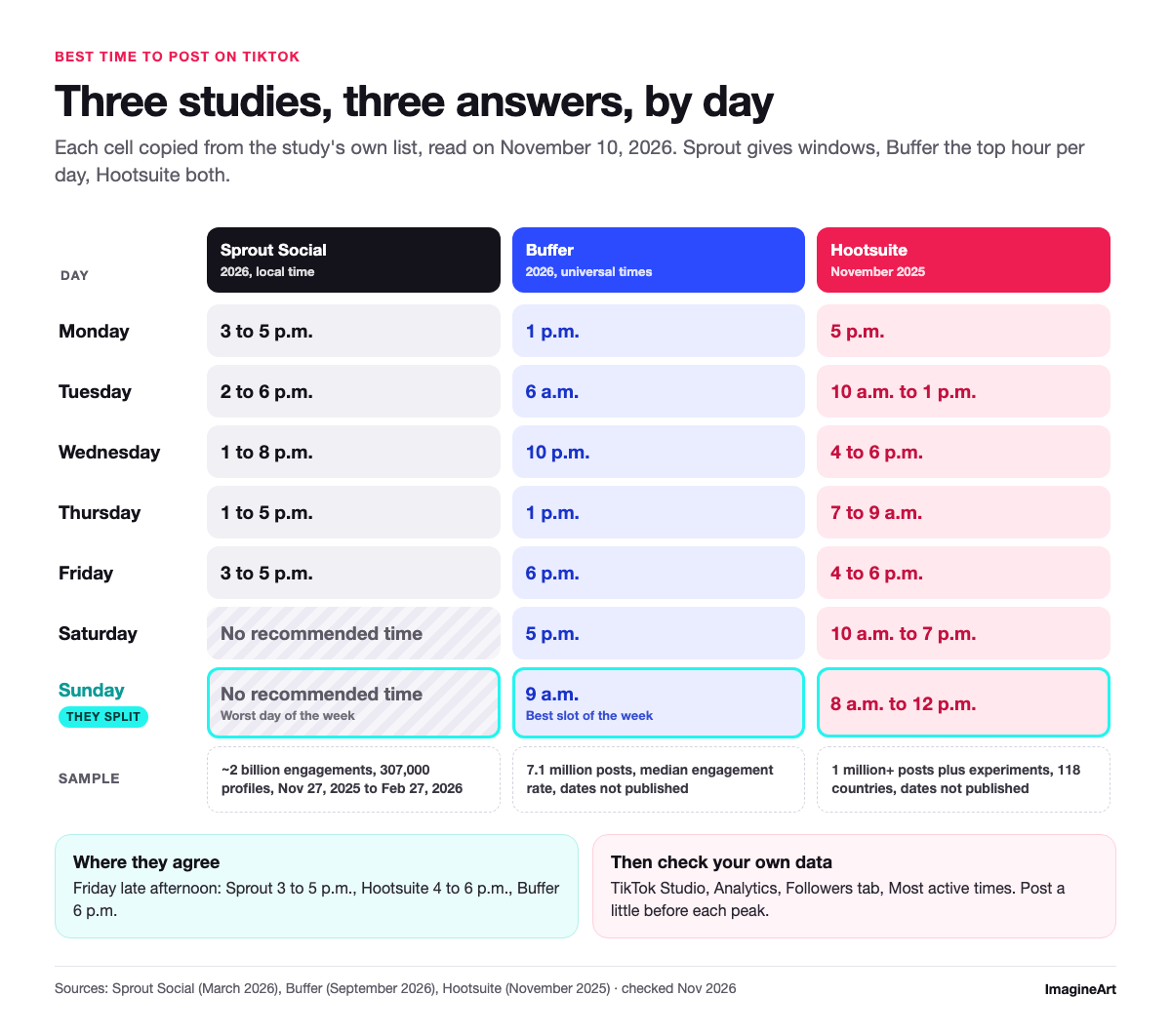
Every cell below is copied from the study's own published list, read on November 10, 2026. Sprout gives windows, Buffer gives the single top hour per day, and Hootsuite mixes both.
| Day | Sprout Social (2026) | Buffer (2026) | Hootsuite (November 2025) |
|---|---|---|---|
| Monday | 3 to 5 p.m. | 1 p.m. | 5 p.m. |
| Tuesday | 2 to 6 p.m. | 6 a.m. | 10 a.m. to 1 p.m. |
| Wednesday | 1 to 8 p.m. | 10 p.m. | 4 to 6 p.m. |
| Thursday | 1 to 5 p.m. | 1 p.m. | 7 to 9 a.m. |
| Friday | 3 to 5 p.m. | 6 p.m. | 4 to 6 p.m. |
| Saturday | No recommended time | 5 p.m. | 10 a.m. to 7 p.m. |
| Sunday | No recommended time (worst day) | 9 a.m. (best slot of the week) | 8 a.m. to 12 p.m. |
| What it measured | ~2 billion engagements, 307,000 profiles, Nov 27, 2025 to Feb 27, 2026, local time | 7.1 million posts, median engagement rate, dates not published | 1 million+ posts plus experiments, 118 countries, dates not published |
 Three studies, three answers, by day
A few rows line up. Friday late afternoon shows up in all three: Sprout's 3 to 5 p.m., Hootsuite's 4 to 6 p.m. and Buffer's 6 p.m. sit within a couple of hours. Thursday at 1 p.m. falls inside Sprout's window and is Buffer's top Thursday hour.
Other rows don't line up at all. Buffer's Tuesday slot is 6 a.m., while Sprout doesn't start Tuesday until 2 p.m. Buffer's Wednesday pick is 10 p.m., two hours after Sprout's Wednesday window closes. One small quirk: Hootsuite's overall pick for Thursday is 6 to 9 a.m., while its day list says 7 to 9 a.m.
Is Sunday the best or worst day to post?
The best time to post on TikTok on Sunday depends on which study you trust. Sprout gives no recommended times on Saturday or Sunday and ranks Sunday as the worst day. Buffer's data puts its best slot of the whole week on Sunday at 9 a.m., with Sunday at 1 p.m. in third place. Hootsuite sits between them with a Sunday window of 8 a.m. to noon.
If Sunday mornings matter to your niche, it's the most useful slot to test, precisely because the studies split on it. A weekend slot is cheap to try and the answer is worth having.
What is the best day to post on TikTok?
The best day to post on TikTok changes with the study. Sprout picks the middle of the week, Tuesday to Thursday. Buffer names Saturday as its best day overall. Hootsuite's two strongest windows fall on Thursday morning and Saturday daytime. Thursday and Saturday are the only days that come out well in two of the three.
Why do the studies disagree?
The studies disagree because they measure different accounts, over different periods, with different yardsticks. Sprout's study draws on its customers' profiles over three months. Buffer ranks posts by median engagement rate. Hootsuite blends 1 million posts with its own experiments. None of them measured your followers.
Start with the time window. Sprout's data runs from November 27, 2025 to February 27, 2026. That stretch includes the December holidays, so it may not match a normal week. Buffer and Hootsuite don't publish date ranges, so you can't tell which season their numbers lean on.
Then the yardstick. Sprout doesn't say how it ranks its hours, while Buffer uses a per-post median engagement rate. If one study leans on volume and another on a per-post rate, quieter hours can look better in the second. That's one plausible reason a Sunday morning can top one list and sink another.
Then the sample. Sprout's numbers come from 30,000 of its own customers, so they reflect the brands and teams that use Sprout. Buffer's 7.1 million posts include carousels, photos and text posts, not only videos. Hootsuite added its own experiments on top of its post data.
Buffer itself is upfront about this. Its article says not all studies agree, that results vary by audience, dataset and method, and that its times are a starting point. That's the right way to read all three. Treat them as hypotheses with good sample sizes, then let your own account vote.
Which one fits you? If you want windows already set to your audience's local time, start with Sprout, which drew on about 307,000 profiles worldwide. If you post a mix of videos, carousels and photos, Buffer's 7.1 million posts cover the same mix. If your followers are spread across countries, Hootsuite localized its data for exactly that. Keep one thing in mind: all three come from companies that sell scheduling tools, and Sprout's sample is its own customers' profiles.
How to find your own best time to post on TikTok
Your own analytics beat any study, because they measure the people who actually follow you. Hootsuite notes that TikTok analytics need a Business or Creator account, so switch that on first if you haven't.
In the TikTok app (path as described by Buffer):
- Open your profile.
- Tap TikTok Studio, just below your bio.
- On the Analytics card, tap View all.
- Open the Followers tab.
- Scroll to Most active times to see the hours and days your followers are on TikTok.
On desktop (path as described by Sprout Social):
- Log in at tiktok.com.
- Hover over your profile icon and choose Business Suite.
- Open Analytics, then the Followers tab, to see when your audience is active.
Menu labels change between app versions, so if a button has moved, look for Analytics and Followers.
On that screen, look for the two or three busiest hours and the busiest days, then plan to post a little before each peak. Buffer suggests exactly that, plus testing several slots for a few weeks rather than trusting one good day.
We looked for a universal posting time from TikTok itself, in its help center and its business blog, and couldn't find one. So the best time to post on TikTok for your account is something you measure, not something TikTok hands out.
A 4-week test to prove your slot
Studies give you candidates. A test picks the winner. This plan is our method, not data, and it fits a small account that posts three times a week.
- Pick three slots. Take one from your Most active times screen. Take two from the day table above, ideally one where the studies agree (Friday late afternoon) and one where they clash (Sunday morning).
- Hold the slots, rotate the content. Keep each slot's day and time fixed for all four weeks, because that's what you're testing. Rotate which topic goes into which slot each week, so no slot always gets your strongest idea. That's 12 posts, four per slot.
- Keep everything else the same. Same format, similar length, similar topic. If one slot gets your best idea and another gets a test upload, you're measuring the idea, not the clock.
- Compare at the same age. Note each post's views, likes, comments and shares at 24 hours and again at 7 days. Comparing a 3-day-old post with a 3-hour-old one tells you nothing.
Here's the sheet we'd use. Copy it into a spreadsheet or print it.
Slot A is your analytics peak (e.g. Wed 7 p.m.), Slot B is one the studies agree on (Fri 4 to 6 p.m.) and Slot C is one they clash on (Sun 9 a.m.). One row per post:
| Week | Slot | Topic | 24-hour views | 7-day views | 7-day comments + shares | Notes |
|---|---|---|---|---|---|---|
| 1 | A | |||||
| 1 | B | |||||
| 1 | C | |||||
| 2 | A | |||||
| 2 | B | |||||
| 2 | C | |||||
| 3 | A | |||||
| 3 | B | |||||
| 3 | C | |||||
| 4 | A | |||||
| 4 | B | |||||
| 4 | C |
After week four, add up each slot's four posts. The slot that wins on 7-day views and holds up on comments and shares becomes your default. The loser gets swapped for a new candidate, and the test starts again.
Four posts per slot is a small sample. If the winner only edges it, call it a tie and run another round with the top two.
Timing only decides who sees a post first. What happens after that depends on the video.
How to post every day without burning out: batch with AI video
Twelve test posts in four weeks is easy to plan and hard to film. The fix is a batch day: one sitting, one prompt template, a week of clips. Inspiration rarely books a slot in advance, so it helps if the video already exists.
ImagineArt's AI video generator turns text, images or existing clips into video with sound, and its page lists 40+ models, including Seedance, Kling and Veo. It can output at 9:16 for vertical feeds or 16:9 for YouTube from the same dashboard. That makes it a fit for a TikTok batch: write the template once, then swap the subject.
The batch prompt recipe
ImagineArt's page suggests describing six things in a prompt: subject, action, scene, camera move, lighting and mood. Build one template with all six, then change only the subject between runs. Try this prompt in ImagineArt's AI video generator with Seedance 2.5 at 9:16 and 10 seconds:
Vertical 9:16 video. A hand flips open a matte black notebook on a wooden desk, the first page shows a hand-drawn weekly posting calendar with three circled time slots, slow push-in, warm morning window light, calm focused mood, no text on screen, no logos.
For the second and third clips, keep every word except the subject:
- Clip B: "a ceramic mug of coffee is set down beside a phone showing an empty video timeline"
- Clip C: "a ring light clicks on in a small home studio, the camera on a tripod faces an empty chair"
 Clip A: the notebook with three circled slots
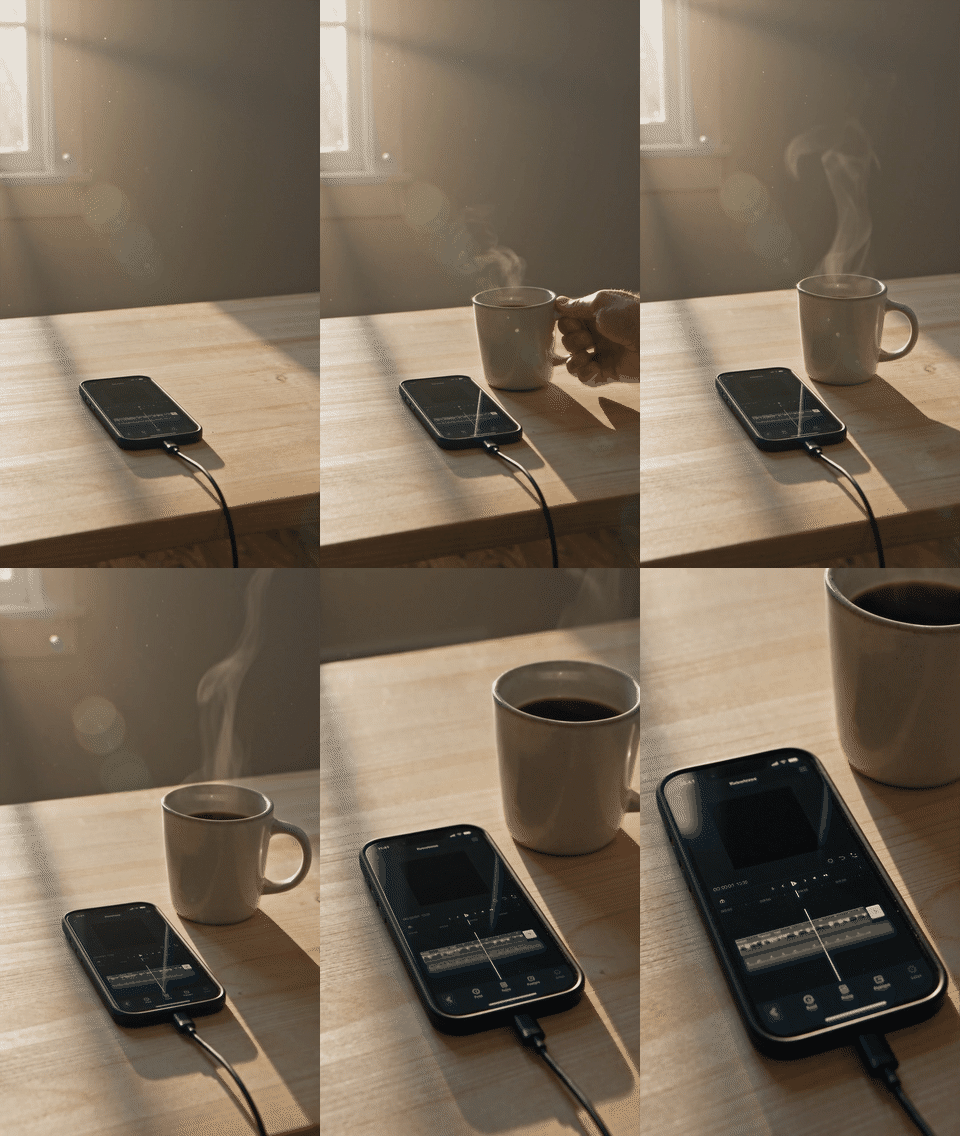 Clip B: the coffee mug beside an empty timeline
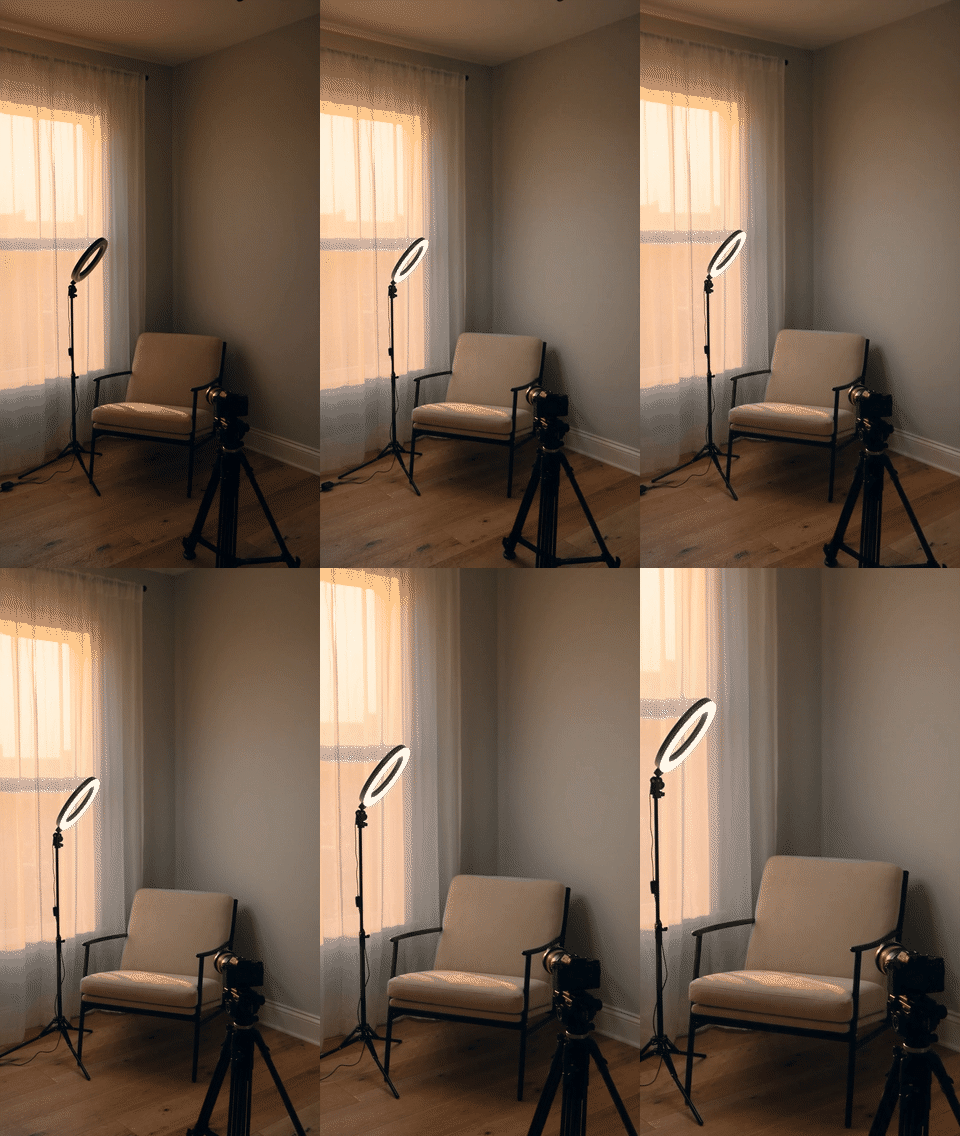 Clip C: the ring light and the empty chair
What to look for: the same light, pace and camera move across all three, so they read as one series on your profile. If one clip drifts, fix the template, not the clip. Per ImagineArt's model card, Seedance 2.5 runs up to 30 seconds with native audio. ImagineArt's page says most videos take 60 to 120 seconds to generate, depending on the model and prompt.
For more templates in the same six-part shape, our list of 80+ AI video prompts is a good place to borrow from.
Add a hook line and captions
On-screen words give a clip a second way in for anyone watching muted. The AI Caption Generator lines subtitles up with the speech and offers caption styles for TikTok, Reels and YouTube Shorts. Add one hook line as on-screen text in your editor, such as "3 time slots, 4 weeks, 1 winner", and use the Caption Generator on any clip with a voiceover. What to look for: the hook reads in one glance, and it still reads on a phone preview before you post.
If you'd rather caption footage you already have, here's how to add captions to a video step by step.
Cut long recordings into test clips
Got a podcast, a livestream or a webinar sitting in a folder? ImagineArt's AI Auto Clipper picks the strongest moments from those and cuts them into ready-to-post clips for TikTok, Reels and YouTube Shorts. One long recording can fill several test slots, which keeps the format steady across the four weeks.
ImagineArt has a free plan with daily credits; check current plan limits before you start a batch. Free-plan videos are for personal, non-commercial use, so a brand account needs a paid plan, which includes commercial use rights (per the AI video generator page's FAQ, November 10, 2026).
When not to post on TikTok?
In Sprout Social's 2026 data, the weekend is the weakest stretch, with Sunday last of all. Buffer's data disagrees and puts its best slot on Sunday morning. The safe answer is your own quietest hours, which you can read off the Followers tab.
Don't cross Sunday off because one study said so. Look at the hours where your Most active times graph is lowest and avoid those for posts you care about. Those are the only dead hours that are definitely yours.
If you post something in a quiet hour by mistake, it isn't wasted: it's one more data point for the test sheet.
Frequently asked questions
Check today's weekday in the day table above and compare the three studies. Then open your Followers tab and look at Most active times for today. If your followers peak at a different hour, post a little before their peak and log the result.
None of the three studies measures "viral". Sprout's study counts about 2 billion engagements. Buffer ranks posts by median engagement rate. Neither is the same as a video taking off. Timing can give a post a good start, but the video itself decides the rest.
Sprout's 2026 study gives no recommended times on weekends and rates Sunday lowest. Buffer's 2026 study rates Sunday at 9 a.m. as the best slot of the week. Since they contradict each other, avoid your own lowest-activity hours instead of a whole day.
It depends on the study. Sprout already reports every time in the audience's local time, and Buffer says its times need no conversion. Hootsuite localized its data across 118 countries. Your own Most active times screen is the safest guide, because it reflects where your followers actually are.
Buffer suggests testing several slots for a few weeks. Our plan uses four weeks, three slots and 12 posts, so each slot gets four tries at the same day and time, with a different topic each week. Compare every post at 24 hours and 7 days before you pick a winner.
Pick a slot and let your account decide
Three big scheduling-tool studies on the best time to post on TikTok disagree, most loudly on Sunday. Use them for candidates, not answers. Your Followers tab shows when your audience is actually around, and a 4-week, three-slot test turns that into a slot you can trust.
The hard part is volume, not timing. Batch the test clips in one sitting with a single prompt template, swap the subject for each slot and caption them before the week starts. Build your first batch in ImagineArt's AI video generator, then let the test sheet tell you when to post them.
Zahida Misher
Exploring how AI transforms marketing, I help businesses unlock growth and future-proof their presence.