Zahida Misher
November 20, 2026 • Updated November 20, 2026
12 mins Read
Picture episode 14. It runs about 70 seconds. The ex-wife walks into the gala, somebody gets slapped, and the frame freezes on a gasp. Episode 15 sits behind a paywall. That's a micro drama: a vertical series told in episodes of a minute or two, each one built to end on a hook you'll pay to resolve.
It sounds like a TikTok habit. By Omdia's estimate it's also a $14 billion business by the end of 2026. This guide covers the format, the money, where to watch, what makes an episode hold, and how to make one with AI, using ImagineArt's Drama Studio as the worked route.
How we made this: desk research from Omdia, Deloitte, MIT Technology Review, StudioBinder and ImagineArt's help center, plus a logged-in look at Drama Studio on November 18, 2026, where we set up a project and built one character. Our account's plan stopped us at the video paywall, so we haven't generated an episode, and nothing below claims one.
What is a micro drama?
A micro drama is a fictional series shot vertically for phones, told in episodes of about one to two minutes, usually 20 to 100 of them per season. Every episode ends on a cliffhanger. The first few are free; the rest usually sit behind a paywall, which is the point of all those cliffhangers.
So, what is a micro drama in one line? A paid cliffhanger habit, served a minute at a time.
From duanju to everyone's phone
The format started in China, where it's called duanju, or "short drama". Simple English Wikipedia's entry sums up the basic shape: vertical, 20 to 100 episodes, each about one to two minutes long. It hasn't stayed in China. Omdia puts about $3 billion of the format's 2026 revenue outside China, with $1.5 billion of that in the US.
Micro drama vs web series vs a TikTok skit
- Web series: any series made for the internet, at any length and in any aspect ratio. A micro drama is a strict subset of it.
- TikTok skit: a single standalone video. It works on its own, and nobody pays to see what happens next.
- Micro drama: vertical, one to two minutes, serialized, cliffhanger every time. Episode 37 without episode 36 is a slap with no context.
People also say "short drama" and "vertical drama" for roughly the same thing.
Why are microdramas suddenly everywhere?
Because the money got big fast. Omdia estimates the format earned $11 billion in 2025 and will reach $14 billion by the end of 2026, and Deloitte expects in-app spending on it to more than double, from $3.8 billion to $7.8 billion, over the same two years. AI production in China is speeding up supply at the same time.
Those two sources don't measure the same thing. Omdia's forecast, from its February 2026 release as reported by Communications Today, covers total revenue. Deloitte's 2026 TMT Predictions count in-app revenue only, which is why its number is smaller.
The money
Numbers about microdramas lose their footnotes fast, so each one below keeps its source and period.
| Figure | Number | Period | Source |
|---|---|---|---|
| Global revenue | $11 billion | 2025 | Omdia release (Feb 2026) |
| Global revenue forecast | $14 billion | end of 2026 | Omdia release (Feb 2026) |
| Revenue outside China | about $3 billion, US $1.5 billion | 2026 (Omdia estimate, Feb 2026) | Omdia release |
| In-app revenue | $3.8 billion, rising to $7.8 billion | 2025 to 2026 | Deloitte TMT Predictions 2026 (Nov 2025) |
| Viewers | over half a billion | annual, as of Nov 2025 | Deloitte TMT Predictions 2026 |
| US share of in-app revenue | 50% in 2025, likely falling to 40% | 2025 forecast; no year given for 40% | Deloitte TMT Predictions 2026 |
| ReelShort and DramaBox in-app revenue | close to $140 million each | Q1 2026 | Sensor Tower, State of Short Drama Apps 2026 |
| Short drama app in-app revenue, all apps | about $750 million | Q1 2026 | Sensor Tower, State of Short Drama Apps 2026 |
| AI dramas released per day in China | 470 | January 2026 | DataEye, reported by MIT Technology Review |
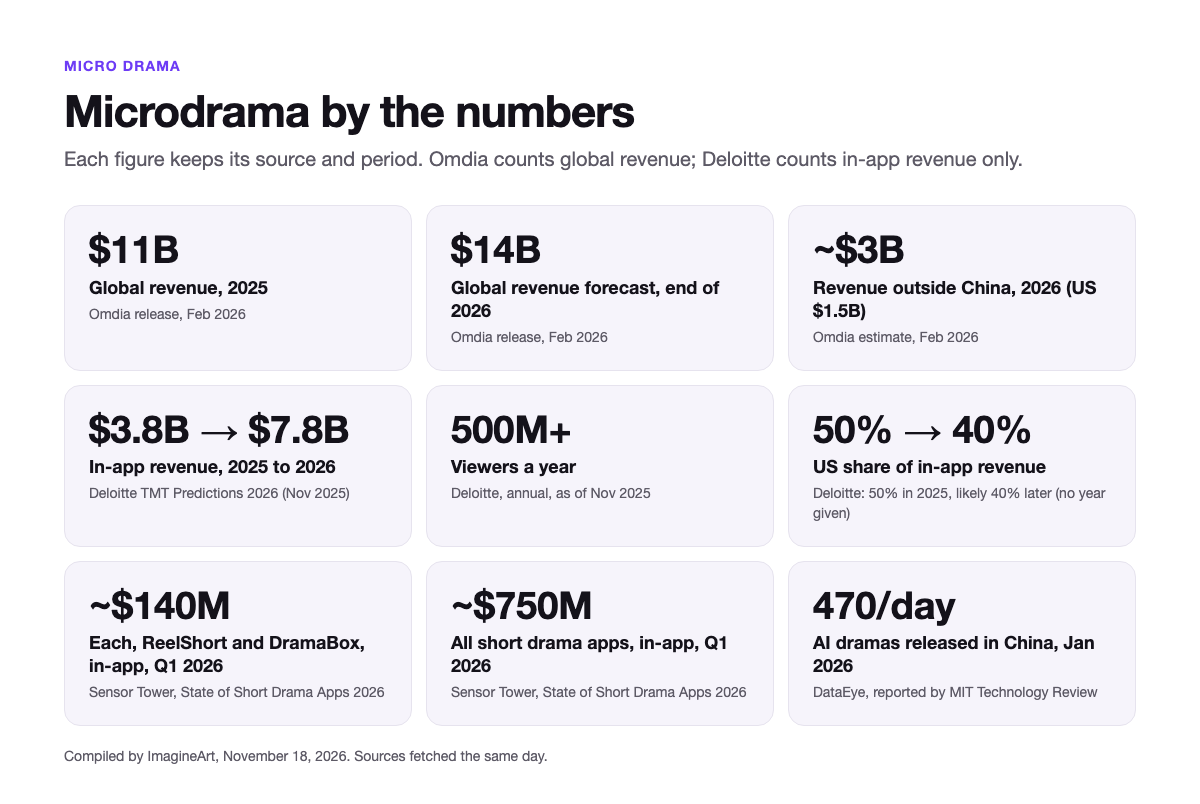 Microdrama by the numbers, with the source and period for each figure
The attention
The format holds people longer than you'd guess. Omdia's analysis of Sensor Tower data for Q4 2025 put ReelShort at 35.7 minutes per user per day on US mobile. Netflix's mobile app got 24.8.
Netflix still has roughly ten times the people: about 12 million US monthly mobile users to ReelShort's 1.1 million, in the same Omdia data. Fewer viewers, watching longer. Few people stop at one episode. That's the trick.
The AI shift in China
In May 2026, MIT Technology Review reported that the analytics firm DataEye counted 470 AI dramas released per day in January 2026. The streamer FlexTV told the magazine that a short drama made for North America used to cost about $200,000, and that AI can cut that by 80 to 90% and production time from three or four months to under one. Nano Banana, Seedance and Kling are among the tools the magazine names.
The volume is the headline. ECNS reported in September 2026 that 430,000 micro-dramas were released online in China from January to August, more than 90% of them AI-generated. China's broadcasting regulator (NRTA) puts users above 800 million.
Cost comparisons need care. The Hollywood Reporter put vertical series budgets at $100,000 to $300,000 per series in November 2025. Caixin, via Fortune, reported that some large Hangzhou companies use AI to make a 100-minute series for under 20,000 yuan (about $3,000). Different countries and scopes, so read those as two data points, not one price comparison.
Where to watch them, and what's free
The biggest dedicated apps are ReelShort and DramaBox, the top-grossing pair in Q1 2026 per Sensor Tower, and Peacock has noticed: Peacock now runs its own Microdramas hub. ImagineArt's Drama Studio help page names ReelShort, TikTok and DramaBox as the platforms its output is built for, which tells you where creators post micro dramas too.
So, is micro drama free? Partly. The opening episodes usually are. StudioBinder's guide to the format says the paywall typically lands around episode 10. From there, The Hollywood Reporter says, you pay, or on some apps watch ads, to keep going.
StudioBinder notes that the biggest turns often arrive around the point where viewers decide whether to keep paying. If you're watching on a budget, decide your stopping point before the episode that ends on a locked door.
Anatomy of a one-minute episode
A good episode is engineered backwards from its last five seconds. StudioBinder's advice for the micro drama script format is to "write backwards" from each ending, and to size an episode at one to two script pages, or 60 to 120 seconds of screen time.
The beat map below comes from Oakgen's micro drama script guide, one writer's breakdown of a 60-second episode rather than an industry standard:
- Hook, 0 to 3 seconds. Open on conflict, not on a hallway.
- Setup, 3 to 15 seconds. Who wants what, in one exchange.
- Escalation, 15 to 40 seconds. The stakes go up at least once.
- Turn, 40 to 52 seconds. A reveal flips what we thought was happening.
- Cliffhanger, the last 5 to 8 seconds. End on a question, not a statement.
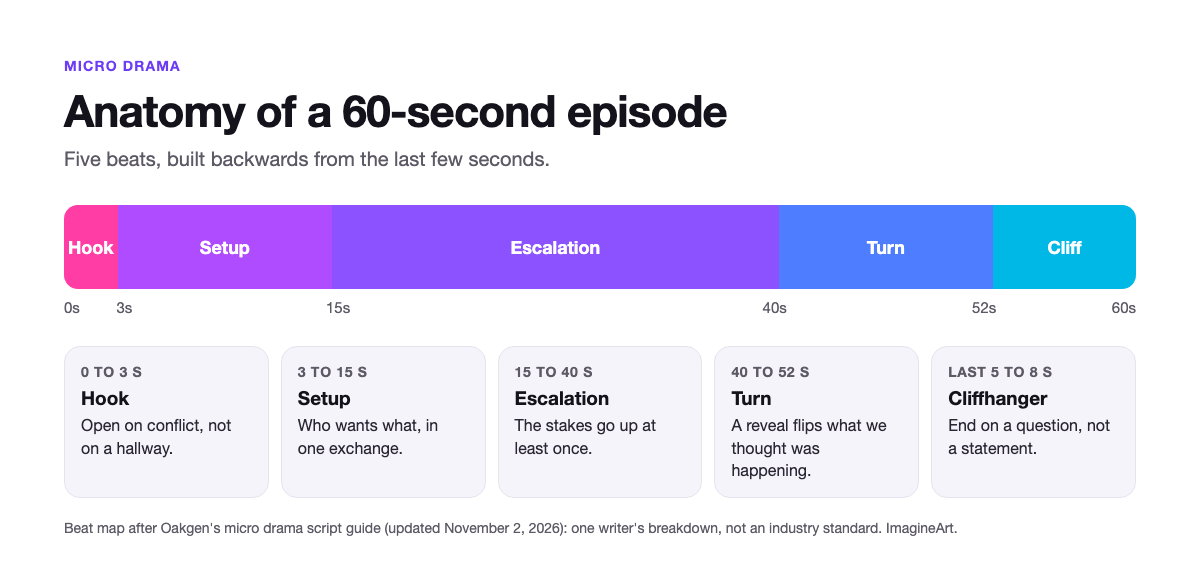 Anatomy of a 60-second episode, after Oakgen's beat map: hook, setup, escalation, turn and cliffhanger
Oakgen budgets 90 to 130 words of dialogue per 60 seconds. That's tight. Nobody gets to say "Hi, how was your day?" unless the answer is a confession.
Then there's the bigger cliff. Because the paywall tends to land around episode 10, the smart place for a season's biggest twist is right in front of it. The first nine episodes are an audition, and the audience is the casting director.
Planning shots before you generate anything saves a lot of rerolls. ImagineArt's Storyboard Mode on the Image tab lays out up to four scenes per sequence, and our guide to storyboarding a film walks through it.
How do you make a micro drama with AI?
Write the season first, lock your cast as reusable characters, generate each shot in 9:16, add voices and music, then build episode 2 with the same faces. In ImagineArt, Drama Studio inside Film Studio is set up for that loop, with an Episodes panel and a character library shared across every episode.
Here's the route, as ImagineArt's help center walks through it.
- Start a Drama project. From the Film Studio home, choose Create Project, then pick Drama instead of Film.
- Build the cast. In the Scene Builder, add Characters with a name, Male, Female or Neutral, and optional instructions. Create Image has 19 preset characters, including Nova, Atlas, Pixel and Luna; on Create Video, characters are Elements (more below). Props and Locations take a reference photo, a name and an optional description.
- Generate the shots. On Create Video, the aspect ratio is fixed at 9:16. Each shot defaults to 3 seconds at 720p, with Style, Genre and Movement on Auto. You can set the camera body, lens, focal length and aperture, and switch on Multi-shot.
- Add sound. Add Audio works as it does in Film Studio: AI Music (ElevenLabs Music 2.5 by default), Text to Speech (ElevenLabs v3 by default, with MiniMax Speech 2.8 HD and Turbo among the options), your library, or an upload.
- Add the next episode. Add Episode appends the next number. Each episode gets its own Scene 1 and shot timeline, while the character, prop and location library carries across every episode.
At the 3-second default, a one-minute episode is roughly 20 shots. The shared library means episode 30 calls the same character reference as episode 1, and the References guide recommends uploading several angles of each character. Edits to a reference only change future generations, not shots you've already made.
What we saw when we set up a project
We set up a Drama project on a logged-in account and looked around. Four things the Drama Studio help page doesn't say:
- The model is named. The Create Project dialog shows Drama with Kling o3, next to Film with Seedance 2.5 or Seedance 2.
- It's desktop only. Open Film Studio at phone width and it tells you it's only available on desktop.
- Shots run up to 15 seconds. The duration slider on Create Video goes to 15 seconds, with 3 as the default.
- Video characters are Elements. You add up to 4 front-facing images, name the element and call it in a prompt with @. An optional voice slot takes one of your saved voices or a new one made from a 5 to 30 second clip you upload or record.
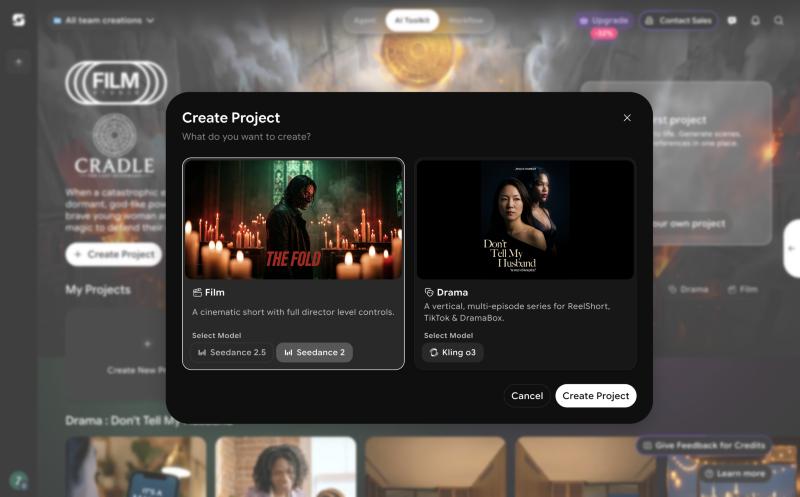 The Create Project dialog, where Drama is the vertical, multi-episode option, with Kling o3
We generated a portrait from the Nova preset in about 40 seconds and turned it into a video element in under 10. Pressing Generate on a video shot asked our account to upgrade, so we stopped at setup. We can't tell you yet how well Kling o3 holds a face across 30 episodes.
What's still undocumented
The help center doesn't document script upload, limits on episode count, lip sync inside Drama, captions, the export format, credit costs or which plan you need. The editor does show a per-character voice slot and an Export button; we couldn't test either.
If a scene needs a talking head, ImagineArt's separate Lipsync tool takes a portrait plus audio or a typed script and usually returns in 30 to 60 seconds. For one-off shots outside a Drama project, the AI video generator has character consistency across shots.
If you'd rather start from the product page, the AI drama generator is the front door, and the AI TV show generator page is another way in.
Other drama tools
ImagineArt isn't alone here. Higgsfield announced its Short Drama Studio in mid-November 2026. Its changelog says you upload a script (PDF, DOCX, FDX, TXT or MD, up to 10 MB), it generates the cast, locations and props, and plans episodes into scenes and clips. It's an early preview and desktop only.
OpenArt's AI Drama Generator page says it turns a story, script or novel chapter into a vertical short drama with lip-synced dialogue and captions.
Are AI micro dramas a problem for actors?
They can be. In October 2026, the BBC reported plans for an AI-assisted microdrama recut of the soap Neighbours, built around Margot Robbie's old scenes. Former actors and crew objected that they hadn't consented to their image, voice or work being reused. The producers say the AI only helps editors find existing footage and doesn't alter faces or voices. The wider issue is consent: AI makes it cheap to reuse a recognizable face in a story its owner never agreed to.
Is micro drama safe? Depends who's asking. For viewers, the main risk is to the wallet, since the biggest turns tend to arrive around the paywall, StudioBinder notes. None of the sources we checked covers content ratings or age gates for these apps, so check each app's own store listing. For creators, the risk is likeness.
The plain rule: don't use a real person's face without their permission. Drama Studio builds characters from reference photos you upload, so use photos you shot, cast or have the rights to. A preset character like Nova or Atlas lets you test a story before you cast anyone.
What are some examples of microdramas?
IMDb keeps a Micro-Drama interest page for the genre, and Peacock's hub collects its own picks.
If you want to see what a series made inside an AI tool looks like, ImagineArt's Film Studio home has All, Drama and Film filters. The Drama filter shows a showcase microdrama series, "Don't Tell My Husband", from S01E01 onward, and you can see it without logging in. Watch three episodes back to back and check them against the beat map above: where the hook lands, where the turn comes, where it cuts.
Frequently asked questions
Usually one to two minutes. StudioBinder sizes an episode at one to two script pages, or 60 to 120 seconds, and ImagineArt's help center suggests roughly 1 to 1.5 minutes per episode in Drama Studio. Either way, the length is set by the cliffhanger, not the clock.
Simple English Wikipedia gives a range of 20 to 100 episodes, and StudioBinder says seasons tend to run 60 to 100. If you're making your first one, Morphic's how-to suggests a 10-episode pilot before committing to a full season.
Free to start, paid to finish. The first few episodes usually cost nothing. StudioBinder puts the paywall around episode 10, and The Hollywood Reporter says viewers then pay or watch ads to see the rest.
You can watch one on a phone; making one is a desktop job for now. When we opened ImagineArt's Film Studio at phone width, it said it's only available on desktop, and Higgsfield says its Short Drama Studio is desktop only during its early preview.
ImagineArt's Drama Studio is our first pick, because its help center documents what a series needs: an Episodes panel, a character library shared across episodes and a fixed 9:16 frame. The drawbacks: it runs on desktop only, and script upload and lip sync aren't documented inside Drama yet. Higgsfield's Short Drama Studio and OpenArt's AI Drama Generator are two of the other drama-specific options.
Your first episode starts with the last scene
A micro drama is a vertical series of one-to-two-minute episodes that each end on a cliffhanger, now a multi-billion-dollar format. The craft hasn't changed. Write backwards from the ending, keep the hook under three seconds, and save your biggest twist for the episode before the paywall.
When the script is ready, open Drama Studio, build your cast once and reuse the same characters from the shared library in every episode. Start your first season in ImagineArt's Drama Studio.
Zahida Misher
Exploring how AI transforms marketing, I help businesses unlock growth and future-proof their presence.
View all articlesRecent posts
The Best AI Avatar Generators In 2027: 11 Tools Compared And Ranked

50 Types of Art Styles: Definitions, Examples and AI Prompts
How to Edit Images With Ideogram 4.6: 38 Edits, Prompts and Results