Zahida Misher
November 19, 2026 • Updated November 23, 2026
11 mins Read
Kling made its name on video, so naturally one of the headline claims for its new still-image model is about words. Kling says Kling Image 4.0 can set up to 2,000 characters of text in a single image. That's a menu's worth of copy, starters through dessert. So what is Kling Image 4.0, beyond a video company trying its hand at typography?
It's the image model Kling AI, part of Kuaishou Technology, announced on November 18, 2026. The name sits one word away from Kling 4.0, the company's video model, and the pages ranking for it so far mostly repeat partner spec sheets. This one keeps the two models apart, sources every spec and flags where Kling's own pages disagree with each other, or with the partner listings.
Kling's previous still-image model, Kling 3.0 Omni, has its own Kling Image O3 page.
What is Kling Image 4.0?
Kling Image 4.0 is a text-to-image model from Kling AI, announced on November 18, 2026. Kling says it generates stills at up to native 8K, sets up to 2,000 characters of text in one image and can plan a series of up to 10 images from a single prompt.
The name causes most of the confusion. Kling 4.0, with no "Image" in it, is Kling's video model, released in October 2026 and covered on our Kling 4.0 video model page. Kling Image 4.0 outputs still images. Same company, same version number, two very different jobs.
Kling teased it on X on November 17 ("Meet Kling Image 4.0.") and posted that it was available the next day. The user guide describes two modes: Default Mode for one image and Series Mode for a planned set.
Kling describes a unified understanding-and-generation architecture in a single autoregressive framework. In plain terms, one model reads your text prompt and your visual references together.
Kling Image 4.0 at a glance
Every row is Kling's own figure unless the source column says otherwise. Where Kling's pages disagree, both numbers are shown.
| Spec | What the source says | Source |
|---|---|---|
| Maker | Kling AI (Kuaishou Technology) | Launch post; TechNode |
| Announced | November 18, 2026 (teased on X November 17) | Launch post, Kling on X |
| Model type | Text-to-image, with up to 10 reference images per input | User guide |
| Resolution | Native 2K, 4K and 8K | User guide, feature page |
| Aspect ratios | 9 options: Auto plus 1:1, 3:4, 4:3, 2:3, 3:2, 9:16, 16:9, 21:9 | User guide |
| Text in one image | Up to 2,000 characters | Launch post |
| Languages | 7 in the launch post; 6 in the user guide, which counts Chinese once | Launch post, user guide |
| Fonts | 70+ commercially licensed fonts, plus font reference images | User guide, launch post |
| Series | Up to 10 consecutive images in one generation | User guide |
| Prompt length | Up to 15,000 tokens (some partner listings say 50,000 characters) | Launch post; user guide; 50,000 from partner listings (fal, Runware) |
| Style presets | 110+ color grading styles (launch post); 104 Style Library presets (feature page) | Both |
| Artificial Analysis | Text-to-image rank 7, Elo 1180; editing rank 6, Elo 1183 (checked Nov 19, 2026) | Artificial Analysis |
Kling's figures come from three of its own pages: the Kling Image 4.0 launch post, the Kling Image 4.0 user guide dated November 18, 2026, and Kling's AI image generator feature page. TechNode's launch report names Kuaishou as the maker and repeats the 2,000-character and 10-image figures. The leaderboard row is unpacked in the ranking section.
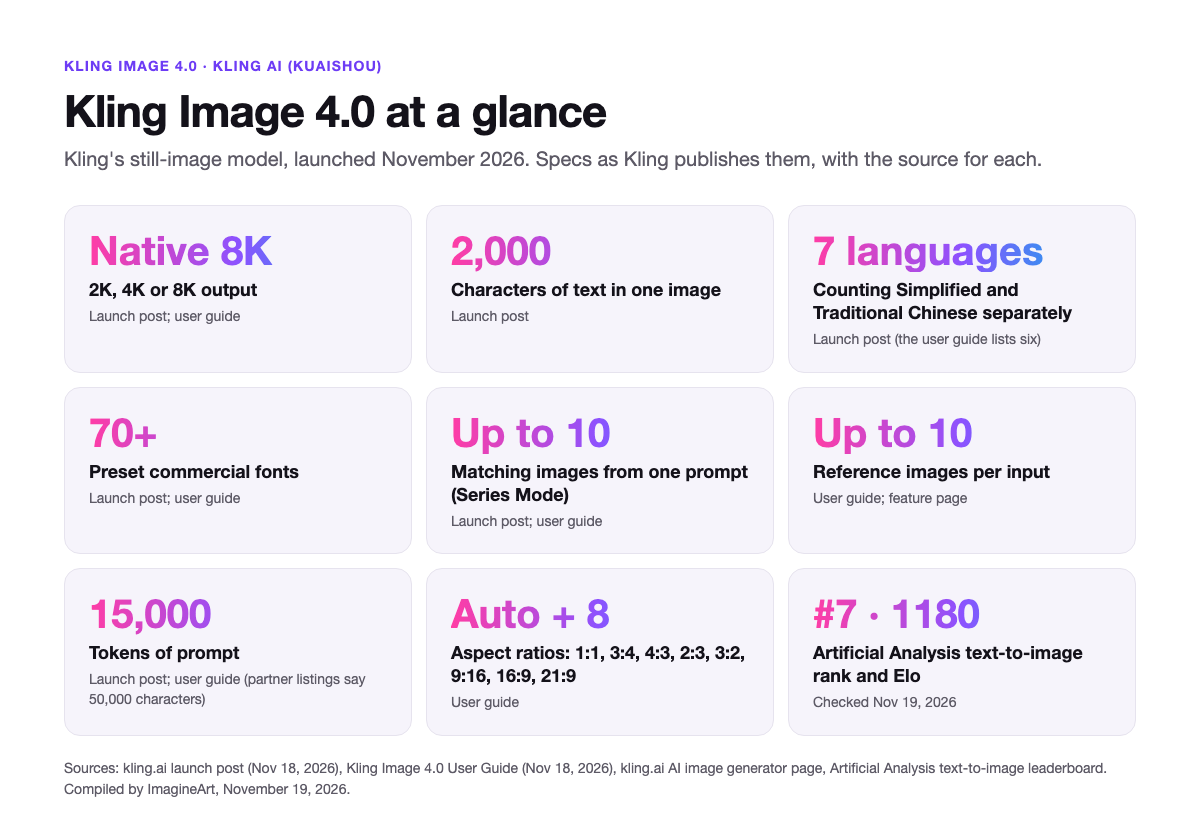 Kling Image 4.0 spec sheet, including 9 aspect ratio options (Auto + 8 ratios). Sources: Kling's launch post, user guide and feature page; TechNode; Artificial Analysis, checked November 19, 2026
What's new in Kling Image 4.0?
Kling's launch post calls 8K a first. Everything else below is Kling's own list of Kling Image 4.0 features, with the source for each.
Native 8K, a first for Kling
Kling's launch post says the model "introduces native 8K image generation for the first time". The user guide lists native 2K, 4K and 8K, and the feature page puts it as "Choose from 2K, 4K, or 8K based on your needs."
Kling pitches 8K at "professional creative work and high-resolution displays" and "post-production cropping". The second is the practical case: one wide frame cut into several tighter shots. For a phone feed, 8K is a lot of pixels nobody will see.
2,000 characters, seven languages and 70+ fonts
The launch post claims up to 2,000 characters in one image, clearer small text and complex multi-section layouts. Its seven languages are Simplified Chinese, Traditional Chinese, English, Japanese, Korean, Spanish and Portuguese.
Here's the first of Kling's two internal conflicts. The user guide's spec table lists six languages: Chinese, English, Japanese, Korean, Spanish and Portuguese. Nobody dropped a language; the launch post counts Simplified and Traditional Chinese separately, so we write "seven, counting both Chinese scripts".
For type, the user guide lists "70+ commercially licensed fonts" and lets you name a font or upload a font reference image. Kling says text and font styles can be edited afterwards in images generated on its own platform.
Series of up to 10 images
The user guide says one generation can produce "up to 10 consecutive images", and Series Mode plans them "around your creative intent, with consistent subjects and visual styles". You tag reference images with an "@mention" in the prompt. Kling names storyboards for "short dramas, animations, and advertisements", scenes and e-commerce sets as the uses.
15,000-token prompts and a 50,000-character footnote
Kling's launch post and user guide both allow prompts of up to 15,000 tokens. Some partner listings, such as fal and Runware, say 50,000 characters instead. Tokens and characters are different units, so the two figures don't really clash. They just never agreed on a ruler. We go with Kling's number.
Color grading presets and the 104 question
The launch post lists "110+ preset color grading styles" and says you can pull a palette and grading from a reference image on Kling's platform. The feature page's Style Library says "The 104 presets cover 2D, 3D, and photographic directions." Kling doesn't say whether these are one library counted twice or two different sets, so we report both with their sources.
Photorealism
Kling claims natural lighting, skin texture and material detail closer to photos straight from a camera. Its examples single out freckles, windblown hair and leather creases staying crisp. That's a vendor claim, and the prompts below include one built to test it.
How does Kling Image 4.0 rank?
On the Artificial Analysis text-to-image leaderboard, checked November 19, 2026, Kling Image 4.0 is rank 7 with an Elo of 1180. On the image editing board it is rank 6 on 1183. Neither board has a separate text-rendering score; both show an overall ranking only.
Artificial Analysis says voters "compare two images generated from the same prompt without knowing which model created each image", and the Elo scores come from those votes. On the Artificial Analysis text-to-image leaderboard, Kling's rank range is 6 to 9, from 5,550 samples. Artificial Analysis doesn't date the page, so treat these as a November 19 snapshot.
The Artificial Analysis image editing leaderboard puts Kling Image 4.0 at rank 6 (range 5 to 7), Elo 1183, from 5,628 samples. Kling 3.0 Omni (listed as Kling Image 3.0 Omni) sits at rank 68 on 954 on that same board, so Kling's jump in one generation is about 230 points.
On the text-to-image board, Kling Image 4.0 is level with Nano Banana 2.1 (rank 8, 1176), since their rank ranges overlap. Kling published no head-to-head numbers of its own, which leaves Artificial Analysis as the only outside read.
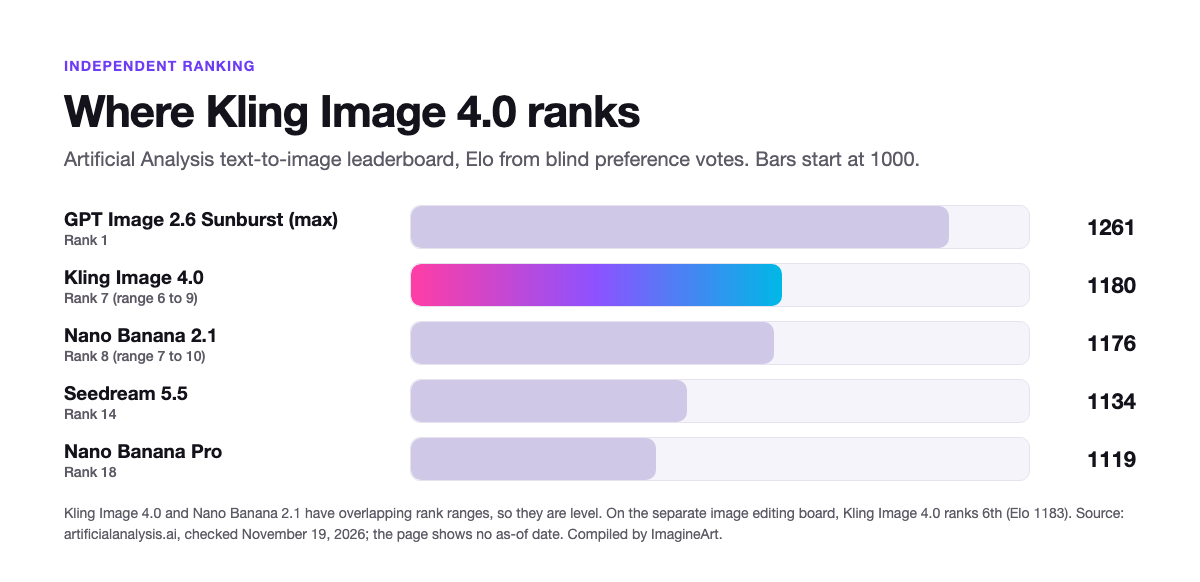 Artificial Analysis text-to-image leaderboard, Elo from blind preference votes, checked November 19, 2026: GPT Image 2.6 Sunburst (max) 1261, Kling Image 4.0 1180, Nano Banana 2.1 1176, Seedream 5.5 1134, Nano Banana Pro 1119
What is Kling Image 4.0 good for?
Kling names e-commerce detail pages and ads, web design, event posters, film storyboards, presentation decks, explainer graphics and portraits. Most of that list shares one trait: words that must read correctly, or a set of images that must match. If your image carries no text and stands alone, the headline features matter less.
Here is each use matched to the spec that makes the case for it:
- E-commerce detail pages: the user guide describes long-format images "for e-commerce product detail pages and web page designs", plus layer editing on Kling's platform that splits text, backgrounds, elements and shapes into layers you can change or regenerate one at a time. For a single clean product shot, ImagineArt's AI product photography app is built for exactly that.
- Event posters: 2,000 characters and 70+ fonts cover a headline, a lineup and the small print. For a film-style poster starring your own photo, there's the AI movie poster generator.
- Film storyboards: Series Mode plans up to 10 frames with consistent subjects, and the feature page names storyboards for "films, ads, comics, and short dramas".
- Decks and explainer graphics: Kling's claim of complex multi-section layouts and clearer small text is aimed at slides and diagrams with labels.
- Portraits: the photorealism claims (skin texture, freckles, natural light) are aimed here. Anyone who has watched an older model turn freckles into a rash will want to check this one.
Kling Image 4.0 prompts to try
We haven't run these. Each pushes one headline claim, so whatever comes back tells you something. For the general craft of writing prompts, see our AI image prompt guide.
1. Long text (the 2,000-character claim)
A cream café menu card, flat lay on a dark wooden table. Title "Linden Lane Café" in a serif font at the top. Three sections, "Breakfast", "Lunch" and "Drinks", each with six items, a one-line description under every item and prices aligned right. Small footer: "Open daily 7am to 4pm. Card payments only."
Check: every item name, every price and the footer, letter by letter.
2. Two scripts on one poster (the language claim)
A minimalist exhibition poster for ceramics. Headline "Quiet Forms" in English with "静かな形" in Japanese beneath it. Dates "March 3 to March 30" and a short paragraph of English body copy along the bottom. Off-white background, one black vase shot in profile.
Check: whether the Japanese characters match what you typed.
3. A six-frame storyboard (Series Mode)
Six storyboard frames for a 15-second bike ad: the same rider in a red jacket on the same city street at dusk, starting from a wide shot, then a close-up of the pedals, then the rider's face, a turn at a crossing, a coffee shop stop and a final frame with the line "Ride home the long way."
Check: the jacket, the face and the street across all six.
4. Leather macro (the photorealism claim)
Macro photo of a worn brown leather wallet on linen, deep creases, visible stitching, a few loose threads, soft window light from the left, shallow depth of field.
Check: whether the creases look like leather or like plastic pretending.
5. Wide 8K night market (the resolution claim)
A 21:9 rooftop view of a crowded night market, dozens of lit stall signs, people at every stall, steam rising from food carts, generated at 8K (or your tool's highest setting).
Check: crop one stall sign to full screen and see if it holds.
Where can you use Kling Image 4.0, and what does it cost?
Kling Image 4.0 runs on Kling Creative Studio, where the launch post says it is available to all users, and partner platforms list it too. Kling hasn't published a per-image credit table for consumers. Its feature page says costs and access vary by plan, and mentions a free tier with limited credits.
The feature page FAQ puts it this way: "Available resolutions, credit costs, and model access may vary by plan and by the options currently shown in the generation panel." So the panel in front of you is the price list.
On ImagineArt, Kling's earlier image model sits on the Kling Image O3 page linked in the intro, which lists up to 10 reference images and output up to native 4K. ImagineArt has a free plan; check the current plan limits before you pick a model.
Limits and open questions
Every capability in this post is Kling's own claim. The launch post shows no benchmarks against rivals, and we found no independent test of the 2,000-character text claim. The leaderboards rank overall preference, so a model can score well there and still misspell a menu.
Four other gaps are worth knowing:
- Spec conflicts: Kling's own pages disagree twice, on six or seven languages and on 110+ or 104 presets. Separately, Kling's 15,000 tokens and the partner listings' 50,000 characters use different units.
- Platform features: text and font editing, layer editing and palette extraction are things Kling describes on its own platform. Don't assume a partner site that hosts the model offers them.
- Pricing: no per-image cost from Kling, and resolution access may depend on your plan.
- Published limits: unlike Google with Nano Banana 2.1, Kling has published no known-limitations list.
The short verdict
This isn't a hands-on Kling Image 4.0 review: we found no independent hands-on test of the text claims, and we ran none ourselves. On Kling's own spec sheet, this is an image model built around text and resolution. Artificial Analysis puts it level with Nano Banana 2.1 on text-to-image and ahead of it on editing (1183 against 1152). Kling's own pages disagree on two specs, so read the source column before you quote a number.
If one image has to carry a full menu, or one prompt has to plan a 10-frame storyboard, those are the two claims to test first. Take the five prompts above for a spin in ImagineArt's AI image generator to see how the models you already use handle the same tests.
Frequently asked questions
No. Kling 4.0 is Kling's video model, released in October 2026. Kling Image 4.0 is a separate still-image model announced on November 18, 2026. They share a maker and a version number, and that's where the overlap ends.
Kling's feature page says Kling AI "offers a free tier with limited credits", but it doesn't say whether Kling Image 4.0 is included or what it costs per image. The same page says credit costs and model access may vary by plan, so the generation panel shows the current cost.
Yes, on Kling's own platform. Kling says text and font styles can be edited in images generated there, and its user guide describes layer editing that separates text, backgrounds, elements and shapes so each can be changed, moved or regenerated. Kling describes both as platform features, so a site hosting the model may not offer them.
Kling's user guide lists nine options: Auto, plus 1:1, 3:4, 4:3, 2:3, 3:2, 9:16, 16:9 and 21:9. That covers square posts, portrait stories, standard horizontal frames and a 21:9 cinematic wide. Auto leaves the shape to the model.
Zahida Misher
Exploring how AI transforms marketing, I help businesses unlock growth and future-proof their presence.
View all articlesRecent posts
The Best AI Avatar Generators In 2027: 11 Tools Compared And Ranked
50 Types of Art Styles: Definitions, Examples and AI Prompts
How to Edit Images With Ideogram 4.6: 38 Edits, Prompts and Results