
Arooj Ishtiaq
July 23, 2026 • Updated July 23, 2026
11 mins Read
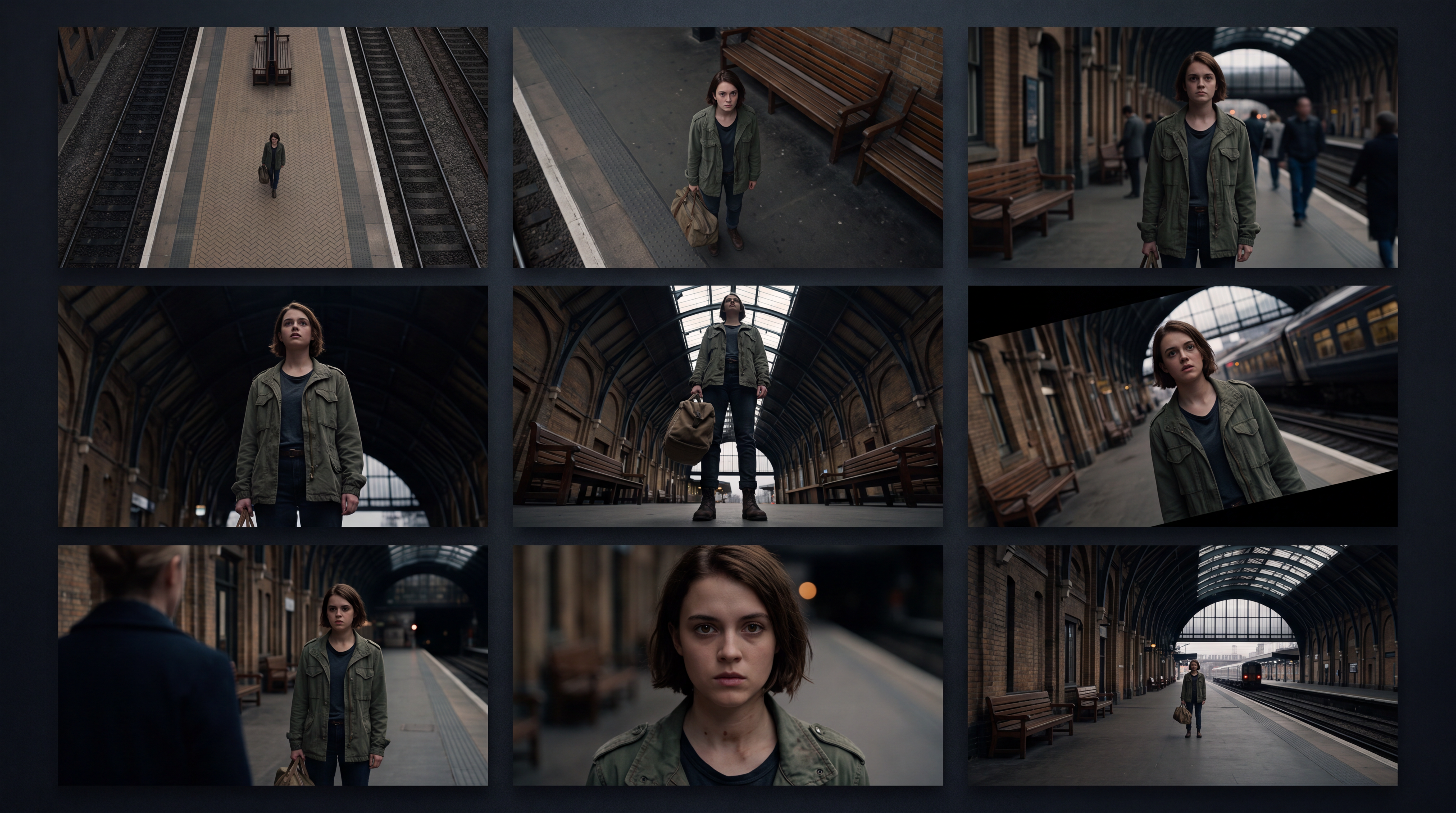
The same subject, shot from a slightly higher position instead of straight on, can read as vulnerable instead of neutral. Shot from below instead, that same subject suddenly reads as powerful, even threatening. Nothing about the subject changed. Only the camera's position relative to it did. That's the entire power of a camera angle: it's one of the few tools in visual storytelling that shapes the audience's emotional read on a scene before a single line of dialogue is spoken or a single edit is made.
This guide covers what camera angles are in practical terms: fourteen named positions, grouped by family, with a clear explanation of what each one communicates and why a filmmaker or an AI prompt would choose it.
What Are Camera Angles?
A camera angle is the position and orientation of the camera relative to its subject at the moment a shot is captured: above the subject, below it, level with it, tilted against it. It's a fixed relationship, not a motion. Unlike a camera movement, which describes what the camera does across a shot's duration, an angle describes where the camera simply sits.
Angles matter because that positioning does real narrative work. A high angle looking down on a character makes them look smaller and less powerful before the audience even registers why. A low angle looking up does the opposite.
Directors choose angles deliberately for exactly this reason, and the same logic applies directly when generating a scene with an AI video generator: shot angles aren't a technical afterthought; they're one of the primary ways a story tells the audience how to feel about what's on screen.
Camera Angles vs. Camera Movements
This is worth stating plainly, since the two get blended in casual conversation more than almost any other pair of filmmaking terms.
- A camera angle is a fixed position: high, low, eye-level, Dutch. There's no motion involved; the camera could hold that exact position for the entire shot and never move.
- A camera movement is a change in the camera's position or orientation while recording: a pan, tilt, dolly, or crane move. Camera movements answer "what is the camera doing?" Camera angles answer "where is the camera positioned?"
Types of Camera Angles
The fourteen angles below fall into four families: vertical position angles (how high or low the camera sits), tilted angles (rotation around the lens axis rather than height), relational angles (positioned around another subject or character), and height-variant angles (smaller adjustments within the eye-level range).
Grouping them this way makes clear why, say, a bird's-eye view and an overhead shot are often confused for the same thing when they're actually distinguished by degree, and why a shoulder-level shot exists as its own choice rather than just being "eye-level, roughly."
Vertical Position Camera Angles
These angles are defined by how high or low the camera sits relative to the subject, the most fundamental and most frequently used angle family.
- Eye-Level Angle: The camera sits at the same height as the subject's eyes, mimicking how people actually see each other in real life. This is the most neutral angle available, no power dynamic implied, no distortion. It's the default choice for dialogue scenes and interviews specifically because it doesn't editorialize.
- High Angle: The camera is positioned above the subject, looking down. This makes a subject appear smaller, weaker, or more vulnerable, a common choice for scenes establishing a power imbalance or building sympathy for a character in a difficult position.
- Low Angle: The camera is positioned below the subject, looking up. The reverse effect: subjects appear larger, more dominant, even threatening. Low angles are a go-to for hero shots, villain reveals, and any moment meant to convey authority.
Bird's-Eye View: An extreme high angle, positioned almost directly above the subject, though not necessarily at a full 90 degrees. This flattens the subject into a pattern or shape within a wider scene, commonly used to show scale, geography, or a character's isolation within a larger space. - Overhead / Top-Down Shot: Distinct from a bird's-eye view by degree: a true overhead shot places the camera at exactly 90 degrees, directly above the subject, looking straight down. Common in cooking content, product photography, and any scene where the goal is showing a flat layout rather than a sense of scale, exactly the kind of shot the AI Ad Studio is built to generate at scale for product listings and campaign creative.
- Worm's-Eye View: The extreme opposite of a bird's-eye view: the camera sits at ground level, looking almost straight up. This exaggerates height and scale dramatically; a skyscraper or a towering character can feel genuinely overwhelming from this position in a way a standard low angle doesn't achieve.
- Aerial / Drone Angle: A high angle taken from a significant altitude, typically covering a wide landscape or cityscape rather than centering on a single close subject. Distinct from a bird's-eye view mainly in scale and distance, aerial angles are about establishing an entire environment, not just looking down on one subject within it.
Tilted Camera Angles
Unlike the vertical family above, a tilted angle doesn't change how high or low the camera sits; it rotates the camera around its own lens axis, tilting the horizon line itself.
- Dutch Angle (Canted Angle): The camera is rotated so the horizon line sits diagonally across the frame rather than level. This immediately reads as unease, disorientation, or psychological tension, a favorite of horror and thriller genres specifically because it makes an otherwise normal scene feel subtly wrong.
Relational Camera Angles
These angles are defined by their position relative to another character or subject in the scene, rather than purely by height.
- Over-the-Shoulder Angle (OTS): The camera is positioned just behind one character's shoulder, framing a second character (or subject) from that vantage point. This is the backbone of nearly every dialogue scene in film and television; it keeps both parties visually present while centering attention on whoever's speaking.
- Point of View (POV): The camera takes the position of a specific character's eyes, showing exactly what they would see. Unlike the other angles here, POV doesn't just position the camera relative to a subject; it replaces the subject's viewpoint entirely, putting the audience directly into a character's perspective.
- Two-Shot Angle: The camera is positioned to keep two subjects in frame simultaneously, typically at eye-level, used to show a relationship or interaction without cutting between individual angles on each person, a common setup to generate directly in AI Film Studio when a scene needs both characters visible for the full exchange.
Height-Variant Camera Angles
These sit within the general eye-level range but shift the exact height enough to change the feel of a shot subtly rather than dramatically.
- Shoulder-Level Angle: Slightly below true eye-level, at roughly shoulder height. Many directors actually prefer this over a strict eye-level angle for a more cinematic, slightly more intimate look, without tipping into the power dynamics a full low angle would introduce.
- Hip-Level Angle: Positioned at hip height, often used for shots involving children, pets, or seated subjects, where a true eye-level angle would require an awkward camera position, or for action sequences where a slightly lower vantage point adds dynamism.
- Ground-Level Angle: The camera rests at or near ground level without necessarily tilting sharply upward the way a worm's-eye view does. Useful for grounding a shot in a physical environment, a car driving past, footsteps approaching, without the exaggeration a full worm's-eye view introduces.
How to Choose the Right Camera Angle for Your Scene
Fourteen angles are only useful once matched to what a scene actually needs emotionally, not just visually.
- For neutral, relatable dialogue: eye-level or shoulder-level. Either keeps the audience on equal footing with the character rather than editorializing about them.
- For vulnerability or diminishment: high angle, or bird's-eye view if the goal is showing a character dwarfed by their surroundings.
- For power, dominance, or threat: low angle, or worm's-eye view for a more extreme version of the same effect.
- For unease or psychological tension: Dutch angle, used sparingly since its impact depends on it standing out from an otherwise level scene.
- For dialogue and character interaction: over-the-shoulder or a two-shot, depending on whether the scene calls for an intimate, alternating conversation or a shot that holds both characters together.
- For full environmental scale: aerial or overhead, aerial for a wide landscape, overhead for a flat, top-down layout.
- For subjective immersion: POV, used deliberately rather than constantly, since its impact comes from being a departure from the audience's usual observer position. Test a POV shot quickly using the Camera Angles tool on an existing photo before committing to a full scene generation.
Applying Camera Angles in AI Image and Video Generation
Understanding these angles matters just as much when writing an AI prompt as it does when physically positioning a camera, arguably more, since a prompt has to name the angle explicitly rather than relying on an operator's instinct for where to stand. Here's how that breaks down across ImagineArt's tools.
Changing the Angle of an Existing Photo
If you already have a photo and want a different angle on the same subject, without reshooting or regenerating from scratch, ImagineArt's Camera Angles tool is built specifically for this.
- Adjust rotation left or right, move the perspective up or down, and zoom, all through simple sliders, no photography or editing skill required.
- Works on personal photos, product shots, or creative artwork while keeping proportions and depth realistic rather than distorted.
- Useful for e-commerce and marketing teams who need the same product shown from several angles without a full reshoot for each one.
Generating a New Scene from a Specific Angle
If you're creating an image from scratch rather than adjusting an existing one, the AI Image Generator lets you specify the angle directly in your prompt low angle, bird's-eye view, over-the-shoulder, and generates the scene from that exact vantage point rather than defaulting to a flat, neutral perspective.
- Naming the angle explicitly in a prompt ("low angle shot, looking up") produces a meaningfully different result than leaving it implied.
- Combine an angle with lighting and lens language for more precise control; a low angle paired with a wide lens reads very differently than a low angle with a tight, compressed lens.
- If the source photo needs quality improvement before you commit to a specific angle adjustment, the Image Upscaler can sharpen it first.
Applying Angles in AI Video
Angles apply just as directly to video generation as they do to still images, and they combine with movement rather than replacing it.
- ImagineArt's AI Video Generator lets you specify a starting angle for a shot, then layer a movement on top of it, a low angle that also pushes in, for instance.
- Kling 3.0 handles precise camera positioning well, useful when an exact angle needs to hold steady through a multi-character scene.
- Veo 3.1 renders angle-driven lighting and perspective with strong physical realism, especially useful for dramatic low or high angles where believable shadow and scale matter.
- Seedance 2.0 maintains a consistent angle across dialogue-heavy scenes, useful for keeping an over-the-shoulder framing steady through a back-and-forth exchange.
- Already have a generated clip and need a different angle on it without a full regeneration? The video reframe tool adjusts that directly.
Refining the Result
- Once an image or clip is generated, the AI Video Editor lets you combine an angle-specific shot with others into a longer sequence.
- For a project that needs several angle and lens decisions tested before a final commitment, how I pre-visualize shoots in Film Studio covers that workflow directly.
Camera Movement and Prompting Resources
Angles are only half the picture in most real shots. For the motion side of this same topic, 18 types of camera movements in film and AI video covers pans, tilts, dolly moves, and more, and for structuring a prompt so both angle and movement are unambiguous to the model, JSON prompting for AI video generation and 50 AI camera movement prompts both go deeper on execution.
Camera Angle Prompting Tips for AI Generation
- Name the angle explicitly, "low angle shot, looking up" rather than "make it look powerful." The model needs the technical term, not just the intended feeling.
- Separate angle from movement in the prompt; per the distinction covered above, describe them as two different pieces of information rather than one blended phrase.
- Pair the angle with lens language when precision matters; a bird's-eye view with a wide lens reads differently than the same angle with a compressed telephoto look.
- Specify degree for extreme angles; "worm's-eye view" and "low angle" both mean looking up, but the degree of exaggeration is very different, and naming that difference helps the model avoid defaulting to a mild version of either.
Master Every Angle, Then Let AI Handle the Execution
A camera angle is one of the quietest but most powerful decisions in visual storytelling; the audience rarely notices it consciously, but they feel its effect every time. Whether you're planning a physical shoot, adjusting an existing photo, or writing a prompt for an AI generator, the same fourteen positions apply; only the tool executing them changes.
Frequently Asked Questions
What are camera angles?
A camera angle is the camera's fixed position and orientation relative to its subject at the moment a shot is captured: high, low, eye-level, or tilted. It describes where the camera sits, not what it does over time, which is what a camera movement describes instead.
What is the difference between a camera angle and a camera movement?
A camera angle is a fixed position (high, low, eye-level, Dutch); a camera movement is motion over time (pan, tilt, dolly, crane). The two are frequently combined in a single shot, but they answer different questions; one is about position, the other is about motion.
What are the most common camera angles in film?
Eye-level, high angle, and low angle are the three most frequently used, largely because they over the majority of everyday storytelling needs: neutral dialogue, conveying vulnerability, and conveying power, without requiring specialized equipment or positioning.
Can AI generate images or video from a specific camera angle?
Yes. Current AI image and video models can generate a scene from a named angle, low, high, bird's-eye, Dutch, and more, directly from a text prompt, or adjust an existing photo's angle without regenerating the whole image. Precision depends on how explicitly the angle is named in the prompt.
Why does the Dutch angle feel unsettling?
Because it tilts the horizon line, which the human eye reads as level by default in almost every other context. A tilted horizon subtly signals that something in the scene is off-balance, which is exactly why it's used so often in horror, thrillers, and moments of psychological tension.
Arooj Ishtiaq
Arooj is a SaaS content writer specializing in AI models and applied technology. At ImagineArt, she creates sharp, product-focused content that helps creators and businesses understand, adopt, and get real value from AI tools.