
Syed Anas Hussain
June 2, 2026 • Updated June 2, 2026
12 mins Read
The first video I edited where I had enough b-roll was the first one I forgot was mine. Something about it felt produced, polished, like a real video rather than a filmed conversation. B-roll is the footage that creates that feeling. The shots between your main content that add depth, cover edits, and keep the viewer’s eyes engaged. In this guide I will break down exactly what b-roll is, the types you need to know, how to plan it properly, and how to create it with AI when filming everything yourself is not an option.
What Is B-Roll in Video Production?
B-roll is the supplemental footage used alongside the primary footage in a video. It provides context, covers edit points, adds visual interest, and supports the narrative without carrying it directly.
The term comes from film’s physical editing era. Editors worked with two reels: the A reel held the main footage, like interviews or central action, and the B reel held everything else. Cutaways. Establishing shots. Detail shots. The B reel was what editors reached for when they needed to cover a cut, add context, or keep the video moving. Today the workflow is digital, but the concept is identical.
A practical example: you are watching a documentary about a chef. The a-roll is the chef talking directly to camera about their craft. The b-roll is every shot of their hands at work, the kitchen full of steam and movement, the finished dish on the pass. Remove the b-roll and you have a person talking in a room. Add it back and you have a story.

A-Roll vs B-Roll: What Is the Real Difference?
A-roll is your primary footage. It carries the story. Interviews, presenters, product demonstrations, main action sequences. When a-roll is on screen, the viewer’s focus is on the primary content and its audio.
B-roll supports everything around it. The most underrated function of b-roll is not visual variety. It is making the edit invisible. When you need to trim a rambling section from an interview, the raw cut creates a visible jump cut. Drop b-roll over that section, make the edit underneath it, and cut back to the speaker. The viewer sees a seamless transition and never registers the seam. That alone makes b-roll worth planning properly.
| A-Roll | B-Roll |
|---|---|
| Primary footage, carries the story | Supplemental footage, supports the story |
| Interviews, presenters, main action | Establishing shots, cutaways, detail shots |
| Audio is usually the priority | Visual interest is the priority |
| Drives the narrative | Contextualizes and decorates the narrative |
| Shot with primary camera setup | Shot separately, from stock, or AI-generated |
Why B-Roll Makes or Breaks Your Video
Viewers do not abandon videos because they are confusing. They abandon them because they are boring to look at.
A talking head with no visual variation demands that viewers stay engaged purely through their ears while looking at the same frame for minutes at a time. That is a hard ask. B-roll relieves that burden by giving the viewer’s eyes something to process while the audio continues.
There is also the emotional dimension. The right b-roll does not just illustrate what the speaker is saying. It amplifies how the viewer feels about it. A founder speaking about company growth is flat. Cut that same audio over footage of the team collaborating, products moving out the door, and a busy floor, and the same words carry more weight. B-roll is the emotional amplifier of video.
The ratio most experienced editors land on: film or generate at least three times more b-roll than you think you will need. You will always run short in the edit. Plan for that in advance.
Types of B-Roll Shots Every Creator Should Know
Different b-roll shots serve different purposes. Knowing the vocabulary makes your planning faster and your edit stronger.
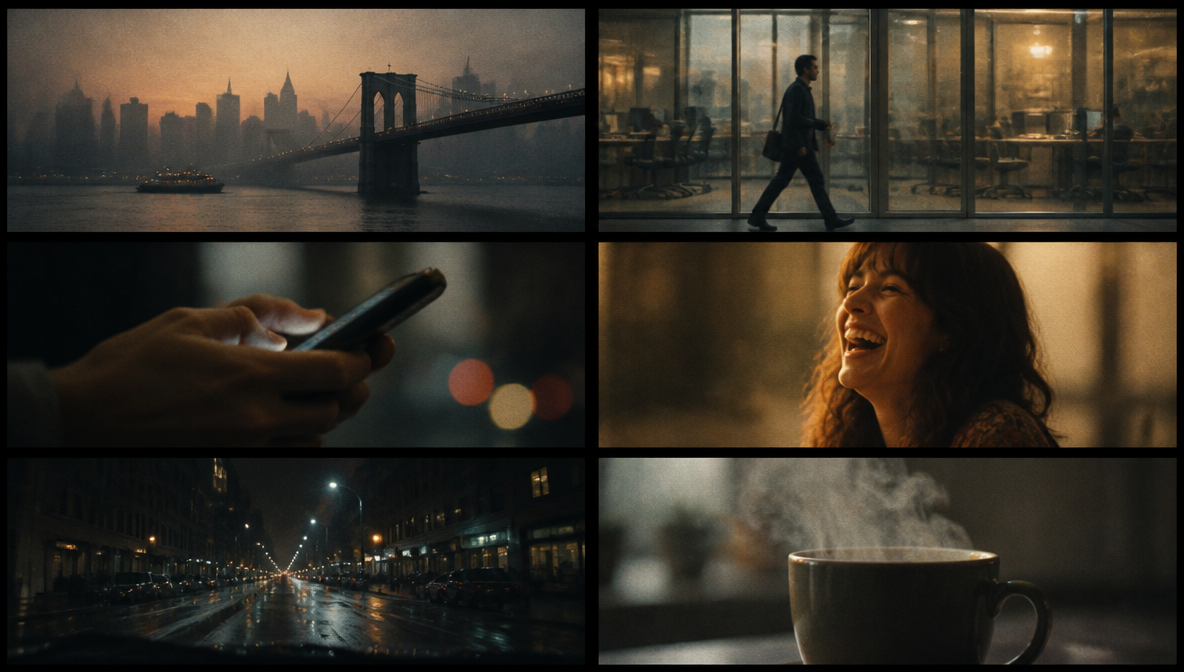
- Establishing shots orient the viewer. Wide shots of a location, building exteriors, city panoramas. These answer “where are we?” before the story zooms in. They are almost always the first b-roll in a new scene.
- Cutaway shots show related action happening alongside the main footage. If the interview subject mentions their morning routine, a cutaway might be them walking out of a building. The cutaway illustrates without interrupting the audio thread.
- Insert shots focus on specific details. A close-up of hands typing. Text on a screen. A product being picked up. A handshake. These add texture and make the content feel specific and real rather than generic.
- Reaction shots capture emotional responses. A taste test reaction in a food video. A team member’s expression during a presentation. An audience member laughing. These create connection.
- POV shots show what a subject sees from their own perspective. First-person walking into a room. Looking down at a keyboard. Driving from behind the wheel. They create immersion when used intentionally.
- Atmospheric shots have no specific narrative function but set the emotional tone. A slow pan across a quiet street. Rain on glass. A coffee cooling on a desk. These breathe pace into a fast edit.
Each of these shot types is also a camera direction decision. Understanding how the camera moves to achieve them is what separates a planned edit from a reactive one. For a full breakdown of every movement type and how to prompt them in AI video tools, the Types of Camera Movements guide covers all 16 foundational movements used in professional and AI filmmaking. And if you are generating b-roll with AI, the AI Camera Movement Prompts guide gives you 50 ready-to-use prompts organized by movement type — a direct resource for translating your shot list into generation-ready prompts.
How to Plan B-Roll Before You Shoot or Generate
This is the step that separates creators who always have enough b-roll from those who are scrambling in the edit.
Start with your script or talking points. Go line by line. For every major statement or scene beat, ask: what does this look like visually? What shot would support or illustrate this? Write it down.
That list becomes your b-roll shot list. A good shot list includes:
- Shot type (establishing, cutaway, insert, reaction, atmospheric)
- Specific subject of the shot
- Framing (wide, medium, close-up)
- Any camera movement (static, slow push, pan, handheld)
- Edit purpose (covering this section, illustrating this point)
With a shot list, you are executing when you film or generate, not improvising. That shift alone cuts editing time significantly.
One addition I always make: unscripted coverage shots. Wide shots of the location, incidental movement, environmental details with no specific planned use. In every edit I have done, those turn out to be the connective tissue that holds scenes together.
If you are using ImagineArt AI Film Studio to generate b-roll, your shot list becomes your prompt list. Each shot you would normally plan to film becomes a text prompt. The planning process is identical. The execution is faster. And for prompting specific shot aesthetics and genres, the AI film prompts guide is worth keeping open alongside your shot list.
How to Create B-Roll with AI Using ImagineArt Film Studio
AI-generated b-roll is now a real production option. I use it for establishing shots of locations I cannot visit, abstract concept visualization, and atmospheric inserts where filming the real thing is not practical.
Here is the exact process inside ImagineArt Film Studio:
- Create a new project in ImagineArt Film Studio.
- Select the Create Video tab inside your project.
- Write your prompt. Specificity matters. “Slow push-in on a rainy London street at night, black cabs and neon shop signs, shallow depth of field, cinematic” produces better results than “city at night.” Include the subject, environment, lighting, mood, and specific visual details.
- Set your Genre. This controls the overall visual style: Cinematic, Documentary, Commercial, Social, Drama. Match it to the tone of your primary footage.
- Set Movement. This controls camera behavior in the generated clip: slow push, pull back, static, handheld, crane. Match it to the energy of your edit.
- Use the Camera settings to control lens and aperture, which affect depth of field and the cinematic feel of the clip.
- Generate and review. Adjust the prompt and regenerate if needed. Small changes in wording produce meaningfully different outputs.
The results work best for anything that does not need to be geographically tied to your actual shoot. Atmospheric cutaways, concept visualization, location establishing shots. Color grade everything to match your primary footage. That is the step that makes AI b-roll invisible in the final edit.
If you want to take AI b-roll further and build it into a fully cinematic production, the How to Make Cinematic Video with AI guide is worth reading alongside this one. It covers how to use genre controls, lighting descriptors, and camera movement techniques specifically for producing professional-quality AI video - the same principles that make AI-generated b-roll look intentional rather than incidental.
For standalone clip generation outside of a full project workflow, AI Workflow also handles individual b-roll clips cleanly.
Examples of B-Roll Footage in the Real World
B-roll is not one-size-fits-all. How it is used and what kinds of shots it consists, varies significantly depending on the format. Understanding how different genres use b-roll helps you make better choices in your own work.
In documentaries, b-roll is the visual backbone of the entire film. Because documentaries rely on interviews and narration as the primary audio, the b-roll has to carry the visual storytelling for extended stretches. A documentary about a city neighborhood might spend minutes of screen time on shots of streets, faces, storefronts, and daily routines, none of it featuring the interview subject directly. The b-roll does not just illustrate; it builds the world the story lives in.
In feature films, b-roll functions as insert and atmospheric footage, such as the close-up of a hand on a doorknob, a clock ticking, or an empty parking lot before a confrontation. Feature b-roll is tightly scripted and precisely motivated. Every shot earns its place in the edit because screen time is expensive and pacing is controlled frame by frame.
In reality TV shows, b-roll tends to be confessional cutaways and environmental coverage. Producers shoot enormous amounts of coverage of people arriving at locations, reactions in hallways, hands preparing food, and crowd shots because they do not know in advance which story threads will survive the edit. Reality b-roll is a hedge against the unpredictability of unscripted production.
In news packages, b-roll is almost entirely contextual. A story about a local business will cut to footage of the storefront, the products, and customers browsing. A story about a political event will cut to wide shots of the venue and crowd. The convention in news is simple: the a-roll tells you what happened, the b-roll shows you where and what it looked like.
In vlogs, b-roll is what separates a talking-head video from something with a sense of place and momentum. Lifestyle vloggers shoot their coffee being made, their commute, the restaurant they are reviewing, and the outfit they are describing, all of it serving as visual context that makes the narration feel grounded and experiential rather than abstract.
B-Roll Best Practices That Move the Needle
After editing a significant amount of footage, here is what consistently makes a difference:
Collect more than you plan to use. Three b-roll shots per finished minute of video is a baseline. Five is more comfortable. Running short on b-roll is not a time problem, it is a planning problem.
Match the energy of your b-roll to your a-roll pacing. Fast, energetic primary footage paired with slow, contemplative b-roll creates a jarring contrast. Your b-roll should breathe at the same rhythm as your edit.
Use stillness intentionally. A perfectly static close-up of a product can be more powerful than a moving shot of the same thing. Unnecessary camera movement reads as filler. Intentional stillness reads as confidence.
Color grade everything together. This applies especially to AI-generated b-roll. If your filmed footage has warm, golden tones, your AI clips need to match. Inconsistent color breaks the production value you have built.
Organize before you edit. Sort your b-roll by type before you open the timeline: wide shots, mediums, close-ups, detail shots, and atmospheric. When you need a specific type mid-edit, organized bins save you from scrubbing through everything.
For still b-roll supporting motion graphics or presentation-style video, ImagineArt’s AI image generator is worth keeping in the workflow for high-quality static visuals.
B-roll is the supplemental footage used alongside the primary footage in a video. It includes cutaway shots, establishing shots, insert shots, and atmospheric clips that add context, cover edits, and maintain visual interest. B-roll supports the narrative without carrying it directly.
A-roll is the primary footage that carries the story, such as interviews or main action. B-roll is secondary footage that supports the story visually, covers jump cuts, and adds depth. A-roll drives the narrative. B-roll decorates and contextualizes it.
Most editors recommend at least three b-roll shots per finished minute of video. Five or more gives real flexibility in the edit. Running short on b-roll is one of the most common production problems. Plan and collect significantly more than you expect to use.
Yes. AI tools like ImagineArt Film Studio let you generate cinematic b-roll footage from text prompts. You describe the shot, set the visual genre and camera movement, and the system generates a clip. AI-generated b-roll works well for establishing shots, atmospheric cutaways, and location-based footage you cannot film directly.
The main types are: establishing shots (set the scene and location), cutaway shots (related action alongside the main footage), insert shots (close-up details), reaction shots (emotional responses), POV shots (first-person perspective), and atmospheric shots (mood-setting visuals). Using a mix of all types produces more visually engaging edits.
Go through your script or talking points line by line and identify what each statement looks like visually. Build a shot list with shot type, subject, framing, camera movement, and intended edit purpose. With a shot list you are executing a plan rather than improvising, which reduces editing time significantly.
Yes, when used correctly. AI-generated b-roll works best for establishing shots, atmospheric clips, and concept visualization where location specificity is not required. Color grade AI clips to match your primary footage so transitions are seamless. ImagineArt Film Studio’s genre and movement controls help match the visual style of existing footage.
Wrapping Up
Good b-roll is what takes a video from serviceable to something people finish and remember. Know your shot types, plan before you film, collect more than you expect to need, and edit with intention.
What is genuinely different now is the access. AI-generated b-roll means the ceiling on what you can produce without a full crew or a second shoot day is much higher than it was. If you have been making do with whatever b-roll you happened to capture, it is worth seeing what planning and generating it deliberately looks like.
Syed Anas Hussain
Syed Anas Hussain is a computer scientist blending technical knowledge with marketing expertise and a growing passion for AI innovation. Curious by nature, he dives into new AI sciences and emerging trends to produce thoughtful, research-led content. At ImagineArt, he helps audiences make sense of AI and unlock its value through clear, practical storytelling.