Umaima Shah
January 19, 2026 • Updated July 13, 2026
8 mins Read
A professional product photoshoot typically costs between $500 and $3,000 per session — before retouching, reshoots, or variant photography. AI-generated product mockups produce equivalent results in under a minute, at a fraction of the cost, with no studio or photographer required.
What are product mockups?
Product mockups are visual representations of a product that show how it will look before it gets manufactured, photographed, or launched. They focus on appearance, not functionality. A product mockup shows things like:
- Shape and proportions
- Materials and finishes
- Colors and variants
- Angles and presentation
Teams use product mockups to make decisions early. This article explains how to shift product mockup creation to ImagineArt using Nano Banana Pro for faster, more consistent results.
Why Do You Need Product Mockups?
Product mockups help you evaluate ideas before spending time or money on production.
They reduce guesswork by turning concepts into review-ready visuals early in the process. This article explains how to shift product mockup creation to for faster, more consistent results.
Benefits and use cases:
- Validate product concepts early
- Align teams and stakeholders faster
- Test presentation before manufacturing
- Compare product variations easily
- Prepare visuals without design files
How to Make Product Mockups with Nano Banana Pro
Step 1: Open Nano Banana Pro in ImagineArt
Go to the ImagineArt image generation page and select Nano Banana Pro as your model.
Before uploading anything, set your generation preferences such as the number of variations, image resolution, aspect ratio, and output size based on where the mockup will be used.
Step 2: Upload your product image and enter your prompt
Upload your product image into the canvas. Then write a clear, descriptive prompt explaining how the product should appear. Include details such as material, color, finish, viewing angle, background style, and lighting. These inputs guide Nano Banana Pro's interpretation of the product and its presentation.
Step 3: Generate the mockup
Once your settings and prompt are ready, click the generate button. Each generation consumes credits based on the resolution and the number of variations.
This approach is based on how Nano Banana Pro interprets structured inputs in ImagineArt. The Nano Banana Pro overview guide provides more detail.
How to Structure a Product Mockup Prompt
Clear prompt structure improves output quality and predictability.
Separate brand rules from product-specific details.
Product description
Define shape, material, color, and finish.
Product presentation
Specify angle, distance, and framing.
Environment
Describe studio setups, surfaces, or lifestyle settings.
Visual Constraints
Exclude text, hands, clutter, and extra objects.
This structure helps teams make controlled changes and compare results accurately.
Recommended Read: Nano Banana Pro Prompting Guide + 75 Prompts
Where Can You Use Product Mockups?
Nano Banana Pro product mockups fit many practical scenarios that require clear visuals, consistent presentation, and quick iteration.
Common examples include:
E-commerce product listings
Teams use product mockups to prepare e-commerce listings before photography or final production. Mockups help define how products appear in catalogs, including angles, scales, and backgrounds. This makes it easier to standardize listings across multiple SKUs and test how products look together before committing to final visuals.
 Keep style and structure consistent across outputs for your E-Commerce product listing.
Client and stakeholder presentations
Product mockups give clients and stakeholders a concrete visual reference during reviews. Instead of discussing abstract ideas or rough descriptions, everyone evaluates the same product representation. This helps teams gather focused feedback on form, finish, and positioning and reach approval decisions faster.
Pitch decks and investor demos
Founders and product teams use mockups in pitch decks to show what the product will look like, not just what it does. Clear product visuals make concepts easier to understand and reduce the need for long explanations. Investors respond better when they can see the product's direction rather than imagine it.
Social media product previews
Teams use product mockups to preview upcoming products on social platforms before launch. Mockups help maintain a consistent visual style while showcasing different products or variations. This allows early promotion without waiting for final photography or production-ready assets.
 Social Media Assets for Campaign
Product launch visuals
Launch teams rely on product mockups to prepare visuals across websites, presentations, and announcements. Mockups help align how the product appears across channels before launch day. This reduces last-minute changes and ensures the product looks consistent everywhere it appears.
Visual comparison of product variants
Teams use product mockups to compare variants such as colors, finishes, or angles side by side. Keeping the product structure consistent helps differences stand out clearly. This supports faster decisions when selecting final versions for production or marketing.
Types of Product Mockups You Can Create With Nano Banana Pro
Nano Banana Pro supports a wide range of product mockup types without locking users into predefined layouts.
You can create:
- E-commerce product mockups
- Packaging and label mockups
- Apparel and accessories
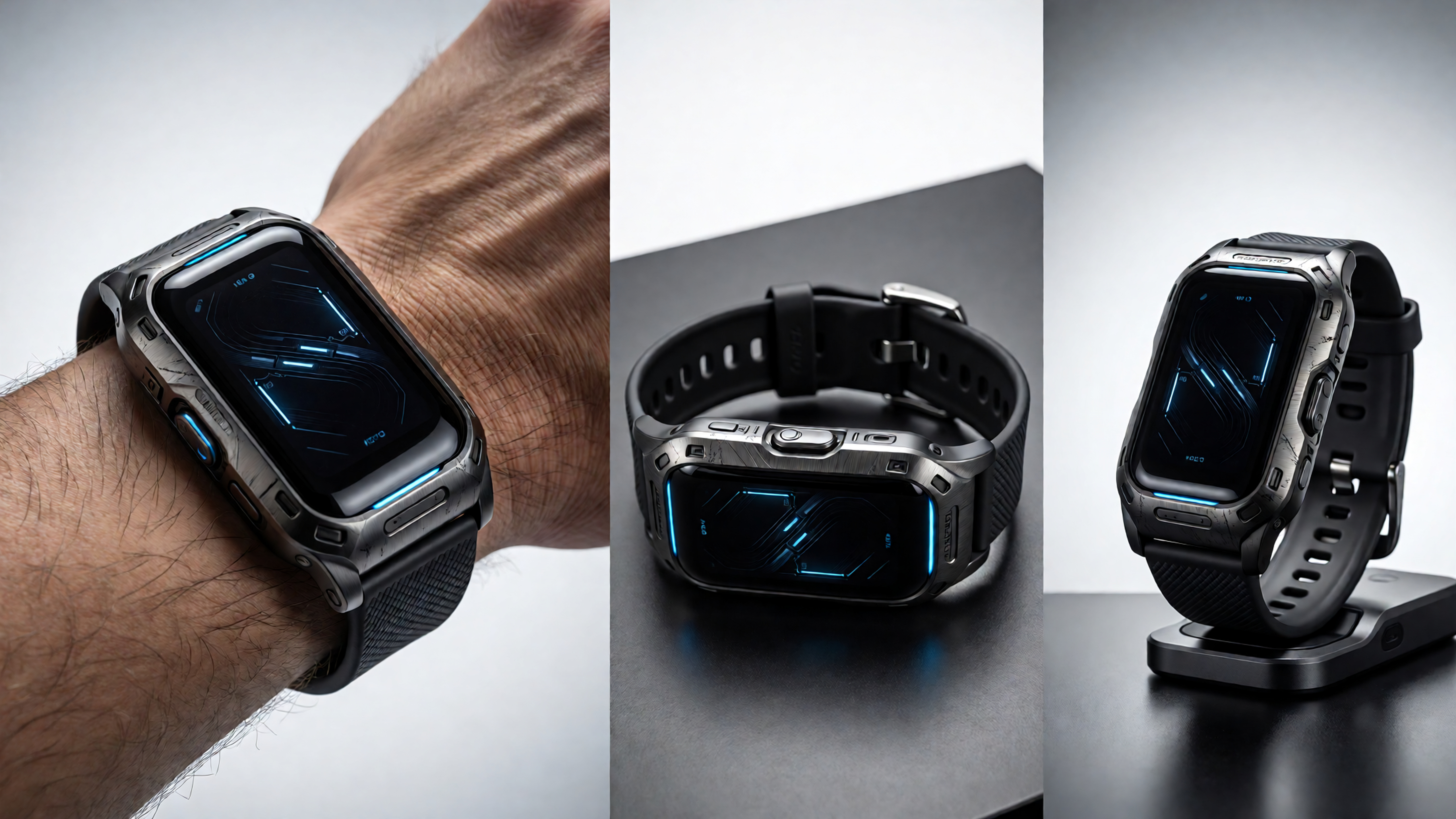
- Tech products and gadgets
- Print products such as books and stationery
- Digital product previews
How to Create Consistent Product Mockups with ImagineArt Workflows?
Creating product mockups through workflows gives you control that single, one-off generations cannot.
Once you define brand rules, lighting behavior, and background treatment, you don’t need to restate them every time you create a new mockup. The product becomes the only variable.
This approach reduces repetition, maintains consistent visual output, and makes comparisons easier when testing multiple products or variations. It also helps teams avoid accidental style drift as projects grow.
Workflows work especially well when branding stays fixed, and products change frequently.
Key Features of Creating Product Mockups With Nano Banana Pro in ImagineArt
When you create product mockups in ImagineArt using the Nano Banana Pro model, the focus shifts from filling templates to translating product details into visuals.
Material, scale, angle, and environment are derived directly from structured inputs, ensuring consistent outputs even as products change. The emphasis stays where it should—on product presentation, not layout presets.
Key features include:
Material and surface definition
Control how finishes, such as matte, glossy, metallic, or textured surfaces, appear across mockups.
Angle and framing consistency
Maintain the same viewing angle and crop across multiple products for clean comparisons.
Lighting behavior control
Define soft, neutral, or directional lighting without changing the overall presentation style.
Environment flexibility
Switch between studio, surface-based, or lifestyle contexts while keeping the product dominant.
Product-first rendering logic
Prioritize the product's form and proportions, avoiding visual noise from unnecessary elements.
Presentation-ready outputs
Generate mockups suitable for e-commerce listings, presentations, and early marketing assets without additional cleanup.
These features make Nano Banana Pro practical for teams that care about clarity, consistency, and decision-ready visuals. When creating product mockups with Nano Banana Pro, comparing it with other best AI image generation tools helps you choose the right approach for your workflow.
How Nano Banana Pro Handles Mockup Variations
Variation matters when teams need to compare how the same product looks under different conditions.
Nano Banana Pro handles variation by responding directly to changes in product-specific inputs while maintaining the core product identity.
This makes it possible to:
- Change viewing angles without distorting product proportions
- Test different background contexts for the same product
- Adjust lighting and mood while preserving material appearance
- Compare studio-style and lifestyle-style presentations side by side
Because changes stay localized, comparisons remain clear and decision-focused.
Key Differences: Nano Banana Pro vs Traditional Mockup Tools
Traditional mockup tools rely on templates and manual file edits. Product changes often require rebuilding layouts, adjusting layers, or duplicating files.
Nano Banana Pro follows a different model:
- Prompt-based workflows instead of fixed templates
- Faster iteration without manual adjustments
- No reliance on PSD files
- Strong fit for concept and early-stage visuals
- Easier experimentation with presentation styles
This approach suits teams that need speed and flexibility.
Frequently Asked Questions
Create Your Product Mockups With Nano Banana Pro in ImagineArt
AI-generated product mockups remove the two biggest bottlenecks in product marketing: production time and production cost. With Nano Banana Pro on ImagineArt, you define the product, the lighting, the surface, and the finish in a prompt — and the output is presentation-ready in under a minute.
The ImagineArt Workflows layer adds consistency at scale: define your brand's visual rules once, and every new product you generate stays on-brand without rebuilding the setup from scratch.
Plans start at $13/month. Free daily credits are included on every account.
Umaima Shah
Umaima Shah is a creative content strategist specializing in AI tools, image generation, and emerging technologies. She focuses on translating complex platforms into clear, practical insights for creators, designers, and product teams