
Tooba Siddiqui
May 4, 2026 • Updated May 18, 2026
14 mins Read
AI voice cloning is the process of creating a digital replica of a human voice using artificial intelligence — trained on a short audio sample, the model generates new speech in that voice from any typed text. It is used by content creators, educators, and brands to produce unlimited narration, voiceovers, and video audio in a consistent voice, without re-recording.
Key Takeaways
- AI voice cloning trains a neural model on your voice and uses it to speak any new text you provide
- You need as little as 30 seconds to 1 minute of clean audio to create a functional clone
- There are three types: zero-shot cloning, few-shot cloning, and full custom cloning — each with different quality and sample requirements
- Legitimate uses include content creation, e-learning, podcast production, and multilingual dubbing
- Cloning someone else's voice without consent is illegal in many jurisdictions and prohibited by most platforms
- ImagineArt Audio Studio lets you clone your own voice and use it across TTS, Lipsync Studio, andAI voice cloning workflows — all under one login
What Is AI Voice Cloning?
AI voice cloning uses deep learning to analyse the acoustic characteristics of a person's voice — pitch, tone, rhythm, accent, and speaking cadence — and build a generative model that reproduces new speech in that voice. The output is not a recording of the original speaker. It is synthesised audio generated by a neural network that has learned to replicate the speaker's unique vocal signature.
This is distinct from a voice impression or an audio filter. An impression mimics surface-level patterns; an audio filter processes existing audio. Voice cloning creates a model that generates entirely new speech — words and sentences the original speaker never recorded — with the same acoustic characteristics as the real voice.
The technology has moved from research labs to consumer tools rapidly. The global voice cloning market was valued at $2.7 billion in 2024 and is projected to reach $10.8 billion by 2030 at a 26.2% CAGR. The primary driver is content production — creators, educators, and businesses using cloned voices to generate audio at a scale and speed that human recording cannot match.
For a technical breakdown of the neural TTS systems that power voice cloning, see the neural text-to-speech guide.
How Does AI Voice Cloning Work?
Voice cloning processes your audio in three sequential stages.
Stage 1 — Audio Analysis
The model ingests your audio sample and extracts speaker embeddings — a mathematical representation of your voice's unique acoustic characteristics. These embeddings capture pitch distribution, formant patterns, speaking rhythm, and tonal range. Longer, cleaner samples produce more complete embeddings because they capture a wider range of phonemes, emotional nuance, and natural variation in your speech.
Stage 2 — Model Training
The speaker embedding is used to fine-tune a pre-trained neural TTS model — transformer-based or WaveNet-based — on your specific voice characteristics. The model does not learn speech from scratch. It adapts an existing high-quality speech model to replicate your acoustic signature specifically, which is why few-shot cloning can produce usable results from as little as 60 seconds of audio.
Stage 3 — Speech Synthesis
You type any text. The fine-tuned model generates audio in your cloned voice — applying your pitch, rhythm, and tone to words and sentences it has never heard you say. Modern cloning systems achieve a Mean Opinion Score (MOS) of approximately 4.0 out of 5 on the standard naturalness scale — placing cloned speech in the near-human quality range.
ImagineArt Audio Studio handles all three stages automatically. Upload your audio sample, the model trains in the background, and your cloned voice is available to use within minutes.
Types of AI Voice Cloning
There are three distinct types of voice cloning, differing in sample requirements, training time, and output quality.
Zero-Shot AI Voice Cloning
No training required. The model generates speech in a target voice from a short reference clip of 5–30 seconds, without fine-tuning on that voice specifically. Quality is good for one-off generations but inconsistent across longer or varied scripts — the model is generalising from a small sample rather than learning the voice's full characteristics. Best for quick demos and short clips where perfect consistency is not required.
Few-Shot AI Voice Cloning
Uses a small audio sample — typically 30 seconds to 5 minutes — to fine-tune the base model on your specific voice. Output quality is significantly better and more consistent than zero-shot. Most consumer tools, including ImagineArt Audio Studio, use this approach. It balances quality and accessibility: you do not need studio-grade recordings or hours of audio to get a usable, natural-sounding clone.
Full Custom AI Voice Cloning
Trains a dedicated model on hours of audio — typically 30 minutes to 10+ hours. Produces the highest quality and most accurate results, capturing subtle vocal characteristics that short samples miss. Used in enterprise applications, audiobook production, and branded voice assistants where the cloned voice needs to be indistinguishable from the original across all content types.
| Zero-Shot | Few-Shot | Full Custom | |
|---|---|---|---|
| Sample needed | 5–30 seconds | 30 sec – 5 min | 30 min – 10+ hours |
| Quality | Good | Very good | Excellent |
| Training time | None | 2–5 minutes | Hours |
| Best for | Quick demos, one-off clips | Content creation, YouTube, courses | Enterprise, audiobooks, branded voices |
How to Clone Voice with AI — Step by Step
Here’s a breakdown of how to clone voice with AI on ImagineArt Audio Studio
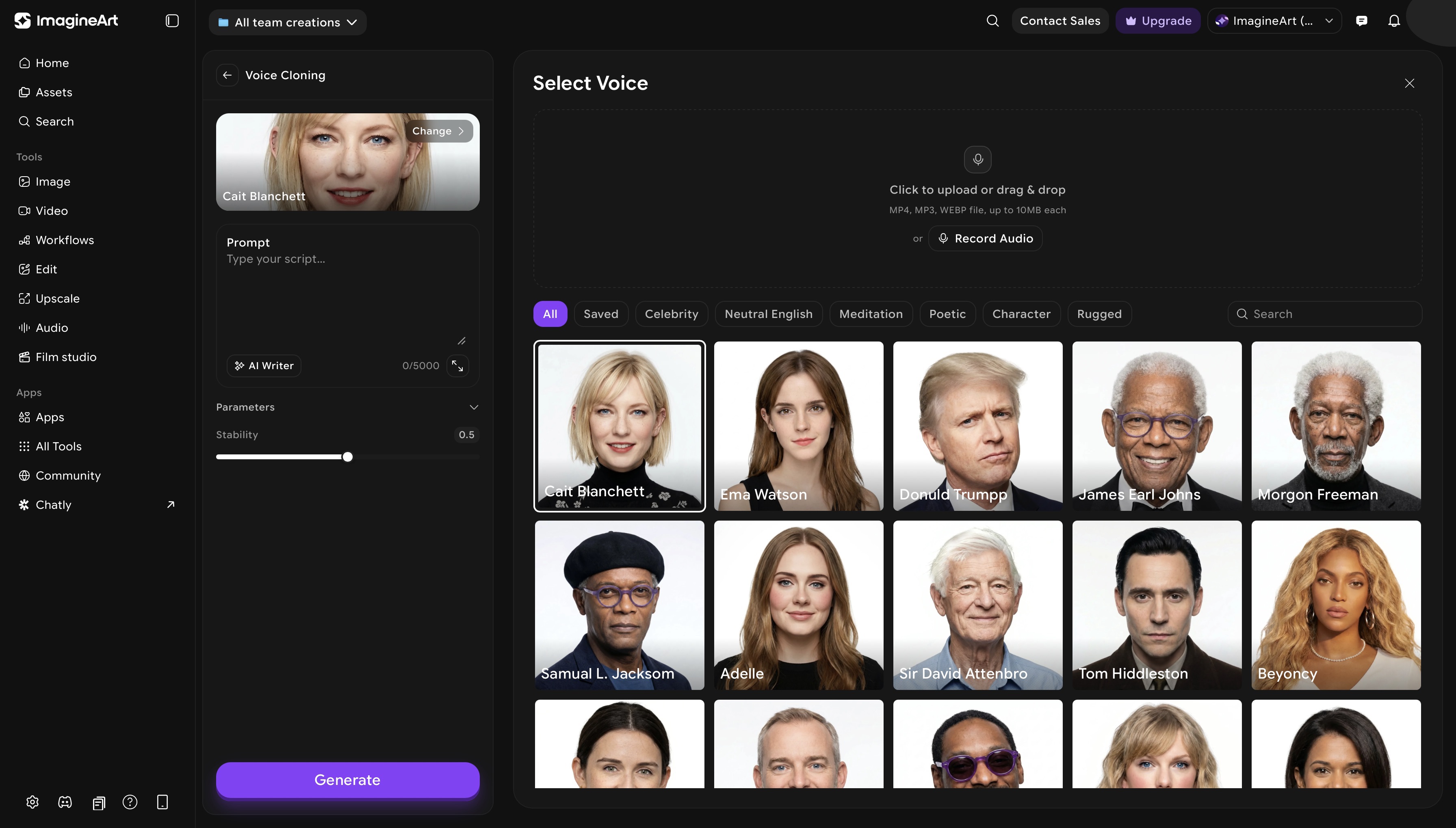 ImagineArt AI voice cloning dashboard
Step 1: Open ImagineArt Audio Studio
Go to your ImagineArt dashboard and open Audio Studio. Select AI Voice Cloning from the available modes. Click on ‘change’ button to add audio input.
Step 2: Record Your Audio Sample
Record a few seconds of yourself speaking naturally, without any background noise, music, audio effects. Use your phone's voice memo app or any basic recording tool. Speak at your natural pace and vary your sentences — avoid reading a single paragraph repeatedly, as this limits phonetic coverage and produces a less accurate clone. Aim for consistent volume throughout and avoid filler words.
Step 3: Write Your Script (Optional)
Type or paste your script into the input field. ImagineArt Audio Studio supports up to 5,000 characters per generation — enough for a full voiceover, course module, or extended narration in a single pass.
Step 4: Upload Your Audio File
Drag and drop your MP3 or WAV file into the upload field. ImagineArt Audio Studio works well with 60–90 seconds of clean audio to get started — longer samples improve consistency and naturalness, particularly for content with varied tone or pacing.
Step 5: Select a Celebrity Voice to Clone
Browse the voice library and choose a celebrity voice to clone. This is the voice model the generation will be based on — the output will replicate the selected voice's acoustic characteristics across your script.
Step 6: Choose Accent and Speaking Style (Optional)
Once you have selected your voice, set the accent and speaking style. These controls shape how the cloned voice delivers your script. You can select from poetic speaking style, a rugged tone, or go for neutral English speech to ensure the output fits your content format and target audience.
Step 7: Generate Your First Line
Go to Text to Speech, select your cloned voice from the voice picker, type a sentence you never recorded, and click Generate. Listen to the output — if specific sounds or words are off, record a supplementary sample that includes those phonemes and retrain.
Step 8: Generate and Preview
Click Generate. Audio Studio produces the cloned voice audio from your script. Preview the output and regenerate any lines that need adjustment before exporting.
Step 9: Use Your Generated Audio
- Text to Speech — use the cloned voice for any narration, voiceover, or script
- AI Video Editor — use the cloned voice to manually add it in your video
- Lipsync Studio — sync the generated audio to a video with automatic lip movement matching
Tips for Better AI Voice Cloning Results
- Match the celebrity voice to your content format, not just your preference. An energetic, upbeat voice works for social content and product demos — a measured, authoritative voice performs better for explainers and e-learning. Choose based on what your audience expects to hear, not just what sounds appealing in the preview.
- Use punctuation to control pacing. ImagineArt Audio Studio reads punctuation as timing cues. Commas create brief pauses; periods create longer ones; em dashes create a natural mid-sentence break. A script with no punctuation beyond full stops will sound rushed. Punctuate the way you would speak, not just the way you would write.
- Keep sentences concise. Long, complex sentences with multiple clauses produce less natural output than short, direct ones. If a sentence runs over 25–30 words, split it. Voice cloning handles short sentences more accurately and produces cleaner delivery.
- Test on a short paragraph before generating the full 5,000 characters. The selected voice may handle your specific script content — brand names, technical terms, unusual phrasing — differently than the preview sample suggests. Generate a short test clip first, identify any problem words, and adjust before committing to the full script.
- Spell phonetically for brand names and abbreviations. If the cloned voice mispronounces a product name or acronym, rewrite it in the script as it sounds rather than as it is spelled. For example, if "ImagineArt" is being stressed incorrectly, try "Imagine Art" with a space to adjust the pronunciation.
- Match the accent to your target audience. A regional accent that sounds natural to one audience can feel mismatched to another. If you are producing content for a specific market, select an accent that fits that geography — it improves listener comfort and perceived credibility.
- Regenerate individual lines rather than the full script. If one line sounds off, regenerate that segment specifically rather than the entire script. This saves generation credits and preserves lines that already sound right.
What Can You Use AI Voice Cloning For?
Content Creation and YouTube
Individual creators are the largest market segment for voice cloning, expected to maintain dominance through 2030. Record your voice once, then script unlimited videos — your channel always sounds like you, even when you do not have time to record. Pair with ImagineArt Lipsync Studio to generate avatar videos in your cloned voice from a typed script alone.
Online Courses and E-Learning
Narrate course modules at scale and update individual lessons without re-recording an entire course. Change a single line in the script, regenerate that segment, and replace the audio — no instructor re-recording required. For courses that update frequently with product changes or policy revisions, voice cloning removes the production bottleneck entirely.
Podcast Production
Generate episode narration, intros, and ad reads in your voice without a microphone setup. For podcast formats driven by scripted content — news briefings, commentary, educational audio — voice cloning replaces the recording session with a text input.
Multilingual Video Dubbing
Clone your voice in ImagineArt Audio Studio, then use it directly in ImagineArt AI Video Translator and translates existing videos into 50+ languages. Because the translator supports cloned voices, your dubbed video sounds like you across every language version, not a generic AI voice. One cloned voice model, unlimited language markets, without hiring separate voice talent per language.
Also read: AI Dubbing Guide
Branded Business Audio
Create a consistent branded voice for company videos, customer service content, and marketing audio. Unlike licensing a voice actor, a cloned brand voice is available on-demand and produces identical output every time — no session fees, no rebooking, no variation between recordings.
Best AI Voice Cloning Tools (2026)
| Tool | Sample Needed | Free Plan | Cloning Type | Best For |
|---|---|---|---|---|
| ImagineArt Audio Studio | 60 sec | Yes | Few-shot | Creators, video workflows, Lipsync integration |
| ElevenLabs | 1 min | Yes (limited) | Few-shot + instant | High-quality standalone audio |
| Murf | 5 min | No | Few-shot | Enterprise, e-learning |
| PlayHT | 30 sec | Yes (limited) | Few-shot | Podcasters, bloggers |
| Resemble AI | 3 min | No | Full custom | Enterprise, developers |
ImagineArt Audio Studio is the strongest option for video creators because voice cloning is one part of a complete production pipeline — not a standalone tool. Clone your voice from 60 seconds of audio, generate narration in Text to Speech, sync it to video in Lipsync Studio, and layer AI-generated background music underneath — all inside one platform under one subscription. Commercial use is included on paid plans from $9/month. The free tier includes daily credits with access to voice cloning, TTS, and AI music generation.
AI Voice Cloning — Legal and Ethical Considerations
Voice cloning's accessibility has outpaced the legal frameworks governing its use. The core principle is straightforward: cloning your own voice, or a voice you have explicit rights to, is legal. Cloning another person's voice without their consent is not.
- Consent is non-negotiable. Multiple jurisdictions — including the US, UK, and EU — have active or emerging legislation specifically targeting non-consensual voice cloning. Several US states have passed laws making it a civil or criminal offence to clone a person's voice without permission. The technology is advancing faster than legislation, but enforcement is increasing.
- The detection gap is significant. In certain published peer-reviewed study with 604 participants, only 57–62% of listeners could correctly identify an AI-generated voice — barely above random chance. The same study found that 73% of listeners perceived AI-generated voices as matching their real counterparts — meaning nearly three-quarters of people cannot reliably tell a cloned voice from the original speaker.
- The fraud risk is real and growing. Deepfake voice fraud losses in the US reached $1.1 billion in 2025 — triple the $360 million recorded in 2024. Voice phishing attacks surged 442% in 2025. 1 in 3 Americans believes they could be fooled by a cloned voice call.
- Best practice for creators: disclose when AI voice is used, particularly in journalism, education, and public-facing content. Most major platforms are developing detection tools, and undisclosed AI voice is increasingly flagged.
ImagineArt AI Voice Cloning only allows you to clone your own voice or voices you have explicit rights to use. Cloning public figures or other people's voices without consent is prohibited on ImagineArt.
Common Mistakes to Avoid
- Recording with background noise or music. The model extracts acoustic patterns from your sample — background noise corrupts those patterns and produces a clone that sounds inconsistent or muffled. Record in a quiet room with no ambient audio.
- Using too short a sample and expecting few-shot quality. Thirty seconds is the minimum to get started — not the minimum for good quality. If your clone sounds unnatural or inconsistent across longer scripts, record and upload a supplementary sample rather than adjusting settings.
- Reading the same paragraph repeatedly. Repeating the same sentences limits phonetic coverage. The model needs exposure to varied vowel sounds, consonants, and sentence structures. Read different content — varied sentences produce a more complete and accurate voice model.
- Not testing the clone on your actual script content. Preview the clone on short generic sentences and it will sound accurate. Test it on your real script — specific words, brand names, or technical terms may expose pronunciation gaps that require a supplementary recording.
- Assuming commercial rights are automatic. Free tier voice cloning on most platforms restricts commercial use. Confirm your plan's terms before using a cloned voice in client work, paid advertising, or monetised content.
Frequently Asked Questions
AI voice cloning creates a digital replica of a human voice using deep learning, trained on a short audio sample. The cloned voice model then generates new speech in that voice from any typed text — producing audio with the same pitch, tone, and rhythm as the original speaker
Most tools require 30 seconds to 3 minutes of clean audio. ImagineArt Audio Studio works well with 60–90 seconds to get started — longer samples improve accuracy and consistency, with professional-grade results requiring 30 minutes or more of audio.
Yes — ImagineArt Audio Studio, ElevenLabs, and PlayHT all offer free tiers with voice cloning. Free plans typically limit the number of generations or characters per month. Commercial use rights are included on ImagineArt's paid plans from $9/month.
Cloning your own voice is legal. Cloning another person's voice without their explicit consent is illegal in many jurisdictions and prohibited by most platforms. The US, UK, and EU all have active or emerging legislation targeting non-consensual voice cloning specifically.
Few-shot cloning produces very natural results — modern systems achieve a MOS of approximately 4.0 out of 5 on the standard naturalness scale. Research shows only 57–62% of listeners can correctly identify an AI-generated voice, suggesting most people cannot reliably distinguish a well-made clone from the original.
Standard TTS generates speech using a pre-built voice from the platform's library — the output sounds like a generic AI voice. Voice cloning creates a personalised model trained on your specific recordings — the output sounds like you. ImagineArt Audio Studio offers both within the same platform.
Yes. With ImagineArt, you can use your cloned voice directly in Lipsync Studio to create videos where an avatar speaks in your voice, or export the audio and sync it to any video manually using the ImagineArt AI Video Editor or an external edito
Zero-shot cloning generates speech in a target voice from a short reference clip without any model training — fast but inconsistent. Few-shot cloning fine-tunes the model on your specific audio sample, producing more accurate and consistent results across longer scripts. ImagineArt Audio Studio uses few-shot cloning.
Recommended read: How to Add AI Voiceover to Video
Tooba Siddiqui
Tooba Siddiqui is a content marketer with a strong focus on AI trends and product innovation. She explores generative AI with a keen eye. At ImagineArt, she develops marketing content that translates cutting-edge innovation into engaging, search-driven narratives for the right audience.