
Tooba Siddiqui
May 4, 2026 • Updated September 1, 2026
13 mins Read
Neural text to speech (neural TTS) is an AI technology that converts written text into natural, human-sounding speech using deep learning models. Unlike older TTS systems that sound robotic, neural TTS replicates the rhythm, tone, and emotion of a real human voice — making it the engine behind modern AI voiceovers, talking avatars, and voice assistants. ImagineArt Audio Studio uses neural TTS to let anyone generate studio-quality voice audio from a typed script in seconds.
Key Takeaways
- Neural TTS uses deep learning to generate natural, human-sounding speech from text — significantly more natural than traditional rule-based systems
- The technology works in three stages: text analysis → neural synthesis → audio rendering
- Neural TTS is used for video voiceovers, AI avatars, e-learning, podcasts, and multilingual dubbing
- ImagineArt Audio Studio combines neural TTS, voice cloning, and AI music generation with a built-in Lipsync Studio — one platform for complete audio-to-video production
What Is Neural TTS?
Neural text to speech (neural TTS) is an AI system that generates natural-sounding speech from written text using deep learning models trained on thousands of hours of real human voice recordings. Rather than stitching together pre-recorded audio fragments like older systems, neural TTS synthesizes speech from scratch, learning rhythm, intonation, and emotional range directly from data.
The technology has a clear origin point. In 2016, Google DeepMind introduced WaveNet — the first neural model to generate raw audio waveforms rather than assembling speech from fragments. The output was a significant leap in naturalness, but early WaveNet models required hours of compute to produce a single second of audio. In April 2017, Google introduced Tacotron, which learned to map text directly to speech spectrograms. By December 2017, Tacotron 2 combined both approaches into an end-to-end system that achieved a Mean Opinion Score (MOS) of 4.53 out of 5 — compared to professional human recordings at 4.58 on the same scale. The quality gap between neural TTS and human speech had effectively closed.
The word "neural" refers to the neural network architecture doing the work. Instead of applying hand-coded rules for stress and rhythm, the network learns speech patterns directly from real recordings. That is why neural TTS produces prosody, intonation, and emotional variation that rule-based systems cannot replicate. The global TTS software market is estimated to grow at over 16% annually through 2033, driven by AI adoption and multilingual demand — a signal of just how widely that capability is being put to use.
How Neural Text to Speech Works
Neural TTS converts text to speech in three sequential stages.
Stage 1 — Text Analysis
The model reads the input text and breaks it down into phonemes, the smallest units of sound in a language. It predicts natural word stress and sentence rhythm, and interprets punctuation as timing cues. A comma produces a brief pause; a question mark shifts the final syllable upward in pitch. This stage is where the model interprets meaning, not just spelling.
Stage 2 — Neural Synthesis
A neural network — transformer-based or WaveNet-based — maps the phoneme sequence to audio waveforms. It applies learned patterns of pitch, speed, and tone drawn from its training data: real human speech across thousands of speakers, styles, and languages. Prosody, intonation, and emotional tone are all synthesized at this stage, not added as a post-processing effect.
Stage 3 — Voice Rendering
The raw waveform is processed into final audio at the target voice, language, and speaking style. Output is delivered as MP3 or WAV, ready for direct use in video production, publishing, or voice applications.
ImagineArt Audio Studio runs this entire pipeline in the cloud: paste your script, choose a voice, and download your audio in seconds.
Neural TTS vs Traditional Text to Speech
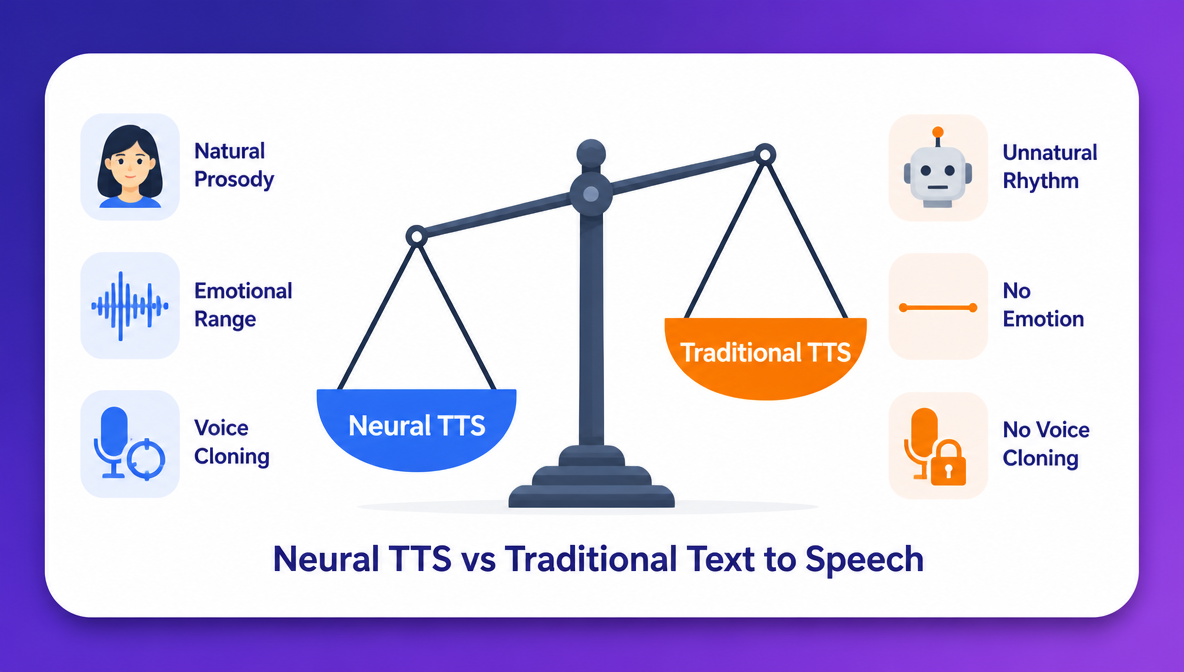 A comparison between neural tts and traditional trext to speech
Traditional TTS works by concatenating pre-recorded audio fragments — phonemes or words recorded in a studio and assembled algorithmically. The result is technically speech, but the rhythm is mechanical, transitions between sounds are audible, and emotional range is absent.
Neural TTS generates speech from a trained model rather than assembling it from fragments. Neural and AI-powered voices now account for nearly 68% of all TTS market revenue, a figure that reflects both quality and adoption. The practical differences are measurable.
| Neural TTS | Traditional TTS | |
|---|---|---|
| Voice quality | Natural, human-like | Robotic, monotone |
| Technology | Deep learning | Concatenative / formant synthesis |
| Emotional range | Yes | No |
| Prosody (rhythm & stress) | Learned from real speech | Rule-based, unnatural |
| Voice customisation | Style, tone, speed, cloning | Minimal |
| Best for | Content creation, avatars, dubbing | Basic accessibility, system alerts |
Prosody and Natural Rhythm
Prosody is the pattern of stress and intonation across a sentence. In traditional TTS, prosody is rule-based, and each word receives a fixed stress value regardless of context. Neural TTS learns sentence-level intonation from real recordings, so stress shifts naturally based on meaning, the way a human speaker would emphasize different words depending on what the sentence is communicating.
Emotional Range and Speaking Styles
Neural TTS can produce speech that sounds conversational, authoritative, warm, or energetic depending on the voice model and style settings. Traditional TTS has one flat tone with no variation for context or content type. That is why, it remains limited to utility contexts like navigation prompts and system alerts, while neural TTS is viable for marketing, storytelling, and long-form content.
Voice Cloning
Neural TTS enables voice cloning — training on a short audio sample to replicate a specific person's voice at scale. Upload a few minutes of your own recordings and generate unlimited lines in that voice from any script. Traditional TTS cannot do this at all.
Also read: A Complete Guide to AI Voice Cloning
Key Benefits of Neural Text to Speech
- No Recording Equipment or Studio Required
Generate professional-quality voiceovers from a typed script on any device. Neural TTS removes the cost and friction of microphone setups, soundproofing, acoustic treatment, and audio editing software. The full production chain is replaced by a text input and a generate button.
- Consistent Voice Quality at Scale
Human recordings vary with fatigue, room conditions, and off-takes. Neural TTS produces identical voice quality on every generation with same tone, same pacing, same audio fidelity regardless of how many clips you produce. As of 2025, 65% of consumers can no longer distinguish AI-generated narration from human narration in e-learning content — a benchmark that makes neural TTS a direct substitute for studio recordings in most content formats.
- Multilingual Content Without Re-Recording
Neural TTS supports dozens of languages from a single generation interface. Microsoft Azure TTS covers 140+ languages and 400+ voices; Google Cloud TTS covers 50+ languages and 380+ voices. Translate your script, select a voice in the target language, and generate a new audio track — the same process, zero additional recording.
- Fast Iteration and Script Changes
Change a single word or rewrite a section — regenerate in seconds. No rebooking voice talent, no studio time, no audio editing to splice a replacement line. For content that updates frequently — product demos, onboarding modules, campaign videos — neural TTS removes the iteration cost entirely.
Real-World Applications of Neural TTS
- Video voiceovers: narrate YouTube videos, product demos, and social content without going on camera. Pair with ImagineArt Lipsync Studio to sync the voice directly to video with no separate editing step. Learn more about how to add AI voiceover to video on ImagineArt blog.
- AI talking avatars: neural TTS is the voice layer in AI talking avatar videos. Generate the character with an AI image generator, create the voice in Audio Studio, and Lipsync Studio animates it speaking — full character video without on-camera talent or recording equipment.
- E-learning and training content: narrate course modules and onboarding videos at scale. The global e-learning market is valued at $439.92 billion in 2025, growing at a 20.4% CAGR through 2034. Update any course section by regenerating the audio from a revised script — no instructor re-recording required.
- Podcast and audiobook production: produce long-form audio from written scripts. With AI voice cloning, every episode sounds like a consistent host even if the script changes entirely between sessions.
- Multilingual video dubbing: replace an existing audio track with a neural TTS voice in the target language. Localise a video into multiple languages from a single translated script, without separate voice talent per language.
- Social media and short-form video: generate narration for Reels, TikTok clips, and YouTube Shorts in minutes, without speaking on camera. The AI voice generator market is valued at $6.40 billion in 2025 and projected to reach $36.43 billion by 2032 — driven largely by short-form content production at scale.
Neural TTS in ImagineArt Audio Studio
Most neural TTS tools give you an audio file and stop there. ImagineArt Audio Studio goes further and combines neural TTS, sound effects, voice cloning, and AI music generation with a built-in Lipsync Studio that takes your audio directly into video production.
Neural Text to Speech
ImagineArt text-to-speech neural TTS library spans multiple languages, accents, and speaking styles. Controls include speed, pitch, and volume length. The text-based prompt gives you fine-grained control over pronunciation and emphasis at the character level. Select a voice, paste your script, and generate.
I created the attached audio sample using:
- Voice: Roger, male, narrative style, American dialect
- Parameters: stability was set to 0.5
AI Voice Cloning
You can your a voice recording or record your own voice on ImagineArt AI voice cloning app and generate a cloned voice. You can select any speaking style and accent, including character-based, meditative, poetic, and rugged styles. Generate unlimited lines from any script in that cloned voice. For course creators, YouTube channels, and branded content where voice consistency matters, AI voice cloning removes the dependency on a recording schedule entirely.
I created the attached voice cloning sample using:
- Cloning voice: character-style speech named 'Samantha'
- Paramters: stability was set to 0.5
AI Music Generation
Describe the mood, tempo, and style, ImagineArt music app generates original background music to match. You can customize the music style and set the music duration up to 5 minutes or create an instrumental version. All tracks are AI-generated and royalty-free, with no copyright risk for commercial use. Layer it under your neural TTS voiceover for complete audio production inside one platform.
I created the attached music using AI music generator:
- Prompt/music description: A dreamy ambient song about lying in a field on a summer night, staring up at a sky full of stars, feeling wonder and peace, soft ethereal vocals humming about the infinite universe, floating synth pads, slow and meditative
- Style: dark cinematic
- Duration: 1 minute
Learn more about how to make AI music on ImagineArt blogs.
Sound Effects
Describe the sound effect you want to create or pick one from 40+ categories, including air, aircraft, vehicle, animal, sports, sci-fi, and more on ImagineArt sound effects. You can create a looping sound effect, fix the duration, and even control the prompt influence on desired sound effect.
The attached sound effect was downloaded from ImagineArt Sound Feect library from the category "Ambience."
Lipsync Studio
Export your AI voiceover and bring it directly into ImagineArt lipsync studio. It syncs AI voices to video with automatic lip movement matching. Upload a reference image or describe the video, attach your audio, and the platform animates the lip sync automatically. You can also record your voice in-browser or upload any external audio file.
The result is a complete production pipeline — script → AI voice → sound effects → synced video — inside one platform.
How to Get Started with ImagineArt Audio Studio
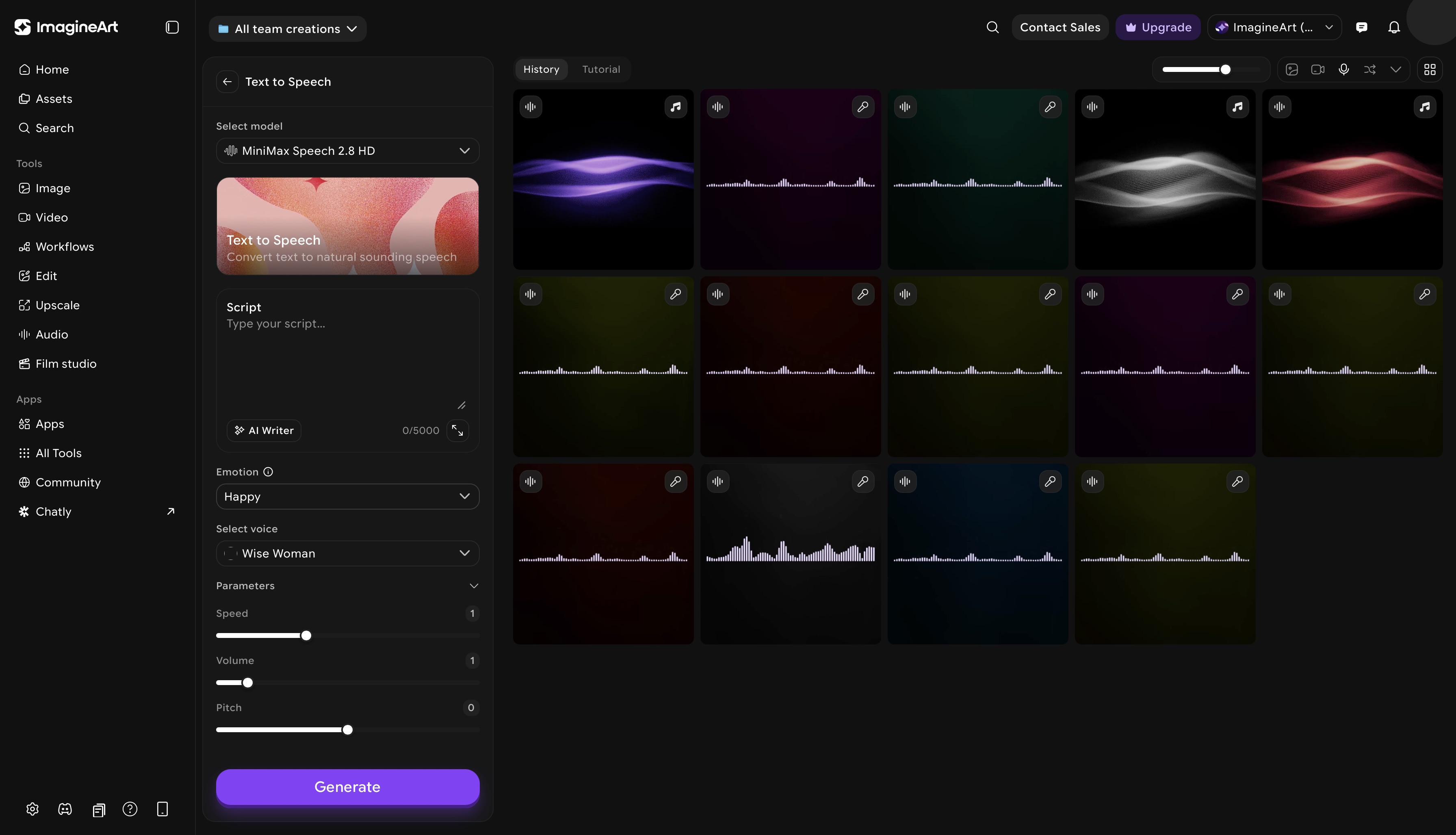 ImagineArt text to speech dashboard
- Go to ImagineArt and open ImagineArt Audio Studio
- Select text to speech, voice cloning, sound effects, or AI music depending on your use case
- For TTS: paste your script, pick an AI voice model, choose a voice from the library (filtered by language, gender, and tone), and adjust the given paramters such as volume, speed, pitch, and stability. Preview each line before exporting.
- Preview your audio or regenerate any line that doesn't sound right before exporting
- Export your audio file, or open lipsync studio directly to sync the voice to video
The free tier includes daily credits, without requiring any payment for the first generation.
Common Mistakes to Avoid With Neural TTS
- Using the wrong speaking style for the content type. A conversational tone on a corporate explainer, or an authoritative delivery on a casual vlog, creates a mismatch that reduces engagement. Choose a voice style that matches the format before generating — not after reviewing the output.
- Ignoring punctuation as a timing tool. Neural TTS treats punctuation as pacing cues. Missing commas cause sentences to run together; missing periods remove natural pauses between thoughts. Edit your script for punctuation before generating, not after.
- Choosing a voice without testing it on your actual script. Voice preview samples use short, generic sentences — your script may hit phrasing or sounds where that voice performs poorly. Generate a test clip from a paragraph of your actual script before committing it to a full production.
- Not using the regenerate option when a line sounds off. Neural TTS generation has natural variation — the same line can produce different results on different runs. If a line sounds unnatural, regenerate it two or three times before adjusting the script or settings.
Ready to Generate Your First AI Voiceover?
Neural TTS removes every barrier between a written script and a professional audio track — no equipment, no studio, no re-recording. ImagineArt Audio Studio gives you neural TTS, voice cloning, AI music generation, and Lipsync video production under one free account. Write your script and generate your first voiceover in under a minute.
Frequently Asked Questions
Neural text to speech is an AI technology that converts written text into natural-sounding speech using deep learning models trained on real human voice recordings. It replicates the rhythm, intonation, and emotional range of human speech — producing audio near-indistinguishable from a professional voice recording.
Traditional TTS stitches together pre-recorded phoneme fragments using rule-based algorithms, producing robotic, monotone output with no emotional variation. Neural TTS generates speech from scratch using a trained neural network. Tacotron 2 achieved a MOS of 4.53 in 2017 — traditional systems score significantly lower on the same naturalness scale.
ImagineArt Audio Studio is free to access with a daily credit allowance — no payment required to generate your first voiceover. Paid plans start from $9/month and include commercial use rights across all Audio Studio features.
ImagineArt Audio Studio is the strongest option for video creators because it combines neural TTS, voice cloning, and AI music generation with a built-in lipsync studio, covering the full pipeline from script to synced video without switching tools.
Yes. ImagineArt voice cloning feature lets you upload your own recordings and generate unlimited lines in that cloned voice from any script. The result sounds like you — not a generic AI voice approximation.
Yes. ImagineArt Audio Studio supports multiple languages and accents across its neural TTS voice library. Translate your script and select a voice in the target language — no separate recording session required per language.
Neural TTS generates speech from a pre-built voice in the platform's library. AI voice cloning creates a custom voice model trained on your own recordings — the output sounds like a specific person rather than a generic AI voice. ImagineArt audio studio offers both within the same platform.
Generate your voiceover in ImagineArt audio studio, then open lipsync studio. Upload your video and attach the generated audio — Lipsync automatically syncs lip movements to the voice.
Recommended read: AI Dubbing Guide
Tooba Siddiqui
Tooba Siddiqui is a content marketer with a strong focus on AI trends and product innovation. She explores generative AI with a keen eye. At ImagineArt, she develops marketing content that translates cutting-edge innovation into engaging, search-driven narratives for the right audience.