
Arooj Ishtiaq
August 6, 2026 • Updated August 6, 2026
14 mins Read
For the last 15 years, growth has meant collecting tools. A tool for research, a tool for writing, a tool for images, a tool for video, a tool for the website, a tool for tracking what worked. The marketing technology landscape went from about 150 tools in 2011 to over 15,000 by 2026, and somewhere in that pile, the person doing the actual growing got buried under exports, copy-pastes, and re-explaining their own business to every new screen.
Imagine Computer exists to close that gap. It remembers you, works for you, and grows what you started, turning a single instruction into finished, usable work across research, writing, design, video, and your own website, instead of a rough draft you still have to finish stitching together yourself. This guide covers exactly what it is, what changes when you use it instead of a stack of separate apps, every tool inside it, and how the pricing actually works.
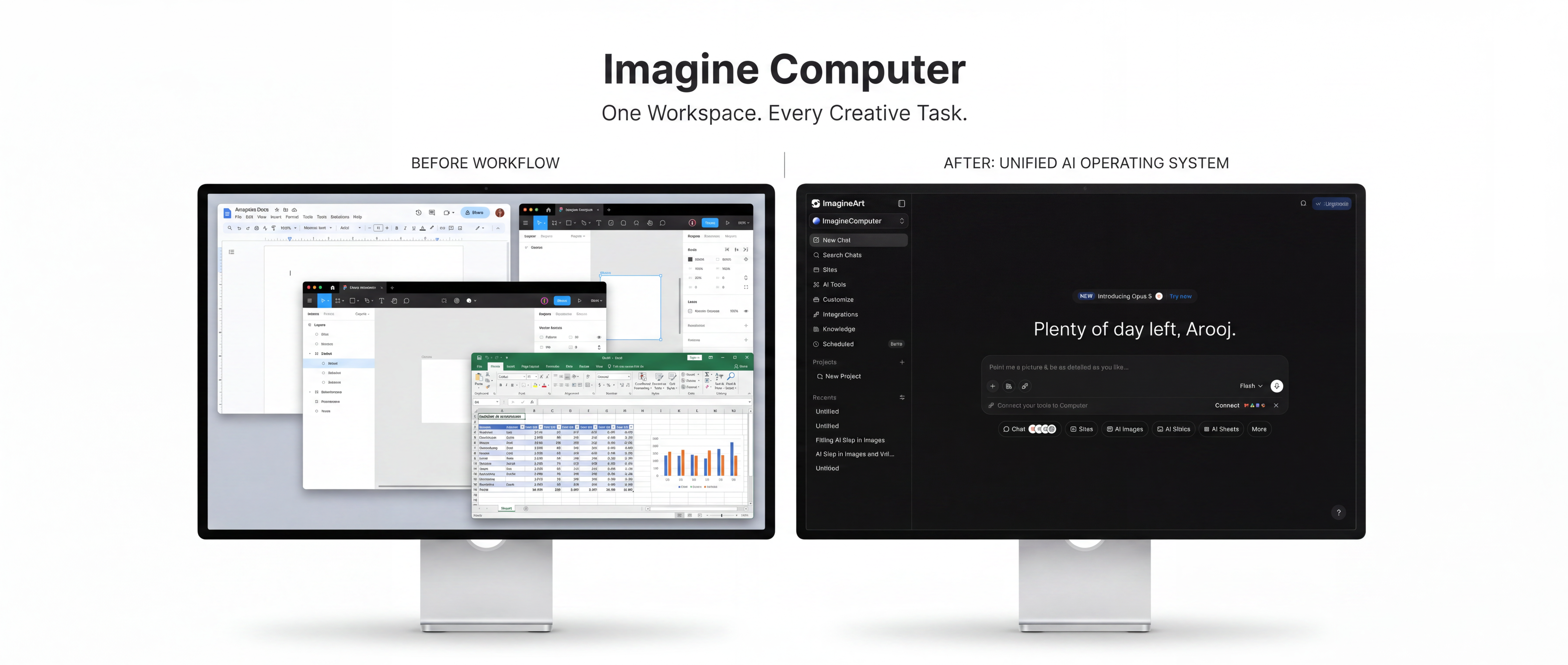
Life Without Imagine Computer vs. Life With It
The clearest way to understand what actually changes is to look at the same task both ways.
| Without Imagine Computer | With Imagine Computer |
|---|---|
| Growth workflows scattered across 10–15 separate tools, with you connecting everything manually. | One unified workspace that handles creating, publishing, measuring, and optimizing from start to finish. |
| Hours spent researching topics and verifying sources before work can begin. | Deep Research automatically finds, analyzes, and cites trustworthy sources. |
| Constantly exporting files and switching between apps to build reports, presentations, and campaigns. | One prompt generates documents, presentations, visuals, websites, and more in a single workflow. |
| Repeating your brand guidelines, project details, and preferences to every new tool. | Persistent memory keeps your brand, projects, and previous work ready across sessions. |
| Uploading the same briefs, images, and assets into multiple applications. | One brief becomes every asset without repeated uploads. |
| Recurring work requires manual repetition every time. | Scheduled runs automate recurring tasks and deliver completed work automatically. |
| Growth is constrained by team size, budget, and available hours. | Scale faster with AI handling routine execution, leaving you free to focus on strategy and creative decisions. |
What Is Imagine Computer?
Imagine Computer is an Agentic AI Workspace built around one idea: growth shouldn't be limited by the size of your team, your budget, or your time. You describe an outcome, a report, a campaign, a deck, a finished website, and Imagine Computer plans the job, works through the individual steps quietly in the background, and hands you the finished thing, rather than a starting point you still have to build out yourself.
It's built specifically for the person most existing tools were never designed around: someone wearing five jobs at once. A founder who's also the marketer, the designer, and the writer. A creator who's also their own production team. A small team competing against a competitor with a department for every function. The more roles you're already covering, the more value one workspace with one memory actually replaces.
Every Tool Inside Imagine Computer
Imagine Computer isn't a single feature. It's a full workspace, and every tool inside it draws from the same conversation and the same memory of your brand and past work, rather than starting from zero each time.
| Tool | What It's For |
|---|---|
| AI Chat | Acts as the central workspace for every task, coordinating research, creation, editing, and other AI tools from a single conversation. |
| Deep Research | Researches topics across multiple sources and delivers structured reports with citations and key insights. |
| Images | Creates original images, illustrations, artwork, and marketing visuals using multiple AI image models. |
| Video | Generates AI videos from text prompts, images, or existing media using multiple video generation models. |
| Docs | Turns ideas, notes, or briefs into polished documents, reports, articles, and other written content. |
| Slides | Builds presentation decks from prompts, documents, or existing content with ready-to-present layouts. |
| Spreadsheets | Creates structured spreadsheets with formulas, tables, calculations, and organized datasets. |
| Graphs | Converts data into charts, graphs, and visual diagrams for easier analysis and presentation. |
| Website Builder | Designs, builds, and publishes responsive websites or web applications from a simple prompt. |
AI Chat by Imagine Computer
Every task in Imagine Computer begins in one place: AI Chat. A single conversation where you describe what you want in plain language, and the rest of the workspace picks up from there.
- Coordinates every other tool in the workspace from one interface, so a single conversation can produce a written brief, supporting images, and a finished deliverable together
- Carries your brand and project context forward automatically, so you're not re-explaining who you are partway through a task
- Works as the entry point regardless of what you're actually building: a document, a deck, a website, or a piece of research
Best for: starting any task, regardless of what the final output ends up being.
AI Image by Imagine Computer
The Images tool turns a written description into a finished visual, with real controls behind it rather than a single fixed output.
- Prompt-first workflow. A description like "minimalist logo for a coffee brand" is enough to start, with built-in starter prompts, a bold promo graphic, a gradient app icon, a cozy interior shot, and a candid golden-hour portrait, available if you want a jumping-off point instead.
- Adjustable style, aspect ratio, and variation count, set directly in the prompt bar before you generate.
- Model choice. Auto picks the best available model automatically, or you can search and select a specific one:
| Model | Best For |
|---|---|
| Auto | Automatically selects the most suitable AI model based on your prompt and creative task. |
| Nano Banana 2 (Pro) | Highest-quality photorealistic image generation with premium detail, lighting, and consistency. |
| GPT Image 2 (Pro) | Creating polished, modern visuals, illustrations, and high-impact creative artwork. |
| xAI Grok Image | Bold, trendy, internet-inspired visuals with strong creative styling. |
| ImagineArt 2.0 | Generating realistic images with balanced aesthetics, lighting, and artistic quality. |
| Nano Banana Pro | Fast, high-quality image generation when speed and visual fidelity are equally important. |
- Multiple variations per generation, so you're choosing from a small set of options rather than committing to a single result.
- An "Inspirations for You" feed showing example outputs directly in the interface for anyone who wants ideas before writing their own prompt.
Best for: logos, social graphics, product visuals, and any creative asset you'd otherwise need a separate design tool for.
AI Video by Imagine Computer
Alongside Images, Imagine Computer includes a dedicated Video tool that turns a written description into a finished video clip.
- Uses the same conversational, prompt-first workflow as the rest of the workspace
- No separate app, export, or upload step required to get started
- Fits into a broader task the same way Images does; generated video can support a document, a deck, or a published page built in the same session
Best for: short video content generated directly from a description, without a separate production tool.
Deep Research by Imagine Computer
Deep Research is built for the part of any project that normally eats up the most time before you can even start writing: finding sources, reading through them, and pulling out what's relevant.
- Ask about a market, a company, a competitor, a technology, or a comparison between two things, and it searches across multiple angles and reads through the sources it finds
- Delivers a structured report with inline citations and a full source list, not an unsourced summary
- Adjustable depth: choose a faster, lighter pass or a more exhaustive one depending on what the question actually warrants
- Every report comes as both a readable preview and a downloadable, properly formatted document
- Can pull from your connected business tools, not just the open web, so results reflect your actual context
Best for: market research, competitor analysis, and any report that needs real citations rather than a chat-style answer. See our explainer on what deep research actually is and our best AI research assistants comparison for more depth.
AI Docs by Imagine Computer
The Docs tool turns a brief into a finished written document.
- Works from a simple prompt or a more detailed brief, depending on how much direction you want to give
- Carries brand voice and context forward from earlier in the same workspace
- Can incorporate research pulled directly from Deep Research in the same session, rather than requiring a separate copy-paste step
Best for: reports, proposals, briefs, and any long-form written deliverable.
AI Slides by Imagine Computer
The AI Slides tool builds a presentation deck from a prompt or existing content.
- Generates a structured deck from a written brief, rather than starting from a blank template
- Can pull in visuals generated through the Images tool and data built in Spreadsheets within the same workflow
- Keeps a consistent look and voice across the deck without manual reformatting between slides
Best for: pitch decks, client presentations, and internal reports that need to look finished, not just informative.
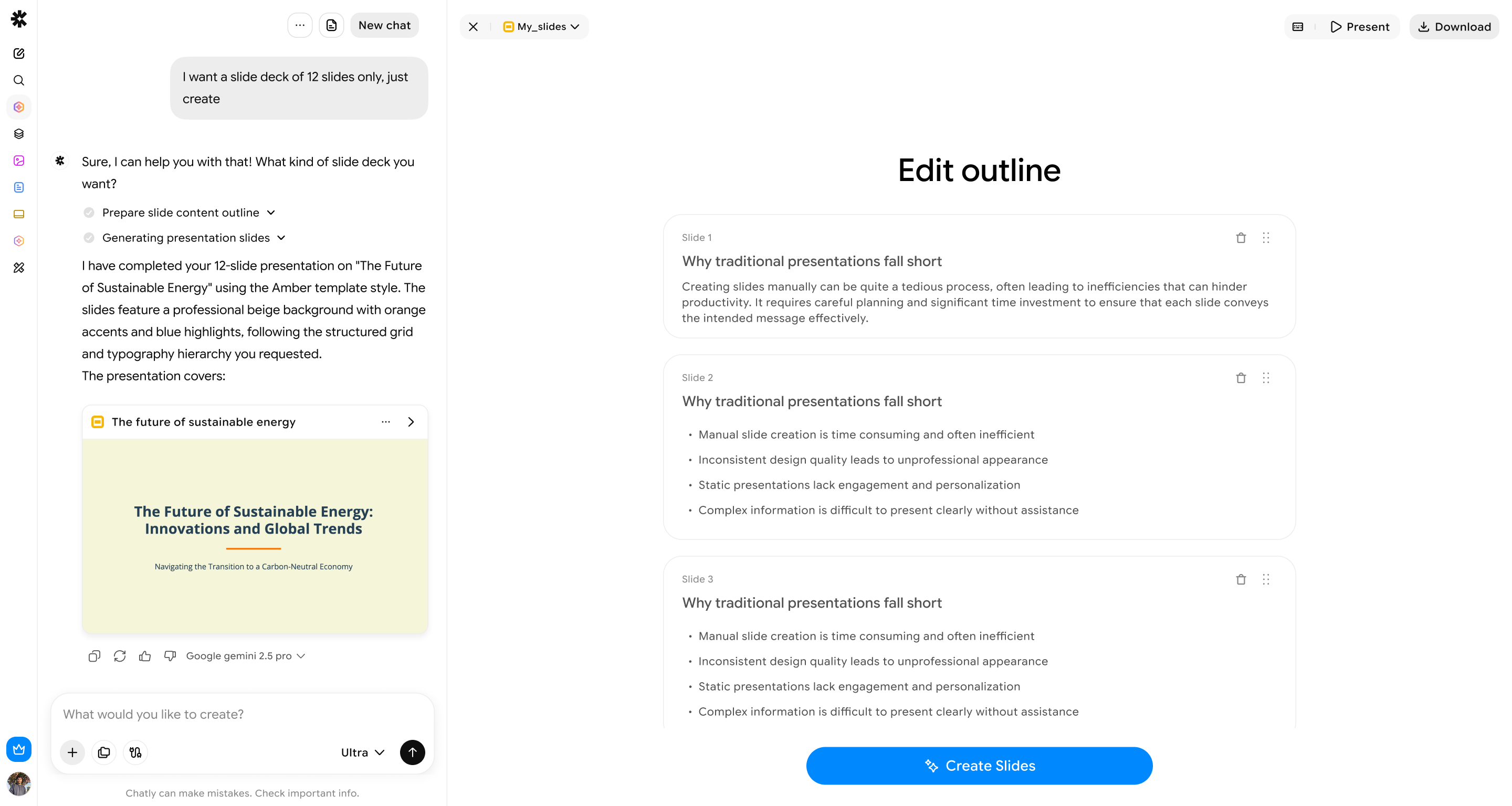 AI Slides by Imagine Computer
AI Spreadsheets by Imagine Computer
The AI Spreadsheets tool builds structured, data-driven tables from a prompt.
- Generates pricing tables, comparison charts, or any structured dataset directly from a description
- Data built here can feed directly into a Doc, a Slide deck, or a published website in the same session
- Removes the step of manually organizing data before it can be used elsewhere in a project
Best for: pricing comparisons, tracked metrics, and any dataset a report or website needs to reference.
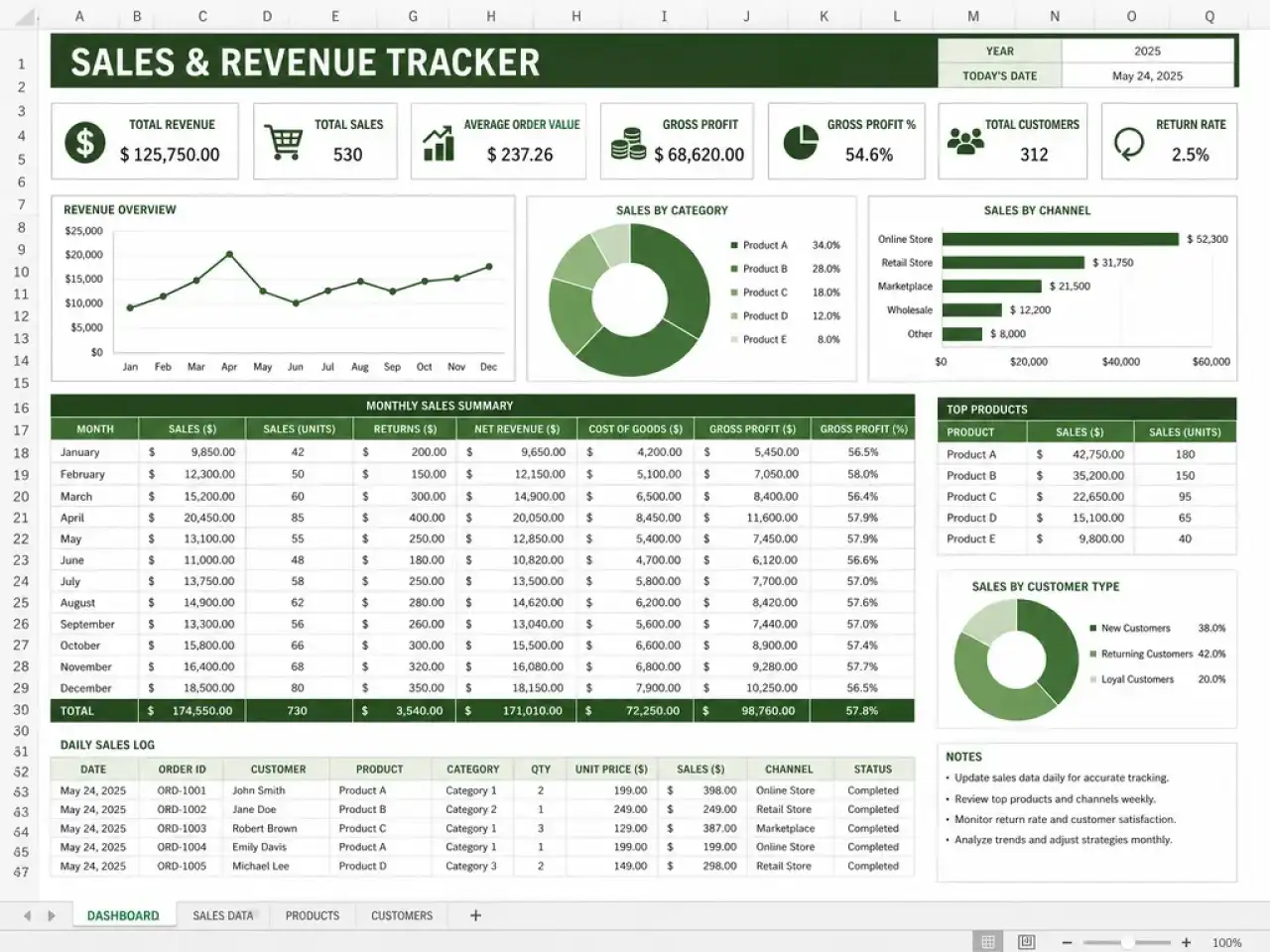 AI Spreadsheets by Imagine Computer
AI Graphs
The Graphs tool turns raw data into a visual chart or diagram.
- Converts numbers or structured data into a chart without needing a separate design or charting tool
- Fits directly into a report, deck, or published page built in the same workspace
- Useful for visualizing data pulled from Deep Research or built in Spreadsheets
Best for: visualizing data inside a report, deck, or webpage without switching tools.
AI Website Builder by Imagine Computer
Imagine Computer's website builder plans the structure, writes the copy, generates the visuals, and publishes the result from a single instruction.
- Builds the full site from one description, rather than handing you a template to fill in manually
- Can pull directly from research done in Deep Research or data built in Spreadsheets within the same session
- Produces fully responsive websites and web apps that work well across desktop and mobile browsers
Important clarification: it does not build native mobile apps for the App Store or Google Play.
- Full comparison: best AI website builders
- For native mobile apps specifically: AI app builders comparison
- Named-competitor reviews: Hostinger, Durable, Framer
Best for: landing pages, business sites, and web apps built and published in one session.
What Ties the Whole Workspace Together
The individual tools matter less than what connects them. A few platform-level capabilities are what actually make Imagine Computer function as one workspace instead of a bundle of separate apps stitched together after the fact.
| Capability | What It Does |
|---|---|
| Memory | Remembers your brand, projects, preferences, and previous work so you don't have to repeat context in every conversation. |
| One Brief, Every Asset | Transforms a single prompt into multiple deliverables, including documents, presentations, images, and published web pages. |
| Scheduled Runs | Automates recurring tasks to generate completed work on a schedule without requiring manual prompts each time. |
| Connected Context | Uses information from connected business apps and data sources alongside web research to deliver more relevant, context-aware results. |
- Memory means you're not re-explaining who you are, what you're building, or what you've already done every time you start a new task. A workspace grounded in your actual work produces results that sound and look like you, not a generic average.
- One brief, every asset means a single description can flow into multiple finished outputs at once: a report, its supporting visuals, and a deck built from the same research, rather than three separate prompts across three separate tools.
- Scheduled runs turn a one-time task into an ongoing one. Set a research report or a recurring update to run automatically and land in your inbox or Slack, without needing to manually trigger it again.
- Connected context lets tasks reflect your actual situation, not just what's publicly available online, by drawing on the tools and data you've already connected.
Pricing and Credits
Imagine Computer runs on a credit system: you spend credits across the different tools, images, video, research, documents, and so on, rather than paying separately for each one.
- A free tier is available to try the workspace before committing to a paid plan
- Paid plans are available on monthly, quarterly, or yearly billing, with better effective pricing on longer terms
- Credits are assigned monthly and don't roll over; unused credits reset at the end of each billing month rather than accumulating
- If you run through your allowance early, you can upgrade your plan or purchase additional top-up credits, which don't expire the way monthly plan credits do
For pricing, view our subscription page for current plans and credit allowances.
Who Imagine Computer Is Actually Built For
Imagine Computer is built for anyone whose growth is currently capped by how many tools they can personally juggle, not by their ambition:
- Founders running their own marketing, design, and writing at once
- Creators who are also their own production team
- Freelancers and small teams competing against much larger organizations with a department for every function
- Anyone who wants one workspace to remember their context instead of starting from zero in a new tool every time
Conclusion
Imagine Computer's real advantage isn't any single tool inside it. It's that Chat, Deep Research, Images, Video, Docs, Slides, Spreadsheets, Graphs, and the Website Builder all share the same memory of your brand and past work, and can be chained into one instruction instead of five separate ones. It remembers you, works for you, and grows what you started, so what you build today becomes the foundation for what it builds next.
So, what are you building next?
FAQ
What is Imagine Computer?
An AI-powered workspace that takes a plain-language instruction and delivers finished work, research reports, documents, images, video, and websites, rather than requiring a separate app for each task.
Can Imagine Computer build a native mobile app?
No. Its website builder produces fully responsive websites and web apps for desktop and mobile browsers, but not native apps for the App Store or Google Play.
How does Imagine Computer's pricing work?
It's a credit-based system with a free tier to start and paid plans on monthly, quarterly, or yearly billing. Credits reset monthly rather than rolling over, and top-up credits are available if you need more within a billing period. Check the live subscription page for current details.
What image models can I use?
You can let the tool automatically pick the best model, or choose a specific one yourself, including ImagineArt's own model and several licensed third-party models, each suited to a different visual style.
Does Imagine Computer include video generation?
Yes, alongside Images, there's a dedicated tool for generating video from a written description.
Can tasks run automatically without me re-prompting each time?
Yes. Scheduled runs let recurring tasks, like a weekly research summary, deliver finished work automatically to your email or Slack.
Who is Imagine Computer built for?
Anyone managing growth across too many roles at once, founders, creators, freelancers, and small teams acting as their own marketing department, design studio, and production team combined.
Arooj Ishtiaq
Arooj is a SaaS content writer specializing in AI models and applied technology. At ImagineArt, she creates sharp, product-focused content that helps creators and businesses understand, adopt, and get real value from AI tools.