
Arooj Ishtiaq
March 26, 2026 • Updated March 26, 2026
9 mins Read
AI video generation has advanced rapidly, but achieving realistic motion and believable physics remains a challenge. Luma AI’s Ray2 is designed to solve this by producing videos that not only look real but behave like real footage, with natural motion, accurate interactions, and cinematic quality.
This guide covers what Ray2 is, how it works, its key capabilities, how to access it in Dream Machine, and how to get the best results.
What is Luma Ray2 AI?
Luma Ray2 is a large-scale video generation model of Luma AI built to create realistic visuals with coherent motion. It supports text, image, and video inputs, enabling creators to generate detailed, controlled outputs.
Unlike earlier models, Ray2 is trained directly on video data. This enables it to understand motion, lighting, and physical interactions more naturally. As a result, it produces more consistent, production-ready videos with higher success rates. Built on a significantly scaled multimodal architecture, Ray2 delivers improved realism, smoother motion, and better logical sequencing compared to previous versions.
Ray2 even has a faster and more cost-efficient version of the model: Luma Ray2 Flash. It is approximately three times faster and cheaper, making it ideal for testing ideas and iterating quickly before generating final outputs.
Key Features of Luma Ray2 AI
Luma Ray2 comes packed with features that give creators precise control over how their videos look, move, and sound. Here is a breakdown of what the model brings to the table.
Natural Motion:
Ray2 generates movement that feels physically grounded. It handles complex actions such as running, animal movement, environmental effects like wind and water, and dynamic camera tracking with consistency across the clip.
Instruction Following
The model accurately interprets detailed prompts and translates them into visuals. It can follow specific instructions related to characters, camera angles, lighting, and scene composition without losing precision.
Physics and Simulation
Ray2 simulates real-world physics effectively, including water flow, fire, explosions, and material interactions. This allows it to produce realistic scenes with convincing physical behavior.
Photorealism
The model delivers highly detailed visuals with strong texture accuracy. Close-up shots and macro details are rendered clearly, making outputs suitable for professional use.
Cinematic Scenes
Ray2 can generate complex cinematic compositions with controlled lighting, dramatic framing, and multi-element scenes that resemble real film production.
People and Expressions
Human subjects are rendered with improved anatomical accuracy and expressive detail. Facial expressions, body movement, and hand gestures appear natural and consistent.
Creative and Surreal Content
Beyond realism, Ray2 supports imaginative and abstract scenarios. It maintains visual quality even in complex or stylized environments.
Camera Movement and World Exploration
The model excels at generating dynamic camera movements such as flythroughs, tracking shots, and wide explorations while maintaining spatial consistency.
Visual Effects
Ray2 supports advanced effects, including long exposure, particle systems, and compositing scenarios, enabling more creative control. Creators working with AI video effects will find Ray2's output particularly compatible with layered post-production workflows.
Additional Capabilities
- Generates 5–10 second base clips, extendable up to 30 seconds
- Supports 540p, 720p, and 1080p, with 4K upscaling available
- Fully prompt-driven generation, enabling precise creative control
How to Access Luma Ray2 AI?
Ray2 is accessible through two main platforms: Luma's native Dream Machine and ImagineArt, which integrates Ray2 into a broader creative toolkit. Both platforms are easy to use but cater to different types of users.
Method 1: Luma Dream Machine
Dream Machine is the primary home of Ray2. To get started, you need an active paid subscription.
- Log in to your Dream Machine account at dream-machine.lumalabs.ai.
- Select Ray2 from the Description Mode in the Prompt Field at the bottom of the Board or Ideas page.
- Choose between Ray2 and Ray2 Flash, depending on whether you want full-quality or faster generation.
- Set your video length between 5 and 10 seconds, choose your aspect ratio, and enter your prompt.
The interface is organized around a Board and Ideas structure, which makes it easy to manage multiple generations and iterate on your work in one place.
Method 2: ImagineArt (Recommended for Creators)
ImagineArt is an all-in-one AI creative suite that hosts Ray2 alongside tools for image, video, music, and avatar generation. It is particularly suited for creators who want access to multiple AI models without managing separate subscriptions.
- Sign up at imagine.art. New accounts receive free credits to try Ray2 immediately.
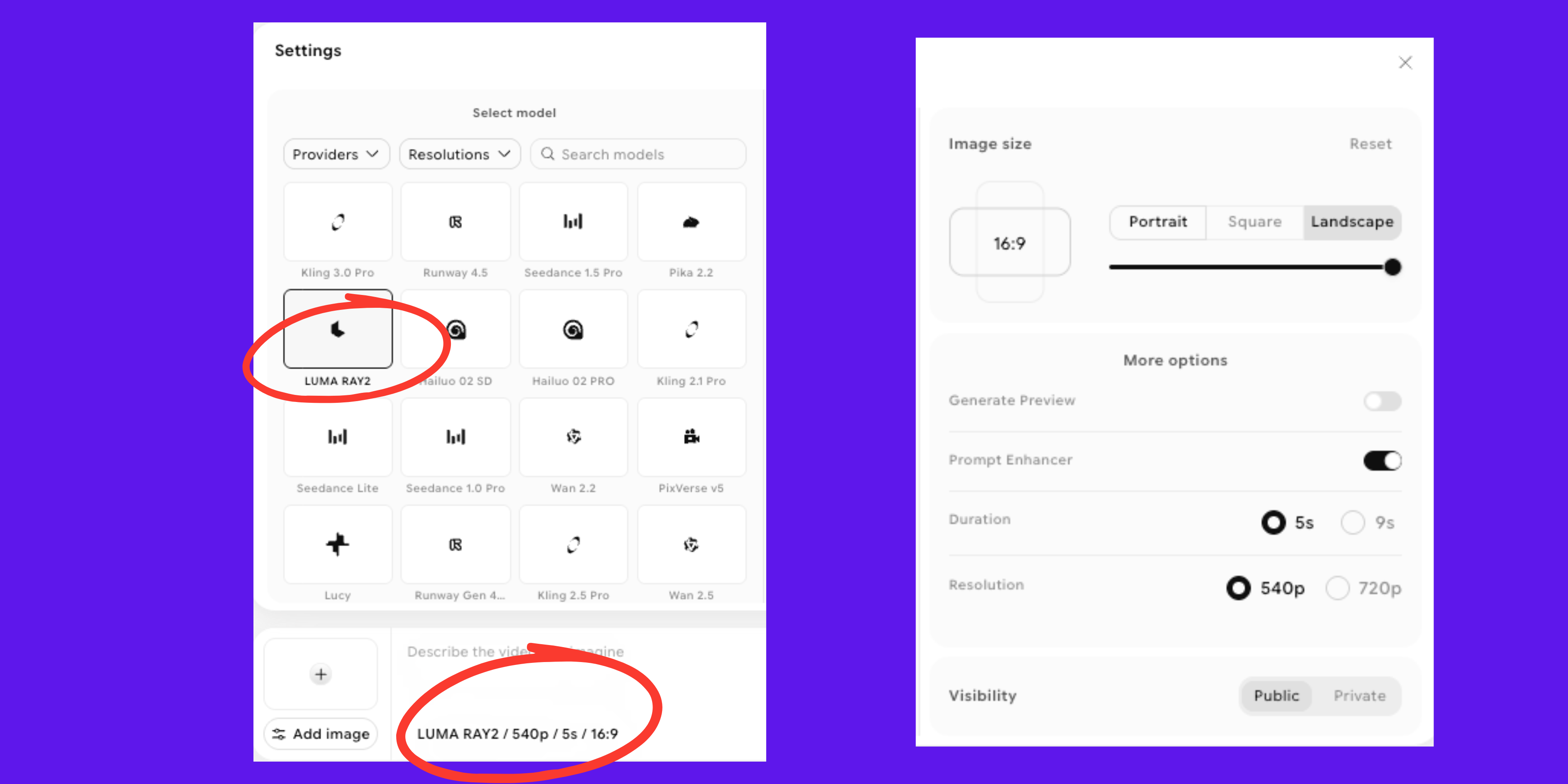
- Open the AI video generator, select Luma AI as the model provider, and choose Ray2.
- Start generating videos—the platform handles rendering, editing, and export within a single, user-friendly interface.
 Access Luma Ray2 On ImagineArt
For creators seeking a simple, all-in-one environment to work with Ray2 and other advanced video generation models, ImagineArt provides the most convenient and accessible option.
Recommended read: Luma Ray2 Pricing
How to Use Ray2 on ImagineArt?
Ray2 is accessible through Luma's Dream Machine platform, and using it is simple once you understand the available settings. Below is a breakdown of all the controls you can adjust before and after generating your video.
Video Length and Settings
Ray2 supports video generation up to 10 seconds, with options for shorter durations. For longer sequences, the Extend feature allows continuation up to 30 seconds, though quality may gradually decrease.
Resolution and Upscaling
Videos can be generated in high resolution and upscaled to 4K, making them suitable for professional production. ImagineArt's built-in AI video enhancer can further refine outputs after generation.
Keyframes
Start and end keyframes can be used to guide the visual direction of a video, helping maintain consistency and control over transitions.
Audio Generation
Ray2 supports audio generation, which allows users to add sound based on prompts. Audio integration increases credit usage, so it should be used strategically.
Generating Videos
Users can create videos individually by entering prompts and selecting generation settings. Users can make quick edits and simplify their video editing process with the built-in ImagineArt AI video editor. It features intuitive tools for fast adjustments, streamlined workflows, and efficient handling of high-volume video content.
Luma Ray2 AI Use Cases
Luma Ray2 offers a range of applications that make creative and practical tasks easier and more efficient. Here, we look at how it can be used in different scenarios.
Content Creation
Luma Ray2 empowers creators to produce high-quality video content without traditional production constraints. From short-form clips to cinematic storytelling, it enables faster experimentation and consistent output across platforms.
1. Short-Form Social Media Videos
Creators can generate visually engaging clips tailored for Instagram Reels and TikTok, including dynamic transitions and trend-based visuals. This helps maintain consistency and boost engagement without heavy editing.
2. YouTube B-Roll Footage
Luma Ray 2 allows creators to produce custom cinematic B-roll that aligns perfectly with their script and tone. This reduces reliance on generic stock footage and enhances video quality.
3. Music Video Concepts
Artists and directors can prototype music video ideas, explore different visual styles, and build narrative sequences. It’s ideal for testing creative direction before full-scale production.
4. Artistic Short Films
Filmmakers can create experimental or story-driven short films with unique visual styles. It opens up possibilities for storytelling without the need for physical sets or large crews.
Business
For businesses, Luma Ray2 streamlines visual content production, making it easier to create professional-grade assets for marketing, sales, and communication.
5. Product Visualization
Brands can generate product visuals in different environments and lighting conditions. This is especially useful for e-commerce and rapid content creation without physical shoots.
6. Real Estate Virtual Tours
Real estate teams can create immersive walkthrough-style visuals for properties, including conceptual spaces. This improves how listings are presented and understood by buyers.
7. Marketing Campaign Videos
Marketing teams can quickly produce and test multiple video creatives for campaigns. This allows faster iteration and reduces production costs.
8. Presentation Backgrounds
Businesses can design subtle motion backgrounds for presentations and events. This adds a polished and modern visual layer to communication materials.
Development
Luma Ray2 supports developers and designers by enabling rapid visual prototyping and experimentation across digital products and immersive experiences.
9. Game Cinematics Prototyping
Game developers can visualize cutscenes and narrative sequences early in development. This helps in refining storytelling without building full assets.
10. App Onboarding Animations
Product teams can create engaging onboarding visuals that guide users through app features. This improves user understanding and first-time experience.
How Ray2 Differs from Ray1.6?
If you used Ray1.6 and found yourself working around its limitations, Ray2 addresses those issues directly. The improvements are not superficial but reflect a significant leap in training scale and a deeper understanding of how video should look and behave.
Ray2 is a large-scale video generation model that creates realistic visuals with natural, coherent motion. It has a strong ability to follow text instructions and can also take video as input. Built on a new multimodal architecture with significantly higher compute, it delivers more advanced and reliable results.
In practical terms, this means videos are more stable, more detailed, and more consistent across their full duration. Issues like slow-motion playback seen in earlier versions have been eliminated, and the overall success rate of usable outputs is noticeably higher.
Here is a clear comparison between Ray1.6 and Ray2 across key areas:
| Feature | Ray1.6 | Ray2 |
|---|---|---|
| Architecture | Previous generation | New multimodal architecture |
| Training Compute | Baseline | 10x higher compute |
| Motion Quality | Standard coherence | Fast, natural, coherent motion |
| Visual Realism | Good | Lifelike textures and ultra-realistic detail |
| Video Resolution | Lower resolution | Up to 720p native, 1080p with 4K upscale |
| Video Length | Shorter clips | Up to 10 seconds, extendable to 30 seconds |
| Slow-Motion Issues | Occasionally present | Eliminated |
| Logical Sequences | Limited | Strongly improved |
| Production Readiness | Moderate | Highly production-ready |
| Input Types | Text | Text, image, and video |
These improvements result in faster, more realistic outputs for both creative and professional use. For users who previously relied on Ray1.6 and spent time correcting its limitations, Ray2 significantly reduces that effort and delivers more reliable results from the start.
Start Creating with Luma Ray2 on ImagineArt
Ray2 is one of the most advanced AI video models available, and ImagineArt gives you everything you need to take it from concept to finished output. For teams managing multi-step production, the ImagineArt AI Workflow connects Ray2 into a structured creative pipeline so nothing falls through the cracks.
Arooj Ishtiaq
Arooj is a SaaS content writer specializing in AI models and applied technology. At ImagineArt, she creates sharp, product-focused content that helps creators and businesses understand, adopt, and get real value from AI tools.