
Zahida Misher
November 16, 2026 • Updated November 16, 2026
11 mins Read
The best free AI video generator depends on which catch you can live with. Every free plan we checked caps something: credits, resolution, the watermark or your right to use the clip commercially.
The short version: ImagineArt is our top pick, with daily credits on its in-house models and, per its video page, no watermark on downloads on any plan. PixVerse prints the clearest daily number: 30 credits a day.
Adobe says output from its own Firefly models is safe for commercial use, though its plans page doesn't say whether that covers free generations. Runway gives a one-time taste. Wan 2.2 is free with no credit cap at all, if you own a serious graphics card. Several famous names can't make video on a free plan.
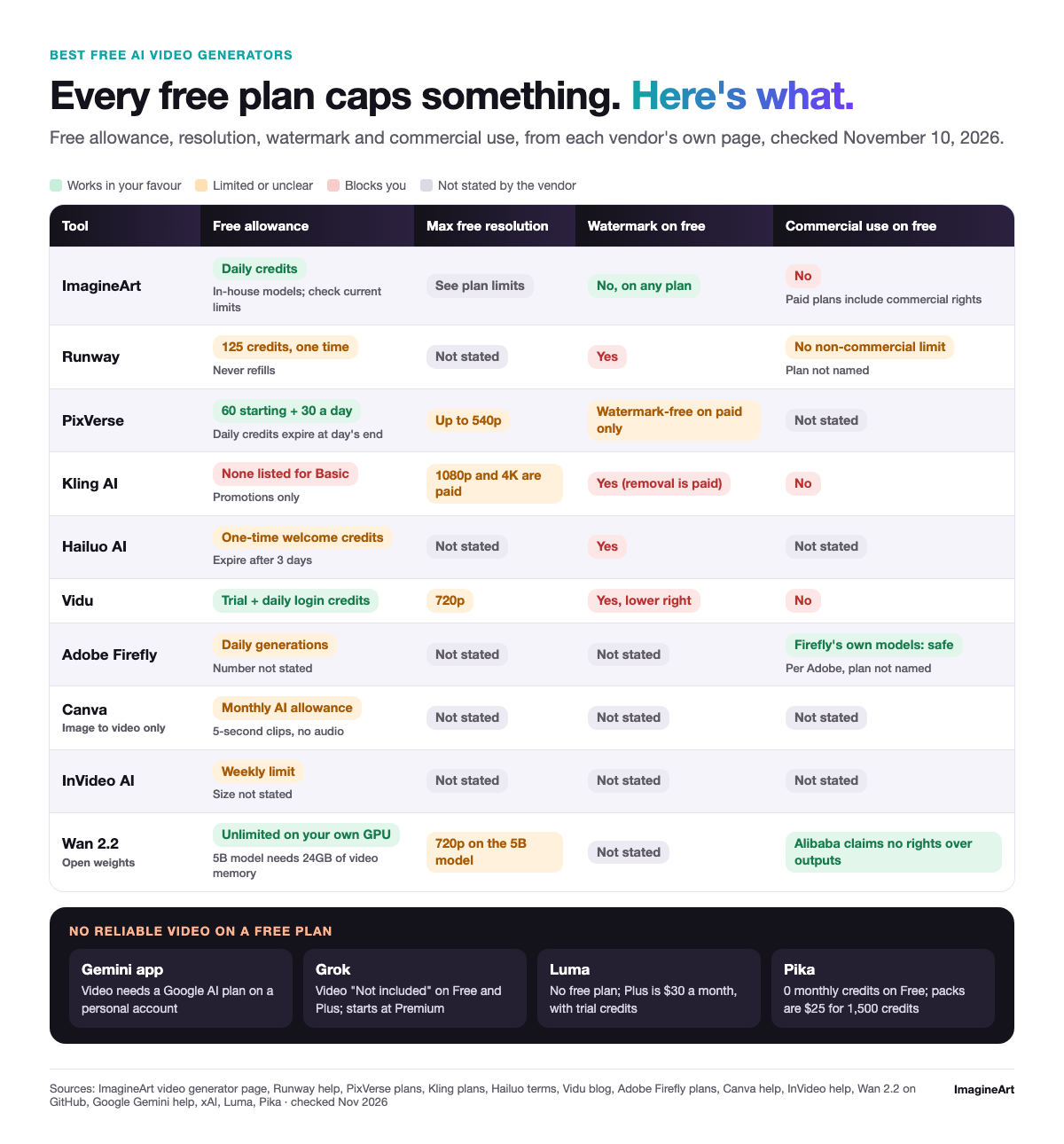 Free AI video plans compared on four common caps
Free AI video generators compared
Here are the free AI video generators side by side, as each vendor's page stated it on November 10, 2026. "Not stated" means the page doesn't say, and we won't guess.
Free AI video plans from each vendor's own page, checked November 10, 2026.
| Tool | Free allowance | Renews? | Max free resolution | Watermark on free | Commercial use on free | Source |
|---|---|---|---|---|---|---|
| ImagineArt | Daily credits, in-house models (check current limits) | Daily | See plan limits | No, on any plan (ImagineArt's video page) | No (paid plans include commercial rights) | ImagineArt video generator |
| Runway | 125 credits, one time | No | Not stated | Yes | Runway places no non-commercial limit (plan not named) | Runway help |
| PixVerse | 60 starting credits, then 30 a day | Daily | Up to 540p | Watermark-free is listed for paid plans only | Not stated | PixVerse plans |
| Kling AI | None listed for Basic | Promotions only | 1080p and 4K are paid features | Yes (removal is paid) | No | Kling plans |
| Hailuo AI | One-time welcome credits | No, they expire after 3 days | Not stated | Yes | Not stated | Hailuo terms |
| Vidu | Trial credits plus daily login credits | Daily login | 720p (Vidu's blog) | Yes, lower right (Vidu's blog) | No (Vidu's blog) | Vidu blog |
| Adobe Firefly | Daily generations, number not stated | Daily | Not stated | Not stated | Firefly's own models: safe for commercial use, per Adobe (plan not named) | Firefly plans |
| Canva | Monthly AI allowance, image to video only | Monthly | Not stated | Not stated | Not stated | Canva help |
| InVideo AI | Weekly limit, size not stated | Weekly | Not stated | Not stated | Not stated | InVideo plan limits |
| Wan 2.2 (open weights) | Unlimited on your own GPU | n/a | 720p on the 5B model | Not stated | Alibaba claims no rights over outputs | Wan 2.2 on GitHub |
What's the best free AI video generator?
ImagineArt is our pick for most people. Its video page lists a free plan with daily credits on ImagineArt's in-house models, says downloads carry no watermark on any plan, and the same account opens 40+ video models once you upgrade, so moving to a paid model doesn't mean moving to a new app.
Past that, pick by the cap you can live with. For daily practice, PixVerse spells out its allowance: 30 credits a day, up to 540p. For commercial work, Adobe says its own Firefly models are safe for commercial use. For no credit cap at all, Wan 2.2 runs on your own 24GB GPU.
That's a call from published plan terms, not from output quality. A plan that refills daily but renders mush isn't a win.
Want to judge quality yourself? Run one prompt on every free account you open, so you compare models, not prompts. Try this: "A barista pours latte art in a sunny café, slow push-in, warm morning light, calm mood." Log what each account charged, the clip length and resolution you got, how long it took, and where the watermark sits. More prompts to try on a free plan work the same way.
 The test prompt: latte art being poured
The free plans, one by one
ImagineArt: best overall free AI video generator
ImagineArt's AI video generator lists a free plan with daily credits that run its in-house models. The same page says downloads carry no watermark on any plan, including free. That's why it's our overall pick on published plan terms: no other hosted free plan in our table pairs daily credits with watermark-free downloads, and the same account opens 40+ models when you upgrade.
Free plan videos are for personal, non-commercial use, and paid plans include commercial rights, per ImagineArt's FAQ. The same FAQ says you can export up to 1080p or upscale to 4K with its AI Video Upscaler. Check current plan limits for today's daily allowance.
Drawback one: the free plan runs ImagineArt's in-house models only, so partner models such as Seedance and Veo need a paid plan. Drawback two: Free and Basic plan videos aren't private, so anything you publish to the community or share by link can be seen by anyone with access.
Runway: best for a quick, one-time look
Runway's Free plan is "free forever" but its credits aren't. You get 125 credits once, they never refill, and a Free account can't buy more, per Runway's Free plan help page. Runway doesn't say which models Free includes. Gen-4.5 costs 12 credits per second on Runway's pricing, so if Free includes Gen-4.5, 125 credits would cover about 10 seconds of it (our arithmetic).
Every Free-plan video carries a Runway watermark, per its help center. Runway also says what you make is yours to use without non-commercial restrictions from Runway, though that article doesn't single out the Free plan. Drawback: once the 125 credits are gone, so is the trial.
PixVerse: best for daily practice
PixVerse Basic costs $0 a month (as of November 2026) and lists 60 starting credits plus 30 daily credits, per PixVerse's plans. Daily credits reset at 00:00 UTC and expire at the end of the day, so they don't stack up.
Basic covers all PixVerse models at up to 540p. Third-party models such as Seedance, Kling and Wan start at the Pro plan. The plans page lists "watermark-free" only on paid cards, so expect a watermark on Basic. Drawback: 540p is the lowest resolution any plan in our table states.
Hailuo AI: best for a short free trial
MiniMax's terms say new users get a one-time welcome package of free credits that expires three days after it's granted. Free downloads include a watermark, and free users can queue up to three tasks but run one at a time.
Those details come from Hailuo's subscription terms, last updated July 14, 2025, because the plan cards didn't load for us. Drawback: miss the three-day window and the trial's over.
Vidu: best for 720p practice clips
Vidu gives trial credits on sign-up and more for logging in each day, per Vidu's pricing. Vidu's own blog, dated May 26, 2026, adds that the free tier caps output at 720p and puts a visible watermark in the lower-right corner.
Drawback: every free clip is watermarked and can't be used commercially, so Vidu's free tier is for practice only.
Adobe Firefly: best for commercial-safe clips
Adobe says you get free daily generations across image, video and audio without a plan, with access to partner models like Nano Banana and Luma Ray3.14, and the limits refresh every day. It doesn't publish the number, per Firefly's plans.
The standout is rights. Adobe says outputs from its own Firefly models are safe for commercial use, though the page doesn't name which plans, and it attaches Content Credentials automatically. Partner-model outputs, Luma's included, are the user's responsibility, so pick a Firefly model for client work. Drawback: you can't plan around an allowance nobody states.
Canva: best if you already design in Canva
Canva Free gets limited access to Standard and Premium AI tools and none to Ultra AI tools. Image to video works on Free while your monthly AI allowance lasts, with 5-second clips and no audio, per Canva's image-to-video help. Canva's pricing page lists its AI video clip generator as an Ultra AI tool, so it's off the free table. Drawback: clips that short and silent work as loops, not scenes.
InVideo AI: a free plan with a weekly reset
InVideo's plan-limits help mentions a weekly limit on Free but doesn't state its size, the free resolution or whether free exports carry a watermark. Its pricing page shows no Free card at all. Drawback: you can't size a plan whose limits aren't published.
Wan 2.2: best if you own the hardware
Wan 2.2 is the only route here with no credit cap. Alibaba released the Wan 2.2 open weights under Apache 2.0 and says it claims no rights over what you generate.
The catch is hardware. The 5B model runs 720p at 24fps and needs at least 24GB of video memory, such as an RTX 4090. The larger A14B model needs at least 80GB on one GPU. Drawback: the software is free, the 24GB graphics card isn't.
Free plans that can't make video
Some big names show up in free-tool searches but won't reliably generate video without paying, according to their own pages (checked November 10, 2026):
- Gemini app: Google's Gemini video help says you must have a Google AI plan to make videos with a personal account.
- Grok: xAI's pricing page marks video generation "Not included" on Free and Plus. It starts at Premium.
- Luma: Luma's plans list no free plan; the cheapest individual plan is Plus at $30 a month (as of November 2026), though all plans include free trial credits.
- Pika: the Free plan has 0 monthly credits and runs on credit packs only, per Pika's pricing. A pack is $25 for 1,500 credits (as of November 2026).
- Kling AI: Basic is free but includes no monthly credits, so you generate only with credits from an occasional promotion or ones you buy, per Kling's membership plans. Watermark removal, 1080p and 4K, and commercial use are all paid.
- Canva AI video clips: an Ultra AI tool, not part of Canva Free.
Is there a free AI video generator with no catch?
Is there a free AI video generator with no cap? Not a hosted one. Every free plan above caps something: credits, clip length, resolution, a watermark or commercial rights. The only uncapped route is running open weights like Wan 2.2 on your own GPU, and the GPU is the catch.
So pick the cap that hurts least:
- Need volume for practice? A daily refill (ImagineArt, PixVerse, Vidu).
- Need clean files? ImagineArt's video page says no watermark on any plan, free included. For the rest, check the watermark row.
- Need to post for a client? Commercial rights on free are rare and usually unclear. Adobe (Firefly's own models) and Runway make the broadest statements, and Wan 2.2's licence claims no rights over your output.
When a paid plan is worth it
Two things usually push people to pay: commercial rights and watermark-free exports. Kling and Pika keep commercial use for paid plans, and Vidu says its free videos can't be used commercially. Runway, Hailuo, Vidu and Kling put a watermark on free output.
On ImagineArt, paid plans include commercial use rights, per its FAQ, which also lists exports up to 1080p and a 4K upscale; check current plan limits before you upgrade.
If you're ready to pay, compare quality first in our paid-model test of nine models, since a cheap plan on a weak model is still a weak clip. Then check what AI video costs across platforms, because credit prices vary more than plan prices. With a shortlist in hand, run it in ImagineArt's AI video generator, which puts 40+ models in one place, so one prompt can test them all.
Frequently asked questions
None of the hosted ones. Each free plan caps credits, resolution, watermark-free downloads or commercial use. Open weights like Wan 2.2 are free to run without a cap, but only on a GPU with at least 24GB of memory.
Not through Sora. OpenAI closed the Sora web and app experience on April 26, 2026, per its help center, so the standalone Sora app is no longer an option.
Not that we found: every plan page we read assumes a signed-in account.
Usually not. Kling and Pika keep commercial use for paid plans, Vidu's blog says its free videos can't be used commercially, and ImagineArt's FAQ ties commercial rights to paid plans. Adobe says its own Firefly models are safe for commercial use and Runway places no non-commercial restrictions, but neither page names the free plan.
Most do. Runway, Hailuo and Vidu say so outright, and Kling charges to remove it. ImagineArt's video page says its downloads carry no watermark on any plan, including free. Pika lists no watermark on any plan, but its free plan has no monthly credits.
Picking the best free AI video generator
No free plan is free of trade-offs, so match the cap to the job. Start with ImagineArt for watermark-free downloads and daily credits.
For daily practice elsewhere, look at PixVerse's 30 daily credits. For commercial work, look at Firefly's own models. For no credit cap, look at Wan 2.2 on a 24GB graphics card. For a one-off look, Runway's 125 credits will do.
Run the same prompt on two or three free accounts before you commit to any of them. When the free credits stop being enough, try your best prompt across several models in ImagineArt's video generator and keep the take that wins.
Zahida Misher
Exploring how AI transforms marketing, I help businesses unlock growth and future-proof their presence.