
Tooba Siddiqui
September 23, 2026 • Updated September 23, 2026
15 mins Read
The best AI video generation models of 2026 are hard to compare, because most rankings test each model on a different prompt, which makes their scores meaningless side by side. We took a different approach. We ran 9 AI video generation models on the same 3 prompts, producing 27 clips, and scored every clip blind on the same five criteria. Cost per second comes from real ImagineArt credit rates, not list prices. The full method, including every prompt word for word, is in the testing section below.
Disclosure: every model was scored blindly and tested and priced through ImagineArt, which offers access to multiple AI video generation models.
Quick verdict
- Best overall: Seedance 2.5
- Best for ads and product video: MiniMax H3 and HappyHorse
- Best for audio and dialogue: Veo 3.1
- Best for photo-to-video: Flux 3
- Best value per second (1080p): Kling 3.0
- Newest to watch: Flux 3, Black Forest Labs' first video model
Best AI Video Models Compared: Scores and Cost per Second
Seedance 2.5 scored highest overall, averaging 8.8/10 across all three prompts.
| Model | Developer | Prompt adherence | Temporal consistency | Visual fidelity | Motion quality | Cinematic realism | Overall /10 | Native audio | Render time / video | $/sec |
|---|---|---|---|---|---|---|---|---|---|---|
| Seedance 2.5 | ByteDance | 9 | 8.5 | 8 | 9 | 9.5 | 8.8 | Yes | 60 seconds | $0.98 (1080p) |
| Veo 3.1 | 7 | 7.5 | 7 | 8.5 | 9 | 7.8 | Yes | 70 seconds | $0.74 (1080p) | |
| Flux 3 | Black Forest Labs | 8 | 7.5 | 7 | 8 | 8.5 | 7.8 | Yes | 67 seconds | $0.54 (1080p) |
| HappyHorse | Alibaba | 7.5 | 7.5 | 7 | 8 | 8 | 7.6 | Yes | 77 seconds | $0.53 (1080p) |
| MiniMax H3 | MiniMax | 7.8 | 7 | 7 | 8 | 7 | 7.36 | Yes | 81 seconds | $0.49 (2K) |
| Wan 3 | Alibaba | 7 | 7 | 8 | 7 | 7 | 7.2 | Yes | 100 seconds | $0.38 (1080p) |
| Kling 3.0 Pro | Kuaishou | 7.8 | 8 | 8 | 9 | 8 | 8.16 | Yes | 63 seconds | $0.31 (1080p) |
| Gemini Omni Flash | 6 | 7 | 6.5 | 7.5 | 6 | 6.6 | Yes | 58 seconds | $0.24 (720p) | |
| Runway Gen-4.5 | Runway ML | 7 | 6 | 6 | 7 | 7 | 6.6 | No | 55 seconds | $0.23 (720p) |
Scores are averages across all 3 prompts. Cost is based on ImagineArt credit rates on the Ultimate plan ($0.003125 per credit), September 2026, audio. Each price is shown at the resolution noted: Runway Gen-4.5 and Gemini Omni Flash top out at 720p, and MiniMax H3 is priced at 2K, so values are compared within those resolutions.
What Is an AI Video Generator, and How Is It Different From an AI Video Model?
An AI video generator is a tool that turns text, images or existing clips into video. The AI video model is the engine underneath, such as Veo 3.1 or Kling 3, and one generator can run many models.
The difference matters when you compare tools. Many "best AI video generator" lists rank apps and models in the same table, so a platform gets ranked against the engine it runs on. Separating the two makes it clear what you're actually choosing: the model decides how the video looks and moves, and the generator decides how you access it, what it costs, and what you can do with the clip afterward.
ImagineArt is an example of the generator side. It runs 15+ video models on one credit system, so you can test the same prompt on several models without a separate subscription for each.
How We Tested These AI Video Generation Tools
We ran the same 3 prompts on 9 models, one generation each, for 27 clips in total, all scored blind by the author.
Settings: 5-second clips, 16:9, the highest resolution each model supports up to 1080p, and audio on wherever the model supports it. All 27 generations ran in a single session on 22nd September 2026 to keep queue conditions comparable.
The 3 prompts, word for word:
Prompt 1: People and motion (text-to-video). Tests prompt adherence, temporal consistency and motion quality, including the two things AI video still gets wrong most often: fast movement and hands.
A woman in her late twenties wearing a bright yellow hooded raincoat runs toward the camera down a narrow city street at night during heavy rain. Her left hand holds the hood in place, and halfway through the shot the wind pulls the hood back and her wet dark hair falls loose. Wet asphalt reflects red and blue neon signs from shopfronts on both sides, and rain streaks diagonally across the frame. Tracking shot: the camera moves backward at her running pace, keeping her centered from the waist up. Shallow depth of field, background neon softly blurred. Photorealistic, 35mm film look, high contrast night lighting. Sound: heavy rain, footsteps splashing through puddles, distant traffic.
Prompt 2: Product shot (image-to-video). Tests visual fidelity, prompt adherence and whether the label text survives the motion.
Source image: use ImagineArt AI image generator to create reference images.
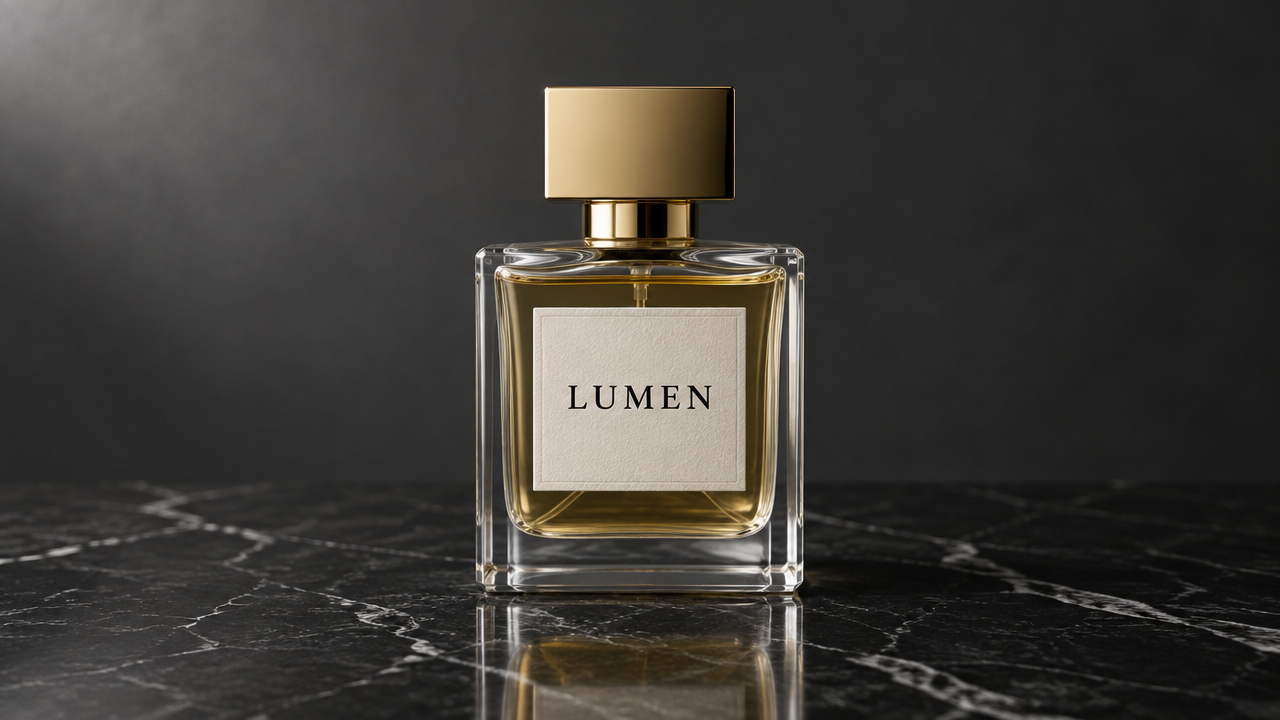 Create reference images with AI image generator
The camera slowly orbits 90 degrees around the perfume bottle from left to right at a steady speed, keeping the bottle centered and in sharp focus the whole time. The bottle itself stays completely still. As the camera moves, the soft studio light glides across the glass, creating a moving highlight along its edge and a faint reflection on the marble. A few fine particles of mist drift slowly upward behind the bottle. The label text "LUMEN" stays sharp, legible and unchanged throughout. No other objects enter the frame. Luxury commercial style, clean and minimal.
Prompt 3: Cinematic dialogue (text-to-video). The hero prompt. Tests cinematic realism, camera direction, audio and lip sync, plus face continuity during a push-in.
Dawn on a small wooden pier at the edge of a misty lake. A weathered fisherman in his sixties, with grey stubble and deep lines around his eyes, wearing a dark green wool sweater and a navy knit cap, sits on an upturned wooden crate mending a fishing net with both hands. Low golden sunlight breaks through the fog behind him, rim-lighting the edge of his face and cap. The camera starts on a wide shot and slowly pushes in to a medium close-up over the full five seconds. He stops working, looks up toward the camera and says in a low, calm voice with a slight rasp: "The fish don't care what time you wake up. The lake does." His lip movement matches the dialogue exactly. Sound: gentle water lapping against the pier, a single distant loon call, no music. Photorealistic, anamorphic cinematic look, muted teal and warm gold color grade.
Scoring: a colleague renamed every clip to a random number before scoring, so the author didn't know which model made which clip. Each clip was scored 1 to 10 on each criterion
Cost: ImagineArt credit rates for each model and resolution, from platform data.
Render time: recorded for each clip as the time from the start of processing to the finished clip, with queue time excluded, since queue depends on platform load rather than the model.
Limits:
- AI video models don't produce the same clip twice, so your results will vary with your own prompts and subjects.
- The "best for" picks reflect how each model performed on these three prompts, which is why the prompts are published in full: you can run them yourself on ImagineArt and compare.
- The render time could also vary from platform to platform.
AI Video Generation Model Results, Model by Model
These are the 9 clips from the above-mentioned hero prompt, the fisherman at dawn.
Seedance 2.5 (ByteDance)
Seedance 2.5 is ByteDance's new video model released on 31st July, 2026. It is built for synced audio and video in a single generation, with clips up to 30 seconds on ImagineArt. It made 28% of all successful video generations on ImagineArt between August 23 and September 20, 2026, making it the most-used model on the platform, and at $0.98 per second it's also the most expensive at 1080p.
- Strongest at: dialogue and lip-sync accuracy, prompt adherence
- Weakest at: micro-movements
- Best for: long narrative and cinematic clip
- Cost: $0.98/sec (1080p)
HappyHorse (Alibaba)
HappyHorse is Alibaba's recent video model released in April 2026. The AI video model is known for multi-reference generation and synchornized audio in single pass.
- Strongest at: visual fidelity
- Weakest at: vocal delivery and lipsync accuracy
- Best for: product demos with image references
- Cost: $0.53/sec (1080p)
Google Veo 3.1 (Google DeepMind)
Veo 3.1 was released in October 2025. Google Veo AI video generation is known for producing dialogue, sound effects and ambient audio in the same pass as the picture. It's widely regarded as one of the strongest all-round models for realism, which makes it the benchmark the rest of this test gets measured against.
- Strongest at: native audio quality and motion
- Weakest at: complex movement consistency
- Best for: cinematic realism
- Cost: $0.74/sec (1080p)
Gemini Omni Flash (Google DeepMind)
Gemini Omni Flash is Google's May 2026 model built for conversational generation and video editing, where each follow-up instruction builds on the previous result. Where Veo 3.1 is built to produce the best single clip, Gemini Omni Flash is built for refining a clip over several turns in plain language.
- Strongest at: audio synchronization
- Weakest at: cinematic realism
- Best for: video editing; the video generation is not this model’s strongest feature.
- Cost: $0.24/sec (720p)
Kling 3 (Kling AI)
Kling 3.0 Pro by Kuaishou was released in February 2026. Kling AI video generation is known for native 4K output and multilingual lip sync. It was tested here at 1080p to keep resolutions comparable.
- Strongest at: subtle expressions, motion control, and cinematic physics
- Weakest at: micro-movements; it requires reitreation
- Best for: character voices and dialogues
- Cost: $0.31/sec (1080p)
MiniMax H3 (Hailuo AI)
MiniMax H3 is MiniMax's latest the latest in the Hailuo AI video generation, releaed on July-August 2026. It is known for realistic body movement and facial expression. On ImagineArt it's priced at 2K rather than 1080p, which is worth keeping in mind when comparing its cost per second.
- Strongest at: native stereo audio generation and background music quality
- Weakest at: text-to-video realism
- Best for: multimodal context-based video generation
- Cost: $0.49/sec (2K)
Wan 3 (Alibaba)
Wan 3 is Alibaba's August 2026 model and the newest release in the Wan AI video generation. The earlier versions, including Wan 2.1 and Wan 2.2, were released as open weights, though Wan 3's weights haven't been released yet.
- Strongest at: emotional performance
- Weakest at: realistic micro-textures
- Best for: budget-friendly video generation for multishot storytelling
- Cost: $0.38/sec (1080p)
Runway Gen-4.5 (Runway ML)
Runway Gen-4.5 is Runway's December 2025 model for Runway AI video generation, known for motion quality and precise camera control. It tops out at 720p, so it was tested at a lower resolution than most models here.
- Strongest at: motion dynamics and camera movements
- Weakest at: audio generation
- Best for: complex motion
- Cost: $0.23/sec (720p)
Flux 3 (Black Forest Labs)
Flux 3 is Black Forest Labs' first video model, released August 4, 2026, with clips up to 20 seconds and native audio. BFL reports an Elo score of 1135 for Flux 3.
- Strongest at: temporal visual consistency and prompt adherence
- Weakest at: audio fidelity and texture; the background soundeffects can be muffled or misaligned
- Best for: motion and camera control
- Cost: $0.54/sec (1080p)
What Happened to OpenAI's Video Generation Model, Sora?
OpenAI shut down the Sora app on April 26, 2026, and is ending API access on September 24, 2026. For anyone who relied on OpenAI video generation, the closest replacements depend on what Sora 2 was used for: for cinematic realism, Veo 3.1 is recommended, and for dialogue with audio, Seedance 2.5.
Which AI Video Generator Is Best for Your Use Case?
No single AI video model wins every category, so the right choice depends on what the video is for.
For product ads and ecommerce
Product video needs label text that stays legible and a product that doesn't warp as the camera moves, which is exactly what Prompt 2 tested. MiniMax H3 held the label most cleanly. For turning those clips into ads with hooks, templates and platform-ready formats, the AI Ad Studio handles that step. MNSAJ, an ecommerce brand, halved its content turnaround after moving production onto ImagineArt.
Model Recommendation: MiniMax Hailuo 3
For short films and storytelling
Storytelling depends on cinematic realism and camera direction more than raw sharpness, which the fisherman prompt was built to test. For multi-shot scenes and longer sequences, the AI Film Studio builds on the same models.
Model Recommendation: Flux 3 and Veo 3.1
For fashion and fabric movement
Fabric is one of the harder things for a video model to get right, since drape and movement expose inconsistency quickly. The raincoat in Prompt 1 is the closest proxy in this test. For garment-specific shoots with consistent models, Fashion Studio is built for that workflow.
Model Recommendation: Kling 3 with motion control
For dialogue, audio and lip sync
Only models with native audio and lipsync feature could compete here, and the difference between them showed most in the fisherman's line of dialogue, where lip movement either matched the words or didn't.
Model Recommendation: Seedance 2.5
For social media and short-form video
Short-form video rewards a strong first second and clean motion more than cinematic polish, and it usually needs a 9:16 version.
Recommendation: Runway Gen-4.5
For the lowest cost per second
Among models tested at 1080p, Kling 3.0 Pro is the cheapest at $0.31 per second. Runway Gen-4.5 and Gemini Omni Flash cost less per second but top out at 720p, so they aren't a like-for-like comparison.
Model Recommendation: Kling 3.0
How to Make an AI Video (Step by Step)
Here's how to make AI video that's usable on the first few attempts rather than the twentieth.
- Choose a model based on your use case. Use the section above, or the comparison table, rather than defaulting to the most expensive model.
- Write the prompt. Cover the subject, the action, the setting, the camera move, the lighting and the audio. The three test prompts above are working examples, and our guide to AI video prompts goes further.
- Set the aspect ratio for where the video will go: 16:9 for YouTube and web, 9:16 for Reels and TikTok, 1:1 for feed placements.
- Draft at 480p or 720p first. Low-resolution drafts cost a fraction of a final render and show whether the idea works. On ImagineArt, 46% of Seedance 2.5 clips generated between August and September, 2026 were made at 480p.
- Change one thing at a time. If the motion is wrong, fix the motion description and leave everything else alone, so you know what caused the improvement.
- Render the final version at 1080p or 4K once the draft is right.
- Optional: add captions, or translate and dub the clip for other markets using subtitles/captions, AI translation and voice generation tools.
How to Create an AI Video From Photos
Image-to-video models animate a still photo using a text prompt that describes the motion.
- Upload a clear, well-lit photo in a supported aspect ratio. Models reject images outside their range.
- Describe the motion, not the image. The model can already see the photo. Tell it what moves, how fast and in which direction.
- Add a camera move if you want one, such as an orbit, a push-in or a slow pan.
- Use start and end frames for controlled transitions, where the model supports them.
- Generate, review and adjust the motion description rather than rewriting the whole prompt.
Common Mistakes When Using AI Video Generation Tools
These come from ImagineArt's own error logs:
- Prompts over 2,000 characters get rejected. A longer prompt isn't a better prompt, and past the limit it isn't a prompt at all.
- Rendering at 1080p before testing the idea at a lower resolution. A draft at 480p shows whether the concept works at a fraction of the cost.
- Uploading images in an aspect ratio the model doesn't support.
- Paying for native audio on clips that will get a voiceover later. Audio adds cost on most models, and it gets replaced anyway if a voiceover goes on top.
- Using human faces as source images on models that restrict them. Some models reject or alter uploaded faces, so check the model's policy first.
- Judging a model on a single generation. Run the same prompt two or three times before writing a model off.
FAQ
What is the best AI video generator in 2026?
ImagineArt is one of the best AI video generator in 2026, as it gives you access to the best AI video generation models at reasonable costs as we tested, compared, and scored above. The best choice still depends on the job, so see the use case section for a recommendation by task.
How much does AI video generation cost per second?
On ImagineArt, from $0.23 to $0.98 per second across the 9 models tested, depending on model and resolution. Seedance 2.5 is the most expensive at 1080p, and Kling 3.0 Pro is the cheapest model tested at 1080p, at $0.31.
Does generating audio cost more?
On most models, yes. Native audio adds to the credit cost of each second, so if a clip is going to get a voiceover later, it's cheaper to generate it without audio.
Can AI make a video from a photo?
Yes. ImagineArt image-to-video animates a still photo from a text prompt that describes the motion. Upload a clear photo in a supported aspect ratio, describe what should move, and add a camera move if needed.
How long can an AI-generated video be?
It depends on the model. Flux 3 generates clips up to 20 seconds, and Seedance 2.5 clips on ImagineArt run up to 30 seconds. Longer videos are usually made by extending or stitching shorter clips.
Which AI video generator has the best audio and lip sync?
In our test, Seedance 2.5 produced the most accurate lip sync on the dialogue prompt
What replaced OpenAI's Sora?
OpenAI shut down the Sora app in April 2026 and is ending] API access on September 24, 2026. In our test, Veo 3.1 was the closest replacement for cinematic work and dialogue with audio.
Is Wan AI open source?
Earlier versions, Wan 2.1 and 2.2, were released with open weights. Alibaba hasn't released weights for Wan 3 yet.
What's the difference between an AI video generator and an AI video model?
The model is the engine that creates the video, such as Veo 3.1 or Kling 3. The generator is the tool you use to access it, and one generator can run many models.
Tooba Siddiqui
Tooba Siddiqui is a content marketer with a strong focus on AI trends and product innovation. She explores generative AI with a keen eye. At ImagineArt, she develops marketing content that translates cutting-edge innovation into engaging, search-driven narratives for the right audience.