
Tooba Siddiqui
May 15, 2026 • Updated May 18, 2026
17 mins Read
Motion graphics are animated graphic elements — text, shapes, icons, and imagery — brought to life through movement, timing, and sound to communicate ideas, tell stories, or enhance visual experiences.
From the film title sequences of 1950s Hollywood to the animated social media content filling your feed today, motion graphics have shaped how visual communication works across every medium. This guide covers everything you need to know — what motion graphics are, how they differ from animation, the types you will encounter, the tools used to create them, and how AI is making the discipline accessible to creators.
What Is Motion Graphics?
Motion graphics are, at their simplest, graphics that move. The discipline emerged from graphic design in the mid-20th century when designers began applying movement, timing, and rhythm to what had previously been static visual work like flat images, text layouts, illustration.
The key distinction from full animation: motion graphics are not character-driven storytelling. A Disney film has defined characters, a plot arc, emotional narrative across 90 minutes. Motion graphics are shorter, purpose-driven pieces that use movement to communicate or enhance — a logo that animates on screen, a data visualisation that builds in sequence, a social media post where text flies in over a background. The motion serves the message rather than carrying a story.
The core components of any motion graphic are:
- Visual elements — text, shapes, icons, illustrations, photography
- Movement — how those elements enter, exit, and behave on screen
- Timing — the rhythm and pacing of the motion
- Sound — music, sound effects, or voiceover that reinforces the visual
All four work together. Change the timing and the entire feeling of a motion graphic shifts — the same animation at half the speed reads as elegant; at double the speed it reads as urgent.
Motion Graphics vs Motion Design vs Animation — What's the Difference?
These three terms are used interchangeably in most conversations but they describe different things. Understanding the distinction matters whether you are hiring a designer, choosing a career path, or deciding which tool to use.
| Term | What it means |
|---|---|
| Motion graphics | A specific technique that includes animated graphic elements such as text, shapes, and icons |
| Motion design | A broader discipline, encompassing motion graphics, UX animation, brand motion systems, product interface animation |
| Motion graphic design | The professional practice of creating motion graphics; the job title and the craft |
| Animation | Character-driven storytelling, including narrative arc, defined characters, emotional journey |
Motion graphics is a technique. You use motion graphics to animate a logo, build a data chart, or create a social media post.
Motion design is a discipline. A motion designer thinks about how movement functions across an entire brand or product — not just individual pieces but the system of motion that defines how a brand behaves visually.
Animation is a storytelling medium. Pixar makes animation. A designer creating a 15-second Instagram post is making motion graphics.
The practical difference: a motion graphics brief asks for a specific deliverable. A motion design brief asks for a system. Both require similar technical skills but different strategic thinking.
What Is Motion Graphics Used For?
Motion graphic design appears across almost every visual medium in use today. The discipline has expanded far beyond its origins in film title sequences.
Film and TV opening credits — the use case that defined the discipline. From Saul Bass's title sequences in the 1950s to modern Netflix series with fully rendered 3D opening sequences, film and TV remain a showcase for motion graphic design at its most ambitious.
Digital advertising — animated ads consistently outperform static equivalents on click-through rate. Motion graphics let advertisers communicate more information in less time and hold attention in environments designed to scroll past.
Social media content — TikTok, Instagram Reels, and YouTube Shorts have created enormous demand for short-form motion graphic content. Animated text overlays, kinetic captions, logo animations, and motion-enhanced product shots are all standard formats in social media production. For the latest on how motion content fits into broader social strategy, see video marketing trends.
News broadcasting and data visualisation — motion graphics help journalists and broadcasters communicate complex information quickly. Election results, economic data, sports statistics — all become more comprehensible when visualised with animated charts and graphics.
Website UX and product interfaces — micro-animations within apps and websites guide users, communicate system status, and make interactions feel responsive. This is motion design at its most functional.
Brand identity — animated logos, brand idents, and motion guidelines have become as important as static brand assets for any organisation producing video content.
Explainer and educational videos — motion graphics are the standard format for breaking down complex processes, products, or concepts into accessible visual sequences.
Types of Motion Graphics
Motion graphic design is not one unified visual style — it encompasses several distinct formats, each suited to different contexts and communication goals.
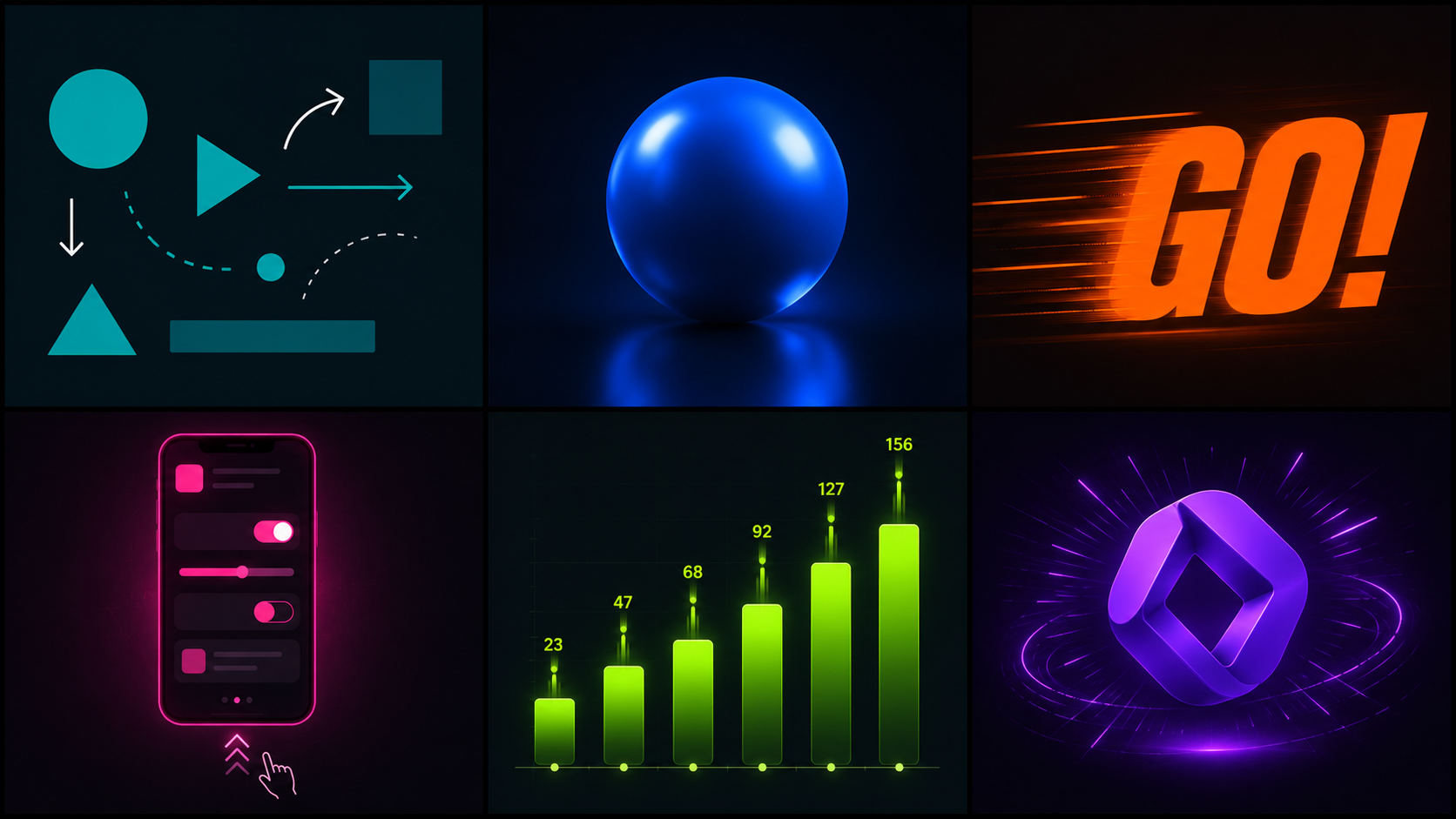 Generated by ImagineArt AI image generator
2D Motion Graphics
The most common form. Flat animated shapes, text, illustrated elements, and icons moving across a two-dimensional plane. The visual language of most social media motion content, explainer videos, and advertising creative falls into this category. Accessible, versatile, and fast to produce compared to 3D.
For a breakdown of what 2D animation typically costs to produce professionally, see 2D animation cost
3D Motion Graphics
Three-dimensional rendered objects with depth, lighting, shadow, and surface texture. Common in broadcast television, product advertising, and high-production-value brand content. Significantly more technically demanding to produce than 2D but increasingly accessible through AI generation tools.
For production cost context, see 3D animation cost.
Kinetic Typography
Text as the primary animated element. Words, phrases, and sentences that move, scale, rotate, and transform in sync with audio or a visual rhythm. Used in lyric videos, quote animations, documentary titles, and brand messaging where the language itself is the design.
UI and UX Animation
Micro-animations within applications and websites — transitions between screens, loading indicators, button feedback, onboarding sequences. Motion design at its most functional. The viewer rarely notices it consciously but immediately feels the absence when it is not there.
Animated Infographics
Static data visualisations brought to life with motion. Bar charts that build in sequence, maps that animate geographically, statistics that count up on screen. Used in news, reports, educational content, and social media to make data more engaging and memorable.
Logo Animation
A brand mark brought to motion for video intros, outros, broadcast idents, and digital advertising. The animated logo is now a baseline expectation for any brand producing video content — a static logo cut into a video feels visually incomplete compared to one that animates in with purpose.
These are all forms of motion graphics. If you are exploring animation techniques beyond digital motion, like frame-by-frame physical animation, see stop motion video ideas.
A Brief History of Motion Graphics
Understanding where motion graphics came from clarifies why it looks and functions the way it does today.
1940s–50s: The pioneers
Graphic designers Saul Bass and Elaine Bass redefined film title design with bold, colourful, and deliberately typographic sequences. Their work on films like The Seven Year Itch (1955) and North by Northwest (1959) established the idea that opening credits could be a creative statement, not just information delivery. Motion graphics as a discipline was born.
1960s–70s: Typography as expression
Designers like Pablo Ferro pushed the discipline further — his title sequence for Dr Strangelove (1964) used rapid-cut typography that influenced decades of design thinking. Motion graphics expanded beyond film into television as the medium grew.
1980s: The digital shift
The arrival of the Apple Mac in the early 1980s gave designers their first accessible digital production tools. The creative ceiling rose immediately. Motion graphics that had required expensive optical film equipment could now be produced on a desktop. The discipline democratised for the first time.
1990s–2000s: After Effects and the internet
Adobe After Effects became the industry standard tool for motion graphics, giving designers precise control over animation, compositing, and visual effects. Simultaneously, the rise of the internet created demand for digital motion content far beyond film and television. Motion graphics entered advertising, web design, and digital media.
2010s: Social media and the animated infographic
The growth of social platforms created mass demand for short-form motion content. Animated infographics became a standard format for communicating data on social media. Motion graphics moved from specialist production to everyday content creation.
2020s: AI motion graphics
Artificial intelligence has fundamentally changed who can create motion graphics. Generation tools that produce animated video content from text prompts have made motion graphic-style output accessible to creators without design training or software skills. The discipline is undergoing its second major democratisation. AI generation tools that produce animated video content from text prompts have made motion graphic-style output accessible to creators without design training or software skills. See AI video generator apps for a full overview of what is available today.
Motion Graphics in the AI Era
The traditional motion graphics workflow requires significant investment: learn the software (months to years), storyboard the concept, build each element frame by frame or keyframe by keyframe, render, revise, export. For a professional designer, a 30-second motion graphic can take several days.
AI motion graphics tools have compressed that timeline to minutes.
The shift is not just about speed — it is about access. A brand with no design budget, a content creator with no technical skills, a marketer who needs a motion graphic for tomorrow's campaign can now generate motion content from a text description. The creative direction moves from software operation to prompt writing and output curation.
What AI does well in motion graphics:
- Generating motion-enhanced video content from text prompts
- Creating consistent visual environments across multiple clips
- Producing social-format motion content at speed and volume
- Adding controlled motion to static images and brand assets
Where traditional tools still lead:
- Complex branded motion systems requiring frame-by-frame precision
- Character animation with defined movement and personality
- Motion graphics requiring specific typographic control
- Long-form broadcast production at the highest technical standard
For most social media motion content, explainer-style video, and brand marketing, AI tools now produce results that are indistinguishable from traditionally produced motion graphics to most viewers.
AI Tools for Motion Graphics
Traditional Motion Graphics Software
Adobe After Effects is the industry standard tool for professional motion graphic design. Precise keyframe animation, compositing, and a vast library of plugins make it the most capable tool available — but also one of the steepest learning curves in creative software.
Cinema 4D is the standard for 3D motion graphics — used in broadcast, product advertising, and high-end brand production where three-dimensional rendered elements are required.
Adobe Premiere handles video editing with motion graphic integration — used alongside After Effects for full video production workflows.
All three are professional-grade tools with professional-grade time investment. For creators without design backgrounds or production budgets, the barrier to entry is significant.
Free Motion Graphics Tools
DaVinci Resolve is a professional-grade video editor and colour grading tool available free. Includes Fusion, a node-based compositor for motion graphics. Steep learning curve but genuinely powerful at no cost.
Blender is an open-source 3D animation and motion graphics software. The free alternative to Cinema 4D for 3D motion work. Extensive capability, extensive learning investment.
CapCut is a free mobile and desktop editor designed for social media content. Motion text, animated effects, and basic motion graphic elements accessible without technical skills. Best suited for short-form social content rather than broadcast-quality production.
For a broader comparison of video animation tools across skill levels, see best video animation apps.
AI Motion Graphics Generators
AI motion graphics generators produce animated video content from text prompts — removing the software skills requirement and reducing production time from days to minutes. The output quality for social media and marketing motion content has reached a level where it is viable for professional use across most formats.
What to look for in an AI motion graphics generator:
- Prompt control — how precisely the output matches your description
- Motion quality — natural, fluid movement without the artificial feel common in early AI video
- Format support — 9:16 for social, 16:9 for broadcast, 1:1 for digital advertising
- Editing tools — built-in capability to refine output without exporting to a separate tool
- Speed — generation time per clip in a production workflow
ImagineArt is the strongest option for creators who need motion graphic-style content for social media and marketing without traditional software skills. It combines AI video generation from text prompts, Motion Control for animating specific assets, and a built-in Video Editor for sequencing and export — a complete motion graphics production pipeline in one platform. See the full workflow in the next section.
How to Create Motion Graphics with ImagineArt
ImagineArt AI Video Generator produces motion graphic-style animated content from text prompts — no After Effects, no storyboarding, no render queue. For creators, marketers, and brands producing social media motion content, explainer-style video, or animated brand assets, it is the most accessible entry point to motion graphics production available.
Step 1: Define your motion graphic's purpose and format
Before opening any tool, be clear on what the motion graphic needs to communicate and where it will be displayed. A TikTok motion graphic (9:16, fast-paced, text-forward) requires different design decisions than a brand ident (16:9, considered, logo-focused). Format determines every subsequent decision.
Step 2: Open ImagineArt AI Video Generator
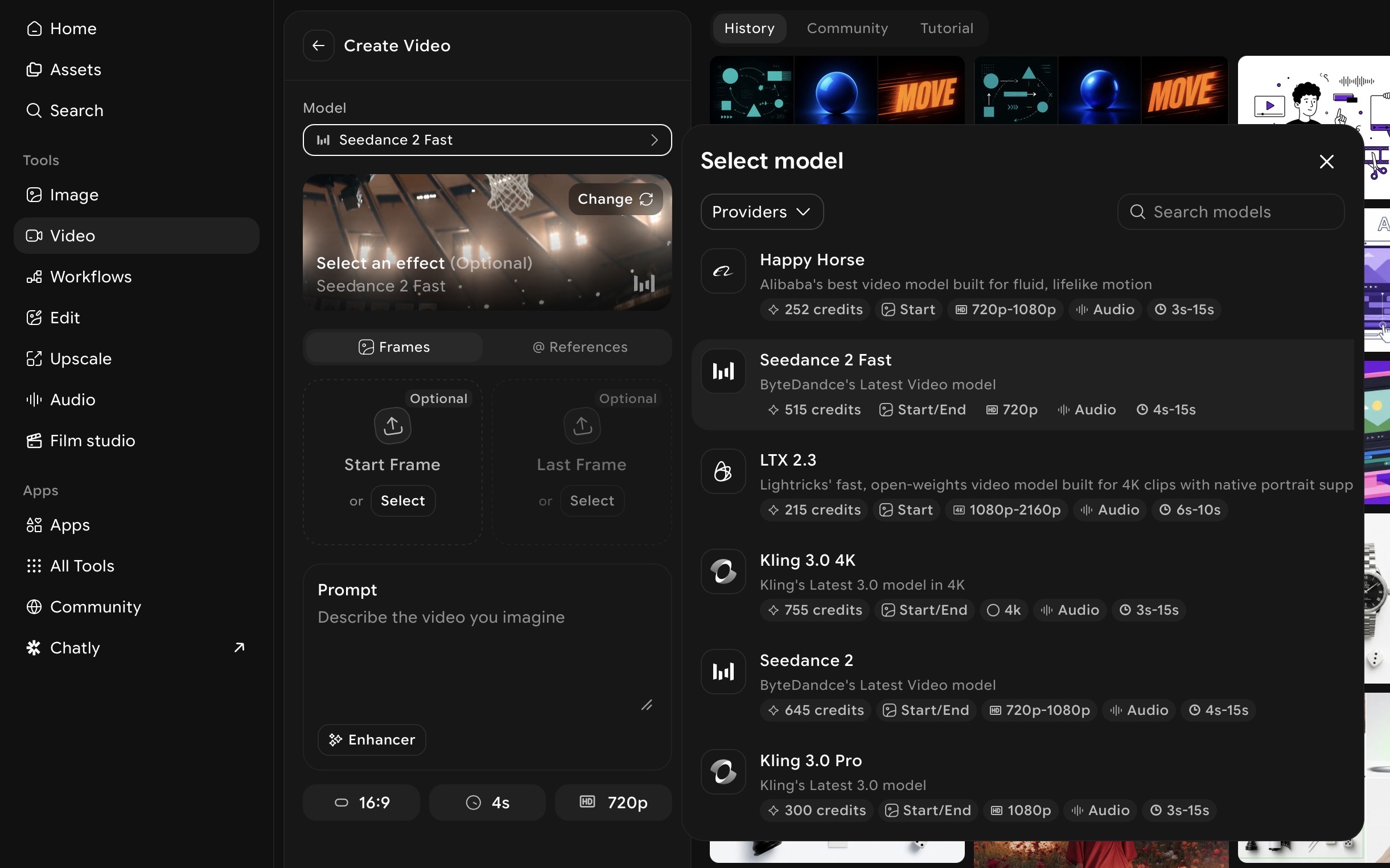
Go to ImagineArt AI Video Generator and select your output format. Select the video model and set the aspect ratio to match your intended platform before writing your prompt.
Step 3: Write a prompt describing the visual style, motion, and mood
Motion graphic prompts work best when they describe the visual aesthetic, the type of motion, and the emotional tone together. Be specific about style — "minimal 2D flat design animation" produces very different output from "dynamic 3D geometric motion graphics."
Prompt examples for motion graphic-style content:
Social media motion graphic: "Minimal 2D flat design animation, bold geometric shapes transitioning across a dark background, smooth fluid motion, modern and clean aesthetic, 9:16 format"
Brand intro ident: "Sleek logo reveal animation, dark navy background with glowing particle effects, smooth cinematic motion, professional and premium tone, 16:9 format"
Kinetic typography style: "Bold text animation with dynamic motion, words flying in from different directions, high contrast white text on black background, energetic rhythm, social media format"
Explainer-style motion: "Clean 2D animated infographic style, simple illustrated icons moving in sequence, soft colour palette, informative and approachable tone, smooth transitions"
Motion graphic prompts work best when they describe the visual aesthetic, the type of motion, and the emotional tone together. For a deeper guide to writing effective video prompts, see AI video prompts.
Step 4: Generate and review output
ImagineArt generates multiple outputs from your prompt. Review each for motion quality, visual consistency, and fit with your intended use. Look specifically at whether the motion feels purposeful — movement that serves the message — rather than movement for its own sake.
Step 5: Add controlled motion with Motion Control
For motion graphics built around a specific visual asset — a product image, a brand mark, a character — use ImagineArt Motion Control app to add directed motion to the static element. Upload your asset, apply a motion reference, and generate animated output with controlled, specific movement.
For a dedicated walkthrough of the Motion Control workflow, see motion transfer guide.
Step 6: Edit in AI Video Editor
Bring your generated clips into ImagineArt AI Video Editor to trim, sequence, add text overlays, and sync audio. This is where individual generated clips become a finished motion graphic — paced, captioned, and export-ready.
For editing tips that apply across any video format, see video editing tips.
Step 7: Export in the correct format
Export at the correct specification for your platform — 9:16 for TikTok and Reels, 16:9 for YouTube and broadcast, 1:1 for Instagram feed. ImagineArt exports at platform-ready dimensions.
Also read: How to Create Satisfying Motion design
What Does a Motion Graphics Designer Do?
A motion graphics designer creates animated visual content for film and TV, advertising, digital marketing, social media, product interfaces, and more.
Day-to-day responsibilities:
- Developing concepts and storyboards for motion graphic projects
- Animating design elements using industry-standard or AI tools
- Collaborating with copywriters, art directors, and video producers
- Adapting motion graphic assets for multiple formats and platforms
- Reviewing and revising work based on client or creative director feedback
Core skills:
- Design fundamentals — typography, colour, composition, visual hierarchy
- Timing and rhythm — understanding how movement pacing affects perception
- Storytelling — communicating a message through sequential visual action
- Software proficiency — traditional tools or AI generation platforms
- Platform knowledge — understanding format requirements for broadcast, social, web
Career path: most motion designers begin in junior roles at agencies or in-house teams, building a portfolio across a range of briefs before progressing to mid-level, senior, and eventually creative director or freelance positions. The discipline increasingly overlaps with UX design, brand strategy, and video production as motion becomes embedded in every visual medium.
Common Mistakes in Motion Graphics
- Overanimating. The most common mistake at every level. Not everything needs to move. Motion that serves no communicative purpose creates visual noise that distracts from the message rather than enhancing it. Every animated element should have a reason to move.
- Ignoring timing. Two designers can use identical visual elements and produce completely different results based on timing alone. Motion graphics live and die on rhythm — how long a transition takes, when an element enters relative to a beat or a word. Timing is the skill that separates competent motion graphics from memorable ones.
- No visual hierarchy. When every element moves simultaneously, nothing stands out. A viewer's eye needs somewhere to land. Stagger animations, scale primary elements larger, use stillness to draw attention — motion graphic design follows the same hierarchy principles as static design but with time as an additional dimension.
- Designing for the wrong format. A 16:9 motion graphic repurposed by cropping for 9:16 social loses composition, text legibility, and visual balance. Design for the platform from the first frame. Format is not a technical afterthought — it is a design constraint that shapes every decision.
- Skipping the storyboard. Motion graphics look deceptively simple to produce with modern AI tools. Without a clear plan — what appears, when, in what sequence, to what end — the output is motion without meaning. Even a rough written sequence of scenes prevents the most common structural mistakes.
- Mistaking movement for quality. Complex, technically impressive animation is not inherently better than simple, well-timed motion. The best motion graphics are often the most restrained — one element, one movement, one message, timed precisely.
Ready to Create Motion Graphics?
Motion graphics have spent 70 years becoming essential to visual communication — from Saul Bass's film title sequences to the animated content filling every social feed today. The discipline has never been more relevant, and with AI, it has never been more accessible.
You no longer need years of After Effects experience to produce motion graphic content that works. You need a clear message, the right format, and a tool built for the output you are trying to create.
ImagineArt gives you all three — AI video generation, motion control, and a full editing pipeline in one platform. Start creating motion graphics today, no design background required.
Frequently Asked Questions About Motion Graphics
Motion graphics are animated graphic elements — text, shapes, icons, and imagery — brought to life through movement, timing, and sound. They are used to communicate ideas, tell short-form stories, and enhance visual experiences across film, television, advertising, social media, and digital products.
Motion graphics use movement to communicate a message through graphic elements — text, shapes, data visualisations. Animation tells character-driven stories with narrative arcs and defined characters. Motion graphics are generally shorter and more purpose-driven. Full animation is a storytelling medium. The two overlap but are distinct disciplines.
Motion design is the broader discipline that encompasses motion graphics, UX animation, brand motion systems, and product interface animation. Motion graphics is a specific technique within motion design. A motion designer thinks systemically about how movement functions across an entire brand or product — not just individual pieces.
A motion graphics designer creates animated visual content for film, television, advertising, social media, digital products, and more. Their work includes concept development, storyboarding, animation, and collaboration with copywriters, directors, and brand teams. They work with tools ranging from Adobe After Effects to AI motion graphics generators.
For creators with design ambitions and time to invest, learning Adobe After Effects is the industry-standard path. For creators who need motion graphic output quickly without technical software skills, AI motion graphics generators like ImagineArt produce usable results from text prompts with no prior experience required. Start with the approach that matches your timeline and technical appetite.
The strongest free options are DaVinci Resolve for professional video editing with motion graphic capability, Blender for 3D motion graphics, and CapCut for social media motion content. ImagineArt also offers a free plan for AI-generated motion graphic-style video content.
Yes. AI motion graphics generators produce animated video content from text prompts, removing the software skills requirement and reducing production time significantly. For social media motion content, explainer video, and brand marketing, AI tools now produce results that are viable for professional use. Complex branded motion systems and character animation with precise control still benefit from traditional tools.
ImagineArt is the strongest AI motion graphics generator for social media and marketing content in 2026. It combines AI video generation from text prompts, Motion Control for animating specific assets, and a built-in Video Editor for sequencing and export — a complete motion graphics production pipeline accessible without design software skills.
Tooba Siddiqui
Tooba Siddiqui is a content marketer with a strong focus on AI trends and product innovation. She explores generative AI with a keen eye. At ImagineArt, she develops marketing content that translates cutting-edge innovation into engaging, search-driven narratives for the right audience.