![Top 10 Video Animation Apps for Visual Storytelling [2026 Guide]](https://blogs-cdn.imagine.art/Chat_GPT_Image_Feb_10_2026_at_04_53_55_PM_7c82fb98c6.png)

Tooba Siddiqui
February 11, 2026 • Updated July 10, 2026
12 mins Read
Animation is no longer a niche skill reserved for studios or trained professionals. The AI video animation apps have democratized creativity for anyone from a beginner social media creator to a professional filmmaker to produce animated and AI-driven videos with ease.
With a multitude of video animation apps available online, it can be overwhelming to choose the right one. So, I have compiled a list of the best AI video animation apps available online, along with a breakdown of their features and limitations.
Quick Comparison: Best Video Animation Apps
| Tool | Type | Free Tier | Starting Price | Best For |
|---|---|---|---|---|
| ImagineArt Motion Control | AI generative + motion control | Yes | $9/month | Character animation, motion direction |
| Hailuo AI | AI generative video | Yes (limited) | $14.99/month | Cinematic scenes, narrative animation |
| Canva Magic Studio | Template-based | Yes | $10/month | Beginners, social content |
| Powtoon | Template-based | Yes (3 min) | $15/month | Explainer videos, presentations |
| Animaker | Template-based + timeline | Yes (limited) | $15/month | Multilingual explainers, HR content |
| Vyond | Corporate template-based | No | $58/month | Enterprise training and L&D |
| Adobe Animate | Professional 2D vector | No | $34.49/month | Professional 2D animation |
| Krea AI | AI stylized + motion | Yes | $9/month | Stylized creative assets |
| Morph Studio | AI character motion | Yes (75 credits) | $7/month | Character-focused AI animation |
| Monet Vision | Motion transfer | Yes (10 credits) | $19.99/month | Style transfer, lip-sync animation |
What “Animation” Means in 2026
The word animation is usually used to refer to images of hand-crafted scenes, a lengthy process, tougher timelines, and expensive software. With AI tools, animation can mean several different things, depending on the tool you pick:
- Template-based Animation: It includes video animation apps that let you animate elements using presets and drag-and-drop editors.
- Generative AI Video: It includes animation apps that can generate animated sequences or video clips from text prompts or reference imagery.
- Motion Transfer & Motion Control: It includes advanced systems that either transfer motion patterns from a reference video or let you direct and control motion like a film director.
Having a clear idea about these different categories can help you choose the right video animation app that fits your creative workflow.
Explore the Top 10 Video Animation Apps
So, here’s a quick breakdown of some of the best video animation apps that you must try in 2026 for visual storytelling:
1. ImagineArt Kling AI Motion Control
ImagineArt Kling AI Motion Control app helps you animate characters and control motion direction. Simply input a reference video along with a static character visual, and the AI will add motion and movements to your character. On AI Motion Control app, you can even select AI motion presets to try out different dance routines and viral trends to animate your characters. The creative control makes it a perfect tool for creators, storytellers, and editors who want to add intentional motion in their videos.
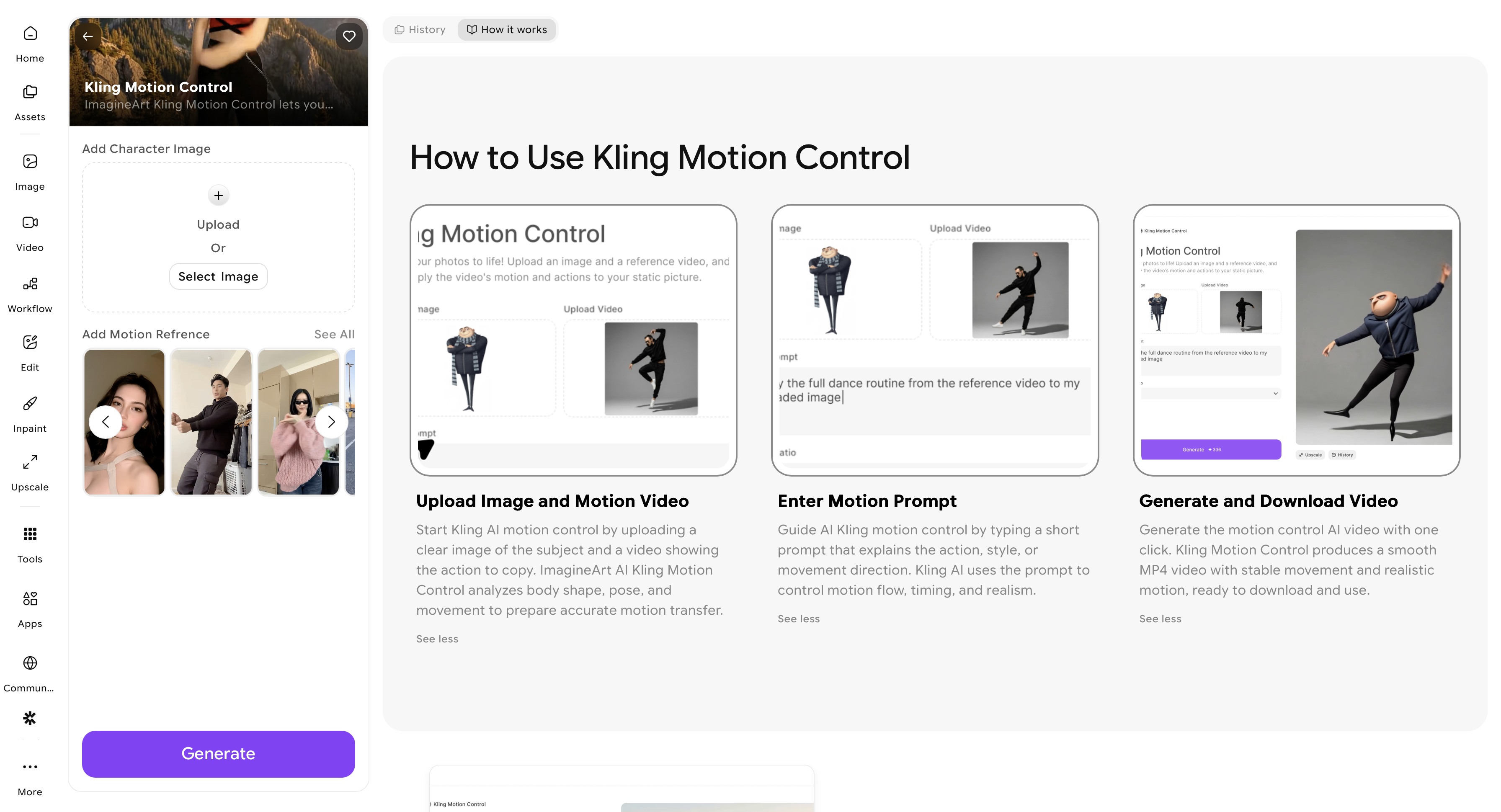 ImagineArt Kling AI Motion Control dashboard
Pricing:
- The standard plan costs around $30/month with 8000 credits.
- The ultimate plan costs around $38/month with 16000 credits.
- The creator plan costs around $142/month with 100,000 credits.
Pros:
- Motion control sets it apart from generic tools.
- Accessible for creators without formal animation training
Cons:
- Only 50 free tokens everyday
2. Hailuo AI
Hailuo AI is referred to as one of the emerging AI video animation tools that focuses on scene generation and natural motion synthesis. It lets you produce scenes with maintained continuity and zero unnatural motion or jumps. The video animation tool comes with multi-scene stitching to produce smooth animated videos with human-like motion paths. It is perfect for short film creators and storytellers that need cinematic motion in their animated video content
Pricing:
- The standard plan costs around $14.99/month with 1000 monthly credits.
- The pro plan costs around $54.99/month with 4500 monthly credits.
- The master plan costs around $119.9/month with 10,000 monthly credits.
Pros:
- Smoother results than most prompt-based AI video generators
- Strong for narrative and cinematic scenes
Cons:
- Pricing can become steep at higher tiers for heavy usage
3. Canva Magic Studio
Canva’s Magic Studio is no longer a simple design platform; it includes an animation maker built into its editor. You can animate text, graphics, and videos by selecting design presets, using templates, or applying AI motion suggestions. It has a library of templates and graphic elements, along with Magic Animate that automatically anticipates the best animation styles for your content. Canva Magic Studio is great for creating quick animated video for Reels, Shorts, TikToks, slideshows, and explainer content.
Pricing:
- The free plan is available with access to basic features and free stock images, elements, graphics, and videos.
- The pro plan costs around $10/month for one-user access with premium templates and advanced AI video animation tools.
Pros:
- Extremely intuitive drag-and-drop interface
- Built-in AI tools for background removal, motion suggestions, and video text trim
Cons:
- Templates are generic.
- Limited control over fine-grained motion compared to advanced tools
Recommended read: Best Canva Alternatives
4. Powtoon
Powtoon is a dedicated video animation platform with a drag-and-drop timeline, character rigs, style libraries, and integrated AI tools for script drafting and voice generation. Its interface prioritizes ease of use while still offering professional features like customizable scenes, infographics, and product explainers. It is perfectfor creating explainer videos, business presentations, and online educators who want to animate tutorials and training content.
Pricing:
- The free plan comes with up to 3 minutes video length
- The lite plan costs around $15/month with 10 minutes video and 5 high-definition exports.
- The professional plan costs around $40/month with up to 20 minutes video length and unlimited HD exports.
- The advanced plan costs around $125/month with up to 30 minutes video length, commercial usage rights, and advanced video animation features.
Pros:
- Robust template ecosystem
- Features like AI avatars and text-to-speech
Cons:
- Slightly higher entry price than basic tools
- Motion is template-based, not generative.
5. Animaker
Animaker focuses on timeline animation with a large asset library, character builders, and AI-assisted tools. The video animation tool supports keyframe animation, allowing for customized movements with precise and layered control over animation, appearance, and exit of elements from a frame. It is perfect for small businesses, marketers, educators, and content creators requiring timeline animation control.
Pricing:
- The free plan comes with limited exports.
- The basic plan costs around $15/month with 5 minutes video length and high-definition exports.
- The starter plan costs around $25/month with 15 minutes video length and FHD quality videos.
- The pro plan costs around $43/month with 30 minutes video length and 2K quality exports.
Pros:
- Great balance of ease and control
- Multi-scene timeline editor
- Text-to-speech for multilingual videos
Cons:
- Some features are restricted to higher tiers.
- Motion presets feel standard compared to cinematic tools.
6. Vyond
Vyond excels at corporate animation. It features regionally varied characters, advanced voice syncing, timeline layers, and a giant template library with generative AI to create scripts and scenes. It is one of the most versatile video animation apps for animated explainer video, training films, HR communications, sales collateral, and internal presentations.
Pricing:
- The starter plan costs around $58/month with 10,000 credits per user per month and access to AI avatars and tools.
- The professional plan costs around $100/month with 20,000 credits per user per month with instant translation into 80+ languages.
- The enterprise plan costs around $137/month with advanced collaboration features, a brand management suite, and enterprise security features.
Pros:
- Enterprise-grade library and brand control
- AI text-to-video generation via Vyond Go
- Excellent for complex, multi-character storytelling
Cons:
- Pricing is significantly higher than that of basic tools.
- Learning curve for deeper features
7. Adobe Animate (via Creative Cloud)
Best For: Professional animators and studios
Adobe Animate is a 2D vector animation powerhouse. It offers advanced frame control, rigging, motion tweening, and integration with other Adobe apps like Character Animator and After Effects. It’s a professional video animation software for complex animation workflows, widely used and preferred by professional animators, graphic designers, and animation studios.
Pricing:
- Adobe Animate is availabe throuh adobe creative Cloud and costs around $34.49/month, including Adobe Animate, Adobe Firefly, and Adobe Express. The plan also includes 25 monthly generative credits and 30GB cloud storage.
Pros:
- Industry-standard animation tools
- Deep integration with other Adobe Creative Cloud apps
- Excellent for detailed motion control and 2D vector animation
Cons:
- Steeper learning curve
- Requires more manual work
Recommended read: Best Adobe Alternatives
8. Krea AI
Krea AI focuses on creating stylized elements and animated videos. The video animation tool comes with motion transfer features for quicker character animation. The camera and motion setting tool lets you adjust camera behavior, motion intensity, and frame consistency. This makes it perfect for digital artists looking for stylized and customizable assets.
Pricing:
- The free plan comes with daily free credits, 100 compute units/day to try basic features.
- The basic plan costs around $9/month with 5000 compute units/month.
- The pro plan costs around $35/month with 20,000 compute units/month.
- The max plan costs aorund $105/month with 60,000 compute units/month.
Pros:
- Strong visual style generation
- Good for asset creation
Cons:
- Limited motion sequencing tools
9. Morph Studio
Morph Studio excels at generating animated characters with motion prompts, which allows storytellers to generate stylized scenes. The focus of this video animation app is primarily on character motion generation, with dedicated features for video editing, camera control, and motion setting.
Pricing:
- The free plan comes with 75 monthly credits.
- The basic plan costs around $7/month with 3000 monthly credits.
- The pro plan costs around $24/month with 12000 monthly credits.
Pros:
- Focused on character animation
- Fun and creative outputs
Cons:
- Not as broad as full animation suites
10. Monet Vision
Monet Vision allows motion transfer, letting you apply different animation styles from one reference clip to another. The video animation tool comes with features for scene editing, lip-syncing, and voiceover integration. It ensures thorough character consistency, making it useful for experimental motion work.
Pricing:
- The free plan comes with 10 credits for new users with upto 50+ bonus credits.
- The standard plan costs around $19.99/month with 1000 credits.
- The premium plan costs around $39.99/month with 3000 credits.
Pros:
- Quick experimentation
- Efficient workflow
Cons:
- Limited output formats
Best Video Animation App by Use Case
Best free video animation app
Canva Magic Studio offers the most complete free experience — templates, drag-and-drop animation, and social media export without a watermark on the free plan. Morph Studio's free tier (75 monthly credits) suits AI character animation. Krea AI offers daily free compute units for stylized motion.
Best video animation app for beginners
Canva Magic Studio is the lowest barrier to entry — no timeline knowledge required. Animaker adds more control while staying accessible. For AI-generated animation where the tool does the heavy lifting, Hailuo AI and ImagineArt Motion Control produce polished output from a text prompt or reference video.
Best video animation app for business and corporate content
Vyond leads for enterprise training and L&D with regional character libraries, voice syncing, and LMS-compatible export. Powtoon suits mid-size teams producing explainers and presentations. For marketing teams producing social-first animated content, ImagineArt Motion Control and Canva cover most needs at a fraction of Vyond's price.
Best video animation app for professional animators
Adobe Animate remains the industry standard for 2D vector animation — frame control, bone rigging, motion tweening, and full Creative Cloud integration. For 3D work, Blender (free, open source) competes with paid tools used in production studios.
Best AI video animation app
ImagineArt Motion Control for directed character animation and motion control. Hailuo AI for cinematic scene generation with natural motion paths. Morph Studio and Monet Vision for character-specific and style-transfer animation respectively.
How to Choose the Right Video Animation App
H3: Define what kind of animation you actually need
Define what kind of animation you actually need
The term "video animation" covers four very different workflows — picking the wrong category wastes time and money:
- Template animation — You animate pre-built characters, scenes, and graphics using drag-and-drop tools. Fast, no learning curve, limited creative control. Best for: explainers, training videos, social content. Tools: Canva, Powtoon, Animaker, Vyond.
- AI generative animation — You describe a scene or motion in a text prompt and the AI generates it. Unpredictable but fast. Best for: social clips, concept previews, AI-aesthetic content. Tools: Hailuo AI, Morph Studio, ImagineArt.
- AI motion control — You provide a reference video and a character image; the AI applies the motion from the reference to the character. More precise than text-only generation. Best for: character animation, dance content, controlled movement. Tool: ImagineArt Motion Control.
- Professional frame-by-frame — Full timeline control, rigging, tweening. Requires skill investment. Best for: broadcast, games, studio-quality output. Tools: Adobe Animate, Blender.
Check export and commercial rights before committing
Free tiers on most animation tools add watermarks to exports. Powtoon's commercial rights are locked behind the $125/month Advanced plan. Adobe Animate requires Creative Cloud. ImagineArt's free tier provides daily credits with commercial use permitted on paid plans from $9/month. Verify before using outputs in client work or paid advertising.
Quick decision table:
- No budget, need results today → Canva Magic Studio (free)
- AI animation, minimal setup → ImagineArt Motion Control or Hailuo AI
- Corporate training and explainers → Powtoon or Vyond
- Precise character motion from reference → ImagineArt Motion Control
- Professional 2D animation → Adobe Animate
- Free professional 3D → Blender
Conclusion
There’s no single “best” video animation app for everyone. But if you want to go beyond animation presets and want to control and direct how characters move, ImagineArt Kling AI Motion Control introduces a new level of creative power.
Because in 2026, video animation is no longer about making characters move. It’s about controlling how they move.
Recommended read: Motion Transfer Guide
Frequently Asked Questions
The right choice of the best video animation app depends on what kind of videos you want to create or edit. However, ImagineArt Kling AI Motion Control is one of the best video animation apps. It lets you animate static images by accurately transferring motion from reference video or selected AI motion presets.
Motion control in AI video is the ability to direct how characters move and interact. Instead of simply asking AI to “animate a scene,” motion control in AI videos lets you control camera logic, timing, and the physics of the movements. This improves the cinematic flow of the scene. Tools like ImagineArt Kling AI Motion Control are built around this concept and give creators more precision over AI video animation.
Most AI video tools let you crete video animation using text-based prompts and reference images and videos. You can describe a scene or action, add static visuals, or upload reference video for action sequence. While AI can generate scenes, the motion can feel random, which is why tools like ImagineArt Kling Motion Control app allow you to guide motion behavior for better video animation.
Yes, ImagineArt Kling AI Motion Control app is designed for users of all skill levels and expertise. It doesn’t have a steep learning curve and requires reference inputs for motion control in your video. The intuitive interface adds to the ease of use.
Recommended read: Best AI Video Models for Motion Control & Animation | 3D Animation Cost | 2D Animation Cost
Tooba Siddiqui
Tooba Siddiqui is a content marketer with a strong focus on AI trends and product innovation. She explores generative AI with a keen eye. At ImagineArt, she develops marketing content that translates cutting-edge innovation into engaging, search-driven narratives for the right audience.