
Syed Anas Hussain
April 20, 2026 • Updated June 2, 2026
11 mins Read
The marketing landscape has changed drastically with Generative AI. Brands are scaling 10x their ad output and getting better results with less effort. So, how do you automate your entire ad creative workflow and scale your content with Gen AI? The answer is Claude + ImagineArt.
Let me break down how using Claude + ImagineArt can help you scale your content and automate your creative workflow with Claude AI ad creative automation.
What You Will Learn
- How automating your ad creative process helps your business
- Why Claude and ImagineArt work better together than any other combo
- How to build an automated ad creative workflow step by step
- How to write prompts that translate perfectly between Claude and ImagineArt
- Real use cases by team type with actual time saved
How Automating Your Ad Creative Process Helps Your Business
With Gen AI scaling content across all niches, some brands have already blown past their competitors. Meanwhile, teams still stuck with manual tasks are wondering how to keep up. The answer to increasing productivity and scale has always been automation.
There are thousands of AI agents to automate every sort of marketing-related task. But since we are talking about ad creatives, there is nothing better than leveraging the power of Claude with ImagineArt's superiority in AI image and video generation.
ImagineArt Workflows was already an exciting platform to make all sorts of creatives in one canvas. But combine it with Claude and you can sit at your desk while your Meta Ad campaign is tested with 50 or even 60+ creatives.
Here is what that automation actually gives you:
- Speed: Brief to platform-ready creative in hours, not days
- Volume: 30-75 unique ad variations from a single brief
- Consistency: Every variation stays on-brand because the workflow enforces your guidelines
- Learning loops: Performance data from round one feeds directly into round two
- Cost reduction: Less agency hours, less designer time, less back-and-forth
Why Claude and ImagineArt?
You could use any LLM for copy and any image tool for visuals. So why this specific combo?
Most AI creative workflows have a split-brain problem. You use one tool to think and another tool to make. Between those two steps sits a manual gap where you lose context, rephrase prompts, and waste hours translating between tools.
Claude is not just a copywriter. It is a reasoning engine. It reads your brief, understands your audience, builds creative hypotheses, and writes visual prompts that are specifically optimized for image generation models. ImagineArt is not just an image generator. It is a full creative production platform: images, videos, format adaptation, style consistency, and platform-ready export all in one place.
When you connect them, Claude's output becomes ImagineArt's input directly. No context lost. No re-prompting. No translation errors. One system thinks. The other makes. You review and decide.
What Claude Brings to Your Ad Creative Workflow
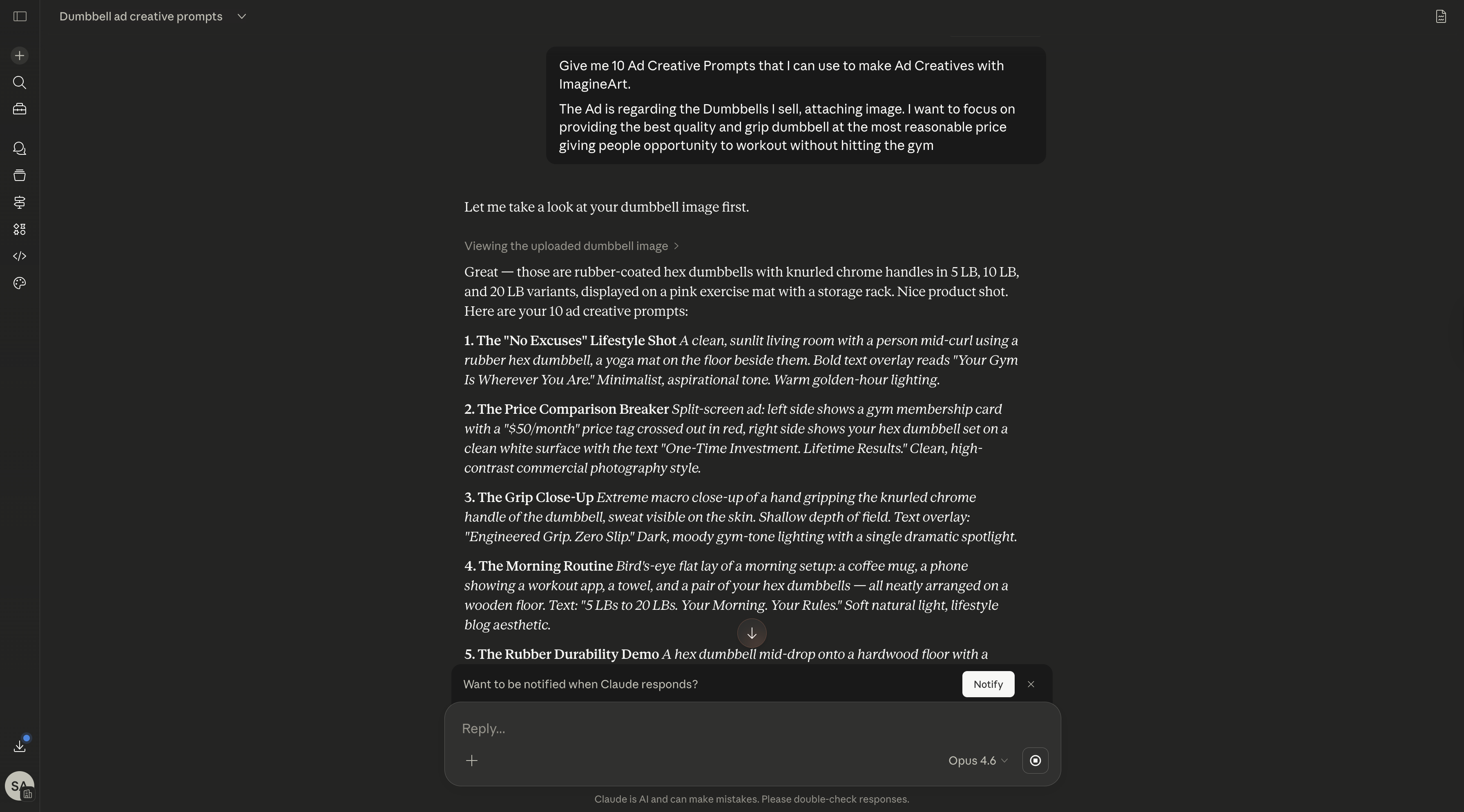
Claude's value is not just "writing copy." It covers the entire upstream thinking process that most teams still do manually.
Brief analysis and distillation. Paste a messy campaign brief into Claude: stakeholder comments, brand guidelines, competing objectives, all of it. Claude extracts the core creative direction in minutes. What used to take a 45-minute kickoff meeting becomes a 2-minute prompt.
Copy variant generation. Claude does not write one headline. It writes 10. Each targets a different angle, emotion, or audience segment. You get direct-response hooks, aspirational angles, problem-solution frames, and social proof variants from a single brief input.
Visual prompt generation. This is where Claude becomes uniquely valuable for ImagineArt users. Instead of "make a product photo," Claude outputs something like:
"Flat-lay product shot, matte ceramic skincare bottle on sage green linen, soft directional morning light from left, minimal negative space right side for text overlay, 4:5 aspect ratio for Instagram feed."
That level of detail produces dramatically better results on first generation.
Creative hypothesis development. Before generating a single image, Claude builds testable hypotheses. "Test dark background vs. light background for this audience segment." "Test problem-first hook vs. outcome-first hook for conversion campaigns." These hypotheses give your creative testing structure instead of randomness.
Post-launch scoring. Feed Claude your CTR, CPM, and conversion data alongside creative descriptions. It identifies patterns: "Dark backgrounds performed 23% better with the 25-34 demographic." Those insights directly inform the next generation cycle.
You can build all of this into a repeatable ImagineArt Workflow that runs every time a new brief arrives.
What ImagineArt Brings to Your Ad Creative Workflow
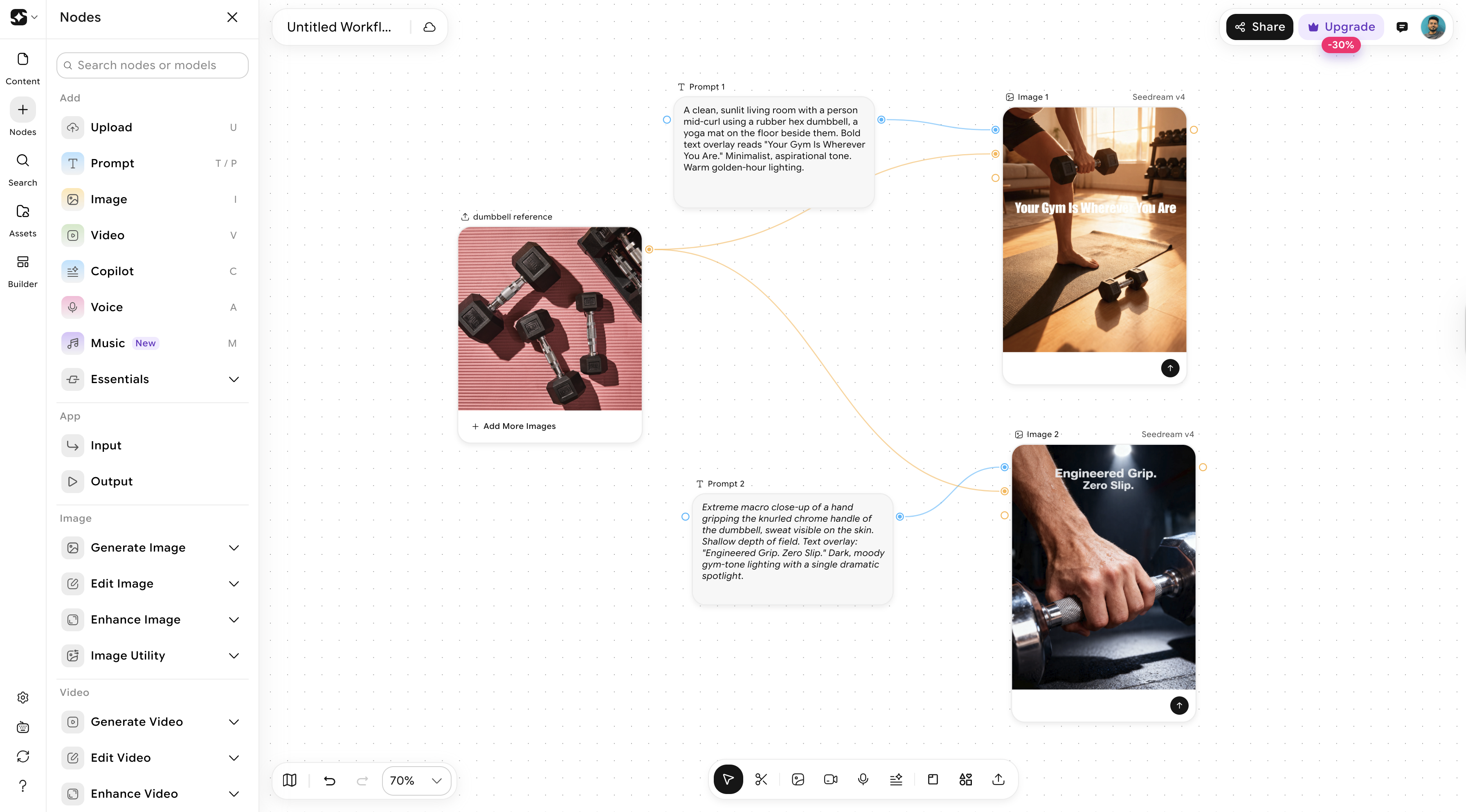
ImagineArt is where Claude's strategic output becomes visual reality.
Bulk image generation.
Take Claude's 10 visual prompts and generate 5 variations of each. That is 50 unique ad images from a single brief. ImagineArt's multi-model access (Flux, SDXL, proprietary models) means you are not locked into one aesthetic. Need photorealistic product shots? Use one model. Illustrated lifestyle scenes? Switch to another.
Video generation.
ImagineArt supports text-to-video and image-to-video across models like Kling, Seedance, Veo, and WAN. Turn a static product image into a 15-second motion ad. Generate a UGC-style video from a script. A single product photo can become five different video treatments, each targeting a different platform.
Recommended Read: AI Video Prompts: How to Get Better Results
Format adaptation.
Generate one hero image and ImagineArt outputs it in 9:16 (Stories, Reels, TikTok), 1:1 (Feed), 4:5 (Instagram optimized), and 16:9 (YouTube, Display). No manual cropping. No Photoshop sessions.
Style consistency.
When you generate 50 variations, they need to look like the same campaign. ImagineArt's style reference and seed controls keep your visual language consistent across every variation.
Platform-ready export.
Assets export at the correct resolution, aspect ratio, and file format for Meta, TikTok, Google Ads, and more. Upload directly without reformatting.
Recommended Read: Best AI Video Generators for Explainer Videos
How to Build an Automated Ad Creative Workflow
Here is the complete pipeline from campaign brief to published ad creative.
- Input your campaign brief into Claude. Include audience demographics, campaign goal, target platform, product details, and brand guidelines. The more context you give Claude, the better its output. Do not summarize. Paste the full brief.
- Claude generates copy variants and visual prompts. From one brief, expect 5-10 headline/body copy variants plus 10-15 visual prompts tailored to your platform and objective. Each prompt includes subject, style, mood, composition, and format specs.
- Paste prompts into ImagineArt and generate the visual batch. Run each prompt with 3-5 variations. In under 30 minutes, you will have 30-75 unique images ready for review. Use different models for different prompt types: photorealistic model for product shots, stylized model for lifestyle scenes.
- Claude reviews outputs against the brief. Describe the generated images back to Claude and ask it to score each against your brief criteria. Which match the target mood? Which hit the right composition? Claude flags winners and explains why each scored high or low.
- Winners go to your ad platform. Losers inform the next round. Upload the top creatives to Meta, TikTok, or Google. Feed Claude the reasons certain images did not work. It uses that context to write better prompts next cycle. This feedback loop is what makes each round better than the last.
- Save the process as a recurring workflow. Save your prompt templates, generation settings, and export configs as a repeatable ImagineArt Workflow. Next campaign, you fill in the brief fields and the pipeline handles everything downstream.
Example: D2C Skincare Brand Launching on Meta
A skincare brand preparing a summer moisturizer campaign inputs their brief into Claude. Target audience: women 25-34. Goal: conversion. Platform: Meta (Feed + Stories). Product: lightweight SPF moisturizer.
Claude generates eight copy angles: hydration-focused, SPF-focused, routine-simplification, before/after texture, summer-activity, dermatologist-trust, ingredient-spotlight, and price-value. Plus 12 visual prompts covering flat-lay product shots, lifestyle close-ups, and texture swatches.
The brand runs all 12 prompts through ImagineArt with four variations each. That is 48 images in about 25 minutes. Claude reviews and shortlists 15 winners across three angles. Those 15 go live as a structured creative test in Meta CBO.
Total time from brief to live ads: under four hours.
How to Write Prompts That Work Between Claude and ImagineArt
The connection between Claude and ImagineArt is only as strong as the prompts that travel between them.
Give Claude the right context. When asking Claude to write visual prompts, specify: "Write image generation prompts for ImagineArt. Include subject, style, composition, mood/color palette, and platform format in every prompt."
Use this template for consistency:
[Subject] + [Style] + [Platform format] + [Mood/Color palette] + [Composition notes]
Example Claude output:
"Woman applying moisturizer, editorial beauty photography style, 4:5 vertical for Instagram feed, soft warm golden-hour tones, tight crop on face and hands with product visible in lower third."
What to avoid:
- Too vague: "A nice product photo" gives ImagineArt nothing to work with. Specify setting, lighting, angle, format.
- Too literal: "A photo of a bottle on a table" produces generic results. Add mood, context, styling.
- Too platform-agnostic: A TikTok Story needs completely different composition than a Google Display banner. Always tell Claude the target platform.
- Missing text space: Ad images need room for headlines and CTAs. Include notes like "leave upper third clear for text overlay."
Batch prompting strategy. Do not ask Claude for one prompt at a time. Give it the full campaign context and request all prompts at once:
"Based on this brief, write 12 image generation prompts for ImagineArt. Create 4 prompts per angle: product close-up, lifestyle scene, and flat-lay. Each prompt should specify subject, style, composition, mood, and target format."
This produces a coherent prompt set that covers your testing matrix without gaps.
Example of a bad vs. good prompt pair:
Bad: "Create a social media ad for running shoes." Good: "Athletic woman mid-stride on wet urban street, editorial sport photography, 9:16 vertical for TikTok, cool blue-grey tones with neon accent on shoe, low angle dynamic composition, motion blur on background, product sharp and centered in lower two-thirds."
The second prompt gives ImagineArt everything it needs to generate a usable ad on the first try. Claude writes prompts at that level of detail automatically when you give it the right campaign context.
Setting Up Your Pipeline with ImagineArt Workflows
ImagineArt Workflows is a node-based creative automation system. Instead of manually entering prompts every campaign cycle, you build the workflow once and trigger it when a new brief arrives.
Here is how to set it up:
Step 1: Start with your brief inputs.
Define the variables that change per campaign: product name, audience segment, campaign objective, key message, target platform.
Step 2: Choose your model and output requirements.
Select the generation model, style references, aspect ratios, and variation count. Lock these down based on what performed in your first manual run.
Step 3: Generate multiple outputs.
Run the workflow. ImagineArt generates your full batch of images and videos in one pass, ready for review and export.
The key insight: the brief variables change every campaign (product, audience, message). The structural elements stay fixed (prompt templates, models, aspect ratios, export settings). A good workflow locks the structure so you only change the variables.
What took three days of manual work compresses into three hours. And as you refine the workflow over time, updating prompt templates based on performance data, that window shrinks further.
Recommended Read: How to Scale Creative Production with AI
Real Use Cases by Team Type
| Team Type | What They Automate | Typical Output | Time Saved |
|---|---|---|---|
| Solo performance marketer | Brief to 20 ad variations across 3 platforms | 20 images + 5 video clips per campaign | ~8 hrs/week |
| E-commerce brand | Product shoot to 5 platform-native variations per SKU | 50-100 assets per launch | ~4 hrs/shoot |
| Creative agency | Client brief to 50 creative variations for testing | 50 images + 10 videos per campaign | ~2 days/campaign |
| SaaS startup | Feature launch to multi-platform creative suite | 30 assets (headers, social, ads, email) per launch | ~1 day/launch |
Solo performance marketer: A freelance media buyer managing Meta ads for three D2C clients uses Claude every Monday morning to process weekly briefs. Claude generates prompt sets for each client. The marketer runs them through ImagineArt in batch. By lunchtime, all three clients have fresh creative in their ad accounts.
Creative agency: A 12-person agency handling CPG brands previously took 10-14 days from brief to approved creative. With the Claude + ImagineArt pipeline, they generate 50 variations on day one. They present the top 10 to the client on day two. They launch on day three. The agency now handles 15 active campaigns per month instead of eight, without adding headcount.
E-commerce brand: A home goods brand with 200+ SKUs used to photograph each product individually, then manually crop for each platform. Now they run one product shoot, feed the images into ImagineArt for background variation and format adaptation, and use Claude to write product-specific ad copy for each SKU. A catalog update that took two weeks now takes two days.
Frequently Asked Questions
No. The core workflow requires no coding. You copy Claude's output and paste it into ImagineArt's generation interface. For fully automated API-to-API pipelines, you will need basic development support for initial setup. But day-to-day operation is completely non-technical.
Claude generates prompts that are more specific, more consistent, and strategically aligned to your brief. You might write 'product on a table.' Claude writes a prompt with lighting direction, color palette, composition, and platform formatting. The result: higher first-generation quality and fewer re-prompting cycles.
Yes, with context. Share your ad platform performance data with Claude. It identifies patterns across winning and losing creatives and uses those patterns to write better prompts in the next generation cycle.
Using the Claude + ImagineArt pipeline, a solo marketer can produce 30-50 variations in a focused 3-4 hour session. An agency team running parallel workflows can produce 100+ per day. The bottleneck shifts from generation to review, which is exactly where your judgment should be.
Syed Anas Hussain
Syed Anas Hussain is a computer scientist blending technical knowledge with marketing expertise and a growing passion for AI innovation. Curious by nature, he dives into new AI sciences and emerging trends to produce thoughtful, research-led content. At ImagineArt, he helps audiences make sense of AI and unlock its value through clear, practical storytelling.