
Syed Anas Hussain
April 6, 2026 • Updated April 6, 2026
8 mins Read
Every marketing team hits the same wall eventually. The briefs keep coming. The platforms keep multiplying. The turnaround times keep shrinking. And somewhere in the middle of all that, the creative team is expected to produce more, better, faster, and still on brand. The good news is that learning how to scale creative production with AI is no longer a complex or expensive undertaking. The tools are accessible. The process is repeatable. And the teams doing it right are producing significantly more without burning anyone out.
Here is how it actually works.
Why Is Scaling Creative Production So Hard?
Before we get into the solution, it helps to understand the problem clearly.
Most creative teams are not slow because the people are slow. They are slow because the process is slow.
Think about what goes into a single campaign asset. There is the brief. Then the concept. Then the first draft or visual. Then feedback. Then revisions. Then, resizing for different platforms. Then the final approval. Then delivery.
That is a lot of steps for one asset. And if you are running multiple campaigns across social, display, email, and video — all at the same time — those steps multiply fast.
Adobe surveyed over a thousand marketers in 2025 and found that 46% had sacrificed work-life balance just to meet content production goals. A third said they had sacrificed creativity to keep up with output demands. That is not a talent problem. That is a process problem.
The answer is not to hire more people. The answer is to build a smarter system.
What Does It Actually Mean to Scale with AI?
This is where a lot of people get confused. Scaling creative production with AI does not mean replacing your creative team with a machine.
It means giving your team a better engine.
AI handles the repeatable, time-consuming parts of production, the resizing, the variations, the formatting, the first visual draft. Your team handles the thinking the direction, the story, the brand judgment.
When you split the work that way, something interesting happens. Your team gets faster without getting bigger. Your output goes up without your quality going down. And the people doing the creative work actually get to focus on the creative work instead of spending half their day in repetitive execution.
Teams using AI strategically for both creation and automation produce around 75% more content per week compared to teams that do not, according to Adobe's research. That is not a marginal gain. That is a fundamental shift in what a team can deliver.
Where Does AI Fit in the Creative Production Process?
AI yields the best results when led by human strategy and creative thinking. So when steered in the right direction, AI can replace the full creative process. As a creator, or a team, you can decide whether you want to scale specific parts, or the process altogether.
Here is where it makes the biggest difference:
Visual generation
Instead of waiting for a designer to produce a first draft, AI Image Generator can create high-quality hero images, product visuals, and scene setups from a text prompt in seconds. This its alis where the biggest time savings happen, especially for teams producing assets at volume.
Variations and resizing
One approved visual needs to become ten. A square for Instagram. A widescreen for YouTube. A vertical for TikTok. A banner for display. Doing this manually is repetitive and slow. AI handles it automatically, with no quality loss.
Style consistency
Keeping visuals on-brand across a long campaign or multiple campaigns is genuinely hard. AI models trained on your brand's visual identity can generate new assets that consistently match your look without starting from scratch every time.
Video from image
Static visuals can be animated into short video clips for social platforms and CTV placements. What used to require a video editor and a production budget can now be done in minutes using AI Video Generator.
Iterating and refining
Instead of going back and forth with a designer over multiple rounds of feedback, teams can generate variations instantly, compare them side by side, and choose the direction that works.
Each of these is a step where AI removes friction. And when you remove friction at multiple steps, the whole pipeline moves significantly faster.
How Do Workflows Make Scaling Actually Work?
Using AI tools one at a time is a start. But it is not really scaling.
True scale happens when you connect those tools into a workflow — a repeatable, structured pipeline where each step feeds into the next automatically.
A workflow means you are not starting from scratch every time a new campaign brief lands. You are running a proven process. The inputs change. The output format changes. But the pipeline stays the same.
This is the difference between using AI and building an AI-powered creative system.
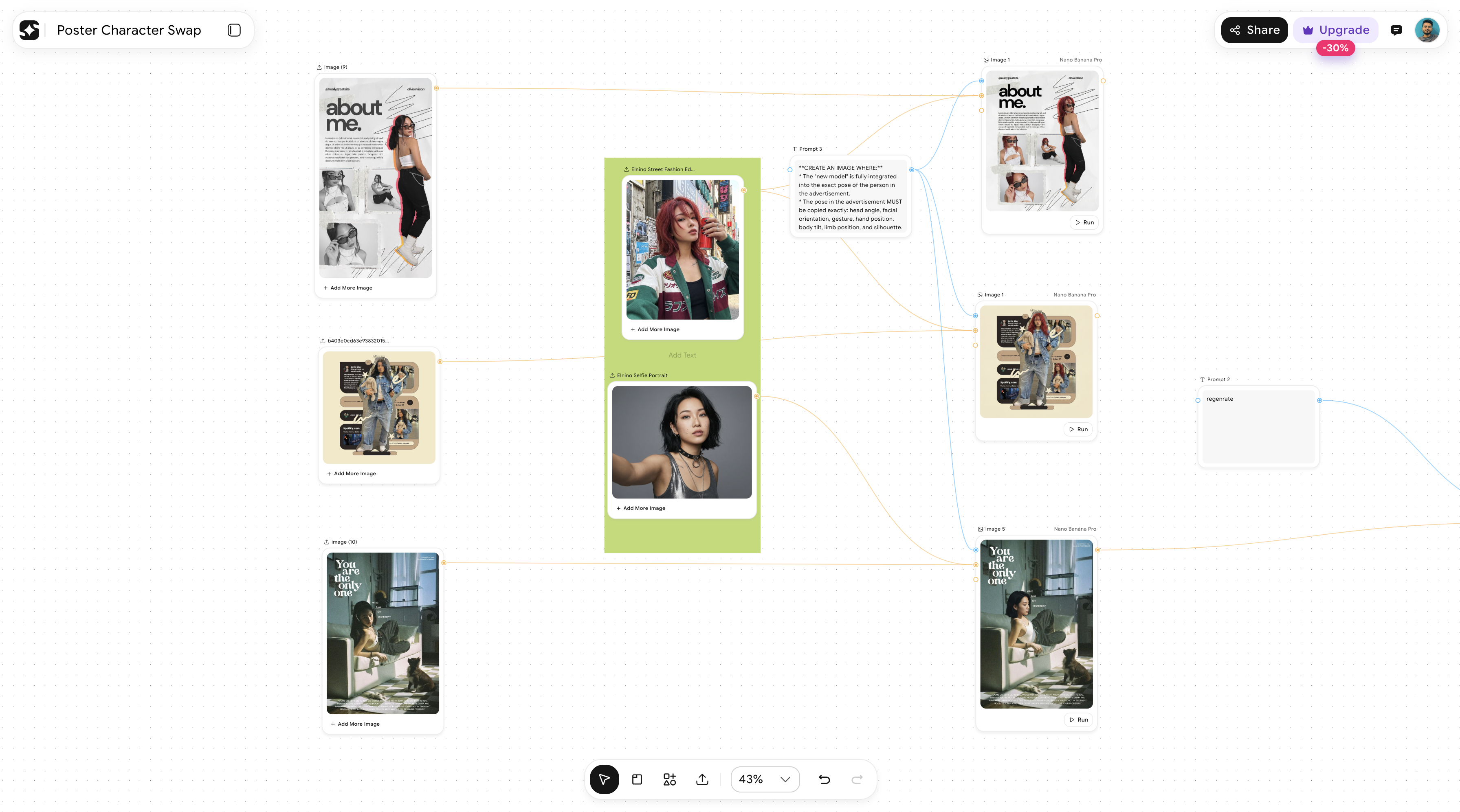
ImagineArt Workflow does exactly this. It is a node-based canvas where you connect generation, editing, transformation, and output steps together. Brief goes in one end. Finished, formatted, platform-ready assets come out the other. The whole pipeline runs in one go — and it can be saved, reused, and refined for every campaign that follows.
That is what scaling actually looks like. Not faster one-off generations. A system that gets more efficient every time you use it.
What Does a Scalable Creative Workflow Look Like in Practice?
Here is a practical example. Say a brand is launching a product across three platforms — Instagram, YouTube, and a display ad network. Here is how the workflow runs:
Step 1 — Brief input The campaign brief is loaded into the workflow. Product details, visual tone, target audience, platform requirements.
Step 2 — Hero visual generation The AI generates the core product visual based on the brief. If the brand has a trained style model, the output already matches the brand's look without any manual adjustment.
Step 3 — Editing and enhancement The hero visual is refined — background cleaned, lighting adjusted, resolution upscaled for large-format use. All of this happens inside the same workflow, not in a separate tool.
Step 4 — Platform variations The workflow automatically produces all required sizes and aspect ratios. Square, widescreen, vertical, banner. Same visual, right dimensions, ready to upload.
Step 5 — Video conversion For platforms that need motion, the static image is animated into a short video clip. Camera movement, mood, and length can all be set within the workflow.
Step 6 — Final export All assets export together, properly labelled and ready for the ad server or social scheduler.
One brief. One workflow run. A full campaign's worth of assets — done.
The same workflow runs next week for a different product. And the week after that. Each time, it is faster because the process is already built.
How Do You Keep Quality Consistent When You Are Producing at Scale?
This is the question most teams ask once they start producing at higher volume. More output, sure - but does quality hold?
It does, when the workflow is set up correctly.
The key is building quality control into the pipeline, not leaving it as an afterthought at the end. That means:
Using consistent models
If every visual in a campaign is generated using the same AI model and the same style reference, the outputs will look cohesive. Visual consistency does not require manual polishing if the generation is structured properly from the start.
Adding Brand Assets
The most important factor when scaling your marekting content is to stay on brand. With ImagineArt Workflows, you can upload your brand guideline and assets to train the model and ensure your logo, brand colors, font, etc are followed in each generation.
Human review at the right points
Not every step needs a human eye. But the brief input and the final approval always do. Building human checkpoints into the workflow at those two stages is enough to maintain brand standards without slowing the pipeline down.
Iterating on the workflow itself
The first time you run a workflow, you will learn things. A prompt adjustment here, a model tweak there. Over time, the workflow gets more dialled in. Output quality improves, not because the team is working harder, but because the system is getting smarter.
This is the compounding advantage of building a proper system. It does not just save time once. It saves more time with every campaign you run through it.
Is Scaling Creative Production with AI Right for Every Team?
Honestly? Yes - but the entry point looks different depending on your team size.
- If you are a solo content creator or small brand
the fastest win is starting with a simple two or three node workflow. Brief to visual to platform resize. That alone removes hours from your week.
- If you are a growing marketing team, the opportunity is bigger.
You can build campaign-specific workflows, maintain brand consistency across multiple content verticals, and give every team member access to production-grade output without needing a designer on every task.
- If you are an enterprise creative team or agency
Workflows become the infrastructure for your entire production operation. Multiple campaigns running in parallel, each through its own structured pipeline, with outputs that are consistent, fast, and scalable across markets.
The common thread at every level is the same: less time on repetitive work, more time on the thinking that actually moves a brand forward.
That is what scaling creative production with AI is really about. Not volume for the sake of it. A smarter way to work that gives your creative team its time back.
Syed Anas Hussain
Syed Anas Hussain is a computer scientist blending technical knowledge with marketing expertise and a growing passion for AI innovation. Curious by nature, he dives into new AI sciences and emerging trends to produce thoughtful, research-led content. At ImagineArt, he helps audiences make sense of AI and unlock its value through clear, practical storytelling.