
Syed Anas Hussain
June 11, 2026 • Updated July 8, 2026
11 mins Read
I've read twelve comparison guides on claude code vs codex — they all benchmark the same coding tasks, declare a winner, and skip the question I actually needed answered: which MCP servers work across both so my creative workflow isn't locked to one agent? That's what this article is actually about.
Quick Answer: Both Claude Code and Codex support MCP servers — but their implementations work differently. Claude Code offers deeper lifecycle control (hooks, CLAUDE.md, subagents). Codex has a broader plugin marketplace and Computer Use. The real question isn't which is better — it's which MCP servers work across both so your tooling isn't locked to one agent.
Claude Code and Codex Both Speak MCP — That Changes the Question
The claude code vs openai codex MCP conversation usually gets framed as a binary: pick one agent, configure your tools, commit. That framing is wrong, and it took me longer than it should have to realize it.
MCP (Model Context Protocol) is the connection layer that lets AI agents call external tools as native capabilities without leaving the session. It's an open standard that originated at Anthropic and has since become genuinely cross-ecosystem. When both Claude Code and Codex adopted it, the interesting question stopped being "which agent supports MCP better" and became "which MCP servers work well on both."
A well-designed MCP server built on HTTP transport is agent-agnostic by definition. It doesn't know whether Claude Code or Codex is calling it. It just receives a request and responds. That means your investment in a good MCP stack doesn't have to be a bet on one agent winning.
That reframe is what this whole article is built around. Let's get into how each agent actually handles MCP setup, where they genuinely diverge, and which servers have earned a permanent slot in my stack across both.
How Claude Code Handles MCP: Settings, Hooks, and Deep Lifecycle Control
Claude Code gives you three ways to configure an MCP server, and the distinction between them matters more than it sounds.
At the command line, it's claude mcp add <name> --transport http <url>. That's the fast path. But the more powerful setup is via settings.json, where you can configure servers at three distinct scopes: global (user-level, applies everywhere), project-level (stored in the project directory, scoped to that repo), and session-level (ephemeral, gone when the session ends).
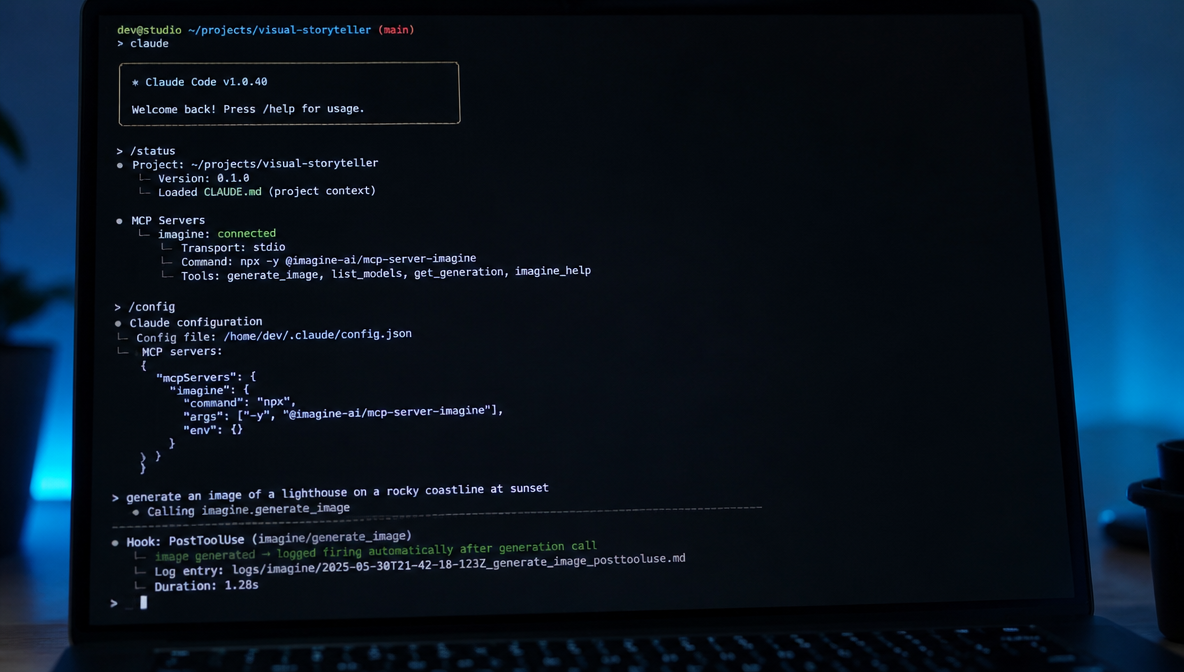
The other thing that separates claude code MCP support from most agent implementations is CLAUDE.md. This is a project-specific context file that you drop into any project directory. It tells Claude how to behave in that context — which tools to prioritize, what the project is, what conventions to follow. Pair that with project-level MCP configuration and you get an agent that arrives already knowing its job.
Then there are the lifecycle hooks. Claude Code exposes 26 event types — PreToolUse, PostToolUse, Stop, and more — that let you fire shell commands when specific agent events happen. PostToolUse alone opens up workflows I hadn't considered: automatically logging every image generation call, triggering a downstream process, routing outputs to different services based on which MCP server fired.
Subagents extend this further. Claude Code can spawn child agents mid-task, which enables parallelization patterns that single-agent workflows can't touch.
The depth of Claude Code's MCP integration is what keeps me coming back for complex projects where I need the agent to behave consistently across a full campaign brief.
How Codex Handles MCP: The Plugin Architecture and 90+ App Store
In April 2026, OpenAI dropped 90+ MCP plugins for Codex in a single release. The framing was intentional — it looked and felt like an app store. One-click install, pre-packaged servers, no manual JSON configuration required. For teams that aren't deep in developer tooling, the accessibility gap versus Claude Code is real.
Codex's MCP model runs on HTTP transport, same as Claude Code, which is why cross-platform servers work at all. But the distribution layer is completely different. Finding, installing, and updating codex MCP plugins is closer to installing a browser extension than configuring a development environment.
The capability that genuinely has no equivalent in Claude Code is Computer Use. Codex has full browser access — it can navigate web interfaces visually and interact with applications the same way a human would. Claude Code does not have this.
For ImagineArt specifically, this creates a different integration pattern. The ImagineArt Campaign Director is a Codex Computer Use workflow where the agent navigates the ImagineArt Workflow canvas directly — building sequences, running a full campaign from a single brief. It's not calling an API. It's operating the interface.
Where They Actually Diverge — Depth vs. Distribution
The useful comparison isn't "which is better." It's "which fits your workflow shape."
| Capability | Claude Code | OpenAI Codex |
|---|---|---|
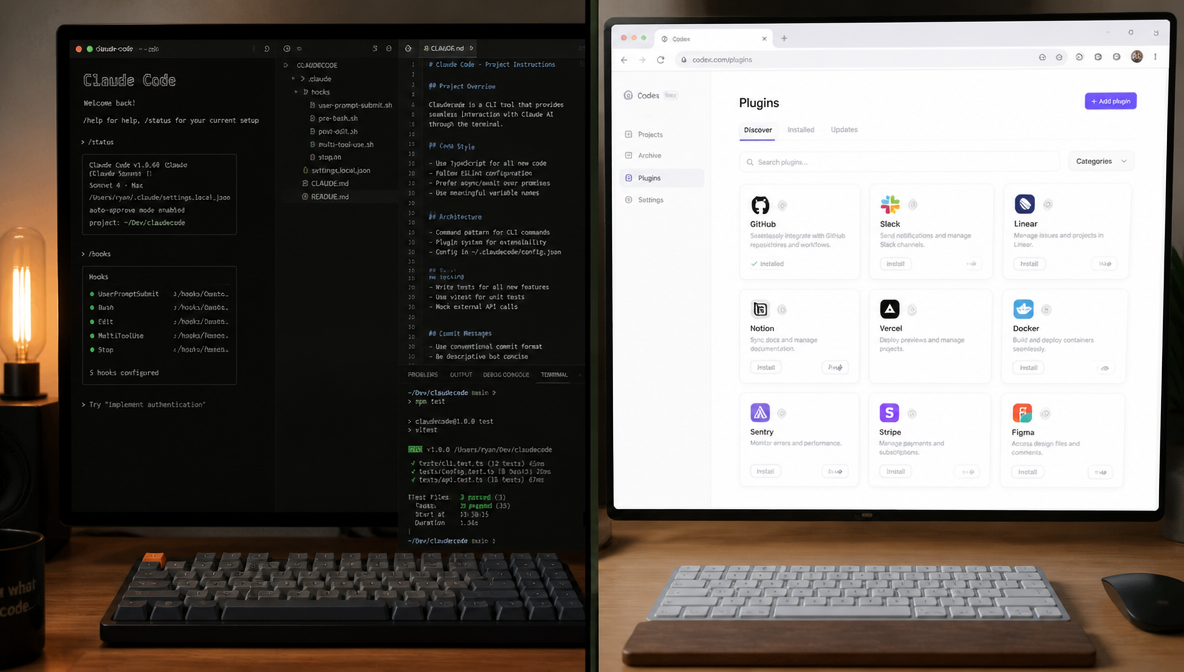
| Underlying model | Claude Sonnet (Pro) / Claude Opus (Max) | GPT-5.3-Codex (default) / GPT-5.4-Mini (subagent) |
| MCP setup | claude mcp add / settings.json | Plugin marketplace (1-click) |
| Config depth | Global / project / session levels | Account-level settings |
| Project customisation | CLAUDE.md per-project | Limited |
| Lifecycle hooks | 26 event types (PreToolUse, PostToolUse, Stop...) | Not available |
| Plugin distribution | Manual JSON config | App store (90+ plugins) |
| Subagents | Yes | Limited |
| Computer Use | No | Yes (full browser access) |
| MCP server compatibility | HTTP/SSE transport | HTTP transport |
Claude Code is a platform for sophisticated agent architecture. If you need consistent, project-specific behavior with hook-driven automation, its depth is the point. Codex is a platform for accessible distribution and visual autonomy. If you need Computer Use or want tools your team can install without touching a config file, Codex fits better.
For me, it's not a decision I've had to make. I run both.
The MCPs That Work on Both — And Why That's the Better Question
Here's the angle that every other claude code vs codex comparison skips: which MCP servers work cross-platform so you're not rebuilding your toolchain when you switch contexts?
The compatibility requirement is straightforward. Any MCP server built on HTTP transport works on both Claude Code and Codex. SSE transport is Claude Code-specific.
The confirmed cross-platform stack I rely on: GitHub, Context7, Playwright, and ImagineArt MCP. All four run HTTP transport. All four behave consistently across both agents.
For creative work specifically, here's how the landscape maps out:
| Creative MCP | Image Gen | Video Gen | Music Gen | Works on Claude Code | Works on Codex |
|---|---|---|---|---|---|
| ImagineArt MCP | Yes | Yes (up to 10s) | Yes | Yes | Yes |
| Pixa | Yes | No | No | Yes | Yes |
| Higgsfield | No | Yes (CLI preferred) | No | Partial | Partial |
ImagineArt MCP is the only creative server covering image generation, video generation, AND music generation — confirmed on both platforms. For a broader view of what's worth installing, Best MCP Servers for Claude Code covers the Claude Code side, and the best Codex plugins in 2026 covers the Codex layer. Best MCP servers for claude code and codex overlap significantly - HTTP transport is the only compatibility filter that matters. If you're evaluating MCP servers that work with codex, start with the HTTP cross-platform column.
ImagineArt MCP - The Creative Layer That Works Wherever You Work
The install is one line on Claude Code:
claude mcp add imagine --transport http https://mcp.imagine.art
On Codex, it's in the plugin marketplace - same HTTP endpoint, one-click install. After that, both agents are calling the same server.
What the ImagineArt MCP gives you: text-to-image generation, text-to-video (up to 10 seconds), background removal, 4x upscaling, music generation, and balance inquiry. Authentication is OAuth with your existing ImagineArt account, no separate API key, same credit balance whether the call comes from Claude Code or Codex. Free tier: 100 credits per day.
The tools map directly to ImagineArt's product layer. The AI Image Generator and AI Video Generator are the core capabilities — through the MCP, both become native agent calls you make inline without opening a browser.
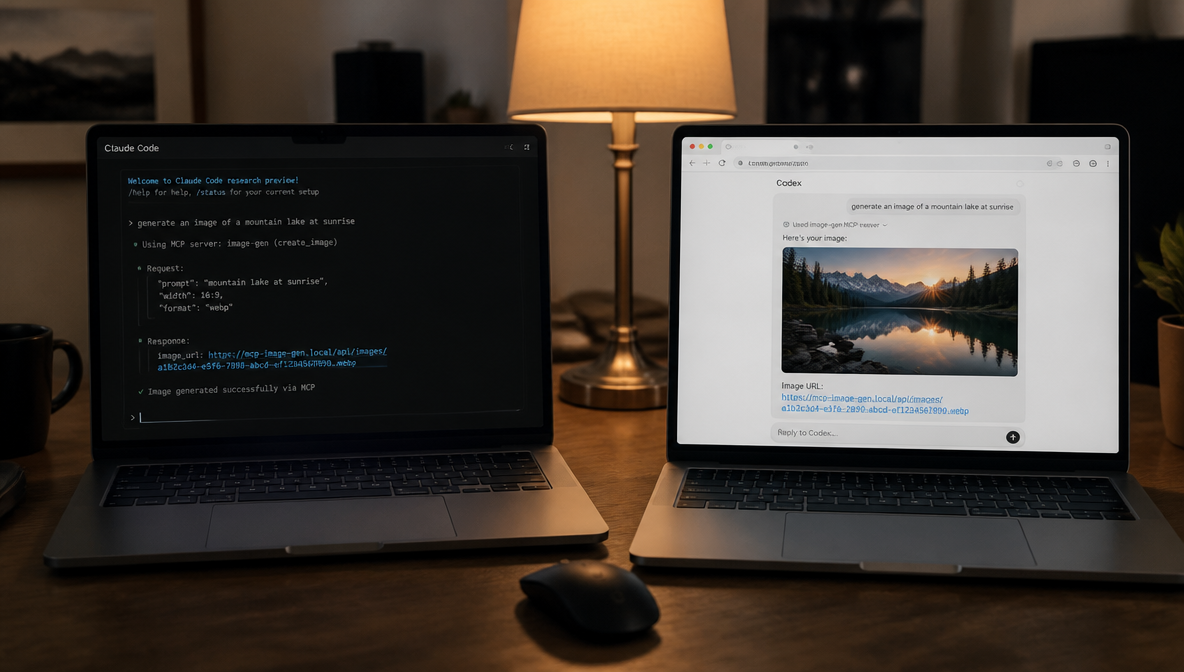
I've run the exact same command in Claude Code and in Codex. Both times, images came back inline. The server doesn't know which agent called it, and that's exactly the point. What changes between the two agents isn't the quality or the output, it's the surrounding architecture. In Claude Code, PostToolUse hooks log every generated asset automatically. In Codex, Computer Use can navigate the full ImagineArt interface for workflows beyond what the MCP tools expose.
Same creative layer. Different control surface.
Who Should Use Which MCP?
The MCP ecosystem has grown fast enough that the question is no longer "should I use MCP" — it's "which servers belong in my stack and on which agent." Here's how to think about it by use case and workflow shape.
Use Claude Code MCPs when:
- You need project-scoped configuration — different MCP behavior per repo or client
- You want lifecycle hooks to fire automatically on tool events (logging, routing, downstream triggers)
- You're running complex multi-step briefs where CLAUDE.md context matters across the full session
- You need SSE transport servers that aren't Codex-compatible
- You're parallelizing with subagents and need deterministic tool routing
Use Codex MCPs when:
- You want one-click install without touching a config file — better for teams that aren't deep in developer tooling
- You need Computer Use alongside MCP calls in the same workflow
- You're managing a team with varying technical backgrounds and need frictionless onboarding
- You want the Campaign Director workflow (Codex operates ImagineArt Workflow canvas directly)
Use cross-platform MCPs (HTTP transport) on both when:
- You switch between agents depending on task type and don't want to rebuild your toolchain
- You need the same creative generation capability available in both Claude Code sessions and Codex tasks
- You're building a stack that should work regardless of which agent your team reaches for
Specific guidance by role:
- Solo developer: Claude Code Max 5x + GitHub MCP + Context7 + ImagineArt MCP. Deep control, hooks for automation, creative generation inline.
- Creative team / marketer: Codex Pro + ImagineArt MCP (plugin marketplace install) + Campaign Director for Computer Use workflows. Accessible distribution, visual automation.
- Engineering team: Claude Code with project-scoped MCPs per repo. PostgreSQL or Supabase for data, Linear or Jira for tickets, GitHub for repo, Context7 for docs.
- Agency running both code and creative: Both agents, shared HTTP MCP stack (GitHub, ImagineArt, Context7). Claude Code for structured briefs, Codex for Computer Use campaigns.
- Beginner / first MCP setup: Codex Free or Plus + ImagineArt MCP from the plugin marketplace. No terminal required, one-click install, 100 free credits/day to test generation before committing.
My Actual Workflow — Running Both Agents With the Same MCP Stack
For claude code vs codex for creative work, here's what my actual setup looks like.
Claude Code handles complex multi-step creative briefs. I have a CLAUDE.md in every major project directory that tells it what the project is, which MCP tools to use, and what output conventions I expect. PostToolUse hooks log every generation call automatically. Subagents let me parallelize when a brief requires multiple asset types running simultaneously.
Codex handles Computer Use workflows. The ImagineArt Workflow canvas is something Codex can actually operate directly via Computer Use — building node sequences, running a full campaign from a brief, delivering the finished assets. That's a different kind of integration than anything MCP alone enables.
The shared MCP stack across both: GitHub, Context7, ImagineArt MCP. Three servers. Everything I produce touches at least one of those three.
The best claude code vs codex comparison I can give: they're both great, they both run my MCP stack, and together they've replaced six tools I used to switch between manually.
FAQs
Claude Code is Anthropic's CLI-based coding agent with deep MCP integration, lifecycle hooks, per-project CLAUDE.md customization, and subagent support. OpenAI Codex is a cloud-based coding agent with a plugin marketplace of 90+ MCP servers and Computer Use (full browser access). Both support MCP via HTTP transport, but Claude Code offers more configuration depth while Codex offers easier distribution and visual automation capabilities.
Yes — any MCP server built on HTTP transport works on both Claude Code and Codex. SSE transport is Claude Code-specific. Cross-platform MCPs confirmed to work on both include GitHub, Context7, Playwright, and ImagineArt MCP. HTTP transport is the compatibility requirement to check before installing any server on both agents.
They support MCP differently rather than one being strictly better. Claude Code offers deeper configuration with three scope levels (global, project, session), 26 lifecycle hooks, and CLAUDE.md per-project customization. Codex offers easier distribution via its plugin marketplace and Computer Use capabilities that Claude Code doesn't have. The best choice depends on whether you prioritize control depth or accessible distribution.
Yes, as long as the MCP server uses HTTP transport. On Claude Code, add it via claude mcp add <name> --transport http <url> or settings.json. On Codex, install it through the plugin marketplace. The server itself doesn't distinguish between agents — it receives HTTP requests and responds the same way regardless of which agent is calling.
The ImagineArt MCP is an HTTP-based MCP server at https://mcp.imagine.art that gives AI agents access to text-to-image generation, text-to-video (up to 10 seconds), background removal, 4x upscaling, music generation, and balance inquiry. It works on both Claude Code and Codex. Install on Claude Code with claude mcp add imagine --transport http https://mcp.imagine.art. On Codex, it's available via the plugin marketplace. Authentication uses OAuth with your existing ImagineArt account.
Any MCP server using HTTP transport is cross-platform. Confirmed cross-platform servers include GitHub, Context7, Playwright, and ImagineArt MCP. For creative work specifically, ImagineArt MCP is the only server covering image generation, video generation, and music generation with confirmed support on both agents.
For creative work, the choice depends on your workflow shape. Claude Code is better for complex multi-step campaigns where you need consistent project-specific behavior, lifecycle hooks, and CLAUDE.md customization. Codex is better when you need Computer Use — particularly for operating visual tools like the ImagineArt Workflow canvas directly. Most serious creative workflows benefit from running both: Claude Code for structured brief execution, Codex for Computer Use automation.
Syed Anas Hussain
Syed Anas Hussain is a computer scientist blending technical knowledge with marketing expertise and a growing passion for AI innovation. Curious by nature, he dives into new AI sciences and emerging trends to produce thoughtful, research-led content. At ImagineArt, he helps audiences make sense of AI and unlock its value through clear, practical storytelling.