
Syed Anas Hussain
May 14, 2026 • Updated August 6, 2026
10 mins Read
This year has been transformative in AI, but today, I watched Codex open ImagineArt, build the workflow canvas, connect the nodes, run Seedance motion on the stills, pull a Music Studio track, and package the final MP4 — and I didn't touch the canvas once. All I did was write a brief about a perfume bottle. That's Campaign Director, and it's the most exciting thing ImagineArt has shipped this year.
What Is Campaign Director? (And Why It's Different)
Campaign Director is ImagineArt's fully automated AI campaign production system. It connects OpenAI's Codex — a powerful AI agent — to ImagineArt's creative platform, and gives Codex everything it needs to plan, build, generate, review, and package a complete marketing campaign, all by itself.
The way it works: Codex uses a capability called Computer Use to operate ImagineArt directly inside Google Chrome. It's not just generating prompts and handing them to you. It's clicking, typing, building workflow nodes, running generation, downloading outputs, and assembling the final video — the same way you would, just autonomously.
I've been using AI tools for a while. I've built workflows inside ImagineArt's Workflow OS manually, node by node. This is genuinely different. Campaign Director doesn't assist the process — it runs it.
What Made Me Stop and Pay Attention
The moment that got me was watching Codex navigate the ImagineArt canvas on its own.
It didn't just paste in a prompt and wait. It planned the whole creative direction first — a shot-by-shot treatment, cinematography decisions, which motion model to use for which clip, how to structure the Music Studio brief. Then it opened the canvas, built every node, verified the layout was readable, and only then started generation.
And before it committed to anything, it spawned a swarm of sub-agents — specialist AIs that brainstorm, challenge, and critique the campaign concept before a single ImagineArt credit gets spent. Weak ideas get caught before they reach generation. That alone is worth something.
This is what ImagineArt built Campaign Director to do: not to give you more prompts to manage, but to have Codex be the campaign director. The clue is in the name.
What You Need to Run Campaign Director
Before I walk you through how I set it up, the one thing to know upfront: Campaign Director runs through the Codex desktop app on macOS. Not the ChatGPT web interface, not VS Code, not the API. The macOS desktop app is the only place Computer Use works right now — and Computer Use is what gives Codex the ability to actually operate ImagineArt in Chrome.
A few other requirements:
- macOS — Computer Use is macOS-only at launch. The Codex app also runs on Windows, but Computer Use isn't available there yet. I
- A ChatGPT account — to sign in to the Codex app.
- An ImagineArt account — a free plan works to start. Generation will use credits.
- Google Chrome, open and logged in to ImagineArt — Codex needs to control the same Chrome session where you're already logged in.
- Your campaign assets — product photos, brand kit, mood board. A rough idea works too; Codex will expand it before generating.
How I Set It Up (Step by Step)
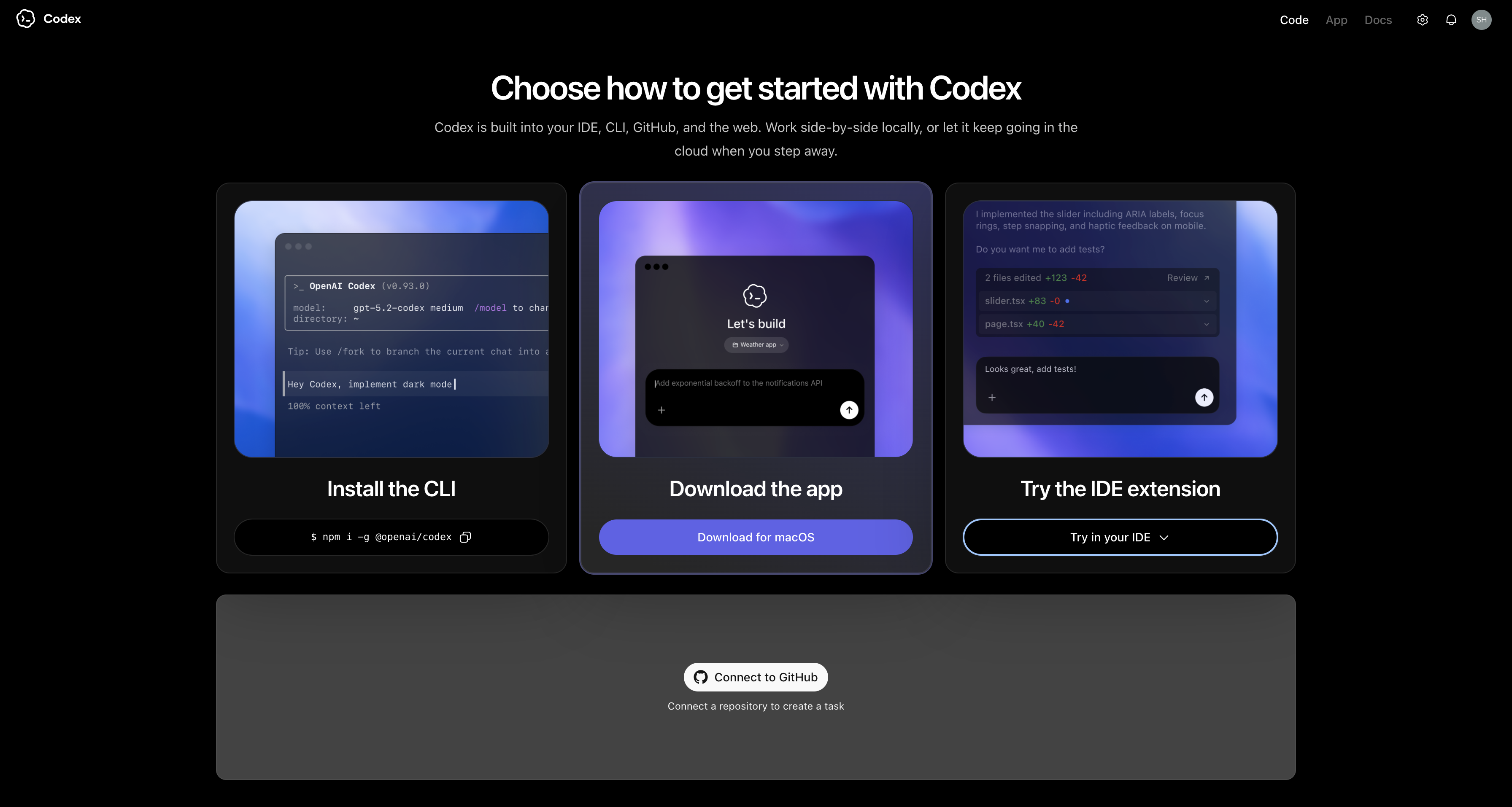
Step 1: Install the Codex Desktop App
Download the Codex app from OpenAI, install it on your Mac, and sign in with your ChatGPT account. This is the only environment where Campaign Director works.
Step 2: Enable Computer Use
In the Codex app: Settings → Computer Use → Install. macOS will ask for two permissions — open System Settings → Privacy & Security and enable Codex under Screen Recording and Accessibility. Both are required. Without them Codex can't control Chrome or ImagineArt.
Step 3: Open Chrome and Log In to ImagineArt
Open Google Chrome, go to imagine.art, and log in. Keep that window up — Codex is going to take control of it during the run. Don't switch tabs or close the workflow tab while it's building.
One thing to expect: Chrome may show a prompt asking if "www.imagine.art can see text and images copied to the clipboard." Click Allow. This is normal — Codex needs clipboard access to paste workflow data into the ImagineArt canvas.
Step 4: Start a Codex Thread
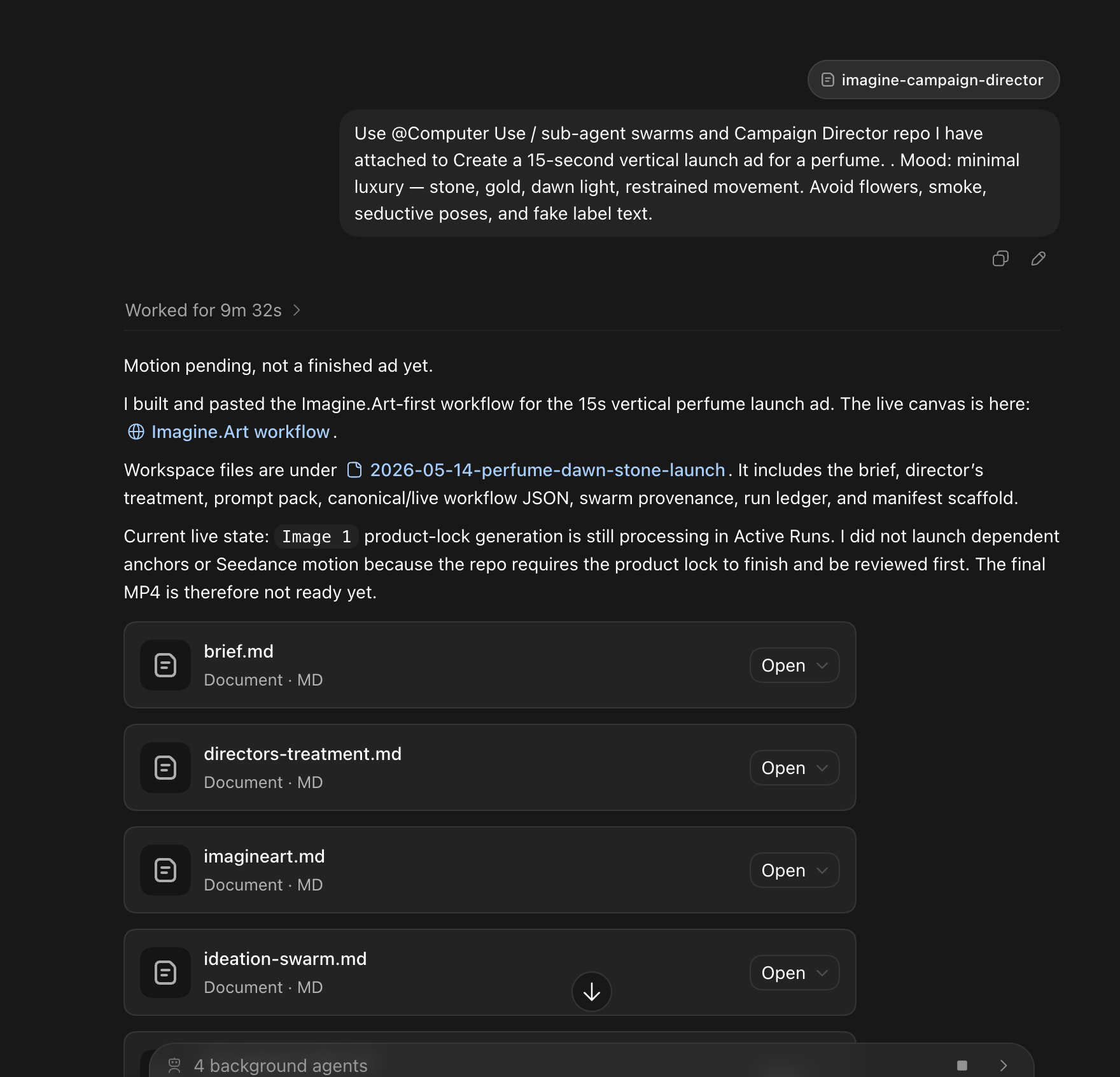
Open a new thread in the Codex app (Local mode). When Codex asks to use Computer Use, approve it. Then paste your campaign brief in this format:
Use @Computer Use / sub-agent swarms and Campaign Director to create
Here's what mine looked like for the perfume campaign:
Use @Computer Use / sub-agent swarms and Campaign Director

Create a 15-second vertical launch ad for this perfume.
Use the attached product photo as the visual source.
Mood: minimal luxury — stone, gold, dawn light, restrained movement.
Avoid flowers, smoke, seductive poses, and fake label text.
Attach your product photo or brand kit alongside the prompt. That's it. Codex takes it from there.
Step 5: Watch It Work
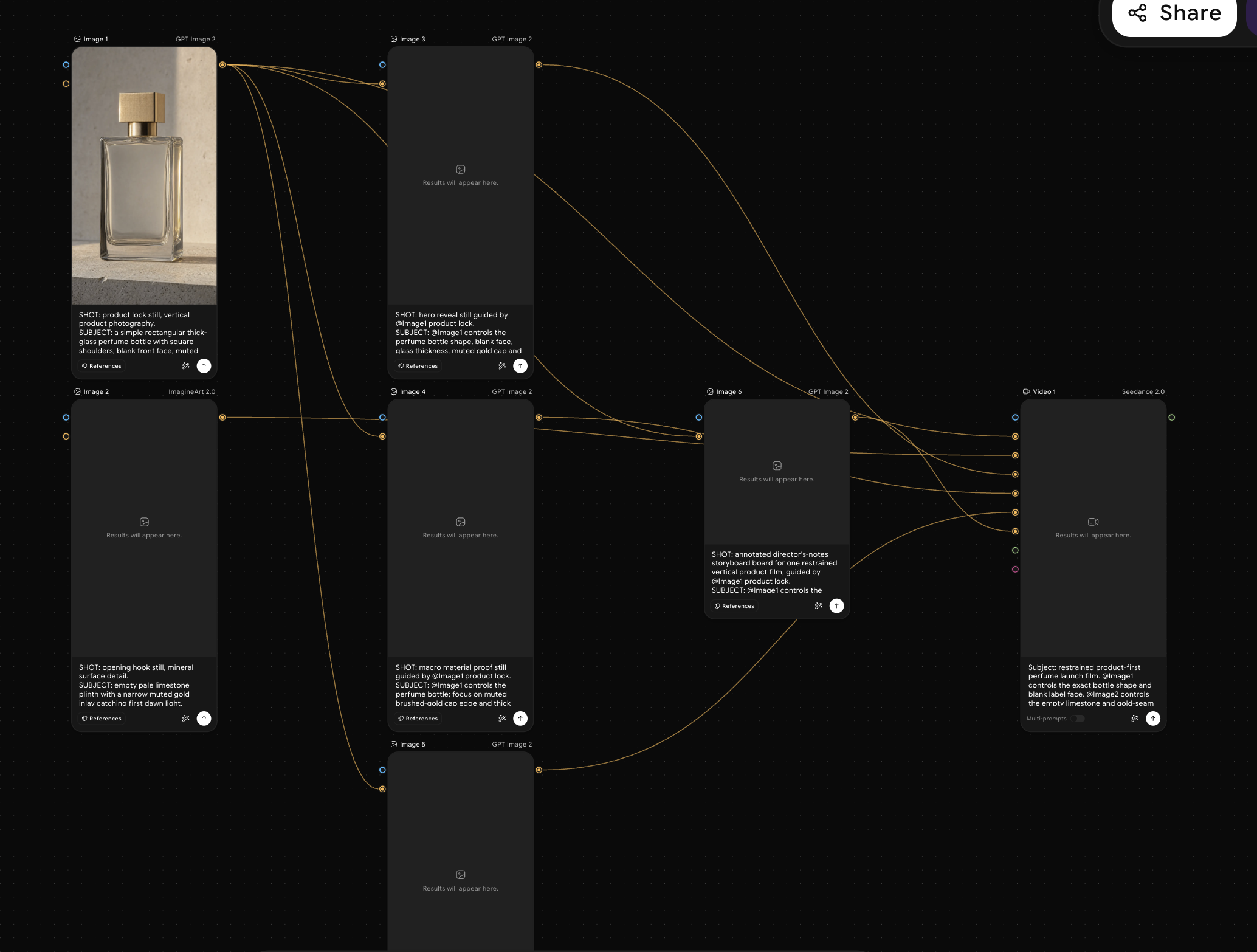
This is the part I genuinely wasn't prepared for. Codex starts by writing a full director's treatment — it planned the shots for my perfume campaign, each with a specific visual brief, cinematography direction, and Seedance motion grouping. Then it opened the ImagineArt canvas and built the whole workflow: source locks, still anchors, motion nodes, the Music Studio brief. It verified the layout was readable before launching any generation. Then it ran the stills, queued the Seedance clips one by one, verified each downloaded file, generated the audio, and put together the review MP4.
I approved a couple of spend confirmations along the way. Everything else, Codex handled.
What Comes Out the Other End
Here's exactly what a finished Campaign Director run delivers:
A full director's treatment and shot plan. Every shot documented before any credit is spent — visual direction, camera choice, which models handle which clips, Music Studio direction. I could read it like a production document.
A built ImagineArt workflow canvas. Not a prompt pack, not a brief document — an actual working workflow with every node connected and labeled. Built inside ImagineArt through Codex controlling Chrome in real time.
Generated motion clips, verified. Real video generation using ImagineArt's Video Studio — Seedance 2.0 for the main motion, with Kling 3.0 Pro, Runway 4.5, and Google Veo 3.1 available for specific shots. Every clip gets downloaded and verified. If export fails, Codex says so — it doesn't fake the final video with a slideshow.
Music Studio audio. A campaign score generated inside ImagineArt, not added from a stock library. The audio brief flows from the same director's treatment as the visuals.
A review MP4 with QC notes and a shot manifest. When the MP4 lands, it comes with documentation: which shot used which node, what was rejected, what needs revision. You know exactly where every frame came from.
What I'd Use Campaign Director For
| Campaign Type | What Codex Builds | Output Format |
|---|---|---|
| Product Launch | Visual identity, motion, audio, review MP4 | 9:16, 1:1 |
| Fashion / Luxury Film | Cinematic treatment, identity locks, Seedance motion | 16:9, 9:16 |
| Social Media Batch | Multi-format assets, consistent brand identity | 9:16, 1:1 |
| AI Film / Cinematic | Director's treatment, shot plan, Seedance 2.0 motion | 16:9, 9:16 |
Product launches.
This is where Campaign Director clicks most immediately. You have a product, you have a mood, you want a launch video. Campaign Director turns that into a full production — stills generated through ImagineArt's Image Studio, motion through Seedance 2.0, a score from Music Studio — in one session. Brand identity stays consistent because Codex locks it in at the source node level before anything generates.
Fashion and luxury campaigns.
The director's treatment approach is exactly what high-aesthetic work needs. Shot-by-shot visual planning, identity locks for consistent talent or product appearance, cinematography direction. The perfume campaign I built leaned hard into this and the outputs held up.
Social media content batches.
Campaign Director plans and generates in 9:16 vertical and 1:1 square natively. Not reformatted after — built in the right format from the start.
AI film and cinematic projects.
If you're doing longer-form creative work and want to create full or short films, A better alternative to Campaign Director is ImagineArt's AI Film Studio, which lets you select any image or video model to create full-length cinematic films.
Honest Take: What It Promises and What It Delivers
I want to be straight about this because the promise is big and I know how that can land.
The one-prompt-to-campaign experience is real.
I ran it. The treatment, the workflow build, the generation, the MP4 — all from a brief. The part that still gets me is that Codex built a workflow I would have spent an hour configuring, in maybe three minutes, while I watched.
The credit safety system is genuinely smart.
Before every generation run, Codex checks exactly which nodes are selected and what they'll cost. The sub-agent swarm critiques the concept before generation starts. I didn't end up with a pile of failed or duplicate outputs.
A few things to know going in:
- Computer Use is macOS-only for now.
- Your brief quality matters. Codex can rescue a vague brief, but a specific one — product, mood, audience, avoid list — produces a first run you can work with.
- Codex needs exclusive Chrome control during the run. Let it work without interruption.
- If you are on Windows, or you would rather not hand over control of a browser window at all, you can run the same brief through AI Chat instead. You lose the autonomous canvas-building, but you keep the part that matters most on a first attempt: the agent reading the brief, planning the treatment, and handing back something you can review.
Who This Is For
Marketers and brand managers who've been manually building ImagineArt workflows and waiting for the production layer to get automated — it's here.
Creative agencies producing campaigns for multiple clients. Campaign Director changes the economics of production. The structured treatment and manifest make handoffs and revision cycles actually manageable.
Solo creators and founders who can't afford a production team but need production-quality output. This is the closest thing to having a director, editor, and motion artist in one prompt.
Frequently Asked Questions
Campaign Director is ImagineArt's fully automated AI campaign production system. It connects OpenAI's Codex to ImagineArt via Computer Use, letting Codex plan the campaign, build the ImagineArt workflow canvas, run Seedance 2.0 motion, generate Music Studio audio, and package a final review MP4 — all from a single brief, without you touching the workflow canvas.
No. Campaign Director requires the Codex desktop app on macOS with Computer Use enabled. The ChatGPT web interface, the API, and VS Code extensions don't support Computer Use — and Computer Use is what lets Codex actually operate ImagineArt in Chrome. You need the macOS desktop app.
The Codex desktop app runs on macOS and Windows, but Computer Use — which Campaign Director requires — is macOS-only at launch. It's also not available in the EEA, UK, or Switzerland at launch. Check OpenAI's Codex documentation for the latest regional availability.
A complete run produces: a director's treatment and shot plan, a built ImagineArt workflow canvas, generated and verified motion clips, Music Studio audio, and a final review MP4 with QC notes and a shot-source manifest. If motion export or audio fails, Codex reports the specific blocker — it doesn't fake the output.
For motion: Seedance 2.0 is the primary model, with Kling 3.0 Pro, Runway 4.5, and Google Veo 3.1 available for specific shots. For stills: ImagineArt 2.0 and GPT Image 2 at 2K high quality. Audio is generated through ImagineArt's Music Studio, with ElevenLabs voiceover for spoken narration when needed.
Codex stops and reports a specific blocker. It does not substitute stills, slideshows, or proxy renders as the final campaign. Every planned motion clip must be downloaded and verified before the run is marked complete — no faking the output.
Campaign Director is part of ImagineArt, which offers a free plan to get started. Running a campaign uses ImagineArt generation credits. Codex checks selection and cost before every generation run, so you're not hit with unexpected spend. Check ImagineArt's pricing page for current plan details.
The Future of Campaigns Is Already Running
I keep coming back to the same feeling after using Campaign Director: this is what AI creative production was always supposed to be. Not a better prompt interface. Not a faster image generator. An AI that actually runs the production — plans the campaign, builds the workflow, generates the assets, QCs the outputs, and hands you something real at the end.
ImagineArt built Campaign Director to make that possible today. And having used it, I don't think we're going back.
Syed Anas Hussain
Syed Anas Hussain is a computer scientist blending technical knowledge with marketing expertise and a growing passion for AI innovation. Curious by nature, he dives into new AI sciences and emerging trends to produce thoughtful, research-led content. At ImagineArt, he helps audiences make sense of AI and unlock its value through clear, practical storytelling.