
Arooj Ishtiaq
July 30, 2026 • Updated July 30, 2026
7 mins Read
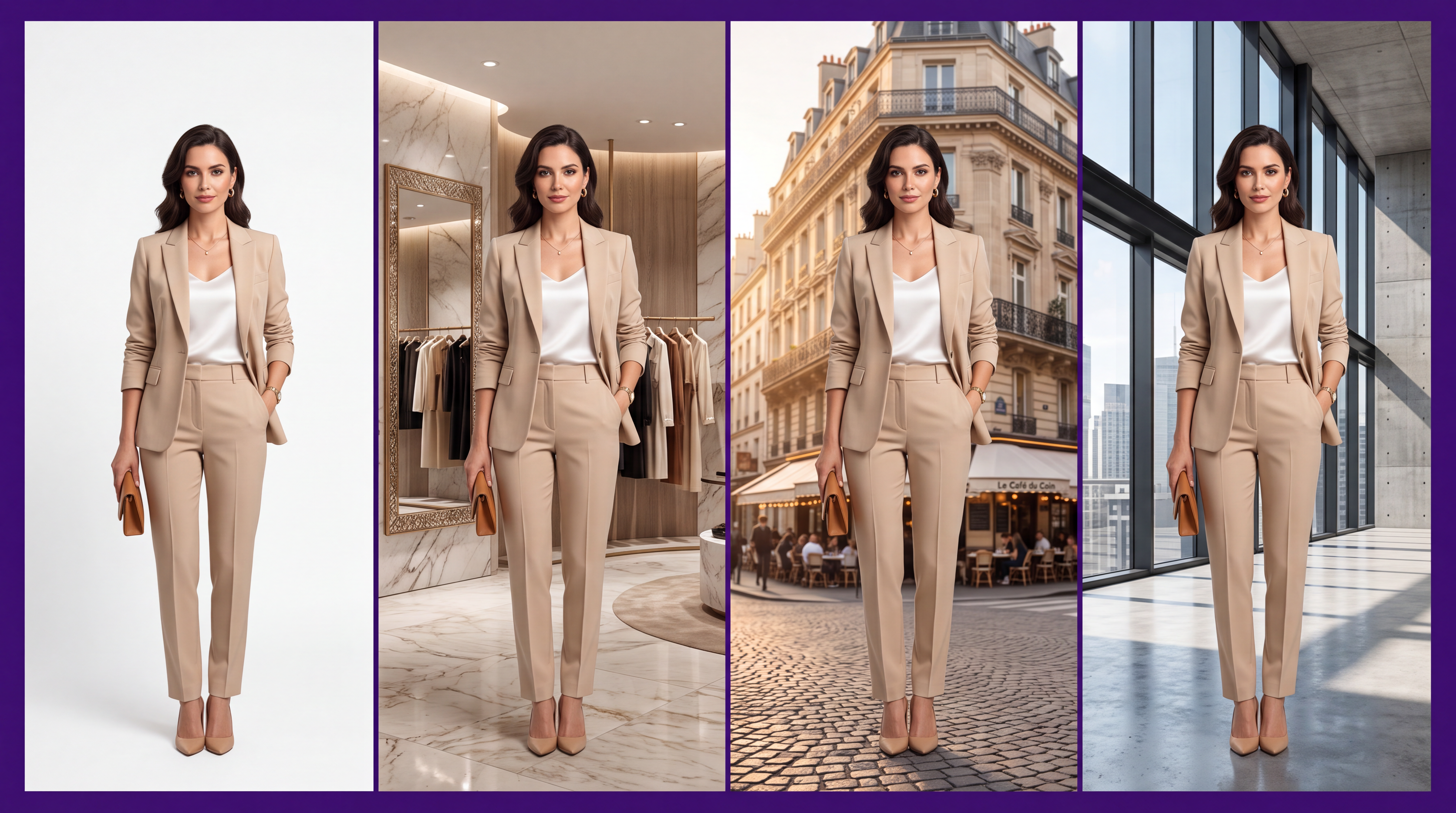
An AI background generator replaces a photo's existing backdrop with a new one, generated from a text prompt or template, without a location shoot or a physical set. For ecommerce and fashion brands, this solves a problem that used to require a studio, a location scout, or an expensive travel shoot: putting the same product in a dozen different visual contexts without physically moving anything.
It's typically one feature inside a broader AI clothing generator or full AI fashion model generator rather than a standalone tool. This guide covers how the category actually works, the modes worth understanding before you use one, and where background generation fits specifically inside a fashion photography workflow.
What Is an AI Background Generator?
An AI background generator identifies the subject in an existing photo, separates it from its current background, and replaces that background with a new one, generated either from a text description or selected from a template library. It matches the lighting, shadows, and perspective of the original subject so the result reads as one coherent photograph rather than an obvious composite.
This differs from simple background removal, which just isolates the subject on a transparent or plain background. Generation goes a step further, actually creating new environmental context: a marble countertop, a sunlit street, a minimalist studio cyclorama, built to match how the original subject was lit and shot.
How AI Background Generation Actually Works
The technical challenge in background generation isn't creating a convincing new scene in isolation. It's making that scene match the subject convincingly. A generated background that doesn't account for the direction the original product or model was lit from produces a result that looks obviously composited, with shadows falling the wrong way, or a light source in the new background contradicting the highlights already present on the subject.
Modern tools handle this by analyzing the original image's lighting, contrast, and perspective before generating the replacement scene, then adjusting shadow direction and color temperature in the new background to stay consistent with what the subject already shows. This is why background generation quality varies significantly between tools: the generation model itself matters less than how well the tool reasons about matching the existing photo's physical lighting logic, the same underlying challenge covered in our guide to fashion photography lighting.
How to Spot a Bad Background Swap
Before trusting a tool with a full catalog, check its output for these tells:
- Shadow direction mismatch. The subject's shadow falls one way, but the background's implied light source points somewhere else.
- Color temperature clash. A warm-lit subject against a cool-toned background, or the reverse, is an obvious sign the two elements were never actually in the same light.
- A hard, visible edge around the subject where the original background was cut away, especially around hair, loose fabric, or fine jewelry.
- Reflections that don't match. Glossy shoes or accessories reflecting a scene that isn't actually in the new background.
Any one of these on its own might be a minor fix. Several at once usually means the tool is reasoning about the subject and the background independently rather than matching them.
Preservation vs. Creative Modes
Most capable background generation tools split into two distinct modes, and understanding the difference determines which one you should reach for on a given shot.
- Preservation mode keeps the exact shape, angle, and every visible detail of your original subject untouched, changing only the background around it. Use this whenever the product's exact color, text, logo, or proportions need to stay completely accurate, since any drift in the subject risks misrepresenting what a customer will actually receive.
- Creative mode allows more transformation: new angles, a product being held or worn by a generated person, or placement in a more imaginative scenario, at the cost of some fidelity to the exact original subject. Better suited to campaign or social content where creative range matters more than pixel-perfect preservation.
For products where text or logos need to stay legible, preservation mode at higher output resolution is the safer choice. Creative mode's additional transformation can subtly soften or misrender fine text detail. Once a background is in place, AI generative fill is the natural next tool for touching up any single detail the background swap disturbed, without regenerating the whole image.
Where Background Generation Fits in Fashion Photography Specifically
For fashion brands, background generation solves two distinct problems depending on whether you're working in catalog or editorial mode.
- Catalog use case: consistent, clean backgrounds across an entire product range. Rather than reshooting or manually editing a background for every SKU, one generated background template can apply uniformly across dozens of products, keeping the catalog visually consistent without a physical backdrop change for each item.
- Editorial use case: placing a styled model shot into a specific mood or location, a sunlit street, a minimalist loft, a seasonal outdoor scene, without booking that actual location. This is where background generation moves from a practical consistency tool into a creative one. Choosing the right tone here isn't arbitrary. Our guide to color draping and choosing a shoot palette covers matching a background's undertone and chroma to the model and garment rather than picking a scene on looks alone.
AI Fashion Studio builds this directly into its background step: choose a catalog backdrop or an outdoor editorial scene, or upload your own reference, as one step in the same six-step workflow used for the rest of the shoot. Because it sits inside the same project as the model and garment setup, background choice doesn't require a separate tool or a second export-and-reimport step.
Background Generation vs. Full Scene Generation
Background replacement is worth distinguishing from the broader category of AI photoshoot generation, which handles the entire scene, model, pose, lighting, and background, from a single generation rather than modifying an existing photo's backdrop alone.
Background generation assumes you already have a usable subject shot and only need a new environment around it. Full scene generation starts further back in the process, building the entire image from a garment reference and a prompt.
For fashion brands specifically producing full on-model shoots rather than just swapping a backdrop, what an AI photoshoot actually is and how it works covers that broader category directly.
Automating Background Generation at Catalog Scale
For brands processing more than a handful of products, doing background generation manually image by image doesn't scale. Several platforms in this category offer API access specifically so background generation can be chained with other operations- background removal, upscaling, color correction- in a single automated request rather than a manual multi-step process repeated for every SKU.
This matters most for brands adding new inventory continuously rather than shooting in discrete seasonal batches. An automated pipeline that applies a consistent background template the moment a new product photo is uploaded removes the manual bottleneck that otherwise grows linearly with catalog size, and it enforces visual consistency by default rather than depending on a human applying the same settings correctly every time.
Conclusion
AI background generation solves a specific, practical problem: putting a product or model into a new visual context without a physical location shoot behind it. The real differentiator between tools isn't how good any single generated background looks in isolation; it's how convincingly that background matches the lighting and perspective already present in your subject.
AI Fashion Studio folds background selection directly into its catalog and editorial workflow, so a background choice is one step in a single shoot rather than a separate editing pass, and what an AI fashion model actually is covers how this fits into the broader generation process if you're newer to the category.
Frequently Asked Questions
What's the difference between background removal and background generation?
Background removal isolates a subject on a transparent or plain background. Background generation goes further, creating an entirely new environmental scene around the subject, matched to the original lighting and perspective, rather than just clearing the old background away.
Which mode should I use to keep my product accurate?
Preservation-style modes keep the exact shape, color, and detail of your original subject unchanged, only altering the background. This is the safer choice whenever product accuracy, especially visible text or logos, matters more than creative range.
How can I tell if a background swap looks fake?
Check for shadow direction mismatches, color temperature clashes between subject and background, hard edges around fine detail like hair or jewelry, and reflections that don't match the new scene. Any of these on their own can be a minor fix, but several together usually mean the tool isn't reasoning about lighting consistency well.
Can AI background generation work for both catalog and editorial fashion photography?
Yes. Consistent, templated backgrounds serve catalog use cases well, while more specific scene-based generation supports editorial and campaign work. Tools that support both modes from the same workflow, like AI Fashion Studio, avoid needing separate tools for each.
Does AI background generation work on video, not just still images?
Some fashion-specific platforms extend background and scene generation into video as well, animating a model into a generated environment with adjustable framing and clip length, rather than limiting the capability to static images alone.
Arooj Ishtiaq
Arooj is a SaaS content writer specializing in AI models and applied technology. At ImagineArt, she creates sharp, product-focused content that helps creators and businesses understand, adopt, and get real value from AI tools.