
Tooba Siddiqui
September 4, 2025 • Updated June 17, 2026
14 mins Read
When it comes to building online presence, high-quality visuals are a must-have. And of course, you can’t afford to hire professional photographers every time you need high-quality images. Most of the time, we resort to using images captured through our phone camera or basic photography equipment. However, those images pose a few issues, such as bad lighting, blurriness, poor angles, and more. Such poor-quality images can impact business credibility and brand name.
The way out? AI image enhancers! An AI image enhancer is a tool that uses machine learning to increase image resolution, sharpen detail, reduce noise, and restore degraded photos — without manual editing. Unlike traditional upscaling, which stretches pixels, AI enhancers generate new detail based on patterns learned from millions of images.
These AI photo enhancement tools help improve image resolution and quality. Here are nine of the best AI image upscaling tools for you to try:
- Topaz Gigapixel AI
- ImagineArt Image Upscaler App
- Magnific AI
- YouCam Online Editor
- Adobe Super Resolution
- Luminar Neo
- BigJPG
- Upscayl
- Remini
Best AI Image Enhancers Compared
| Tool | Best For | Platform | Free Tier | Starting Price | Max Upscale |
|---|---|---|---|---|---|
| ImagineArt Image Upscaler | Quick one-click enhancement | Web | Yes (100 credits) | $10/month | 4K |
| Topaz Gigapixel AI | Professional photography, face restoration | Desktop | Trial (no export) | $99.99/year | 16x |
| YouCam Online Editor | Portrait enhancement, casual editing | Web | Yes | $3.33/month | — |
| Magnific AI | Generative upscaling with style control | Web | Limited | $39/month | 4K |
| Adobe Super Resolution | Adobe Creative Cloud users | Desktop | No | $69.99/month | 4x |
| Luminar Neo | Full photo editing suite | Desktop | No | $8.25/month | — |
| BigJPG | Free upscaling, anime and illustrations | Web | Yes | $4.99/month | 16x |
| Remini | Face and portrait restoration, mobile | Mobile + Web | Yes (limited) | $9.99/month | — |
| Upscayl | Offline upscaling, batch processing | Desktop | Yes (free) | Free | Custom |
9 Top AI Image Enhancers for 2026
Equipped with deep learning models and large datasets, AI-powered image enhancement tools can edit and improve image quality at a pixel level. Here’s a breakdown of some of the top AI image enhancers:
1. Topaz Gigapixel AI
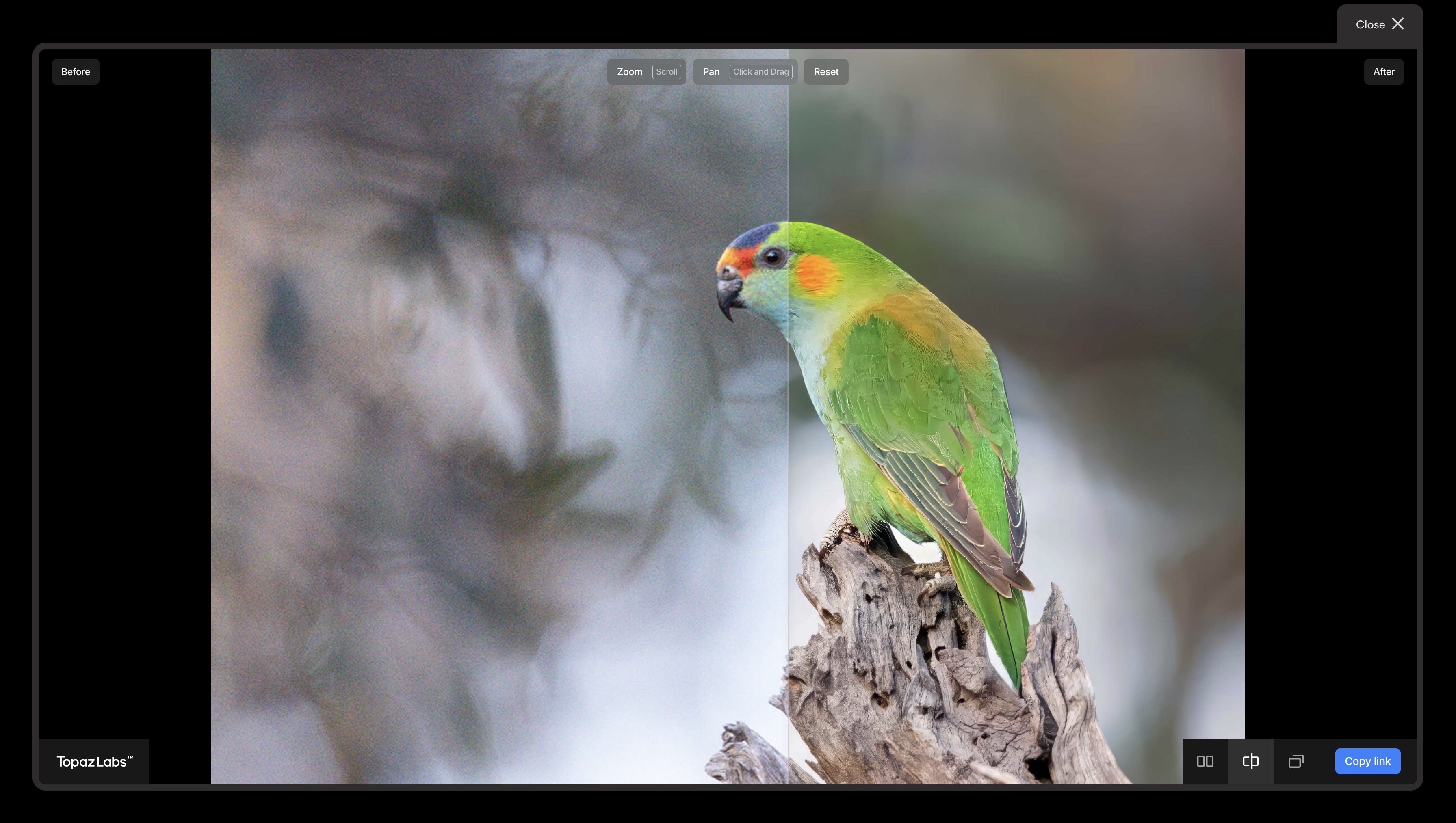
Featuring advanced AI models and trained on multitudes of images, Topaz Gigapixel is designed to enlarge images up to 16 times the actual image size — and that too without losing the image details and reducing distortions. This AI image upscaling tool can be used as a standalone tool on your computer or as a plug in on image editing software. It makes Topaz Gigapixel an ideal tool for professional users and hobbyists.
Key Features:
- This AI photo enhancement tool features AI-driven image upscaling that can generate new pixels to enlarge the existing image. The details are preserved, and the results are high-definition.
- It features “Recover” and “Redefine” models that fix the mixing details, such as the texture of skin, fabric, and even different surfaces.
- This AI photo enhancement tool includes a dedicated face recovery mode, allowing you to enhance and enlarge human faces with photorealistic details.
- It can help reduce distortions, noise, and distractions from images, making it ideal for large-scale creative projects.
- It can be integrated with Adobe Photoshop and Lightroom.
Limitations:
Topaz Gigapixel AI requires high-performing RAM and VRAM for larger upscales and optimal efficiency. The AI image enhancer has a steep learning curve, making it complex to use for beginners.
Pricing:
Topaz Gigapixel AI is available at $99.99 and includes all updates for one year. The commercial Pro plan starts at $499. The trial plan is free and fully functional, but without any image export capabilities.
2. ImagineArt Image Upscaler App
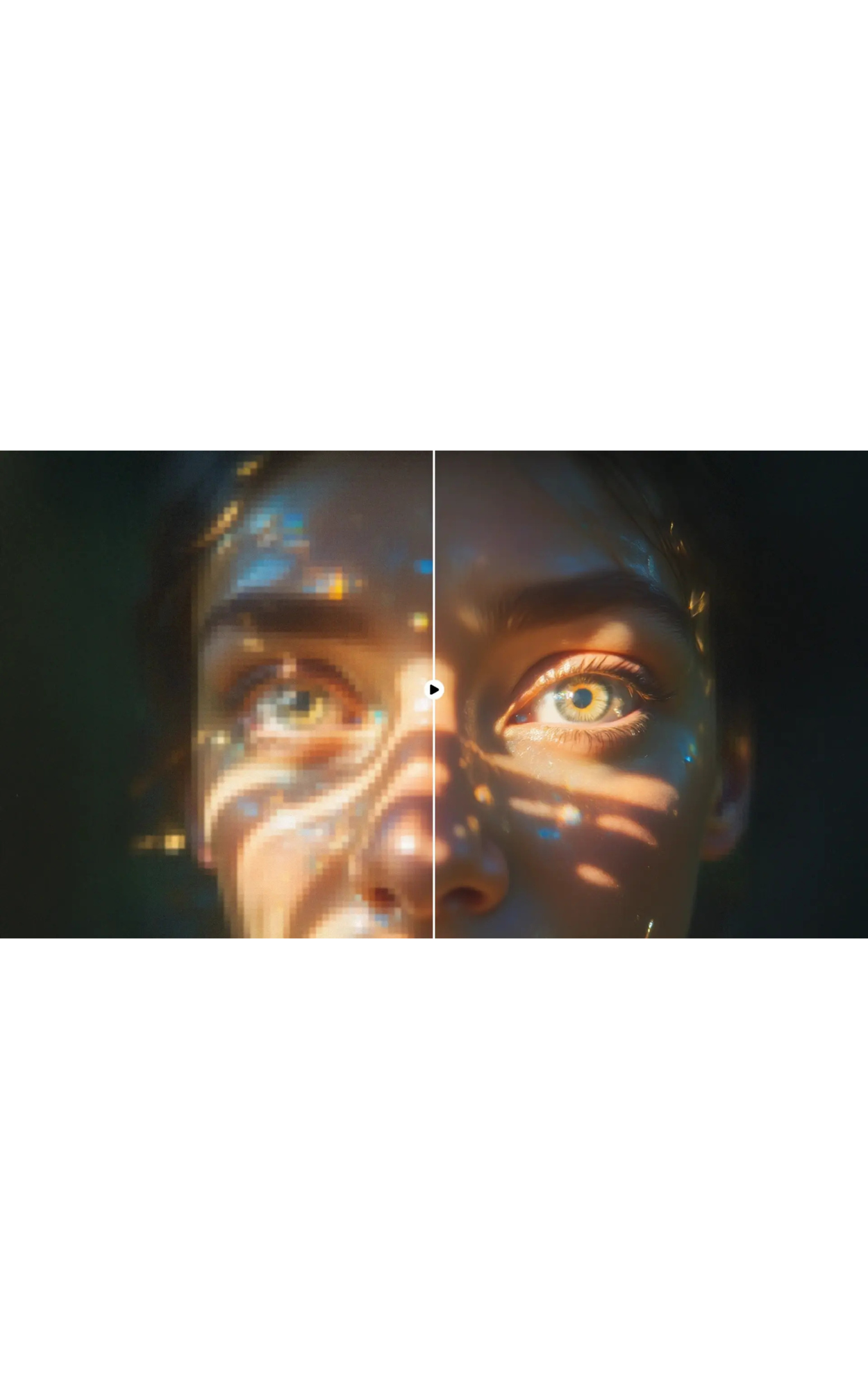
ImagineArt AI Image Upscaler app is a standalone browser-based app inside the ImagineArt ecosystem that transforms low-quality, blurry, or pixelated images into sharp, high-resolution visuals instantly without any editing experience. Simply upload an image and the AI restores lost details, improves clarity, and delivers professional-grade results in seconds.
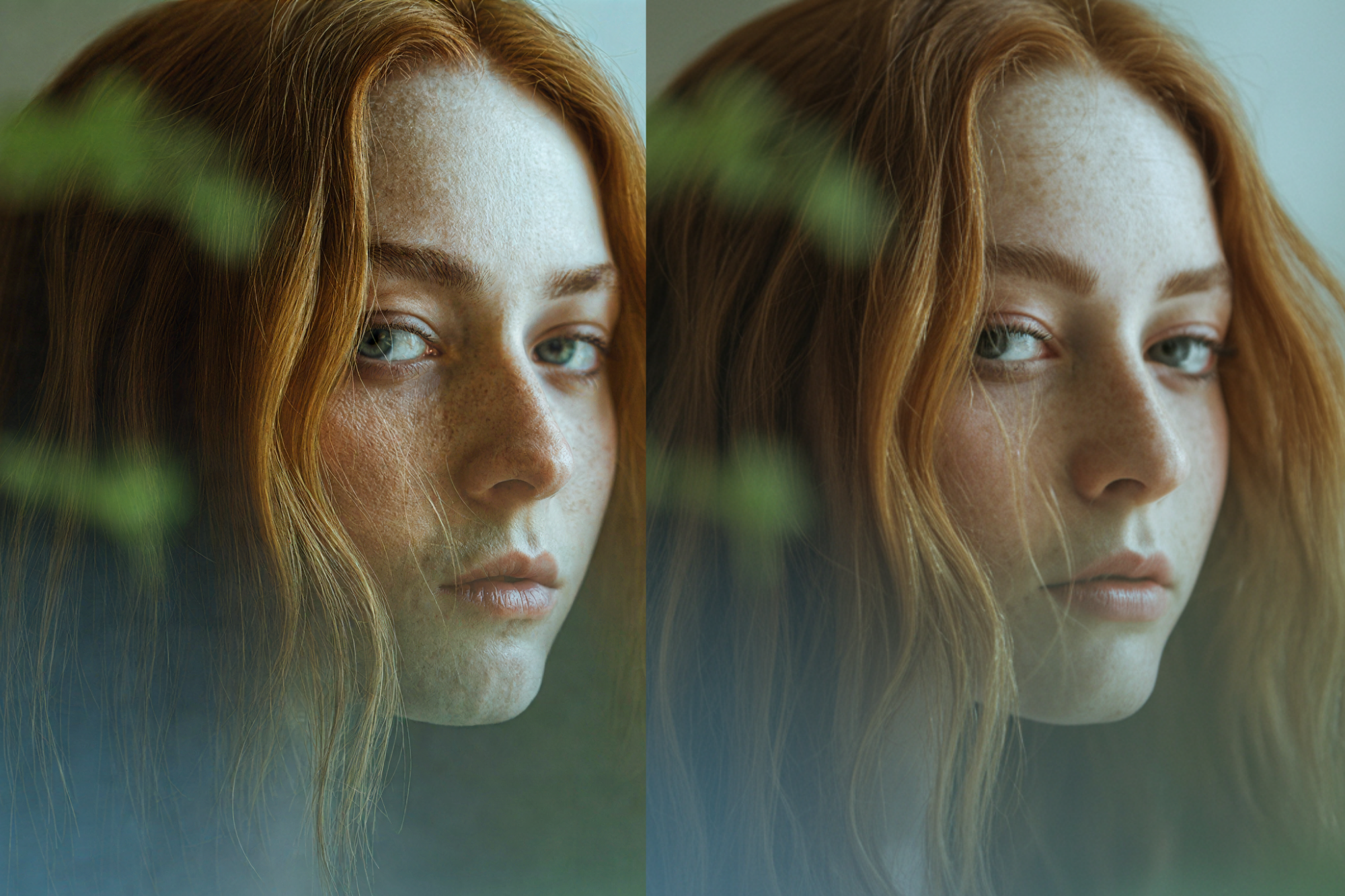 Improved clarity and color using ImagineArt Image Upscaler
Key Features:
- It offers one-click enhancement with zero editing required. Upload your image, click Generate, and the AI automatically restores detail, improves resolution, and sharpens edges
- It provides fast and accurate resolution improvement. Recovers fine textures, edges, and detail from blurry images, old scans, compressed files, and screenshots, delivering consistent, polished output within seconds of upload.
- It ensures consistent 1080p output with 4K support. Upscales images to 1080p as standard with the option to select 4K resolution — ideal for print, portfolio display, social media publishing, and presentation-ready visuals.
- AI Image Upscaler app supports JPG, PNG, and WebP formats and preserves proportions, colors, and textures without stretching, pixelating, or distorting the original.
- It is mobile-friendly and can run fully in mobile browsers, enhancing images on the go from any device without downloading an app.
- It is integrated into the ImagineArt ecosystem and works alongside ImagineArt AI image generator, video tools, and editing apps.
Limitations:
- Entirely cloud-based and requires a stable internet connection — the tool cannot be used offline and processing speed depends on connection quality.
- Output resolution caps at 1080p on standard generations, with 4K available as a selectable option rather than the default.
- No text-based prompt input at the upscaling stage
Pricing:
ImagineArt operates on a credit-based subscription model applicable across all its tools including the AI Image Upscaler. The free plan includes 100 credits with limited generations — sufficient to test the tool before committing. The Basic plan starts at $10/month with up to 18,000 credits per year. The Professional plan starts at $41/month with up to 180,000 credits per year, suited for high-volume creators, agencies, and teams.
3. Magnific AI
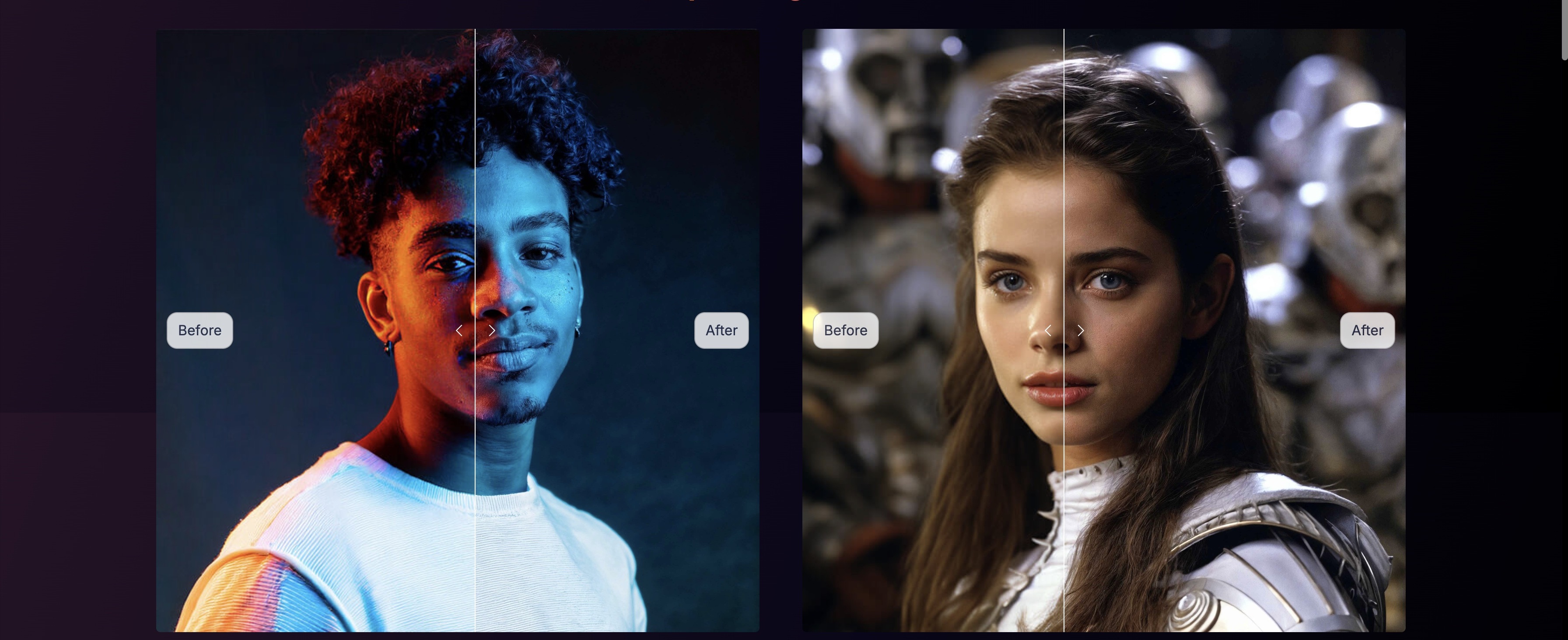
Featuring generative AI techniques, Magnific AI is an advanced image upscaling tool that can convert your low-resolution images into a crisp and polished visual. This AI image enhancer generates new details rather than enlarging the existing pixels for a clearer and better-quality output image. Magnific AI supports artistic and realistic images, featuring different sliders and controls for optimal customization. The tool is completely web-based and serves as an ideal fit for photographers, artists, and designers looking for a quick solution for image clarity and resolution.
Key Features:
- This AI-powered image enhancement tool lets you upscale image and balance realism through precise modifications.
- Magnific AI can upscale up to 4K resolution with textural, contrast, and color preservation.
- The AI image enhancer features noise reduction and guide enhancement through prompts for sharper images.
- It features different styles, including standard, portrait soft/hard, art & illustrations, videogame assets, landscapes, film, sci-fi & horror styles.
- Magnific AI lets you transfer the style of one image to another for advanced image enhancements.
Limitations:
The credit usage system makes experimenting with the tool difficult. This AI image enhancer can, at times, struggle with small faces and complex customization. The complex interface and limited free access make it slightly daunting for the beginners.
Pricing:
Magnific Pro is available at $39/month with 2,5000 tokens. Magnific Premium is available at $99/month with 6,500 tokens. Magnific Enterprise has custom pricing with larger token packages.
4. YouCam Online Editor
YouCam Online Editor is a browser-based AI image enhancer that helps users quickly improve photo quality without requiring advanced editing skills or software installation. Designed for both casual creators and marketers, it uses AI to sharpen details, upscale low-resolution images, remove unwanted objects, and enhance portraits in just a few clicks. Its intuitive interface and wide range of enhancement tools make it a practical option for users who want polished visuals for social media, e-commerce, presentations, or content marketing without a steep learning curve.

Key Features:
- Web-Based Editing: Accessible directly from a browser with no download required.
- AI Image Enhancer: Automatically improves clarity, sharpness, lighting, and overall image quality.
- AI Object Removal: Removes unwanted people, text, blemishes, or distracting elements from photos.
- AI Background Removal: Instantly isolates subjects and creates transparent backgrounds for product or profile images.
- AI Portrait Enhancement: Refines facial details and improves portrait quality with natural-looking results.
- Image-to-Video Generator: Converts a single image into short animated video clips for social and marketing use.
Limitation:
While YouCam Online Editor is highly accessible and beginner-friendly, some advanced professional editing capabilities and granular controls available in desktop software may be limited.
Pricing:
YouCam Online Editor offers free credits upon sign up to test a feature, PLUS plan with 100 credits at $3.33 per month, PRO plan with 300 credits $5.83 per month, and pay-as-you-go credit packs allow users to pay only for the AI tools they use.
5. Adobe Super Resolution
A built-in Adobe Photoshop and Adobe Lightroom tool, Adobe Super Resolution can analyze and enhance images using Adobe Sensei AI. This AI image upscaling tool can enlarge images up to 4 times the actual size, without losing any detail or adding distortions. It works on all types and formats of image files, including PNG, JPEG, RAW, and TIFF. The generated output can be further used for editing, making it ideal for photographers, designers, and content creators.
Key Features:
- This AI image enhancer is well-integrated with Adobe Creative Cloud applications, making the overall image editing process seamless within the same ecosystem.
- Trained on numerous images and large datasets, it gives your images a natural edge, refined details, finer texture, without any visual artifacts.
- It can increase image resolution by four times, making it perfect for large-format posters and displays.
Limitations:
Adobe Super Resolution can’t enlarge an image more than 4 times directly. It requires high GPU system and larger SSD storage for larger upscaling projects.
Pricing:
Adobe Creative Cloud Pro plan is available at $69.99/month, which includes Adobe Photoshop and Adobe Lightroom.
6. Luminar Neo
Luminar Neo is an incredible AI image upscaling and editing software with features such as Sky Enhancer AI, Noiseless AI, Supersharp AI, and AI Background Removal. The built-in AI upscaling tool allows you to reconstruct the missing details while increasing the resolution of your image. It is available for both Mac and Windows, making it accessible and available to all. The intuitive user interface allows for a simpler process and faster photo enhancements.
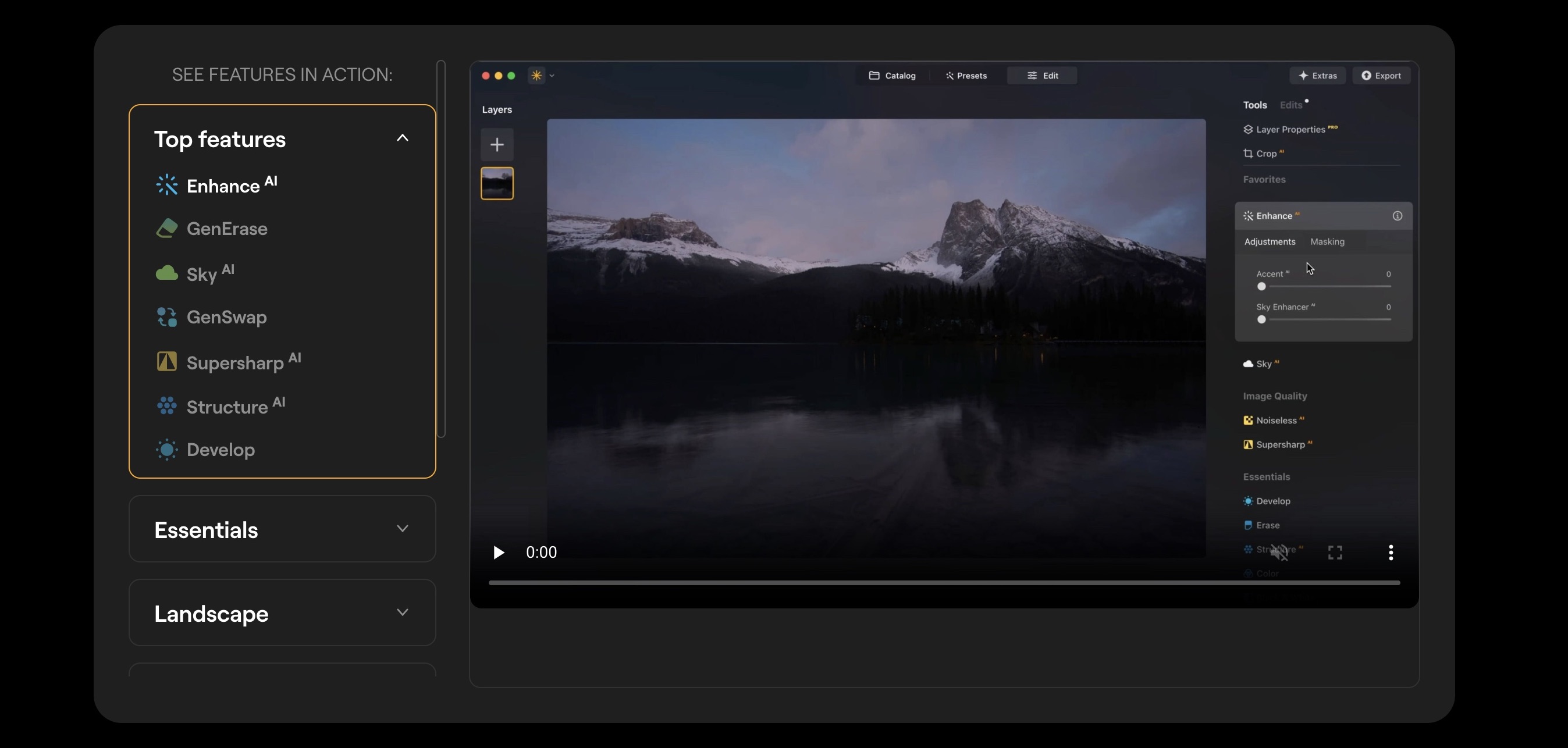
Key Features:
- With Enhance AI, you can improve and adjust brightness, contrast, lighting, and color in one click
- With Supersharp AI, you can reduce the blurred elements and parts of the image for improved resolution.
- This AI image upscaling tool lets you improve image sharpness and reduce noise.
- It features portrait enhancement to help you edit and enhance your portrait with minimal effort.
- It supports multiple formats, image resizing, and seamless integration.
Limitations:
The AI features of Luminar Neo come with subscription and aren’t available for free access. For optimal performance, you might need a 8-16GB RAM. Using AI features on Luminar Neo might need some learning for great results.
Pricing:
Luminar Neo costs around $8.25/month and is billed annually at $99 for core software with ongoing updates.
7. BigJPG
BigJPG is a free web-based AI image upscaler built on deep convolutional neural networks, designed to enlarge images without the blurring and pixelation associated with traditional resizing. It offers two distinct processing modes — one optimized for photographs and one for anime and illustration-style images — making it one of the few free tools that handles both photographic and digital art content with equal reliability.
The tool's core strength is accessibility: no account is required, no software installation, and the basic tier is completely free. Users upload an image, select their upscale factor and image type, and download the result in under a minute. BigJPG supports upscaling up to 16x, matching the maximum output of premium desktop tools like Topaz Gigapixel AI, though at lower resolution limits on the free tier.
For creators who need a quick, no-commitment upscaling option for web assets, social content, or illustration work, BigJPG is a practical starting point before investing in a paid subscription.
Key Features:
- Two processing modes: Photo and Anime/Illustration
- Up to 16x upscaling on supported plans
- No account required for basic use
- Batch processing available on paid plans
- Supports JPG and PNG formats
Limitations:
- Free tier limited to images under 3MB and 3000×3000px output
- Watermark applied on free downloads
- No advanced editing controls or style parameters
- Processing speed slower than web-based competitors on the free tier
Pricing:
- Free: Basic upscaling with watermark, file size limits apply
- Pro: ~$6/month — removes watermark, increases file size limits and processing priority
8. Upscayl
Upscayl is a free, open-source AI image upscaler for desktop — available on Windows, macOS, and Linux — that runs entirely offline without requiring an internet connection or account. Built on Real-ESRGAN and similar open-source AI models, it provides the same generative upscaling quality as cloud-based tools while keeping images on the user's local machine, making it a strong option for creators working with sensitive, confidential, or client-owned content they cannot upload to external servers.
The tool offers multiple AI model options selectable per image: standard models for photographs, dedicated models for digital art and illustrations, and sharper models for line art. Users can set custom upscale factors and process entire folders in batch — a meaningful advantage for photographers, game designers, and 3D artists managing large asset libraries who need consistent upscaling across hundreds of files without per-image credit costs.
Because Upscayl is open source with active development, its model library is regularly updated and advanced users can add custom models to extend its capability beyond the default options.
Key Features:
- Fully offline — no uploads, no account, no internet required
- Multiple AI models for photos, illustrations, and line art
- Batch processing for entire folders
- Custom upscale factor selection
- Available for Windows, macOS, and Linux
- Custom model support for advanced users
Limitations:
- Desktop only — no web or mobile version
- Processing speed depends on local hardware (GPU recommended for best performance)
- No built-in editing or style controls beyond upscaling
Pricing:
- Free — open source, no subscription required
9. Remini
Remini is an AI-powered photo enhancement app built primarily for face and portrait restoration, available on iOS, Android, and web. It uses generative adversarial network (GAN) technology to reconstruct facial detail from low-resolution, blurry, or damaged photos — making it the most widely used consumer tool for restoring old photographs, degraded scans, and compressed portrait images.
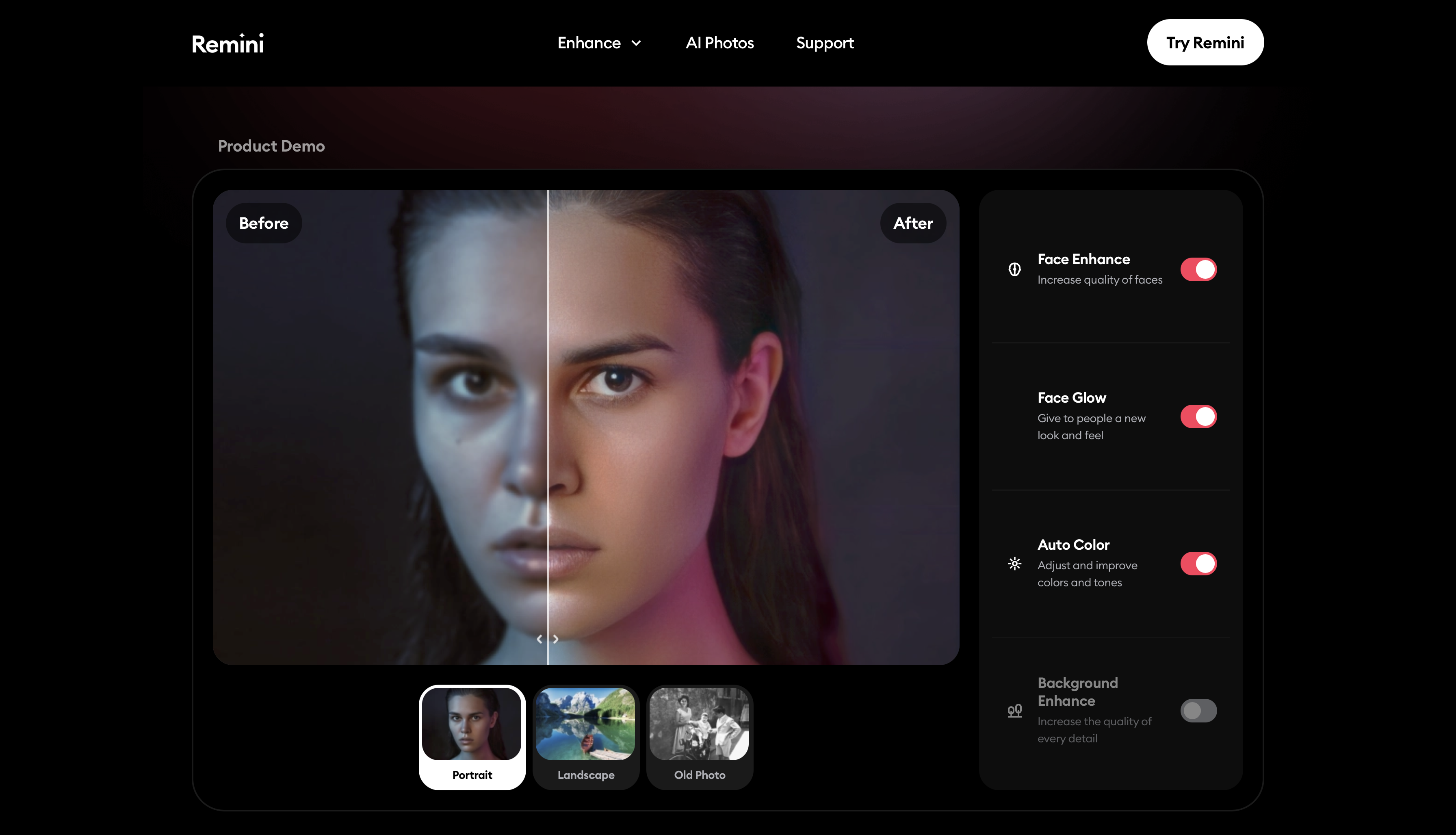
The app's face enhancement engine targets facial regions within an image and applies reconstruction to restore skin texture, eye detail, and sharpness independently from the background. This makes it particularly effective for portrait photography, selfie enhancement, and archival photo restoration where faces are the primary subject — use cases where general-purpose upscalers often produce flat or over-smoothed results.
Beyond still images, Remini extends its enhancement engine to video, allowing users to apply AI sharpening to mobile footage directly from a phone. For content creators who shoot on smartphones and need a quality boost before publishing, this makes Remini one of the most practical mobile-first tools in this category.
Key Features:
- AI face reconstruction for portraits and old photo restoration
- Video enhancement for mobile footage
- Selfie and portrait AI enhancement
- Batch photo processing on premium plans
- Available on iOS, Android, and web
Limitations:
- Optimized for faces — results on landscapes, products, and non-portrait images are inconsistent
- Weekly free generations are limited; premium required for regular use
- Mobile-first interface — web version has fewer features than the app
Pricing:
- Free: Limited weekly enhancements
- Premium: $9.99/month or $49.99/year
How to Choose the Best AI Image Enhancer
The right tool depends on what kind of image you're working with, how much control you need, and whether you want a one-click fix or a full editing workflow.
Best AI image enhancer for eCommerce and product photos
Use Magnific AI or ImagineArt Image Upscaler. Product images need accurate color, texture, and edge detail without over-generating content that misrepresents the product. Magnific AI's style modes let you control how much detail is added versus preserved. ImagineArt Image Upscaler is the faster, lower-cost option for high-volume product image batches.
Best AI image enhancer for portrait and face restoration
Use Remini or Topaz Gigapixel AI. Remini is purpose-built for face reconstruction — it targets facial regions specifically and restores skin texture, eye detail, and sharpness that general upscalers flatten. Topaz Gigapixel AI is the stronger option for professional restoration work, with a dedicated face recovery mode and support for upscaling up to 16x alongside the facial enhancement.
Best AI image enhancer for maximum upscale factor
Use Topaz Gigapixel AI or BigJPG. Both support up to 16x upscaling — the highest in this list. Topaz Gigapixel AI produces the more controlled output and is better suited for professional photography and print. BigJPG is the right choice when you need the same upscale range for free, particularly for illustrations or anime-style images where its dedicated processing mode produces cleaner results.
Best AI image enhancer for artistic and AI-generated images
Use Magnific AI. It offers style-specific upscaling modes — portrait, art, landscape, film, videogame — that tailor the enhancement to the image type rather than applying a universal model. This makes it the most capable option for AI-generated images, digital art, and stylized photography where generic upscalers reduce the intentional aesthetic of the original.
Best AI image enhancer for Adobe users
Use Adobe Super Resolution. If you're already in a Lightroom or Photoshop workflow, there's no reason to export to a separate tool. Adobe Super Resolution runs inside your existing Creative Cloud apps, supports RAW, TIFF, JPEG, and PNG, and requires no additional subscription beyond what you already pay.
Best AI image enhancer for offline or privacy-sensitive work
Use Upscayl. It is the only tool in this list that runs entirely on your local machine with no internet connection required and no file uploads. For creators working with client images, confidential product imagery, or watermarked assets that cannot leave a local environment, Upscayl is the only viable option. It also supports batch processing across entire folders at no cost.
Best free AI image enhancer with no limits
Use Upscayl or BigJPG. Upscayl is completely free with no usage limits — the only cost is local processing time. BigJPG's free tier covers basic upscaling without an account, though it applies a watermark and caps file size. For free web-based enhancement without a desktop install, YouCam Online Editor and ImagineArt Image Upscaler both offer free credits on signup.
Conclusion
AI image upscaling tools help you save time on manual editing and refining of images. These AI-powered image enhancement tools allow designers, creative professionals, artists, and marketers to transform an ordinary visual into a high-resolution assets — saving time and extra efforts.
Related reading:
Best AI Image Generators for Photorealistic Visuals
Best AI Image Generators for Artistic Visuals
Best AI Image Generators for Cinematic Visuals
Tooba Siddiqui
Tooba Siddiqui is a content marketer with a strong focus on AI trends and product innovation. She explores generative AI with a keen eye. At ImagineArt, she develops marketing content that translates cutting-edge innovation into engaging, search-driven narratives for the right audience.