

Arooj Ishtiaq
March 26, 2026 • Updated July 9, 2026
10 mins Read
Creating a visually appealing image is easy, but keeping it consistent, editable, and responsive to feedback is where most tools fall short. That’s why comparing Seedream 5.0 Lite and Seedream 4.5 matters. Both are from ByteDance, but they perform differently when handling strict constraints, editing reliability, and multi-image consistency.
This Seedream 5 vs 4.5 guide breaks down the key differences and helps you choose the right version for your workflow.
Head-to-Head Comparison: Seedream 5 vs 4.5
Before diving into Seedream 5 vs 4.5, here’s a side-by-side look at how they compare across key capabilities:
| Dimension | Seedream 4.5 | Seedream 5.0 Lite |
|---|---|---|
| Primary direction | Image quality first | Intelligence and reasoning first |
| Web search integration | Not available | Yes |
| Deep reasoning | Basic prompt understanding | Multi-step spatial, physical, and logical reasoning |
| Vague intent editing | Requires precise instructions | Supports vague instructions like “make this look more high-end” |
| Example-based editing | Not supported | Yes — applies A-to-B transformations to new images |
| Realism & material texture | Near-photographic, natural rendering | Slightly artificial; flatter material rendering |
| Dense small text rendering | Professional-grade consistency | Occasional distortion |
| Text layout hierarchy | Basic | Clear title, subtitle, and body hierarchy |
| Bilingual text layout | Average | Significantly improved |
| Structural stability | Mature and stable | Occasional distortions |
| Character consistency | Excellent | Further improved |
| Information visualization | Basic | Enhanced with reasoning |
| Reference image support | 1–14 images | 1–14 images |
What Seedream 4.5 Is Built For?
Seedream 4.5 focuses on working with existing images at a precision level that earlier versions couldn’t achieve. Its main strengths lie in editing, consistency, and accurate typography. On ByteDance's internal MagicBench benchmark, it showed significant improvement over Seedream 4.0 in prompt adherence, alignment, and aesthetics for both text-to-image and single-image editing tasks.
Reference Image Consistency
Seedream 4.5 preserves facial features, lighting, colour tone, and structural details from reference images when making edits. Changes are targeted, leaving the surrounding elements intact. Official documentation demonstrates this with examples:
- Changing the clothing material from silver metal to transparent water while keeping the pose and dress shape unchanged, with the lighting shifting from reflection to refraction
- Translating text within an image to Chinese using a handwritten font without altering other content
- Changing a single highlighted word to blue italic text without affecting anything else
- Removing specific characters while keeping the outlined character intact
These capabilities address real commercial needs like product adaptation, multi-market localisation, and asset updates without reshooting. Creators can combine Seedream 4.5 with ImagineArt's editing tools, including the AI object remover, relight tool, and background changer, for a complete workflow.
Multi-Image Editing
Seedream 4.5 identifies target elements across multiple images and ensures consistent output across the set. This is particularly useful for:
- E-commerce teams are producing product imagery across multiple scenes
- Agencies running character-based campaigns require consistent subjects
- Any project where a subject or visual element must remain identical across assets
For teams handling this at volume, ImagineArt's AI Workflow supports node-based pipelines that process multi-image sets through Seedream 4.5 as a repeatable, structured step, removing the overhead of managing each generation individually.
Typography and Dense Text Rendering
Text is often where AI image models fail, but Seedream 4.5 handles dense, small, and multi-line text accurately. Examples include:
- Exhibition posters with small-font venue, date, and story text precisely aligned
- Beauty product visuals with labelled ingredients, compound names, and percentages
- Gym promotional visuals with layered typography and geometric backgrounds
- Wedding invitation designs with gold foil text and structured card layouts
- Product detail pages with multi-element copy
For any workflow where text is structural, Seedream 4.5 produces commercially reliable results.
Poster Layout and Logo Design
Beyond text rendering, Seedream 4.5 delivers designer-level compositions for posters, brand visuals, and multi-element layouts by treating visual hierarchy as a structural principle. Instead of handling text blocks, imagery, and whitespace independently, the model considers their relationships as a whole, producing structured outputs that are ready for commercial use without post-generation layout corrections. It performs well across a variety of layout-heavy scenarios, including:
- Minimalist exhibition posters with precise typographic placement and balanced negative space
- High-end product detail pages where copy tone, colour palette, and layout hierarchy work seamlessly together
- Multi-element advertising visuals that combine real-world objects with illustrative or hand-drawn components
- Invitation and event collateral designs featuring layered decorative and typographic elements
For teams creating logos and brand assets, ImagineArt's AI logo generator is an excellent resource to explore alongside Seedream 4.5’s layout capabilities.
What Seedream 5 Does Well?
Seedream 5.0 Lite represents a strategic shift in what the model is designed to do. The main improvement brought by Seedream 5.0 Lite is not higher resolution or faster speed, but the deep thinking behind 'reading', 'seeing', 'drawing', and 'writing
Web Search Integration
Seedream 5 is the first image generation model to include real-time web search as a native capability. Before generating, the model determines whether a prompt involves time-sensitive information, and if it does, it retrieves current data before producing the image. This is not triggered on every generation — standard creative requests bypass the search entirely. Where it activates, it produces meaningfully different results:
- A prompt for a "2026 Oscar Best Picture poster style" retrieves current information rather than relying on training data
- A request for "latest product ad imagery" fetches current visual references rather than generating outdated versions
- A prompt describing a current weather scene visualises real-time conditions rather than generic representations
For content teams working on time-sensitive social content, editorial visuals, or trend-responsive marketing campaigns, this is a capability Seedream 4.5 simply cannot provide.
Deep Reasoning
Where Seedream 4.5 understands prompts, Seedream 5 reasons through them. This distinction produces meaningfully different outputs in scenarios that require multi-step logic rather than direct prompt interpretation:
- Spatial reasoning: Complex layouts such as "A is top-left of B, C is directly below D" are handled accurately, whereas Seedream 4.5 often struggles with intricate spatial relationships
- Physical consistency: Reflection angles, water reflections, and perspective are rendered with stronger physical accuracy
- Logical deduction: Tasks such as predicting the next move in a game or inferring assembly results from scattered parts are within Seedream 5's capability range
- Domain knowledge: Scientific diagrams, geological cross-sections, ecosystem illustrations, and anatomy visuals benefit from Seedream 5's richer built-in knowledge base
For creators producing educational content, information visualisations, or knowledge-driven graphics, this reasoning depth produces more accurate outputs.
Vague Intent and Example-Based Editing
Seedream 5 introduces two editing capabilities that Seedream 4.5 does not support. Vague intent editing removes the requirement for precise instruction writing — a prompt like "make this photo look more high-end" is interpreted and executed without needing to specify every individual change.
Example-based editing goes further: you provide a set of before-and-after transformation examples, and the model learns the transformation logic to apply it to new images. This is particularly useful for:
- Maintaining style consistency across batches without rewriting detailed prompts for each asset
- Applying a defined visual treatment across a large set of images efficiently
- Creative direction workflows where the desired outcome is better shown than described
Where Seedream 5 Regresses Compared to Seedream 4.5?
Seedream 5 is a deliberate strategic shift toward intelligence and reasoning, and ByteDance has been transparent about the trade-offs that come with that direction.
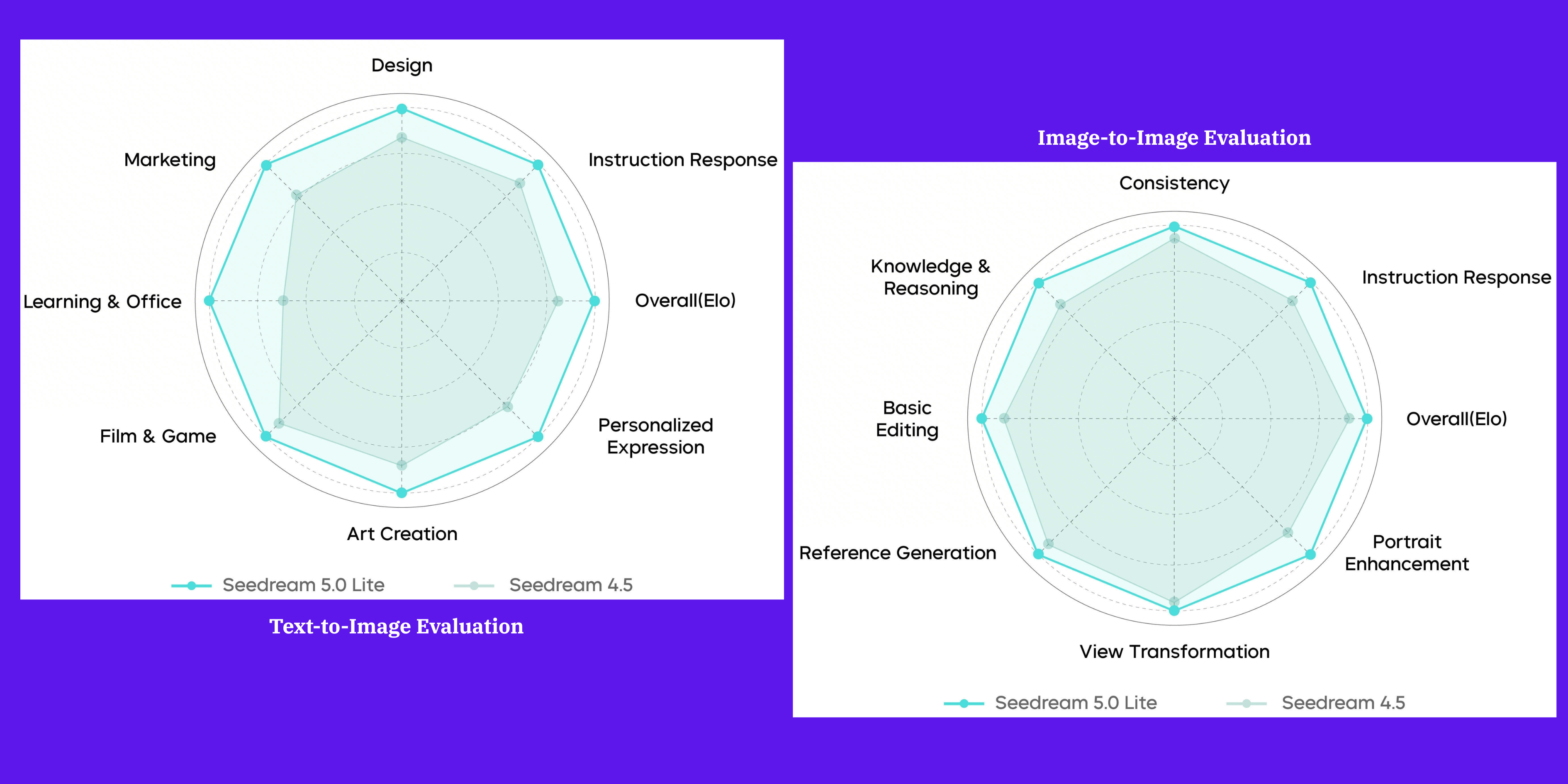 Where Seedream 5 Regresses Compared to Seedream 4.5
Seedream 5 vs 4.5: Realism and Material Rendering
Seedream 4.5 produces near-photographic output with natural skin textures, layered material surfaces, and soft lighting transitions. Seedream 5 does not match this standard in its current form, with outputs that carry a more visible AI-generated quality. The differences are most apparent in:
- Skin texture, which appears natural in 4.5 but occasionally reads as plastic in 5
- Material surfaces such as metal and fabric, which carry realistic depth in 4.5, but render relatively flat in 5
- Lighting transitions, which are nuanced in 4.5 but trend slightly harsh in 5
For commercial product photography, portrait work, and premium brand visuals where photographic realism is a baseline requirement, Seedream 4.5 remains the stronger model. ByteDance has confirmed that the full Seedream 5.0 release will address realism further. The current 5.0 Lite treats it as a deliberate trade-off in favour of intelligence capabilities.
Seedream 5 vs 4.5: Dense Small Text Precision
Text rendering is still a limiting factor in AI-generated imagery, but Seedream 5.0 Lite makes a notable improvement. It handles bilingual typography in English and Chinese with clearer structure, better spacing, and improved readability of small text.
The model also produces reliable poster-style layouts with intentional hierarchy, balanced negative space, and clear separation between headlines, subheads, and other textual sections, making it particularly suitable for social media and marketing visuals.
Seedream 5 vs 4.5: Structural Stability
In compositions with multiple elements, complex spatial relationships, or detailed human poses, Seedream 5 produces anatomical distortions and spatial misalignments more frequently than Seedream 4.5. For technically demanding scenes, this creates additional review cycles. The ImagineArt camera angles tool and AI replace app can address specific structural issues in outputs without requiring a full regeneration.
Seedream 5 vs 4.5: Which Model Fits Your Workflow
Use Seedream 4.5 If
- Your workflow involves editing existing images with strict preservation of reference details
- Your production requires near-photographic realism for product photography, portrait work, or premium brand visuals
- Your brief includes dense small text — menus, manuals, data dashboards, or ingredient lists — where rendering precision is critical
- You need a consistent subject identity maintained across a batch of images as a single operation
- Your team has an established prompt library and quality standard built around 4.5, which is producing reliable results
Use Seedream 5 If:
- Your content needs to reflect current events, trending topics, or real-time information, where web search integration adds direct value
- Your prompts involve complex spatial relationships, physical simulations, or domain-specific knowledge, where reasoning depth improves accuracy
- Your workflow includes batch-style consistency tasks where example-based editing removes the need to rewrite detailed prompts for each asset
- You are producing educational content, information visualisations, or knowledge-driven graphics that benefit from deeper model reasoning
Seedream 5 vs 4.5 Pricing & Credit Consumption on ImagineArt
Seedream 4.5 is priced at $0.04 per image on external platforms, while Seedream 5.0 Lite comes at a lower per-image cost. On ImagineArt, this difference translates directly to credit usage: Seedream 4.5 consumes 24 credits per image, whereas Seedream 5.0 Lite uses 20 credits per image.
For teams generating content at scale, that four-credit difference per image can add up quickly. A practical approach is to run intelligence-driven tasks through Seedream 5.0 Lite while reserving Seedream 4.5 for work where image quality or reference fidelity is critical.
Which Seedream Version Is Right for You?
If your work requires photographic realism, dense text accuracy, or precise reference-based editing, Seedream 4.5 is the best fit. If you need trend-responsive content, complex reasoning, batch style consistency, or want to reduce credit consumption at volume, Seedream 5.0 Lite provides capabilities that 4.5 does not.
Both are available on ImagineArt's AI image generator under a single subscription.
Arooj Ishtiaq
Arooj is a SaaS content writer specializing in AI models and applied technology. At ImagineArt, she creates sharp, product-focused content that helps creators and businesses understand, adopt, and get real value from AI tools.