
Kamran Arshad
November 13, 2026 • Updated November 14, 2026
13 mins Read
Seedream 5.5 is ByteDance Seed's newest image generation and editing model, released on November 9, 2026. In our tests on ImagineArt, it beat Seedream 5.0 Pro where it matters for production: edits drifted about three times less, transparent PNGs came straight from the prompt, and small text came out readable, full paragraphs included.
The short verdict: use Seedream 5.5 for repeated edits, cutouts, packaging and anything with real text on it. Stay on Seedream 5.0 Pro when you need native 4K files.
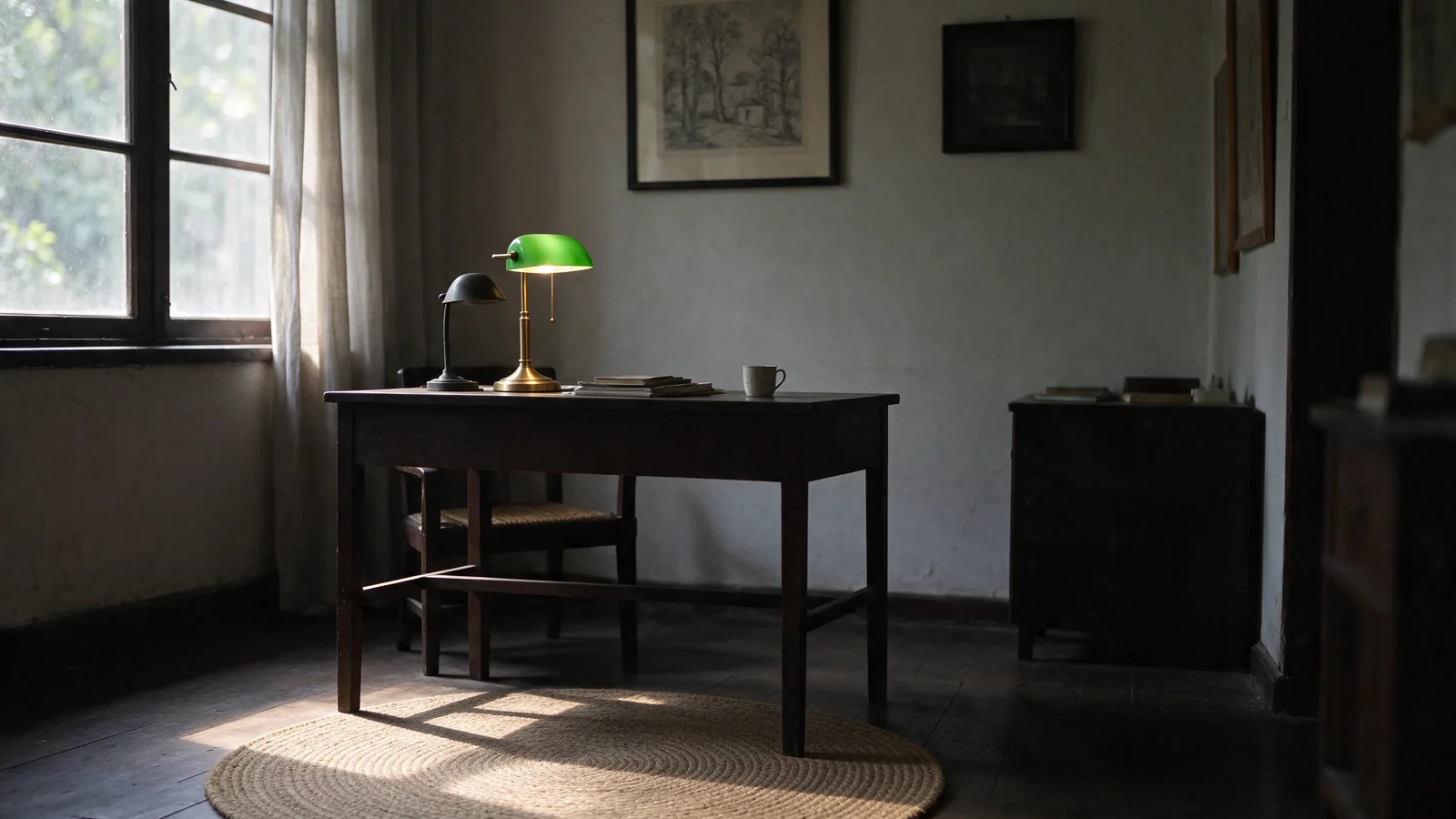
A study edited three times in Seedream 5.5, with a rug and a green desk lamp added and the rest of the room unchanged
Seedream 5.5 at a glance
| Spec | Seedream 5.5 |
|---|---|
| Maker | ByteDance Seed |
| Released | November 9, 2026 |
| Best at | Multi-round edits, transparent PNGs, realistic light and skin, small dense text |
| Aspect ratios on ImagineArt | 1:1, 2:3, 3:2, 3:4, 4:3, 9:16, 16:9 |
| Resolution on ImagineArt | 1K or 2K (2K is 2368 x 1776 at 4:3) |
| Reference images on ImagineArt | Up to 14 per edit |
| Transparent output | Yes, as a PNG with a real alpha channel; ask for it in the prompt |
| Text | English and Chinese, including dense small type |
| API price | From $0.02 per image on BytePlus, ByteDance's API platform |
| Pro version | Announced by ByteDance, no release date yet |
Is Seedream 5.5 better than Seedream 5.0 Pro?
Yes, for most production work. We ran the same prompts on both models on ImagineArt on November 13, 2026, at 2K with the prompt enhancer off, one run per prompt. Here's how they compared.
| Test | Seedream 5.0 Pro | Seedream 5.5 |
|---|---|---|
| Drift in untouched areas, per edit | 2.1 to 2.3 levels out of 255 | 0.7 levels out of 255 |
| Pixels that visibly changed after two edits | 2.0% | 0.0% |
| Transparent PNG from a text prompt | Only when you start from a transparent image | Yes, real alpha channel |
| Newspaper body text | Readable headlines, slips such as "Thandday" in the dateline | Full grammatical paragraphs; one slip ("mcd-ern") in the columns we proofread |
| Infographic captions | Slips such as "Antnnae" | All eight captions spelled correctly |
| Native 4K | Yes | No; 1K or 2K on ImagineArt |
Pick Seedream 5.5 for edits, cutouts and text. Pick Seedream 5.0 Pro if you need native 4K print files, or for a workflow already tuned to it.
Test 1: Edits that don't drift
This is the headline upgrade, so we measured it instead of eyeballing it. We generated an empty study, then made two single-change edits, adding a jute rug and then a desk lamp, on both Seedream 5.0 Pro and 5.5 with the same prompts. Then we compared the pixels in the parts of the room each edit was told to leave alone: the window, the walls and the ceiling.
Edit prompt: Add a round jute rug on the floor in front of the desk. Change nothing else: keep the walls, window light, floorboards, desk, chair and camera angle exactly as they are.
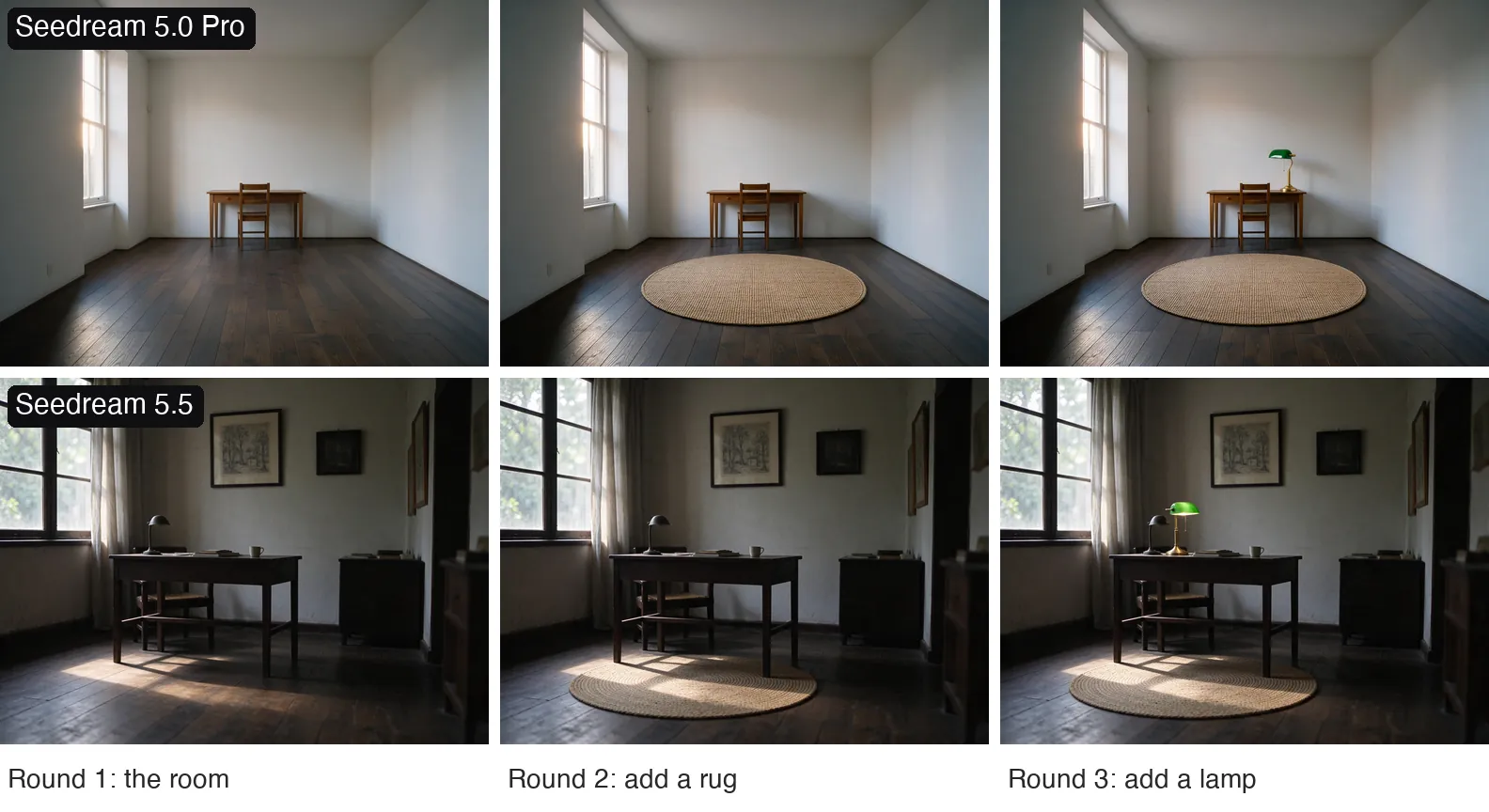 Seedream 5.0 Pro and Seedream 5.5 edit chains side by side: a study, then a rug added, then a lamp added
| Untouched areas | Seedream 5.0 Pro | Seedream 5.5 |
|---|---|---|
| Average change, round 1 to 2 | 2.1 / 255 | 0.7 / 255 |
| Average change, round 2 to 3 | 2.3 / 255 | 0.7 / 255 |
| Average change after both edits | 3.7 / 255 | 1.2 / 255 |
| Pixels that moved visibly (more than 12 levels) | 2.0% | 0.0% |
Seedream 5.5 drifted about three times less, and nothing outside the edits moved enough to see. One caveat: 5.0 Pro saves JPEGs and 5.5 saves PNGs, and JPEG compression adds a little noise of its own, so part of 5.0 Pro's number is compression. The visible-change figure, 2% against 0%, isn't affected by that.
ByteDance's own demo pushes this to 100 rounds on one portrait. We ran two rounds, so treat 100 as a stress test rather than a promise, but the trend in our numbers matches the claim.
Test 2: Transparent PNGs straight from the prompt
On ImagineArt, Seedream 5.5 has no background switch. You simply ask for transparency in the prompt. We tried three subjects that are hard to cut out: a snowy owl with spread feathers, a frosted perfume bottle with a sheer ribbon, and hand-painted lettering.
Prompt: A snowy owl with wings fully spread, every flight feather clearly layered, fine gaps between the wingtip feathers, sharp talons, isolated on a transparent background.
All three came back as PNGs with a real alpha channel, no background remover needed. Feather tips and brush edges had soft, partly transparent edges instead of hard, jagged cutouts.
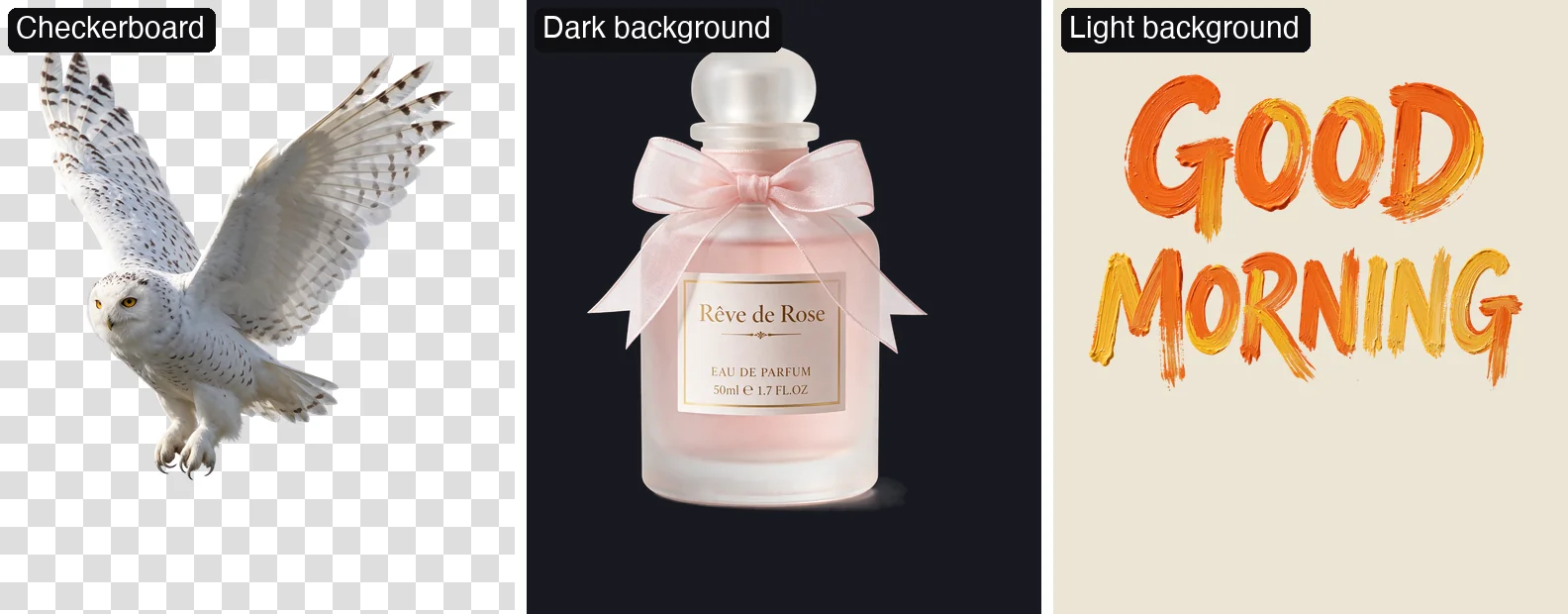 Seedream 5.5 transparent PNGs: an owl on a checkerboard, a perfume bottle on a dark background and GOOD MORNING lettering on a light background
| Subject | Fully transparent area | Partly transparent pixels in the subject |
|---|---|---|
| Owl | 71.6% of the frame | 3.1% |
| Perfume bottle | 61.2% of the frame | 3.4% |
| Lettering | 77.7% of the frame | 9.9% |
We noticed two things:
- The frosted glass itself came out mostly solid, not see-through. The soft transparency sits at the edges. If you need truly see-through glass, check the result on a dark background before you use it.
- The model added a label reading "Rêve de Rose" to the bottle that we never asked for. If you don't want text on a product, say "no label, no text".
Cutouts like these drop straight into ad layouts, marketplace tiles and decks. For clothing, AI Fashion Studio goes a step further and puts your garment on a model that stays the same in every shot.
Test 3: Small text you can actually read
Dense text is where image models usually collapse into gibberish. We asked both versions for a broadsheet newspaper front page about Shakespeare's Globe Theatre with four columns of small body text.
Prompt: A broadsheet newspaper front page about Shakespeare's Globe Theatre, a masthead, an engraved portrait of Shakespeare, an illustration of the theatre, and four columns of small readable English body text with subheads and a pull quote, aged newsprint texture.
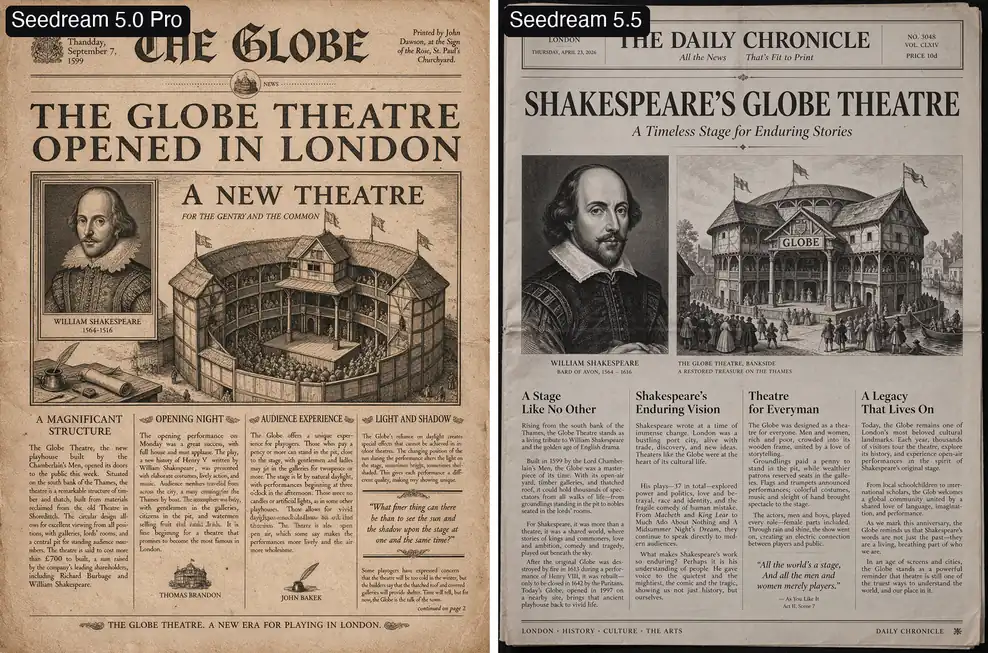 Seedream 5.0 Pro and Seedream 5.5 newspaper front pages from the same prompt
Seedream 5.0 Pro got the headlines right but slipped in the details, with "Thandday" in the dateline. Seedream 5.5 wrote real, grammatical paragraphs, column after column. Here's an unedited crop of its body text:
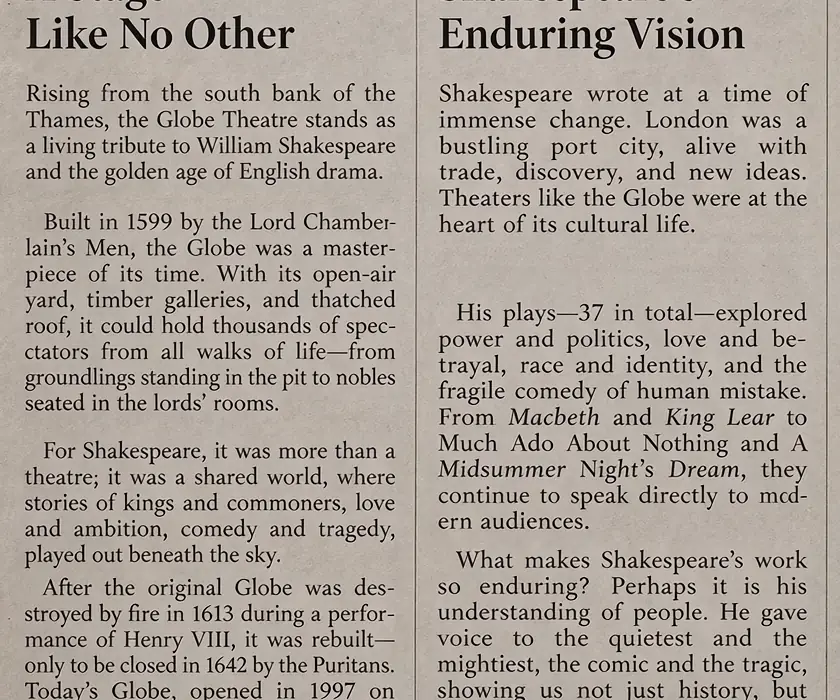 Close-up of Seedream 5.5 newspaper body text: full readable paragraphs about the Globe Theatre
In the text we proofread, the only slip was "mcd-ern" where a hyphenated "modern" broke across a line. We saw the same jump on an infographic: Seedream 5.5 spelled all eight butterfly captions correctly, where 5.0 Pro wrote "Antnnae".
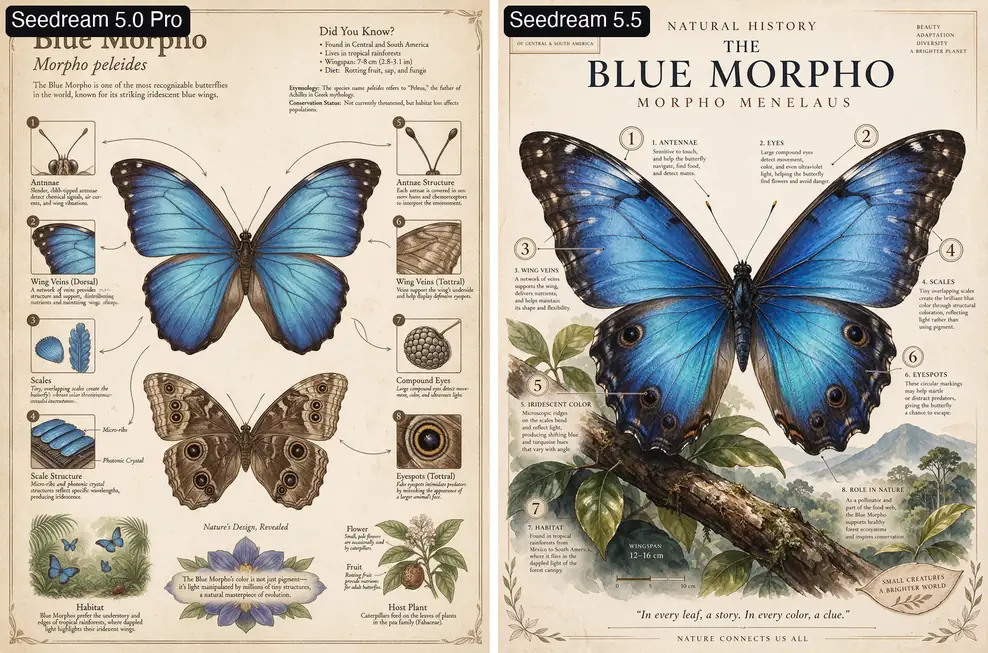 Seedream 5.0 Pro and Seedream 5.5 blue morpho butterfly infographics from the same prompt
Still proofread anything you'll print. Numbers, prices and dates deserve a second look on any model.
Test 4: Light that looks shot, not rendered
Seedream 5.5 is tuned for photographs that don't look generated: softer light falloff, real material texture and skin that keeps its detail in shadow. We ran the same candid portrait prompt on both versions.
Prompt: A candid portrait of a father asleep on a linen sofa with a newborn on his chest, soft afternoon window light across his forearms, visible skin texture and fine arm hair, a wrinkled cotton T-shirt, quiet everyday mood, shot on 50mm, natural color.
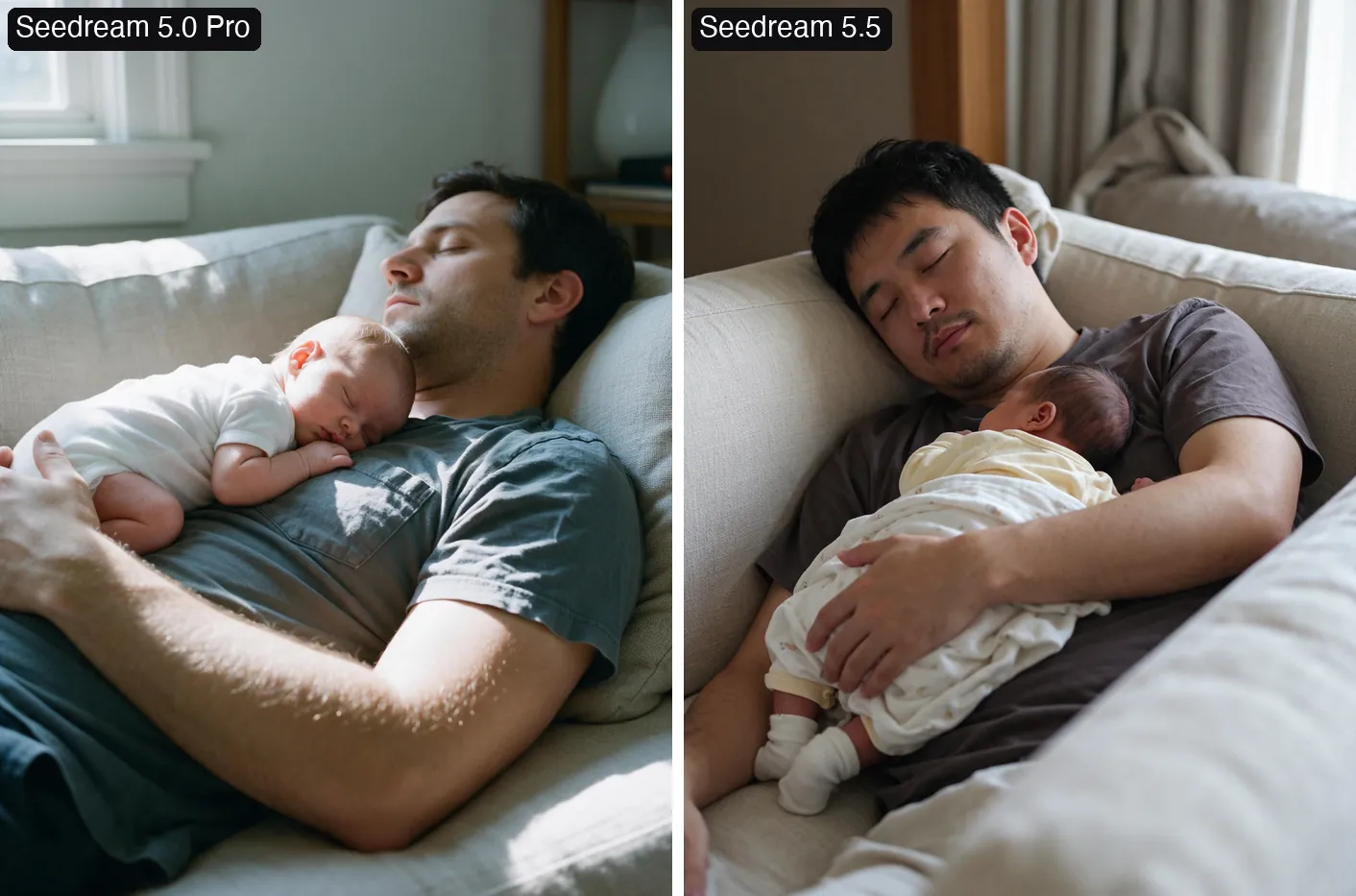 Seedream 5.0 Pro and Seedream 5.5 portraits of a father asleep with a newborn, same prompt
Both are convincing. To our eye, Seedream 5.5's version reads more like a real snapshot: the window light falls off naturally across the room, and the scene feels less staged. A frame like this also makes a strong starting point for an AI video generator if you want the moment to move.
Materials benefit just as much. Here's a velvet curtain in hard afternoon light from Seedream 5.5:
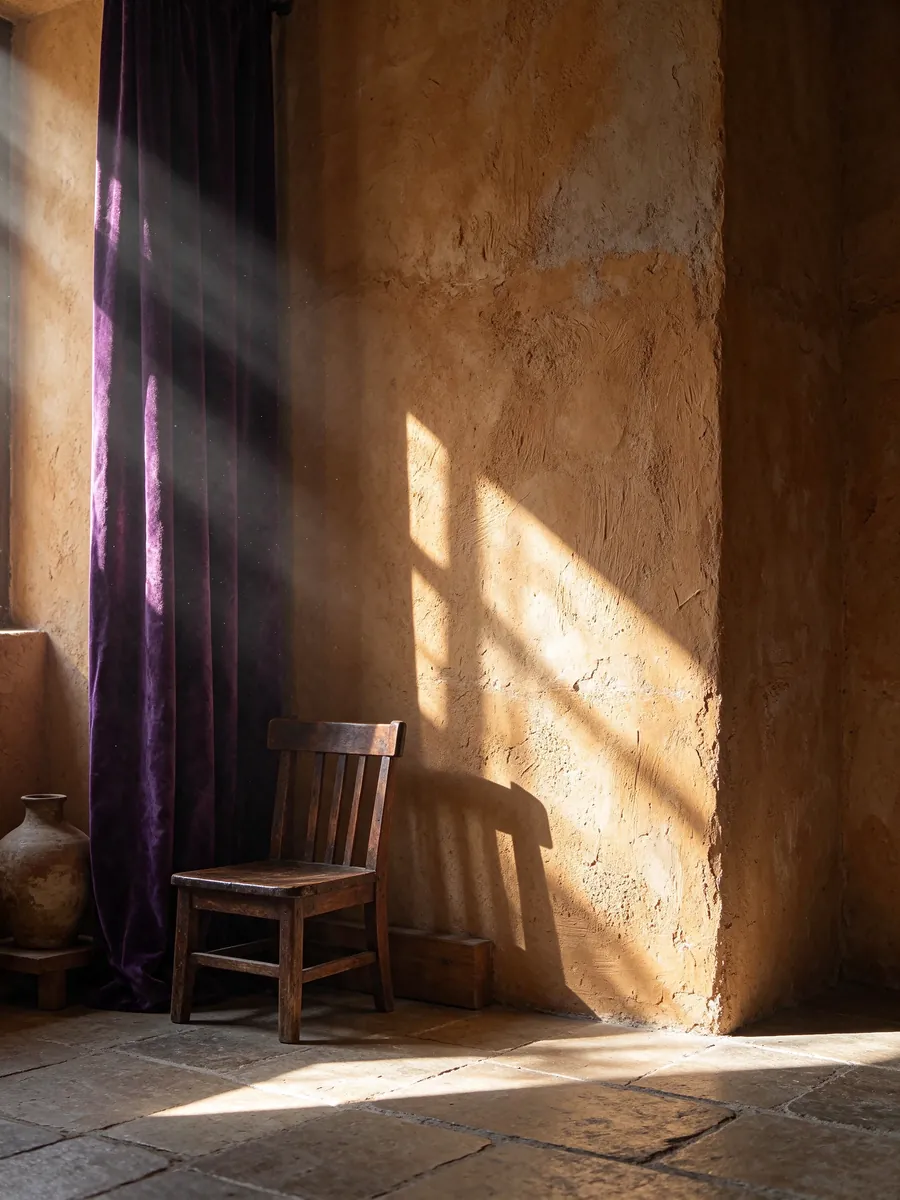 Seedream 5.5 purple velvet curtain in hard afternoon light against an ochre plaster wall
How to prompt multi-round edits in Seedream 5.5
The edit preservation only pays off if you edit in a way that lets it work. These habits gave us the cleanest chains:
- Make one change per round. "Add a round jute rug" beats a list of five changes.
- Name what must stay. End each edit with "Change nothing else: keep the walls, window light and furniture exactly as they are."
- Feed each output into the next edit, rather than going back to the original every time.
- Keep the camera fixed. Don't ask for a new angle in the middle of a chain.
- If something drifts, step back one round and rephrase instead of fixing it in the next edit.
- For consistent characters or products across a set, attach them as reference images. ImagineArt accepts up to 14 per edit.
Seedream 5.5 vs Nano Banana 2.1 and GPT Image 2.6
Seedream 5.5 isn't the best model for every job. Here's where it fits next to the other top image models on ImagineArt.
| If you need | Pick | Why |
|---|---|---|
| Many rounds of edits on one image | Seedream 5.5 | Untouched areas stay put, as our drift test showed |
| Transparent PNG cutouts | Seedream 5.5 | Real alpha channel straight from the prompt |
| Dense small text, menus, packaging | Seedream 5.5 or GPT Image 2.6 | Both set small type cleanly; proofread either |
| Editing a real photo where faces must stay identical | Nano Banana 2.1 | ByteDance's own chart shows 5.5 behind it on image-to-image realism |
| Looping GIFs or SVG logos | GPT Image 2.6 | Seedream 5.5 outputs still images only |
| Native 4K print files | Seedream 5.0 Pro | 5.5 tops out at 2K on ImagineArt |
All of these sit side by side in ImagineArt's AI image generator, so you can run the same prompt through two models and keep the better result.
Seedream 5.5 benchmarks, read honestly
The benchmarks published so far all come from ByteDance itself, and no independent leaderboard has ranked Seedream 5.5 yet. Read them as the maker's own numbers.
- Text: ByteDance reports serious text errors in 0.4% of outputs and minor errors in 1.7%, across English and Chinese.
- Usability: in six production categories scored by its own evaluators, 5.5 beat 5.0 Pro in every one, and usability more than doubled in film/TV and office work. The chart's scale tops out at 35%, though, so even doubled, most outputs in those tests were judged not ready to use as they were.
- Head-to-head: ByteDance's pairwise chart puts 5.5 ahead of GPT Image 2.5 Sunburst and Seedream 5.0 Pro on text and realism. Against Nano Banana 2.1 it's nearly level on text, ahead on text-to-image realism, and behind on image-to-image realism (-6.18%). The launch post mentions only the categories 5.5 wins.
Our own tests line up with the edit and text claims. The fair reading: a clear step up from 5.0 Pro, but not the best choice for every photo edit.
Seedream 5.5 pricing and API
On ImagineArt, your first few images are free, and models are free and unlimited on certain plans. The pricing page lists which.
Through ByteDance's BytePlus API platform, Seedream 5.5 starts at $0.02 per image, with prepaid packs for volume. Third-party API hosts such as WaveSpeed and Kie.ai charge from about $0.02 at 1K to $0.035 at 2K, and some bill every reference image in an edit separately, so multi-image edits cost more than the headline price. If you'd rather skip API keys entirely, ImagineArt runs Seedream 5.5 in the browser.
How to use Seedream 5.5 on ImagineArt
From prompt to a finished, editable image takes about a minute.
- Open Seedream 5.5 in the ImagineArt image tool, or pick it from the model picker.
- Choose an aspect ratio and set resolution to 2K. Turn the prompt enhancer off if you want the model to follow your words exactly.
- Type your prompt. Add "isolated on a transparent background" if you want a cutout.
- To edit, press + and attach the image, then describe one change and what must stay the same.
- Generate, check the result, and keep editing one change at a time.
- Download the PNG, or keep editing until it's right.
Seedream 5.5 prompts to copy
Every prompt here produced an image on this page in Seedream 5.5. Keep the structure: subject, material, light, then exact text in quotes and what must stay the same.
Realism
A candid portrait of a father asleep on a linen sofa with a newborn on his chest, soft afternoon window light across his forearms, visible skin texture and fine arm hair, a wrinkled cotton T-shirt, quiet everyday mood, shot on 50mm, natural color.
A sunlit room corner with a heavy purple velvet curtain, its folds catching hard afternoon light and casting a long shadow on a rough ochre plaster wall, a wooden chair in the corner, dust in the light beam.
Transparent PNGs
A snowy owl with wings fully spread, every flight feather clearly layered, fine gaps between the wingtip feathers, sharp talons, isolated on a transparent background.
The words "GOOD MORNING" painted in thick gouache brushstrokes in warm orange and yellow, visible bristle texture and paint ridges, isolated on a transparent background.
Small text
A broadsheet newspaper front page about Shakespeare's Globe Theatre, a masthead, an engraved portrait of Shakespeare, an illustration of the theatre, and four columns of small readable English body text with subheads and a pull quote, aged newsprint texture.
A natural-history infographic of a blue morpho butterfly, a large central illustration with eight numbered callouts on the antennae, wing veins, scales and eyespots, each with a short readable caption, cream paper, fine ink linework.
An edit chain
Round 1: A quiet old study with dark wood floorboards, a tall window with soft morning light on the left, plain white walls, a simple wooden desk and chair against the back wall, an empty floor in the foreground, photoreal interior photography, eye-level wide shot.
Round 2: Add a round jute rug on the floor in front of the desk. Change nothing else: keep the walls, window light, floorboards, desk, chair and camera angle exactly as they are.
Round 3: Add a brass reading lamp with a green glass shade on the desk. Change nothing else: keep the rug, walls, window light, floorboards, desk, chair and camera angle exactly as they are.
Seedream 5.5 limitations
Plan around these before you build a workflow on it.
- No native 4K. ImagineArt offers 1K or 2K, so upscale or use Seedream 5.0 Pro for large print.
- Frosted glass and sheer fabric come out mostly solid in transparent PNGs; the soft transparency is at the edges.
- It can add text you didn't ask for, like a perfume label. Say "no text" when you don't want any.
- Small text is much better but not perfect. We still found one slip in a full newspaper page.
- Still images only. For loops or vector logos, use GPT Image 2.6.
- All published benchmarks are ByteDance's own, and its own chart puts 5.5 behind Nano Banana 2.1 on photo-to-photo realism.
Frequently Asked Questions
Yes, for edits, transparent PNGs and text. In our tests, untouched areas drifted about three times less across edits, transparent PNGs came straight from the prompt, and small text was far more accurate. Seedream 5.0 Pro is still the pick for native 4K.
Seedream 5.5 is ByteDance Seed's image generation and editing model, released on November 9, 2026. It's built for stable multi-round editing, native transparent output, realistic light and skin, and clean small text.
Yes. Add "isolated on a transparent background" to your prompt and it returns a PNG with a real alpha channel. Edges like feathers and brushstrokes stay soft, but glass bodies tend to come out mostly solid.
ByteDance demonstrated 100 successive edits on one image. In our two-round test, nothing outside the edited areas changed visibly. Make one change per round and step back if anything drifts.
Yes. It wrote full, grammatical newspaper paragraphs and spelled every infographic caption correctly in our tests. ByteDance reports serious text errors in 0.4% of outputs. Proofread numbers, prices and dates before you publish.
It depends on the job. Seedream 5.5 is the stronger choice for repeated edits, transparent PNGs and generating from text. For editing a real photo where a face must stay identical, ByteDance's own chart puts Nano Banana 2.1 slightly ahead.
On ImagineArt, Seedream 5.5 outputs 1K or 2K images in seven aspect ratios: 1:1, 2:3, 3:2, 3:4, 4:3, 9:16 and 16:9. It accepts up to 14 reference images per edit.
Yes, to start. Your first few images on ImagineArt are free, and models are free and unlimited on certain plans. The ImagineArt pricing page lists which plans include unlimited use.
Kamran Arshad
Kamran Arshad is a full-stack marketer and growth strategist for Gen AI and B2B SaaS companies.