Zahida Misher
October 16, 2026 • Updated October 16, 2026
8 mins Read
Put words in quotation marks and Ideogram reads them as "spell exactly this". That habit does more for your Ideogram prompts than any style keyword. Ideogram's own text-in-images docs say it plainly: quote the exact words, mention them early, keep them short.
This guide covers both halves of Ideogram 4.5, the newest model: prompts that generate text-heavy images, and one-change edits, with the drift we saw. New to it? Read what Ideogram AI is first.
You leave with a five-part formula, 12 prompts that passed our spelling test, and an edit chain with honest results.
How do you use Ideogram AI?
To use Ideogram AI, write your prompt as a plain sentence, put the words you want on the image in quotation marks near the start, pick an aspect ratio and quality, then generate. With Ideogram 4.5 you keep going: give it the result plus an instruction that changes one thing, and repeat.
That's how to use Ideogram AI in one loop. On ImagineArt:
-
Open the image tool and pick Ideogram v4.5.
-
Write a sentence: subject, setting, style, exact text in quotes.
-
Choose a ratio (9:16, 3:4, 1:1, 4:3 or 16:9) and a quality level.
-
Generate 1 to 4 variations and read every letter at full size.
-
Open the Edit tab with your favourite and ask for one change.
Ideogram's step-by-step basics and this video cover how to use Ideogram from scratch.
The formula behind good Ideogram prompts
Good prompts follow one shape: subject + setting + style + "exact text" + layout. A gig poster, dark background, bold retro lettering, reading "THE NIGHT OWLS", date at the bottom.
Ideogram's prompting guide adds the house rules, and our AI image prompt guide: what actually works covers other models.
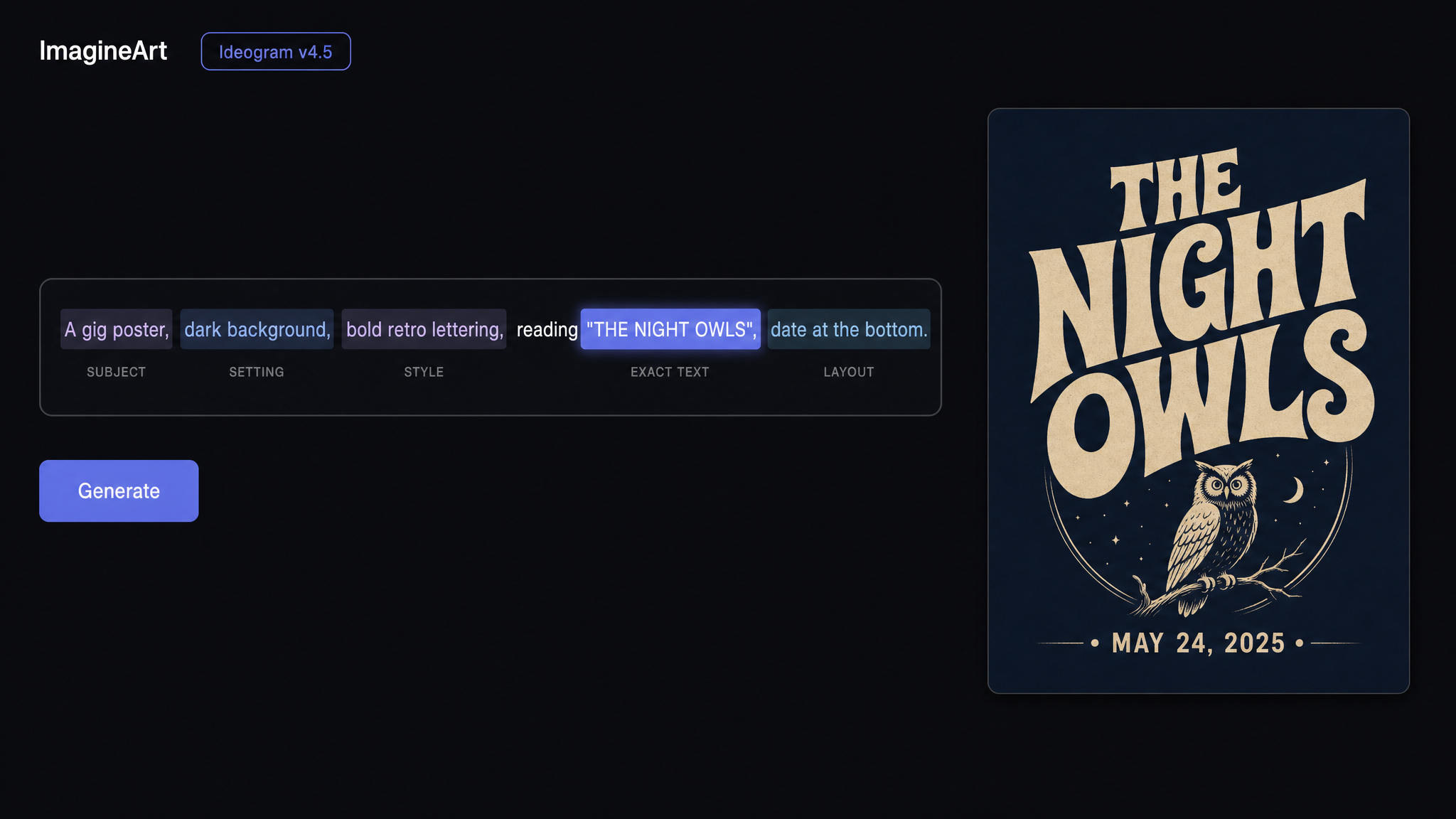 Five-part Ideogram prompt formula: subject, setting, style, exact text, layout
Write sentences, main idea first
Ideogram's guide prefers sentences to tag lists. Lead with the thing itself ("A chalkboard cafe menu") and add detail after. Prompts can run to 10,000 characters, per Ideogram's model docs. Clarity still beats length.
Say what you want, not what you don't
"No people, no clutter" plants people and clutter in the prompt. Describe the scene you want: "an empty street at dawn". It's "don't think of an elephant", for robots.
Skip weights like ::1
Ideogram doesn't read weight syntax such as `::1`. If something matters more, move it earlier. Aspect ratio, seed and quality are settings, not prompt text.
How do you get text right in Ideogram?
To get text right in Ideogram, quote the exact words, mention them early in the prompt, and keep each line short, as Ideogram's docs advise. In our tests, 12 of 12 copy prompts and 6 of 6 placement variations on Ideogram 4.5 spelled the quoted text correctly.
We tested "early": the headline "FRESH BREAD BAKED EVERY SINGLE MORNING" went at the start of one prompt and the end of another, 3 variations each. Both scored 3 out of 3. Early is good practice, not a cliff edge.
They also showed 4.5's biggest habit: unrequested text. All six bakery windows gained an invented shop name, such as "MARLOWE & SON BAKERY". The fix: name every line you want and read the whole image.
You can't name a font, so describe it
Ideogram's docs say you can't pick a font by name. Describe the letters: "tall art deco letters", "rounded sans-serif". More in our typography prompts that describe the letters guide.
English is the most reliable
Ideogram says English prompts are the most reliable, though image text can be another language (see the edits below). For wordmarks, see our logo prompts post.
Magic Prompt: on or off?
Magic Prompt rewrites and expands your prompt before Ideogram generates. Turn it off when exact wording matters, because it rewrites your prompt and our one cleaner "on" result is a single pair. Turn it on when you have a rough idea and want a richer scene. On ImagineArt the same switch is called Prompt Enhancer, and it's on by default.
We ran it side by side. Same prompt, `A gig poster that reads "THE NIGHT OWLS, LIVE, FRI 8PM"`, at 3:4 and High quality:
| Prompt Enhancer | Quoted words kept | What else happened |
|---|---|---|
| Off | All 6 words, spelled right | Invented a venue, "THE RUSTY BELL · 412 ELM ST", and ticket prices |
| On | All 6 words, spelled right | No extra text, richer owl illustration with a microphone and floral border |
It also switches back on when you change models, so check it.
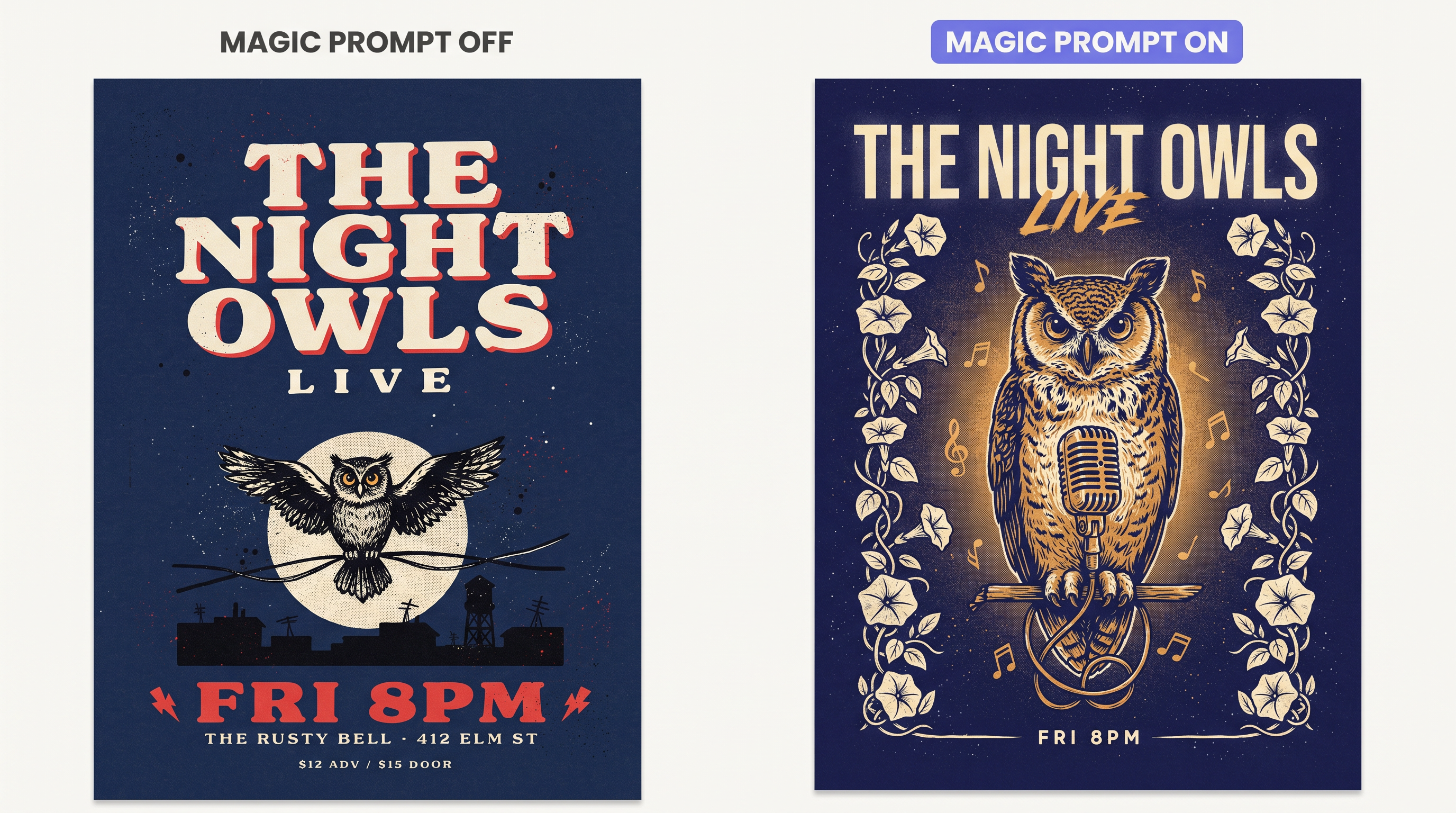 Same Ideogram prompt with Magic Prompt on and off
12 Ideogram prompts to copy
We tested these 12 Ideogram AI prompts once each on Ideogram v4.5 on ImagineArt (1:1, High; the enhancer setting wasn't recorded). All spelled their quoted text right.
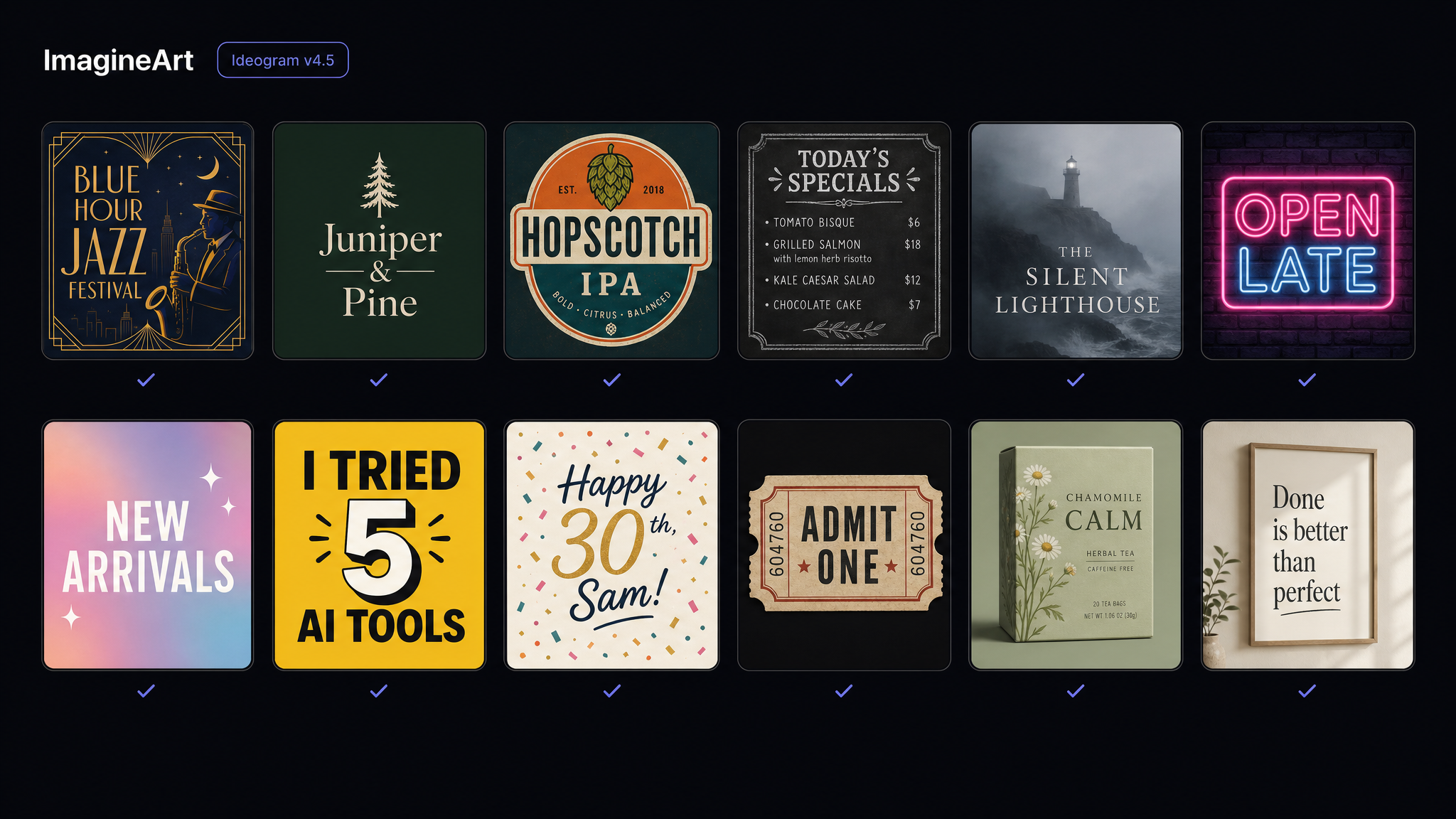 Twelve Ideogram 4.5 outputs from the copy prompts, each with correctly spelled text
-
Tested. `A jazz festival poster that reads "BLUE HOUR JAZZ FESTIVAL" in tall art deco letters, with "JULY 18-20, HARBOR PARK" below, midnight blue and gold` (added a "PRESENTED BY" line)
-
Tested. `A flat vector logo for "Juniper & Pine", a small pine tree icon above the name in rounded sans-serif, forest green on white` (added "EST. SMALL BATCH")
-
Tested. `A craft beer can label that reads "HOPSCOTCH IPA" with "6.5% ABV" in the corner, bold retro illustration, orange and teal` (added "CRAFTED IN SMALL BATCHES" and "12 FL OZ · 355 ML"; flat label, no can)
-
Tested. `A chalkboard cafe menu titled "TODAY'S SPECIALS" listing "Soup 6", "Quiche 8", "Lemon Tart 4" in neat hand-lettering` (no extra words)
-
Tested. `A book cover for a mystery novel titled "THE SILENT LIGHTHOUSE" by "Mara Ellison", foggy coast at night, serif title` (added "A NOVEL OF THE NORTH COAST", "NORTHWIND PRESS" and a fake review quote credited to The Guardian: delete it)
-
Tested. `A neon sign on a brick wall that reads "OPEN LATE", pink and blue glow, night` (clean)
-
Tested. `A square social media graphic that says "NEW ARRIVALS THIS WEEK" in bold white letters over a soft pastel gradient` (clean)
-
Tested. `A YouTube thumbnail with the words "I TRIED 5 AI TOOLS" in huge yellow letters with a black outline, a surprised man on the right` (outline came out as a shadow)
-
Tested. `A birthday card that reads "Happy 30th, Sam!" in playful brush lettering, confetti and balloons` (punctuation kept)
-
Tested. `A concert ticket design that reads "ADMIT ONE" and "ROW F SEAT 12", vintage paper texture` (added "THE MIDNIGHT HOUR", "OCTOBER 14 • 1974", "THE ORPHEUM", a ticket number and an illegible stamp)
-
Tested. `A minimalist tea box that reads "CHAMOMILE CALM" with "20 tea bags" at the bottom, soft sage green` (added "PURE HERBAL BLEND" and an "EST. 2024" stamp; "20 tea bags" came back in caps)
-
Tested. `A wall print with the quote "Done is better than perfect" in elegant serif letters on cream paper` (added a small "A REMINDER" line)
Ideogram prompts for editing with 4.5
The Ideogram 4.5 model page calls it Ideogram's most precise edit model, with less drift (pixel shifts, colour changes, texture artifacts) across multi-turn edits.
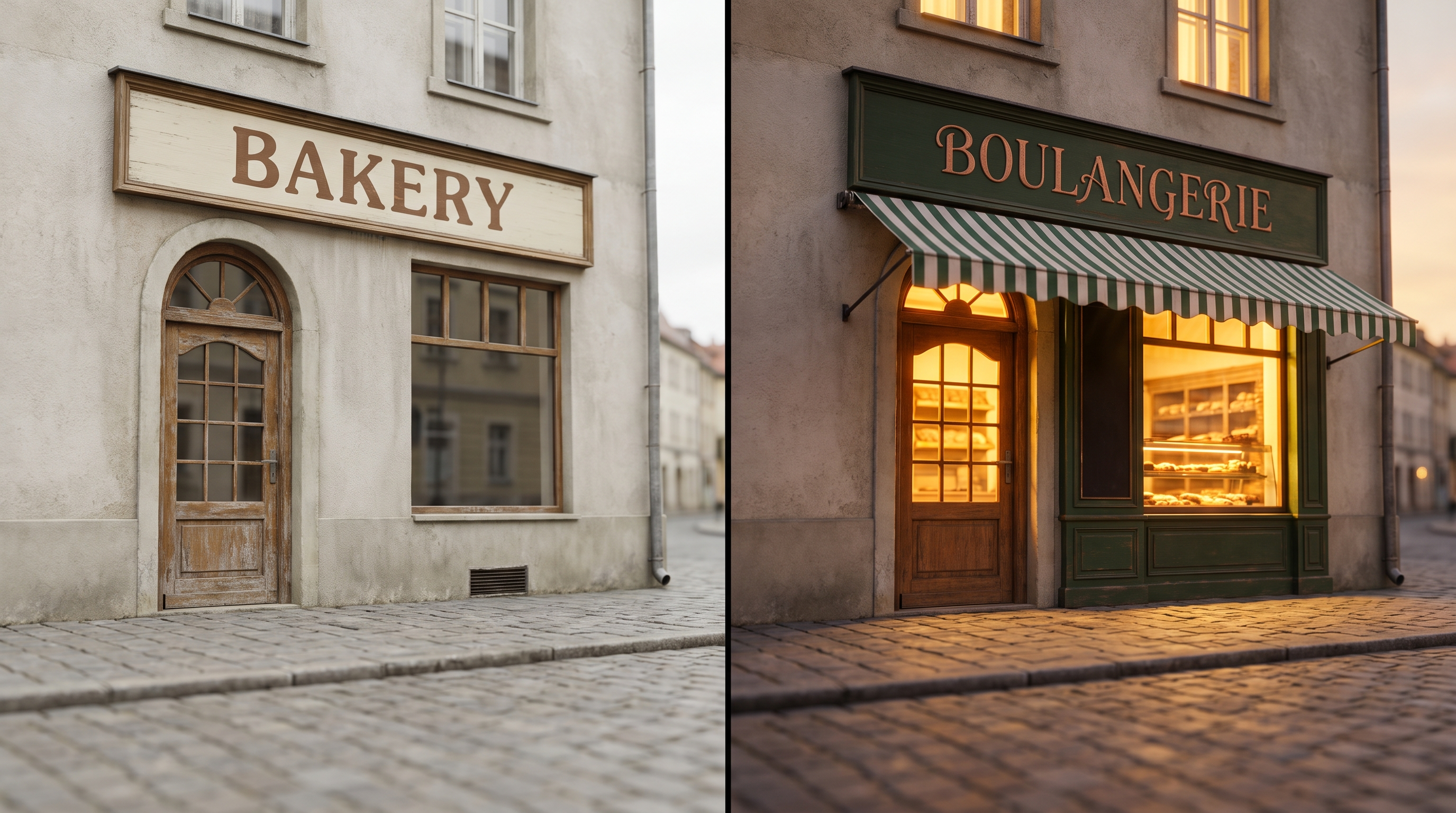
The rule from Ideogram's guide: change one thing at a time. In every step we also named what should stay. Here's a five-step chain we ran on a bakery sign in ImagineArt's edit tool:
-
`Change the sign's background color to dark green, keep the lettering and everything else exactly the same` (worked; lettering drifted from brown to copper and "EST. 2014" went faint)
-
`Add the words "Since 1998" under BAKERY on the sign, keep everything else exactly the same` (line added, but the small date read like 1903)
-
`Relight the scene to dusk with warm street lamp light, keep the sign, its text and the building exactly the same` (warm dusk light, sign untouched, no lamp appeared)
-
`Add a green striped canvas awning above the arched door, keep the sign, its text and everything else exactly the same` (awning added; it swallowed the top of the arch)
-
`Translate the text on the sign into French, keep the same lettering style, colors and layout, keep everything else exactly the same` (BOULANGERIE in the same style, accent correct, chalkboard left in English)
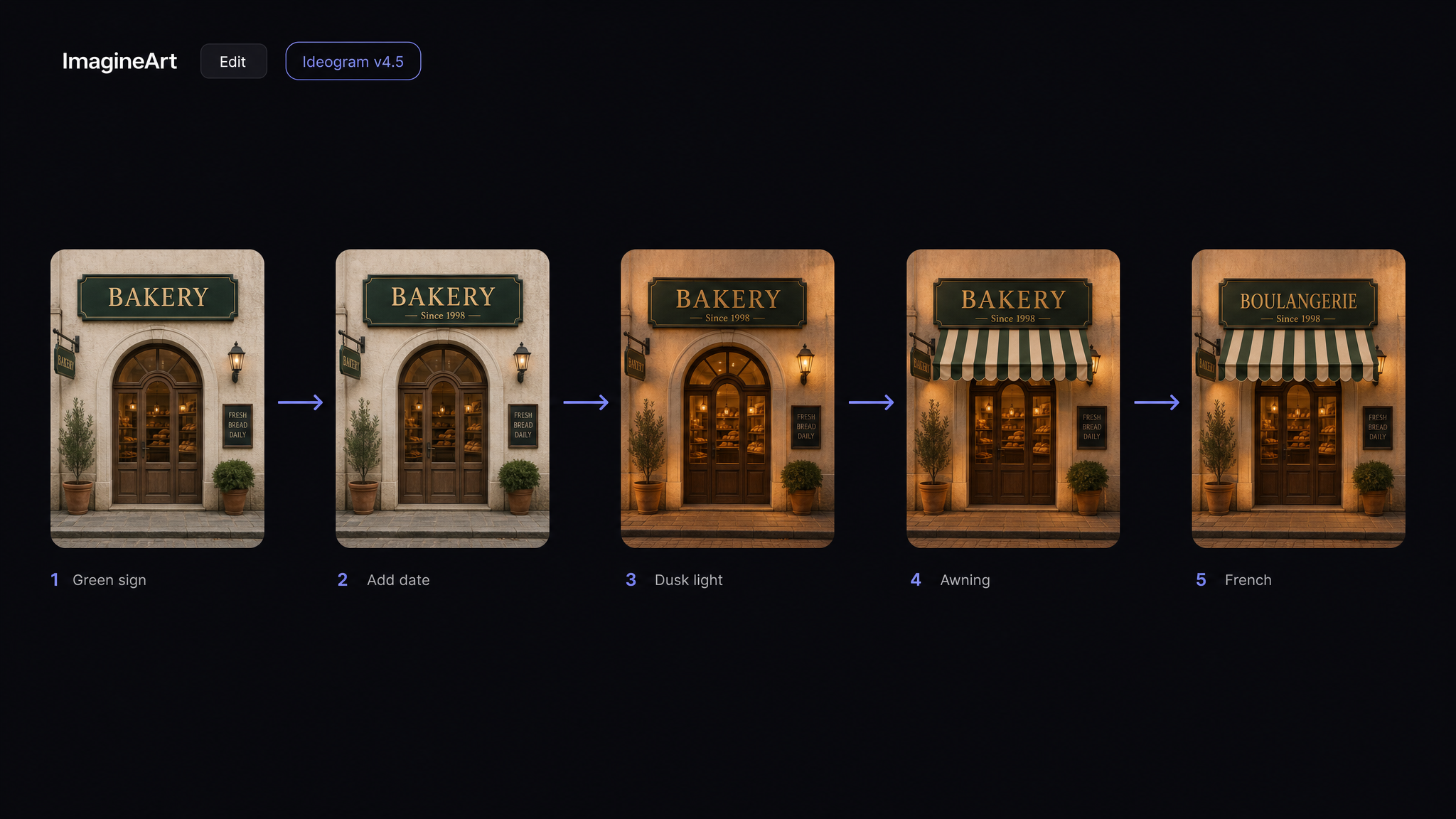 Five Ideogram 4.5 edits on one bakery sign: green background, added date, dusk light, awning, French text
Ideogram also pitches 4.5 for product photography and old-photo restoration. On ImagineArt, Ideogram 4.5 is the only Ideogram model in the Edit tab.
While ideogram 4.5 was specifically built for precise and targeted editing, it performs extremely well across general editing tasks.
— Ideogram (@ideogram_ai) September 30, 2026
Settings that change results
On ImagineArt, Ideogram v4.5 has five ratios, 1 to 4 variations, references and three quality levels. As of October 2026, each image costs 19 credits at Low, 38 at Medium and 138 at High, and an edit costs the same as a new image at that quality. Plan details live on the subscription page.
Low suits drafts, but our Low test misspelled the small text it added on its own. Ideogram's model docs list 1K or 2K output, while ImagineArt's v4.5 offers quality levels, not a resolution picker. Ideogram treats seed as a setting, not prompt text; the controls we logged didn't include a seed field. Style types and presets in Ideogram's image settings are Ideogram 3.0 only. On 4.5, style lives in your sentence.
Copy, quote, check, then edit
Good Ideogram prompts come down to three habits. Quote the exact words and keep them short. Spell out every line, or 4.5 writes its own. Fix details with one-change edits.
Swap your words into the 12 tested prompts. Run them with Ideogram v4.5 in ImagineArt's image tool, then take the best one into the Edit tab for the final fixes.
Frequently asked questions
How do I use Ideogram AI for the first time?
Describe the image in one sentence, quote the exact words near the start, pick a ratio and generate. Fix any wrong detail with an Ideogram 4.5 edit.
Why does Ideogram add text I didn't ask for?
Ideogram 4.5 fills empty space with plausible extras: shop names, "EST." lines, once a fake review quote. Name every line you want and check before publishing.
What does the Magic Prompt toggle do?
It rewrites and expands your prompt, and can translate it into English. On ImagineArt it's the Prompt Enhancer toggle, on by default. Switch it off when the wording must stay yours.
Can I choose a font in Ideogram?
Not by name, per Ideogram's docs. Describe the letterforms instead: weight, width, serif or sans, era.
Zahida Misher
Exploring how AI transforms marketing, I help businesses unlock growth and future-proof their presence.