Most fashion collections lose more time to misalignment than during production. A stylist pictures one mood, the photographer plans for an exact opposite one, and nobody notices until the shoot date is already scheduled.
A fashion mood board exists to prevent exactly that: a single visual reference the whole team agrees on before a fabric is cut or a photo is taken. While Pinterest might work for casual inspiration gathering, but it doesn’t always give you an actual mood board built around the concept, color story, and silhouette direction you are looking for.
This guide covers what a fashion mood board actually is, what a professional one includes, and how to build one directly with AI instead of pinning references and hand-picking images.
What Is a Mood Board in Fashion?
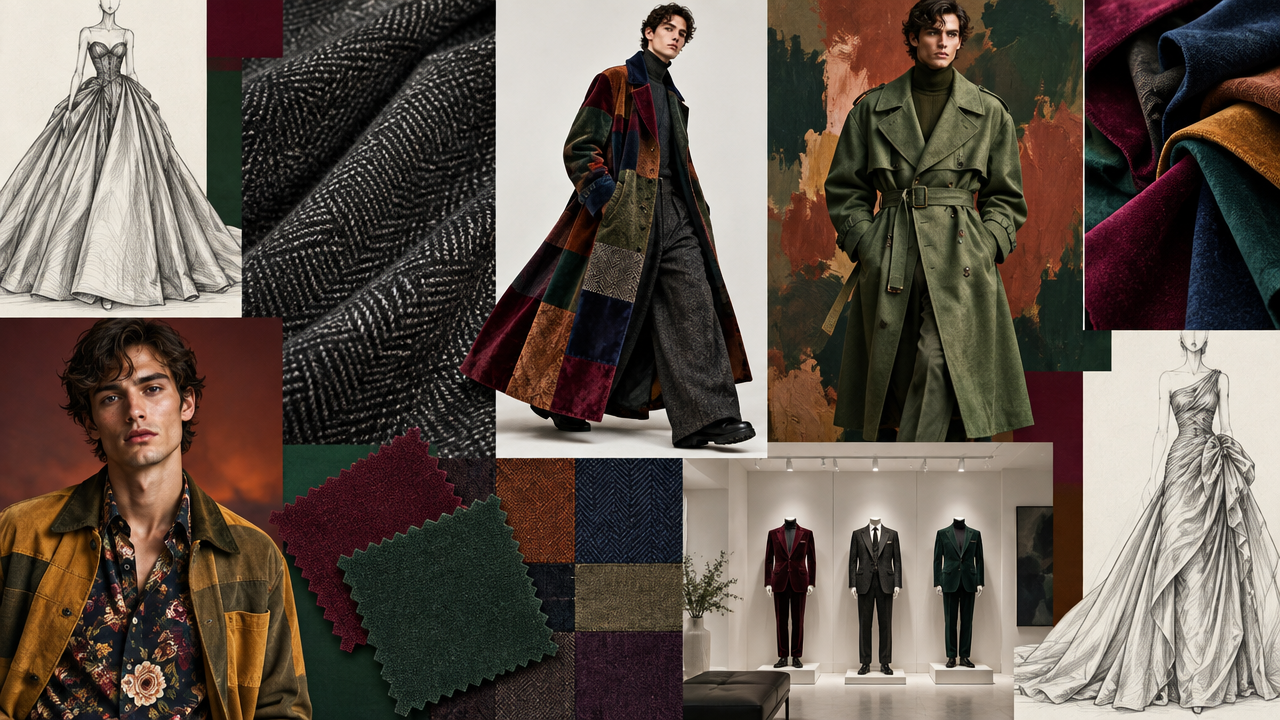 Fashion Moodboard generated by ImagineArt AI image generator
A mood board in fashion is a curated visual collage that communicates the aesthetic, concept, and creative direction of a collection before production begins. It typically includes inspirational imagery, a color palette, fabric and texture references, typography, and lifestyle photography that together define the mood a collection is meant to carry. A fashion mood board is the reference point the for design and production.
Mood Board vs. Lookbook: What's the Difference
A mood board and a fashion lookbook get confused often, but they sit at opposite ends of the same production timeline.
- A mood board comes first: abstract, conceptual, built first, and meant to align a team on direction.
- A lookbook comes after: concrete, styled, built from finished garments on an actual model, and meant to sell the collection to buyers, press, or customers. For more on how a finished lookbook comes together once the direction is set, see 14 use cases of generative AI in fashion, including AI lookbooks.
The practical difference shows up in what each one can include. A mood board can hold:
- a fabric swatch
- a color reference
- or an unrelated photograph that only captures a feeling.
On the other hand, in a fashion lookbook every image needs to be a real finished look. Skipping the mood board usually means the lookbook ends up needing more revision, since the direction never got tested and agreed on before finalization.
What Makes a Professional Fashion Mood Board
A professional fashion mood board follows a structure and typically includes:
- A one-line concept statement that names the collection's direction before anything else gets added
- A color story, ideally five to eight colors, referenced against a system like Pantone so a colorway can actually be reproduced consistently by anyone who picks up the project later
- Fabric and texture references, close enough to communicate weight and hand-feel, not just color
- Key silhouette references representing the shapes the collection will build around
- Lifestyle or setting imagery that establishes the mood and context the collection is meant to live in
- A short rationale tying the board back to the intended customer
Pantone references matter beyond the mood board itself. A color described only as "olive green" reads differently, but a specific Pantone code remains intact and same throughout the fashion design mood board and final production.
How to Create a Fashion Mood Board with ImagineArt
Building a mood board with ImagineArt runs across three tools in sequence: Image Generator for the reference and mood imagery, AI Fashion Studio when the board needs an accurate hero look built from a real garment, and AI Image Combiner to assemble everything into finished tiles.
Step 1: Generate mood and reference images in Image Generator
On ImagineArt AI Image Generator:
- Pick a model. The platform supports multiple AI image models, including GPT Images 2.5, Nano Banana Pro, Seedream 5, Flux, and more.
- Write a prompt describing the reference needed, color palette, texture, setting, lighting mood, and generate.
- You can upload and select built-in style references, camera angles, and color palettes, along with uploading your own reference images when a specific look already exists.
- Choose the aspect ratio the image needs.
A specific prompt produces a usable fashion image for mood board than a vague one. "Muted rust and olive color palette, wool and suede texture close-ups, golden-hour outdoor lighting." Using a prompt like "fall colors and cozy textures" usually requires several regenerations before creating something that you can include in fashion mood board.
Step 2: Generate the model-and-product tile
For an actual hero look built around a real, designed garment, use ImagineArt AI Fashion Studio instead:
- Start a new project and select Editorial
- Choose Image mode, pick a model from the library or upload your own
- Select the outfit from the built-in categories or upload your own garment with fabric detail and add footwear and accessories
- Choose the scene and shot setting or upload your own shot
- Generate.
AI Fashion Studio exists specifically to apply a real garment to a model accurately. For a board that needs to show motion, how a fabric moves, or a runway-style reference clip, ImagineArt's AI video generator produces that tile instead of a static image.
Step 3: Combine two images into one tile using Image Combiner
On ImagineArt AI Image Combiner:
- Upload the mood image from Step 1 and the model or product image from Step 2
- Select a resolution (1K, 2K, or 4K)
- Pick an aspect ratio from the nine available (1:1, 2:3, 3:2, 3:4, 4:3, 4:5, 5:4, 16:9, 9:16)
- Generate.
Adjust layout and arrangement of images using ImagineArt AI Image Editor to create variations, so the fashion mood board doesn't default to a fixed template.
Step 4: Repeat and arrange
Repeat Steps 1 through 3 across every reference type the board needs, then arrange the finished tiles into the board's final layout.
This saves hours of pulling images from other sources, checking usage rights, and manually creating fashion mood board collage. It gives you a workflow that produces reference imagery built specifically for a specific fashion collection.
Why Fashion Mood Boards Matter
Color is often the first thing a buyer reacts to, and design decisions get expensive to reverse once they're locked into a collection. Widely cited color-psychology research suggests that as many as 85% of buyers name color as their primary purchase factor, with up to 90% of a snap product judgment formed on color alone, which is exactly why a mood board's color story tends to get more scrutiny than any other tile on the board.
AI adoption in fashion currently leans toward operations, not creativity. McKinsey's State of Fashion research found 75% of fashion executives prioritize AI for demand forecasting, inventory, and cost control, and 45% point to AI-driven marketing as a top 2025 value driver.
The same report notes creative use cases are expanding as adoption grows, WGSN and other trend forecasting services already do the research; a mood board is where that research becomes a specific, collection-ready direction. For the broader shift this fits into, see 11 fashion marketing trends for 2026.
None of this is about replacing a designer's judgment. It's about locking in agreement on the board's core references before the cost of disagreement multiplies across a full shoot and production run. Catching the wrong direction during moodboarding costs an afternoon of revision. Catching it after the shoot costs a reshoot.
Fashion Mood Board Templates: What to Include
A reusable fashion mood board template covers the same core tiles every season, so the structure doesn't need rebuilding each time a new collection starts:
- Concept statement tile, one line, placed first
- Color palette tile, five to eight swatches with Pantone references
- Fabric and texture tile, close-up references showing weight and texture
- Silhouette or hero look tile, the clearest representation of the collection's shape
- Lifestyle or setting tile, establishing where and how the collection is meant to be seen
What changes season to season is the content inside each tile. Keeping the same template across collections also makes it easier for a team to scan a new board quickly, since they already know where to look for the color story versus the silhouette reference.
Fashion Mood Board Collage: Layout and Arrangement Tips
A fashion mood board collage is a hierarchial arrangement of several images placed next to each other. It communicates which reference matters most and which ones are supporting context.
- Lead with the hero image, the strongest silhouette or concept reference, sized larger than everything else on the board
- Group color and texture references together rather than scattering them, so the color story reads as one connected idea
- Leave visible space between unrelated tiles rather than letting every image touch edge to edge, since a cluttered board is harder to scan quickly
- Keep typography, if used at all, limited to the concept statement and any labels, not decorative text competing with the imagery
- Keep the color treatment consistent across every tile on the board too
Fashion Mood Board Examples and Ideas by Theme
Fall Fashion Mood Board
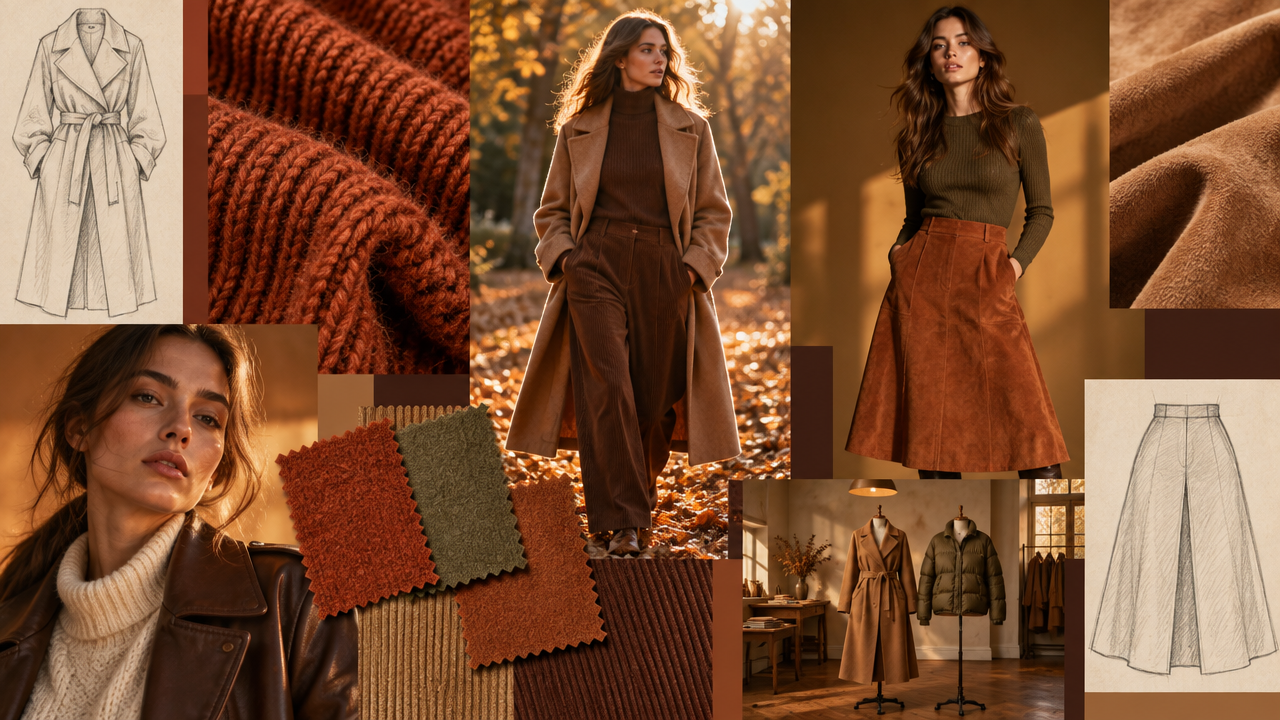 Fall fashion moodboard generated by ImagineArt AI image generator
A fall mood board typically leans on warm, muted earth tones: rust, olive, camel, deep brown, paired with textures that read as heavier and warmer, wool, suede, corduroy. Lighting references usually favor amber or golden-hour tones rather than the brighter, high-key lighting a spring or summer board would use. In AI Image Generator, a prompt built around "rust, olive, and camel tones, suede and wool texture, warm amber lighting" captures this direction directly.
90s Fashion Mood Board
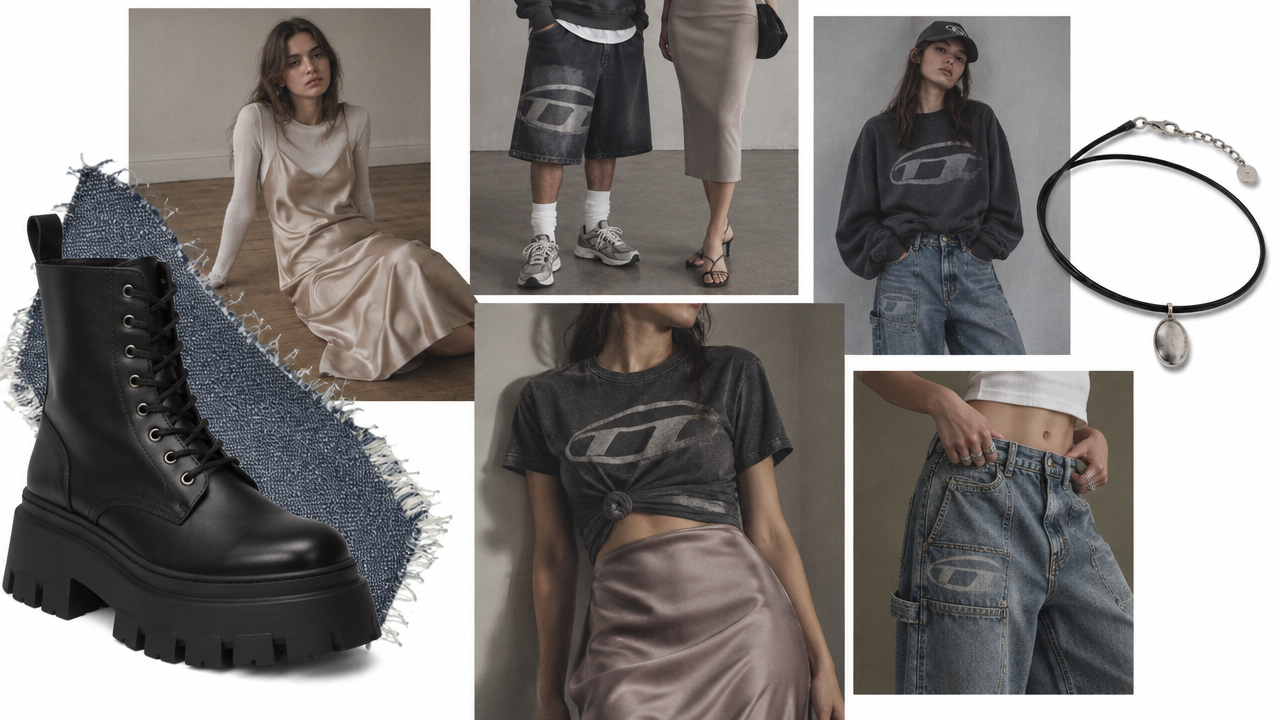 90s fashion moodboard generated by ImagineArt AI image generator
A 90s mood board draws on a specific visual language: slip dresses and minimalist silhouettes set against bold, logo-driven streetwear from the same decade. Texture references often include film grain or slightly desaturated color grading to match how the era is remembered visually, rather than how it was actually photographed at the time. A prompt built around "slip dress silhouette, muted color grading, film grain texture" captures the era's signature without needing to reference a specific brand.
Modern Fashion Mood Board
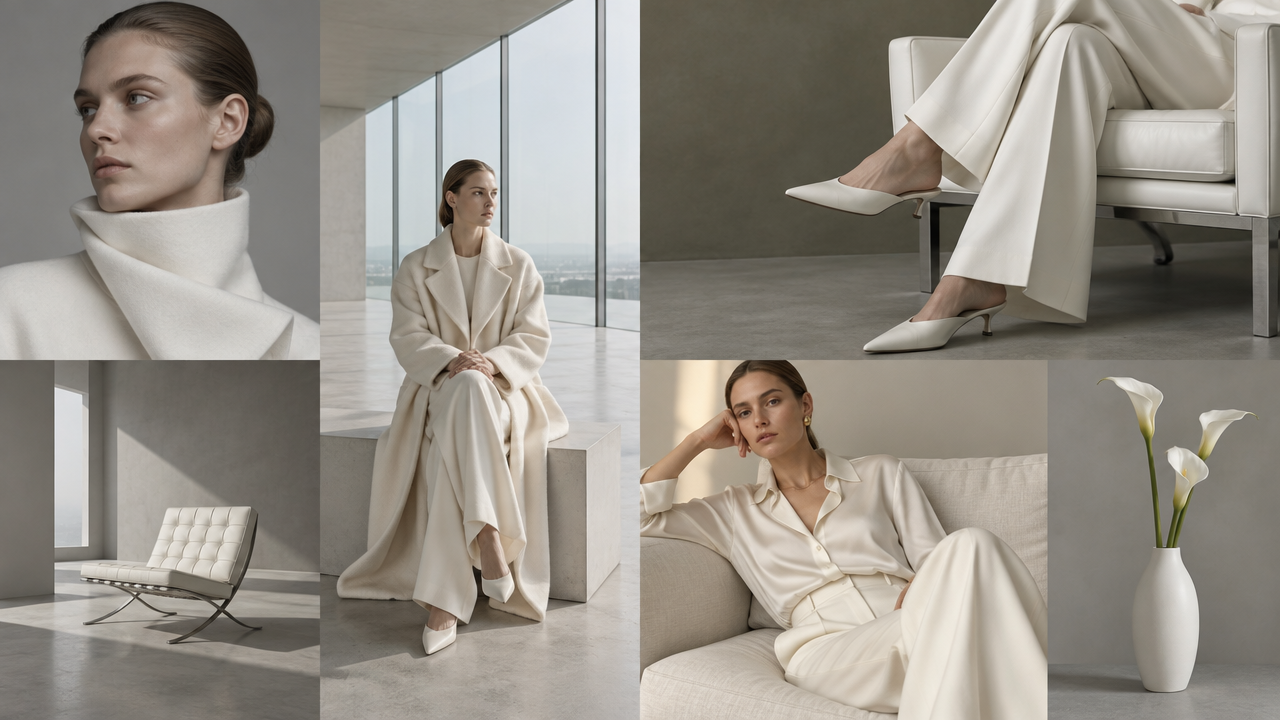 Modern fashion moodboard generated by ImagineArt AI image generator
A modern fashion mood board favors clean, restrained color palettes, architectural references, and negative space over a busy, layered collage. Silhouette references tend toward structured, minimal shapes rather than decorative or heavily embellished ones. A prompt built around "monochrome palette, architectural background, soft directional lighting" reflects the restraint this category is built on.
Y2K Fashion Mood Board
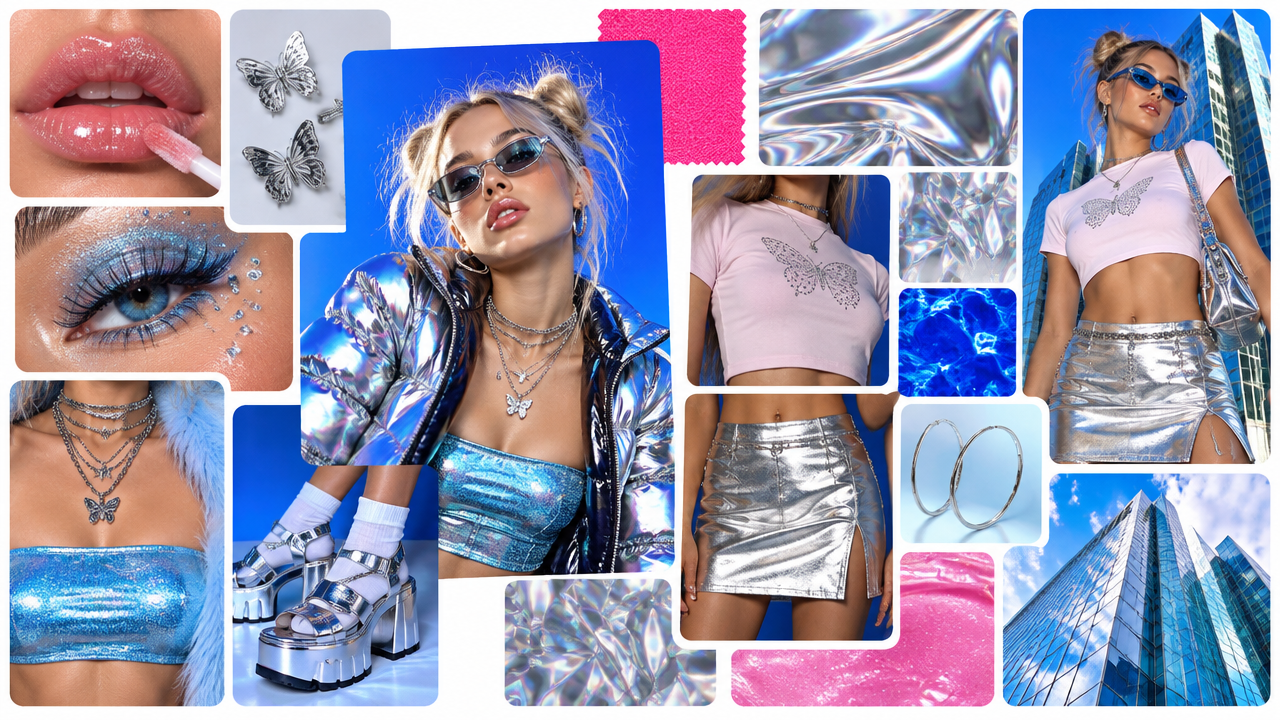 Y2K fashion moodboard generated by ImagineArt AI image generator
A Y2K board pulls from early-2000s references: metallics, low-rise silhouettes, and saturated primary colors, often paired with early digital or tech-inspired texture references rather than natural materials. A prompt built around "metallic fabric texture, low-rise silhouette, saturated primary color palette" captures the look directly.
Dark Academia Fashion Mood Board
A dark academia board centers on muted, tonal palettes, deep browns, forest green, charcoal, paired with tweed, leather, and knit texture references, and lifestyle imagery drawing on library, campus, or archival settings rather than a studio or street backdrop. A prompt built around "muted brown and forest green palette, tweed and leather texture, library interior setting" reflects the category's visual signature.
A handful of other themes work well as fashion mood board ideas without needing a full breakdown: cottagecore, built on soft florals, natural fabrics, and rural settings, and old money aesthetic, built on quiet, tailored luxury with muted neutrals and minimal branding.
Common Mistakes to Avoid When Building a Fashion Mood Board
A few mistakes show up often while building a fashion mood board:
- Treating it as decoration instead of a working document. A board with beautiful images but no Pantone codes, no fabric names, and no concept statement looks good and helps nobody once production actually starts.
- Including too many directions at once. A board trying to cover several different moods usually means none of them were actually decided on. Narrow the concept before adding images, not after.
- Skipping the rationale. A board with no line connecting the imagery back to the intended customer or season is a personal inspiration board, not a professional one.
- Using images with unclear usage rights. A photo pulled from an unrelated source can create real problems once a board turns into an actual campaign brief or gets shared outside the team.
- Building it after the key decisions are already locked in. A mood board only does its job if it's built early enough to actually change a decision, not as a retroactive summary of choices already made.
Build Your Fashion Mood Board with ImagineArt
Every tile covered here comes from the same constraint: gathering the right reference imagery takes time, and borrowed images come with usage rights. Image Generator, Fashion Studio, and Image Combiner remove that constraint by generating reference imagery built specifically for the collection, so a board that used to take an afternoon of searching can be built and arranged in the time it takes to describe what it needs to show.
Ready to put this into practice?
![14 Use Cases of Generative AI for Fashion Industry [+Workflows]](https://blogs-cdn.imagine.art/Fashion_marketing_trends_8650a9f480.jpg)