
Zahida Misher
September 16, 2025 • Updated July 2, 2026
11 mins Read
Seedream 4.0 is ByteDance's AI image model that made headlines in September 2025 by combining image generation and image editing in a single unified model. At launch, it went head-to-head with Google’s Gemini 2.5 Flash Image, commonly known as “Nano Banana.” and beat it on the leaderboards. The Seedream family has grown since then, but 4.0 remains one of the most-used image models in the world, and for good reason.
Seedream 4.0 is ideal for marketers, designers, and content creators who want to quickly produce high-quality visuals for social media, advertisements, websites, or any digital project. With Seedream 4.0, you can turn your ideas into polished, professional images in just a few clicks, making the creative process faster and more efficient.
ByteDance Seed launches Seedream 4.0, combining Text to Image and Image Editing in a single unified model!
— Artificial Analysis (@ArtificialAnlys) September 9, 2025
Seedream 4.0 represents a significant evolution from ByteDance Seed's previous models, merging the capabilities of Seedream 3.0 (Text to Image) and SeedEdit 3.0 (Image… pic.twitter.com/wkPU40PWkk
What Is Seedream 4.0?
Seedream 4.0 is a text-to-image and image-editing AI model built by ByteDance's Seed team, the same company behind TikTok. You type a description, and it creates a high-quality image in about two seconds. You upload a photo and describe a change, and it edits the image for you.
What made it stand out at launch is that these were usually two separate tools. Before Seedream 4.0, you would generate an image with one model and edit it with another. Seedream 4.0 merged ByteDance's Seedream 3.0 generator and SeedEdit 3.0 editor into one model that does both.
It generates images at up to 2K resolution, works with up to six reference images to guide the style, and keeps characters looking consistent across multiple edits.
Where Seedream 4.0 Stands in 2026
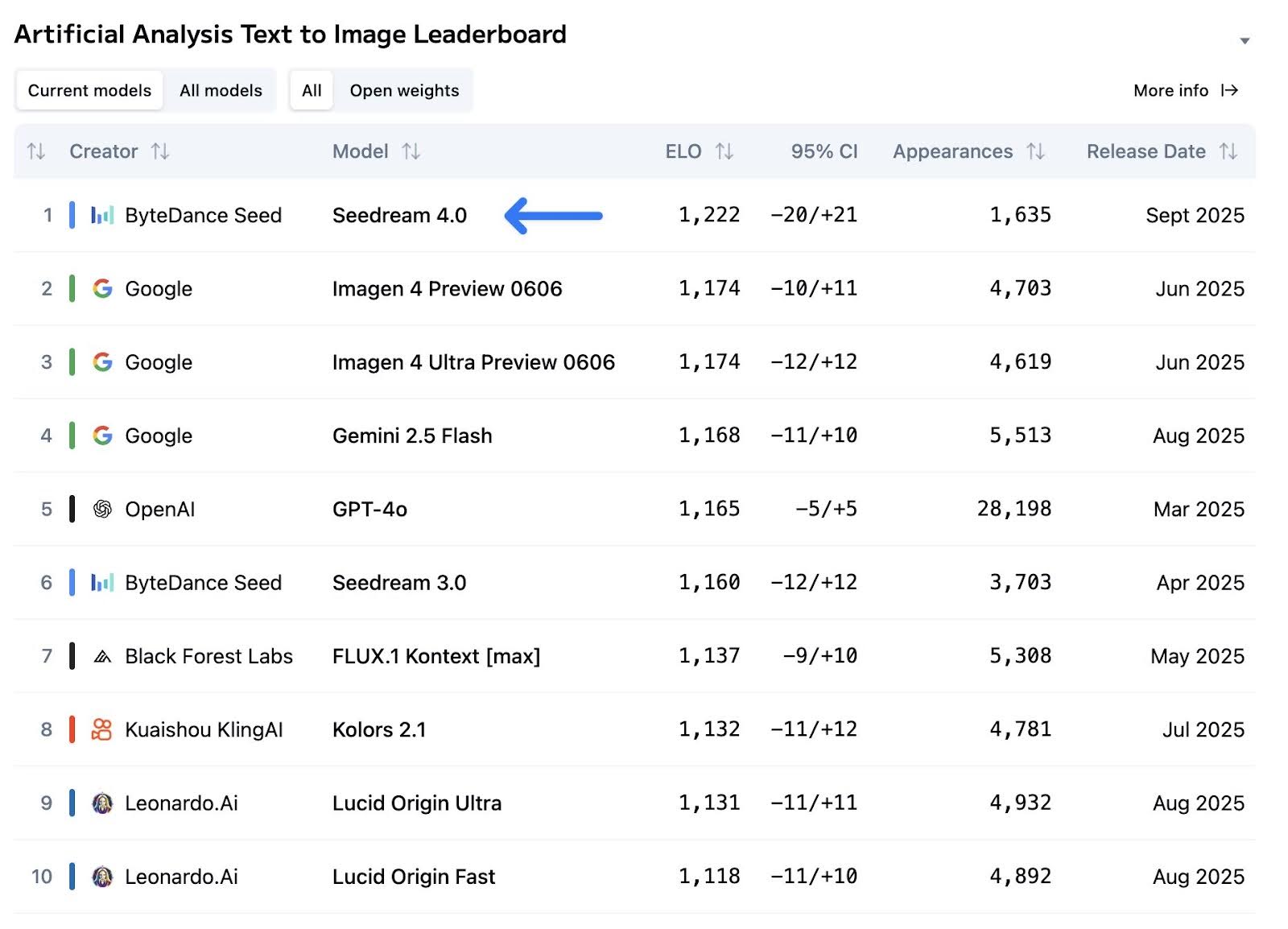
When Seedream 4.0 launched, it did something nobody expected: it jumped past Google's Imagen 4 and Nano Banana to the top of the Artificial Analysis leaderboards for both image generation and image editing. For a moment, ByteDance had the best image model in the world.
 Text to Image Leaderboard.jpg
The field has moved fast since then. Google answered with Nano Banana Pro and Nano Banana 2, Black Forest Labs shipped Flux 2, and ByteDance itself released Seedream 4.5 and the Seedream 5.0 family. Seedream 4.0 no longer sits at the top of the charts.
So why does it still matter? Because leaderboards measure peak quality, and most real work runs on speed, cost, and reliability. Seedream 4.0 still generates 2K images in about two seconds, still costs less per image than the newer flagships, and still handles editing tasks like background swaps and character consistency as well as models twice its price. It went from champion to workhorse, and workhorses are what production teams actually run on.
Key Features Of Seedream 4.0
1. Lightning-Fast Image Creation
Seedream 4.0 is incredibly fast at making pictures. It can create high-quality, detailed 2K images in about a minute. This speed comes from its smart internal design called "Mixture of Experts" architecture.
For creative professionals and artists, this means no more long waiting times - you can see your ideas come to life almost instantly, making your creative process much smoother and more productive.
 Super Fast Speed
2. Multiple Reference Photos & Batch Creation
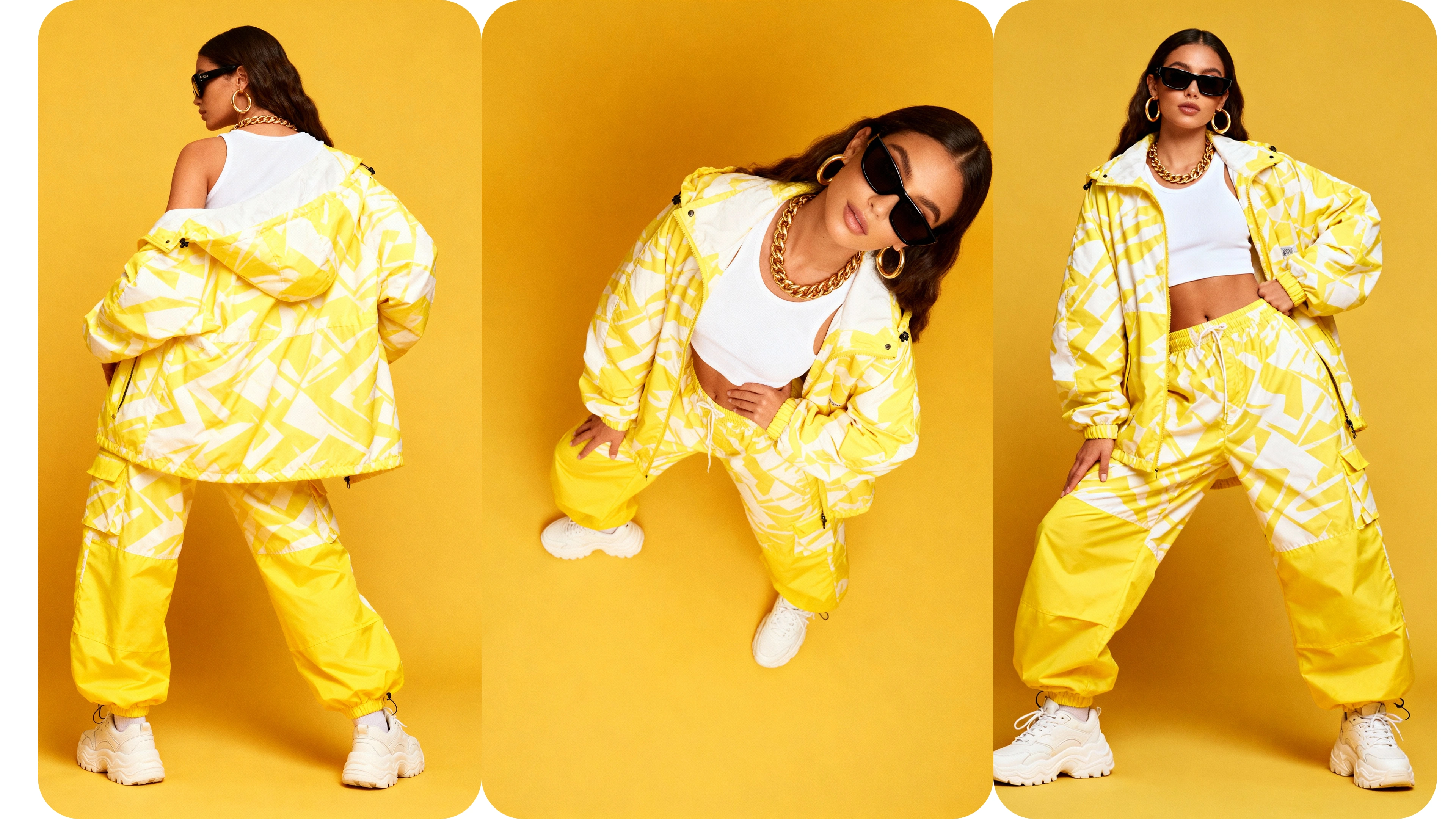
Seedream 4.0 allows you to upload different reference images at once to guide your creation. Think of it like showing the AI several example photos to help it understand what you want.
Even better, it can create multiple different versions of your image all at the same time. This is especially helpful when you're working on a project that needs several related images that should look similar or follow the same style theme.
 Multiple References
3. Powerful Image Editing Tool
Seedream 4.0 works like a super-advanced photo editor.
You can change backgrounds completely, remove unwanted objects from photos, add new elements, transform the artistic style, adjust colors to your liking, modify lighting conditions, enhance textures for more detail, and apply various artistic filters.
What makes it special is that it can keep characters looking the same across different edits, and you can make multiple changes step by step until you get exactly what you want.
 Natural Language Edit
4. Edit Using Simple Descriptions
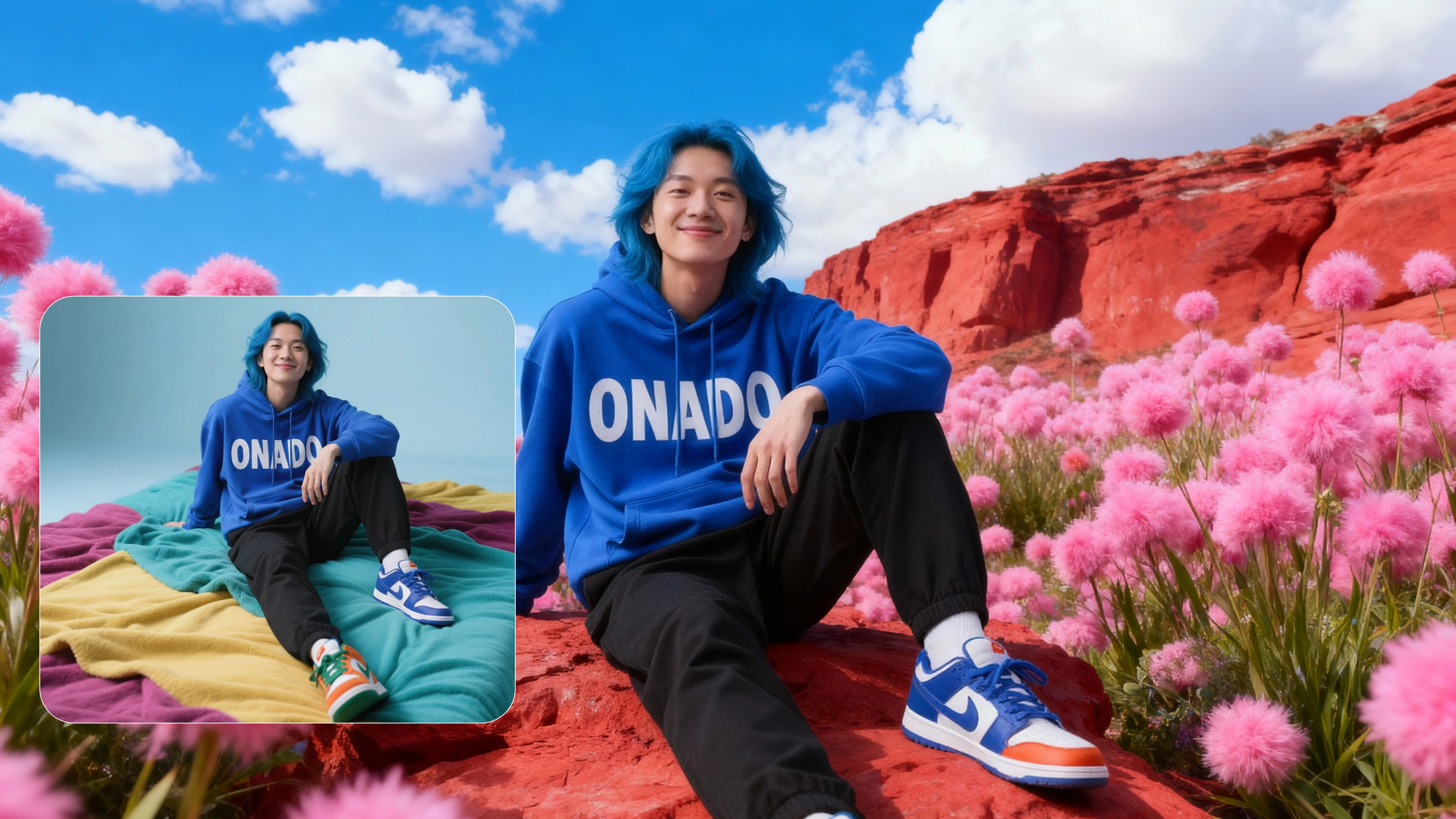
Instead of learning complicated editing tools, you can simply tell Seedream 4.0 what you want in everyday language.
For example, you can say things like "change the background to a beautiful sunset beach" or "make the person wear a bright red jacket instead of the blue one they're wearing."
The AI is smart enough to understand what you mean and makes the changes while keeping everything else in the photo looking natural and realistic.
 Editing With Textual Prompts
5. Smart Scene Recognition
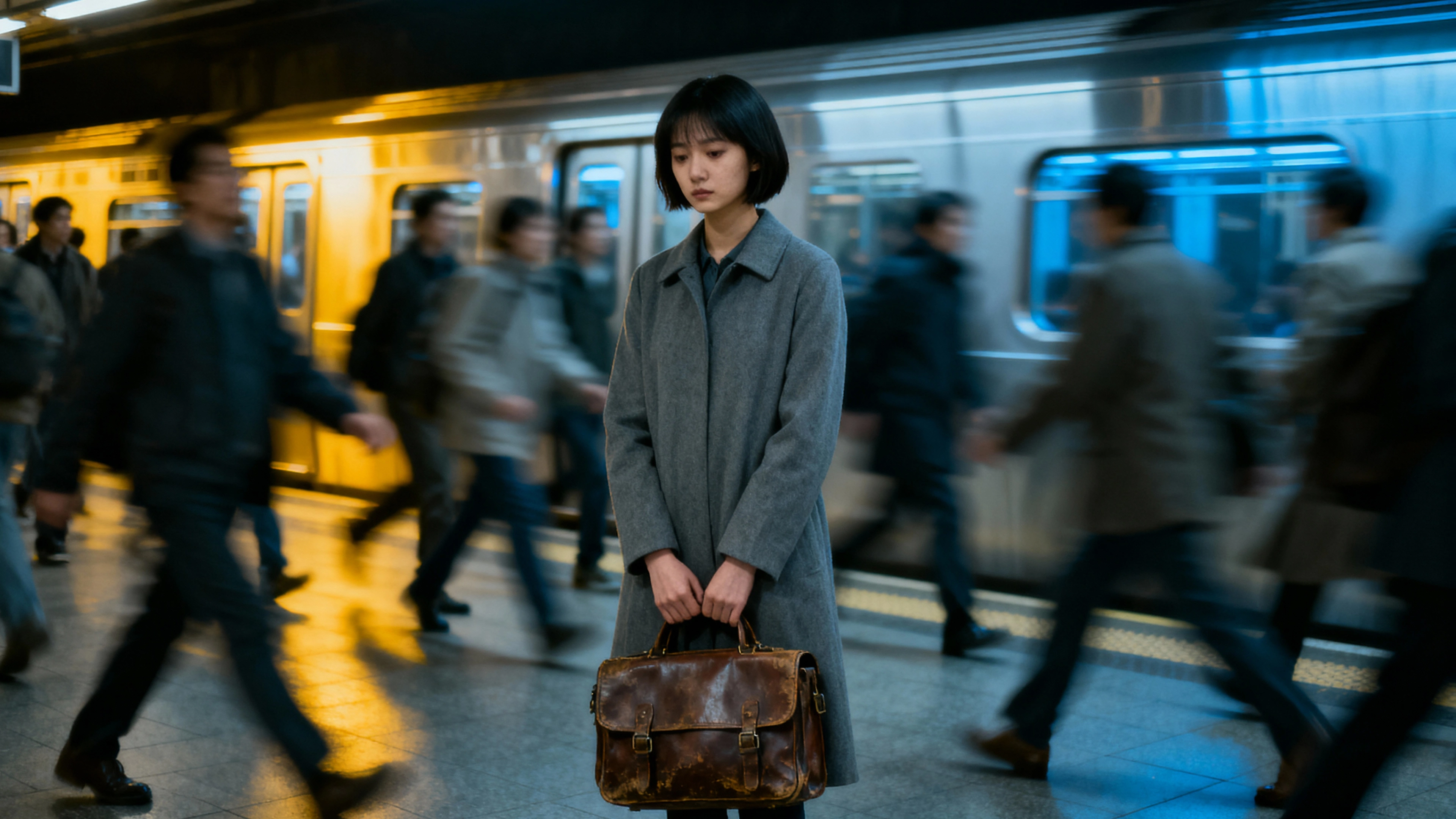
Seedream 4.0 has an impressive ability to understand complex pictures and scenes. It can figure out what's happening in an image, how people are positioned, what they're doing, and how different objects relate to each other in space.
This means when it creates or edits images, everything looks realistic and makes sense together - people don't float in mid-air, objects appear in logical places, and the overall scene tells a coherent visual story.
 Smart Scene Recognition
Use Cases Of Seedream 4.0
Virtual Clothing Try-Ons
With Seedream 4.0, you get a virtual try-on experience where you can try on clothes without physically wearing them.
You can upload your photo and virtually wear different shirts, dresses, or jackets to see how they would look on you. This helps online clothing stores to provide customers with realistic try-on experiences, reducing returns and increasing buyer confidence by showing exactly how garments will appear on different body types.
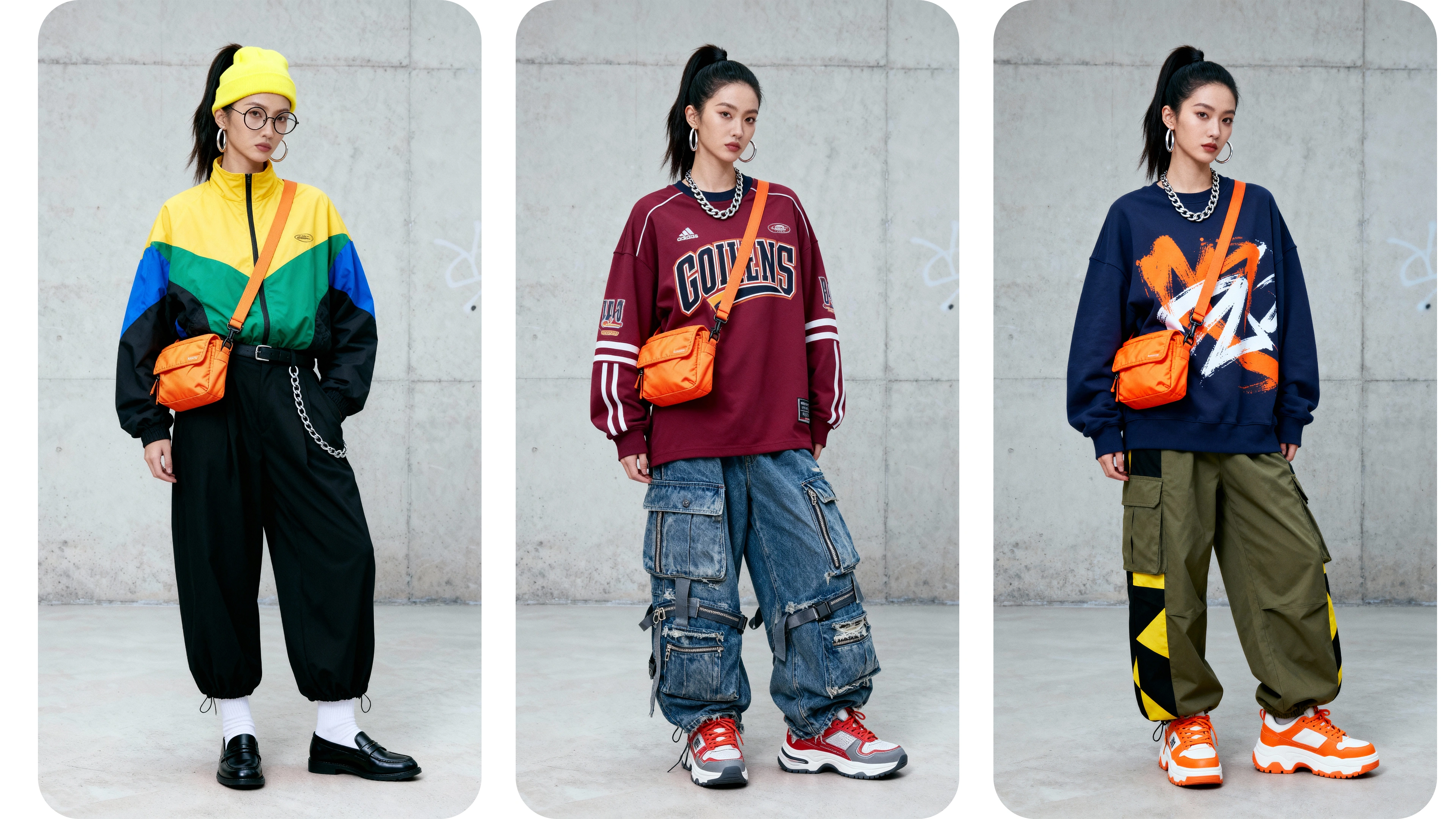 Virtual Try-Ons
Product Label Handling
Seedream 4.0 allows you to precisely remove or replace product labels and company logos in images with incredible accuracy. You can seamlessly eliminate competitor logos or replace them with your own branding.
The model fills in backgrounds naturally where old labels existed, making new labels appear as if they were always part of the original image.
This capability is essential for businesses maintaining consistent branding across all marketing materials and product presentations.
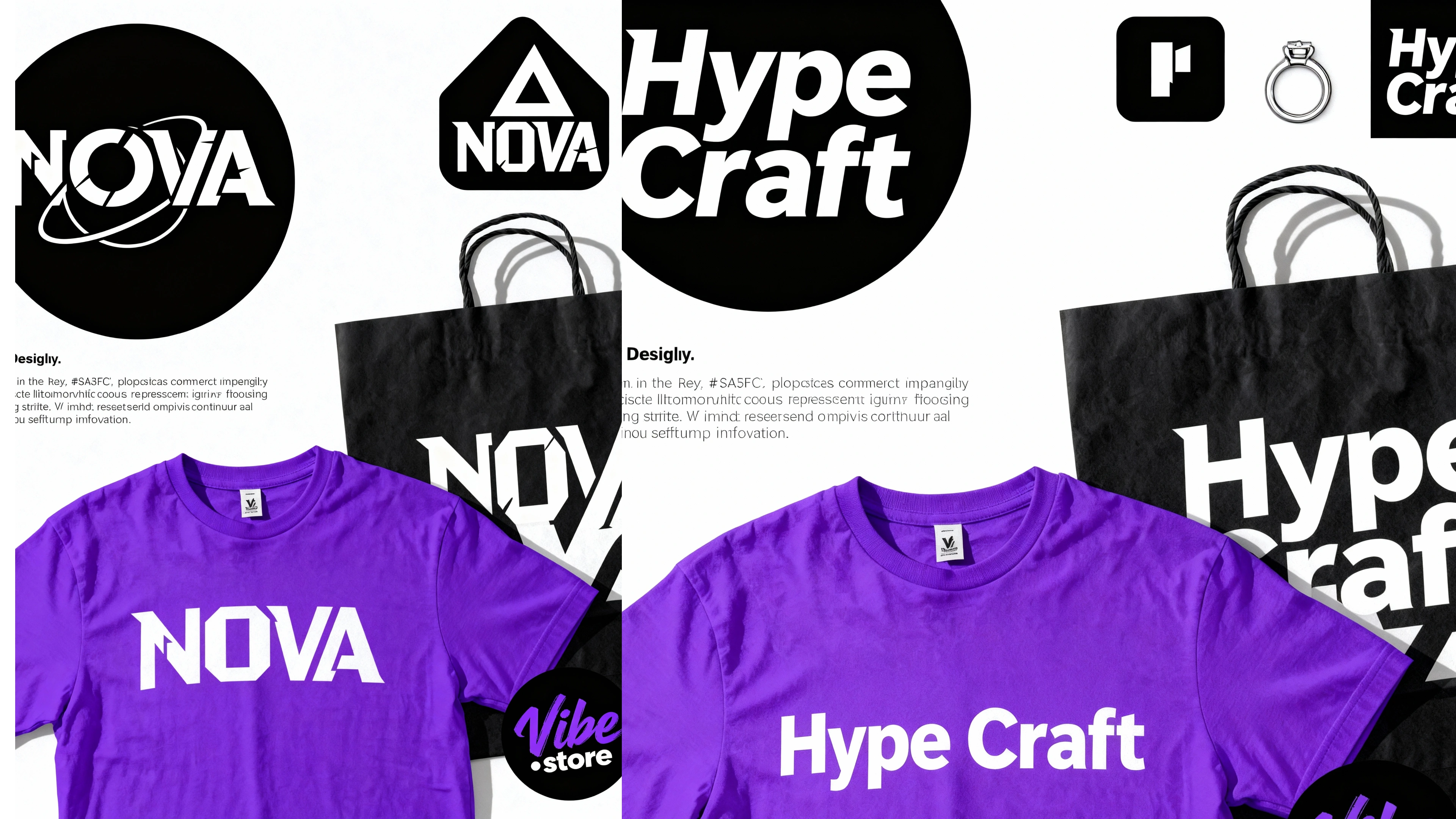 Product Label Handling
Background Replacement
With Seedream 4.0, you can completely replace backgrounds in any photo with professional-quality results, eliminating the need for green screens.
You can transport people from their living rooms to tropical beaches or from busy streets to peaceful mountain landscapes.
It carefully separates subjects from original backgrounds and place them in new settings with perfectly matched lighting, shadows, and atmospheric conditions that look completely natural.
 Background Replacement
Texture and Material Editing
Seedream 4.0 understands and manipulates how different materials should look and behave in photographs.
You can transform a cotton shirt to appear as silk, change wooden furniture to look metallic, or adjust surface properties from shiny to matte.
It accurately simulates how light reflects off different materials - adding appropriate reflections and transparency when changing objects to glass or other reflective surfaces.
This feature is invaluable for product designers and fashion brands showcasing items in various material options.
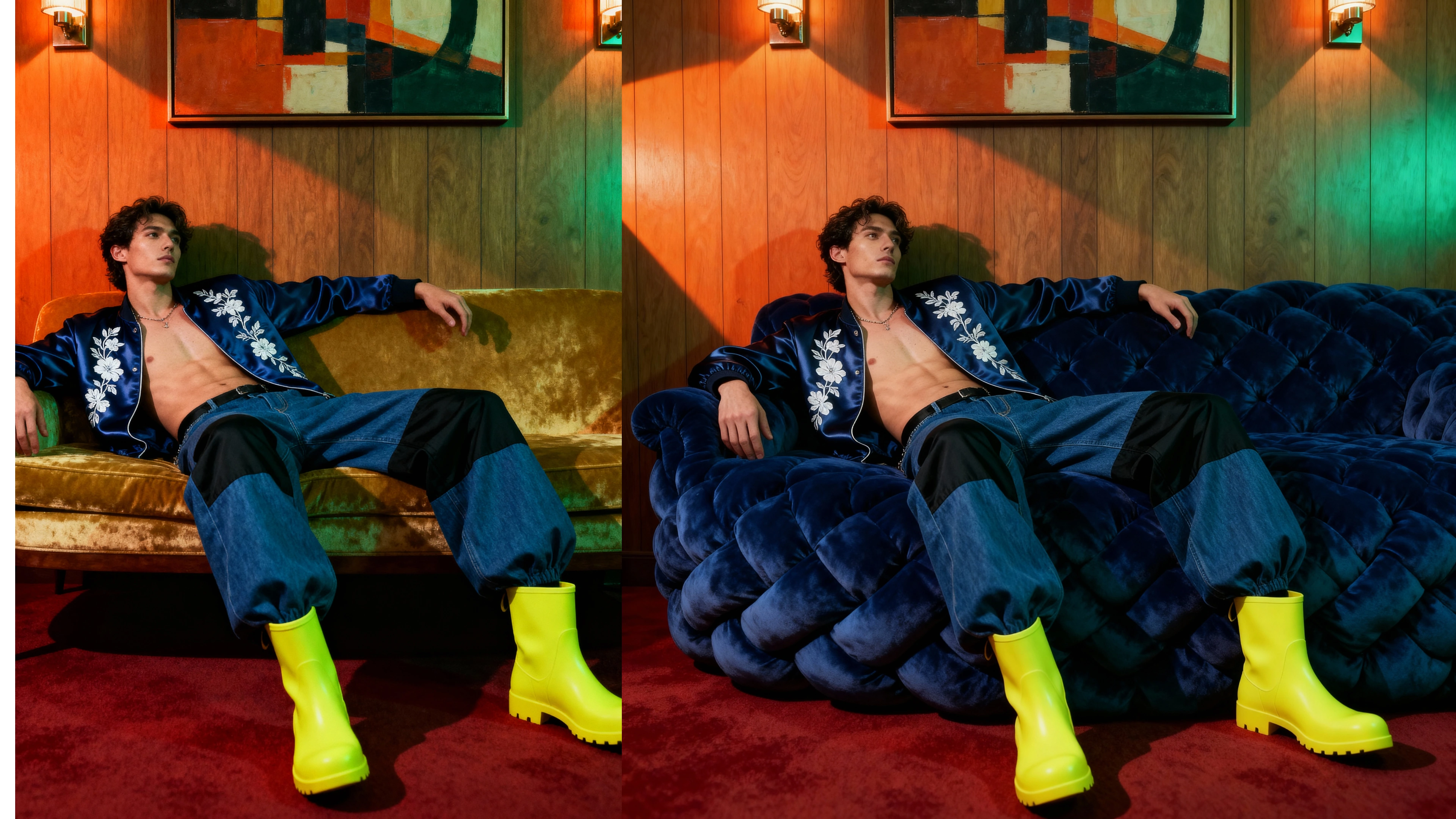 Texture and Material Editing
Text Editing and Typography
You can edit any text appearing in images using simple natural language commands, bypassing complex design software. You can change fonts on store signs, adjust text sizes, or reposition words anywhere in the image.
Seedream 4.0 handles all technical typography aspects while keeping text looking natural and properly integrated into the surrounding image.
This makes updating marketing materials, creating app mockups, and designing packaging incredibly straightforward and professional.
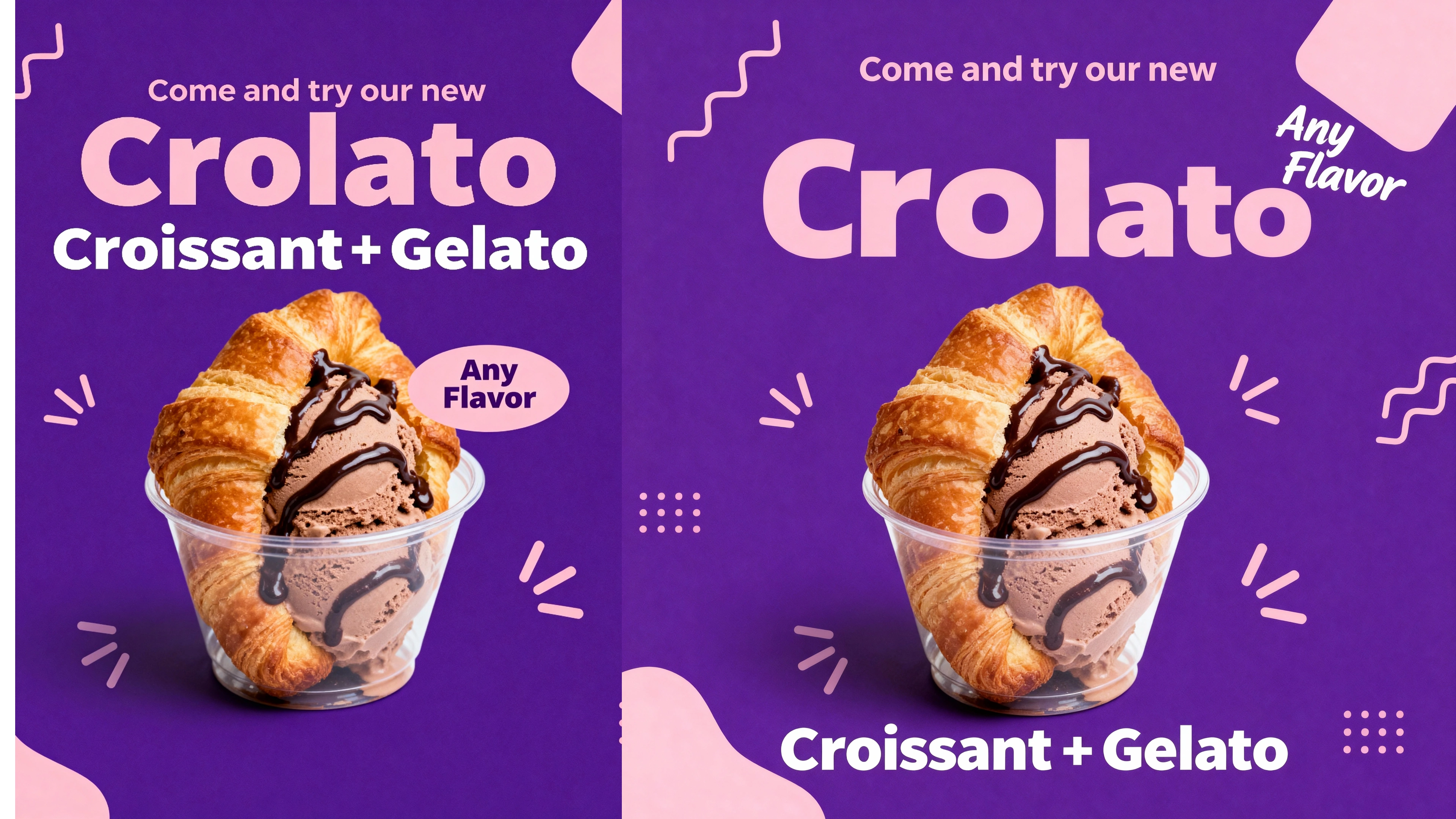 Text Editing and Typography
Style Transfer and Artistic Effects
Seedream 4.0 gives you access to advanced style transfer capabilities that give you incredible control over artistic transformations. You're not limited to preset styles - you can create unique artistic effects by combining different visual elements.
You can create photos that blend multiple artistic styles, such as part watercolor and part digital art, or apply stylistic effects selectively to specific image areas.
This gives creators unlimited possibilities for producing unique visual content that stands out in crowded digital environments.
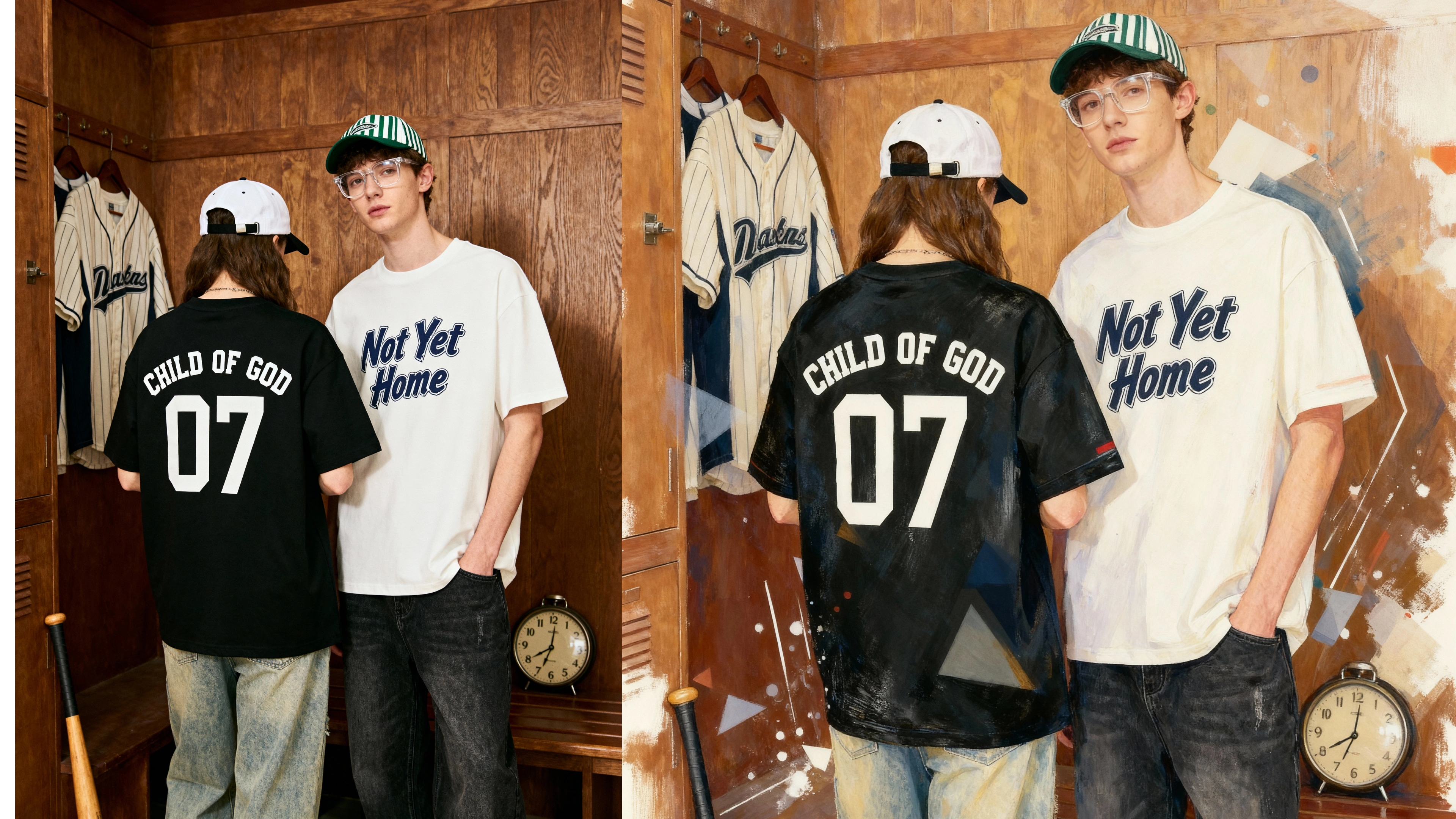 Style Transfer and Artistic Effects
Furniture Color Customization
Seedream 4.0 allows you to instantly change the color of any furniture piece in your photos without physical modifications. You can transform a brown sofa to see how it would look in blue, red, or any color imaginable.
Seedream 4.0 allows you to help interior designers showcase different color options to clients, letting them visualize how various colored furniture would complement their space.
Online retailers can use this feature to display multiple color variations without maintaining extensive physical inventory.
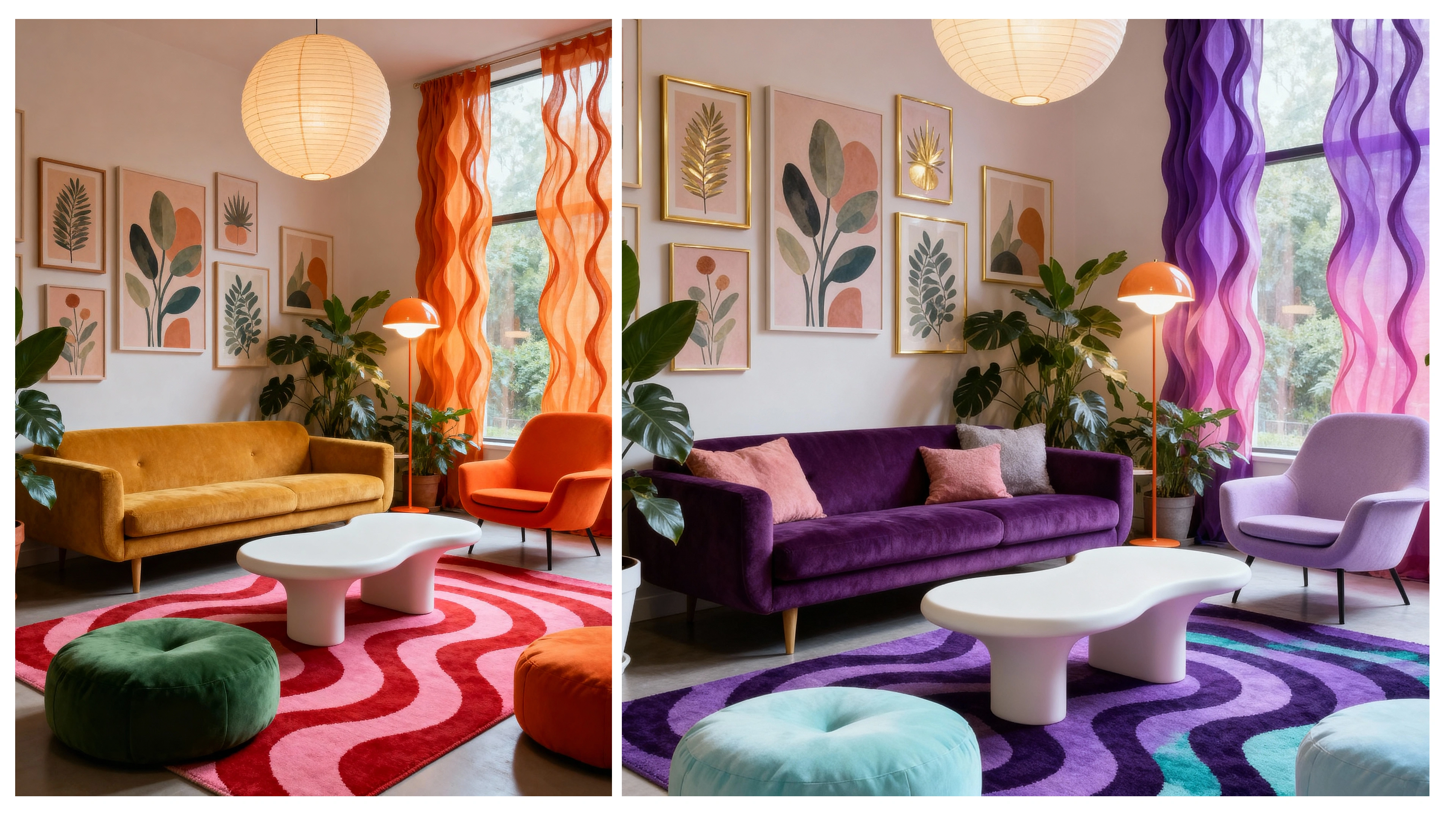 Furniture Color Customization
Artistic Style Transformation
Seedream 4.0 allows you to transform ordinary photographs into stunning artistic masterpieces. You can convert your family photos into beautiful watercolor paintings or transform landscapes into futuristic cyberpunk scenes with neon lights and digital effects.
Seedream 4.0 allows you to apply these artistic filters while preserving all important details and maintaining image quality. Content creators and artists can use this to make their work stand out with professionally stylized visuals.
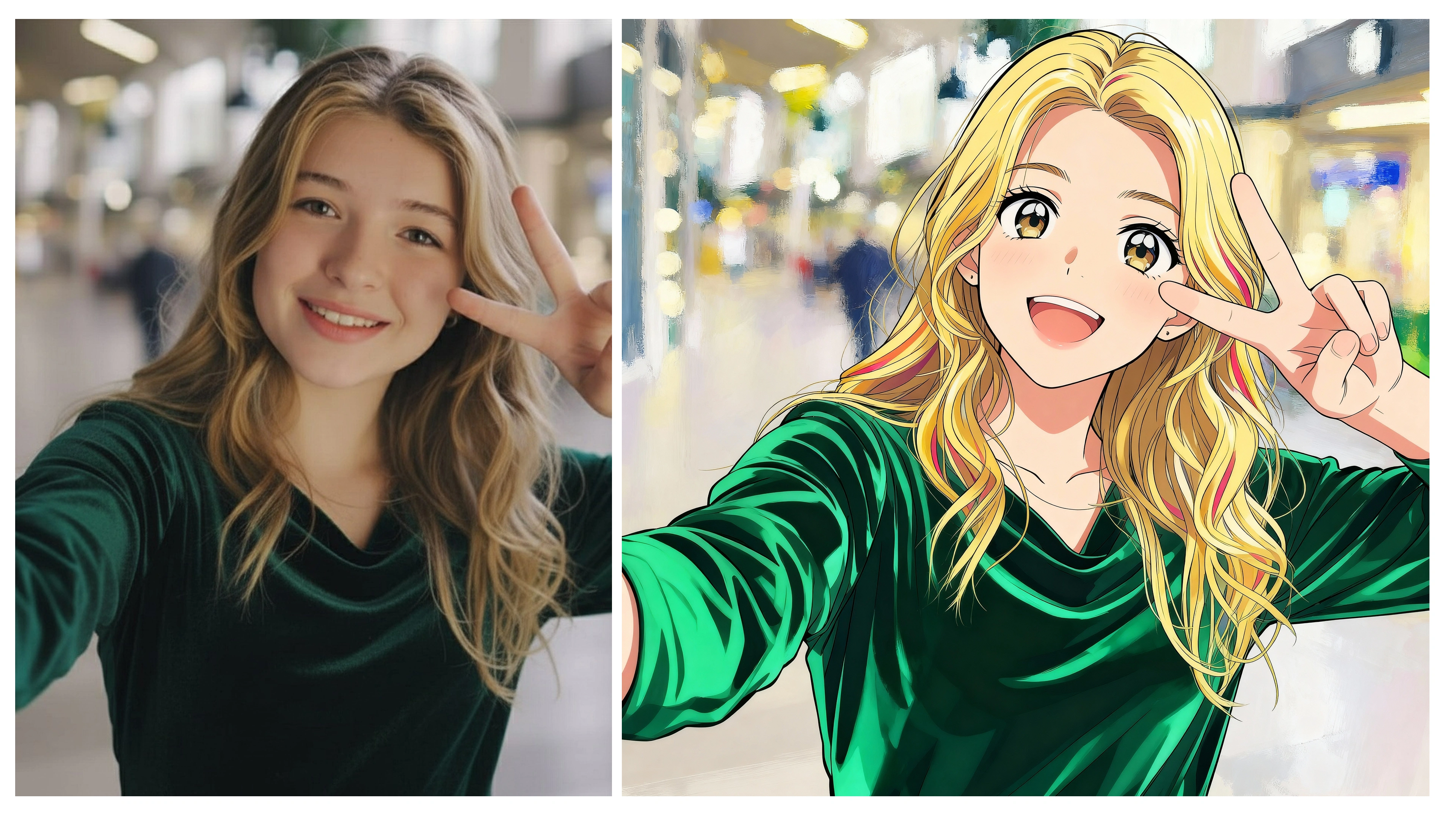 Artistic Style Transformation
How To Use Seedream 4.0?
New in ImagineArt: Seedream v4 + Start & End Frame ✨
— ImagineArt (@Imagine_aiart) September 11, 2025
Seedream v4 = 4K resolution + lightning-fast edits + highly detailed image generation.
Start & End Frame = your ticket to next-level video creativity 🎬
Now inside New ImagineArt.
Ready to imagine like never before? 👀 pic.twitter.com/r6Wqs4Ku8T
Seedream 4.0 can be used through ImagineArt's user-friendly platform, serving as a comprehensive creative hub that combines AI image generation and editing in one unified interface.
This is how the prompt box area looks like for AI image generation using Seedream v4:
 Prompt Box.png
With Seedream 4.0, you can simply type in a text prompt and instantly generate images that match your description. ImagineArt gives you the option to create up to four variations in a single go, so you can explore different looks and pick the one you like best.
You can also set the aspect ratio of your choice, whether you need square, portrait, or landscape images, making it flexible for social media posts, ads, or any creative project.
This is how the prompt box area looks like for AI image editing using Seedream v4:
 Prompt Box for Image Editing.png
ImagineArt lets you upload and work with up to four reference images at the same time, giving you more control over editing and creativity.
By combining multiple references, you can guide the AI to match a certain style, capture specific details, or merge different elements into one final design. This makes it easy to refine your visuals, experiment with variations, and achieve results that are closer to your exact vision.
The best part about the interface is that you can see how many credits will be utilized for your creations keeping things completely transparent for users.
Seedream 4.0 vs 4.5 vs 5.0: Which One Should You Use?
The Seedream family now has three generations, and picking between them is simpler than it looks. Seedream 4.0 is the proven all-rounder. Fast 2K generation, strong natural-language editing, and reliable character consistency across edits. If your work is product photos, background swaps, social content, or batch creation, it does the job at the lowest cost.
Seedream 4.5 arrived in late 2025 as a refinement. The biggest gains were in prompt following, especially with complex multi-part instructions, and in handling posters and layouts with longer text. Think of it as 4.0 with fewer retries.
The Seedream 5.0 family is a different kind of model. Released in early 2026, it adds deep thinking and real-time web search, which means it can reason through multi-step instructions and pull current information from the internet while generating. Ask it to visualize a trending topic or today's weather, and it actually knows what you mean. It also accepts up to 14 reference images, more than double what 4.0 supports.
The simple rule: use 4.0 for fast, high-volume creative work where cost matters. Step up to 5.0 when your project needs reasoning, current information, or heavy reference-image control. You can try both on ImagineArt and compare the results on your own prompts.
Cost Of Seedream 4.0
Seedream 4.0 is available on ImagineArt through flexible subscription tiers to match different creative needs.
Billed Yearly
Basic: $9/month – 36K credits/year
Standard: $20/month – 96K credits/year
Ultimate: $35/month – 192K credits/year
Creator: $178/month – 1.2M credits/year
Billed Monthly
Basic: $13/month – 36K credits/year
Standard: $30/month – 96K credits/year
Ultimate: $50/month – 192K credits/year
Creator: $255/month – 1.2M credits/year
To Conclude
Seedream 4.0 has outlived the launch hype and settled into something more useful: a fast, affordable, professional-grade image model that handles both generation and editing without fuss. Newer models have passed it on the leaderboards, including ByteDance's own, but few match its balance of speed, cost, and editing precision.
What makes it even more appealing is its versatility, whether you’re a marketer, designer, content creator, or part of a creative agency, Seedream 4.0 adapts to a wide range of workflows and creative needs.
Best of all, you can access Seedream 4.0 directly on ImagineArt, where it’s integrated with flexible subscription plans, making it easier than ever to bring your creative ideas to life.
Frequently Asked Questions
No, and the similar names confuse a lot of people. Both come from ByteDance's Seed team, but Seedream is the image generation and editing model, while Seedance is the video generation model. If you want still images, you want Seedream. If you want AI video, you want Seedance.
Seedream is built by the Seed team at ByteDance, the Chinese technology company behind TikTok and CapCut. The Seed team is ByteDance's AI research division and also develops the Seedance video models.
The model itself has no official free consumer app from ByteDance for most regions, so access runs through platforms that carry it. On ImagineArt, you can try Seedream 4.0 using daily free credits, with paid plans available when you need more volume.
Seedream 4.0 tops out at 2K resolution natively. If you need larger output, you can generate at 2K and run the result through an AI upscaler, or use the newer Seedream 5.0 family, which supports higher resolutions on some platforms.
They are direct competitors that solve the same problem in similar ways: both combine image generation and natural-language editing in one model. Seedream 4.0 is known for speed and low cost, while Google's Nano Banana line, especially Nano Banana Pro, leads on text rendering and photorealism at a higher price. Many creators keep both in their toolkit and pick per task.
Yes, on platforms like ImagineArt you own the images you create and can use them commercially. Terms vary by platform, so if you generate through a different service, check its usage policy first.
Zahida Misher
Exploring how AI transforms marketing, I help businesses unlock growth and future-proof their presence.