![12+ Best Photo Editing Apps for 2026 [Free + Paid + AI-Powered]](https://blogs-cdn.imagine.art/Best_Photo_Editing_Apps_FI_869a50db41.png)

Saba Sohail
December 31, 2025 • Updated July 13, 2026
19 mins Read
How I compiled this list of best photo editing apps?
To find out the best photo editing apps, I ran simple tests with basic and complex photos and looked at the results and the overall photo editing process. So, before I jump into the rankings, here are 10 factors I used to battle-test these apps:
- first off: The best photo editing apps are user-friendly, affordable and offer enough features for their target users.
- availability on mobile and PC
- AI editing features like text-based prompts and reference images for generative enhancements.
- Simplicity of platform and learning curve, intuitive interfaces, fast onboarding
- user fit for solo creators, beginners, professionals, teams and enterprises
- the creative range of these photo editing apps: effects, templates, presets, realistic edits, and creative transformations.
- speed of these apps and workflow for marketing, ecommerce, and social content production.
- visual consistency, realism, and repeatability of results across multiple edits.
- pricing and cost transparency, free access limitations, and whether pricing aligns with delivered value for different user segments.
So, here is a quick rundown of the 12 tried and tested and perhaps the best photo editing apps of 2026:
- ImagineArt Apps — AI-powered, prompt based photo editing apps for beginners to businesses
- ImagineArt 2.0 Edit - photorealistic text based image editing
- GPT 1.5 Apps — light-weight, professional photo editing
- Nano Banana Pro Apps — intelligent photo editing
- Flux 2 Max — realistic photo editing
- Adobe Lightroom — a pricey photo editing app for professionals
- Picsart — templated-based photo editing for social media
- Fotor — template-based photo editing for social media
- Pixlr — template-based photo-editing for small teams
- Photopea — Photoshop alternative to image editing
- Freepik — photo editing templates, effects, and library of assets
- Canva — photo editing for beginners
Let’s start!
1. Imagine Apps by ImagineArt
Imagine Apps by ImagineArt are the best photo editing apps because the platforms delivers the most complete GenAI photo and video ecosystem available today. Instead of relying on a single editor with scattered features, ImagineArt brings 20+ purpose-built AI photo editing apps into one interface. These apps cover everything from effects, templates, presets, and creative transformations to advanced visual styling and image animation.
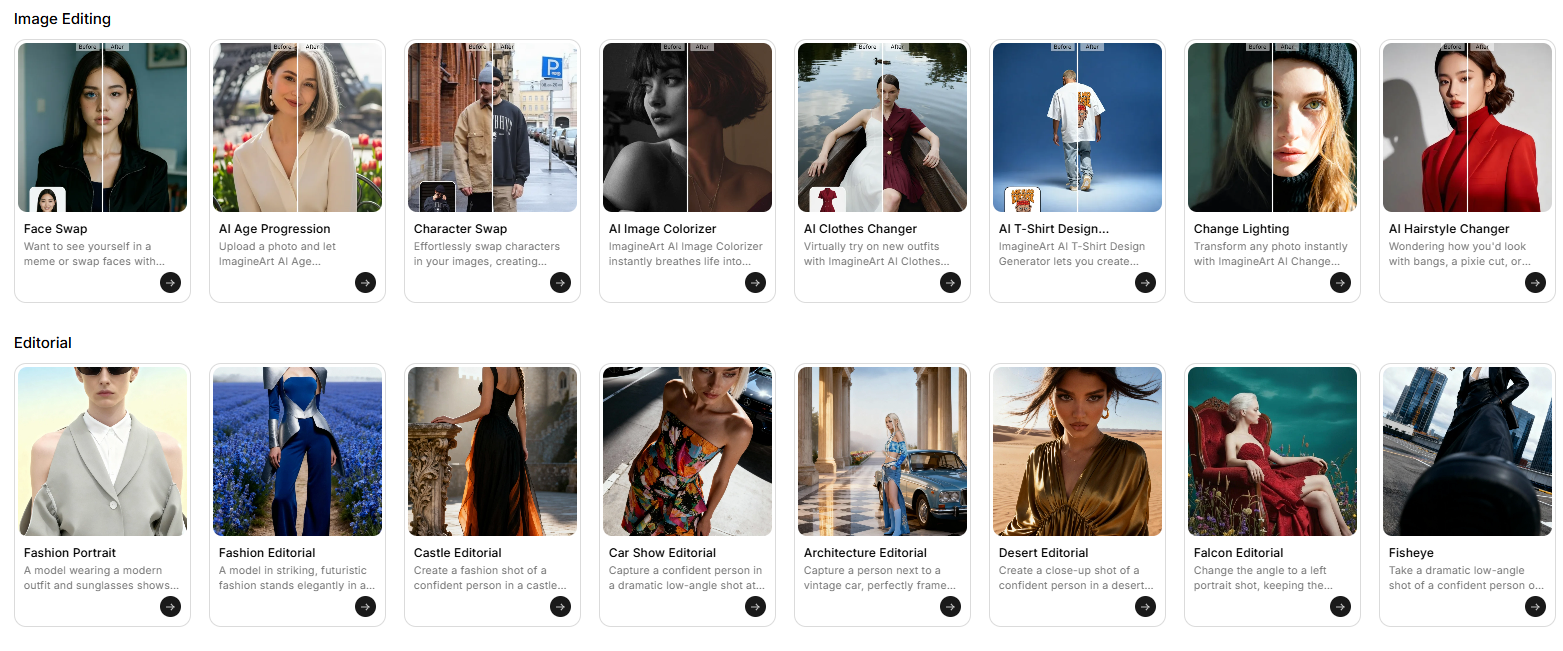 Best Photo Editing Apps by ImagineArt
The biggest advantage of Imagine Apps lies in their one-window workflow. ImagineArt as a suite has:
- AI chat to brainstorm ideas and create campaigns
- AI image generator with multiple models
- AI video generator for text to video, image to video and video to video outputs. You upload an image, type a text prompt, and generate results instantly: no switching tools, no exporting between platforms. You can even animate an edited image in the same workspace, which dramatically reduces production time for marketing, ecommerce, and social content.
Imagine Apps scale cleanly across user types. Solo creators use them for fast visuals and experiments. Professionals rely on them for repeatable, high-quality outputs. Teams and enterprises benefit from consistent results, shared workflows, and speed that supports high-volume content production. The platform removes the traditional learning curve associated with professional photo editing by replacing complex controls with natural language prompts and ready-made AI apps.
If you want fast, flexible, and scalable AI photo editing without juggling multiple tools, Imagine Apps set the benchmark.
Pros
- one complete AI creative suite to experience 20+ best photo editing apps
- go from text, chat, image to video and apps in clicks.
- Extremely fast workflows: upload image, type prompt, export
- Minimal learning curve for beginners and professionals
Cons
- only 100 credits in 24 hours
ImagineArt Pricing
ImagineArt comes with 100 free credits daily and paid plans start at $13/month.
2. ImagineArt 2.0 Edit — Text-Prompt Photo Editing
ImagineArt 2.0 Edit is ImagineArt's most photorealistic photo editing model. Where most tools give you sliders and filters, 2.0 Edit takes plain-language instructions. Type "change the jacket to dark navy, adjust the background to a warm studio setting, clean up the skin texture" and the model applies the whole brief as a single coherent edit pass.
The results hold up in commercial use: clean edges, naturally adjusted lighting, edits that blend with the original rather than overwriting it. No over-processed AI look. No mismatched lighting between subject and background.
Pros
- Photorealistic images with high-quality export
- Option to upload multiple images to edit and create a new image
- Extremely easy to use - Beginner friendly
Cons
- Less free credits
ImagineArt Pricing
This also being part of ImagineArt has 100 free credits daily and paid plans starting from $13/month.
3. GPT 1.5 Apps — lightweight photo editing apps
GPT-1.5 photo editing apps on ImagineArt offer image editing features, speed, simplicity, and task-specific photo editing. These apps solve one problem at a time and they do it fast. You open a mini-app, upload an image, add a short prompt, and generate a result within seconds.
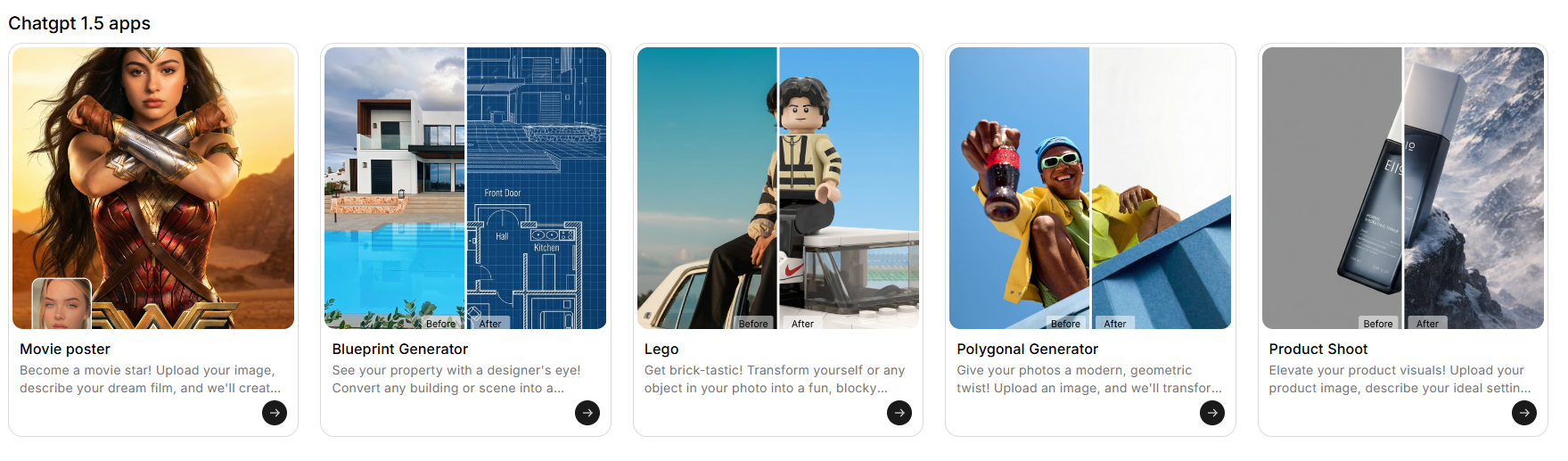 GPT 1.5 Image Apps by ImagineArt
Yes, that’s in the name too: OpenAI’s newest GPT 1.5 AI image generation and editing model is powering these apps for use cases like architectural blueprint generation from photos, LEGO-style effects, movie poster generators, polygon art creators, and AI product photoshoots.
So, Each app targets a clear use case, which makes GPT-1.5 Apps superb for quick transformations, concept validation, and early-stage visual ideation.
These apps work especially well for beginners, marketers, and non-designers who need visuals without learning complex tools. Marketers use them to mock up ad creatives. Ecommerce teams test product visuals. Creators generate ideas before moving to higher-end models. GPT-1.5 Apps also support rapid iteration—you can test multiple ideas quickly without heavy cost or setup.
Compared to Imagine Apps, GPT-1.5 Apps trade creative depth for speed and affordability. They do not offer the same end-to-end creative workflows or animation flexibility, but they excel at focused, repeatable tasks.
Pros
- basic text-based instructions for simple to detailed edits
- Minimal learning curve for beginners and professionals
Cons
- Limited to 50 free tokens per day
GPT 1.5 Image Pricing
Access through Imagine Apps with the token-based system. Paid plans start at $13/month.
4. Nano Banana Pro Apps — intelligent photo editing apps
Nano Banana Pro app offer high-concept, stylized, and brand-driven photo editing. These apps prioritize creative direction, visual identity, and bold transformations over speed alone. If GPT-1.5 Apps focus on utility, Nano Banana Pro focuses on art direction and campaign-ready visuals.
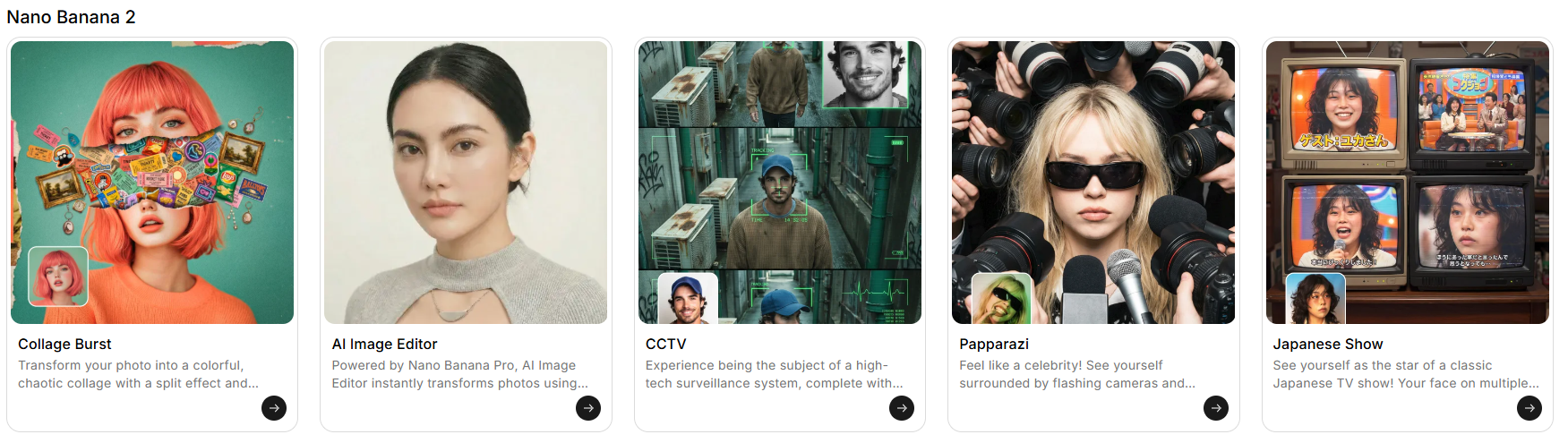 Nano Banana Pro Apps by ImagineArt
Nano Banana Pro is already ‘intelligent’ and ‘data-driven’. The photo editing apps go a step beyond and includes brand kit generators, outfit vending concepts, CCTV-style visuals, paint and manga effects, superhero art, and behind-the-scenes aesthetics. At the core of these workflows is an AI image editor that allows teams to refine composition, styling, and visual details while keeping creative direction consistent. These tools work exceptionally well for branding teams, agencies, and creators who want visuals that stand out rather than blend in.
Nano Banana Pro delivers strong results for campaign ideation, experimental visuals, and stylized storytelling.
- Fashion brands use it to explore outfits and looks. Marketing teams use it to test visual identities.
- Creators use it to build recognizable styles across content.
- These photo editing apps support individuals, professionals, and large teams equally well, especially when visual consistency matters.
The trade-off is cost. Nano Banana Pro runs at a higher price point than Imagine Apps and GPT-1.5 Apps, which makes it less suitable for casual use or high-volume experimentation. You choose Nano Banana Pro when creative impact matters more than speed or budget.
Pros
- Brand-level photo editing for social media campaigns and creative production
- intelligent, data-driven photo editing for high-end use cases
Cons
- More expensive than other ImagineArt app tiers
Nano Banana Apps Pricing
- Comes with token-based system. Paid plans start at $13/month.
Recommended read: Nano Banana Pro Overview
5. Flux 2 Max – Realistic Text-Based Photo Editing
Flux 2 Max is one of the best photo editing apps because it offers realistic, prompt-driven photo edits with visual flair. The model handles lighting corrections, object-level changes, background tweaks, and style adjustments through simple text instructions. You upload an image, describe the change, and receive a clean, realistic result without complex setup.
Inside ImagineArt, Flux 2 Max serves users who want natural-looking edits rather than heavy stylization.
- Ecommerce teams use it to refine product photos.
- Photographers use it for fast retouching.
- Creators rely on it for fun but grounded edits that stay close to the original image.
Flux 2 Max stays flexible and accessible, but it does not match the consistency or creative polish of Imagine Apps or Nano Banana Pro. Yet reference-based enhancements also help maintain visual continuity across multiple edits.
Results vary more across repeated prompts, especially in complex scenes. While realism remains its strength, it lacks advanced animation, preset ecosystems, and end-to-end workflows.
Flux 2 Max fits users who value straightforward realism, fast edits, and moderate creative control without stepping into full-suite complexity.
Pros
- Strong realism and natural-looking edits
- Flexible text-based and reference-driven workflows
- Useful for ecommerce and photography
Cons
- Lower consistency than Imagine Apps and Nano Banana Pro
- Limited creative depth and polish
Flux 2 Max Pricing
- Available within ImagineArt’s token-based system
- low cost compared to GPT-1.5 and Nano Banana Pro
Recommended Read: AI Photography Prompts
6. Adobe Lightroom – Enterprise-Grade Photo Editing Standard
Adobe Lightroom is the industry standard for professional photo editing, and its main users demand manual precision rather than AI automation.
Adobe’s photo editing apps excel at color grading, exposure control, tone curves, masking, and batch corrections. Photographers and agencies rely on Lightroom for consistent, high-quality outputs across large image libraries.
Lightroom is best for enterprises, agencies, and professional photographers who need predictable results and full creative control. It supports complex workflows, RAW image processing, and deep color management. Businesses that prioritize brand consistency and technical accuracy continue to adopt Lightroom at scale.
However, Lightroom falls behind modern GenAI platforms in speed and accessibility. The learning curve remains steep, and meaningful results require technical expertise. AI features exist, but they feel limited compared to text-based editing, generative effects, and instant transformations offered by ImagineArt. For users who only need photo editing, the subscription cost feels high relative to value delivered. All in all, Lightroom makes sense for professionals who prefer manual workflows.
Pros
- Professional-grade control and precision
- Industry-standard for agencies and enterprises
- Excellent for color correction and batch edits
Cons
- Steep learning curve and limited AI capabilities
- High cost for non-professional users
Adobe Lightroom Pricing
- Adobe Lightroom plans start from $11.99/month
Recommended read: Adobe Alternatives
7. Picsart – AI Photo Editing App with templates
Picsart is a template-first photo editing platform built for speed, volume, and social-native visuals. The platform offers a large library of templates, effects, stickers, backgrounds, and basic AI-powered tools that help users create content quickly without design expertise. Ecommerce brands use Picsart to generate product creatives, lifestyle visuals, and promotional assets. Social media teams rely on it for rapid post production across platforms.
Picsart shines in mobile-first workflows. The app works exceptionally well on smartphones, making it easy for creators and marketers to edit, resize, and publish content on the go. AI features like background removal, object replacement, and style effects simplify routine edits. For teams managing frequent campaigns, the template system accelerates production.
However, Picsart limits creative depth compared to ImagineArt. It focuses on preset-driven output rather than generative freedom. Users cannot animate images into videos, chain workflows, or move seamlessly from photo edits to advanced AI transformations. Consistency across repeated outputs also varies when projects scale.
Picsart suits creators and ecommerce teams that prioritize speed and simplicity over creative control.
Picsart Pricing
- Picsart’s basic plan is free with watermarks
- Paid plans start at $13/month
Pros
- Large template and effects library
- Strong mobile experience
- Fast content creation for social and ecommerce
Cons
- No advanced animation or workflow chaining
Recommended Read: Picsart Alternatives
8. Fotor – Simple AI Editing for Business and Casual Users
Fotor is one of the best photo editing apps that gives you the mix of Gen AI, templates, fast results, easy-to-use interface and mid-level AI-powered editing. It’s a great image editor for beginners, teams and small businesses, as well as content creators and casual users. Picsart’s platform offers quick enhancements through one-click tools, templates, and basic AI features. Users can edit product images, create social posts, and apply effects without technical knowledge.
Above all, Fotor is accessible. The interface feels intuitive, onboarding stays fast, and users reach usable results within minutes. AI features include background removal, image enhancement, style effects, and basic retouching. Small ecommerce teams use Fotor for clean product images and promotional graphics. Casual users rely on it for everyday edits and social content.
Despite its simplicity, Fotor lacks depth for advanced workflows. It does not support complex creative transformations, multi-step editing pipelines, or cross-format outputs like image-to-video. Compared to ImagineArt, Fotor offers fewer AI-driven controls and limited scalability for professional teams. Fotor works best for users who want straightforward edits without creative experimentation.
Pros
- Beginner-friendly interface
- Fast onboarding and simple AI tools
- Suitable for small teams and ecommerce
Cons
- Limited creative range
- No advanced generative workflows
- Not ideal for large teams or brand-heavy projects
Fotor Pricing
- Fotor has a free plan with basic editing and collage features
- Fotor’s paid plans start from $8.99/month.
9. Pixlr – Lightweight Online Photo Editor with AI
Pixlr is one of the fastest best photo editing apps for desktop and mobile. It’s for users who want quick results without installing heavy software. The platform runs entirely online and focuses on accessibility, speed, and essential AI-powered edits. Pixlr works well for ecommerce sellers, marketers, and casual creators who need to clean up images, remove backgrounds, or apply effects in minutes.
Pixlr offers core photo editing tools such as cropping, resizing, layering, and color adjustments, with AI features like background removal, object cleanup, and style effects.
Pixlr is great for product image preparation, simple ad creatives, and social media visuals. The interface stays lightweight and familiar, which makes it a great photo editing app option for beginners to start immediately.
However, Pixlr is not a full creative suite, so it doesn’t offer the advanced generative AI workflows, animation capabilities, and multi-step automation. Teams working at scale or designers managing brand consistency across campaigns often find Pixlr limiting. Compared to ImagineArt, Pixlr offers less creative control, fewer AI-driven transformations, and no image-to-video or workflow chaining options.
Pixlr fits best when speed matters more than depth and when edits stay simple.
Pros
- No installation required, fully browser-based
- Fast edits for ecommerce and social content
- Simple AI tools for background removal and effects
Cons
- Limited advanced AI capabilities
- Not designed for large teams or brand workflows
- No animation or multi-format creative pipeline
Pixlr Pricing
- Pixlr comes with a 7-day free trial. An ad-free basic version costs $2.49/month
- Pixlr’s paid plans start at $9.99/month.
- Pixlr also offer credit top-ups.
Recommended read : Best AI Tools For Image Editing
10. Photopea – Online Photoshop-Style Photo Editor
Photopea is a fully browser-based photo editing app and a strong alternative to Photoshop. It supports PSD, XCF, Sketch, XD, and standard image formats, which makes it especially useful for designers who collaborate across tools or need quick fixes on layered files.
Photopea focuses on manual editing control rather than heavy generative AI. Users can work with layers, masks, smart objects, blend modes, adjustment layers, and advanced selections directly in the browser. This makes Photopea the go-to tool for graphic designers, marketers, and freelancers who already understand Photoshop-style workflows and want a lightweight, accessible option.
The interface of Photopea works well for banner design, social creatives, ad layouts, ecommerce visuals, and quick retouching tasks. Photopea also suits teams that need emergency edits or file compatibility without licensing constraints.
All-in-all, Photopea is a utility editor for Photoshop users who are looking for a more budget-friendly professional editing platform and so, it doesn’t have substantial AI support.
Pricing
- Photopea has a free basic plan and paid subscriptions start from $22.99/month.
Pros
- Full Photoshop-style editing in the browser
- Supports PSD and professional file formats
- No installation or hardware requirements
Cons
- Limited AI and generative features
- a lot of manual work and no creative pipelines
11. Freepik – AI Creative Suite for Images, Design, and Marketing
Freepik operates as a full AI-powered creative suite like ImagineArt and combines stock assets, AI image generation, photo editing tools, and design templates under one ecosystem. Unlike single-purpose editors, Freepik targets beginners, marketers, content creators, and professionals who want fast visual production without deep technical skills.
Freepik offers multiple photo editing apps for image fixes and remixing, background generation, mockups, social creatives, and marketing visuals.
You can generate images from text, enhance photos, remove or replace backgrounds, apply styles, and adapt visuals for different platforms. The platform also integrates templates, icons, illustrations, and stock imagery, making it ideal for rapid campaign execution.
Freepik excels in accessibility. Beginners can rely on templates and presets, while professionals use AI tools to accelerate workflows. However, Freepik prioritizes convenience over deep control. It does not offer advanced node-based workflows, image-to-video pipelines, or animation-first editing like ImagineArt. Creative flexibility remains strong, but repeatability and fine-grain control can feel limited for large teams.
Freepik works best for marketing visuals, social content, presentations, and quick design output at scale.
Pros
- Large library of templates, assets, and mini photo editing apps
- Beginner-friendly with fast results
Cons
- Less control for advanced creative workflows
Pricing
- Freepik offers a free account and its paid subscriptions start at $5.75/month
12. Canva — Beginner-Friendly Photo Editing for Beginners
Canva is a design-first platform for beginners, marketers, and teams, but it does offer decent mini apps for photo editing. It bundles templates, library of assets, presets and effects inside a larger ecosystem that has also started offering basic AI image generation and AI video generation.
While Canva is not a dedicated AI photo editing tool, it still works well for social media creators and casual users who want fast, presentable visuals without learning professional editing software.
Users can create ads, visuals, Instagram stories, basic product videos etc. and use photo editing features like background removal, basic retouching, filters, adjustments, and template-based layouts.
It also supports brand kits, shared libraries, team collaboration, and approval workflows, which makes it popular with startups, social media teams, and non-designers in business roles.
Canva offers AI features such as Magic Design, text generation, and layout suggestions. However, its photo editing apps do not respond to text-based AI instructions. You cannot describe an edit and expect accurate results. Editing remains largely manual and trial-and-error, which can frustrate beginners who expect prompt-based workflows like ImagineArt. Canva also lacks advanced realism control, generative photo transformations, and creative experimentation depth. Canva works best for templated content, brand-safe visuals, and collaborative design.
Pros
- basic features are free
- beginner-friendly interface
- strong library of templates
Cons
- limited AI features for photo editing
- Limited creative depth compared to GenAI-first platforms
Canva Pricing
- Canva is free for basic design
- Canva’s main photo editing apps are part of pro plans starting from $15/month
Recommended Read: Canva Alternatives
Recommended read : Canva Alternatives
How to Choose the Best AI Photo Editor in 2026
Not every photo editing app works the same way. In 2026, the difference between a traditional editor and an AI-powered one is significant enough that picking the wrong type means starting over. Here is how to choose the right one before you commit.
What kind of editing do you actually need? There are two types of tools in this list. The first type adjusts photos you already have — color grading, exposure correction, retouching, and layer-based manual editing. Adobe Lightroom and Photopea are built for this. The second type generates or transforms images using AI — creating scenes from text prompts, swapping backgrounds, applying style effects, and building visuals from scratch. ImagineArt, Flux 2 Max, and Nano Banana Pro belong here.
If you are fixing real photos, you need the first type. If you are creating content for social media, ecommerce, or marketing from scratch, you need the second.
Are you editing on mobile or desktop? Most AI tools in this list work on both, but the experience differs. Picsart and ImagineArt are optimized for mobile workflows — fast, template-driven, and built for vertical content. Photopea and Lightroom are desktop-first — precise, layer-based, and better suited for print-grade outputs. If 90% of your work happens on your phone, choose accordingly.
What is your skill level?
- If you are a beginner at photo editing, pick ImagineArt, Fotor, or Picsart
- If your skill levels are intermediate, pick Pixlr, Freepik, or Canva
- If you are professional photo editor, pick Adobe Lightroom or Photopea
- If you are an AI-first creator, pick ImagineArt, Flux 2Max, or Nano Banana Pro.
Beginner tools prioritize presets, templates, and one-click results. Professional tools prioritize manual control, RAW support, and precision. AI-first tools prioritize generation quality and prompt accuracy — the skill required is knowing how to describe what you want, not how to operate sliders.
What is your use case?
- Social media content: ImagineArt, Picsart, or Canva — fast output, multi-format support, and mobile-friendly
- Ecommerce product photography: ImagineArt 2.0 Edit or Flux 2 Max — background removal, mockup generation, and batch editing
- Brand campaigns: Nano Banana Pro — brand kit integration, consistent visual identity, stylized outputs
- Professional print work: Adobe Lightroom or Photopea — RAW processing, color accuracy, and high-resolution export
- Quick mockups and iteration: GPT Image 2 or Fotor — low learning curve, fast turnaround
How does the pricing actually work? Most AI editors use one of three models. Subscription gives you a fixed monthly allowance — predictable cost, good for daily users. Credit-based charges per generation — better for occasional use but costs add up fast at volume. Free with limits works for testing but caps output quality or quantity.
ImagineArt gives 100 free credits daily before any payment, which is enough to evaluate whether it fits your workflow. Adobe Lightroom requires a subscription from day one. Photopea is the only tool here with a full browser-based free tier for serious editing work.
Picked the best photo editing apps yet?
If you want quick edits, plenty of photo editing apps will get the job done. But if you want speed, scale, and structure in your creative pipelines, the choice becomes clearer. In addition to photo editing apps, ImagineArt has image to video workflows so your creative production even gets smoother and you move from idea to export in minutes, not hours.
Frequently Asked Questions
What is the best free photo editing app?
For AI-powered editing at no cost, ImagineArt offers 100 free daily credits refreshed every 24 hours — covering 20+ purpose-built AI photo editing apps. For traditional editing with no subscription at all, Photopea is the strongest free option: full Photoshop-style editing in the browser with layer support, PSD compatibility, and no watermarks. Fotor and Canva both offer usable free tiers for social media graphics.
What is the best photo editing app for iPhone?
ImagineArt works on iPhone via mobile browser with no app download. Picsart has one of the strongest iOS experiences for template-based social content. Imagine Apps is the best free mobile photo editor on both iOS and Android.
What is the best AI photo editor for adding objects to images?
ImagineArt 2.0 Edit and GPT-image 2 Apps both support object addition through text prompts — describe what you want added and where, and the model generates it in context with the existing photo. ImagineArt 2.0 Edit handles photorealistic additions with natural blending to match existing lighting and texture. Flux 2 Max is the strongest option specifically for environment and background additions.
How can I edit photos without Photoshop?
Photopea is the closest free browser-based Photoshop alternative — it supports PSD files, layers, masks, blend modes, and smart objects without any installation. For AI-powered editing that removes the need for manual layer management entirely, ImagineArt 2.0 Edit accepts plain text instructions to apply complex adjustments: change backgrounds, retouch skin texture, swap jacket colors, adjust lighting. Pixlr and Canva cover simpler edits for users who don't need Photoshop-level control.
What is the best photo editing app for Instagram?
ImagineArt and Picsart are the strongest options for Instagram content. ImagineArt handles AI-powered transformations, background changes, and consistent branded visuals across posts. Picsart's template library and mobile experience are optimised for Stories and Reels.
Can I use AI photo editors for product photos?
Yes — and for most e-commerce use cases, AI editors now replace traditional product photography workflows. ImagineArt 2.0 Edit handles background swaps, mockup generation, and batch editing. Flux 2 Max is strong for placing products in natural studio-style or lifestyle settings through text prompts.
Saba Sohail
Saba Sohail is a Generative Engine Optimization and SaaS marketing specialist working in automation, product research and user acquisition. She strongly focuses on AI-powered speed, scale and structure for B2C and B2B teams. At ImagineArt, she develops use cases of AI Creative Suite for creative agencies and product marketing teams.