If you're building a content automation stack and still copying files between tools by hand, is it even a pipeline? Or maybe it is, but broken!
Knowledge workers spend 19% of their time searching for information (McKinsey). A lot of that time burns at exactly those handoffs.
This guide gives you a crash course in building content automation with three tools your team is already using: Claude, ImagineArt Enterprise and Meta Ads.
So while there is no learning curve for these tools, I have covered human touchpoints, stages in content automation pipeline, how to strategize and scale your creative production.
What is content automation?
Content automation means using software for handling repeatable content and creative production tasks without manual execution at each step.
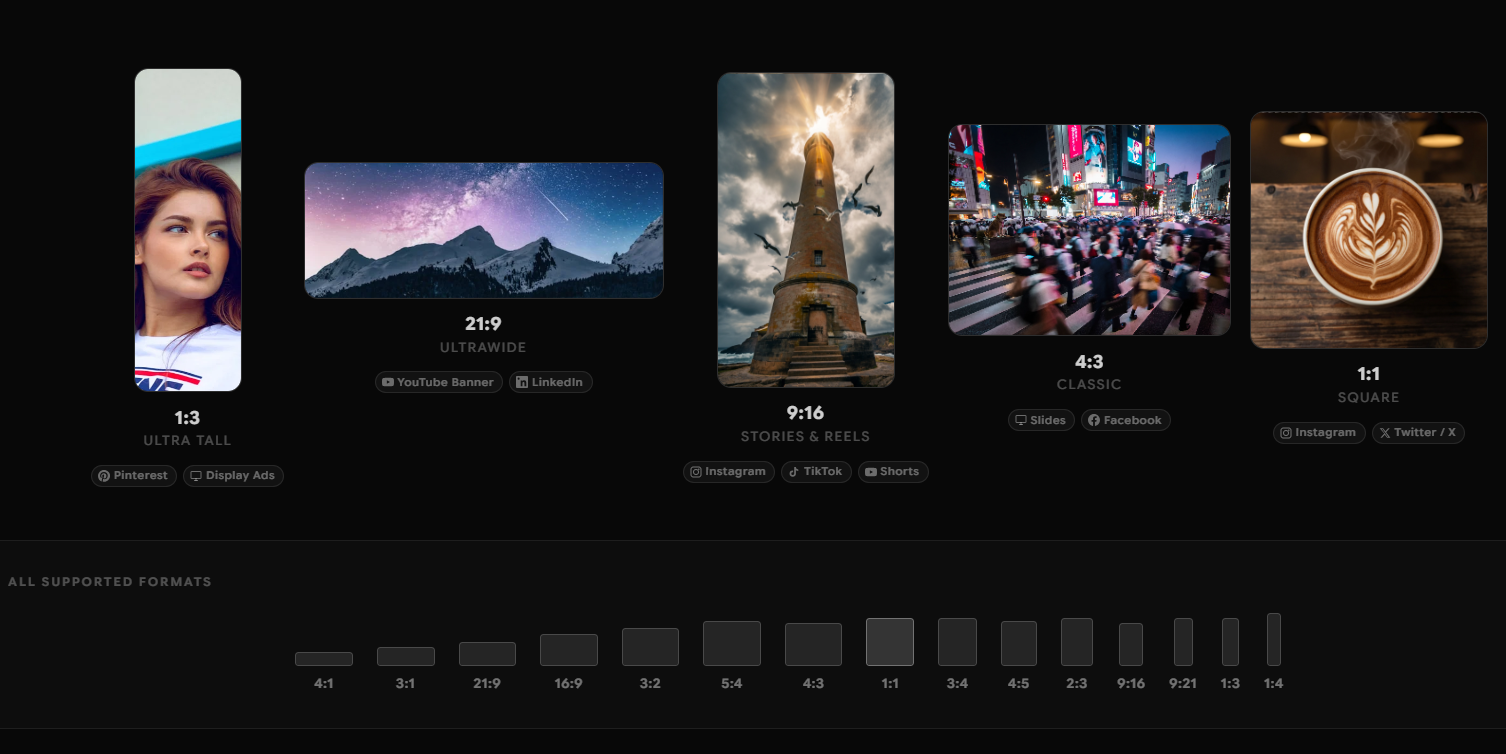 Content Formats for Different Platforms
That includes generating images, writing copy, resizing assets for different channel formats, routing content through review queues, scheduling and publishing to platforms, pulling performance data, and feeding that data back into the next production cycle.
The operative word is repeatable. Content automation has replaced execution steps. This is all the work that happens once a creative decision has been made.
However, it does not replace creative direction. A human still defines the brief, the brand parameters, and the campaign objective. Automation handles what comes after.
This is the 10-80-10 AI creative workflow tool.
Connect the right tools, tell them what to create, watch back while they execute and refine as your last 10% effort.
The case for doing this is straightforward.
Requoting McKinsey estimating that knowledge workers spend 19% of their time searching for information. In content production, most of that is wasted moving files between tools, finding the correct asset version, tracking approval status across Slack threads.
Content automation pipelines eliminate those handoffs. The production capacity of a team scales without adding headcount, and output quality dramatically improves because systems and brand kits within the AI creative tools enforce brand parameters.
4 Stages of Content Automation
A content automation pipeline runs in four stages and each stage produces outputs the next stage consumes directly.
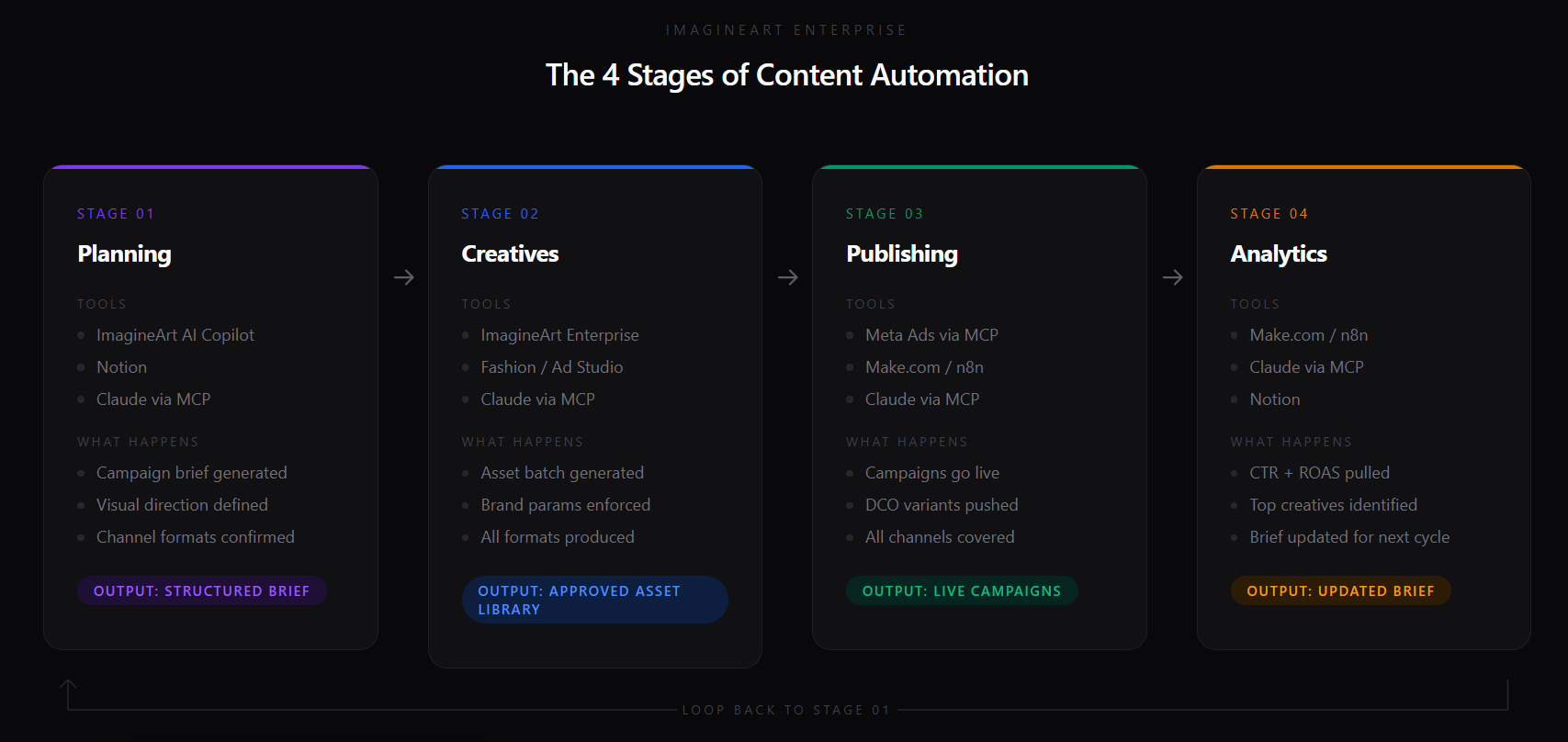 Content Automation Stages
Stage 1: content planning
The pipeline starts with a brief. A structured brief specifies the product, campaign objective, audience, channel list, visual direction, and copy direction. Most of the briefs also cover branded references, style guides, font details, typography ideas, trends competitors are following and inspiration posts.
Every tool downstream depends on this brief as its input.
Automation at the planning stage means the brief is generated and structured automatically. While I will get into AI-powered creative brief in detail, for starters Claude with human direction can do 80% of the strategy part. Your marketing teams can just name trends, paste references and boom, you get a direction document. In fact, when fed correctly, Claude can give you data-backed ideas on what went well during the previous campaigns. So your teams are not exactly starting from a blank Notion document, but have data-driven, on-brand intelligence to establish future creative production systems.
Stage 2: creatives, assets, advertisements
With an MCP, Claude directly connects to ImagineArt Enterprise and the brief triggers generation. Images, video, ad variants, and platform-specific formats all generate from brief parameters without manual tool-switching.
At scale, ImagineArt gives you tool-level features for compounding on-brand assets, say ad videos, trainings, product demos and tutorials.
This stage produces hundreds of asset variants per campaign in minutes. And since the Brand Kit has already locked visual parameters, all of your creatives meet guidelines.
Stage 3: publishing
After creative execution by ImagineArt, design then marketing teams approve assets. These assets route to the correct channels, in correct aspect ratios, in correct formats on the correct schedule. Campaign structures build like this one automatically.
- A story goes to Instagram.
- A static image post goes to Meta Feed.
No one in your team has to download, upload files manually or fill out campaign fields, which would take another 2 hour round.
Stage 4: analytics
Performance data flows back into the system. CTR by creative variant, ROAS by campaign, engagement by format. The top-performing creative parameters write back into the next brief. The loop closes.
When all four stages connect, content automation produces a compounding return: each cycle improves the next because performance intelligence feeds directly into planning.
The Best AI Content Automation Tools
1. Claude
Claude, in its own words, is the thinking partner. But with connectors and ImagineArt MCP, it does more than strategy.
In technical terms, it is the orchestration layer. It reads briefs, calls other tools, makes decisions, and executes multi-step workflows based on instructions rather than pre-configured triggers. To stay on-brand and to really scale creative production and content publishing, ask your teams to create skills.md files. These help Claude understand your preferences, your team’s goals and so the output is closest to your plans.
The key here is MCP (Model Context Protocol). MCP lets Claude call external platforms directly — including ImagineArt Enterprise and Meta Ads. With those MCP connections active, Claude reads the campaign brief, calls ImagineArt to generate the asset batch, and builds the Meta campaign from approved outputs. A human approves at two points. Claude runs everything in between.
In addition to Claude, there are some workflow automation tools like Zapier and Make.com. Even these tools can execute pre-configured trigger-action scenarios. But Claude is team-friendly. Beginners to advanced designers to marketers and even interns in your creative teams can prompt and Claude will execute.
In fact, building onto stage 4, Claude reads analytics data across the full campaign, identifies which creative parameters drove performance, and writes updated brief recommendations back to Notion. In a way, the loop concludes. Yet you have valuable input for upcoming campaigns.
2. ImagineArt Enterprise
ImagineArt Enterprise handles creative generation. It takes the brief Claude passes and produces the full asset library: hero images, ad variants, lifestyle shots, and platform-specific formats.
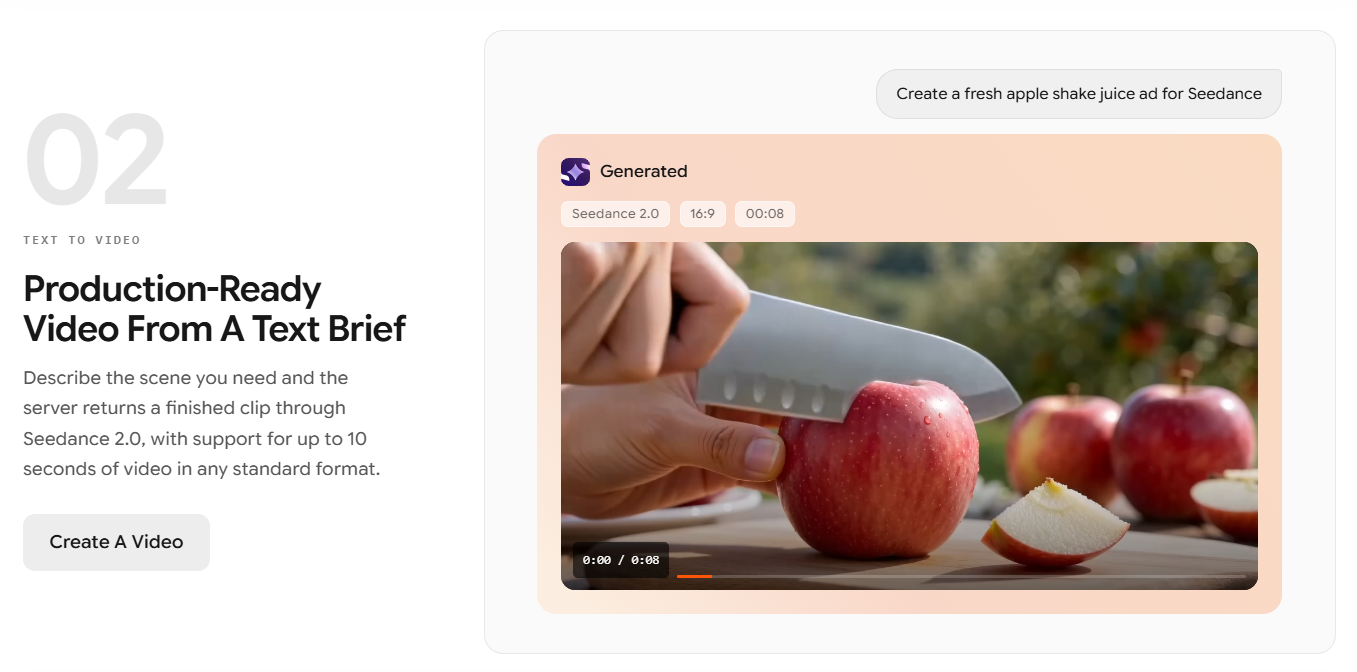 Creative autiomation with ImagineArt
Two factors make ImagineArt Enterprise the right tool for automated content pipelines.
First: the node-based AI Workflows.
- Brand parameters
Content teams run workflows with variable inputs and the brand treatment reproduces identically at every generation. Brand consistency is a property of the workflow.
When 71% of marketers cite brand consistency as their biggest content challenge, workflow-level locking builds brand consistency into the system.
Second: the MCP server.
With ImagineArt Enterprise's MCP server active, Claude calls the platform directly from the campaign brief. No human opens ImagineArt. No parameters get copied by hand. The brief becomes a full asset batch in a single automated session.
ImagineArt also runs an AI Copilot that covers Stage 1 planning: generating campaign concepts, visual direction, and copy angles from raw campaign intent.
The same platform covers planning and generation, which means the brief and the generation spec stay in one environment. Nothing is lost in translation between a brief written in one tool and a creative team interpreting it in another.
- Fashion Studio generates apparel and lifestyle imagery on models trained for fashion photography conventions.
- Ad Studio generates Meta, TikTok, Pinterest, and Stories formats from a single brief with correct dimensions and text safe zones per platform.
- One workflow run produces the full format set Stage 3 needs.
Most importantly, ImagineArt Enterprise is SOC 2 certified. It’s commercially safe, has team plans with subscriptions for sets of seats and customizable plans for larger teams too.
3. Meta Ads
Meta Ads is the publishing destination. With Meta Ads' MCP server active, Claude builds and launches campaigns directly from the approved ImagineArt output. Campaign structure, creative assignment, audience targeting, budget setup — Claude executes all of it from the brief and the approved asset batch.
A campaign that previously required a media buyer to manually set up ad sets, upload creatives, and configure targeting now runs from a single Claude session. The media buyer reviews and approves. Claude handles the setup.
I have used Meta Ads as the example publishing destination. The same MCP connection logic applies to TikTok Ads, Google Ads, and other platforms with MCP servers.
The pipeline principle stays the same: Claude reads the brief, generates assets via ImagineArt Enterprise, and publishes to the ad platform via MCP.
5 Use Cases for Enterprise Content Automation
1. Dynamic Creative Optimization
DCO, for example Meta Advantage+, Google DCO, TikTok Smart Performance Campaigns, tests creative variants automatically and allocates spend toward top performers.
It requires at least 5 variants per ad set to generate meaningful optimization signals. Most teams run 1-2 because producing more manually takes too long.
ImagineArt Ad Studio generates the full DCO variant set from a single brief: multiple visual treatments, multiple copy directions, correct format specifications per platform. Push those variants via Claude and Meta Ads MCP, and DCO has the creative supply it needs.
Teams running ImagineArt Enterprise see variant coverage climb from 20-30% to over 80% of active campaigns, the threshold where DCO starts producing material ROAS improvement.
2. Programmatic Advertising
DSPs, for example The Trade Desk, DV360, Amazon DSP, assemble ads from component libraries: background layer, product image, headline, CTA. Programmatic at scale requires hundreds of component variants to cover targeting segments accurately.
ImagineArt Enterprise generates the full component library: multiple background treatments, product shots, and lifestyle images, all brand-consistent and commercially cleared.
AI workflow tools like Make.com or n8n push the library to ad servers. The DSP handles assembly, targeting, and bidding. Claude manages the handoff between generation and distribution.
3. Enterprise-grade Content at Scale
Enterprise content requirements differ from agency or startup requirements.
- Volume is higher.
- Brand governance is stricter.
- Security requirements block most consumer AI tools.
Literally everything needs an audit trail.
ImagineArt Enterprise covers all four. Workflow nodes enforce brand governance at the generation level. SOC 2 Type II certification clears enterprise security procurement. Commercial use rights on all outputs eliminate per-campaign legal review.
Every generation, approval, and publishing action logs with timestamps and user attribution.
This three-tool pipeline will handle the output volume of a full marketing department. The Scale plan runs 40 seats at $350/month. The pipeline adds capacity without adding headcount.
4. On-brand content at scale
Even when human designers are executing, brand consistency breaks at volume.
- A marketing team running 50 campaigns a year can manually review for brand violations.
- A pipeline running 500 asset variants per campaign cannot be reviewed asset by asset.
Previously, small and large businesses that prioritized brand consistency in messaging, added headcount to meet content QA goals. This headcount definitely comes with a fat price tag of billable design hours.
ImagineArt Enterprise handles this by encoding brand parameters into the workflow itself. The brand manager configures the workflow once: color palette, typography treatment, model type, composition rules, style parameters. Every generation that runs through the workflow produces brand-consistent output. Content teams don’t need to enforce brand parameters at the prompt level because brand guide now comes in built-in.
5. 100% AI-powered content repurposing
A single campaign brief produces content for every channel automatically. Claude reads the brief and calls ImagineArt Enterprise to generate the full asset library. Ad Studio produces paid social formats. The same generation pipeline produces organic social assets, email visuals, and landing page imagery from the same brief and brand parameters.
Claude routes the outputs. Paid social variants go to Meta via the Meta Ads MCP. Organic assets route to the scheduling queue.
This means repurposing without the production step. One brief; every format generates from it in a single automated session.
Set up this content automation pipeline in 3 steps
The pipeline runs on MCP connections.
- Activate ImagineArt Enterprise's MCP server and connect it to Claude
- Activate Meta Ads' MCP server and connect it to Claude
- Connect Claude to your brief tool via its MCP server, for example Notion.
Your system is up and running. Trigger Claude to read a specific brief and start.
ImagineArt Enterprise
Want to set up a content automation pipeline for your business?
ImagineArt Enterprise gives marketing and creative teams a governed AI production platform that runs end-to-end content workflows on autopilot. Build the pipeline once, scale brand-consistent content across every channel, market, and format from one environment.
FAQs
ImagineArt Enterprise tracks every asset from brief to published ad with timestamps and role-based approval built into the workflow. Claude handles stage transitions via MCP — reading the brief, triggering generation, and routing approved assets to Meta Ads for launch.
Dynamic content adapts to each recipient based on their segment, behavior, or location, and requires multiple creative variants to function. ImagineArt Ad Studio generates that variant library from a single brief, ready for Meta Advantage+ to test and allocate spend across.
ImagineArt Enterprise generates images, video, and ad variants from a brief at a fraction of agency production cost. Claude routes every output from generation through approval and into a live Meta campaign without manual tool interaction.
Claude connects to Meta Ads via MCP and builds campaigns directly from ImagineArt-approved outputs. The campaign goes live without a human uploading files, filling out campaign fields, or switching tools.
ImagineArt Ad Studio generates Meta, TikTok, Pinterest, and Stories formats from a single brief with correct dimensions and text safe zones per platform. Claude routes each format to the correct channel via Meta Ads MCP.
Ready to put this into practice?


![What is Creative Burnout? [and 8 Tools to Help You Recover]](https://blogs-cdn.imagine.art/Creative_Burnout_FI_c0ad752bea.png)