
Tooba Siddiqui
March 19, 2026 • Updated June 4, 2026
12 mins Read
If you have spent any time editing a video, then the terms color grading and color correction mustn’t be new to you. While some video editors use these terms interchangeably, they are quite different. And the difference isn’t just a technical exercise; it’s the matter of video quality at the end. That’s because colors set the mood, tone, and atmosphere. From high-contrast scene that build suspense to a warm glow that adds emotional richness, colors tell a story beyond the scenic details.
- Get the video editing sequence right, and you will have a cinematic masterpiece
- If you get it wrong, then even the professional-grade video editing will fall flat.
Understanding color correction vs color grading is the most important distinction in post-production — and one of the most commonly confused. So, in this blog, I am thoroughly covering what color correction in video editing is and how it is different from color grading. But stay tuned for the most important part: how these video editing tips make all the difference with an AI video editor like ImagineArt.
What Is Color Correction in Video?
Video color correction in videos includes cleaning up the raw footage and ensuring the colors look natural and accurate. This post-production process often removes lighting inconsistencies, fixing camera settings, balancing colors, and resolving color temperature inaccuracies.
In simpler terms, video color correction is more like resetting the captured footage and replicating exactly what you saw on set.
Most video editors regard this as a process to make your video look more natural and realistic instead of adding cinematic flair to it.
Color correction in videos is done clip by clip or shot by shot. Each shot is treated and fixed individually, as no two video shots have the same color irregularities. The first shot might be overexposed, while the next one has a high blue color cast, and the last one might have an inaccurate lighting setting.
What does color correction actually fix when editing videos?
- Overexposed or underexposed shots, bringing brightness and contrast back into a normal range
- White balance errors, removing yellow casts from tungsten light or blue casts from shade
- Inconsistent exposure across multi-camera shoots, so cuts don’t feel jarring.
- Skin tone accuracy, ensuring people look natural and realistic on screen
- Color space issues, converting LOG or RAW footage into a usable working format
Recommended read: How to Color Correct Video with AI
What Is Color Grading in Video?
 Generated by ImagineArt AI Image Generator
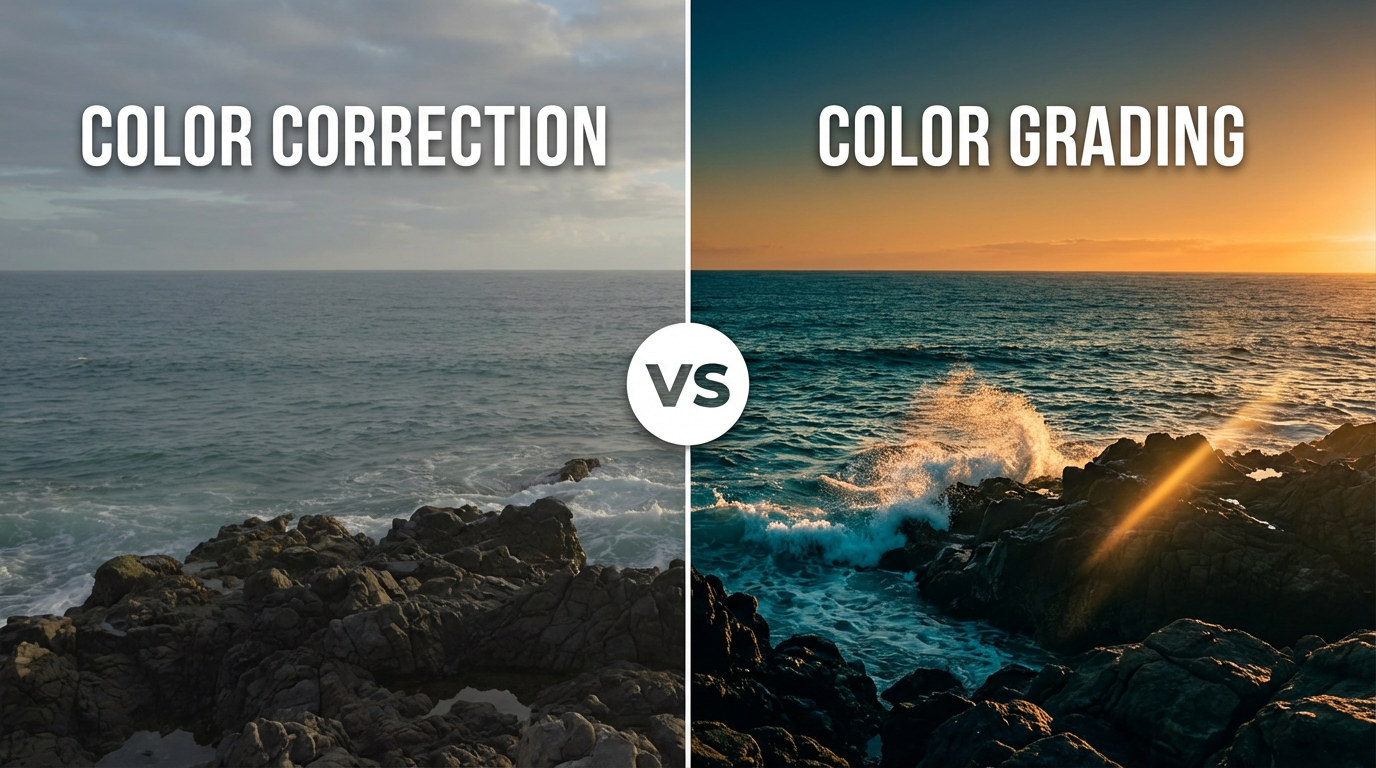
Color grading is the next step after color correction in the video editing process. Once video color is consistent and fixed after color correction, color grading enhances the mood, tone, feeling, and style of your video.
In short, color correction is fixing inaccuracies, and color grading is about making those fixes intentional. This is where color sets the visual tone of your video. A horror film will always have deep shadows and desaturated midtones. A warm lifestyle brand video might boost golden tones in the highlights and add a subtle vignette. A documentary film looks professionally done a clean, journalistic look and controlled contrast. While none of these color adjustments are predefined for a certain genre, they are creatively purposeful.
Unlike video color correction, color grading is done at the scene level rather than individual shots or clips. Start with building a look using a LUT (lookup table), color wheels, or custom curves. Apply that across sequences to maintain visual consistency throughout the video project.
What does color grading actually fix when editing videos?
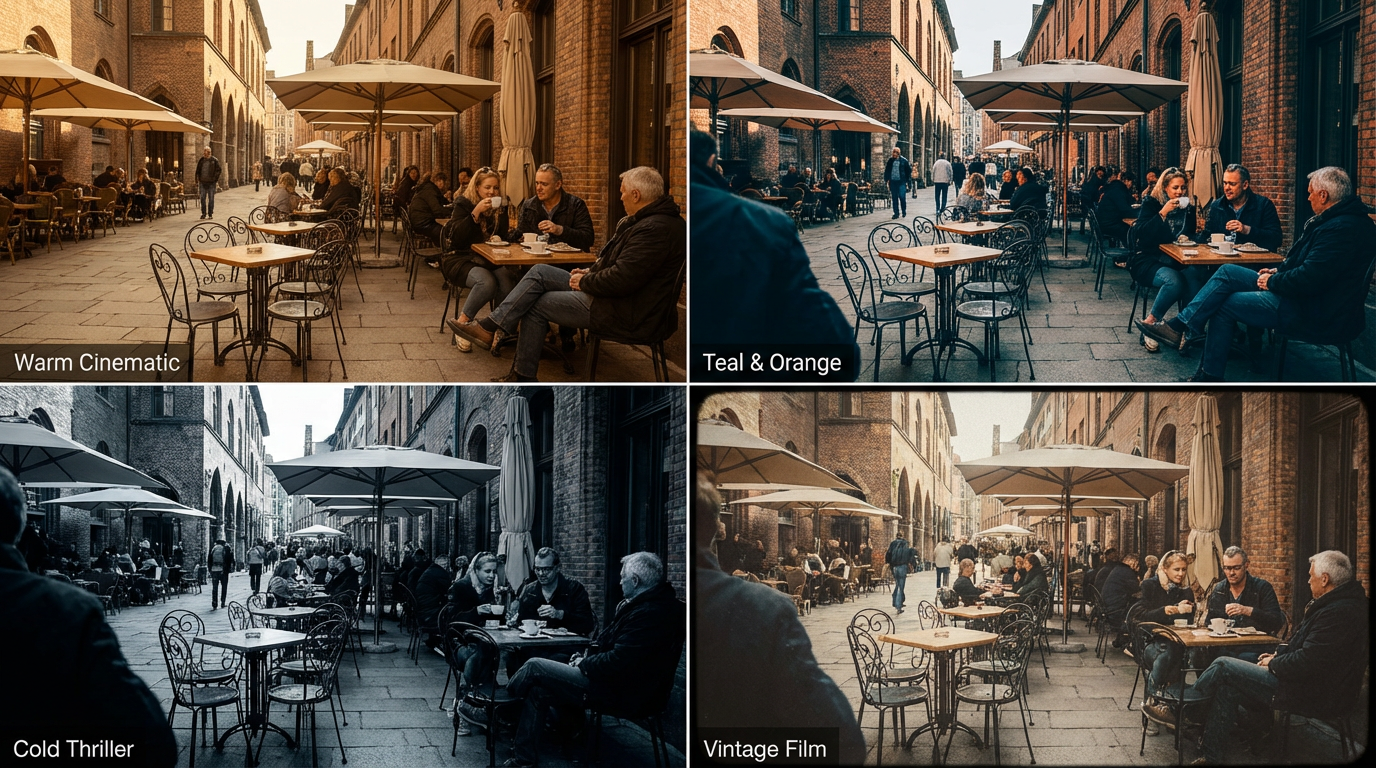
- Genre-specific looks: cool and desaturated for thrillers, warm and golden for romance, high contrast for action
- Brand-consistent aesthetics: the same visual fingerprint across every video in a series
- Emotional tone reinforcement: warm tones evoke nostalgia and comfort; cool tones suggest tension or detachment
- Signature filmmaker styles: from the teal-and-orange Hollywood blockbuster look to vintage film grain aesthetics
- Narrative coherence: visual cues that signal flashbacks, dream sequences, or shifts in time
All in all, color grading in video editing tells a story beyond the scenic details. It transforms raw footage into an intentional work.
Recommended read: How to Color Grade Video with AI
What Are LUTs in Color Grading?
A LUT (Look-Up Table) is a file that maps one set of color values to another — it is the primary tool used to apply a consistent color grade across an entire video project. Rather than manually adjusting every color parameter on every clip, a colorist applies a LUT and the transformation happens instantly across all selected footage.
LUTs come in two types:
-
Technical LUTs handle color space conversion — converting LOG or RAW footage from a camera's flat, low-contrast recording format into a standard display color space. These are applied during color correction, before any creative work begins. They are not aesthetic choices; they are technical requirements for footage shot in LOG or RAW.
-
Creative LUTs apply a stylistic look to color-corrected footage — the warm orange-and-teal of action films, the desaturated cool palette of thriller dramas, the soft high-key look of romantic comedies. These are applied during color grading and represent aesthetic decisions, not technical corrections.
Using LUTs correctly requires one rule: always apply a creative LUT to color-corrected footage, never to raw or uncorrected footage. A LUT applied to inconsistently exposed or white-balanced clips will amplify those inconsistencies rather than correct them. The LUT assumes neutral footage — if the footage is not neutral, the grade will not hold. LUTs are distributed as .cube or .3dl files and are supported by every major video editor that supports manual video editing
What is the difference between color correction and color grading?
At the surface level, both color grading and color correction do adjust colors in your video content. Both post-production processes can be done using the same video editing software. Then, how do they differ? While color grading vs color correction might still be confusing to some, here’s a full breakdown of key differences:
Color Grading vs Color Correction — A Side-by-side Comparison
| Aspect | Color Correction | Color Grading |
|---|---|---|
| Purpose | Fixes technical issues | Creates mood and style |
| Stage | Always First | Always Second |
| Scope | Clip by clip | Scene or full project |
| Output | Nuetral, accurate | Stylized, intentional |
| Nature | Technical &objective | Creative & subjective |
| Edits | Should go unnoticed | Defines your visual craft |
Color Correction vs Color Grading — A Detailed Analysis
 Generated by ImagineArt AI Image Generator
1. Purpose: Fixing Problem vs. Creating a Look
The most fundamental difference between the two processes is what they’re trying to achieve.
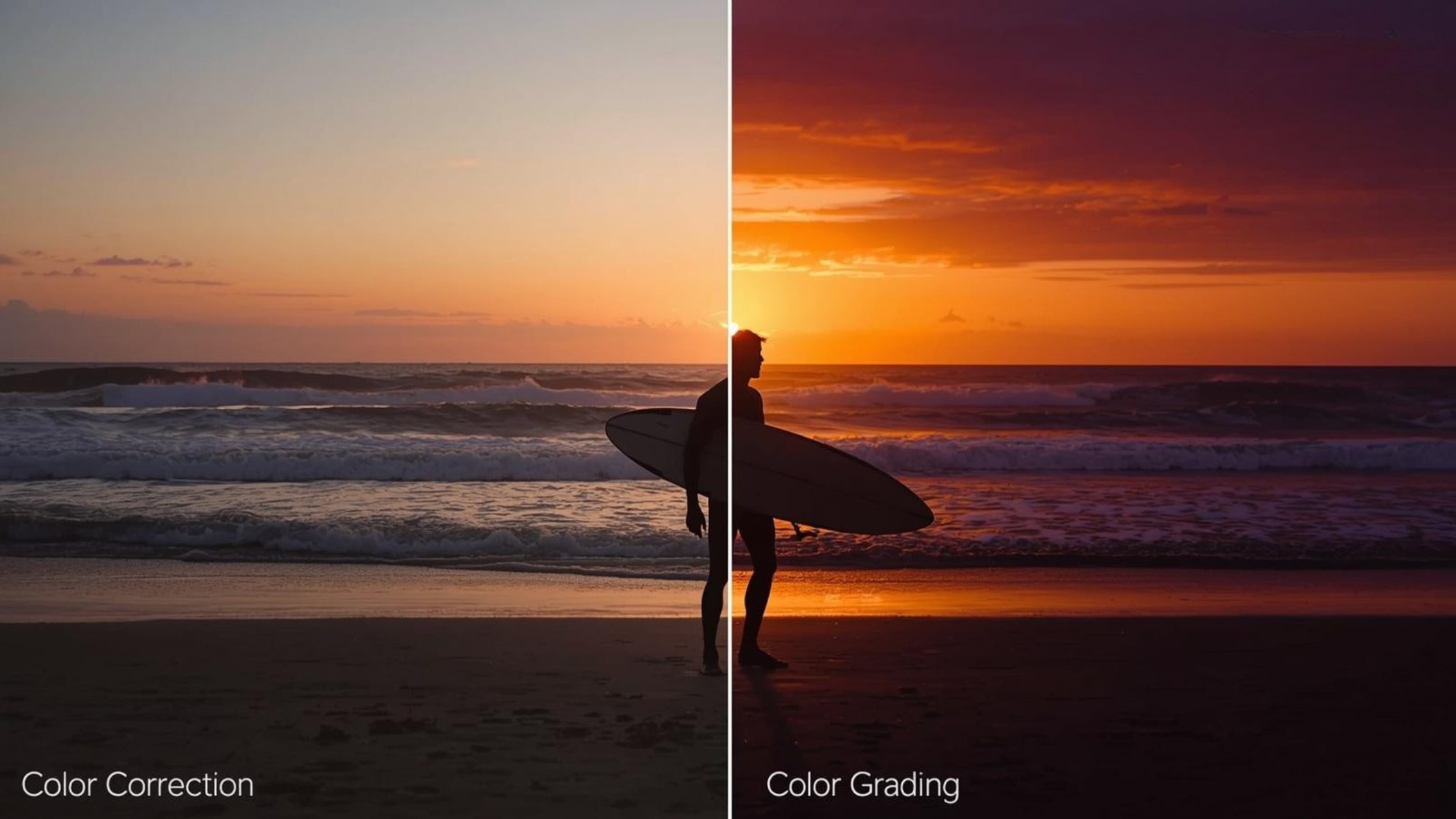
Color correction in video fixes what’s technically incorrect. It adjusts the exposure, color cast, lighting, shadows, hues, contrasts, and more. Color correction restores what the shot actually looked like in real life. The goal is to enhance realism and maintain a natural look before moving forward to creative fixes.
Color grading in video builds a mood. It shapes how the viewers might feel once the video colors are corrected and consistent. Color grading is a stylistic enhancement to the visually consistent video.
Color correction asks ‘does this look real’ while color grading answers ‘does this look fit the story?’
2. Order: Correction Always Comes First
No professional or amateur video editor should ever break this rule: video color correction comes before color grading. The processes must be followed in the said order, not interchangeably. This sequence of post-production work is more of a technical requirement, not an editor’s choice.
When you color grade a video without color correction, the slight inconsistencies and subtle variabilities become more obvious. For example, a slightly underexposed shot becomes muddy after a stylistic LUT amplifies the shadow detail issues.
With video color correction, you are creating a neutral baseline that simplifies and improves color grading. Even if you plan to apply a heavy stylistic grade, your footage needs to be technically neutral before any creative color work begins. This is the single most common mistake self-taught video editors make.
3. Nature: Technical vs. Non-Technical
Color corrrection deals with the technical aspects of video editing and must achieve a certain result upon finalization.
Color grading is mostly a creative choice and depends on the editor working on the video.
Two editors working on color correcting a video must create a neutral baseline. While the same editors can produce two different color grades working on the same color-corrected video.
This distinction is crucial because it defines who makes the decisions. Video color correction requires implementation of technical knowledge. On the other hand, color grading is about understanding the director’s vision, the brand’s identity, or the story’s emotional arc and translating that into color.
4. Workflow: Shot by Shot vs. Entire Scene
Video color correction is a clip-by-clip editing process. It fixes the errors in individual shots and ensures the footage flows naturally.
Color grading is done at the scene level. Once the shots and clips are fixed, a color grade is applied thoroughly across the scene. It ensures the desired mood or tone is coherent throughout the video.
In practicality, video color correction takes more time, while color grade can be applied easily and quickly once the desired look is decided.
5. Edits: Seamless vs. Recognizable
Good color correction often remains imperceptible. If a viewer can notice the clean up, the color correction wasn’t done right. The color adjustment shouldn’t draw attention, and everything should remain consistent. The viewers shouldn’t be thinking about color inaccuracies while watching a video.
While color grading is done intentionally to set a certain style. It defines the creative identity and becomes a core part of the aesthetic. Think of Wes Anderson’s movies, which are characterized by pastel palettes and candy-colored hues, like The Grand Budapest Hotel.
The two processes require completely different mindsets. Video color correction is a craft of restraint, where the goal is to remain unnoticed. Color grading in video editing is a craft of expression, where the goal is to leave a mark.
How to Color Correct Video with ImagineArt
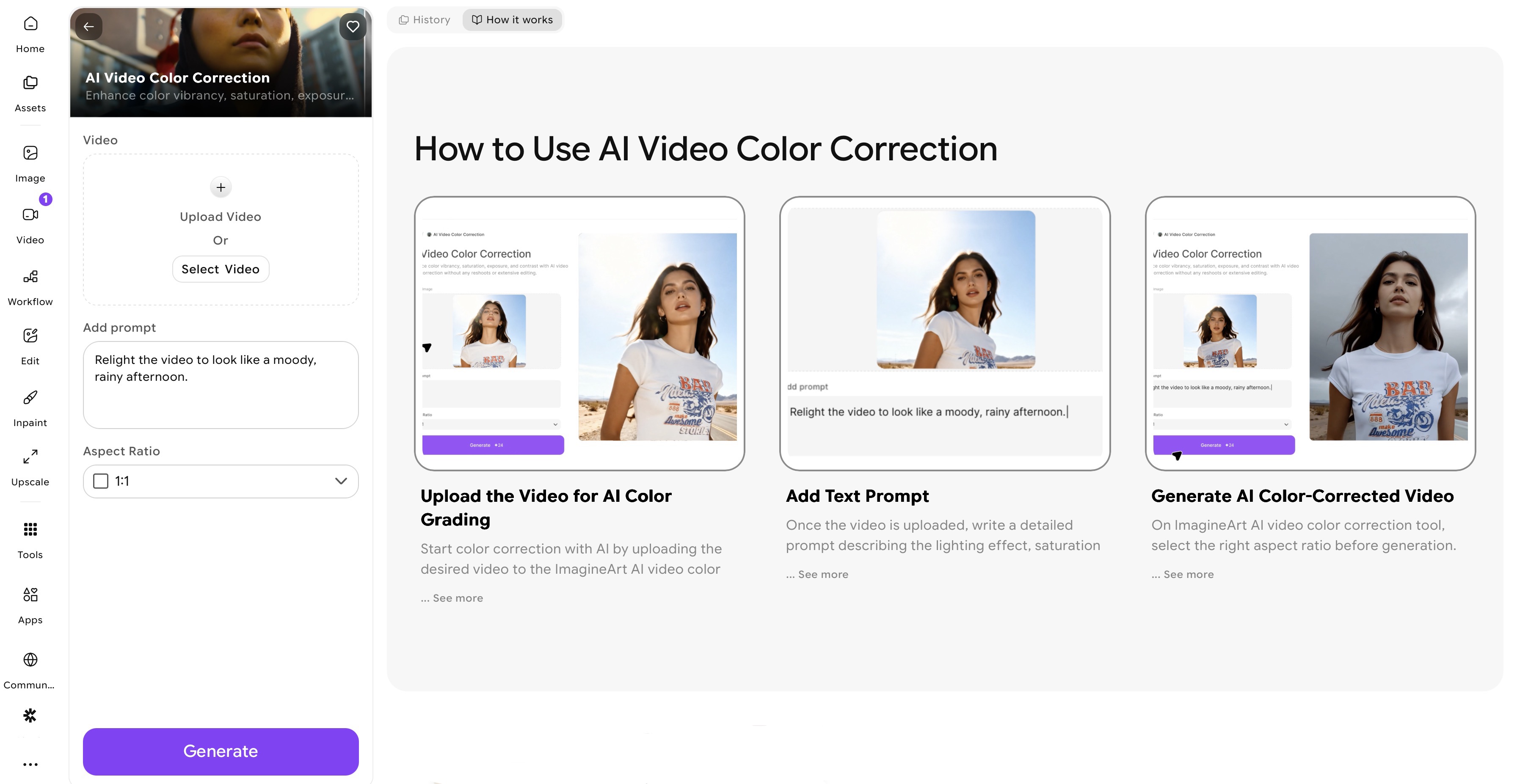 ImagineArt AI Color Correction app dashboard
With ImagineArt AI Video Color Correction, you can color grade video by simply:
- Uploading Your Video
Once you sign up, go to ImagineArt Apps, navigate to video editing category, and select ImagineArt AI Video Color Correction app. Import the color-corrected video and make sure the video is of high quality. You can even generate your own video using ImagineArt AI Video Generator.
- Write Prompt
Write a detailed prompt, mentioning the desired color hues, saturation, white balance, and contrast. Select the desired aspect ratio.
- Generate and Refine
Give your prompt a final look over and click the ‘generate’ button. Preview your color-graded video and export in HD.
How AI Is Transforming Video Color Correction and Video Color Grading
AI tools for color correction and grading have reduced the time both stages take, tasks that once required manual color adjustment can now be done in minutes. While AI video color correction and color grading tools accelerate the process, human creativity remains pivotal.
AI Video Color Correction
Since video color correction is a time-consuming technical process, AI tools are highly effective. The AI tools like the ImagineArt AI video color correction app, help fix white balance, contrast, exposure, hues, saturation, and inconsistency across video. It keeps your footage natural and balanced while automating color adjustment. The AI analyzes the lighting, color distribution, contrasts, and more such issues and creates the base video.
So instead of manually fixing each shot and clip, an AI video color correction app can:
- Balance exposure across scenes
- Maintain natural skin tones
- Achieve accurate white balance
- Maintain consistent color between clips
AI in Video Color Grading
Video color grading is more of a creative task and requires human input. While AI video color grading tools can add stylistic visuals, apply filters, or achieve a cinematic look, the creative direction needs a human editor.
In color grading, AI video editor can help editors experiment with different tones and aesthetics. It lets video editors and content creators explore different looks before finalizing the visual style.
The best results come from combining both: using AI tools like the ImagineArt AI Video Color Correction app to establish a clean foundation, and then applying creative color grading to define the final look of the video.
When To Use Color Correction or Color Grading
Knowing when to use color correction and grading as separate stages — and when to treat them as a continuous workflow — directly determines the quality of your final video. The short answer: always color correct first, color grade second — but knowing when each is the endpoint changes how you approach both.
Use color correction as the endpoint when:
- The project requires technical accuracy above creative style — news, documentary, corporate interviews, instructional content
- The footage will be broadcast on platforms with strict color standards (broadcast TV, medical, legal recordings)
- The goal is to make the footage look like natural reality, not a crafted visual experience
- You are handing corrected footage to another editor who will apply their own grade
In these cases, color correction is the deliverable. The work is done when footage looks natural, consistent, and technically accurate. Adding a creative grade would undermine the neutrality the project requires.
Use both color correction and color grading when:
- The project has a defined visual tone — narrative films, music videos, branded content, social media series
- The footage needs to communicate emotion through color — warm equals safety and nostalgia, cold equals tension and isolation, desaturated equals documentary realism, oversaturated equals heightened reality
- You are building a visual identity across multiple episodes, videos, or a campaign where consistency across releases matters
- The story requires visual distinction between timelines, locations, or emotional states
Use color grading to signal narrative shifts: Color grading is one of the most effective tools for visual storytelling without dialogue. A flashback turns cooler and slightly desaturated. A dream sequence gains a soft, blown-out quality. A villain's scenes shift toward green-grey. A love story warms into amber. These are grading decisions, not correction decisions — and they require the stable base that color correction creates.
The practical rule: if you are asking whether the footage looks right, you are doing color correction. If you are asking whether the footage feels right, you are doing color grading. Both questions need answering before the edit is finished.
Color Grading vs Color Correction: Common Mistakes
Even experienced editors fall into these traps — and AI tools, for all their power, won’t protect you from them if the fundamentals are wrong.
- Skipping video color correction: One of the most common mistakes that most editors make is to start working on color grading without fixing the inconsistencies. This becomes quite difficult to fix later.
- Overusing LUTs or AI filters: If you haven’t created a correction base, adding LUTs or AI filters will only compound the existing technical problems rather than resolving them.
- Ignoring skin tone: Skin tone is one of the first things that a viewer notices, and it should be the first thing that a video editor should fix during color correction.
- Applying heavy grades to low-quality video: If you are working on a compressed video or one with low-bitrate, then avoid heavy color grades. This will only result in compression artefacts and reduced visual integrity.
Ready to Color Correct Video with AI?
With video content dominating the internet, knowing the fundamentals of video color correction and color grading is important for the post-production workflow. Color correct your video first and grade with the intention to amplify the emotional tone and visual style. And let the AI video editing tools do the heavy-lifting while you focus on the work that matters: telling a story worth watching.
Tooba Siddiqui
Tooba Siddiqui is a content marketer with a strong focus on AI trends and product innovation. She explores generative AI with a keen eye. At ImagineArt, she develops marketing content that translates cutting-edge innovation into engaging, search-driven narratives for the right audience.