
Arooj Ishtiaq
February 25, 2026 • Updated March 27, 2026
6 mins Read
Seedream 5.0 Lite introduces a new approach to AI image generation. Unlike traditional models that rely only on past training data, Seedream 5.0 is designed to work beyond static knowledge. Most image generators struggle with recent events, new product launches, or trending topics. The results often feel outdated or slightly inaccurate. This raises an important question: should creative tools be limited by when they were trained?
Seedream 5.0 Lite represents a shift toward more current, context-aware image generation.
What is Seedream 5.0 Lite?
An AI image generator traditionally relies only on pre-trained data. When asked about recently launched products, trending cultural moments, or current events, most models either generate outdated information or hallucinate details.
Seedream 5.0 addresses this limitation by connecting image generation to live web search. Instead of relying purely on static training data, the model can retrieve current information when your prompt requires it, allowing your images to reflect up-to-date knowledge.
Released as a preview in early 2026, Seedream 5.0 introduces a shift toward knowledge-driven generation. It combines real-time web search with multi-step logical reasoning and structured instruction following.
The model supports:
- Text-to-image generation
- Instruction-based image editing
- Example-based editing
- Multi-image compositing
- High-resolution outputs up to 4K
In addition to search, Seedream 5.0 applies domain-specific knowledge across fields such as architecture, medicine, biology, industrial design, geography, and nutrition. This enables technically accurate content generation rather than purely aesthetic outputs.
You can use Seedream 5.0 Lite on the Bytedance Model Playground and generate 50 free images when you sign up.
How To Access Seedream 5.0 Lite on ImagineArt
Seedream 5.0 will be available on ImagineArt alongside the full Seedream model family (e.g, Seedream 3.0, Seedream 4, Seedream 4.5). You can switch between versions depending on your task.
Use Seedream 5.0 for:
- Current events and trend-based content
- Knowledge-heavy prompts
- Professional and technical illustrations
- Multi-step logical operations
- Structured editing tasks
If your primary goal is high photorealism or purely aesthetic refinement, other Seedream versions may be more suitable.
Seedream 5.0 uses a credit-based system, and generation works with text prompts, reference images, or a combination of both.
How To Use Seedream 5.0 Lite?
Using Seedream 5.0 is very easy. You can generate images from text, edit existing visuals, or combine multiple references. You need to follow a clear process to make sure your output is accurate, context-aware, and aligned with your creative goals.
1. Choose Your Generation Mode
Seedream 5.0 supports three main workflows:
- Text-to-Image: Best for conceptual, knowledge-driven, or reasoning-heavy prompts.
- Image-to-Image Editing: Upload one or more reference images and describe the changes you want.
- Example-Based Editing: Provide a transformation example and apply the same logic to a new image.
2. Write Your Prompt with Specificity
For search-based content, include:
- Full product names
- Event titles
- Brand names
- Specific dates
- Public figures
For reasoning tasks, describe relationships clearly. For example: “Deconstruct the fashion outfit from the reference image. Break down each element clearly, including outerwear, top, bottom, footwear, accessories, colors, fabrics, and overall styling.”
For domain-specific work, include technical terminology to improve accuracy.
3. Upload Reference Images (When Required)
For editing or compositing workflows:
- Upload subject images
- Upload style references
- Upload layout references
You should clearly define each image’s role within your prompt. This improves precision and reduces inconsistencies.
4. Set Output Parameters
Seedream 5.0 supports up to 4K output resolution.
For most workflows, 2K provides an optimal balance between speed and quality. On ImagineArt, the output generated is in 3K resolution.
Select aspect ratio based on usage:
- Horizontal for presentations and banners
- Vertical for social media
- Square for product grids
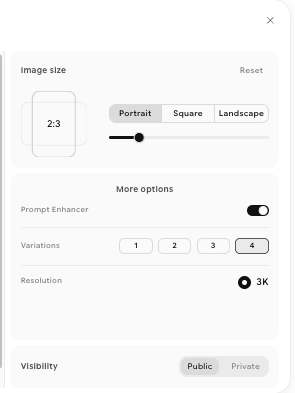 Resolution & Output variations
5. Generate and Evaluate
After generation:
- Verify factual details for search-based outputs
- Check logical accuracy
- Review lighting consistency and integration in edited images
- Examine edges and blending in composited scenes
 Generation with variations
6. Refine with Targeted Adjustments
Instead of rewriting your entire prompt, you can adjust only the element that needs correction. For complex tasks, you can break instructions into clear sequential steps rather than dense paragraphs.
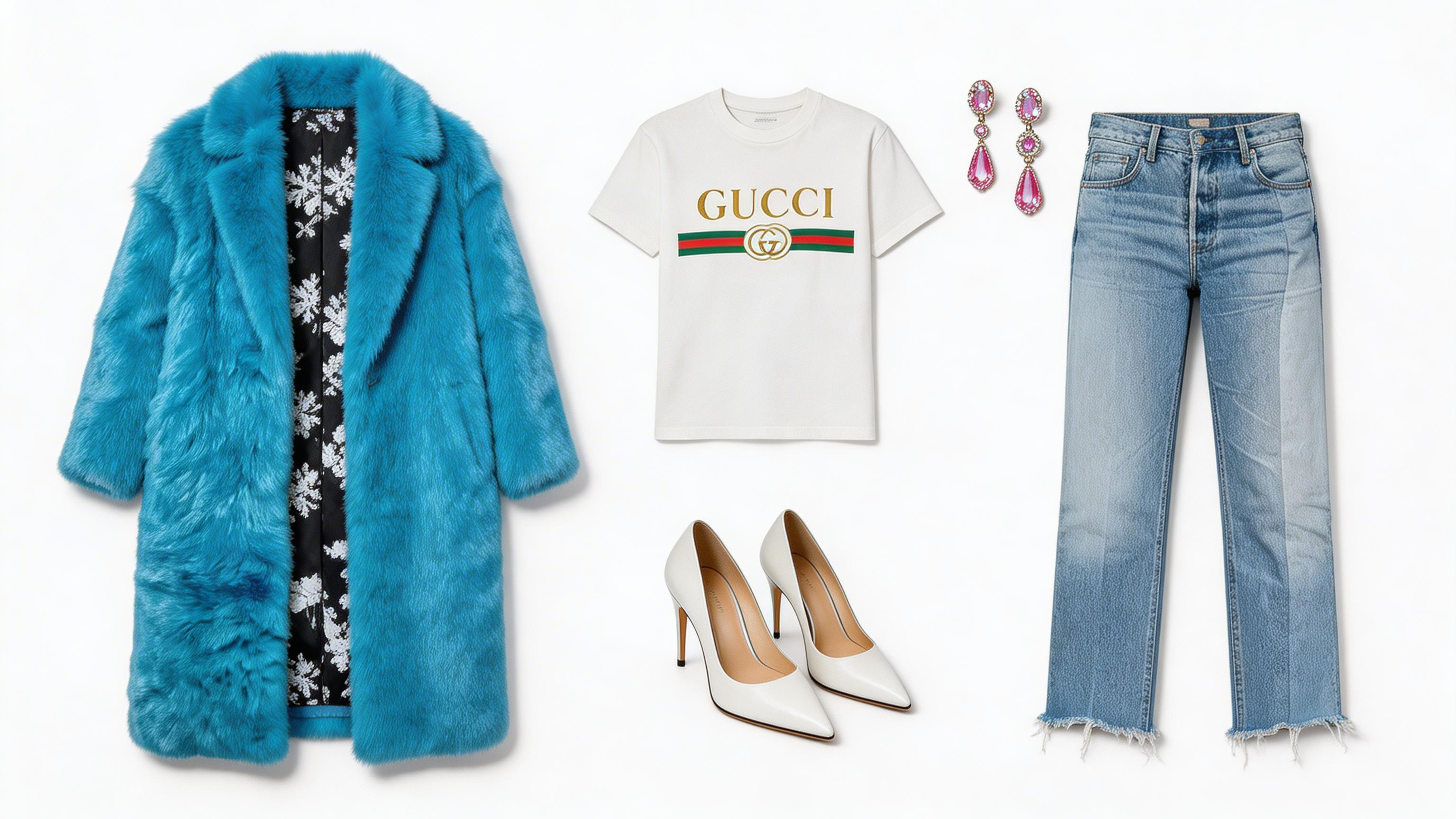 Refine the output with targeted adjustments
Key Features of Seedream 5.0 Lite
Key Features of Seedream 5.0 Lite
Seedream 5.0 offers the features of real-time search and precise editing to help you create accurate, high-quality visuals.
Real-Time Web Search
Seedream 5.0 can search the live web before generating an image. When your prompt includes time-sensitive information, brand names, public figures, recently released products, or ongoing events, the model retrieves relevant data and incorporates it into the output.
The search activation is automatic. The model determines when retrieval is necessary based on prompt context, e.g., entity-specific and time-relevant prompts are most likely to trigger it.
This makes the model particularly useful for:
- Recently launched product visuals
- Event-based marketing assets
- Cultural trend content
- Brand-specific materials
The model searches automatically when your prompt hints at recent or specific information. Using words like “latest,” “current,” “2026,” “today,” product or brand names, event references such as “Oscars” or “Super Bowl,” or trending terms like “viral,” “TikTok,” or “meme” makes it more likely to pull up fresh results.
Intelligent Logical Reasoning
Seedream 5.0 handles structured reasoning tasks that earlier image models struggled with.
It understands:
- Spatial relationships
- Weight distribution
- Object size comparison
- Sequential instructions
- Structured classification
For example, it can:
- Tilt a seesaw correctly based on weight
- Arrange objects in order of size
- Place items logically into designated containers
- Generate labeled technical diagrams accurately
The built-in domain knowledge enables professional outputs in areas such as architectural visualization, medical anatomy, industrial diagrams, and scientific illustrations.
Precise Editing Control
Seedream 5.0 improves instruction-following for complex edits. It supports three primary editing workflows:
#### 1. Instruction-Based Editing
You can describe exactly what to change while keeping the rest intact. For example: “Replace the sky with a vivid orange sunset while maintaining foreground lighting.”
#### 2. Feature Transfer
You can extract specific characteristics from one image and apply them to another. This includes color palettes, lighting styles, makeup details, brand design language, or material textures.
#### 3. Example-Based Editing
You can provide a before-and-after example pair. The model learns the transformation and applies it to a new image. This is especially useful for complex style transformations that are difficult to describe in text.
Multi-Image Generation and Compositing
Seedream 5.0 can analyze multiple reference images simultaneously and generate a cohesive result.
It understands contextual relationships between inputs instead of treating each image independently.
This supports:
- Brand campaign series
- Product variant generation
- Poster design with multiple elements
- Visual identity systems
- Structured layout compositions
What Can You Create with Seedream 5.0 Lite?
- Brand and Marketing Visuals: You can design campaign graphics and poster series that maintain a consistent style and align with your brand identity.
- Product Photography and E-Commerce: Seedream 5.0 can generate styled product shots and e-commerce mockups quickly, without needing a full photoshoot.
- Packaging Visualization: You can visualize packaging designs and turn 2D templates into realistic 3D representations.
- Spatial Layouts: You can place furniture or products into different environments to explore layouts and arrangements clearly.
- Technical and Educational Illustrations: Seedream 5.0 can produce accurate diagrams and visuals, such as architectural plans or medical illustrations.
- Scientific and Industrial Graphics: It can create structured process visuals that are clear, organized, and easy to understand.
- Trend-Based and Event Content: Seedream 5.0 can develop visuals for recent product launches, events, or cultural trends to keep your content relevant.
- UI and App Design Concepts: You can explore interface ideas by referencing existing design systems and layout patterns.
Ready to Create Smarter, More Relevant Visuals?
Seedream 5.0 makes it easier to create images that are accurate, structured, and aligned with real-world context. Instead of working around limitations, you can focus on turning your ideas into reliable visual outputs.
If your work depends on clarity, precision, and staying current, now is the time to explore a more intelligent way to generate images.
Recommended read: Seedream 4.5 Guide
Arooj Ishtiaq
Arooj is a SaaS content writer specializing in AI models and applied technology. At ImagineArt, she creates sharp, product-focused content that helps creators and businesses understand, adopt, and get real value from AI tools.