Scored For Virality
Every clip carries a virality score, with a breakdown into hook strength, shareability, story quality and emotional impact. Open the strongest first.

Virality breakdown
Hook strength
Shareability
Story quality
Emotional impact
AI-Autoclipper
Paste a YouTube link. Get captioned vertical clips, each scored for virality.
Vertical clips, sized for
How It Works
Drop in a YouTube link or upload an MP4 or MOV. Pick the spoken language and a caption style, and set clip length to auto or a fixed range: 15 to 30, 30 to 60 or 60 to 90 seconds.
The recording is transcribed, the strongest moments are found and each is cut to a vertical clip with the speaker kept centred. A full run usually takes five to ten minutes.
Each clip arrives captioned and scored for virality. Export one, or export all as a zip. Open any clip in ImagineArt Edit for finer cuts. The source becomes a folder you can come back to.
Features
Every clip carries a virality score, with a breakdown into hook strength, shareability, story quality and emotional impact. Open the strongest first.
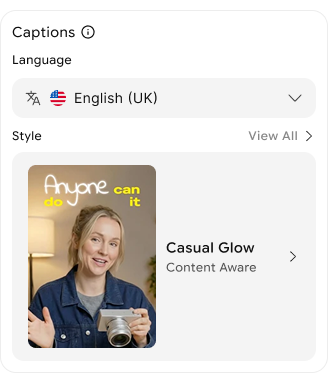
Captions are transcribed from the recording and burned into every clip. Thirteen spoken languages, and a style you pick once.
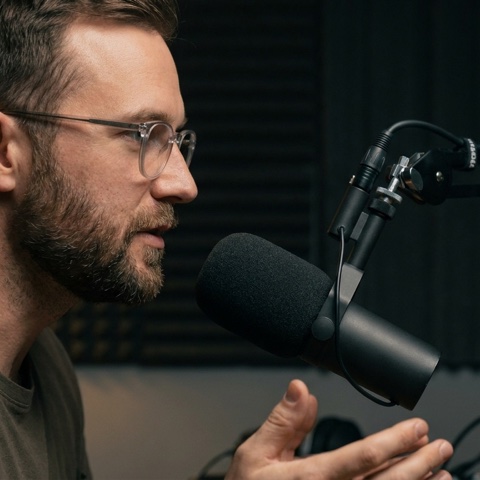
A wide recording becomes a 9:16 clip. Face tracking keeps the speaker centred as the frame moves.
 9:16
9:16Export a clip as MP4, or export all of them as one zip. Any clip opens in ImagineArt Edit for finer cuts, and the source stays as a folder of its clips for later.
 01_the-safe-plan.mp402_the-drop.mp4
 03_cart-abandon.mp4
 04_open-water.mp4
Podcasters
Every episode comes back as a set of captioned vertical clips, each scored, so the week's posts are chosen in a minute instead of an afternoon of scrubbing.
Streamers and creators
Paste the link. The moments with the strongest hooks and energy come back cut, captioned and ranked, ready for Shorts and TikTok while the stream is still fresh.
Educators and coaches
Each recording becomes a handful of short, captioned clips that carry a single clear idea, the kind that earns a follow without a sales pitch.
Marketing teams
The recording goes in the same afternoon and a folder of clips comes out, captioned in the language of each market you publish to.
Agencies
One workflow across every client. Each source stays as its own folder of scored clips, exported in a click, so the retainer covers clipping without another hire.
FAQ
The questions people ask before they run their first video through AI-Autoclipper.
AI-Autoclipper turns one long video into short clips. You paste a YouTube link or upload a file, choose a caption style and clip length, and it finds the strongest moments, cuts them into captioned vertical clips and gives each one a virality score. You download the clips you want, one at a time or all at once.
Anything with people talking: podcasts, interviews, webinars, live streams, keynotes and course lessons. Moments are scored on hooks, pacing and speaker energy, so talk-heavy footage gives the most clips per hour of source. Links must be YouTube links, and uploads can be MP4 or MOV.
A full run usually takes five to ten minutes. You are told when every clip is ready, and the set stays in your history afterwards.
Yes. Any clip opens in ImagineArt Edit, where you can trim it, change captions or make finer cuts. AI-Autoclipper itself does the clipping, captions, framing and scoring.
Clips are vertical, 9:16, framed for TikTok, Instagram Reels and YouTube Shorts, with the speaker kept centred. Leave clip length on auto or fix it to 15 to 30, 30 to 60 or 60 to 90 seconds.
The link or file you started from becomes a folder holding every clip generated from it, so you can come back and download them later.
You can start clipping for free. Paid plans add more source minutes and higher export resolution. See the pricing page for current limits.
Paste the link and see what the AI picks. Free to start, no card needed.