How it worksTemplatesExamples
ImagineArt
FAQGitHubWatch demo
ImagineArt

Direct your campaign.

Codex does the rest.

Turn one sentence into a finished Imagine.Art campaign. Sub-agent swarms plan, generate, review, and package the run.

Watch demoGet Started →
Paste into Codex
Use @Computer Use / sub-agent swarms and this repo:
https://github.com/Vyro-ai/imagine-campaign-director

to create a 15-second vertical launch ad for cold brew
Computer UseSub-agent swarmsParallel executionAuto packaging
Every formatOpen sourceOne brief → campaignNo manual steps
Walkthrough

See it run in 40 seconds.

A real Codex session: starting the prompt, building the Imagine.Art workflow, and receiving the finished campaign video.

getting-started-walkthrough.mp4
What it does

One sentence. The whole canvas.

Below is a real Imagine.Art canvas, built end-to-end from the brief on the left. Click the canvas to open the live workflow.

The brief
Cinematic product story for our rabbit headphones. Pink chrome, kawaii character, vertical-first.
→ Codex generates
A complete Imagine.Art canvas: every node, every connection, every export, built end-to-end without you wiring a single edge.
0 min end-to-end·0 sub-agents·0 manual edits
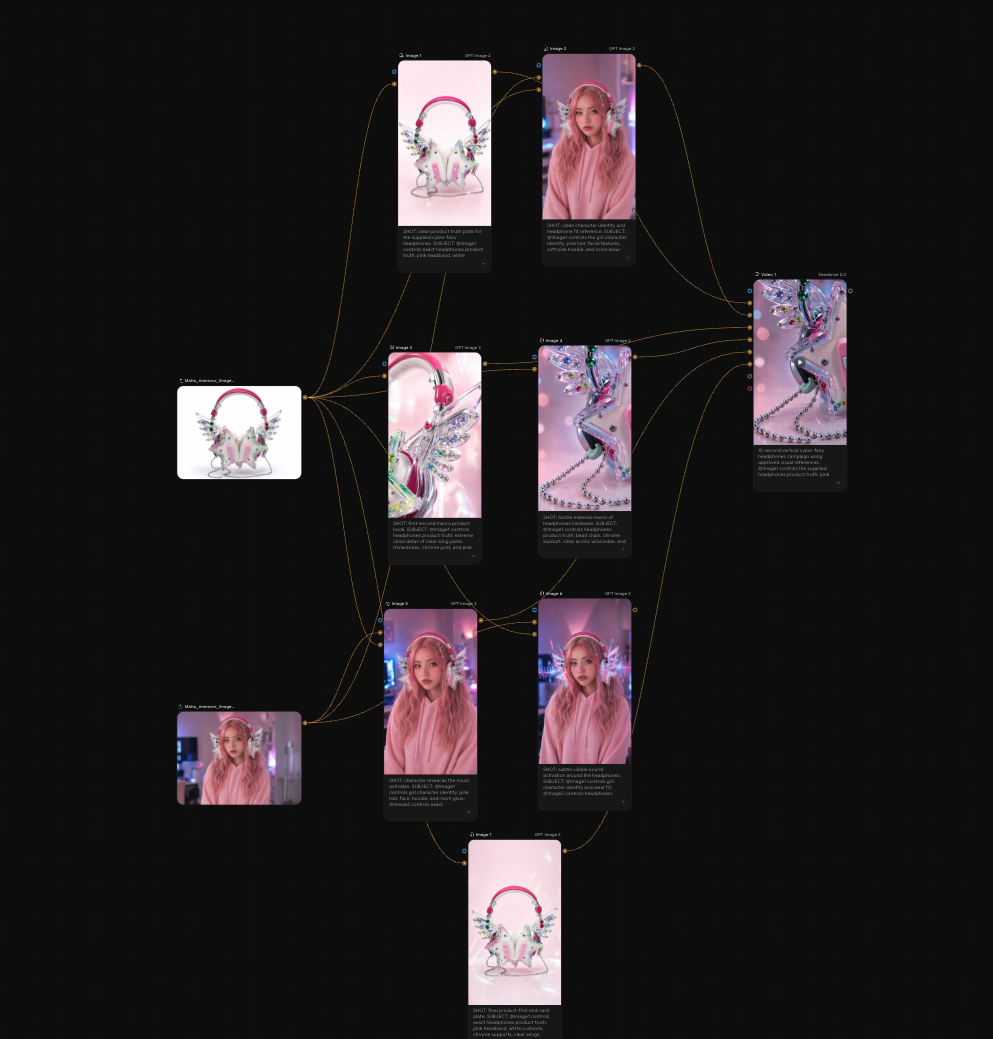
Building canvas…imagine.art/flow/rabbit
Rabbit headphones · vertical campaign
0 nodes·0 connections·0 min
Open the live canvas
How it works

Paste, plan, run.

The repo handles every node. You don't wire a single edge.

01
~30s
Paste the starter prompt
Drop the prompt into Codex with your idea. Attach references if you have them.
02
1–2 min
Sub-agents plan the run
The repo critiques, costs, and shapes your campaign before any credits are spent.
03
5–15 min
Canvas built end-to-end
Computer Use opens Imagine.Art, wires the workflow, generates motion, and packages a review MP4.
What you can build

Four briefs to start with.

Plain creative briefs. Copy one, paste it after the starter prompt, swap the brand, and you have a working campaign request.

Minimal product float
E-commerce

Create a minimal floating product video for an ecommerce launch. Clean white background, soft shadows, slow rotation with subtle depth. Output: 9:16 and 1:1 crops ready for Instagram and TikTok.

Editorial ecommerce clean
Fashion

Editorial-style ecommerce campaign. Clean layout, strong typography, model in neutral wardrobe. Vibe: high-end fashion meets everyday utility. Deliver a full social set and a hero banner.

Cinematic time jump
Short film

Cinematic short film with a time-jump narrative. Multiple eras, consistent protagonist, dramatic lighting transitions. Score with tension and release. Final deliverable: 60-second cut and 15-second teaser.

Full marketing campaign
Paid social

End-to-end marketing video campaign. Hook in the first 3 seconds, clear value prop, branded outro. Optimised for paid social. Deliver three length variants: 6s, 15s, 30s.

What you can build

Every format. From one sentence.

UGC reels, brand templates, cinematic shorts. Every frame from a single natural-English brief.

Minimal Float
Editorial Clean
Studio Dark
Luxury Marble
Ambient Glow
Bold Color
Lifestyle Scene
Outdoor Natural
Bag Color
Minimal Float
Editorial Clean
Studio Dark
Luxury Marble
Ambient Glow
Bold Color
Lifestyle Scene
Outdoor Natural
Bag Color
Currently Codex-only. That's intentional.
Building real workflow canvases needs reliable browser, clipboard, and download control. Codex with Computer Use handles that today. You'll need a Codex workspace with Computer Use enabled, Google Chrome open, and an Imagine.Art session signed in.
Enable Computer Use

Frequently asked questions

Building a real canvas needs reliable browser, clipboard, and download control. Codex with Computer Use is the only agent today that handles all three consistently. Other agents are coming as their tooling matures.
No. Sub-agents plan and critique before any generation runs, and every node has a cost check. You can also run an audit-only pass that touches nothing, just reads your existing canvas and reports back.
A sentence is enough. Codex expands the brief, proposes directions, and asks sub-agents to critique before any credits are spent. References sharpen the result but they are optional.
Five things you can check: a campaign direction with shot plan, the built Imagine.Art canvas, generated motion clips (not stills), a review MP4, and QC notes with a shot-source manifest.
It surfaces the blocker: login required, missing Computer Use, sub-agent failure, export error, low credits. And stops. You get a clear next step, not a half-finished run pretending to be done.

Get started

Direct your first campaign.

One sentence. A few attachments. Codex handles the rest — planning, generating, reviewing, and packaging the run end-to-end.