
Saba Sohail
April 27, 2026 • Updated June 10, 2026
15 mins Read
Advertising creative has always been expensive, slow, and headcount-dependent. A single campaign across paid social, display, video, and regional markets used to require weeks of production and teams spanning photography, motion design, copywriting, and retouching. AI has changed that equation entirely — and the best AI ad tools for creative content creation are now the primary reason enterprise brands and growing marketing teams can produce at volume without growing their production budgets proportionally.
The shift isn't just about speed. The tools at the top of this category have matured past novelty-generation into genuine production infrastructure — platforms that can handle brand governance, team collaboration, multi-format output, and the kind of consistency that makes a campaign look like a campaign rather than a collection of individually generated assets. Whether you're running a global brand with dozens of regional markets or a growing e-commerce business trying to compete on creative output, there is now an AI tool built for your use case.
 AI Ad Creation Tools
This guide covers the seven best AI ad tools for creative content creation available in 2026 — what each one does well, where it has limits, and who it is best suited for. We start with the evaluation criteria that should guide your decision, then go tool by tool.
Not sure what ad creative actually covers as a format type? See what is an ad creative before comparing tools.
Factors to look for in an AI ad creation tool
Before evaluating any of the best AI ad tools for creative content creation, establish what your organization actually needs from the platform. The factors that separate enterprise-grade tools from consumer or SMB tools are not just about output quality — they are about the infrastructure around the generation.
Output quality and variety
The baseline. Can the tool produce imagery, video, and copy that meets your brand's visual standard? Does it handle product photography, lifestyle content, and motion assets — or only one of those? The best tools handle multiple modalities without requiring you to stitch different platforms together manually. Once you've shortlisted a tool, use AI to test ad creative variations to validate which outputs perform before scaling.
Brand consistency controls
The most overlooked factor. Generating one strong image is not the challenge. Generating five hundred images that all look like they came from the same brand is the challenge. Look for tools that let you lock style references, lighting configurations, and visual parameters so that consistency is structural — not dependent on someone remembering the right prompt every time.
Workflow and pipeline infrastructure
One-off generation is not a production system. Enterprise ad creation requires repeatable workflows: node chains, batch processing, and the ability to run the same pipeline across an entire product catalog or campaign set without rebuilding the brief from scratch each time. For ongoing campaigns, refreshing ad creative to combat ad fatigue is a workflow consideration worth building in from the start.
Team collaboration and permissions
If multiple people across different functions — design, marketing, regional teams, legal — need to interact with the tool, it needs role-based access, shared workspaces, and controls that prevent non-designers from breaking brand-critical workflow settings. Individual tools do not scale to team operations.
Multi-format output
Ad creative needs to land in multiple formats simultaneously: 9:16 for Reels and Stories, 1:1 for feed, 4:5 for paid social, 16:9 for YouTube and display. Tools that require manual reformatting for each channel after generation are adding hidden production time back into the process.
Security and compliance
For enterprises in regulated industries — finance, healthcare, legal services — the platform needs to meet data security standards (SOC 2, GDPR), have clear policies around training data and content ownership, and provide audit trails for approval workflows. This is non-negotiable at enterprise scale.
Best AI ad tools for creative content creation
1. ImagineArt Enterprise
ImagineArt is the most production-complete platform among the best AI ad tools for creative content creation, built from the ground up for teams that need to generate at volume without sacrificing brand consistency. Where most AI creative tools function as standalone generation interfaces, ImagineArt is a workflow operating system — a canvas where AI models are chained into production pipelines that run the same way every time, with brand parameters locked in at the architecture level rather than left to individual prompt interpretation.

The core of the platform is ImagineArt Workflows, a visual node-based canvas that connects 50+ AI models into sequential production chains. A campaign workflow might chain Generate Image → Edit Image → Relight → AI Resize → Image Iterator, taking a creative brief through base generation, brand style application, lighting standardization, multi-format adaptation, and catalog-scale variation in a single run. For video, the same architecture applies: Generate Image → Generate Video → Extend Video → Combine Videos, producing campaign-ready motion assets without a production shoot. Audio nodes — TTS via ElevenLabs, music generation, and sound effects — integrate directly into the same canvas, so full multimedia ad production runs through one system.
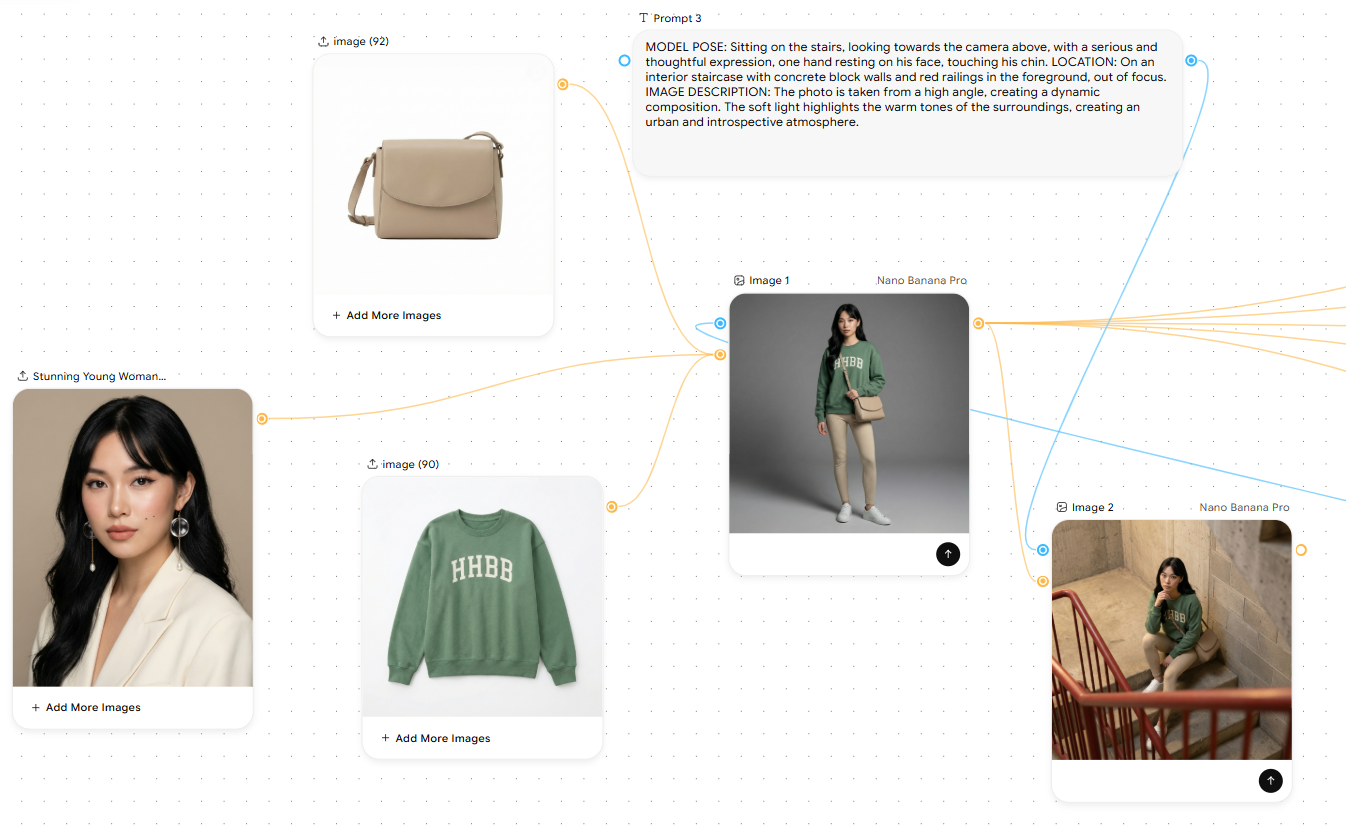 Designing Ad campaigns in ImagineArt Workflows
What separates ImagineArt from other tools in this category is the governance layer. The Edit Image node accepts style reference images as structural inputs — not as suggestions in a text prompt, but as visual anchors that shape every output generated downstream. The Relight node applies a consistent lighting configuration across all assets in a run, regardless of the background environment or generation model used upstream. The result is that a batch of five hundred product images produced in a single workflow run has the same lighting, the same compositional logic, and the same brand visual register — without a designer manually reviewing each one for consistency.
For enterprise teams, the App Builder layer solves the distribution problem. Any validated ImagineFlow workflow can be published as a Team App — a clean, simplified interface that exposes only the inputs the end user needs (campaign brief, product selection, output format) while keeping the underlying node architecture locked. Design builds the system once. Marketing, regional, and sales teams operate it through the App without touching the workflow. The creative standards are permanent, not suggestions that disappear the moment a non-designer opens the canvas.
ImagineArt is SOC 2 compliant and offers these pricing tiers:
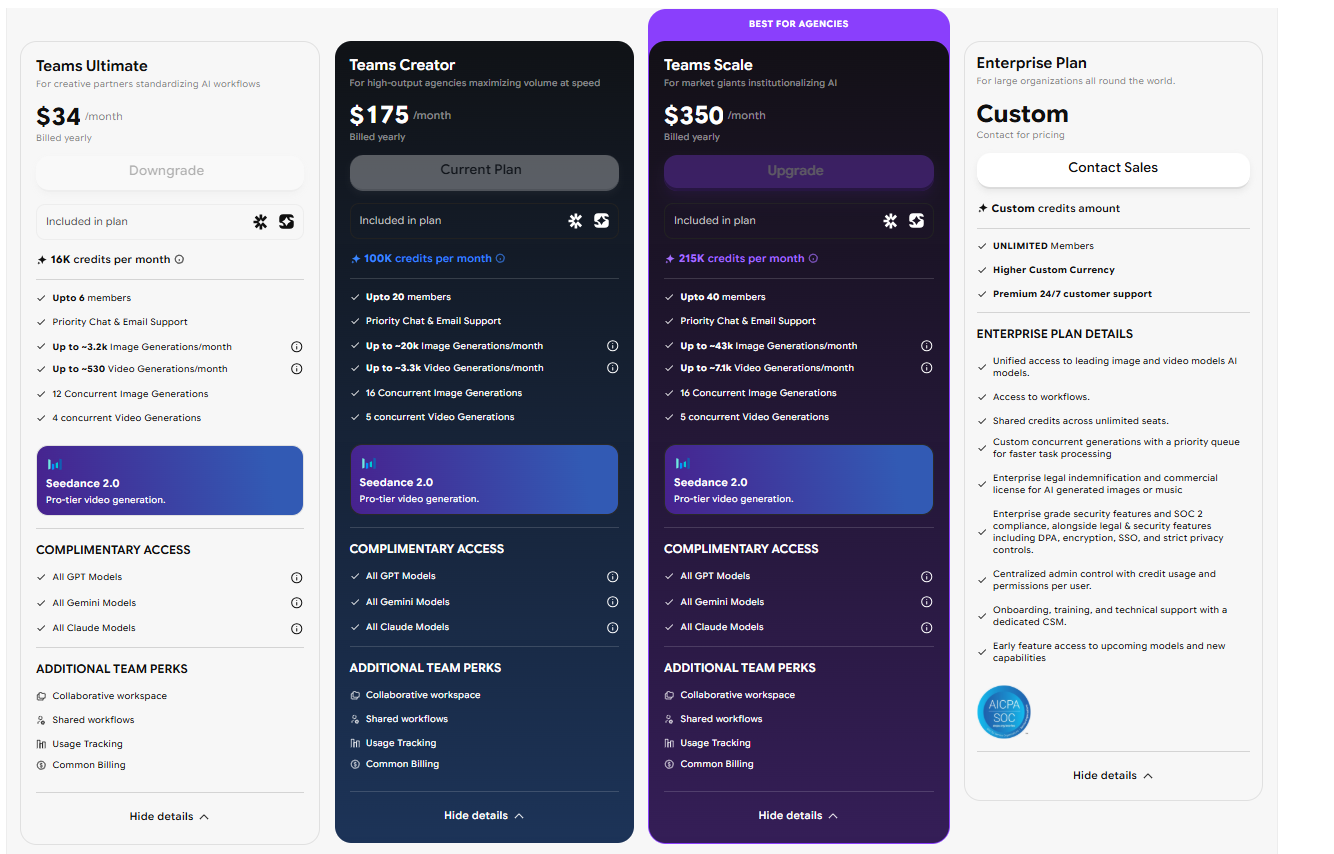 ImagineArt Enterprise - Pricing for Teams
For organizations evaluating creative AI for enterprises, ImagineArt Enterprise has a combination of workflow infrastructure, brand governance, and team-level deployment makes it the most enterprise-complete option in this category.
For a broader comparison of enterprise creative platforms, see Adobe Firefly Enterprise vs ImagineArt Enterprise and Canva Enterprise vs ImagineArt Enterprise.
2. ImagineArt AI Ad Studio
While ImagineArt Enterprise covers the full creative production workflow, AI Ad Studio is ImagineArt's standalone product purpose-built for one specific job: taking a product URL and returning a campaign-ready video ad in under 3 minutes.
How it works: Paste your product URL from Amazon, a DTC store, or any ecommerce link. Select from 9 ad templates — UGC, Unboxing, Creator UGC, Virtual Try-On, Hyper Motion, Product Review, Pro Virtual Try-On, UGC Testimonial, and ASMR. Choose an AI avatar from 40+ built-in options or generate a custom one. Describe your scene, set your aspect ratio, and generate. Ad Studio auto-writes the script from your product copy — you don't write a brief, the product page does. For a step-by-step guide to producing UGC-format ads, see how to make UGC ads with AI.
What makes it distinct from generic AI ad tools:
- Ecommerce-native input: Built around product URLs, not blank prompts — the product image, copy, and context feed directly into the generation
- Ad-specific templates: Multiple formats that map to actual paid social use cases, not general video styles
- Volume at consistency: Generate 20–50 ad variations in a single session with locked brand colours, fonts, tone, and avatar across every variant — ready for A/B testing without re-running production
- Platform-ready export: Correct aspect ratios for Meta Stories, Meta Feed, TikTok, YouTube, Google, and OOH in one export
Best for: Ecommerce and DTC brands running paid social, performance marketing teams that need high-volume creative output, and agencies managing multiple product clients simultaneously.
Pricing: Monthly studio subscription — significantly under traditional production costs at scale. Free to trial. For the broader creative scaling framework, see how to scale creative production with AI.
3. Canva
For teams whose primary output is social content, presentation decks, and display ads built on templates, Canva's AI layer, particularly Magic Media and Magic Design, lowers the barrier to creative production significantly.
Magic Media is Canva's text-to-image and text-to-video generation interface, accessible directly within the design canvas. Users can generate imagery from a prompt and drop it into an existing template layout without leaving the platform. The integration between generation and layout is Canva's strongest differentiator: the visual output doesn't need to be exported and reimported into a design tool because it is already in one. Magic Design takes a brief or uploaded asset and generates a full layout suggestion — a usable starting point that most users find faster than building from a blank canvas.
The best part about these AI ad tools is that both, Canva and ImagineArt offer brand kit and asset management features. Organizations can store brand colors, fonts, and approved logos centrally, and team members building from templates automatically have access to those assets. For teams operating at the template level — producing social posts, email headers, and presentation materials — Brand Kit provides meaningful consistency control.
The limitations become apparent at production scale. Canva is fundamentally a template-and-layout tool with AI generation added to it; it is not a workflow system. There is no node canvas, no ability to chain models into repeatable production pipelines, no batch processing for catalog work, and no equivalent of an Image Iterator that processes an entire SKU set in a single run. Each generation is a standalone action — useful for individual content creators and small marketing teams, but not designed for the high-volume, system-level production that enterprise ad creation requires.
Canva Teams pricing starts at approximately $10/user per month for teams of five or more, with Canva Enterprise available at custom pricing for organizations needing advanced brand controls, SSO, and dedicated support. It integrates with major DAMs and content platforms, which helps with asset management at scale even where the generation workflow itself has limits.
4. Adobe Firefly
Adobe Firefly is the generative AI layer embedded across Adobe's Creative Cloud ecosystem — Photoshop, Illustrator, Express, and Premiere Pro — and it is the most commercially safe generative AI available for enterprise use. Firefly models are trained exclusively on Adobe Stock imagery, licensed content, and public domain material, which means every output is cleared for commercial use without the intellectual property risk that complicates enterprise adoption of models trained on scraped web data. For legal and procurement teams evaluating AI creative tools against IP liability exposure, this is Firefly's most significant differentiator.
Within Photoshop, Firefly powers Generative Fill and Generative Expand — the two features that have had the highest real-world adoption among professional creative teams. Generative Fill allows users to select any area of an image and replace or extend it with AI-generated content that matches the surrounding visual context seamlessly. Generative Expand extends the canvas of any image in any direction, generating contextually consistent background content. For advertising teams working in Photoshop on product imagery, these tools reduce the retouching and compositing time that previously required either a production shoot or a skilled retoucher for each asset.
Firefly in Illustrator adds vector-native generation — the ability to generate vector graphics, patterns, and design elements directly in a vector format without rasterization. This is functionally significant for brand asset production, where scalability across print and digital formats matters.
Adobe Express includes Firefly generation in a simpler interface designed for non-designers, creating a tiered access model that mirrors what other platforms offer through Team Apps: professional tools for the design team, simplified interfaces for marketing and content operators.
The primary limitation for teams evaluating Firefly as a standalone advertising production tool is that it lives inside Adobe's existing application ecosystem rather than offering a purpose-built workflow canvas for AI production pipelines. It is an exceptional enhancement to an existing Photoshop or Illustrator workflow but does not provide the batch generation, catalog processing, or pipeline infrastructure that high-volume ad production requires independently.
Adobe Creative Cloud with Firefly is included in existing CC subscriptions, with Firefly credits available as an add-on for higher-volume generation needs.
5. Freepik
Freepik has evolved from its roots as a stock asset library into a full AI creative platform, and the combination of its stock asset depth with its AI generation layer makes it a compelling option for content teams that operate at the intersection of template-based production and custom generation. The platform now offers Pikaso (its AI image generation tool), an AI-powered design interface, and access to one of the largest libraries of vectors, photos, illustrations, and templates on the web — all integrated into a single subscription.
Pikaso is Freepik's image generation interface, built on a combination of proprietary and third-party models. It supports text-to-image generation, image-to-image transformation, and sketch-to-image workflows — the latter being particularly useful for creative teams that want to rough out a composition before committing to a high-fidelity output. The sketch input reduces the prompt interpretation ambiguity that affects most text-to-image systems: the model has a compositional anchor to work from rather than interpreting spatial layout purely from language.
The stock library integration is Freepik's most practical differentiator for advertising teams. When generated output doesn't quite meet the brief, teams can search Freepik's library for stock assets that do — all within the same platform, under the same license. For content teams producing high volumes of social and display ad creative where the blend of generated and licensed content is normal workflow, this eliminates the tab-switching and cross-platform licensing complexity that slows production.
Freepik's AI tools also include background removal, AI upscaling, and basic image editing — making it a reasonably complete toolkit for teams working primarily in the still image category. Video generation is more limited compared to specialized video platforms, and the workflow infrastructure is closer to Canva's template-layer approach than to ImagineArt's pipeline architecture.
Freepik team plans start $37/seat/month with higher-tier subscriptions available. The subscription includes access to the full stock library alongside the AI generation tools, which represents strong value for teams that would otherwise pay separately for a stock subscription and a generation tool.
Best for: Content teams producing social and display ad creative at moderate volume, particularly those who regularly blend AI-generated assets with licensed stock imagery.
6. Picsart
Picsart is a mobile-first AI creative platform that has expanded significantly into web-based tools and team features over the past two years. It sits in the category of best ai ad tools for creative content creation that prioritize accessibility and speed over workflow depth — a strong choice for social media managers, content creators, and small marketing teams who need to produce large volumes of edited and generated content quickly without a steep learning curve or significant design background.
The platform's AI tools center on image editing rather than pure generation. Background removal, background replacement, AI-powered cutout tools, and smart retouching are the features that drive the most usage — capabilities that translate directly to ad production workflows where product isolation, lifestyle background swapping, and consistent image polish are everyday tasks. Picsart's AI background replacement is fast and clean enough for most social and display ad formats without requiring manual masking, which is a meaningful time-saving for teams running high-frequency content calendars.
Picsart's generative AI layer — introduced progressively over 2024 and 2025 — adds text-to-image generation, AI-powered text effects, and style transfer capabilities. The generation quality is competitive for social-format output but does not reach the production fidelity needed for premium brand campaigns at full resolution. The tool is optimized for the output formats and quality standards of social platforms, which is exactly what its core user base needs.
The team and business features have matured considerably. Picsart for Teams includes brand kit functionality (centralized color palettes, fonts, logos), shared asset libraries, and a template system that helps marketing teams maintain visual consistency across content without requiring every team member to have strong design skills. The interface is designed to be operable by non-designers, which makes it genuinely accessible to the distributed content operations that many brands now run across regional and functional teams.
Picsart Business pricing is available on request, with individual plans starting at around $5/month. The mobile app remains the most feature-complete interface, though the web platform has narrowed the gap considerably for editing and generation workflows.
Best for: Social media teams, content creators, and small marketing teams prioritizing fast editing and content production for social platforms over deep workflow infrastructure.
7. Runway
Runway is the specialist video AI platform in this category, and for any team whose ad production is weighted toward motion content — video ads, social reels, cinematic brand content — it is the most capable dedicated tool available. While the other platforms covered here approach video as one output type among several, Runway is built specifically for video generation and editing, with a depth of video-focused tooling that generalist platforms cannot match.
The platform's flagship model, Gen-3 Alpha, produces high-fidelity video output from text prompts and image inputs with motion coherence and cinematic quality that represents the current state of the art in AI video generation. Image-to-video conversion is Runway's most practically useful feature for advertising teams: starting from an approved product or lifestyle still, Gen-3 Alpha generates motion-native video content without a shoot, with controllable camera movement, subject animation, and scene atmosphere. For brands that want motion content but don't have the production budget for regular video shoots, this capability has a direct and significant ROI.
Runway's motion brush and director mode tools give creative teams finer control over what moves within a generated video and how — addressing the precision gap that made earlier AI video models difficult to use for brand content where specific elements (a product, a face, a logo area) needed to stay controlled while the environment animated around them. This level of control moves Runway from "interesting AI experiment" into "usable production tool" for brand advertising.
Beyond generation, Runway includes a full video editing interface — timeline, multi-track audio, color grading, and green screen tools — that integrates directly with the AI generation output. Teams can generate a clip, edit it, extend it (Extend Video), and export without leaving the platform. This is the tightest generation-to-post workflow in the video AI category.
The limitations are the inverse of ImagineArt's strengths: Runway excels at video but doesn't offer the still image production pipeline, catalog processing, brand governance layer, or App Builder distribution that enterprise teams need for full-funnel ad creative. It is a best-in-class tool for video production specifically, not a comprehensive ad creative platform.
Runway pricing starts at $12/month for Standard and scales to $76/month for Pro, with Enterprise pricing available for teams needing higher generation credits and custom model training.
For a deeper look at the video models powering ad production specifically, see best AI video ad generators.
Found the best AI ad tools for creative content?
The best AI ad tools for creative content creation in 2026 span a wide range of use cases like product videos, AI influencers and UGC, and enterprise workflow infrastructure. The right tool is the one that matches your production volume, your team structure, and the brand governance requirements your organization actually has. For enterprise teams that need consistent output across markets, channels, and campaign cycles, the choice comes down to which platform can function as infrastructure rather than just as a faster way to generate a single asset.
If your team is ready to move from one-off AI generation to systematic, brand-governed creative production at scale, the kind that compounds over time rather than resetting with every new brief, the platform you choose needs workflow depth, team controls, and multi-format output capability built into its core architecture.
Create enterprise-grade ads for your business with ImagineArt Enterprise — the only platform in this list built from the ground up as a workflow operating system for teams that need to produce at volume without compromising on brand quality.
For editing specifically — once assets are generated — see which AI video editor is best for ads.
Saba Sohail
Saba Sohail is a Generative Engine Optimization and SaaS marketing specialist working in automation, product research and user acquisition. She strongly focuses on AI-powered speed, scale and structure for B2C and B2B teams. At ImagineArt, she develops use cases of AI Creative Suite for creative agencies and product marketing teams.