
Tooba Siddiqui
December 26, 2025 • Updated December 26, 2025
6 mins Read
The awkward and ill-timed lip syncing in AI videos used to be a major giveaway, distinguishing the real from reel. With the advancement in AI video models, lip syncing has progressed from being a ‘nice-to-have’ option to a ‘must-have’ feature. Since businesses and professionals are gradually moving towards AI video content, mismatched lip movements can’t be overlooked — one glitchy utterance and your content will go viral for all the wrong reasons.
Why is AI Lip Sync Animation Important?
If you are someone my age (old enough to have experienced the world without AI), you’d remember the famous Tom Holland lip sync battle, lip syncing Rihanna’s ‘Umbrella.’ That performance was the right blend of expressiveness, timing, and, of course, his iconic dancing. Just like Tom’s winning performance, AI lip sync animation focuses on delivering the same level of accuracy and flawlessness.
- Lip sync AI animation eliminates the uncanny valley effect by synchronizing the mouth movement and dialogue.
- Mismatched audio-visual sync looks fake and leads to distrust with the target audience, especially in videos with digital avatars/presenters and marketing campaigns.
- Accurate synchronization adds to the emotional impact and seamlessly captures the subtleties of expressions, gestures, and body language.
- Lip sync AI helps you automate a lengthy video editing task, producing high-quality output in a few minutes and saving you the cost of recruiting a professional editor.
- Modern lip sync AI tools let you dub videos in multiple languages, without needing any multilingual voiceover artist.
Overview of SyncLabs Lip-Sync AI Models
SyncLabs introduced three of the most high-performing and realistic lip sync AI models. These lip sync AI models can create and dub videos in more than 90 languages with expressive and natural-looking results. SyncLabs models support video and audio input and generate a new video with phonetic accuracy. These lip sync models are:
Sync React-1
- With this lip sync AI model, you can control the emotional impact of the video with well-defined emotion presets, including happy, angry, sad, neutral, surprised, and more.
- You can define and determine the animation mode. Lip animation targets mouth movements, face animation enhances the facial expressions, and head animation adds head movements for a dynamic video.
- This lip sync AI model allows you to decide audio-visual handling with different mode options, such as bounce, silence, loop, and more.
Sync Lipsync-2
Built on sync react-1:
- With sync lipsync-2, you can create videos almost instantly without needing to train or refine audio for multiple speakers/characters.
- The lip sync AI model excels at maintaining the character identity, environmental settings, and scene elements.
- It offers flexible word-level editing features, allowing you to reanimate character performances and tweak expressions.
Sync Lipsync-2-Pro
Built on sync lipsync-2:
- This lip sync AI model can automatically recognize the character speaking in the input video and apply the audio cues/dialogues when required.
- Sync lipsync-2-pro offers improved identity and facial preservation, regardless of obstructions such as masks and glasses.
- It supports 4K resolution and can deliver artefact-free results across different characters and scenes, including real and animated scenes.
Overview of ImagineArt Lip Sync AI Studio
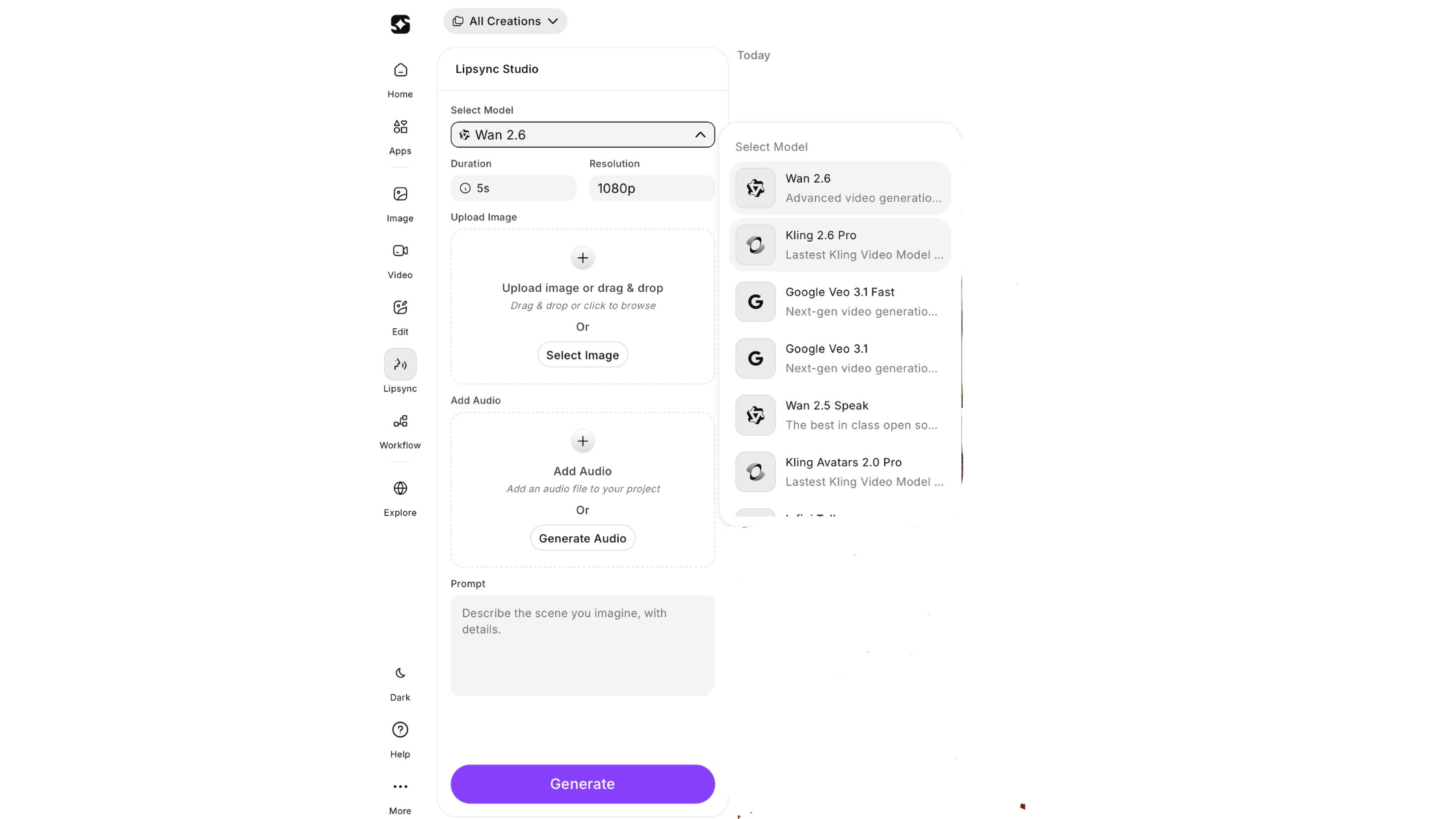 ImagineArt Lip Sync AI Studio
ImagineArt AI lipsync studio is one of the extended features of the ImagineArt AI video generator.
- The lip sync AI tool comes with an intuitive interface and supports multi-modal input, including text prompts, audio text, reference images, and reference audio.
- It has some of the top-notch lip sync AI models integrated into the studio, including Kling 2.6, Omnihuman 1.5, Kling Avatar 2.0, Veo 3.1 Fast, Veo 3.1, Wan Speak, and Infinite Talk.
- The lip sync AI studio allows you to create videos and add captions in multiple languages.
- You can reformat the input video and choose an aspect ratio of your preference for different platforms. It supports 9:16 (vertical), 1:1 (square), and 16:9 (landscape).
- You can create videos of different durations and resolutions, ranging from 5s to 15s and 720p-1080p.
- With ImagineArt lip sync AI studio, you can add more than 100 AI voices in 25 languages with complete creative control over style, tone, speed, and emotion.
SyncLabs vs. ImagineArt Lip Sync AI Studio: Comparison
Speed:
- SyncLabs sync react-1 is optimized for lower latency and higher performance, syncing audio and visuals in almost 12 milliseconds.
- While the lip sync AI video generation speed depends on the selected model and preferences in ImagineArt lip sync AI studio. A longer video duration might take a minute or a few to generate.
Ease of Use:
- ImagineArt lip sync AI studio comes with an intuitive interface, making it ideal for non-technical users, hobbyists, and creators.
- While the SyncLabs AI models are more suitable for API integration, requiring a technical approach and expertise, they are perfect for high-volume projects.
Performance & Control:
- Apart from lip sync, SyncLabs models let you animate the facial and head movements, emotions, refine the tone, and tweak the timing of expressions. It gives you more granular control over the whole character performance and video editing.
- While ImagineArt offers less control over the micro-expressions and character performance. However, it allows you to refine emotions, tone, pace, and mood of the video via text-based prompts.
Voice Compatibility:
- Sync Lipsync-2 lets you tweak dialogues and audio cues, while maintaining the tone, style, and features of the multiple characters, without needing any training.
- Powered by top-notch AI video models, ImagineArt lip sync AI studio lets you add, refine, and alter dialogues of different characters at a time. The ‘audio text’ option lets you type in the desired dialogues and audio cues for a more tailored result.
Post-Production Flexibility:
- Even though SyncLabs AI models provide more control and are perfect for high-volume production, they require an external AI video editing tool for comprehensive video editing.
- On the other hand, ImagineArt lip sync AI studio comes with a built-in AI video editor that lets you add, remove, and edit graphics, background music, text elements, visual effects, filters, and more, without switching to another tab.
Output Quality:
- Sync lipsync-2-pro supports 4K resolution, generating videos with greater clarity.
- On ImagineArt lip sync AI studio, the video resolution depends on the selected lip sync AI model. The supported video resolution ranges from 720p to 1080p.
When to Choose Which Lip Sync AI Tool?
Here’s a quick breakdown to find the right lip sync AI tool for your requirements:
- Sync react-1: ideal for interactive media, low-latency production, and corporate training.
- Sync lipsync-2 & lipsync-2-pro: ideal for reanimating live-action performance, voice cloning, AI and 3D characters, translation of educational content.
- ImagineArt lip sync AI studio: ideal for faster iterations, AI avatars, solo users, ads, marketing, and more — an all-in-one budget-friendly solution for post and pre-production.
Ready to Sync it Up?
In the end, the choice of the right tool depends on your needs and preferences. If you want more control over the entire lip-syncing and production process, go for SyncLabs. But, if you want an easy-to-use lip sync AI tool with a simpler interface, sign up on ImagineArt!
Tooba Siddiqui
Tooba Siddiqui is a content marketer with a strong focus on AI trends and product innovation. She explores generative AI with a keen eye. At ImagineArt, she develops marketing content that translates cutting-edge innovation into engaging, search-driven narratives for the right audience.