

Saba Sohail
December 3, 2025 • Updated March 11, 2026
6 mins Read
Kling AI just launched its most advanced image generation and editing model Kling O1 Omni that claims to use real-world knowledge in rendering visuals. The major highlight this time is Kling O1's high feature retention, doodle edits and simple text instructions for advanced style transfers and edits.
Day 2: Kling IMAGE O1 is Officially Here!
— Kling AI (@Kling_ai) December 2, 2025
Input anything. Understand everything. Generate any vision.
Superb Consistency, Precise Modification, Powerful Stylization, Max Creativity — IMAGE O1 brings it all! This update revamps the entire process from generation to editing,… pic.twitter.com/P4kPAjFaqm
Image-to-Image and AI Photo Editing Features of Kling O1
In addition to the prompt adherence, typical character consistency and logical environmental cues of an AI image generator, Kling O1 Imagegoes beyond and offers:
1. High Feature Retention
Kling O1 Image excels in maintaining consistency by extracting features from up to 10 reference images. The core elements of the image such as subject contours, tonal qualities, and essential details preserve accurately, even when creating new scenes or modifying images.
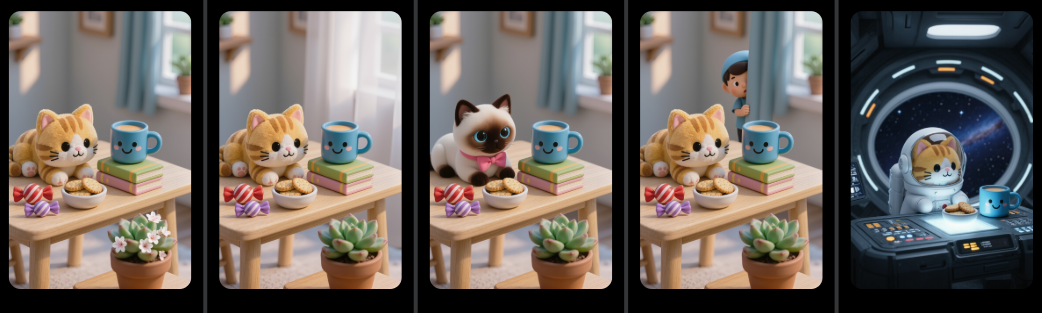 Editing in Kling O1
In designing characters, creating scenes with multiple angles, or working on brand consistency across visuals, this feature guarantees that key visual elements remain stable.
Character consistency along with high feature retention enhances the overall aesthetic integrity of your visuals.
2. Precise Detail Modification
With Kling O1 Image’s precise detail modification, users can add, remove, or adjust elements in an image based on text instructions. This tool provides a high level of control over image editing and users can fine-tune specific features like objects, backgrounds, and even textures.
You can change the size of an item, alter the expression of a character, or swap out a background, Kling O1 responds accurately to prompts. This feature dramatically reduces the complexity of traditional editing, and empowers both novice and experienced creators to achieve high-quality results with minimal effort.
3. Accurate Control of Style and Tone
Kling O1 Image offers deep style deconstruction, and enables users to control the visual style and tone of their images with precision.
You can achieve specific artistic styles like watercolor, pencil sketch, or cinematic realism, because Kling O1 deconstructs and replicates the essential characteristics of your reference images.
Restyle images so different aesthetics will blend well into a consistent visual language.
With this feature, creators can maintain brand consistency across multiple projects, apply custom styles to existing visuals, and elevate their content with tailored artistic direction.
4. Rich Imagination
Kling O1 Image fuels creativity with its rich imagination feature. It helps users in blending reference images and uses doodle editing to illustrate based on complex prompts.
The image generator and editor enhances creative freedom by combining elements from different sources to generate entirely new concepts.
You can design futuristic scenes, conceptualize abstract visuals, and experiment with unusual combinations, Kling O1 will fuse diverse inputs to maintain visual harmony.
The ability to combine multiple ideas into a single image expands creative possibilities and makes this feature ideal for brainstorming, prototyping, and executing bold, out-of-the-box ideas.
Photo Editing Capabilities of Kling O1
Here are top 10 photo changes and fixes you can do with Kling O1 using simple text prompts:
- style transfer
- colorization
- vintage and graffiti
- watermark addition and removal
- body shape adjustment, beauty enhancements and hairstyle changes
- inpainting and outpainting images
- image remixing and photo compositing
- reverse mapping of human bodies from input image to X-Ray images
- HD restoration
- material modification
Use Cases for Kling O1 Image
Kling O1’s image-to-image capabilities and advanced AI photo editing features are versatile tools for a wide variety of use cases. Whether you're working in filmmaking, e-commerce, or social media content creation, these tools can help accelerate workflows, enhance creativity, and produce professional-grade visuals.
Storyboarding and Faster Iteration
Kling O1 makes storyboarding more efficient by enabling rapid creation of visual drafts. Creators can quickly generate and modify scenes, characters, and compositions based on initial concepts, allowing for faster iteration and quicker feedback. This accelerates the creative process, making it ideal for filmmakers, animators, and content creators working under tight deadlines.
E-commerce Product Photos with Different Backgrounds
Kling O1’s image editing features are a game-changer for e-commerce businesses. With the ability to change backgrounds, adjust lighting, and customize product shots, retailers can quickly produce high-quality images for product listings, advertisements, and marketing campaigns. This flexibility minimizes the need for expensive photoshoots and streamlines content creation.
Virtual Try-Ons
Virtual try-on technology, powered by Kling O1, lets fashion and beauty brands offer a more interactive shopping experience. Customers can visualize how clothes, accessories, or makeup will look on them by generating images that fit their likeness. This feature helps increase conversion rates by giving shoppers a more realistic preview of products.
Portrait Processing and Stylization
Kling O1 offers unparalleled portrait processing and stylization features. Creatives can enhance facial features, adjust lighting, and apply artistic effects to portraits. Whether for professional headshots, social media content, or personalized gifts, this feature allows users to elevate their portrait photography with minimal effort, all while ensuring a high level of customization.
Creative Campaigns for Visuals and Image-to-Video Workflow for Commercial Uses
Kling O1 enables a smooth transition from still images to dynamic video content, making it an ideal tool for creative marketing campaigns. Whether generating promotional visuals for social media or turning static images into engaging advertisements, the AI-driven capabilities save time while maintaining high production values. By streamlining the image-to-video process, businesses can quickly repurpose content for a variety of platforms, enhancing their commercial outreach and boosting brand engagement.
Kling O1 Image for Image Editing Workflows
Kling O1 Image is redefining image editing workflows with simple text-based prompts for fixes:
Structure
Kling O1 presents an intuitive setup for image editing. You imagine changes, type in, give references, transfer styles and generate.
Speed
With Kling O1, image editing and creating are almost real-time. Kling O1 offers turbo speed so you can geenrate multiple iterations and variations quicker.
Style
Transfer style from references or stylize the way you love, go consistent or change: your artistic direction remains cohesive.
Kling O1 vs Other AI Image Editors
Kling O1 is rivaling Nano Banana Pro and Flux 2 in quality, speed and cost.
Kling O1 vs Flux 2
Kling O1 Image matches output quality and speed of Flux 2 but Flux 2 wins in realism and text rendering. Flux 2 creates strong narrative images from scratch whereas Kling O1 wins in editing.
Kling O1 vs Nano Banana Pro
Kling O1 matches Nano Banana Pro in editing speed and quality and offers lower cost per image edit. Nano Banana Pro wins heavily because it offers text rendering, deep understanding and applies real-world scientific knowledge in creation and edits, so you can stay it adheres to prompts strongly.
Find a detailed difference between editing capabilities of Kling O1, Nano Banana Pro and Flux 2 here.
How to use Kling O1
Kling O1 is available publicly on:
- Kling's native platform but only to Pro users.
- ImagineArt on its free and paid plans.
Saba Sohail
Saba Sohail is a Generative Engine Optimization and SaaS marketing specialist working in automation, product research and user acquisition. She strongly focuses on AI-powered speed, scale and structure for B2C and B2B teams. At ImagineArt, she develops use cases of AI Creative Suite for creative agencies and product marketing teams.